

Hosted VoIP commonly costs $15 to $30 per user per month for basic plans, with $20 to $35 per user per month representing a practical all-in benchmark for most small businesses. Advanced tiers often rise to $30 to $50 or more per user per month, especially when they include contact-center workflows, integrations, recording, and analytics.
You may be looking at a legacy PBX replacement because the old hardware is aging, support is getting harder to find, or every office move turns into a project. The vendor quote appears simple enough: users multiplied by a monthly rate. Then the invoice adds taxes, E911 charges, porting, toll-free usage, devices, and feature bundles.
I've helped small and mid-sized businesses make this transition, and the recurring mistake is rarely choosing the wrong technology. It's approving a price that looked clear until the first complete bill arrived.
Introduction to Hosted VoIP Pricing Without Surprises
A hosted VoIP system moves the phone system from equipment your business owns and maintains to infrastructure managed by a provider. Calls use internet-based voice technology, while employees typically connect through desk phones, desktop softphones, mobile apps, or browser tools. That change affects both operations and accounting.
Traditional telephony often demands substantial upfront spending on PBX equipment, installation, and refreshes. Hosted VoIP replaces much of that capital expense with a recurring operating expense. The OECD analysis of VoIP market developments notes that VoIP services are normally priced much lower than PSTN services, which helps explain why cloud-based phone systems became attractive to smaller organizations.
Budgeting mindset: Treat the monthly seat price as the starting point, not the finished budget.
Per-user pricing became common because the provider is supplying software access, calling identity, administration, and features for each person or endpoint. A 20-person office therefore thinks about seats, while a call center also needs to account for queues, recording, routing logic, and call volume. The more the system supports business workflows, the less useful a basic voice-only comparison becomes.
For a plain-language overview of the technology and migration considerations, see this guide to hosted VoIP for business. The important purchasing question remains practical: what will the organization pay every month after the necessary features, usage, fees, and equipment are included?
This guide separates the pricing models, identifies the cost drivers, compares advertised and all-in totals, and works through two budget scenarios. It also includes a negotiation checklist designed to uncover the charges that pricing pages often leave in the fine print.
How Hosted VoIP Pricing Models Actually Work
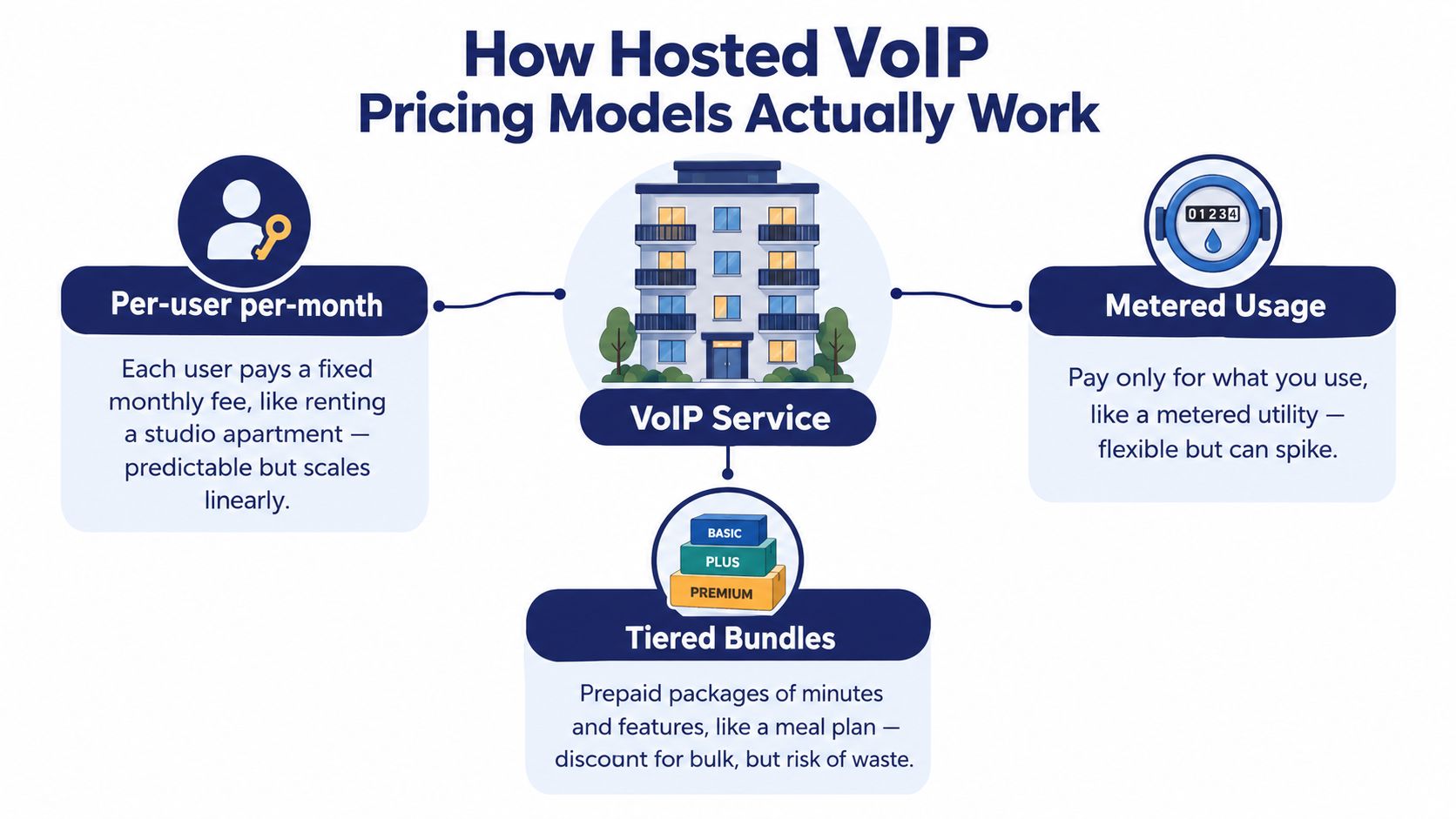
Hosted VoIP pricing makes more sense when you compare it with housing and utilities. A per-user plan resembles renting an apartment. You pay a predictable amount for access, and the provider supplies the underlying building. A metered plan resembles a utility bill. The starting commitment may be smaller, but usage changes the final amount. A tiered bundle acts more like a meal plan, with a package of minutes and features that may be convenient but can include capacity your team doesn't use.
Per-user plans
With per-user per-month pricing, each employee receives a license or seat. Mainstream small-team plans commonly cluster around $15 to $30 per user per month, while advanced plans can reach $30 to $50 or more as organizations add AI, omnichannel communication, CRM integrations, recording, and multi-level auto attendants, as described in this hosted VoIP cost benchmark.
This model is easy to forecast. Multiply the number of active users by the monthly rate, then add fees, devices, and one-time migration costs. It fits offices where most employees need a business identity, voicemail, mobile access, or shared call handling.
The limitation is that every additional seat increases the recurring bill, even if some employees make very few calls. Audit users carefully, especially seasonal workers, shared reception accounts, conference rooms, and employees who only need occasional access.
Metered usage
A metered plan charges according to usage, commonly based on minutes or destinations. It can suit a low-volume team with predictable calling patterns, but a sales group, support desk, or service department may create a larger bill during busy periods.
Ask how the provider measures usage. Confirm whether inbound calls, outbound calls, international destinations, toll-free minutes, transfers, conference calls, and forwarded calls are treated differently. A low headline rate isn't useful if the usage definition doesn't match your call behavior.
Teams comparing this structure with other billing approaches can also review metered billing for business communications. The decision should follow actual call patterns, not the lowest displayed starting price.
Tiered bundles
Tiered bundles group features into entry, mid-market, and premium packages. Entry plans generally focus on calling and voicemail. Higher levels may add auto-attendant, call recording, analytics, integrations, advanced routing, and contact-center capabilities.
The cause and effect is straightforward: software capability drives much of the price increase. Voice transport alone is rarely the main difference between a basic seat and a workflow-heavy communications platform. Compare the features your staff will use every day, then check whether the vendor places those features in one tier or splits them across add-ons.
Key Cost Drivers Behind Your Monthly Bill
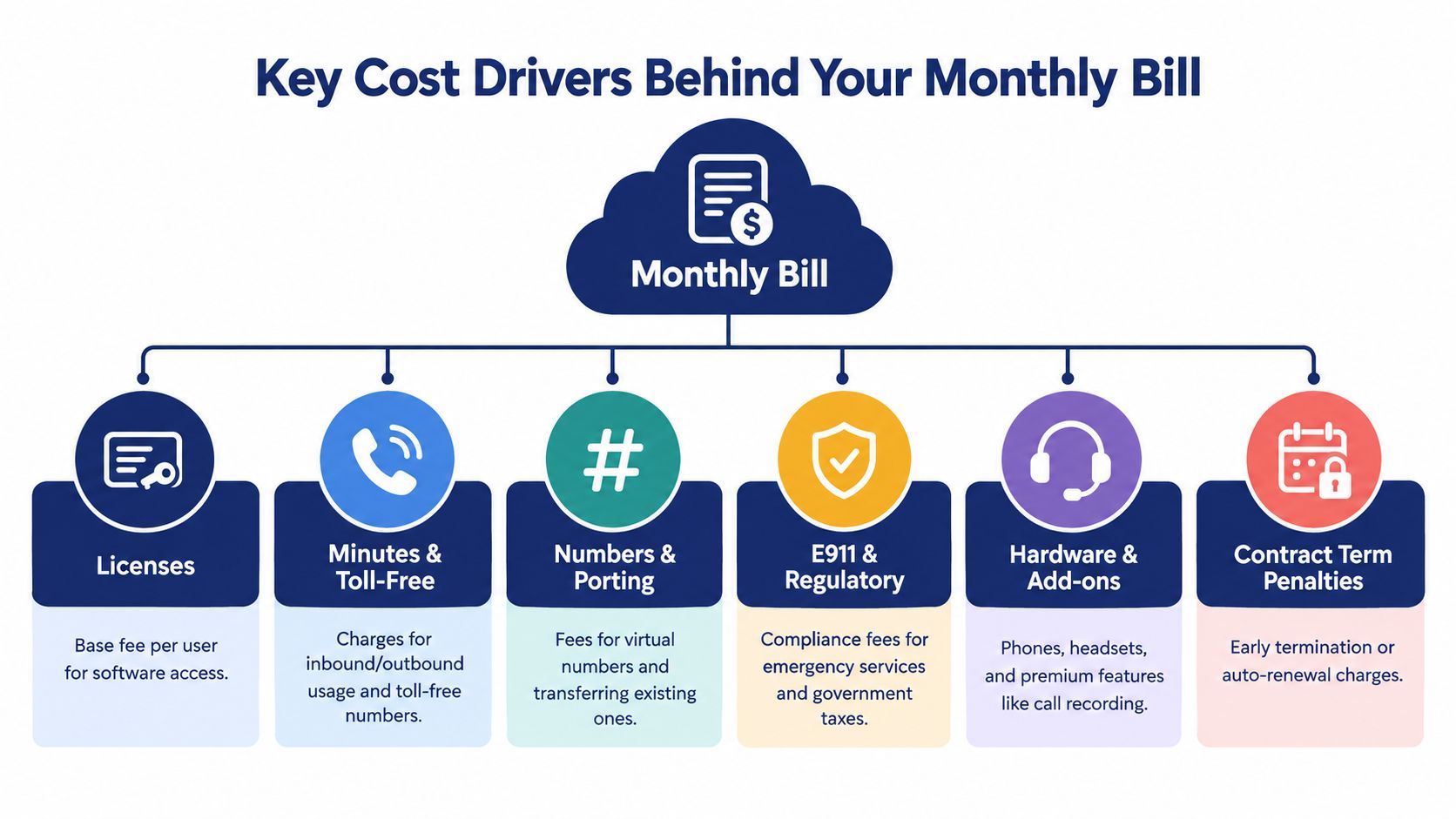
A quote becomes easier to audit when you read it as a collection of separate decisions rather than one monthly number. The advertised seat rate usually covers only the core license. Your final bill depends on who needs access, how they call, which numbers you retain, and how much infrastructure the provider manages for you.
Start with licenses and calling usage
Licenses are the recurring seat charges. A basic plan may cover calling and voicemail, while higher tiers add auto-attendant functions, call recording, analytics, AI tools, and integrations. Count users by role, not just by headcount. A receptionist, field employee, supervisor, call queue agent, and shared conference room may require different access.
Minutes and toll-free usage can move a low-looking quote upward. Confirm whether calling is unlimited, metered, or limited to an allowance. International calling deserves separate attention because the destination and plan rules can affect the result.
Numbers and compliance charges
Numbers and porting include the business numbers you want to keep, new local or toll-free numbers, and the work required to transfer existing numbers. Ask whether the quote includes every location and whether porting is charged once, per number, or as part of onboarding.
E911 and regulatory fees may appear separately from the license. The exact amount can vary by location and provider structure, so request a line-item estimate for every office and remote-user arrangement that needs emergency-location handling.
Devices, integrations, and support
Softphones and mobile apps can keep deployment near the lower end because employees use existing computers and phones. Desk phones, headsets, replacement devices, and accessories increase the upfront or amortized cost. Review business VoIP equipment costs before accepting a hardware recommendation.
Integrations can also change the tier. CRM screen pops, call logging, recording controls, analytics, cloud faxing, and contact-center reporting may be included, limited, or sold separately. A useful resource on ways to improve team communication in 2026 can help you decide which collaboration capabilities deserve budget priority.
Finally, inspect support and onboarding scope. A low price may exclude implementation, admin training, call-flow design, or migration assistance. Ask what happens after the number port completes, when a device fails, or when your team needs a new routing rule.
Why Advertised Rates Rarely Match What You Pay
The sticker price answers one narrow question: what does the base seat cost before the rest of the service is configured? Independent pricing guidance places many base plans around $20 to $30 per user per month, while real bills can run 20% to 40% higher after E911 fees, porting, regulatory surcharges, overages, toll-free minutes, and add-ons, as explained in this business VoIP pricing considerations guide.
The gap isn't automatically evidence of bad pricing. Taxes, emergency-service obligations, number work, and optional capabilities are legitimate costs. The problem occurs when buyers compare one provider's base license with another provider's configured total.
For a 20-seat organization, normalize every quote into the same categories. The table below shows the comparison method, not a universal invoice.
| Cost Component | Advertised Quote | True All-In Total |
|---|---|---|
| Base user licenses | Per-seat rate only | Licenses for every required user |
| Calling allowance | Included or headline calling plan | Actual domestic, international, and toll-free treatment |
| Features | Basic listed features | Recording, auto-attendant, analytics, integrations, and queues |
| Numbers and porting | Often separated or unclear | Existing-number transfers and additional numbers |
| E911 and regulatory | May be excluded | Location-specific fees, taxes, and surcharges |
| Hardware and setup | Often optional | Phones, headsets, onboarding, configuration, and installation |
| Monthly result | Base price multiplied by seats | Complete recurring bill plus allocated setup costs |
Make quotes comparable
Give each vendor the same user count, locations, numbers, calling profile, feature list, device preference, and support expectations. Then request the recurring subtotal, estimated taxes and fees, one-time charges, overage rules, and renewal terms in writing.
Regulatory charges can vary considerably by state and usage pattern. Some pricing guides warn that these fees alone may add 7% to 12%, or in some cases 15% to 25%, to a pre-tax bill, so a national estimate shouldn't replace a location-specific quote.
Real World Cost Scenarios and TCO Calculations
Numbers become useful when they reflect a defined configuration. The following scenarios use the supplied benchmark assumptions for a 20-seat multi-location SMB and a 30-seat call center. They show how feature selection and call behavior change the monthly result.
Scenario one, a 20-seat multi-location SMB
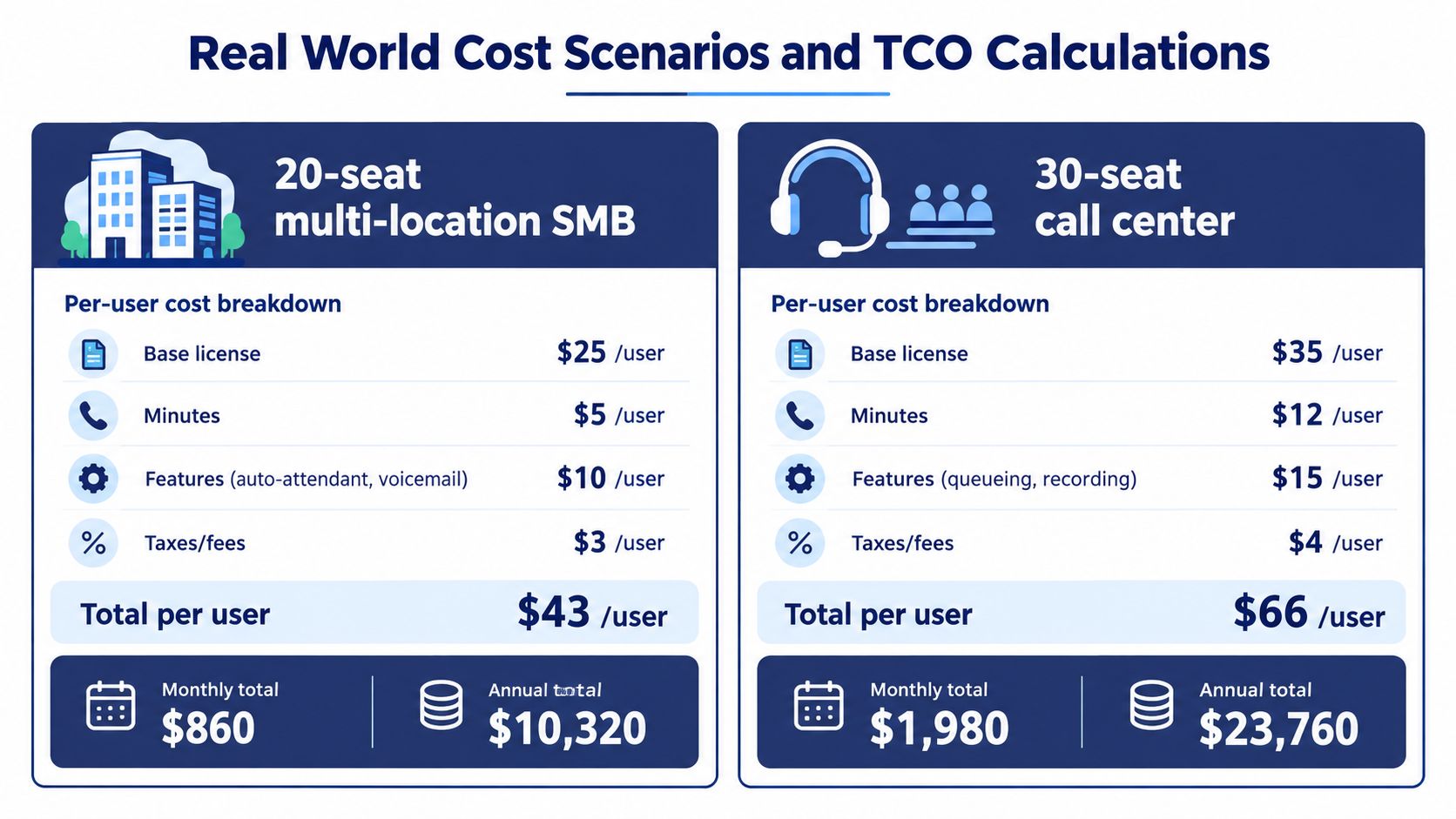
This office uses a $25 base license per user, $5 per user for minutes, $10 per user for auto-attendant and voicemail, and $3 per user for taxes and fees. The resulting modeled total is $43 per user, or $860 per month for 20 seats.
The annual run rate is $10,320, calculated from the supplied monthly total. This scenario assumes the listed feature and fee categories are already included, but it doesn't add a separate hardware amount because the configuration can use existing devices or softphones.
Scenario two, a 30-seat call center
The call center uses a $35 base license per user, $12 per user for minutes, $15 per user for queueing and recording, and $4 per user for taxes and fees. That produces a modeled total of $66 per user, or $1,980 per month for 30 seats.
The annual run rate is $23,760. The higher total comes from call volume and workflow features, not just from having more employees. Queue management, recording, and agent-focused controls make this a different service requirement from office calling.
Reuse the formula
Use this structure for your own quote:
Monthly recurring cost = seats × (license + usage + required features + estimated taxes and fees)
Then calculate:
Three-year service TCO = monthly recurring cost × 36 + one-time setup, porting, and equipment
Compare that result with the alternative you're replacing. On-premises PBX ownership can require $20,000 to $100,000 or more in upfront hardware and installation, according to this hosted VoIP cost comparison. Include maintenance, refreshes, support, and internal IT effort in the comparison rather than treating the old system as free after installation.
Common Pitfalls and Negotiation Tips That Save Money
Many buyers focus on getting the per-seat rate down and overlook the contract mechanics that control the bill later. The cheapest plan can become expensive if your team pays for unused seats, exceeds an allowance, or discovers that essential features sit in a higher tier.
Read beyond the promotional rate
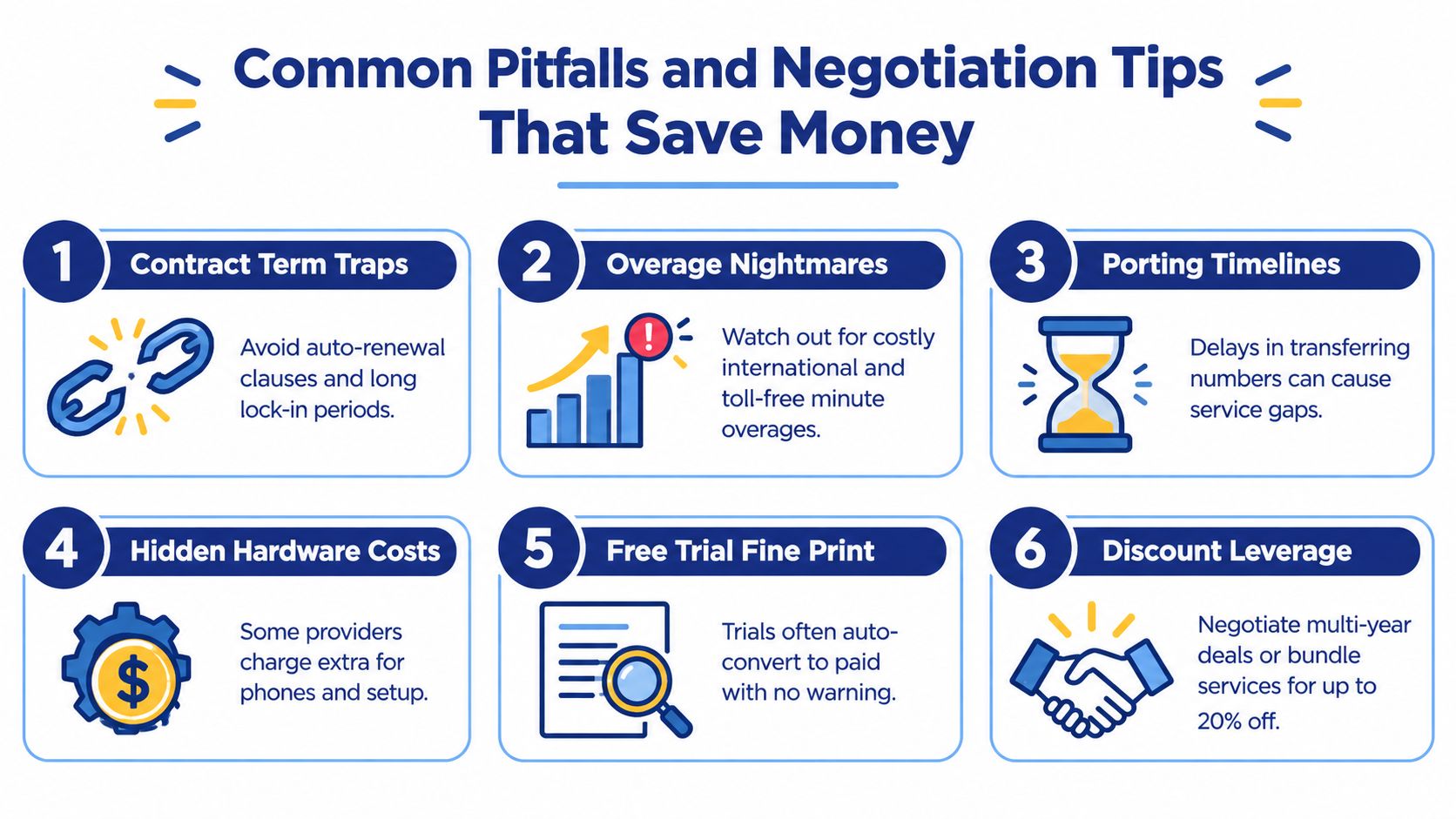
Check the renewal clause, cancellation process, minimum seat commitment, and rules for reducing licenses. Auto-renewal can limit your options if the notice period passes unnoticed. A free trial may also convert to a paid subscription, so document the end date and cancellation requirement before provisioning users.
International calling and toll-free traffic deserve their own review. Ask for the rate treatment by destination, the included allowance, the overage trigger, and whether transferred or forwarded calls consume billable minutes.
Porting creates an operational risk as well as a financial one. Confirm the required documents, expected timeline, temporary-number process, and who owns the escalation if a number transfer stalls. Don't cancel the old service until the new provider confirms that critical numbers work.
Use this negotiation checklist
- Request all-in pricing: Ask for a written monthly estimate that includes licenses, usage, E911, taxes, regulatory fees, numbers, and required add-ons.
- Clarify every location: Have the vendor identify emergency-service and regulatory charges for each office and remote arrangement.
- Separate essential from optional: Mark recording, queues, integrations, fax, analytics, and AI features as required or optional before comparing tiers.
- Ask for onboarding relief: Request that number porting, configuration, call-flow design, and admin training be included or clearly priced.
- Confirm device freedom: Find out whether softphones and existing hardware are supported, and whether recommended desk phones are mandatory.
- Protect the second year: Ask how pricing changes at renewal, whether seat reductions are allowed, and whether the provider will document a price-lock period.
A vendor that answers these questions clearly gives you a better basis for budgeting than one that only advertises a low starting rate. You're not negotiating just the monthly number. You're negotiating the definition of “included.”
How SnapDial Delivers Predictable Value and Next Steps
The most useful hosted VoIP pricing model is the one your finance team can forecast and your staff can operate without constant add-on decisions. SnapDial presents its cloud business phone service around all-inclusive, predictable pricing, with white-glove setup and ongoing support included at no additional setup cost.
Its stated feature set includes Auto Attendant and IVR, unlimited lines, call recording, visual voicemail with transcription, mobile apps, call routing, a self-service web portal, cloud faxing, and advanced call-center functions such as queue management, callbacks, wait-time announcements, real-time statistics, and reporting. A 24/7 Texas support center is also part of the service model.
That approach addresses the main buying problem identified throughout this guide: a basic seat rate doesn't tell you whether the functions your business needs will trigger another upgrade. A bundled plan can make comparison easier when the provider documents exactly what the recurring charge includes.
Before choosing any provider, prepare a short requirements sheet. List active users, locations, existing numbers, international destinations, toll-free needs, devices, call queues, recording requirements, integrations, and expected support. Send the same sheet to each vendor and ask for a complete recurring and one-time quote.
Review the quote with the formula above, test the call flows with representative users, and verify the porting plan before you schedule the cutover. A clear comparison should show not only the monthly seat rate, but also the all-in monthly spend, setup exposure, renewal rules, and three-year TCO.
SnapDial offers an all-inclusive cloud phone system with white-glove setup, mobile-ready calling, call routing, recording, voicemail, and advanced call-center capabilities under a predictable pricing approach. Visit SnapDial to request a quote built around your seats, locations, features, and actual hosted VoIP requirements.