
Most buying guides treat auto attendant vs. IVR as a contest between two phone-system features. That framing sends buyers in the wrong direction. The question is simpler: Do you need to route callers to people, or do you need to resolve requests without people?
An auto attendant handles the first job. IVR can handle both, provided it has the integrations and call logic to act on caller data. If you choose based on a long feature checklist, you can easily overbuild a basic reception flow or force callers through a menu that can't answer what they need.
A useful enterprise benchmark supports the importance of this call-routing layer. A widely cited industry study found that 85.8% of Fortune 500 companies use an auto attendant system, while 14.2% did not use an IVR or auto attendant at the time of the study, as reported by Fortune 500 phone system adoption data. The terminology overlaps because an auto attendant often acts as the customer-facing entrance to a broader IVR flow.
Why the Auto Attendant vs IVR Question Is Usually Misframed
Vendors often present auto attendants and IVR as competing products. Buyers then compare menu options, speech recognition, queues, reporting, and integrations as if the system with the longer feature list must be the better purchase.
That's the wrong test.
Routing means directing a caller to the right person, extension, department, queue, or voicemail. Containment means resolving the caller's request inside the phone system without transferring to a live agent. Those outcomes require different designs, different integrations, and different levels of operational effort.
An auto attendant is primarily a routing tool. It greets the caller, presents choices, and sends the call where it belongs. IVR starts with that same routing foundation but adds structured data capture and backend actions. It can ask for an account number, check a database, retrieve a ticket, or complete a supported transaction.
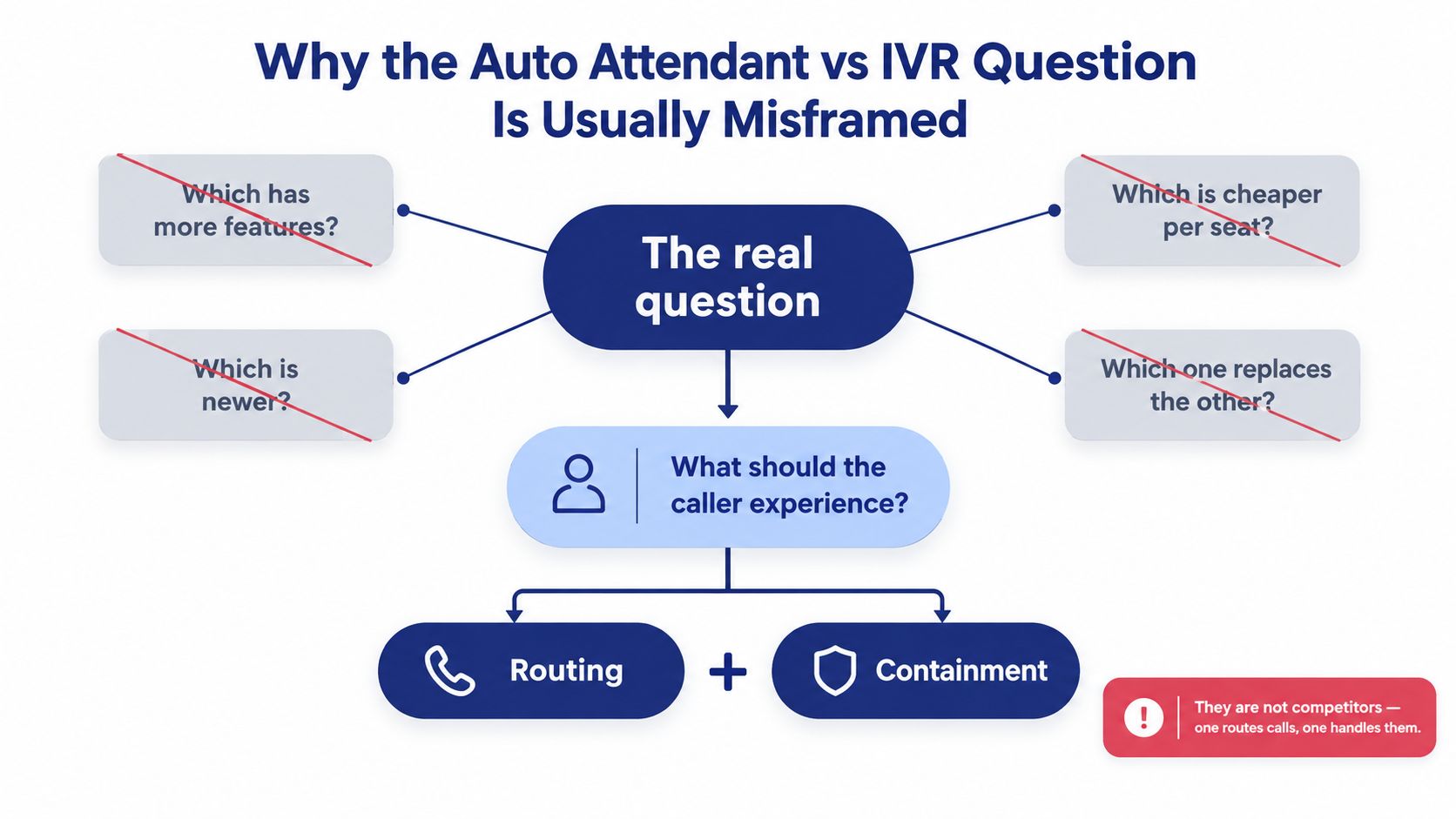
Practical rule: If the caller still needs a human after making a menu choice, you've built routing. If the caller can finish the request without an agent, you've built containment.
The cost of asking the wrong question
A small firm that only needs callers to reach sales, billing, or an office manager doesn't need a database-driven IVR project. It needs clear prompts, accurate schedules, and reliable transfers.
A support operation that repeatedly handles order status, account verification, or appointment requests has the opposite problem. An auto attendant can sort those calls, but it can't do the work. Callers still wait for an employee, and staff still perform the same repetitive lookup.
This routing-versus-containment lens also handles the next stage of phone automation. Traditional menus remain useful for deterministic paths, while conversational AI can handle open-ended intent and multi-step dialogue. The right design may therefore combine a simple outer attendant, transactional IVR, and AI for calls that don't fit a rigid tree.
What Each System Actually Does in Plain English
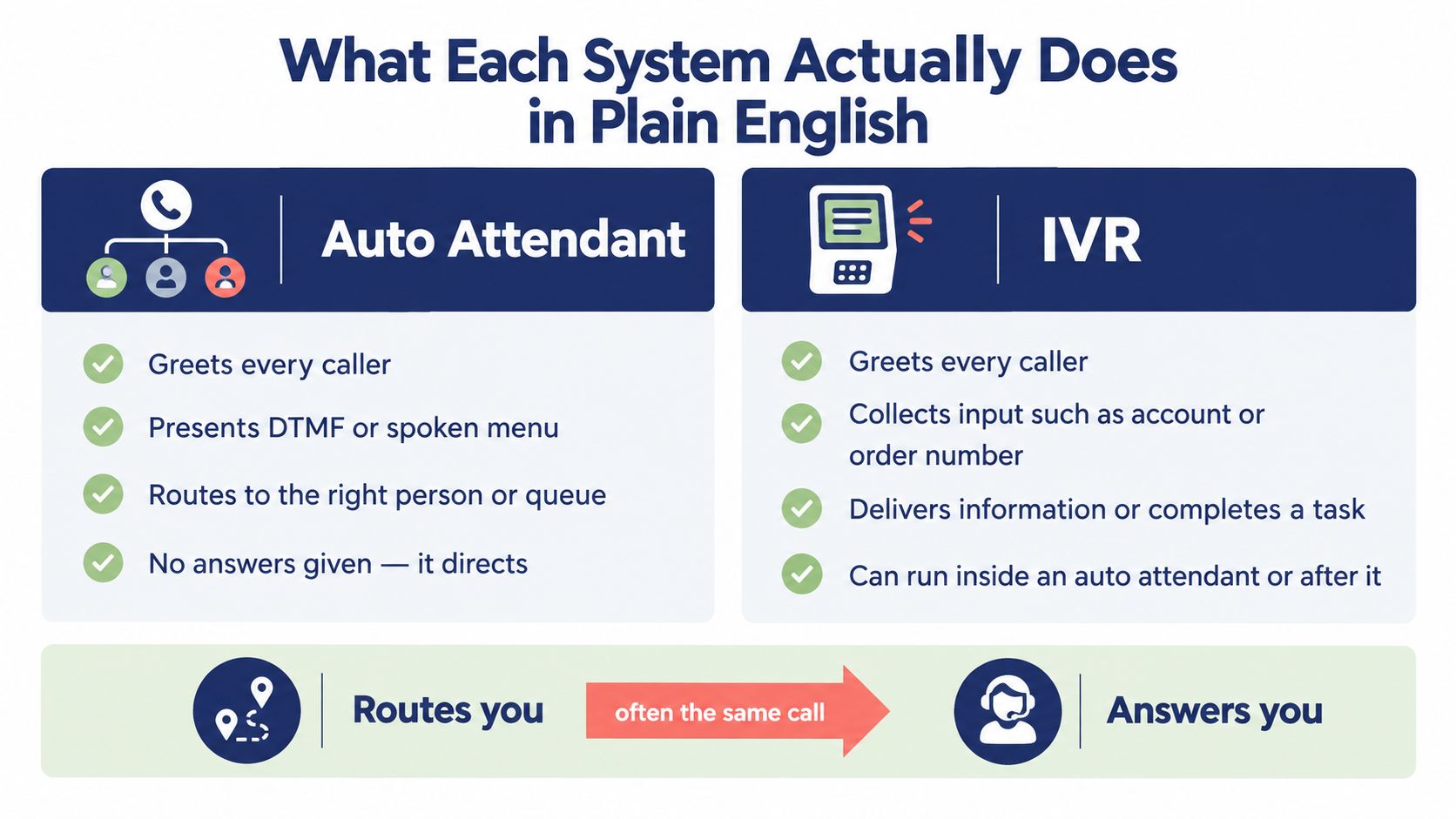
An auto attendant is a digital receptionist. It answers an inbound call, plays a greeting, and offers choices such as “Press 1 for Sales” or “Say Support.” The caller's selection determines whether the system transfers the call to an extension, department, ring group, queue, or voicemail.
The logic is explicit. If the caller chooses one option, the system follows the path assigned to that option. Time-of-day schedules, holiday messages, caller-ID rules, and spoken keywords can make the routing more capable, but the central job remains directing the call.
IVR, or interactive voice response, includes that routing layer and adds interaction with caller-supplied data. An IVR can collect an account number, PIN, order reference, or other structured input, then query a CRM, helpdesk, scheduling platform, or database. If the workflow is properly integrated, the caller can receive information or complete a task before any agent joins.
For a broader explanation of the technology, see what an IVR system does.
A quick recognition test
Ask what happens after the caller makes a selection.
- Auto attendant: The caller reaches a person, team, queue, or mailbox.
- Basic IVR: The caller may enter structured information before routing.
- Integrated IVR: The system uses that information to retrieve an answer or complete an approved action.
Many hosted VoIP platforms bundle both capabilities. In practice, you're often not choosing between two separate vendors. You're deciding how much call-flow depth, integration work, and maintenance your team can justify.
Watch the walkthrough below for a visual introduction to how these systems fit into business calling.
The distinction is easy to remember: an auto attendant routes you, while IVR can answer you. They may appear in the same call flow, and often do.
The Feature and Capability Differences That Matter
A feature checklist becomes useful only when each capability changes the caller's outcome. The table below focuses on the differences that affect architecture, staffing, and upkeep.
Auto Attendant vs IVR Capability Comparison
| Capability | Auto Attendant | IVR |
|---|---|---|
| Primary purpose | Routes callers to people, teams, queues, or voicemail | Routes callers and supports self-service |
| Menu structure | Usually simple, explicit menu trees | Multi-step trees with conditional branches |
| Data capture | DTMF or spoken selection, with limited structured input | Account numbers, PINs, order details, and other caller data |
| Backend access | May support basic lookups in advanced platforms | Designed for CRM, database, helpdesk, scheduling, and other integrations |
| Authentication | Usually transfers the caller for verification | Can support caller authentication within the flow |
| Transactions | Not its core function | Can support approved tasks such as status checks, balance inquiries, or booking |
| Routing rules | Time of day, holidays, extensions, departments, and queues | Conditional routing based on caller input, records, intent, or workflow state |
| Speech capability | Spoken keywords or simple voice choices may be available | Speech recognition can support richer input and intent handling |
| Reporting | Menu selections, transfers, missed calls, and queue outcomes | Containment, task completion, transfers, failures, and data-path outcomes |
| Maintenance | Easier to edit because the tree is visible and limited | Requires testing of prompts, integrations, credentials, conditions, and exception paths |
The overlap matters. Modern auto attendants may accept spoken keywords and apply caller-aware routing, while simpler IVRs may still behave like keypad menus. The product label doesn't tell you enough. Ask whether the system can act on caller data beyond selecting a destination.
Where the systems separate sharply
The dividing line appears when a call needs multiple backend actions. A routing flow can send “Billing” to an employee. A deeper IVR can identify the account, retrieve an invoice status, apply business rules, and escalate only when the record requires human attention.
Payments deserve special caution. A payment-enabled IVR needs appropriate security design and compliance controls. Don't treat a menu builder with a few API fields as a complete payment architecture.
Maintenance also changes quickly. An attendant can usually be redesigned by editing prompts and destinations. A deep IVR needs regression testing, version control, integration monitoring, and regular review of failed paths. If nobody owns those tasks, the promised containment will erode.
Senior consultant's view: Buy the simplest flow that removes the actual bottleneck. Complexity is an operating cost, not a free feature.
Containment Rate and What It Reveals About the Choice
Containment rate measures how many calls finish inside an IVR without reaching a live agent. Calculate it as calls completed in the IVR divided by total calls entering the IVR, multiplied by 100. The definition and formula appear in IVR containment rate guidance.
Use this metric to decide whether you need routing or containment. An auto attendant classifies callers and sends them to the right destination. An IVR can also resolve selected requests, provided it has the prompts, data access, and integrations to complete those tasks. A routing system with low containment is not underperforming if routing is its intended job.
Benchmark guidance places well-designed self-service IVRs around 70% to 80% containment. Routing-only IVR trees are often associated with 20% to 40%, while traditional self-service IVRs commonly fall around 50% to 70%. Treat these as diagnostic ranges, not promises. The same containment rate reference shows why the result must be judged against the flow's purpose.
Containment Rate by Call Type
| Caller Intent | Auto Attendant | Basic IVR | Integrated IVR |
|---|---|---|---|
| Directory or department request | Routes to a destination | Routes after menu input | Routes using caller data or conditions |
| Business hours or location | Plays a recorded message or routes | Plays information through prompts | Can tailor the response using records or location logic |
| Order or ticket status | Transfers to an employee | Collects information, then may transfer | Retrieves status from connected systems |
| Account or identity request | Sends the caller to staff | Captures input for verification | Authenticates and proceeds through approved logic |
| Appointment request | Routes to scheduling staff | Collects basic choices | Checks availability when connected to scheduling data |
| Complex exception | Transfers to a person | Usually transfers after failed steps | Escalates with captured context |
What the metric tells you
Low containment is acceptable when callers need specialists. It becomes a purchasing signal when the same repetitive request reaches an agent because the phone system cannot access the required data. High call volume strengthens the case for IVR only when the business can identify repeatable tasks worth completing automatically.
High containment can also hide a poor caller experience. Long menus, unclear prompts, failed authentication, and stale integrations drive abandonment and repeat calls. Give callers a clear path to a person when the request falls outside the system's rules.
Track containment with transfer reasons, abandoned calls, repeat callers, failed inputs, and task completion. Containment has value only when the caller receives a correct answer or completes the intended action. For conversational AI readiness, prioritize clean intent data and reliable task completion over a headline containment score.
Matching Each System to Real Business Scenarios
The cleanest way to choose between an auto attendant and IVR is to examine the repeated work behind the calls. The system should match the bottleneck, not the company's headcount alone.
A professional services firm with straightforward destinations
Consider a 12-person professional services firm handling 150 calls a day across billing, scheduling, and new inquiries. An auto attendant is the right starting point.
The callers already know what they need. The business doesn't need the phone system to inspect account records or perform transactions. It needs a professional greeting, clear destinations, business-hours routing, and a reliable after-hours message.
The trigger is destination count and routing simplicity. With fewer than six meaningful destinations, an IVR project would add configuration and testing work without removing enough human effort.
A multi-location dental group with repetitive requests
A three-location dental group handling 600 daily calls with recurring appointment and prescription refill requests has a different problem. IVR earns its keep when it connects to scheduling and clinical systems, provided the organization can govern access and protect sensitive information.
The phone flow can identify the request, collect the necessary information, and check available records or appointment data. It should still route emergencies and unusual clinical questions to trained staff.
The trigger is repeat intent combined with integration availability. If the same requests recur throughout the day and the systems of record expose reliable interfaces, containment becomes operationally meaningful.
A contact center with skills and escalation paths
A 40-seat contact center handling sales, support, and tier-one troubleshooting needs IVR with skills-based routing. The auto attendant may remain at the outermost layer, but it shouldn't carry the whole design.
Callers can identify a broad intent, provide account context, and enter the correct queue. The routing engine can then use skills, availability, priority, and escalation rules to place the call with an appropriate agent.
The trigger is queue specialization and workflow complexity. This environment needs reporting that separates self-service completion, queue transfer, agent outcomes, and escalation. A basic attendant alone will only sort the line, not manage the operation.
Decision test: If the same caller intent repeats and your systems can answer it reliably, build containment. If callers mainly need different people, improve routing instead.
Configuring Either Option Inside a Hosted VoIP Platform
Configuration should begin with the number callers dial, not with a menu template. In a cloud PBX such as SnapDial, assign the appropriate auto attendant or IVR flow to the relevant DID, then define the destination behind each path.
Start by listing caller goals in plain language. “Sales,” “Support,” “Billing,” and “Hours” are clearer than internal labels such as “Commercial Operations” or “Client Services.” Keep the top-level menu compact, and avoid nesting deeper than three levels unless the business can prove that callers can use it successfully.
Build the outer call path first
Use the outer layer to handle predictable decisions:
- Business hours: Route active-period calls to departments, queues, or ring groups.
- Holiday schedules: Play a date-specific message and offer the correct fallback.
- After-hours handling: Send urgent calls to an answering service, on-call group, or voicemail.
- No-answer behavior: Define what happens when the chosen destination doesn't pick up.
- Invalid input: Repeat the prompt briefly, then offer an operator or live-agent path.
For teams evaluating industry-specific workflows, real estate calling tools can provide useful context on how phone routing connects with lead handling and customer records.
A routing tree should be readable by someone who didn't build it. That requirement matters during staff turnover, holiday coverage, and emergency changes.
Add IVR logic only where it removes work
Connect CRM, helpdesk, scheduling, or billing systems when the integration can return trustworthy information. An IVR might read an account balance, identify an open ticket, report an appointment slot, or capture an order reference before transfer.
Don't add a data prompt merely because the platform supports it. Each requested field creates another failure point, especially when callers don't have the information available.
Review recordings monthly, audit menus quarterly, and maintain a change log for prompts, destinations, schedules, and integrations. Teams configuring a cloud PBX can also use this auto attendant configuration guide as a practical reference.
Where Conversational AI Changes the Decision
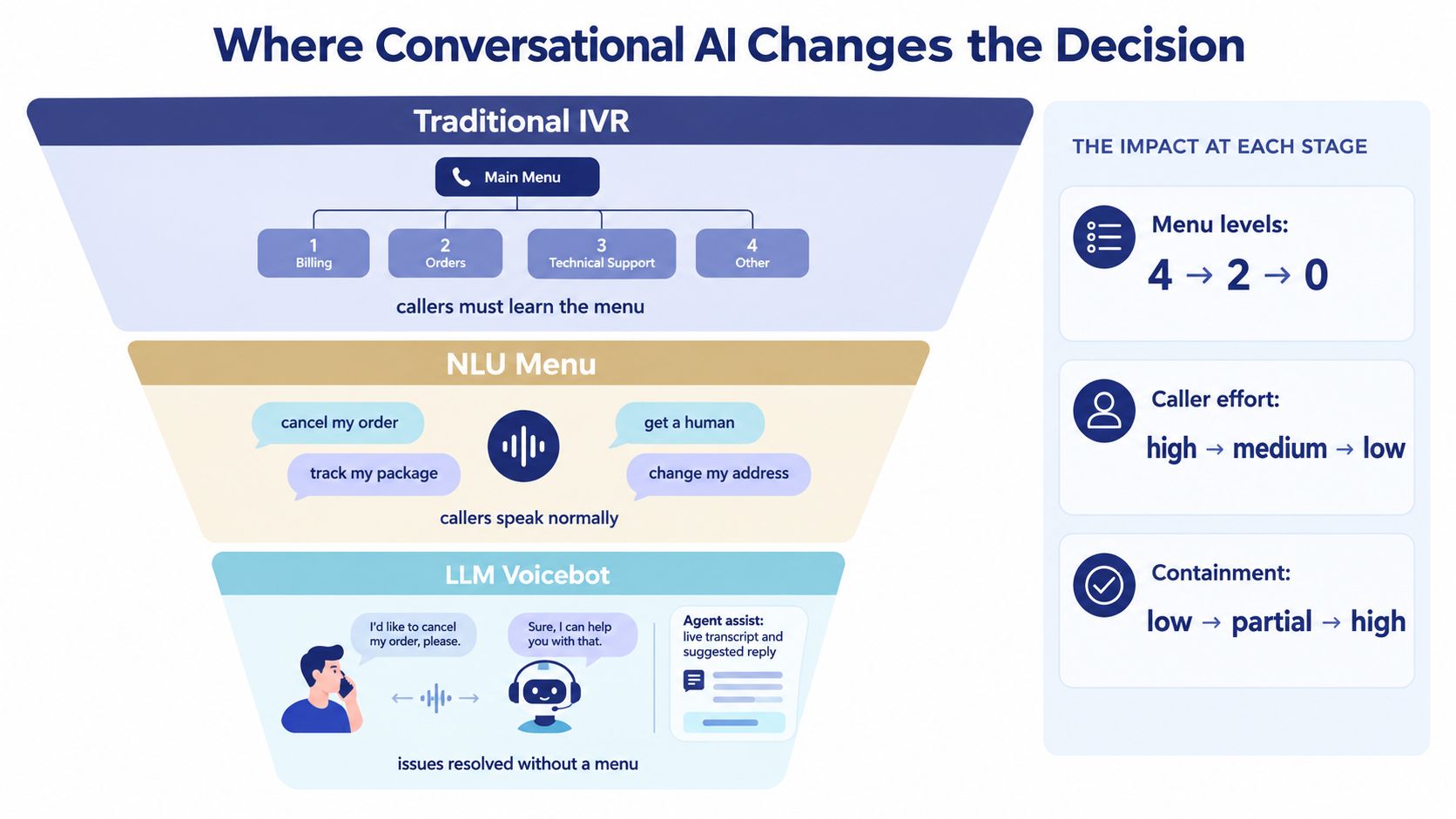
Auto attendant and IVR succeed when caller intent is predictable. “Sales,” “Support,” extension lookup, business hours, and a known order-status request can follow fixed rules. These paths are easy to test and audit, so use them for routing work that does not require interpretation.
Conversational AI changes the choice when callers describe needs in their own words. A voicebot can interpret open-ended requests, sustain a multi-turn exchange, retrieve information through integrations, and transfer the call with collected context. Conversational AI voice agents therefore add containment capability, rather than replacing keypad prompts with speech.
Use each layer for the work it handles well
Traditional auto attendant belongs at the deterministic edge of the system. Configure it for extensions, departments, schedules, caller-ID rules, and direct transfers. It is the right tool when callers mainly need to reach a known destination.
Integrated IVR earns its place when callers provide structured information and the platform can complete a defined action. Order status, account lookup, balance information, and appointment booking fit this model when backend data is accurate and accessible. Add IVR to reduce agent work, not to make a menu look polished.
Conversational AI fits open-ended intent, multi-step troubleshooting, language variation, after-hours triage, and requests that do not fit a numbered tree. An analysis of the future of IVR describes the shift toward agents that understand natural language, retrieve information, complete integrated tasks, and escalate with context. It also reports that moving from multi-level touch-tone IVR to conversational agents reduced abandonment by about 20% to 40%, especially where the original IVR experience was poor.
Data quality sets the ceiling. A voicebot connected to clean CRM and ticket records can contain calls effectively. Inconsistent customer data produces confident but unreliable answers.
Architecture rule: Keep deterministic rules deterministic. Add conversation where caller language, rather than menu structure, prevents resolution.
A Decision Framework and Quick Answers for Buyers
Use three practical triggers.
- Choose an auto attendant when inbound volume is modest, the business has fewer than six destinations, and callers mainly need a person or department.
- Choose IVR as the minimum layer when multiple queues receive recurring transactional requests and reliable business-system integrations are available.
- Layer conversational AI over IVR when callers use varied language, requests require several conversational turns, and the organization can maintain accurate connected data.
The brief's proposed call-volume rules are useful as buying guardrails: under 200 calls per day with fewer than six destinations favors an attendant, 200 to 1,000 calls per day across multiple queues with repeat transactional requests makes IVR the floor, and higher-volume environments with open-ended language justify evaluating conversational AI. Treat those thresholds as planning rules, not universal laws.
Auto Attendant vs IVR vs Conversational AI Buyer Decision Matrix
| Business Profile | Recommended Stack | Cost Band per User/Month | Typical Setup Time |
|---|---|---|---|
| Small team with simple destinations | Auto attendant, schedules, queues, voicemail | Basic hosted-phone tier | Short configuration project |
| Multi-location business with repeat transactions | Auto attendant plus integrated IVR | Mid-tier communications and integration tier | Multi-stage configuration and testing |
| Contact center with complex intent | IVR, skills-based routing, analytics, and conversational AI where justified | Advanced contact-center tier | Discovery, integration, testing, and controlled rollout |
Don't let a quote hide the operational details. Check number porting, after-hours overflow, call recording, queue callbacks, reporting, integration ownership, and the process for changing a prompt. A low per-user price can become expensive if every routing change requires outside professional services.
Buyer questions answered directly
Can I run both at once? Yes. That's the normal architecture. Put the auto attendant at the entrance and send selected paths into IVR.
Will IVR hurt CSAT? A badly designed IVR will. Keep prompts short, provide a human escape, and test with callers who didn't build the flow.
What about multilingual callers? Use separate language paths only when you can maintain accurate prompts and routing. Conversational tools can reduce menu friction, but they still need reliable language handling and escalation.
How long does cloud-PBX configuration take? A simple attendant can be configured quickly. Integrated IVR takes longer because every data path, exception, transfer, and failure state needs testing.
Do I need new numbers or hardware? Usually not. A hosted platform can often assign the flow to existing business numbers, while compatible phones and mobile apps handle the endpoints.
SnapDial provides hosted VoIP capabilities that include auto attendant and IVR call flows, along with routing, queues, call recording, mobile calling, and cloud-PBX administration. Review SnapDial to map your current numbers, caller intents, integrations, and after-hours paths before choosing between routing-only automation and deeper containment.