
The front desk is helping someone in person, another caller is on hold, and the office phone rings again. After closing, those same calls reach a generic voicemail box that nobody owns. You don't necessarily need more phones. You need clear rules for who answers, what happens when they can't, and how callers get help without starting over.
A good automated phone system for business makes those rules manageable. Before signing, test the caller's journey, the network underneath it, and the emergency-location and consent controls that a polished sales demonstration can hide.
What an Automated Phone System Actually Does
An auto attendant is like a receptionist who never leaves the desk: it answers, identifies the business, and offers a destination. Vendors often group auto attendants and interactive voice response (IVR) together, although speech recognition and interactive self-service need separate verification.
The menu is only the entrance. Behind it, routing rules, queues, voicemail, recording, and mobile applications determine whether someone gets helped.
Automated phone system components and what they do
| Component | What it does | What the caller experiences | Typical business gain |
|---|---|---|---|
| Auto attendant (IVR) | Greets callers and offers menu options by keypress or speech | Hears options for sales or support | Calls reach the right team without a receptionist |
| Call routing | Sends calls by time, caller ID, dialed number, or location | Call rings at the appropriate office or mobile | Fewer unnecessary transfers and missed calls |
| Smart queue and callback | Holds callers in order, announces estimated waits, and offers callbacks | Can keep waiting or request a return call | Less need to remain on hold during peaks |
| Visual voicemail with transcription | Converts voicemail to text in an inbox | Leaves a normal message | Staff can review missed-call messages quickly |
| Call recording | Records calls for coaching, quality checks, and disputes | Hears an appropriate disclosure when recording is enabled | A reviewable record of the conversation |
| Mobile office and app | Rings a mobile app and desk phone through a business number | Dials the office rather than someone's personal number | Staff remain reachable away from desks |
What happens behind the greeting
Call routing is the switchboard operator's rule card. It decides whether the sales option rings a group, a branch, or an employee's mobile app. Specify what happens when that destination is busy, signed out, or unanswered.
A queue is a waiting room with an estimated-wait sign. Callback should preserve a useful place in that process, not create an unassigned task. Confirm who receives the callback and what happens if the customer doesn't answer.
Transcription makes messages easier to scan, but staff should listen to the audio when names, amounts, or instructions are unclear. Recording serves a different purpose: preserving the conversation, with appropriate access and retention controls.
Software rather than another cabinet
In a hosted or cloud PBX, these functions run as software services rather than hardware bolted onto an office cabinet. That doesn't make every internet calling application equivalent: the ITU's fixed-telephone framework distinguishes managed VoIP from unmanaged software calling applications.
Industry workflows also matter. Legal offices assessing intake can explore voice automation for attorneys from Lighthouse Legal to frame their questions about automation and human handoff.
Start with your phone log. Mark which functions address missed calls, repeated transfers, unattended messages, or busy-hour abandonment. Anything else is secondary.
Which Setup Fits Your Business Size
Business profiles, priorities and warning signs
| Business profile | Main problem | Features to prioritize | Watch for |
|---|---|---|---|
| Small business | Missed calls when staff are busy or out | Auto attendant, mobile office, voicemail transcription | Deep menus that discourage callers |
| Multi-location company | Inconsistent answering across sites | Shared directory, per-site routing, central administration | Accurate emergency-location records |
| Contact center or support team | Long queues and abandoned calls | Smart queues, callback, live statistics, reporting | Agent-level reporting and working CRM connections |
| Remote or hybrid team | Business numbers tied to desks | Softphone apps, number-based routing, call logs | Quality on home internet connections |
Review routing with the people who answer calls, not just the person buying the system.
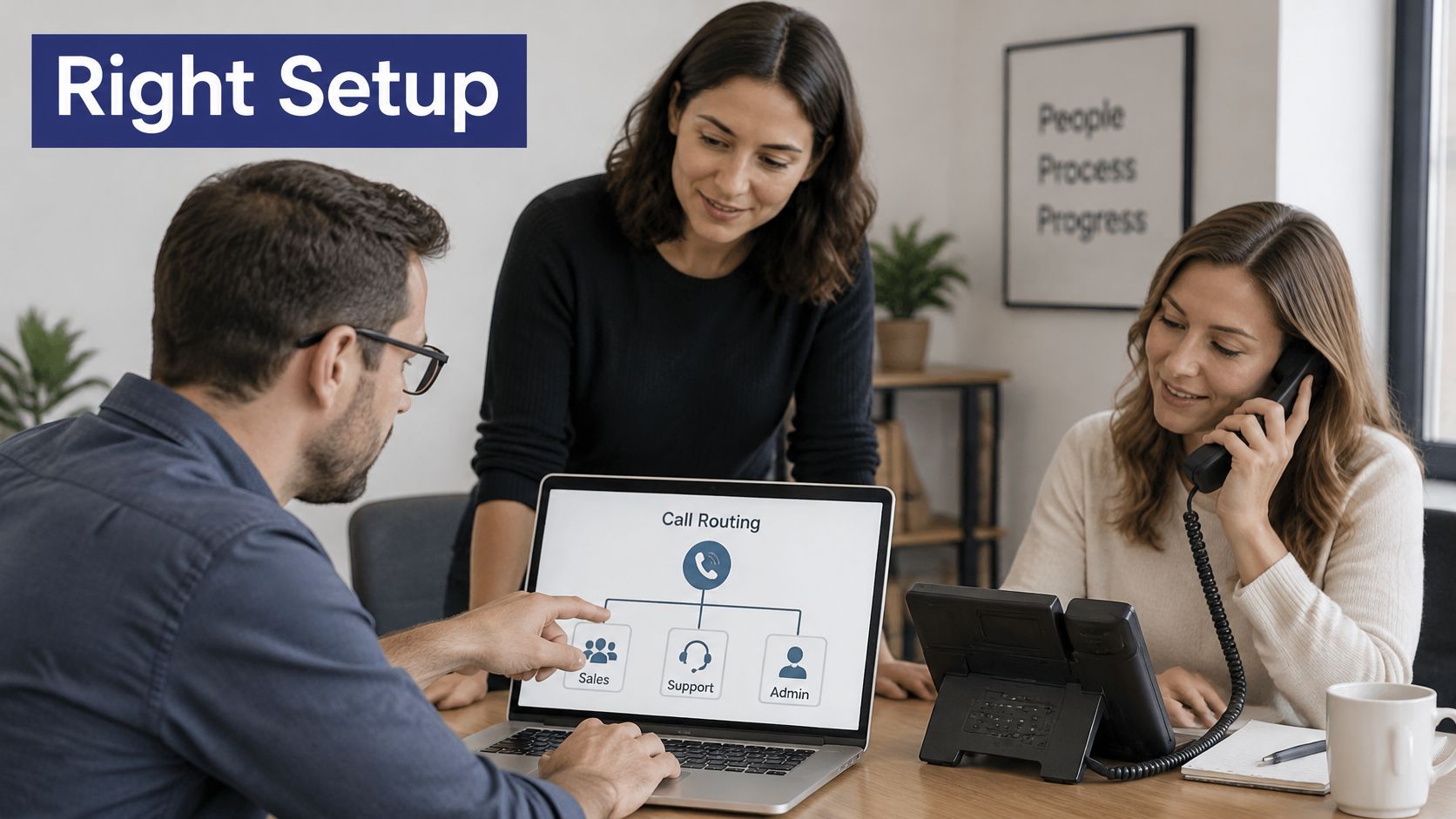
Operating patterns matter more than headcount. A compact office may need advanced queues if everyone handles support. A larger company may need little more than reliable branch routing and a shared directory.
An auto attendant in a small office fills a reception gap. Across branches, it must respect local schedules, use consistent department names, and avoid routing a caller to a closed location. Remote teams need clear availability rules so an employee's unanswered app doesn't become a dead end.
Match the setup to the actual problem
Internet-based business telephony isn't an experimental category. In December 2023, the United States had approximately 64 million interconnected VoIP subscriptions, and business connections represented about 62% of fixed retail voice connections, according to the FCC's voice-services report. Those figures support evaluating managed VoIP seriously, but they don't establish that every business needs a contact-center platform.
Use a representative working period to tally unanswered calls, double transfers, and callers who disconnect while waiting. Separate callers who heard opening hours and left satisfied from callers who abandoned a queue before receiving help.
Use this video as a discussion prompt, then require a demonstration using your own destinations and schedules.
Buy the setup that fixes the largest problem in your call count, not the one with the longest feature list.
Features and Reliability Checks Before You Buy
Evaluation criteria, what to check and red flags
| Criterion | What to check | Red flag |
|---|---|---|
| Voice quality | Packet loss, jitter, and delay per site during peak use | Testing only on an idle network |
| Emergency calling (E911) | Location records and a documented update process | Address entered at installation and never revisited |
| Menu depth and fallback | Invalid-input handling and a path to a person | Menus without live-agent transfer |
| Call recording controls | Disclosure, line-level control, access, and retention | Recording can't be disabled for a team |
| Reporting | Waits, transfers, abandonment, and queue-level logs | Monthly totals without queue detail |
| Integrations | Actual workflows in your CRM and calendar | Your required application isn't supported |
| Support | Coverage, escalation channels, and outage ownership | Email-only support without an outage process |
| Pricing and contract | Subscription basis, setup, porting, tiers, and term | Required fees disclosed after signing |
Test conversations, not just bandwidth
A fast internet connection isn't proof of dependable audio. Packet loss means audio packets don't arrive; jitter means they arrive unevenly; round-trip delay measures travel time out and back. ITU-T's VoIP monitoring guidance identifies these diagnostic variables while cautioning that individual measurements don't reliably explain every user's perceived quality.
A larger jitter buffer absorbs uneven arrival times but adds conversational delay. A smaller buffer keeps exchanges quicker but can discard late audio, clipping words. Don't accept buffer tuning as a substitute for investigating congestion or poor wireless coverage.
Have the network administrator correlate call complaints with site, wireless access point, network segment, and internet path. Apply quality of service (QoS) where your equipment controls traffic, then verify the result under load. Don't assume an internal priority setting controls the public internet.
Busy queues and heavy data transfers belong in acceptance testing. Also check touch-tone recognition: delayed or missing digits can send callers through repeated prompts even while the dashboard says the service is operational.
Run a repeatable trial
Small offices should emphasize missed-call recovery and easy administration. Branch businesses need schedule and destination testing; support teams need queue reporting; hybrid teams need home-network and device checks.
Use this trial script during a busy period:
- Compare access paths. Place calls through a mobile softphone on cellular data and a laptop on the office network. Also call the published number from an ordinary mobile voice connection.
- Exercise every branch. Select each menu option, enter invalid input, wait without responding, and reach a person.
- Finish the workflow. Leave voicemail, request a callback, and confirm delivery to the responsible employee.
- Record evidence. Log the time, device, network, destination, audio defects, and outcome in a shared sheet.
Require resolution and a retest for failed items. A successful greeting isn't a successful acceptance test.
Three Call Flows Worth Copying
A dental clinic after closing
A patient calls after the receptionist has left. The greeting separates booking, urgent dental concerns, and opening hours. The urgent option rings the on-call dentist; booking requests reach a transcribed voicemail inbox assigned to the morning team.
The critical setting isn't the greeting's voice. It's the escalation if the on-call dentist doesn't answer. Clinical staff should approve that message and distinguish urgent dental support from public emergency services.
A retailer with several branches
A customer calls the main number looking for stock. Branch selection establishes the desired location, then the schedule checks whether that store is open. If it's closed, the system offers an open alternative rather than sending the customer somewhere unexpected.
Don't infer the nearest store from caller ID alone. A mobile number doesn't reliably identify where someone is shopping. Unanswered calls can roll to head office, provided head-office staff can resolve the request.
A support team handling different skills
A customer chooses billing or technical help, then enters the appropriate skill-based queue. A callback becomes available after the configured waiting interval, and the receiving agent gets the selected reason for calling.
Keep these as configuration examples, not universal templates.
Call flow examples with menu, routing and fallback
| Scenario | Menu design | Routing rule | Fallback |
|---|---|---|---|
| Dental clinic after hours | Booking, emergency, opening hours | Emergency selection rings the on-call dentist | Transcribed voicemail and next-morning callback for nonurgent requests |
| Multi-site retailer | Main number with branch selection | Selected location and business hours determine the open-store destination | Unanswered calls roll to head office |
| Support team with queues | Billing or technical, followed by necessary clarification | Skill-based queue for each group | Live agent after repeated invalid input; callback after a short wait |
Design for callers who can't finish the menu
Start with a shallow menu, offer press-zero operator access, and send repeated invalid input to a person rather than replaying forever. Provide speech-independent choices, multilingual prompts where useful, and staffed SMS or web alternatives. Test with callers using relay services or international connections rather than assuming your preferred input method works for everyone.
For healthcare teams planning access for patients who can't easily travel, Life Primary Care's resource lets readers explore house call medical care. Apply the same access-first thinking to phone design: the caller shouldn't need to overcome an unrelated barrier to request help.
Use an auto-attendant script to draft clear destinations and escape routes before recording. Name the business promptly, especially on callbacks; the FCC's guidance on unwanted robocalls and texts underscores the importance of identification and consent in automated communications.
Document an outage destination outside the affected office network. Test whether mobile forwarding still works during a local connectivity failure, and distinguish that from a provider-wide outage requiring a separate continuity arrangement.
Measure resolution, not deflection. A caller who disappears from a menu hasn't necessarily received help.
Compliance Rules for Automated Calls
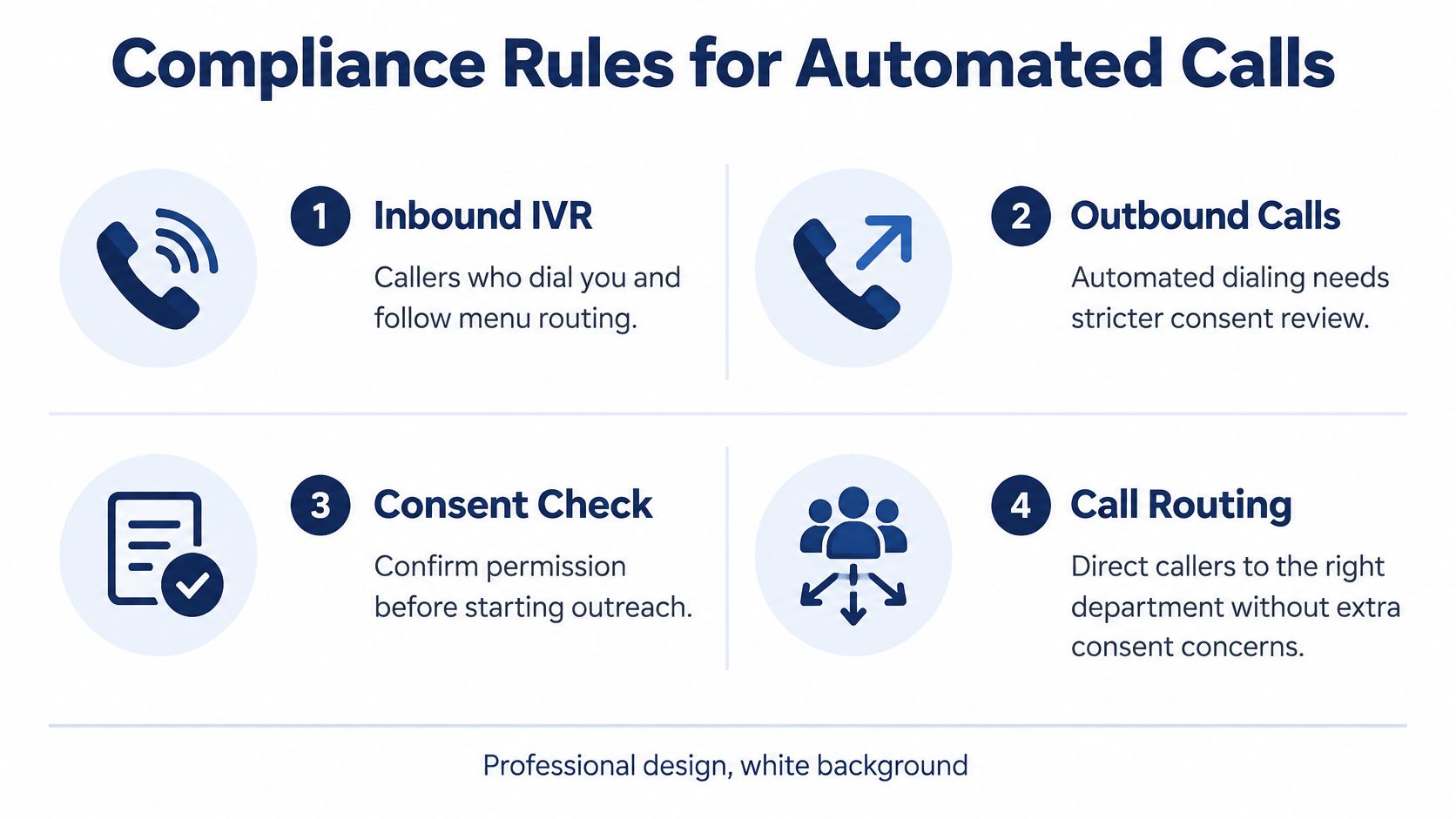
Inbound routing and outbound automation are different workflows. Someone calling your business and selecting a department isn't the same situation as your system initiating an artificial-voice call. Don't let an outbound campaign inherit approval because the inbound menu works.
In the United States, the FCC's confirmation that the TCPA applies to AI-generated human voices means those calls fall within restrictions on artificial or prerecorded voices, with prior express consent required unless an exception applies. Applicable rules also require identifying information, including the caller's identity or business name and telephone number, and prerecorded telemarketing messages need an opt-out mechanism.
Classify the message before enabling it
Appointment reminders should stay focused on the scheduled appointment. Adding a promotional offer changes the message and calls for renewed compliance review.
Service notifications need a defined purpose, such as communicating a change affecting an existing service. Don't assume a customer relationship authorizes every automated communication.
Marketing or promotional calls require their own approval and consent assessment. The precise obligations depend on the message, technology, recipient, and jurisdiction, so don't apply a reminder workflow's assumptions to a sales campaign.
Use a call-center compliance checklist to organize implementation, but have counsel approve the actual workflows. This is general information, not legal advice.
Configure enforceable controls
Keep evidence that staff can retrieve, not just a consent checkbox whose origin nobody can explain.
- Consent source. Preserve when, where, and how permission was obtained, alongside the wording presented and the approved purpose.
- Shared suppression. Make opt-outs available across locations and agents so another office doesn't restart unwanted outreach.
- Message history. Retain approved scripts, campaign classifications, and records of changes.
- Restricted permissions. Limit who can launch campaigns, use synthetic voices, or override contact restrictions.
- Human escalation. Give recipients a workable route to staff who can correct records and resolve objections.
Recording deserves a separate policy decision. If it isn't a fit for a company, we can disable SnapDial's call recording upon request.
Automation makes a mistaken workflow easy to repeat at scale. Before launch, configure consent checks, suppression enforcement, opt-out capture, access permissions, and audit logs, then test them using a deliberately suppressed contact.
What Automated Phone Systems Cost and How to Compare Quotes
The advertised subscription isn't the whole purchasing decision. Price the call flows your staff need, including the features necessary to complete them. A basic plan with no usable queue reporting isn't equivalent to a support setup that includes it.
Request a written breakdown that distinguishes subscriptions, implementation, equipment, usage, and optional services. Don't accept a feature name as confirmation that the quoted tier includes its required configuration.
Build a comparable scope
| Cost component | What the quote should specify |
|---|---|
| Subscription | Per-user, per-line, or per-number basis and included calling |
| Implementation | Setup, configuration, training, and number-porting charges |
| Feature access | Recording, transcription, analytics, queues, and CRM connections |
| Equipment | Required desk phones, headsets, adapters, and replacement terms |
| Emergency services | Emergency-calling and location-management charges |
| Usage | Metered calling, toll-free traffic, messaging, or AI usage where applicable |
| Contract | Term, renewal, cancellation, and number-release conditions |
AI reception introduces another comparison problem: usage-based charges may sit alongside the phone subscription. Cleaning companies evaluating booking automation can use Estimatty's AI voice agent pricing for cleaners to frame questions about the scope being priced. Don't assume an AI answering service replaces the underlying business telephone service.
Compare complete workflows
- Choose the essentials. Write down the features justified by your phone log, plus the safety and compliance controls you can't omit.
- Request an annual total from each provider using identical staff counts, telephone numbers, destinations, and call flows. Include realistic usage assumptions rather than an unexplained unlimited label.
- Separate recurring and one-time charges. Mark installation, hardware, subscription, consumption, taxes, and surcharges distinctly.
- Check the proposal against the evaluation criteria, particularly outage support, location administration, and the reporting needed to verify results.
- Reject incomplete pricing. If a required function needs an upgrade, have that upgrade included before comparing totals.
Buying rule: Compare identical call flows. Otherwise, the cheaper quote may simply describe a smaller system.
Also document who administers changes after installation. A low subscription can be a poor fit if routine schedule edits require work your office can't reliably perform.
Migrate Without Dropping Calls, Then Go Live
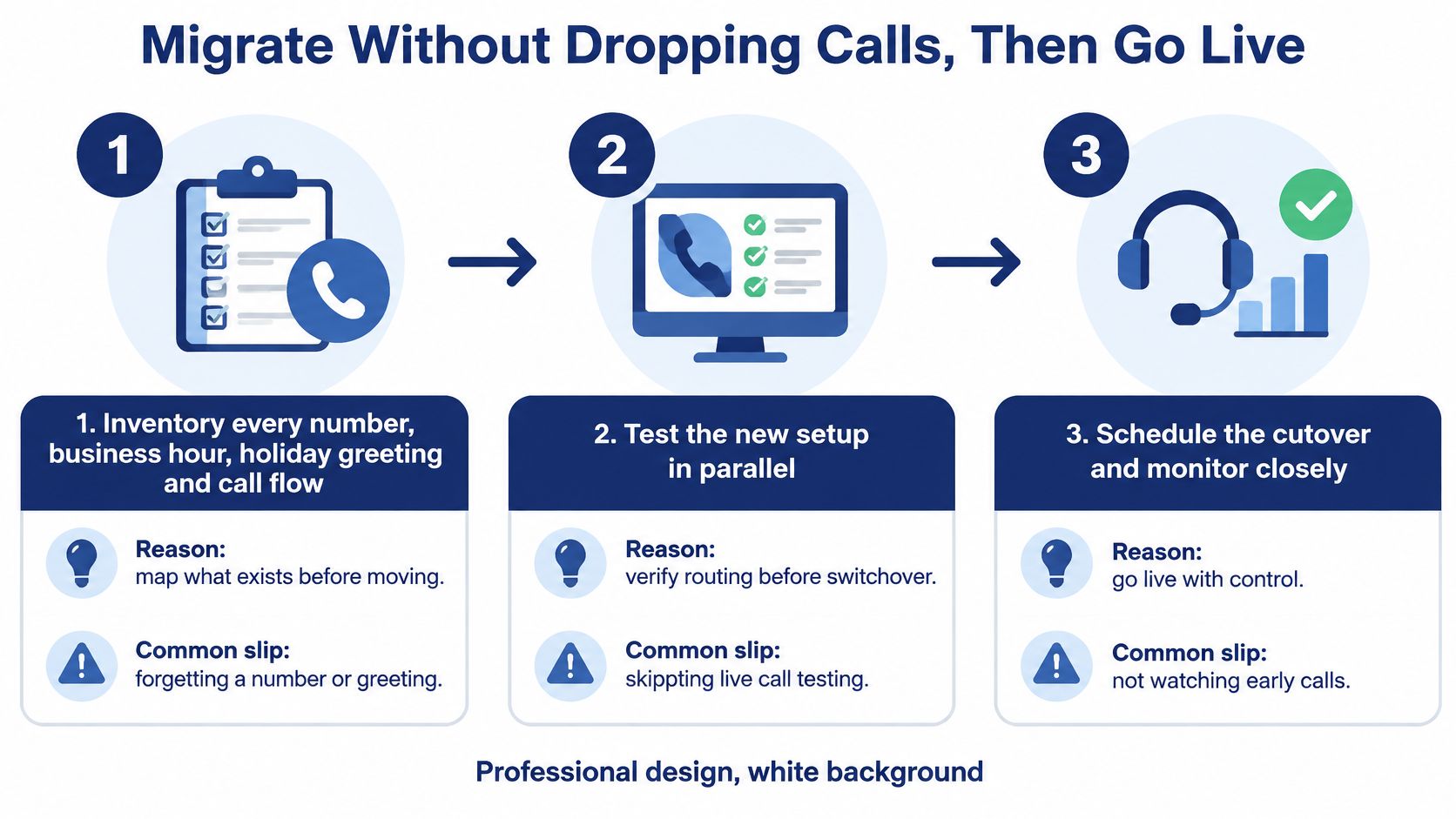
Treat migration as a controlled change with a rollback plan, not a date when everyone receives a new handset.
Inventory the existing service. List numbers, owners, business hours, holiday greetings, extensions, and destinations. Include fax, alarm, elevator, or other special-purpose lines for separate compatibility review. The common slip is moving the main number while forgetting a secondary service.
Map each caller journey into a shallow menu with a named destination owner. Record busy, unanswered, and closed-office behavior. Avoid copying obsolete extensions just because they exist in the old PBX.
Approve emergency locations before activation. The FCC's VoIP and emergency-calling guidance warns that calls may reach the wrong answering point, lack location or callback information, or fail during power and internet disruptions; interconnected VoIP providers must obtain a service location and support updates. Maintain records by user, device, office, and floor where applicable, and require confirmation after moves or remote-work changes.
Schedule porting and document responsibilities. Our technicians handle setup, configuration, and replacement of an existing VoIP phone system from start to finish, at no cost to the customer. Use the business phone system installation guide to prepare the information needed for that handoff. Don't cancel the losing service before port completion is confirmed.
Test inbound calls, transfers, voicemail, queue callbacks, and the provider's coordinated emergency-routing verification procedure. Never place an unarranged emergency test call. Include loss-of-power and connectivity scenarios, with backup power and alternate connectivity where justified.
Pilot before moving the published number. Use temporary numbers and agreed forwarding arrangements to verify real workflows while preserving the existing service. A ported number doesn't remain independently active with both carriers, so document the actual rollback method.
Cut over outside peak demand, watch live calls, and review destination-level reports afterward. Keep necessary residual services active until their dependencies are cleared, rather than cancelling the entire old account reflexively.
Make launch a decision gate
Stop the cutover if a critical check fails. Launch only when the setup matches the phone log, busy-hour tests pass across office and mobile access, emergency locations are confirmed, and each flow has human assistance and an outage procedure. Outbound workflows also need documented consent decisions and tested opt-out handling.
Bring competing quotes and your call-flow map to the final review. Resolve differences in scope before authorizing the move.
SnapDial offers managed cloud business calling, automated routing, and technician-led setup so your team can replace an existing VoIP system with a defined migration plan. Visit SnapDial to request a quote or schedule a call, and bring your number inventory and busiest call flows for a walkthrough.