
The call timer is running, the other person is halfway through a sentence, and then you hear a click. Silence. You try calling back, but the same thing happens again a few minutes later. When your phone keeps dropping calls, the obvious suspect is a weak signal, but the signal bar is only one piece of the system.
A failed call can start with a congested cell tower, a bad handoff, an unstable Wi-Fi access point, a router rewriting SIP traffic, outdated radio firmware, a carrier provisioning problem, or a VoIP quality issue. The person holding the phone hears the same symptom even though the failure may exist in a completely different layer. That's why random reboots rarely provide a lasting answer.
This guide starts with quick checks, then separates cellular, Wi-Fi calling, VoIP, device, and carrier failure patterns. It also covers how to measure whether a fix worked, when monitoring is justified, and when a managed phone system makes more sense than continuing to patch an unstable setup.
Why Your Phone Keeps Dropping Calls Mid-Conversation
A sales representative is midway through a product explanation when the call timer freezes. There's one short beep, then silence. The representative checks the phone and sees a reasonable signal, so the problem feels inexplicable. The customer, meanwhile, only knows that the conversation ended without warning.
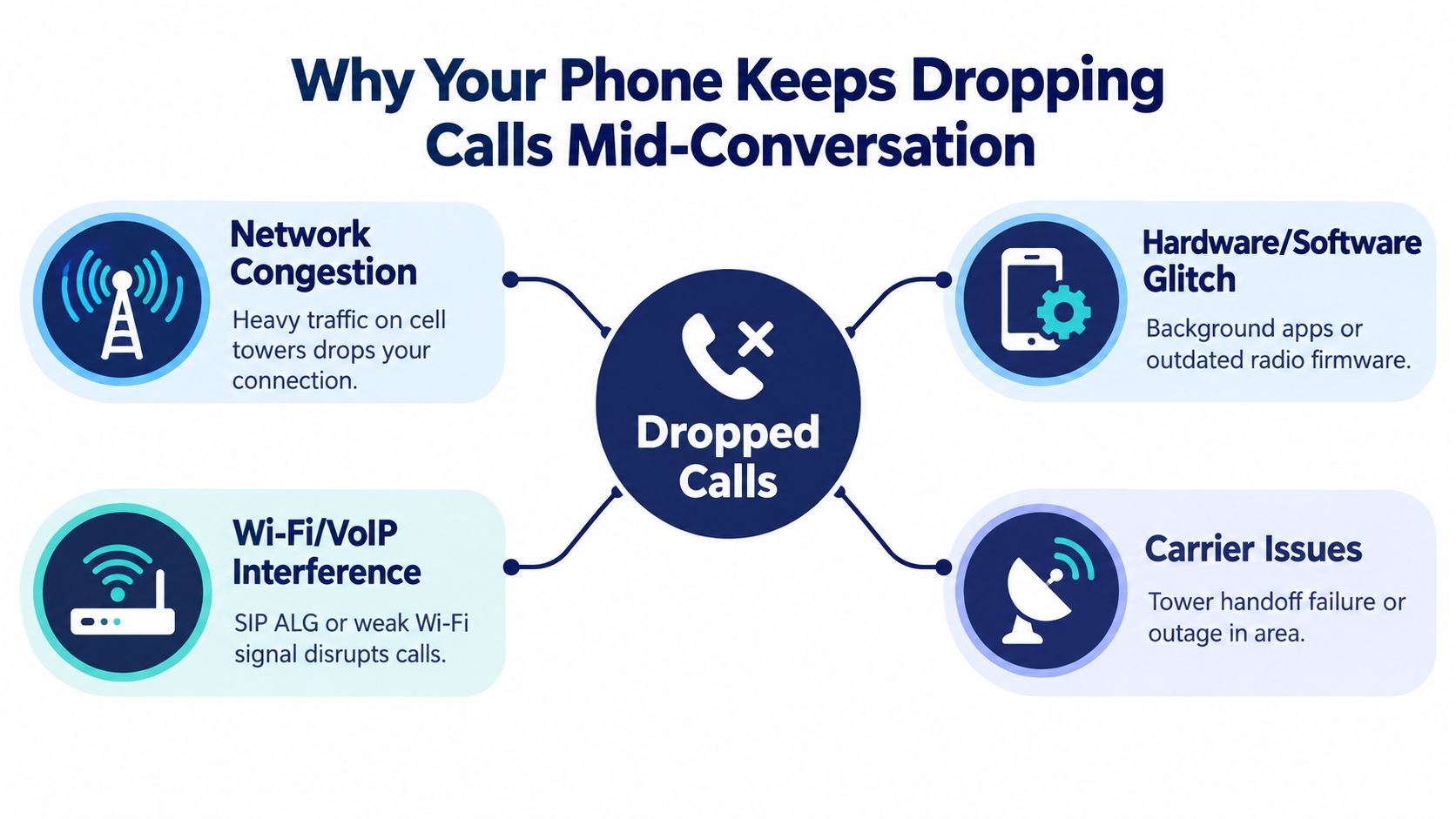
That same experience can come from several overlapping failure points. On a cellular connection, the handset may fail while moving between towers, lose its voice bearer during congestion, or struggle with a band transition. On Wi-Fi calling or VoIP, the access point, router, NAT behavior, SIP session, or packet path may interrupt the media stream. A device can add its own problems through outdated baseband firmware, conflicting dialers, VPN interception, or power-saving behavior.
The distinction matters because each layer responds to a different fix. A reboot might reload a damaged radio state, but it won't correct a carrier-side IMS registration problem. Moving closer to the router might improve Wi-Fi, but it won't repair SIP ALG rewriting. For readers who need to understand the audio-quality side of these failures, this explanation of what jitter means in networking provides useful context.
Dropped calls are a measurable reliability problem, not merely an annoyance. Regulators define the dropped-call rate as the percentage of established calls interrupted before normal completion because of the operator's network, and it's tracked as a voice-quality KPI. The UAE regulator's 2024 benchmarking report set a target below 2%, while measured outdoor rates were 0.005% for one operator and 0.015% for another across about 19,780 call attempts per operator. Indoor rates were about 0.02% and 0.03% across roughly 5,487 attempts per operator, showing why indoor conditions deserve separate attention. These benchmarks are documented in the TRAI consultation paper on call-drop measurement.
Quick Checks to Run Before Anything Else
Start with the lowest-risk checks. They establish whether the phone has a temporary registration problem before you change router settings, reset network profiles, or open a carrier ticket.
Force a fresh network attach. Turn on Airplane Mode, wait about 10 seconds, then turn it off. This clears the current radio attachment and makes the handset register again. If calls become stable immediately but fail later, the issue may involve network selection, handoffs, or carrier registration rather than the microphone or speaker.
Inspect the SIM or eSIM profile. For a physical SIM, power the phone down, remove the tray, check for visible debris, and reseat it firmly. For an eSIM, open the cellular settings and confirm that the correct line is enabled for voice and data. Don't delete an eSIM profile unless the carrier has instructed you to do so, because reactivation may require carrier support.
Check the radio state, not only the signal bars. On an iPhone, Field Test Mode can expose more detailed cellular information. On Android, open the mobile-network or SIM status screen. Look for a phone that repeatedly flips between connection types or loses service during the call. A strong bar display doesn't prove that the voice bearer is stable.
Remove local interference. Step away from thick concrete, metal shelving, elevator areas, and enclosed rooms. Temporarily disable aggressive battery-saving modes and test again. These settings can restrict background radio activity or interrupt Wi-Fi calling continuity, depending on the handset and operating system.
Perform a full restart. Locking and the screen isn't a restart. Power the device down completely, wait briefly, and turn it back on so the operating system and radio stack reload together.
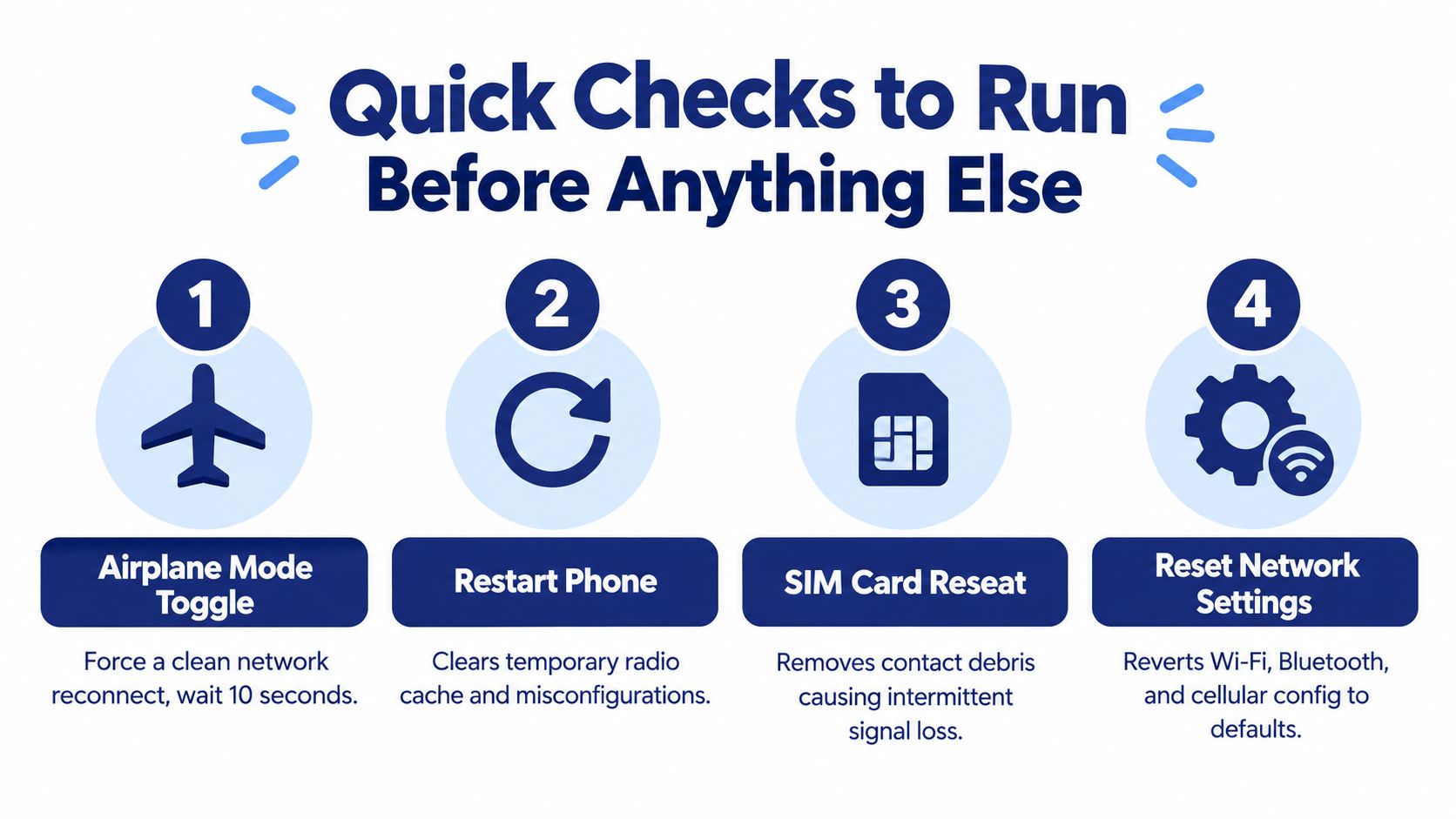
If the phone still drops calls, reset network settings only after recording saved Wi-Fi passwords and other connection details. That reset can remove a damaged configuration, but it also removes stored Wi-Fi and Bluetooth relationships. For office routers, review what SIP ALG is and how to disable it before assuming the handset is defective.
Why Calls Drop and How to Tell the Causes Apart
A dropped call is a reliability failure with several possible points of failure. Ask what the phone was doing at the exact moment the call ended. Timing, location, movement, and whether the call used cellular or Wi-Fi usually reveal more than the signal bars alone.
Cellular failures
A call that ends while walking, driving, or changing floors points toward a handoff failure. The phone must transfer its connection between cells or bands without interrupting the voice session. Repeated failures in a crowded venue or at a predictable busy period suggest congestion. Indoor losses can also come from building materials and difficult radio paths, even when outdoor coverage is strong.
Carrier provisioning creates a different pattern. Voice over LTE or IMS registration may be absent, unstable, or configured incorrectly. Roaming adds another dependency, because both the handset and carrier must support the visited network's voice arrangement.
Wi-Fi calling and VoIP failures
If a call works beside the router but fails in another room, check access-point association and Wi-Fi coverage first. One-way audio followed by silence points more toward packet loss, NAT behavior, or session management than a cellular handoff.
For business VoIP, inspect packet loss, jitter, round-trip latency, codec selection, and call setup success before changing several settings at once. SIP signaling can complete while the RTP media path degrades. The call then remains connected in one system but becomes unusable for the people speaking.
Practical rule: The same symptom on cellular and Wi-Fi does not prove the same cause. Test each transport separately.
| Symptom Pattern | Most Likely Cause | Layer |
|---|---|---|
| Drops while walking or driving | Tower or band handoff failure | Cellular network |
| Drops in a crowded area or at a repeatable busy period | Cell congestion | Carrier network |
| Drops after moving between rooms | Access-point roaming or weak Wi-Fi coverage | Wi-Fi |
| One-way audio, then silence | RTP loss, NAT behavior, or SIP session interruption | VoIP infrastructure |
| Only one handset fails | Device firmware, dialer, VPN, SIM, or local configuration | Device |
| Several users fail at the same time | Router, ISP, PBX, carrier, or upstream outage | Shared infrastructure |
Treat one failed call as a clue, not a diagnosis. Repeated patterns provide a better basis for isolating the failing layer. For a broader method of checking call quality and distinguishing voice problems, use this voice-quality troubleshooting guidance. Record the transport, location, movement, affected devices, and audio symptoms for each test. That evidence makes it easier to separate a handset problem from a shared network, carrier, or VoIP failure.
Fixing Wi-Fi Calling and VoIP Drop Issues Step by Step
Wi-Fi calling and business VoIP need a clean path for both signaling and media. Start at the router, then stabilize wireless behavior, then prioritize voice traffic. Changing codecs first usually treats the visible symptom rather than the network condition causing the interruption.
Start with router behavior
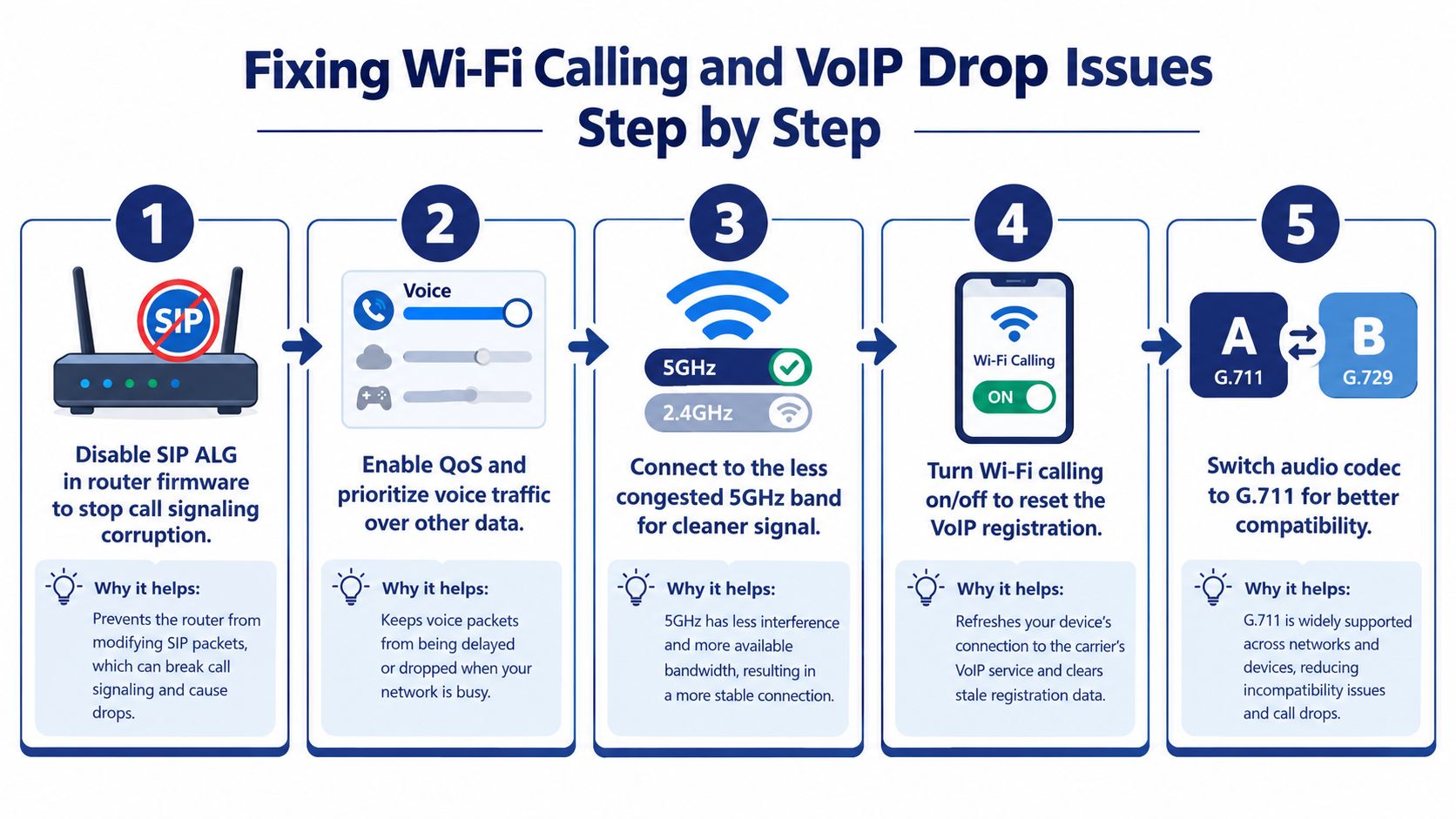
Disable SIP ALG in the router's advanced security, firewall, or VoIP settings. SIP ALG is intended to help traffic traverse NAT, but consumer implementations often rewrite signaling incorrectly and create failures after answer, during transfers, or when a session refresh occurs. Apply the change, save the configuration, reboot the router if required, and place a fresh test call.
Next, update the router firmware and review roaming features. Band steering and aggressive roaming can move a handset between radios while the call is active. If the call fails only as the user walks around the building, test with a fixed SSID and a stable access point before re-enabling automated steering.
Give voice traffic a predictable path
Connect the handset or softphone to the 5 GHz network where coverage is reliable and interference is lower. Don't choose a distant 5 GHz signal because the label sounds faster. A stable connection near the access point is more valuable than a nominally faster band that repeatedly roams.
For an office, place voice devices in a dedicated voice VLAN where the switching design supports it. Configure QoS across the router and switches so SIP signaling and RTP media receive priority over backups, video uploads, and large downloads. Reserve DHCP leases for fixed phones and avoid unnecessary port-forwarding changes. Inbound rules and NAT behavior should follow the PBX provider's documented design rather than improvised firewall edits.
A managed switch is generally easier to control than an unmanaged consumer hub when several extensions share the network. It can apply voice VLAN and QoS policies consistently, while a basic hub provides little visibility into contention or packet errors.
Check bandwidth and codec negotiation
Don't judge bandwidth by download speed alone. Confirm that the upstream remains stable while someone is uploading files, using cloud backup, or streaming video. The troubleshooting method should measure packet loss, jitter, latency, codec choice, and setup success, then correlate those results with SIP, SBC, router, and endpoint logs.
Codec compatibility matters, but forcing G.711 won't repair an unstable path. It can also increase bandwidth demand compared with compressed codecs. Review the negotiated codec and make sure the call isn't repeatedly transcoding or renegotiating.
For teams evaluating Wi-Fi-based messaging alongside calling, this SMS Activate guide to sending SMS over Wi-Fi helps separate text-message behavior from voice-session behavior. The two services can use the same local network while failing for different reasons. For a broader decision about the trade-offs, see whether Wi-Fi calling is a good choice.
How to Test and Confirm the Fix Actually Worked
One clean conversation does not confirm a repair. Test the change against the failure mode you identified, then compare results with the earlier configuration.
Call the same destination from the same handset and repeat under different conditions, including a busy period. Record the timestamp, connection type, location, duration, and whether the call completed. If Wi-Fi calls alone fail, repeat with Wi-Fi calling disabled. If the problem affects one user, test another handset on the same network to separate endpoint trouble from a shared network fault.
Measure the path during an active call
Collect jitter and packet-loss data from the router's QoS dashboard, PBX portal, softphone diagnostics, or handset tools. Use the targets below as troubleshooting thresholds, not as a promise that every call will sound perfect.
| Metric | Target | Warning Sign |
|---|---|---|
| Jitter | Below 30 ms | Unstable delay, clipped or robotic audio |
| Packet loss | Under 1% | Missing syllables, one-way audio, disconnects |
| Round-trip latency | Stable and low | Delayed conversation or talk-over |
| Call setup success | Consistent completion | Failed or delayed ringing |
| SIP dialog behavior | No unexpected termination | Retransmissions, timeout, or unexplained BYE |
The quality targets and diagnostic sequence follow the VoIP troubleshooting methodology cited earlier. A continuous ping or traceroute can expose path instability, but neither tool shows what happened inside the SIP session or RTP stream. Use them alongside call signaling and media evidence.
Preserve logs before changing more settings
Save the SIP trace, SBC events, router logs, and endpoint diagnostics surrounding the failed call. Check for retransmissions, a mid-dialog BYE, registration loss, or a timeout. Compare call-detail records before and after the change, then place the same call from a wired computer softphone as a control.
Keep the exact firmware version, router model, handset model, transport, timestamps, and test result in the notes. If the drop follows the user across networks, suspect the handset, account, or carrier. If several endpoints fail at the same time, preserve the shared network and PBX evidence before changing more settings. A support ticket containing those details gives an engineer a usable starting point instead of a general report that the phone keeps dropping calls.
Preventing Future Drops with Monitoring and Smart Setup
A one-time fix can hide a recurring problem. Reliable voice service comes from keeping every part of the path observable and maintaining the configuration after the network changes.
Apply QoS across the complete route, not only at the internet router. A policy that prioritizes voice at the gateway can still fail if a switch, mesh node, or wireless uplink introduces contention. Use consistent VLAN and queue policies across managed network equipment, and document which ports and SSIDs carry voice traffic.
Firmware maintenance deserves a scheduled process. Router, access-point, handset, PBX, and carrier settings can all affect SIP registration, Wi-Fi roaming, and radio behavior. Update during a controlled window, retain the previous configuration, and test inbound, outbound, transfer, hold, and emergency calling afterward.
Monitor the signals that precede failure
A useful monitoring plan watches more than completed calls.
- Call quality trends: Review jitter, packet loss, latency, and call completion in the PBX or provider portal.
- Registration events: Alert when phones repeatedly unregister or fail to authenticate.
- Network health: Monitor WAN availability, access-point status, switch errors, and interface saturation.
- Call-detail records: Compare failed, short, and unexpectedly terminated calls by user, site, carrier, and transport.
- Configuration changes: Record router, firewall, firmware, VLAN, NAT, and codec-policy changes.
A rising dropped-call rate deserves context. Regulators commonly use 2% or less as a monthly service-area benchmark and may treat cells above 3% as bad cells requiring remediation, according to this parliamentary telecom document. Don't treat those thresholds as a substitute for local diagnosis. A small sample can move sharply after one failure, while a recurring pattern across users and locations is much stronger evidence.
Build resilience into the office
Use a secondary ISP or a 4G or 5G failover router for critical calling. Test the failover rather than assuming it works. Run a scheduled outage drill, confirm that phones register through the backup path, and verify that inbound routing reaches the intended users.
Keep phones within dependable access-point coverage, avoid daisy-chained consumer routers, and audit NAT rules after every firewall change. For remote workers, provide a wired option for users who handle critical calls from a fixed desk. Good habits don't replace monitoring, but they reduce the number of unstable variables engineers must investigate.
When It Is Time to Escalate or Move to a Managed PBX
Escalate when the evidence points outside the handset or local network. A carrier or VoIP provider should investigate when multiple devices fail, users in different locations report the same behavior, calls fail across separate internet connections, or the timing matches a known outage. Repeating the same reset on every phone only creates more downtime when the fault is upstream.
Prepare the ticket before contacting support. Include:
- Call timestamps: Record several failed calls with time zone and caller information.
- Transport details: Identify cellular, Wi-Fi calling, wired softphone, or office Wi-Fi.
- Network evidence: Attach router diagnostics, packet-loss results, latency observations, and traceroute output where appropriate.
- SIP evidence: Provide registration events, call-detail records, and trace extracts showing the termination behavior.
- Environment details: List the handset, operating-system version, router, access points, firewall, ISP, and PBX platform.
This information helps support teams distinguish a local radio problem from a carrier outage, NAT failure, codec mismatch, or PBX defect. It also prevents the common mistake of changing several variables at once and losing the original evidence.
A managed hosted PBX becomes a sensible option when firmware updates, QoS, stable bandwidth, and network cleanup don't stop the same pattern. Repeated failures across sites may indicate aging on-premises hardware, complicated NAT traversal, weak carrier interconnection, or a design that can't provide dependable voice prioritization. At that point, the issue is architectural rather than a missing handset setting.
SnapDial provides hosted VoIP capabilities including SIP trunking, codec handling, geographically redundant servers, call-quality monitoring, reporting, mobile applications, call routing, and support for business phone deployments. Its platform also includes functions such as auto attendant, call recording, visual voicemail transcription, call logs, and queue management, which can help teams investigate missed and terminated calls from a central system. That doesn't eliminate the need for a sound local network, but it gives an organization a managed service layer instead of leaving every failure investigation to office staff.
For a small or midsize business, the decision should rest on call impact and operational burden. If staff repeatedly lose customer conversations and internal teams spend more time troubleshooting than serving callers, compare the cost of continued outages with a hosted system that includes monitoring and provider-side escalation.
If your phone keeps dropping calls, start by separating cellular, Wi-Fi, device, and carrier symptoms, then collect call-quality evidence before changing more settings. SnapDial can provide hosted VoIP, call routing, quality reporting, and managed support for businesses that need a more reliable alternative to a fragile phone setup.