
A legacy phone system rarely fails at a convenient time. It starts with a missed call, a handset that won't register, or a routing change that requires someone to find an old administrator who left years ago. Then the replacement quote arrives, and the business owner discovers that keeping the old PBX alive may cost almost as much as replacing it.
That's why cloud phone systems deserve a serious evaluation. The decision isn't only about getting newer handsets or moving calls onto the internet. It's about deciding who owns the infrastructure, how much operational control the business needs, what happens when the network fails, and whether the phone system supports the way the company really works.
Why SMBs Are Moving to Cloud Phone Systems in 2026
An owner looking at an aging PBX usually faces an uncomfortable choice. The existing system still makes calls, but its hardware is difficult to support, its licensing is opaque, and even a minor change can become a specialist project. Replacing it with another on-site system preserves control, but it also preserves the maintenance burden.
Cloud phone systems change that trade-off. The provider operates the core telephony infrastructure, while the business manages users, routing, numbers, recordings, and workflows through a web portal. Employees can answer calls from desk phones, computers, or mobile applications without tying every extension to a physical office.
The market is already large enough to make this a mainstream infrastructure decision. One estimate valued the cloud-based phone system market at USD 31.15 billion in 2025, with a projection of USD 77.94 billion by 2032, equivalent to a projected 14.0% compound annual growth rate over that period (market estimate for cloud-based phone systems). A separate estimate placed the cloud business phone systems market at USD 35.6 billion in 2025, projecting USD 105.7 billion by 2034 at a 12.8% CAGR (cloud phone system market analysis).
The real reason for the move
Features aren't the main driver anymore. The pressure comes from several directions:
- Infrastructure replacement: Carriers and regulators are accelerating the retirement of older telephony infrastructure, making legacy circuits harder to justify.
- Workforce flexibility: Staff work from multiple locations, and a desk-bound extension doesn't match that operating model.
- Administrative capacity: Many SMBs don't have a telecom specialist who can maintain an on-premise PBX, troubleshoot trunks, and manage handset provisioning.
- Business continuity: A hosted platform can reroute calls to mobile devices or backup numbers when an office connection fails, provided the failover design is configured correctly.
SMBs considering a legacy replacement should also review the local carrier timetable and compliance requirements. For UK businesses, practical guidance on whether to replace your landline before January 2027 can help frame the urgency without confusing a carrier deadline with a technology preference.
Consultant's view: Treat the move as a continuity project, not a handset refresh. The cheapest migration is the one that documents numbers, dependencies, and failover before the old system becomes an emergency.
How a Cloud Phone System Actually Works
Think of traditional telephony as owning a generator. Your company buys the equipment, houses it, powers it, replaces components, and finds someone who knows how to repair it. A cloud phone system works more like an electricity utility. The provider maintains the infrastructure, and your business consumes calling capacity through managed software.
The provider's infrastructure consists of call-control software and telephony services hosted in data centers. Your users connect through an internet connection, a desk phone, a softphone on a computer, or a mobile application. The system handles the business logic that determines where a call goes and what happens after it ends.
The building blocks
SIP trunks provide the connection between the phone platform and the public telephone network. They replace the role that older PRI or similar circuits played, but the business doesn't need to install the core switching equipment on-site.
The hosted PBX is the system's brain. It stores extensions, schedules, queues, forwarding rules, greetings, permissions, and call-handling policies. A cloud PBX isn't just a transport method. It's the control layer that turns a call connection into a business workflow.
SIP phones, softphones, and mobile apps are the endpoints. A SIP desk phone behaves like a familiar office handset. A softphone lets an employee call from a laptop. A mobile app gives the user a business identity while working away from the office.
The PSTN gateway connects the cloud environment with public telephone services. It also matters for special services, emergency calling, fax requirements, and locations where public network access must be handled differently.
DIDs and number porting connect people to the business. A DID is a direct business number that can route to a user, department, queue, or application. E.164 formatting provides a consistent international numbering structure, while porting transfers an existing number from the old carrier.
An IVR, or interactive voice response system, is the menu tree. “Press one for sales” is an IVR. It's only one part of the wider phone system, not a synonym for the PBX.
VoIP is the transport layer. The cloud PBX is the decision-making layer. That distinction matters because a basic VoIP service may carry calls without providing strong routing, administration, analytics, or CRM workflows.
A call in practice
A customer calls the company's main number. The cloud platform identifies the number, plays the opening greeting, and places the caller in a support queue. If no desk phone is available, the platform can route the call to a user's mobile application. The call recording is stored according to the company's retention policy, and the call record can be associated with the customer in a CRM.
The physical path is invisible to the caller. The operational path is not. It determines whether the call reaches the right person, whether a manager can review it, and whether the next employee has the context needed to continue the conversation.
For the hardware side of deployment, a practical guide to VoIP phone setup can help administrators understand the relationship between handsets, network connectivity, and user provisioning.
Cloud PBX vs On-Premise PBX
The cloud-versus-on-premise decision should be made across four axes, not by comparing feature checklists. Look at total cost of ownership, control, scalability, and maintenance. A system that appears inexpensive at purchase can become expensive when you include specialist labor, hardware refreshes, support contracts, and business interruption.
On-premise PBX still has legitimate strengths. The business owns the equipment, controls its local environment, and can preserve deep integrations with analog paging, door-entry systems, alarm panels, and unusual legacy devices. It can also suit an organization that prefers capital expenditure and has internal staff who understand telephony.
Cloud PBX is stronger when the business has multiple sites, hybrid workers, frequent staff changes, or limited telecom expertise. New users can usually be created through a portal, routing can be changed without opening a hardware cabinet, and calls can be redirected when a site loses connectivity.
| Factor | Cloud PBX | On-Premise PBX |
|---|---|---|
| Cost structure | Recurring operating expense, with clearer user and service charges when fully itemized | Larger equipment and licensing purchase, followed by maintenance and upgrade costs |
| Control | Provider operates core infrastructure and service availability | Business controls hardware, software versions, and local configuration |
| Scalability | Suits multi-site growth, remote users, and rapid changes | Expansion may require additional hardware, licenses, and specialist work |
| Resilience | Can use redundant infrastructure and provider failover | Depends heavily on local power, connectivity, hardware, and disaster recovery |
| Legacy integration | May require gateways or replacement workflows for analog devices | Usually better for existing paging, alarms, and proprietary equipment |
| Administration | Web portal and provider support reduce internal workload | Internal IT or a specialist partner owns more of the troubleshooting |
| Customization | Strong standard workflows, but some edge cases may be restricted | Greater control for businesses willing to build and maintain integrations |
A buyer comparing systems should also understand what “cloud” does not remove. The business still owns its LAN, Wi-Fi, firewall policies, endpoint security, user permissions, emergency-calling records, and internal training. A provider can host the PBX, but it can't compensate for a congested wireless network or an undocumented call flow.
For a technical overview of how the PBX category works, this explanation of what a PBX system is is useful before vendor demonstrations begin.
The recommendation
Choose on-premise only when local control, specialized hardware, or data sovereignty outweighs the maintenance burden. For most SMBs with distributed users, multiple locations, or no dedicated telecom administrator, cloud is the sensible default. Hybrid architecture should be treated as an exception for a specific dependency, not as a comfortable way to postpone the decision.
Features That Matter and How Pricing Really Works
Most vendor demos begin with an impressive feature wall. That's the wrong starting point. Begin with the calls your team handles every day and identify where work is being lost, delayed, or recorded manually.
The essentials are usually straightforward. An auto-attendant handles basic reception. Hunt groups and call queues distribute calls. Voicemail-to-email prevents messages from disappearing in a shared mailbox. Softphones and mobile applications keep users reachable away from a desk. CRM integration removes manual call logging and gives employees context before they answer.
Advanced analytics, transcription, sentiment analysis, and omnichannel routing can be valuable, but only when they solve a defined operational problem. Recent market coverage describes a shift toward AI-assisted analytics, routing automation, voicemail transcription, CRM integrations, and voice-plus-messaging platforms (cloud business phone system market coverage). Don't pay for an AI label if the actual need is a reliable queue and a clear callback process.
Three pricing structures
| Pricing Model | Typical Range | Best For | Watch Out For |
|---|---|---|---|
| Per-user monthly | Entry, standard, and premium tiers | Teams where each employee needs a dedicated identity | Unused seats, feature gates, and automatic price increases |
| Concurrent-channel | Charges based on simultaneous call capacity | Businesses with many occasional users and concentrated call periods | Capacity limits, peak-hour charges, and confusing definitions of concurrency |
| Usage-based metered | Charges for minutes, messages, or specific actions | Low-volume teams or highly variable calling patterns | Unpredictable invoices and separate charges for numbers, recordings, or transfers |
Ask vendors to model the same user count, calling pattern, number inventory, recording needs, and international destinations. A per-seat quote is not comparable with a metered quote until the usage assumptions are written down.
The invoice is the product
Hidden costs often appear outside the advertised license:
- Number services: Porting, additional DIDs, toll-free numbers, and emergency address administration may be separate.
- Telephony usage: Transfers, international destinations, premium numbers, and toll charges can change the monthly bill.
- Hardware: Handset rental, device replacement, shipping, and configuration may sit outside the software price.
- Analytics: Call recording, transcription, AI summaries, and supervisor dashboards may require a higher tier.
- Renewal pricing: An introductory rate can disappear after the initial contract period.
Buyer's rule: If the vendor won't put your complete monthly cost, renewal price, usage assumptions, and add-ons in writing, don't sign the order.
Use the same discipline when reviewing cloud PBX pricing. Ask for a line-by-line invoice example, not a marketing calculator. The best system is the one whose total cost remains understandable after the sales team leaves the call.
Security, Reliability, and SLAs You Should Demand
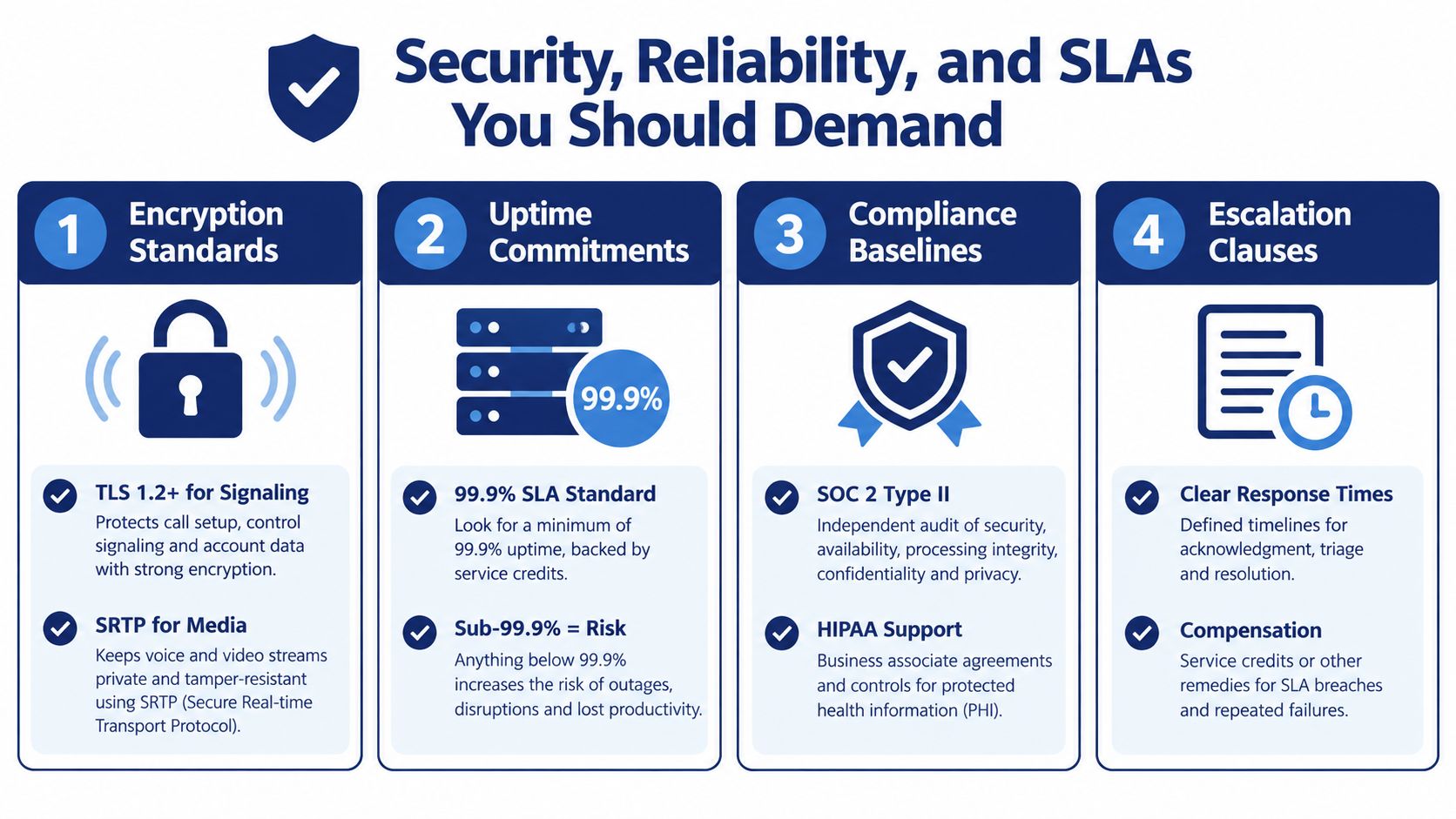
A cloud phone system moves important business data outside the office. That includes call recordings, voicemail, customer numbers, user identities, transcripts, and routing information. Security can't be reduced to a vendor saying that the platform is “enterprise grade.”
Demand answers in writing. For signaling, ask how the provider protects the connection between endpoints and the service. For media, ask whether voice traffic is encrypted. TLS for signaling and SRTP for media are reasonable requirements to put on the technical checklist, alongside clear retention, deletion, access-control, and audit policies.
Geographic resilience matters as well. Published guidance on cloud phone reliability emphasizes automatic failover, disaster recovery, and geographically distributed data centers, with uptime commitments commonly ranging from 99.9% to 99.999% (cloud phone system reliability guidance).
Measure the network, not just the vendor
Cloud infrastructure can't fix poor local connectivity. One industry guide identifies three practical voice-quality constraints:
- Latency: Keep one-way latency at or below 150 ms for natural conversation.
- Jitter: Keep jitter below 30 ms.
- Packet loss: Keep packet loss below 1% to avoid audible degradation.
These thresholds and the symptoms of missing syllables, robotic audio, and choppy speech are described in VoIP call-quality guidance on latency, jitter, packet loss, and QoS.
Use wired connections for fixed phones where possible, separate voice traffic with QoS, reduce Wi-Fi contention, and monitor the WAN path continuously. SD-WAN can help multi-site organizations prioritize voice and select healthier paths, but it still needs correct design and monitoring.
Read the SLA line by line
A meaningful SLA should define the measurement method, exclusions, incident communication process, detection time, restoration target, and service credits. It should explain whether outages caused by the customer's network are excluded, and whether a provider-wide incident is measured by region or by account.
Reject language that says the provider will make “commercially reasonable efforts” without a measurable commitment. Reject credits that require a complex claim but offer no practical remedy. Reject an uptime promise that excludes the exact components your team depends on, such as registration, calling, recordings, or administration.
Review the vendor's uptime guarantee terms before procurement approves the contract. An SLA isn't a substitute for resilience, but a vague SLA is a warning that the provider hasn't defined responsibility clearly.
A Realistic Migration Path From Legacy to Cloud
A successful migration starts with inventory, not installation. The first working session should document every business number, direct dial, toll-free line, fax service, alarm connection, elevator phone, door-entry device, paging system, and analog adapter. If a number isn't on the list, nobody should assume it is unimportant.
The network assessment follows. Test the office connection under normal working conditions, inspect the firewall and SIP handling, review VLAN and QoS policies, and check whether wireless coverage is suitable for softphones. The provider should identify what it will configure and what remains the customer's responsibility.
Run the new system beside the old one
Choose a small pilot group that includes a receptionist, a manager, a remote worker, and someone who handles a busy queue. Let the group use the cloud platform while the legacy PBX remains available. This exposes problems with permissions, greetings, transfers, mobile behavior, recording policies, and CRM logging before the main number moves.
Porting is the point where administrative accuracy matters most. Match the losing carrier's account name, service address, authorized contact, and number list exactly. A rejected port request can delay the cutover, while a firewall or routing mistake can prevent registration after the port completes.
Practical rule: Don't schedule the main-number cutover until the pilot team has completed real inbound, outbound, transfer, voicemail, mobile, emergency-calling, and failover tests.
Port numbers in controlled batches, starting with a department that can tolerate a short troubleshooting window. Keep the old service available during the transition and publish an internal escalation plan so employees know where to report call problems.
Close the old system deliberately
After the final port, validate every published number, queue, voicemail box, fax workflow, and emergency location. Recover rented equipment, export any records the company must retain, cancel legacy contracts only after the final invoice is checked, and keep a short rollback plan for unresolved issues.
The migration becomes much easier when the team treats porting and network configuration as separate risks. Porting depends on documentation and carrier coordination. Call quality and registration depend on the customer's network and the provider's configuration. Test both independently.
Your 30-60-90 Day Decision and Implementation Plan
Start with a simple scorecard. Give each vendor a written assessment for cost per user, feature fit, SLA strength, and migration risk. Don't let a polished demo compensate for weak porting support or an unclear renewal price.
The first month should produce four deliverables:
- A number inventory: Every business number, route, device, and dependency is documented.
- A requirements brief: Users, departments, queues, recording rules, integrations, emergency-calling needs, and mobile requirements are listed.
- Comparable quotes: At least three providers respond to the same requirements and usage assumptions.
- An accountable team: The IT lead owns technical validation, finance checks the commercial model, and an executive sponsor resolves policy and budget decisions.
During the second month, run a proof of concept for one site or department. Test the actual network, not a vendor's demonstration environment. Confirm that users can answer calls, transfer them, retrieve voicemail, use the mobile app, access recordings, and complete the workflows connected to the CRM.
During the third month, complete the cutover in controlled stages. Monitor registration, call quality, queue behavior, number routing, support response, and user adoption. Decommission the legacy PBX only after validation and contract review are complete.
Pause the project if the provider won't disclose renewal pricing, the SLA excludes core calling functions, the number inventory is incomplete, emergency-calling responsibilities are unclear, or the pilot fails on the production network.
| Decision Criterion | Vendor A | Vendor B | Vendor C |
|---|---|---|---|
| Total recurring cost | |||
| Renewal and usage terms | |||
| Required features included | |||
| CRM and device compatibility | |||
| SLA and failover design | |||
| Porting and migration support | |||
| Internal administration effort | |||
| Main unresolved risk |
SnapDial offers hosted VoIP and cloud PBX capabilities including auto attendant and IVR, call recording, voicemail transcription, mobile applications, call routing, cloud faxing, and queue management, with setup and support handled as part of the service. If you're replacing a legacy PBX and want a provider-led migration conversation, visit SnapDial with your number inventory and current call-flow requirements ready.