

The old PBX usually fails at the worst possible time. A business disconnects it on Friday, expecting a clean Monday transition, then spends the first morning explaining dead lines, missing transfers, and voicemail messages that never arrive. The hardware may be gone, but the work was never just about replacing hardware.
A reliable VoIP phone system setup is a sequenced project covering inventory, network readiness, user provisioning, number porting, call routing, emergency locations, testing, training, and rollback. That matters even more when employees work from several offices, home networks, and mobile apps. A managed cloud platform such as SnapDial can handle much of the configuration, but the business still needs accurate site information, a usable dial plan, and a proper acceptance test.
The same engineering discipline applies beyond basic business calling. Teams evaluating complex voice environments may also benefit from Yellow.ai's perspective on enterprise voice engineering, particularly when voice systems must connect with broader customer-service workflows. For the practical migration path, start with a documented business phone system installation process rather than treating cutover as a weekend plug-in exercise.
Why Legacy PBX Migrations Deserve a Real Setup Plan
Legacy PBX migrations go wrong when everyone focuses on the visible equipment. Someone orders desk phones, someone else signs the service agreement, and an administrator assumes the old numbers will appear in the new system. Meanwhile, nobody has confirmed which extensions are still active, which hunt groups customers rely on, or where a remote employee's emergency address is registered.
The safer approach is to treat the migration as a controlled operational change. Begin by recording the current system, then prepare each network, stage devices, port numbers, configure the caller experience, validate emergency calling, and test every meaningful call path before production use. A Friday cutover can work, but only when Friday is the final step in a project that started with discovery.
What actually breaks during cutover
The failures are usually ordinary and preventable. A phone may receive power but fail to register because it landed on the wrong voice VLAN. A receptionist may answer the main number while transfers point to obsolete extensions. A port can appear complete while an overlooked direct number still routes through the old carrier. A softphone can work perfectly at headquarters yet present the wrong emergency location from a home office.
Practical rule: If a call path matters to customers, staff, or emergency responders, document it and test it independently.
A white-glove implementation changes the division of labor, not the technical requirements. The provider can stage Yealink phones, configure users, coordinate number porting, build auto attendants, and help troubleshoot the network. Your team still needs to identify who uses each number, confirm each site's physical address, approve the routing logic, and decide what happens when internet or power fails.
By the end of the setup, you should have more than functioning handsets. You should have a site-by-site inventory, a tested network design, a porting plan, a documented dial plan, validated emergency locations, trained users, and a rollback procedure. That is what separates a replacement phone service from a dependable communications system.
Planning Your VoIP Phone System Setup
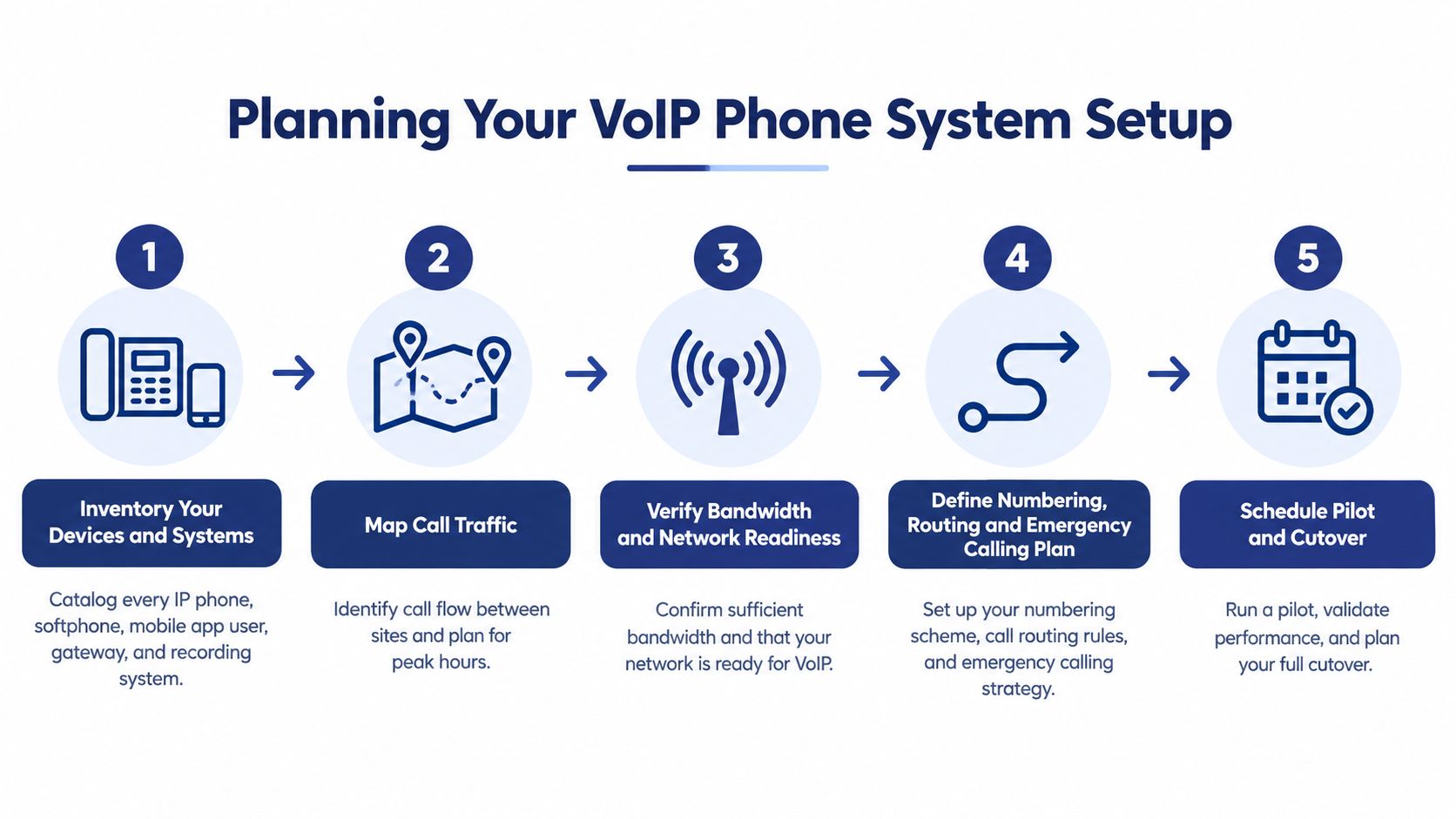
The planning phase determines whether the installation feels routine or turns into an emergency. Start with an inventory that names every endpoint and service involved in calling. Include desk phones, softphones, mobile applications, analog adapters, SIP servers or hosted trunks, session border controllers, gateways, call recording systems, fax devices, conference equipment, and shared-area phones.
Then map traffic between locations. Record which offices call each other directly, which departments share queues, where recordings are stored, and which numbers need to reach multiple destinations. A simple diagram showing signaling, media, management, and internet paths often reveals dependencies that a spreadsheet misses.
Build the site readiness record
Create one record for every office and remote-work pattern. Capture:
- Connectivity: Document the primary internet connection, backup path, provider contact, and expected resilience.
- Voice quality conditions: Measure latency, packet loss, and variation in packet delivery during normal and busy periods.
- Network ownership: Identify who controls the firewall, switches, wireless network, and remote-access policy.
- Endpoint mix: Separate desk phones, computers, smartphones, shared phones, and temporary users.
- Operational dependencies: Note elevators, door-entry phones, alarms, fax lines, payment terminals, and other services that may still depend on telephony.
Global telecommunications data illustrates why this cannot be a headquarters-only exercise. The International Telecommunication Union's telecommunications data reported 17 fixed-broadband subscriptions per 100 inhabitants worldwide in 2021, compared with 11 fixed-telephony subscriptions per 100 inhabitants. Fixed telephony had reached 19 subscriptions per 100 inhabitants in 2006, while fixed-broadband subscriptions had exceeded fixed-telephony subscriptions globally since 2017. Conditions remain uneven, with least-developed countries averaging 1.4 fixed-broadband subscriptions per 100 inhabitants in 2021.
Those figures don't guarantee that a branch has a suitable connection. They support a practical conclusion: broadband is increasingly central to voice, but a multi-location rollout must validate each site rather than assume that every office has equivalent readiness.
Decide the numbering and pilot strategy
Build a porting list containing every number, its current use, its destination, and its owner. Define extension ranges by site only if that makes transfers and administration clearer. Otherwise, use a consistent numbering convention that staff can remember and the auto attendant can explain.
Keep the first rollout deliberately small. A pilot should include a receptionist, a manager, a queue agent, a remote user, a shared phone, and any unusual endpoint type. Test it during ordinary work and under heavy data use. If the pilot exposes a firewall, provisioning, or routing issue, fixing it before the full migration is far less disruptive than discovering it across every office.
Preparing Your Network and Provisioning IP Phones
Voice traffic deserves its own treatment on the network. Put desk phones and other voice endpoints on a dedicated voice VLAN, use a separate DHCP scope where practical, and prevent general data devices from initiating unnecessary voice protocols toward the PSTN-facing gateway. This segmentation makes troubleshooting easier and reduces the chance that an exposed service or misconfigured workstation can reach a sensitive voice component.
NIST recommends logically separating voice and data networks and restricting direct initiation of H.323, SIP, or related VoIP protocols from the data network toward the PSTN-facing voice gateway. The NIST guidance on securing VoIP systems is useful because it treats voice as an application with signaling, media, management, and security paths, rather than just another device on the switch.
Prepare the network before the handsets
Configure the voice VLAN and DHCP options first. Use LLDP-MED or an equivalent provisioning method so supported phones can identify the voice network and retrieve their configuration. Apply QoS markings such as DSCP consistently, then ensure switches, routers, and firewalls preserve those markings instead of stripping them.
Firewall rules should permit only the signaling, media, provisioning, and management flows the service requires. Avoid unrestricted SIP exposure. Review NAT behavior deliberately, because undocumented translation rules often cause registration failures or one-way audio. If the provider has specific port requirements, record them in the change plan and test them from each site. A focused SIP and IP port reference can help administrators assemble that rule set without guessing.
Stage phones instead of improvising at desks
Provision phones before installation whenever possible. Record each handset's intended user, extension, location, model, firmware status, and assigned profile. Yealink devices can range from straightforward entry models to executive touch and video devices, so test the actual models you plan to deploy rather than assuming that one handset represents the entire fleet.
A staged phone should boot, obtain its network settings, retrieve its configuration, register, make an internal call, make an external call, receive a transfer, and survive a reboot. Confirm that time, line keys, voicemail access, caller ID, and emergency-location association appear correctly. Do the same for softphones and mobile applications, but test them on the networks where employees will use them.
The classic mistakes are predictable:
- Flat networks: Data and voice share one unrestricted segment, making policy and troubleshooting harder.
- Open SIP exposure: Internet-facing services accept more traffic than the deployment needs.
- Unrecorded NAT behavior: A firewall change fixes registration but breaks media, or the reverse.
- Single-handset testing: One successful desk phone creates false confidence while other endpoint classes remain untested.
SIP Trunking and Porting Your Existing Numbers
SIP trunking replaces the physical connection between a legacy PBX and the public telephone network with an IP-based service. In a traditional environment, that connection may involve PRI lines, analog circuits, channel banks, or a local gateway. With hosted SIP trunking, the provider manages more of the carrier layer, while your team focuses on users, routing, network access, and business continuity.
That shift simplifies the architecture, but it doesn't make number porting automatic. The number is part of your customer-facing identity, so treat porting as its own project with ownership, records, approvals, and a fallback plan.
Build a clean porting file
Gather the current carrier account name, service address, billing information, authorized contact, recent bill, and letter of authorization. List every DID, main number, fax number, after-hours number, and line used by an alarm, elevator, door system, or payment device. Mark numbers that should remain with the existing carrier rather than assuming the entire account should move.
Don't cancel the old service before the port completes and the new routing has passed testing. Early cancellation can make the port harder or interrupt service before the replacement is ready. During the cutover window, keep the old system available, confirm the new inbound routes, and publish an internal escalation path for missed calls.
The operational difference is easier to see in a direct comparison:
| Aspect | Legacy PRI/Analog | Hosted SIP Trunking |
|---|---|---|
| Connection model | Physical circuits connect the premises to the telephone network | Provider-managed IP connectivity carries calling service |
| Capacity changes | Often require carrier or hardware changes | Usually handled through service configuration and subscription changes |
| Maintenance | Local PBX, gateways, circuits, and cabling remain business responsibilities | Provider manages more of the trunking layer, while the customer manages network readiness |
| Migration risk | Existing hardware may hide undocumented dependencies | Number porting, firewall rules, routing, and endpoint registration become the main controls |
A hosted SIP trunking service for business can reduce the amount of carrier equipment your team must maintain, but it still needs a carefully prepared network and an accurate number inventory.
Use test numbers without risking production service
Testing should use controlled destinations and test identities wherever possible. Teams that need temporary SMS-capable numbers for verification workflows can review bulk virtual numbers for testing, while keeping those test resources separate from customer-facing numbers and emergency calling. Never use an unverified test number as a substitute for validating the production port.
The cutover plan should state who confirms port completion, who changes the routing profile, who tests inbound and outbound calls, and who authorizes rollback. A port is not the finish line. It is the point at which the new system becomes responsible for a number customers already know.
Configuring Auto Attendant, IVR, and Call Routing
A three-location services company might start with one main number, separate local numbers, a support queue, and a small group of mobile workers. The cleanest design begins with the caller's intent, not with the provider's feature list.
The main greeting could offer service, sales, billing, and location-specific assistance. Service calls enter a queue with a callback option and wait-time announcements. Sales calls route to the appropriate office during business hours, then to an on-call group after hours. Billing goes to a small shared group, while callers who know an extension can bypass the menu.
The administrator then creates each user in the self-service portal and assigns the right devices, extensions, permissions, voicemail behavior, and recording policy. A receptionist may need desktop and mobile access, a service agent may need queue membership and callback permissions, and a manager may need reporting access without access to every recording.
Design the caller journey
Write the call flow in plain language before opening the configuration screen. For each route, define:
- Entry point: Which number, extension, or menu option starts the flow?
- Destination: Which user, queue, location, or external number receives it?
- Fallback: What happens when nobody answers, the queue is closed, or the site loses connectivity?
- After-hours behavior: Does the call reach voicemail, an on-call user, a callback workflow, or an announcement?
- Ownership: Who reviews the route when staffing or office hours change?
Avoid creating a menu that mirrors the company org chart. Customers don't care which internal team owns a task. They care about reaching someone who can resolve it. Keep the first layer understandable, then use direct extensions, caller recognition, and queue logic for repeat callers.
A salon, for example, may need a different balance between appointment requests and service questions. A business exploring specialized automation can review AI phone answering for salons, but any automated answerer should have clear boundaries, escalation rules, and a reliable handoff to staff.
Add visual voicemail with transcription, call recording, cloud faxing, and mobile-office routing only after the basic routes are clear. Each feature changes retention, privacy, training, or operational expectations, so document who can use it and what happens when the primary device is unavailable.
A short configuration walkthrough can help administrators understand the portal sequence before they build production routes.
Before testing, export or document the dial plan. Include greetings, business hours, queue members, fallback numbers, voicemail owners, recording settings, and mobile destinations. A usable portal list is not just an onboarding record. It becomes the change-control reference when an employee leaves, an office closes, or a queue needs to be redesigned.
Getting Emergency Calling Right From Day One
Emergency calling is not a checkbox at the end of a VoIP deployment. In the United States, the FCC's rules for interconnected VoIP require 911 service as a standard feature, without customer opt-out, and require providers to obtain a physical location before activation. Providers must support practical location updates and transmit the callback number and registered location to the appropriate emergency authority. The FCC's VoIP and 911 service guidance established this as an operational responsibility for interconnected services.
Mobility makes the issue harder. A softphone that lets an employee work from anywhere can still present an office address if nobody updates the registered location. A desk phone moved to another floor may remain associated with the old dispatchable location. A remote user on home broadband may appear to be at headquarters.
Build an emergency-location workflow
Collect and validate each civic address before activation. For multi-floor or multi-building offices, divide the site into dispatchable locations that responders can understand. Associate users, extensions, shared phones, softphones, and mobile endpoints with the location where they will be used.
Then configure emergency-call routing and internal notifications where supported. Test the callback identity and registered location using the provider's approved process or the relevant local authority's testing procedure. Keep a record of the result, the endpoint tested, the date, and the person who approved it.
Repeat the check after a desk move, branch opening, office relocation, remote-work policy change, or network replacement. Power and broadband outages also need documented procedures, because a correctly registered address doesn't make an internet-dependent endpoint available during every failure.
The current FCC guidance distinguishes fixed and non-fixed services. Fixed services must provide automated dispatchable location, while non-fixed services must provide it when technically feasible or otherwise use a validated registered address or approved alternative location data. That distinction reinforces the practical rule: mobility requires governance.
A phone that works from anywhere isn't automatically safe from anywhere.
Make emergency location part of onboarding and change management. Give administrators a location inventory, give users clear instructions for address changes, and make the go-live gate depend on correct callback identity and location for every tested endpoint class.
Testing, Troubleshooting, and Your Go-Live Checklist
A successful registration test proves very little. The acceptance benchmark should require 100% successful emergency, internal, external, transfer, conferencing, and failover test cases across every site and endpoint class. This is an internal release standard, not a published industry success rate. The NIST guidance supports a staged rollout and broad functional testing, but it doesn't provide a universal VoIP setup success-rate benchmark.
Test quality under peak data load, not only when the office is quiet. Run calls while users perform ordinary business tasks, then inspect one-way audio, delay, dropped calls, codec behavior, and queue performance. Include a pilot and a rollback rehearsal so the cutover team knows what to do when a dependency fails.
Use symptoms to narrow the fault
| Symptom | Likely cause | First response |
|---|---|---|
| Phone won't register | Wrong VLAN, DHCP option, credentials, firewall rule, or provisioning profile | Confirm network assignment, obtain logs, and compare the endpoint with a known-good device |
| One-way audio | NAT behavior, blocked media flow, or an incomplete firewall rule | Check media paths in both directions and review translation behavior |
| Calls drop under load | QoS is missing, markings are stripped, or the connection is saturated | Recheck DSCP handling and test during realistic data activity |
| Inbound calls misroute | Porting, number assignment, business hours, or auto-attendant logic is wrong | Trace the number from carrier delivery through the final destination |
| Transfers fail | Extension plan, permissions, or route patterns are incomplete | Test blind and attended transfers between sites and endpoint types |
Set the release gate
Before authorizing production, verify the following:
- Emergency calls: Each site and endpoint class returns the correct callback identity and registered location through the approved test process.
- Internal dialing: Users can reach extensions across locations, including shared phones and mobile applications.
- External calling: Inbound and outbound calls work for every ported number and approved caller identity.
- Call handling: Transfers, holds, queues, announcements, voicemail, recordings, and conference bridges behave as designed.
- Failure recovery: The team knows what happens during internet, power, endpoint, and provider failures.
- User readiness: Receptionists, queue agents, managers, and administrators can perform their daily tasks without relying on undocumented shortcuts.
- Rollback: The old service, carrier contacts, routing changes, and decision owner are documented until the new system has cleared the acceptance gate.
Provider support belongs in the escalation plan, not as a substitute for internal ownership. The provider should receive precise evidence, including the site, endpoint, time, direction of the call, destination, symptom, and recent network changes. Keep the final configuration, number list, emergency-location inventory, firewall change record, and dial plan in a location future administrators can access.
A VoIP migration stays safe after launch when every change follows the same discipline as the original setup. Add a user, move a phone, open a branch, or change a queue, then update the documentation and retest the affected paths.
SnapDial provides managed cloud PBX setup covering network assessment, phone staging, number porting, auto attendant, call routing, voicemail, mobile apps, and ongoing support. Visit SnapDial to discuss a migration plan that keeps emergency-location work, site validation, and cutover testing in the same project.