

At 8:45, an account manager answers a customer on her desk phone. A few minutes later, she leaves for coffee and moves the live call to her laptop. At the client site, she continues the conversation through the mobile app, with the business number, caller context, and recording still attached.
That experience only feels effortless when the underlying phone system handles the transitions correctly. If the call drops, the caller sees a personal number, the transfer loses its history, or the mobile app struggles on weak Wi-Fi, the feature list stops mattering. The most useful way to evaluate cloud PBX features is to pair each capability with the operational problem it removes, then test what happens when people change devices, locations, and networks.
A Phone Call That Travels Across Three Devices
The account manager's morning is ordinary for a hybrid business. She starts at her desk, where a physical handset gives her a familiar interface. When she steps away, the desktop softphone becomes her extension. Later, the mobile application keeps the conversation connected while she travels between the office and a customer site.
The customer shouldn't need to know which device she's using. The caller should continue seeing the company's number, and the employee should retain the tools that make the call useful, including transfer controls, call history, recording policies, and access to colleagues. That continuity is the true test of a cloud PBX, not whether an administrator can find a mobile app in the product menu.

A softphone for VoIP can turn a laptop into a business extension, but the application alone doesn't create a mobile office. The platform also needs consistent identity, device presence, permissions, call-state synchronization, and routing rules that remain valid when an employee moves away from the office.
The old failure points
Legacy systems often tied call control to a premises cabinet or to a particular desk. An employee could forward a call, but the handoff might change the caller ID, lose the call record, or require a workaround that only an administrator understood. A second office might use a different greeting and separate extensions, forcing staff to learn local rules instead of following one company-wide workflow.
Cloud PBX developed to solve that fragmentation. The call-control layer is hosted as software, while employees can still use desk phones, computers, or mobile devices. That separation gives a distributed team a common operating model without requiring every location to maintain its own PBX installation.
Practical rule: Test a live call across every device your employees actually use. A feature that works only in the office isn't a mobility feature.
The sections that follow treat each capability as a response to a specific breakdown. Auto attendants address missed first impressions. Queues address uncontrolled waiting. Mobile apps address fixed-location extensions. Quality telemetry addresses calls that technically connect but sound unusable. Resilience controls address the assumption that moving the PBX to the cloud removes every failure.
What Cloud PBX Actually Replaces
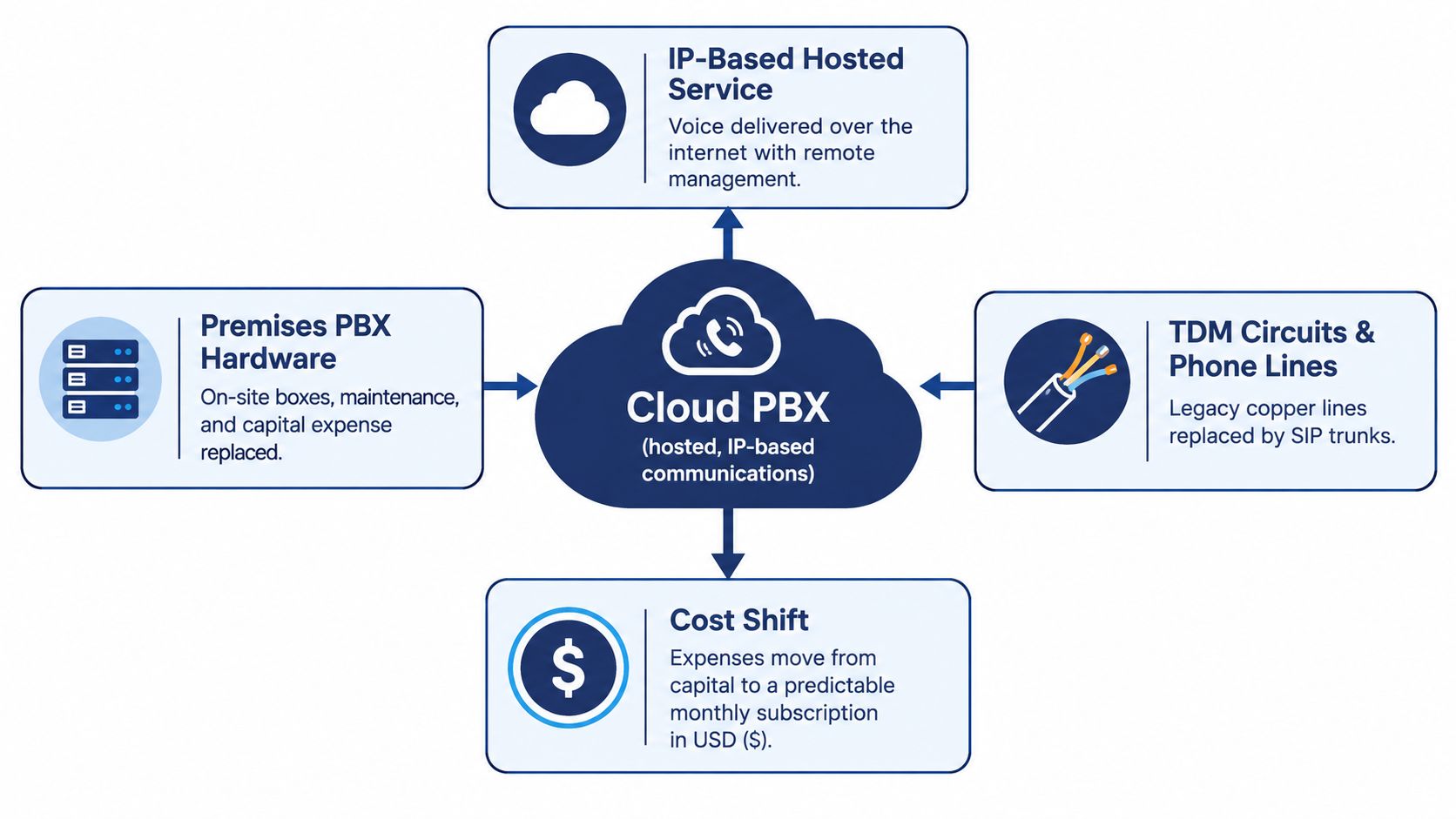
A traditional PBX is a physical call-control system installed at the business. Earlier telephony networks commonly relied on dedicated, circuit-switched paths, while modern hosted systems send voice as IP traffic through software-managed services. The FCC's documentation of enterprise migration to IP-based communications places cloud PBX within that broader transition from legacy PBX and Centrex systems to hybrid PBXs and enterprise VoIP.
The simplest analogy is the move from postal mail to email. A postal letter follows a dedicated physical route and needs handling at each stage. Email travels as data through a shared network and can be managed through software. Cloud PBX applies the same architectural change to business calling, though voice still depends on suitable endpoints, networks, carriers, and emergency-calling controls.
The practical boundary
Cloud PBX doesn't mean that every phone disappears. A company can keep desk handsets at fixed workstations, add desktop applications for laptops, and provide mobile applications for employees who work away from the office. The important change is that core call control moves into a hosted software environment.
That shift gives an administrator one place to configure extensions, greetings, routing, voicemail, conferencing, and user access. Adding a user no longer has to mean installing a new PBX card or visiting a wiring closet. A second location can follow the same rules as the first, provided its internet connection and endpoints are properly designed.
The platform still has dependencies. Internet access, local power, Wi-Fi, endpoint registration, carrier connectivity, and emergency-service configuration all affect the result. Cloud hosting relocates parts of the infrastructure, so buyers should assess the complete service path rather than assuming that off-site equipment makes the local environment irrelevant.
The FCC-derived U.S. voice figures for June 2025 illustrate why modern cloud PBX features focus on mobility and software administration. The United States had 63.4 million interconnected VoIP subscriptions, compared with approximately 15 million traditional switched-access lines. Business VoIP subscriptions reached about 44.0 million, up from roughly 42.2 million a year earlier, and business fixed connections were reported at approximately 83.6% VoIP.
For a company comparing providers, the useful question isn't whether a system is hosted. It should ask which functions are centralized, which endpoints are supported, how failover works, and how much control the administrator retains. A neutral guide to finding the right cloud PBX system can help structure that comparison, while understanding what a PBX system is clarifies the terminology behind the product pages.
Call-Handling Features That Replace the Front Desk
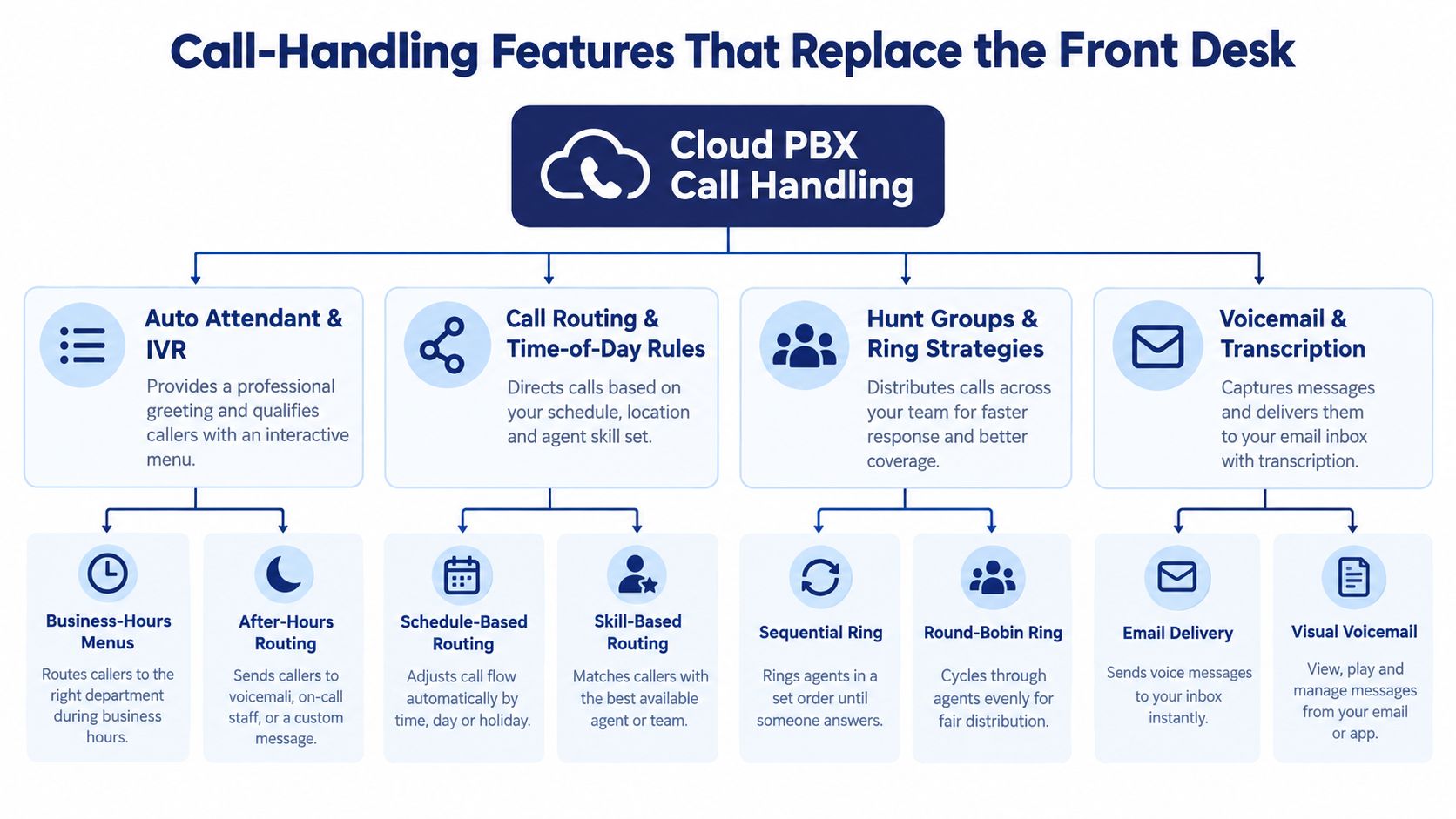
A small company doesn't necessarily need a receptionist to deliver a controlled inbound experience, but it does need rules. The useful cloud PBX features are the ones that decide where a call goes, what the caller hears, and what the team can learn afterward.
From general greeting to intentional route
An auto attendant handles the first moment of contact. It can greet callers, offer department choices, and send a request toward sales, support, billing, or a named employee. The problem it replaces is the unstructured main line where every caller waits for whoever happens to answer.
IVR menus work best when they stay short and reflect how customers describe their needs. A complex menu may technically offer more options, but it increases confusion and encourages callers to choose the wrong destination. Review the menu from the caller's point of view, especially after a department or office changes.
Time-of-day routing solves a different problem. During business hours, the main number might reach a team queue. After hours, it can send callers to an on-call group, a message, or a separate emergency path. Multi-location businesses can use schedules that reflect local operating hours, but administrators should make those schedules visible and easy to audit.
From ringing phones to managed demand
A hunt group distributes calls among a set of users. Sequential ringing may suit a small leadership team, while simultaneous ringing can reduce delay when several people are equally qualified. Round-robin strategies can distribute opportunities more evenly, but only if user availability and presence data are accurate.
Queues become important when demand exceeds immediate capacity. They hold callers in an orderly line, announce wait information, and give supervisors a view of demand rather than forcing employees to guess why phones are busy. Queue callback goes further by allowing a caller to keep their place without remaining on hold, but buyers should ask whether the callback remains active during an outage and whether it preserves the original queue context.
Call recording and reporting provide the evidence layer. A manager can review a customer interaction for training, investigate a disputed detail, or compare call activity across offices. Recording policies need clear permissions, retention rules, and notification practices, particularly where consent requirements apply.
Operational test: Ask the provider to show abandoned calls, queue wait behavior, callback handling, agent state, and reporting filters in one demonstration. A dashboard that only displays completed calls won't explain why customers leave.
Real-time statistics matter because an average can conceal an overloaded period. Detailed reports should let administrators examine call volume, wait behavior, routing outcomes, and team activity by relevant business dimensions. For terminology and implementation considerations, vendor-neutral SIP and WebRTC guidance offers useful context without reducing the decision to a vendor feature list.
A telephone auto attendant is therefore more than a recorded greeting. It is the first control point in a workflow that should continue through routing, queue treatment, agent availability, recording, and review.
Productivity Features That Extend the Office Everywhere
The personal productivity layer begins after the call reaches an employee. A desk phone may be the preferred endpoint in the office, but it can't be the only endpoint for a recruiter visiting candidates, a manager working from home, or an engineer moving between sites.
A desktop softphone gives a laptop the employee's business identity. A mobile application extends that identity to a smartphone without requiring the employee to expose a personal number. Simultaneous ringing can alert the desk phone and mobile device together, while controlled forwarding can direct calls according to presence, schedule, or availability.
The handoff deserves more scrutiny than the marketing label. A useful system should let an employee move from handset to softphone or mobile app without forcing the caller to repeat information. It should preserve outbound caller ID, maintain call history, and avoid duplicate ringing after the employee has answered elsewhere.
Messages that don't stay trapped in a mailbox
Visual voicemail replaces the habit of dialing into a shared mailbox and navigating messages in sequence. An employee can see who called, review the audio, and use transcription to scan the content before deciding whether to return the call. Searchable history becomes particularly valuable for staff who receive messages while moving between devices.
Transcription isn't infallible. Names, technical terms, accents, and poor audio can produce errors, so the original recording should remain available. The practical gain comes from faster triage, not from treating every transcript as a perfect record.
Meetings and documents
Audio and video conferencing keep internal and external conversations within the same communications environment. The best fit depends on how the team works, but the important test is whether employees can move from a phone call to a conference without creating a separate identity or losing basic context.
Cloud faxing addresses a narrower but persistent workflow. An administrator can send a signed document from a laptop instead of maintaining a dedicated fax machine. Collision avoidance matters when several employees access the same fax workspace, because two people shouldn't unknowingly edit or process the same item at once.
IP phones still have a role. A curated range can serve reception, shared work areas, executives, and video-enabled rooms without forcing every employee onto a laptop. The trade-off is operational: more endpoint types create more configuration and support requirements, so device policies should define which functions belong on a desk phone, a softphone, or a mobile app.
Hybrid work creates a further distinction between mobile-ready and workflow-ready. Cisco's 2025 global study surveyed 21,513 employers and employees across 21 markets and found that only 49% of employees believed their organization provided a consistent workflow across all work locations. The study also reported that hybrid arrangements fell from 62% in 2022 to 45% in 2025, while 72% reported organizational office mandates. These figures are from Cisco's published hybrid-work study, and they reinforce a practical point: an app icon doesn't prove that a call survives a change of device or network.
Security, Call Quality, and Resilience You Can Actually Verify
A cloud PBX can be easy to reach and still be unsafe, unstable, or difficult to troubleshoot. Administrators should verify the controls behind the interface, not accept “secure” or “reliable” as complete answers.
Protect signaling and media separately
SIP signaling carries registration, authentication, routing, and call-setup information. The voice conversation travels separately as RTP media. A sound security design uses TLS for SIP signaling and SRTP for the voice payload, so encrypting setup messages doesn't leave the conversation exposed.
The provider and administrator should also address certificate validation, key management, unauthorized registrations, credential theft, toll fraud, and replay or interception attempts. The security guidance cited in the VoIP performance and protection material identifies TLS and SRTP as the baseline pattern for protecting signaling and voice media.
A practical control set includes:
- Identity controls: Use strong authentication, role-based administration, device and session inventory, and auditable changes.
- Calling restrictions: Limit international dialing and high-risk destinations according to business need.
- Anomaly detection: Alert administrators to unusual registrations, unexpected locations, or calling behavior that differs from normal use.
- Endpoint coverage: Apply encrypted signaling and media to desk phones, softphones, mobile apps, and inter-site connections.
Measure conversational quality
A call-completion report only tells you that the parties connected. It doesn't tell you whether they could interrupt naturally, hear every word, or tolerate the delay.
ITU-T G.114 guidance identifies approximately 150 ms of one-way mouth-to-ear delay as the boundary for high-quality interactive speech. Above that point, turn-taking becomes less natural. MOS is commonly represented on a 1 to 5 scale, with 5 excellent and 1 unacceptable, while sustained packet loss approaching 1% is a useful point for investigation.
A serious quality dashboard correlates MOS with RTP and RTCP statistics, call records, endpoint, site, and network path. That lets an administrator distinguish a handset problem from a congested LAN, a WAN issue, a VPN hairpin, a carrier problem, or a cloud media-region issue. Typical remedies include prioritizing RTP traffic, reducing unnecessary VPN routing, selecting an appropriate media region, and separating voice from bulk data traffic.
Design for failure, not just uptime
The Irish Times' reporting on hybrid-work infrastructure challenges cites research in which nearly half of IT decision-makers rated their infrastructure only “somewhat” or “not too” capable of supporting hybrid work. That is a warning against treating cloud hosting as a complete resilience plan.
Test each failure mode explicitly:
- Primary broadband loss
- Local power loss
- Wi-Fi failure
- Handset failure
- Carrier interruption
- Cloud-region disruption
- Emergency-service address mismatch
Ask whether calls forward automatically to mobile numbers, whether queue callbacks survive an outage, whether agents can log in from another site, whether outbound caller ID remains consistent, and whether supervisors retain useful statistics. Resilience is demonstrated through tested recovery paths, connectivity diversity, endpoint flexibility, and documented procedures.
How the Features Fit Together Across Multiple Locations
A multi-location business doesn't need separate collections of isolated features. It needs one workflow that remains recognizable whether a caller reaches an agent in the main office, a colleague at another site, or someone working from home.
Consider a customer calling the main number. The auto attendant identifies the department, the routing rules check the schedule and agent availability, and the queue handles demand when everyone is busy. An agent answers through a home softphone, transfers the call to a colleague in another office, and keeps the business identity visible to the customer. The supervisor later retrieves the recording and call history through the central administration portal.
That sequence works only when the components share state. If the mobile app has a different presence model, if the transfer loses caller information, or if the supervisor can't see activity across locations, the individual features don't add up to a coherent system.
The workflow gap each group closes
| Feature Group | What It Replaces | Workflow Gap It Closes |
|---|---|---|
| Auto attendant and IVR | Manual first-line answering | Gives callers a consistent entry point |
| Routing and time-of-day rules | Informal forwarding instructions | Sends calls to the right team under changing schedules |
| Hunt groups and queues | Uncontrolled simultaneous ringing | Organizes demand and distributes work |
| Mobile apps and softphones | Desk-bound extensions | Keeps the business identity available across devices |
| Transfers and device handoff | Repeated call restarts | Preserves continuity when an employee changes endpoint |
| Voicemail and transcription | Phone-only message retrieval | Makes messages searchable and easier to prioritize |
| Recording and reporting | Anecdotal performance review | Provides evidence for coaching and operational decisions |
| Quality telemetry | Generic availability reporting | Connects poor audio to a specific endpoint or network path |
| Central administration | Separate site-by-site configuration | Applies users, policies, and routing consistently |
Cisco's study found that only 49% of employees believed their organization provided a smooth workflow across work locations, so the buyer's test should focus on continuity rather than mobility labels. Can an employee transfer a live call from a desk phone to a mobile app? Does caller ID remain correct? Does call history follow the user? Can an administrator see the same routing and presence state across offices?
Only 32% of employers in the study were investing in high-grade collaboration technology for flexible work models. The lesson for a smaller organization is practical: don't assume that a larger feature catalog will solve fragmented work. Test the complete journey with real users, real endpoints, and a deliberately weak home network.
A cloud PBX earns its place when the workflow survives movement. The feature count is secondary.
Choosing a Cloud PBX Without Falling for the Feature Count
Start with the call, not the brochure. Choose a customer interaction that begins on a desk phone, moves to a softphone, reaches a mobile app over weak home Wi-Fi, and ends with a transfer to another location. Ask the provider to demonstrate that journey live.
Use four buying tests:
- Mobility: Can users change devices without changing business identity, losing call history, or creating duplicate ringing?
- Security: Are SIP signaling and RTP media protected separately, and can administrators review sessions, permissions, logs, and unusual calling behavior?
- Quality: Does the dashboard expose delay, jitter, packet loss, MOS, endpoint, site, and network-path information rather than only completed calls?
- Administration: Can one portal manage users, schedules, queues, voicemail, recordings, devices, and location-specific policies?
Then run failure tests before signing. Disconnect the primary broadband connection, remove local power, disable Wi-Fi, fail a handset, and simulate a cloud or carrier interruption. Confirm what callers hear, where active queues go, whether callbacks persist, how outbound caller ID behaves, and whether emergency-service information remains accurate.
The strongest platform isn't necessarily the one with the longest list of checkboxes. It's the one whose cloud PBX features work together when a person changes location, endpoint, or network during a live conversation. For SMBs and multi-site teams, SnapDial offers hosted VoIP with auto attendant and IVR, call routing, recording, visual voicemail with transcription, mobile applications, conferencing, cloud faxing, a self-service administration portal, Yealink IP phones, and advanced queue functions including callback, wait-time announcements, real-time statistics, and reporting. Its model also includes white-glove setup and predictable pricing, which can reduce the implementation burden for teams replacing legacy equipment.
Make the final decision from observed behavior. A polished demonstration of isolated features is easy to arrange. A successful handoff, secure endpoint registration, intelligible audio on a weak connection, and documented failover provide much stronger evidence that the system will work after launch.
SnapDial provides a managed cloud PBX for calling, conferencing, mobile work, routing, voicemail, recording, queues, and centralized administration, with white-glove setup and predictable pricing. Test the complete desk-phone to softphone to mobile workflow, then visit SnapDial to discuss a rollout built around how your team works.