

90% of employees saw value in collaboration tools, yet only 32% of employers were investing in high-grade collaboration technology for flexible work, according to Cisco's 2025 Global Hybrid Work Study of 21,513 employers and employees across 21 markets. That gap reframes the buying decision: giving people another communications app isn't the same as giving them a dependable way to work.
For an operations manager replacing a legacy phone system, the job is bigger than choosing handsets. You need to keep customer calls flowing, control the full cost, and prove that employees can use the system effectively wherever they work. The best unified communications solutions earn their place through measurable performance, not a long feature list.
What a Unified Communications Solution Includes
A sales manager calls a colleague's desk phone, checks a voicemail email, opens a chat app, then searches for a conference bridge. Each tool works, but the manager still has to carry the conversation between them. A unified communications system should remove that coordination work.
A unified communications solution combines voice calling, messaging, video conferencing, presence status, voicemail, and mobile access through a shared directory and common administration. Think of it as a shared dispatch desk rather than a separate radio for every team: employees can see who's available and choose the right way to reach them.
Integration matters more than the label
UC is an integrated communications layer, not just an application containing several buttons. Grand View Research valued the global unified communications market at USD 136.1 billion in 2023, but that broad category includes products with different capabilities and integration depth, according to its unified communications market analysis.
Vendors use the label loosely. A bundle of separately managed calling, messaging, and meeting products may still leave employees searching different directories and administrators maintaining duplicate accounts.
Use a working test during demonstrations:
- Follow the conversation: Start a chat or call on one device and attempt to continue it on another without rebuilding the thread or redialing.
- Check shared status: Put someone on a call and see whether colleagues receive an accurate availability indicator.
- Change an account: Update a user's details and check whether the change reaches every relevant service.
Not every platform supports every handoff. What matters is identifying which transitions your employees need, then making those workflows contractual acceptance tests rather than assumptions.
Choosing Hosted, On-Premises or Hybrid Deployment
Choose a deployment model by assigning responsibility for the platform, equipment, and support. The right fit depends on your local IT capacity, appetite for recurring costs, and tolerance for a migration that keeps old and new systems running together.
An on-premises PBX, or private branch exchange, runs on equipment you control. Your organization pays for hardware and installation, then handles maintenance, upgrades, and replacement.
A hosted VoIP or cloud PBX runs at the provider. You generally pay a recurring subscription while the provider operates the platform. Hybrid deployment retains selected local systems while adding cloud services, which can make a phased replacement more manageable.
Cloud-based UC represented 71.2% of the market in 2025, according to Polaris Market Research. That figure provides market context, not a reason to move a workload that does not suit cloud service.
On-premises, hosted and hybrid deployment compared
| Factor | On-premises PBX | Hosted VoIP (Cloud PBX) | Hybrid |
|---|---|---|---|
| Upfront cost | High: servers, PBX hardware, handsets and installation | Low: mainly handsets and setup | Medium: retains some on-site hardware |
| Ongoing cost | Maintenance contracts, IT staff time and hardware replacement | Recurring subscription | Mix of hardware upkeep and subscription |
| Upgrades | Scheduled, often manual and on-site | Managed by the provider | Split between provider and local systems |
| Adding a new site | New hardware and installation for each site | Add users and numbers in the portal | Install local hardware only where retained PBX functions require it |
| Remote and mobile staff | May need extra gateways or VPN access | Softphone and mobile apps | Mobile users on cloud, office users on PBX |
| Outage responsibility | Your team, power and network | Provider platform and your internet link | Shared, so responsibilities need to be clear |
| Best fit | One stable site with a need for local control | Multi-location, remote or growing businesses | Legacy PBX moving to the cloud in phases |
These are planning patterns, not fixed quotations. Hosted service can still require network upgrades, replacement phones, or specialist integrations. Hybrid can preserve useful equipment, but maintaining both environments adds work until the legacy components are retired.
Choose by operating responsibility
A stable location with capable local IT and a clear need for local control can justify on-premises deployment. Before choosing it, document which responsibilities your organization will take on, including maintenance, upgrades, hardware replacement, and outage response. SpecStory's guide to on-premise deployment
For distributed teams, a hosted PBX system is often the more practical model to evaluate first. Central administration makes personnel changes less tied to a building, but local connectivity remains part of the service path.
Practical rule: Don't accept “the cloud stays up” as an outage plan. Specify where incoming calls go when the office loses internet or power.
Map the connection from handset to customer, then assign ownership for each part: device, office network, internet circuit, provider platform, and carrier connection. Include an escalation path for faults that cross those boundaries. That assignment reduces delays when staff cannot place or receive calls.
Core Features That Work Together
Choose features by the action an employee needs to complete. A receptionist transferring a caller and a field salesperson returning a voicemail need different workflows, even when they use the same platform.
The useful picture is a shared workspace, not a collection of unrelated applications.

Test actions rather than feature names
- Find an available colleague: Presence should distinguish someone who's available from someone already handling a call. Test whether manually selected statuses and calendar information behave as expected.
- Handle a message without dialing voicemail: Unified messaging and visual voicemail should make messages accessible through the appropriate app, email notification, or transcript.
- Use the office identity away from a desk: A softphone is software that makes and receives calls. Test outbound caller identification, incoming notifications, and transfers on the mobile app.
- Reach the right destination: Call routing should follow business hours, staff availability, and escalation rules. An auto attendant or interactive voice response menu should give callers understandable choices.
- Resolve a question together: Conferencing and screen sharing should be accessible without forcing everyone to rebuild the conversation in another tool.
- Recover the customer context: CRM integration should attach the correct call history to the correct customer record, including missed calls and follow-up activity.
These capabilities should behave like rooms in a building with a common front door, not separate buildings connected by a footpath. Shared identity and consistent permissions matter as much as a matching interface.
Give customer-facing teams deeper tests
For support teams, examine queue management, wait-time announcements, callback options, and reporting. A callback button isn't enough: test what happens when the customer doesn't answer, when the queue closes, and when the agent becomes unavailable.
For managers, recording, call logs, and reports should answer operational questions without requiring a support ticket. Check whether supervisors can distinguish an unanswered call from a caller who disconnected while waiting.
Use this video as a discussion prompt, then verify the relevant workflows in your own trial.
Prioritize presence and CRM workflows for sales, queues and reporting for support, and routing with central administration for multi-site operations. Don't pay for advanced features until the everyday tasks work reliably.
Benefits for Small Businesses and Multi-Location Teams
A small business owner wants customers to reach the business without handing out a personal mobile number. A branch manager wants calls answered consistently when a local receptionist is absent. UC can support both outcomes, but neither happens just because everyone receives a login.
Small businesses need fewer administrative tasks
A common business identity lets staff answer calls away from the counter or desk. Consolidating services can also remove duplicate subscriptions, while routine account changes can move into an administration portal.
The condition is usable administration. Give an office administrator a realistic task during the trial: add an employee, assign a number, change the greeting, and remove access when that employee leaves. If every adjustment requires specialist intervention, include that dependency in the operating cost.
Adoption also needs a practical check. Employees should be able to transfer a call, retrieve voicemail, and change availability without resorting to personal accounts or handwritten workarounds.
Multi-location teams need consistent customer handling
Consider a dental group with several clinics. After closing, every clinic's main number routes to a shared answering queue, while the answering team can identify which clinic the patient called.
The benefit isn't merely centralized answering. It's a consistent route into the business without losing local context. That requires:
- A maintained directory: Staff names, locations, roles, and escalation contacts must stay accurate.
- Clear coverage ownership: Someone must maintain holiday schedules, overflow destinations, and temporary closures.
- Comparable reporting: Branch managers need consistent definitions for answered calls, callbacks, and abandonment.
Moving an employee between branches should become an account change rather than a cabling project. Still, the destination needs a suitable device, connectivity, and the correct calling configuration.
Don't transfer the operating cost to employees
Reachability can conceal an accessibility problem. An employee may have weak home broadband, an older phone, hearing or visual access needs, or no quiet place to speak.
Provide appropriate equipment, accessible interfaces, captions or transcripts where needed, and a fallback channel. Offer those options without requiring employees to explain private circumstances to their manager.
A system isn't equally available just because everyone has permission to sign in.
Recording and automated summaries introduce another condition: clear governance. Decide who can access them, why they're retained, and how consent requirements will be assessed across applicable jurisdictions. Availability should not become permission for unrestricted monitoring.
Verify these benefits after launch through task completion, access checks, and recording-control tests. Call volume alone won't tell you whether employees can use the system fairly or customers receive better service.
Calculating the ROI of a UC Upgrade
Start with invoices, not projected productivity. Gather a full annual billing cycle, maintenance agreements, equipment records, and support tickets before requesting quotes. Otherwise, each provider will compare its proposal against a different version of your current costs.
Separate recurring operating savings, one-time transition costs, and potential business benefits. That prevents an attractive monthly subscription from hiding a costly migration.
ROI inputs to measure before comparing quotes
| Line item | Type | How to measure |
|---|---|---|
| Phone lines and call charges | Cost | Current monthly bill, cost per user multiplied by users |
| Handsets and hardware | Cost, one-time | Quotes for replacement phones or the refresh cycle |
| Maintenance and repairs | Cost | Annual service contracts and call-out fees |
| IT admin time | Cost | Hours per month on moves, adds and changes |
| Migration and training | Cost, one-time | Vendor quote plus staff hours for cutover and training |
| Missed or abandoned calls | Benefit | Call log counts multiplied by the value of one lost call |
| Staff time saved on routing and voicemail | Benefit | Hours saved multiplied by loaded hourly rate |
| Travel avoided through remote conferencing | Benefit | Meetings replaced multiplied by cost per trip |
| Customer response time | Benefit | Queue abandonment rate and callback completion rate |
For missed calls, don't treat every unanswered attempt as a lost sale. Separate repeat callers, spam, existing customers, and genuine new opportunities. Where you monetize recovered opportunities, use a defensible conversion assumption and contribution margin rather than the full sales value.
Use cloud PBX pricing as a proposal input, then compare the complete operating scope. Include internet resilience, recording storage where charged, accessories, integrations, taxes, and any remaining legacy contracts.
Calculate savings without double counting
Use a consistent definition:
Annual ROI = (annual quantified benefits − annual solution costs) ÷ annual solution costs
For this calculation, benefits include avoided legacy spending and defensible additional value. First-year solution costs include migration and training as well as recurring charges. Label later-year calculations separately so the removal of one-time costs doesn't look like an unexplained improvement.
Payback period = one-time migration costs ÷ monthly net savings
As a clearly hypothetical example, suppose a firm's existing monthly spending consists of 2,000 currency units for lines and calls, 800 for maintenance, and 600 for administration, totaling 3,400. A proposed service costs 1,400, with administration costing 100, so the replacement totals 1,500.
That produces hypothetical monthly savings of 1,900. If migration and training cost 9,000, the illustrative payback is about 4.7 months, before assigning value to recovered calls.
Budget discipline: Keep the investment case viable on documented savings. Treat uncertain revenue improvements as an upside scenario, not money already earned.
Per-user charges, administration effort, and unanswered customer demand deserve close attention. Also distinguish released staff capacity from cash savings: saving time doesn't reduce payroll unless you change expenditure or put that capacity to productive use.
Score Vendors on These Criteria Before You Sign
Compare a small shortlist using the same tasks, endpoints, and commercial assumptions. I'd score each criterion from weak to strong, with pricing, security, and migration carrying extra weight, because those determine much of the financial and operational exposure.
Apply a rejection gate before calculating a total. A provider that cannot meet a mandatory security or accessibility requirement shouldn't win because its interface looks better.
The matrix below provides a useful layout for organizing the comparison.
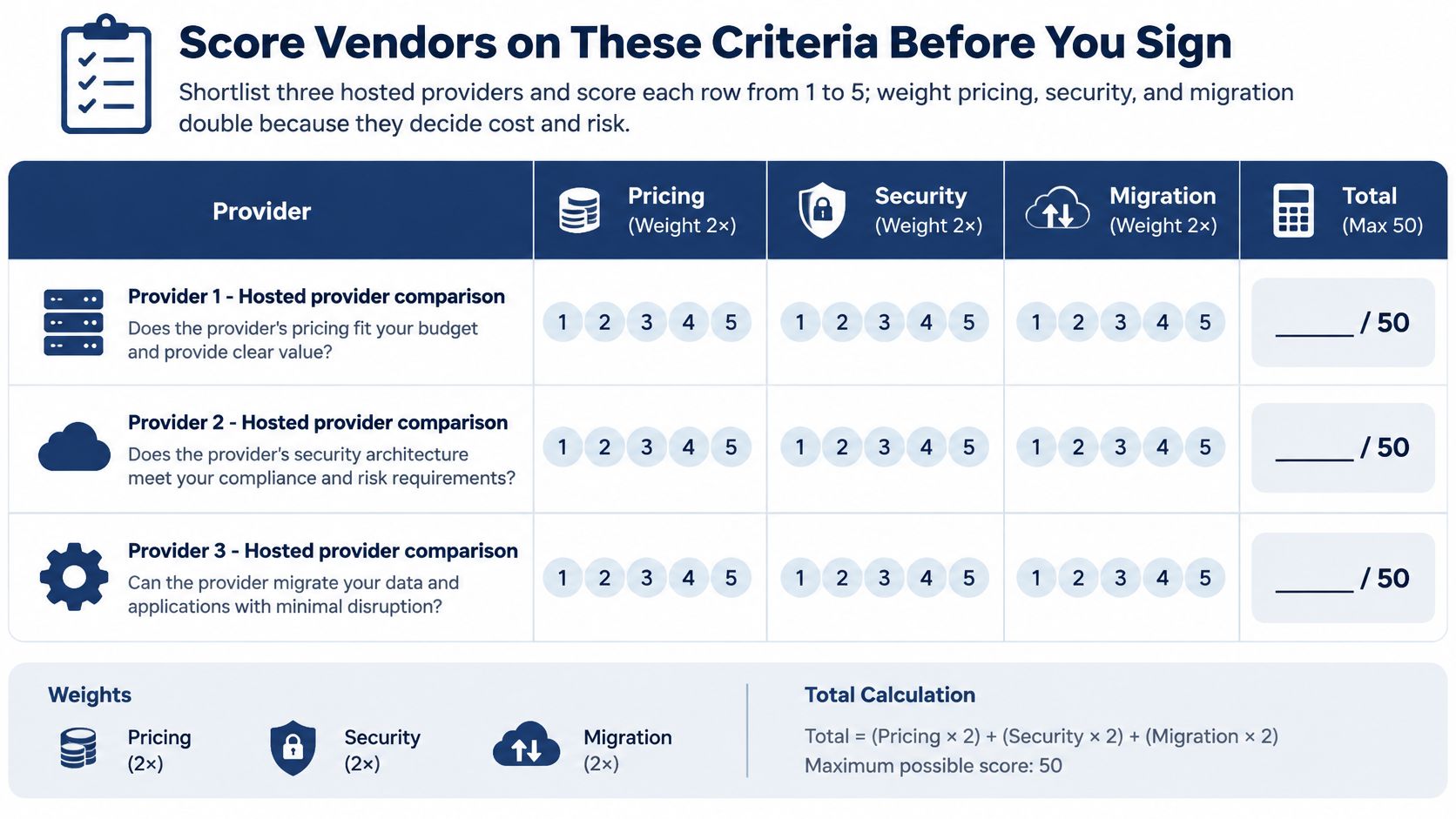
Vendor scoring criteria for a UC shortlist
| Criterion | Question to ask in writing | Red flag |
|---|---|---|
| Pricing | Which features, recording, statistics and support are included in the per-user price? | Costs added after the trial |
| Security | Which TLS and SRTP versions are supported, and how are certificates managed? | No documentation offered |
| Migration | Who ports numbers, configures devices and performs cutover? | Migration left entirely to your team |
| Integrations | Which CRM platforms integrate, and how is call history synced? | Integration only through custom work |
| Reporting | Which queue statistics, call logs and reports are in the portal? | Reports only on request |
| Accessibility and privacy | Which retention controls, transcripts and audit trails are available? | No retention or audit controls |
| Support | Is human support available around the clock, and what is the escalation path? | Email-only support with no escalation |
| Mobile apps | Can the trial run softphone calls on mobile over your real network? | Trial limited to desk phones |
Custom integration isn't automatically unsuitable, but it needs an owner, maintenance terms, and a priced scope. Likewise, a specialist support arrangement can work if its coverage matches your operating hours and escalation requirements.
Require security evidence before the demonstration
Signaling security and media security are different controls. NIST's Security Considerations for Voice Over IP Systems describes TLS protection for SIP signaling and SRTP protection for media streams, including confidentiality, authentication, and replay protection.
Ask for the supported endpoint configurations, certificate responsibilities, and key-management design. Encryption on an administration website doesn't establish that a voice call is protected. For a wider checklist covering messaging alongside telephony, use Ciphar's enterprise messaging security criteria to structure questions about the communications environment.
Don't accept a security logo in place of technical answers. Test whether old handsets require weaker settings and whether exceptions can be isolated rather than applied across the deployment.
Make commercial claims testable
At SnapDial, our all-inclusive pricing covers a unified communication solution, call statistics, and call recordings. Our Web Portal lets businesses manage voicemails, call logs, call recordings, and call routing changes from anywhere. Put those functions through the same acceptance tests you use for every shortlisted provider.
For integrations, create controlled customer records and test incoming calls, outgoing calls, duplicate matches, and missing matches. For reporting, reconcile a sample of calls against the portal rather than accepting a dashboard screenshot.
Finally, obtain written support hours, escalation contacts, service-level definitions, and exclusions. Distinguish provider platform availability from the complete user experience, since local equipment and connectivity may sit outside the provider's commitment.
Sign when the evidence supports the score, not when the demonstration ends. Keep test results and promised remedies with the contract so unresolved issues remain visible during implementation.
Migrating From a Legacy PBX Without Downtime
Downtime-free migration is a design objective, not a blanket guarantee. Number porting, network faults, and overlooked integrations can interrupt service. Reduce the risk by preparing alternate call paths and refusing to cut over an untested site.
Use the migration flow as a checklist, then turn it into a dated plan with named owners and rollback decisions.
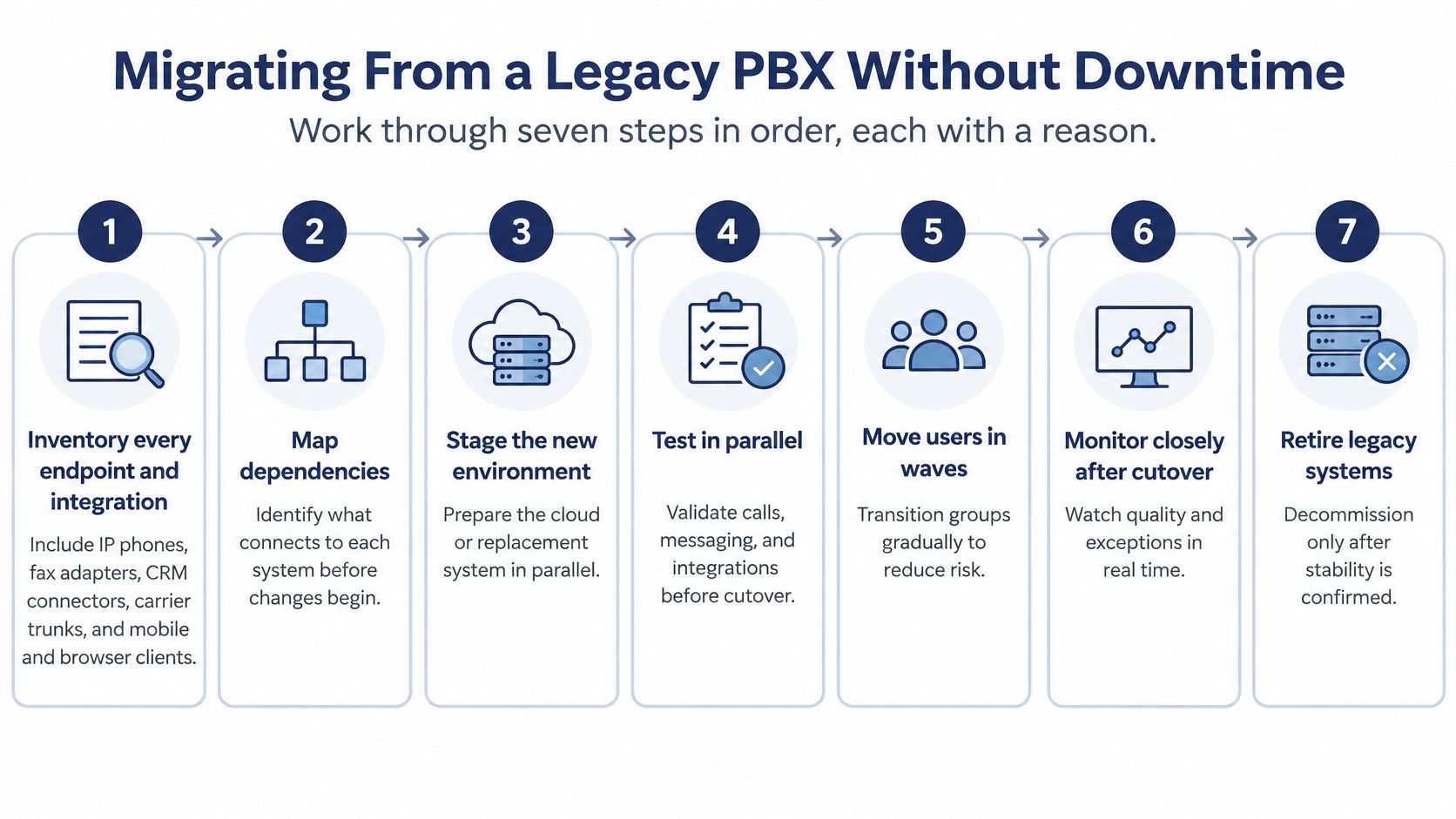
Build the cutover around dependencies
Inventory every endpoint and integration. Include IP phones, mobile and browser clients, fax adapters, CRM connectors, carrier trunks, and any entry or alarm equipment using telephone services. Record ownership, location, purpose, and replacement requirements. An extension list alone isn't an inventory.
Map protocol support and exceptions. NIST SP 800-52 Rev. 2 requires government TLS clients and servers to support TLS 1.2 with FIPS-based cipher suites and support TLS 1.3 from January 1, 2024. Those government requirements aren't a universal private-sector mandate, but they provide a useful procurement benchmark. Confirm endpoint interoperability, certificate-chain validation, supported media protection, and documented fallback rules.
Confirm carrier and emergency-calling details. Reconcile every number against the losing carrier's records, including rarely used direct numbers. Verify emergency-calling addresses and how mobile or relocated users update their location. Keep cancellation separate from porting approval so service isn't disconnected prematurely.
Pilot under real operating conditions. Choose a representative team or location and retain the existing system while testing the replacement. Exercise incoming calls, transfers, overflow, voicemail, callbacks, remote access, and integration failures. Continue until the pilot includes your relevant busy periods and exception cases.
Assign certificate lifecycle ownership. Use automated renewal where supported or maintain central expiry tracking with an accountable owner. Test renewal procedures before they become urgent, and monitor failed registrations rather than waiting for staff to report missing calls.
Move sites in controlled waves. Schedule outside peak demand and confirm the authorized go-or-no-go decision maker. Maintain legacy forwarding where the carrier arrangement permits it, and document what can be reversed after a number port. A rollback plan must describe available actions, not say “restore the old system.”
Train, monitor, then retire. Give staff role-specific practice on the softphone, transfers, and portal. Compare post-cutover service against the agreed baseline, investigate failed registrations, and keep legacy services until dependencies and billing obligations have been reconciled.
Put implementation ownership in writing
Our technicians handle setup, configuration, and replacement of a business's existing VoIP phone system from start to finish, at no cost to the customer. Internal owners still need to approve routing, provide account information, and validate business workflows.
Use the VoIP phone system setup process to organize that handover. The final cutover plan should name the task owner, scheduled date, acceptance evidence, fallback action, and person authorized to approve retirement of the old service.
Measuring Quality, Accessibility and Privacy After Launch
Consolidation doesn't prove improvement. A Riverbed global survey of 1,200 business decision-makers, IT leaders, and technical specialists across seven countries in 2025 found that respondents spent an average of 42% of their workweek using UC tools, while only 46% were very satisfied with their performance.
Measure your own environment before cutover, during the trial, and after launch. Use consistent definitions and comparable operating periods so a quiet week doesn't make a weak deployment look successful.
The dashboard should help someone investigate a failure, not merely display a reassuring average.
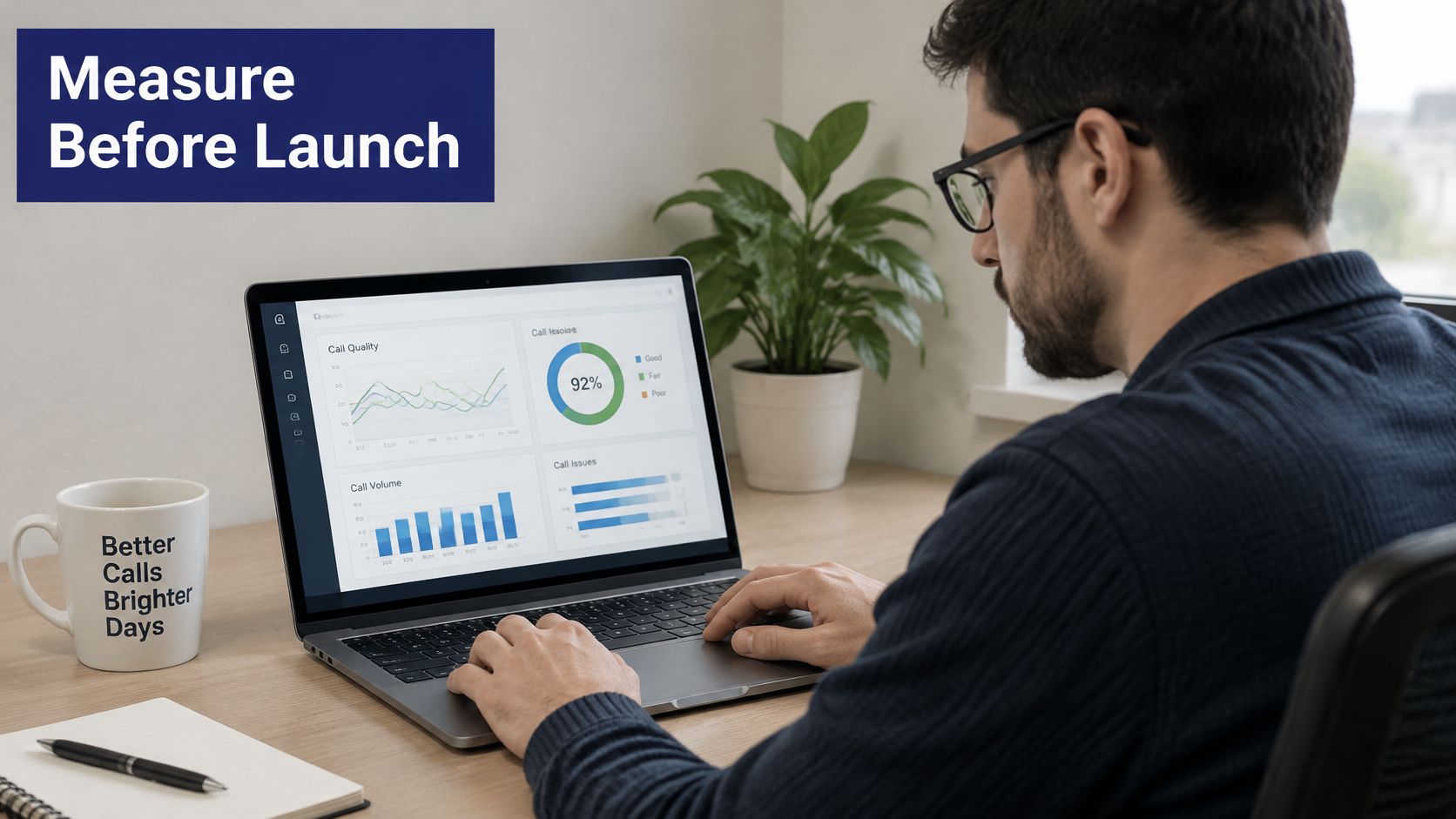
Build a scorecard with actionable measures
For every indicator, record the baseline, agreed target, actual result, owner, and corrective action. Set targets from business needs and documented service capabilities rather than inventing universal thresholds.
| Measure | What to examine | Initial investigation owner |
|---|---|---|
| Audio packet loss, jitter and latency | Media quality by call path and operating period | IT network lead with provider |
| Dropped-call rate | Unexpected disconnects against connected calls | Provider and endpoint administrator |
| Queue abandonment | Callers leaving before an agent answers | Support operations manager |
| Callback completion | Successful callbacks against eligible requests | Queue owner |
| Mobile handoff failures | Failed transitions between supported connections or devices | Mobile administrator |
| Transcription accuracy | Errors in a controlled sample, especially names and commitments | Workflow owner |
| Mean time to resolution | Time from reported fault to verified restoration | Service owner |
Segment results by location, device, and connection type. Compare wired office phones, office Wi-Fi, home connections, and mobile use separately. Otherwise, a poorly served group can disappear inside an acceptable overall result.
Assign incidents to the provider, local network, Wi-Fi, endpoint hardware, or user configuration using evidence. Record timestamps, affected call identifiers, device details, and symptoms in the support ticket. Avoid sending unnecessary customer content when technical metadata is sufficient.
Verify access and governance through actual tasks
Ask employees to complete representative calling and voicemail tasks using the supported access options. Check captions or transcripts, keyboard navigation, device provision, and fallback channels. Collect access barriers privately without requiring staff to disclose medical or household circumstances.
For recordings and AI outputs, test the controls rather than relying on a policy document:
- Consent and notice: Confirm that approved announcements operate on the intended call paths.
- Retention and permissions: Verify deletion settings and test access using ordinary staff and supervisor accounts.
- Auditability: Confirm that authorized reviewers can trace relevant administrative actions.
- Human review: Require people to check automated summaries before using them for commitments or consequential decisions.
Set a scheduled post-launch review period with recurring owner meetings. Escalate persistent target failures through the named human support path, and close an issue only after a repeat test confirms the fix. Reuse this scorecard in vendor trials so selection and acceptance depend on the same evidence.
SnapDial offers hosted cloud VoIP with all-inclusive pricing, centralized call management, and end-to-end setup handled by our technicians at no cost. Visit SnapDial with your endpoint inventory, current bills, and acceptance scorecard to discuss a replacement plan built around your calling workflows and measurable service requirements.