
Three people run the office. At 12:20, two of them are already on calls and the third is at lunch. The line rings on the empty desk, rings six times, then drops into voicemail that nobody checks until 2 p.m. The customer calls a competitor.
Nobody on that team was lazy. The phone system had no opinion about where the call should go. That's the gap an ACD fills, and it's the reason small teams end up buying one. But an ACD is not a staffing fix or a training fix, and treating it like one is how companies end up with a queue, a dashboard, and the same complaints. What follows is how the routing works, what the queue settings change, and how to prove any of it helped.
How an ACD Phone System Routes Each Call
An ACD phone system is call-handling software that puts each incoming call into a queue and assigns it to an available agent using rules you define. That's the whole idea. It's mainstream inside formal contact centres: in 2024, 93.4% of contact-centre respondents reported using ACD technology, according to Bucher + Suter's summary of Call Centre Helper research.
Now walk the lunchtime call through one. Think of a restaurant host rather than a phone line. A good host doesn't let guests wander the room looking for an open seat. They check the book, count the party, see which server is free, and seat people in the order that makes the room work. An ACD does that with calls.
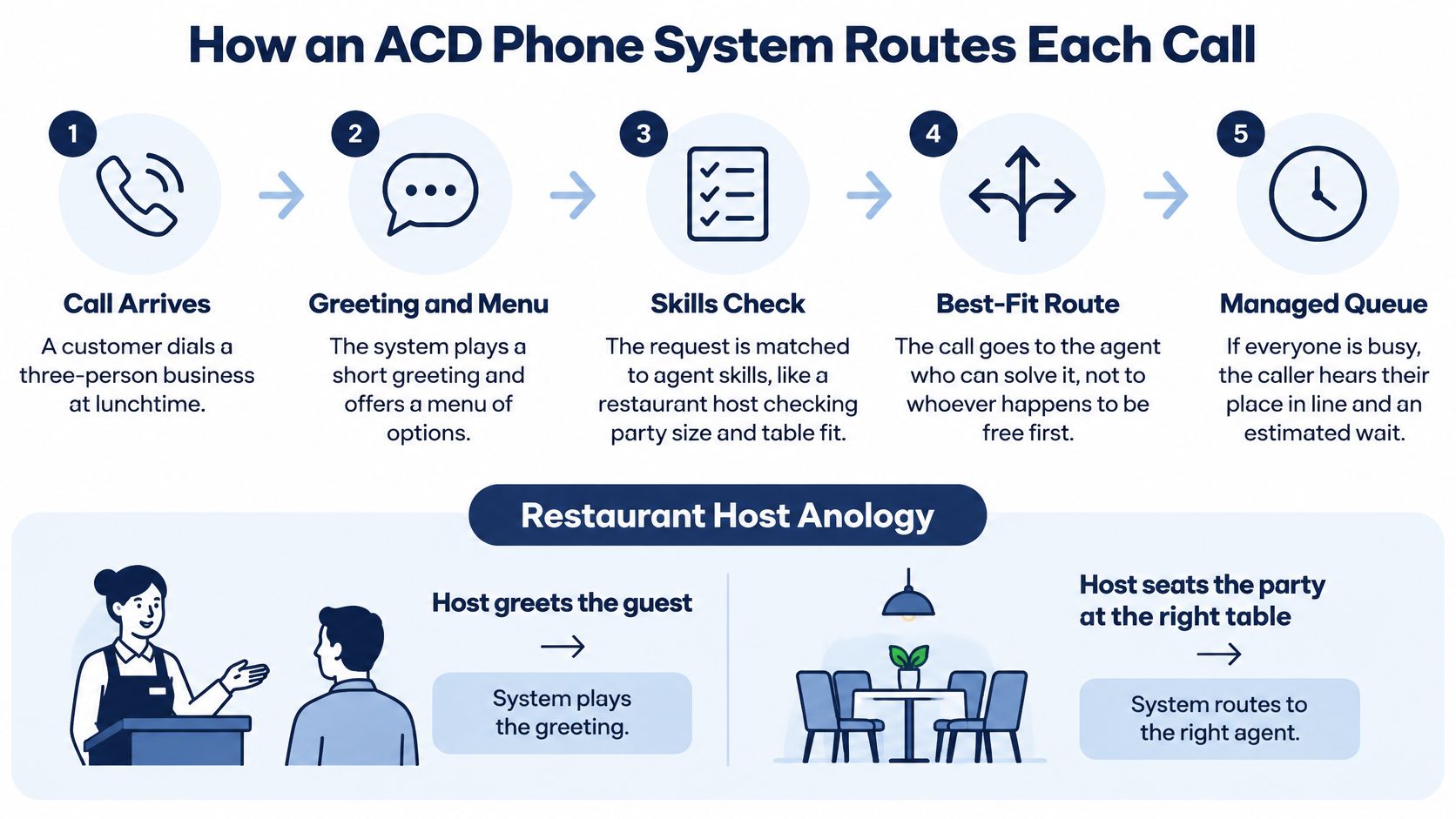
Arrival and menu. The call lands and hears a greeting with a short menu: press 1 for billing, 2 for support. That choice is the party size and the reservation note.
Queue placement. The call gets a position and a priority level. It's not just "waiting." It's waiting with a rank.
Routing decision. The system checks agent availability, tagged skills, location, and queue conditions before picking a destination.
Connection and logging. The call connects to an agent, and a record stores the wait time, the agent ID, and the outcome.
That last step is what a plain desk phone can never do. A ringing line leaves no trace of who called, how long they waited, or who finally picked up.
The concept is old. ACD grew out of computerized telephone switching in the 1950s and became significant in large information operations in the early 1970s, when New York Telephone used a modified 5XB switch to spread calls across hundreds of 4-1-1 information operators, as the history of automatic call distributors records. The breakthrough wasn't technology for its own sake. It was converting answering from a desk duty into a managed, measurable process.
Here's the test to apply to your own setup: when a call has to wait, who gets it and why? If you can't answer both parts, you have a phone number, not a routing system.
Call Routing Methods and When Each Fits
Most routing confusion comes from not knowing which method does what. These eight cover nearly every business phone system you'll evaluate.
| Method | How it picks the agent | Best for | Main trade-off |
|---|---|---|---|
| Longest idle | Sends the call to the agent who has been free longest | Teams of similar agents with even workload | Can send a complex call to someone unqualified |
| Round robin | Rotates calls evenly in a fixed order | Simple teams with identical roles | Ignores whether an agent is still on a long call |
| Skills-based | Matches the caller's need, such as language or product, to tagged agents | Support desks with specialists | Skills must be maintained, and small skill groups can leave callers waiting |
| Priority | Moves VIP or high-value callers ahead in the queue | Sales lines and escalations | Low-priority callers can wait much longer unless a cap is set |
| Location or department | Routes by the number dialed, caller region or branch | Multi-location companies | Overflow between sites must be designed deliberately |
| Time-of-day or schedule | Changes the destination by hours, shifts or holidays | Businesses with shifts or after-hours cover | Schedules drift and need updates for holidays |
| Least occupied | Picks the agent with the lowest share of talk time in the period | Mixed-length calls and blended work | Harder for agents to understand and explain |
| Ring all | Rings every available agent until one answers | Small teams with low call volume | Can annoy agents and create noise on busy queues |
Read the table as a ladder, not a menu. Start with the simplest method that covers your call types. A team of four generalists should run longest idle or round robin and stop there. Add skills-based call routing only when you have specialists, such as a billing group and a technical group with different knowledge. Add priority only for VIP or escalation calls, and cap how long low-priority callers can sit before they get an overflow option.
Consider a six-person support desk with two billing specialists and four general agents. Billing calls route by skill to the two specialists. Within each group, longest idle decides who answers next. That's two methods on one queue, which is about the ceiling for a team this size. For operations under ten agents, two routing methods per queue is a practical limit. Every extra rule needs an owner, a review, and a test call after any change.
Practical rule: if maintaining a queue's logic takes more than a few minutes a month, it's too complicated for the volume it serves.
Three symptoms tell you the method is wrong: calls get transferred two or three times before someone helps, agents sit idle while a queue visibly grows, or the same caller gets bounced between groups. All three point at configuration, not at the agents' effort.
Queue Features That Cut Caller Hold Time
The queue is where callers form their opinion of your company. A few settings change that experience more than any other part of the system.

Position and wait messages. Telling a caller where they stand and roughly how long the wait is reduces hang-ups. Silence feels like abandonment, so a short message every 30 to 45 seconds beats endless music.
Queue callback. This is the most impactful setting in most systems, and it's measurable. A contact-centre performance research report found that technologies including courtesy callback, presence-based expert escalation and blended routing were associated with reductions in average queue time ranging from 12% to 43%. The mechanism is simple: a callback turns a caller occupying a live slot into a deferred task. Build it carefully. The callback should keep the original call's skill tag and priority, verify who's being called back, and have a retry rule for the first no-answer.
Overflow. When the queue passes a threshold, send calls somewhere deliberate: another group, voicemail, or an after-hours answering option. Never let a queue grow without a ceiling.
Length and timeout limits. Set a hard cap. A clinic might allow eight calls in the queue and a five-minute wait, then switch to voicemail with a callback offer.
Hold messages and music. Keep them short, relevant, and repeated. A message pointing callers to email or chat support clears real volume.
If you change only one thing this month, change the wait messages and turn on callbacks. Both take minutes to configure, both show up in abandonment data within a week, and neither requires new staff. The deeper configuration work, including queue tiers and routing thresholds, is covered in this guide to call center queue management.
Metrics That Prove an ACD Is Working
Reporting is a management process, not a tab in the dashboard. The point of measurement is to answer one question: did service improve, and at what cost? Eight numbers cover it.
| Metric | What it shows | Common misread |
|---|---|---|
| Service level | Share of calls answered inside the time target you set | Hitting the target in quiet hours hides failures at peak |
| Average speed to answer | Mean wait before an agent picks up | Averages hide a tail of callers waiting ten minutes or more |
| Abandonment rate | Share of callers who hang up while queued | High abandonment can mean long waits or an IVR menu that's too long |
| First-contact resolution | Share of issues solved in one call | Pressure to cut handle time can lower it |
| Transfer rate | Share of calls passed to another agent or team | Often points to routing or skills errors rather than agent weakness |
| Occupancy | Share of logged-in time agents spend on calls | Very high occupancy predicts burnout and longer queues |
| Cost per interaction | Total contact cost divided by interactions handled | Cheap channels can raise repeat calls and total cost |
| Callback completion rate | Share of queued callbacks that reach the caller | Low completion usually means callback timing or retry rules are wrong |
Before changing anything, run a 30-day baseline. Record each figure as it stands, give every metric one named owner, and review them weekly. Ownership matters more than the tool: a number nobody owns gets explained away.
Read conflicting indicators together. Falling average handle time with falling first-contact resolution means agents are rushing calls they should be solving. High occupancy paired with rising abandonment usually means you're understaffed or after-call work is eating the day. Neutral industry guidance on the contact centre business case names missing visibility into interaction volume, productivity, quality, cost and staffing forecasts as core operational problems rather than technology gaps, which is the right frame.
Keep two views separate. An operational dashboard shows today in real time so a supervisor can move an agent into a queue. Workforce planning uses weekly and monthly trends to set schedules. Mixing them produces daily panic and no plan.
An ACD doesn't fix weak staffing, sloppy routing or thin training. It makes all three visible, which is a different and more useful thing.
For finance and IT stakeholders, the same metric discipline applies to service businesses generally. Vight's weekly scorecard breakdown is a useful reference for structuring a weekly review that turns numbers into decisions rather than reports. A small team should start with three metrics only: service level, abandonment rate, and first-contact resolution. More detail on defining each one sits in this guide to call center KPIs.
Staffing the Queue With Erlang Math
Dividing daily call volume by the number of agents gives an answer that is always too optimistic. Waiting time doesn't grow in a straight line as agents get busier. It curves upward sharply once everyone is close to fully occupied.
That looks like this. Sixty calls arrive in a 30-minute interval and average three minutes each. Multiply 60 by 3 to get 180 minutes of work, divide by the 30 minutes available, and you get 6 Erlangs of offered load. Six agents would be exactly fully occupied with zero spare capacity, which means callers still wait, because any call arriving while all six are busy has nowhere to go.
Erlang-C handles that math properly. It takes arrival rate, service rate and the number of agents, then estimates the probability a caller waits and the resulting service level, as this queueing tutorial sets out. It's used specifically for staffing ACDs and operator positions and produces agent counts close to detailed simulation.
The steps:
- Pull interval data. Export calls per 15- or 30-minute interval across four typical weeks, not a single quiet one.
- Measure handle time. Include after-call work and notes, not just talk time.
- Calculate offered workload. Multiply call volume by average handle time per interval.
- Run Erlang-C. Solve for the agent count that meets your service target in each interval.
- Switch models if callers abandon. Classic Erlang-C assumes nobody hangs up. If yours do, use an abandonment-adjusted model such as Erlang-A, or predicted staffing will look far better than reality.
- Reconcile monthly. Compare predicted answer times against actual ones and adjust.
The same tutorial notes that calculating per interval rather than per day is what makes the result usable. If you have no Erlang tool yet, the honest starting point is one week of exported call logs. Read the arrival pattern by half hour before you commit to any staffing level.
Benefits and Trade-offs of Moving to ACD
When calls arrive faster than staff can answer, an ACD gives each call a defined destination. Fewer calls are left without an owner, and work can be distributed instead of falling to whoever answers fastest. Shared greetings and routing rules also make the caller's experience more consistent across locations. Call records give managers a basis for decisions rather than guesswork.
Those records can reveal uncomfortable truths. An ACD may show idle periods alongside staffing gaps, exposing that the problem is scheduling, routing or training rather than a lack of effort. The system measures and directs work; it does not correct those problems on its own.
There are trade-offs in how the system is run. Traditional systems tied agents to a central office and duplicated software across sites, creating management overhead and potential downtime at each installation. Cloud or hybrid routing reduces reliance on locally maintained hardware, but puts more weight on connectivity, account access and configuration. Small organisations moving to cloud routing may face security concerns, limited internal IT capacity, thin training and unclear compliance responsibilities.
Resilience checklist: arrange two different internet paths, set a failover number that rings elsewhere, prepare a device fallback for power or connectivity loss, and document a recovery test each quarter, including its result.
Check remote-agent audio before launch, not during a busy shift. Decide who can access recordings and transcripts, who keeps them, and how long they remain available. Recording and transcription require clear privacy and deletion practices, so treat them as part of the operating process.
Consider a remote team that loses internet access during the morning. Without failover, calls may go to voicemail; with a failover number, they can ring a mobile pool and continue through the queue. The backup route helps, but it cannot provide coverage if the receiving staff are unavailable.
The verdict: an ACD is useful when connectivity, staffing and operating practices support it. Otherwise, it can make existing routing and capacity problems easier to see without fixing them.
Typical ACD Use Cases by Business Type
Routing patterns repeat across industries. Six setups and the one number that proves each is working:
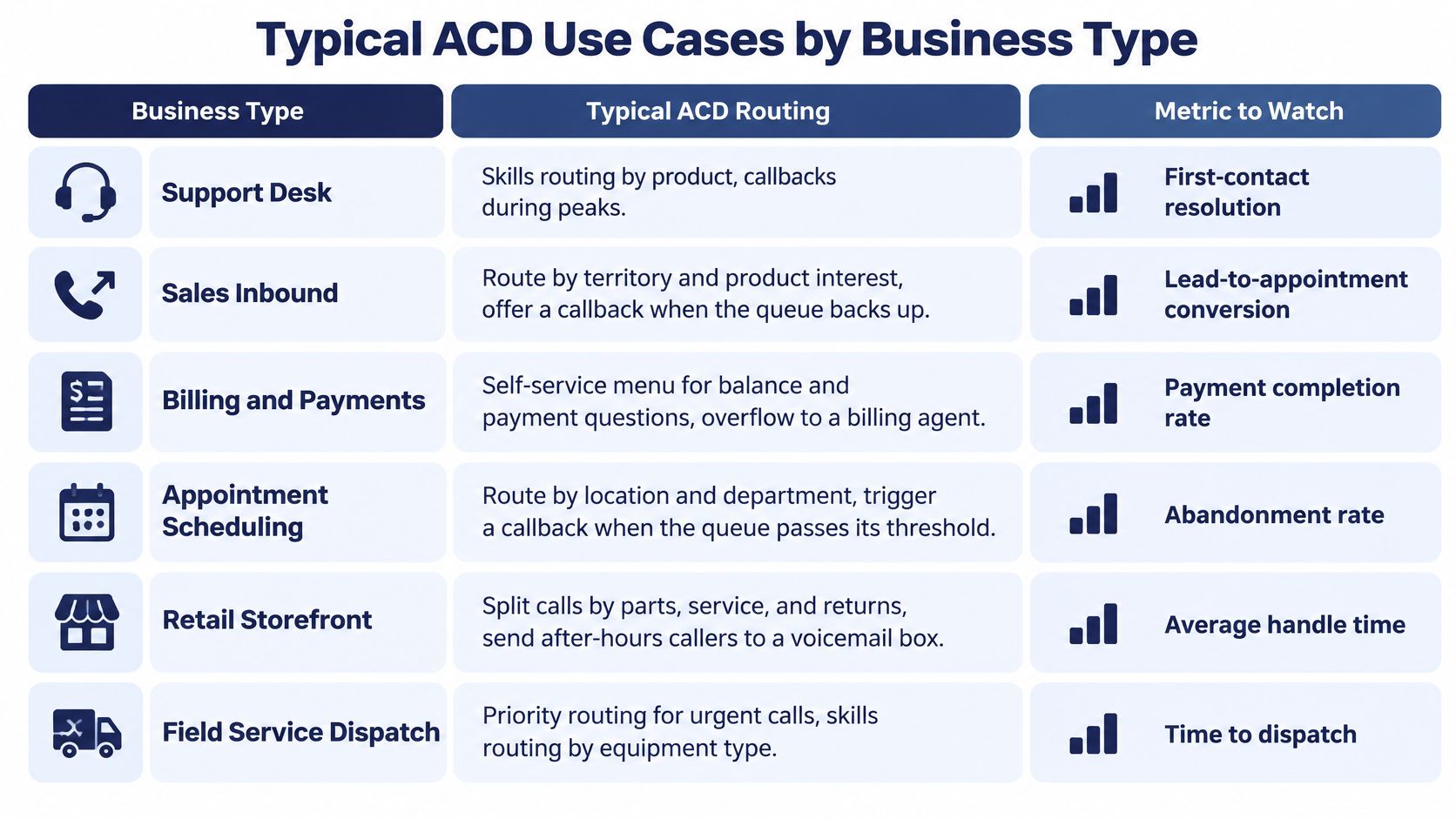
Support desk. Skills routing by product line, with callbacks offered during peaks. Watch first-contact resolution, not handle time. A support line that solves more calls while spending longer on each one is winning.
Sales inbound. Route by territory and product interest among reps and offer a callback when the queue backs up. Watch lead-to-appointment conversion, since speed to a human is what a buyer notices.
Billing and payments. Put balance and payment questions in a self-service menu and overflow to a billing specialist. Watch payment completion rate, which tells you whether self-service is helping or pushing people into repeat calls.
Appointment scheduling. Clinics, salons and service offices route by location and department, then trigger a callback once the queue passes a threshold. Watch abandonment rate, especially Monday mornings and the day after a holiday.
Retail storefront. Split calls by parts, service and returns, and send after-hours callers to a voicemail box that gets checked. Watch average handle time, because unclear menus make calls longer.
Field service dispatch. Priority routing for urgent calls and skills routing by equipment type. Watch time to dispatch, which is usually what the customer really cares about.
Match the route to your call types, then pick one metric you'll review every week. One is enough to start.
Questions to Ask Before You Choose an ACD
Vendor comparisons show features. These eight questions show whether the system will survive contact with your business.
- What happens during an internet or power outage? Is there a failover number, local survivability or device fallback, and how long does the switch take?
- Can you test remote-agent audio before go-live, and who measures call quality afterward?
- Who holds the recordings and transcripts, for how long, and how is deletion demonstrated when you ask?
- How are administrator privileges granted and removed when someone leaves the company?
- How are emergency calls routed when staff work from multiple locations?
- Who configures queues, schedules and changes, and what does support cost after launch?
- Can reports export queue time, abandonment, callback completion and transfer rate separately, so a 30-day baseline runs without a data analyst?
- How many routing methods can one queue carry before the logic becomes hard to maintain?
Put all eight to every provider in writing and compare the answers side by side. SnapDial is one option to test against that list: it offers a cloud-based business phone system with Auto Attendant, call queue features and call reporting. The questions matter more than the shortlist.
When you're ready to see how this works in practice, SnapDial offers a hosted cloud phone system with call queues, queue callback, wait-time announcements and real-time queue statistics, so a small team can run the same routing model the big centres use. Setup and configuration are handled end to end by our technicians at no cost, and you can test every answer to the questions above before you commit. Visit SnapDial to compare the platform against your own call data and see what your busiest half hour looks like.