
Your main business number rings, but the person who usually answers is away. A customer waits through a long greeting, chooses support, and ends up in an unattended voicemail box. Meanwhile, someone on your team could have helped from their mobile phone.
Phone number routing is the set of network lookups and business rules that determines where a call goes. Getting it right means more than making a phone ring. You also need customers to reach you during a provider change, backups that work during an outage, and outbound caller ID that recipients can trust.
How a Dialed Number Becomes a Destination
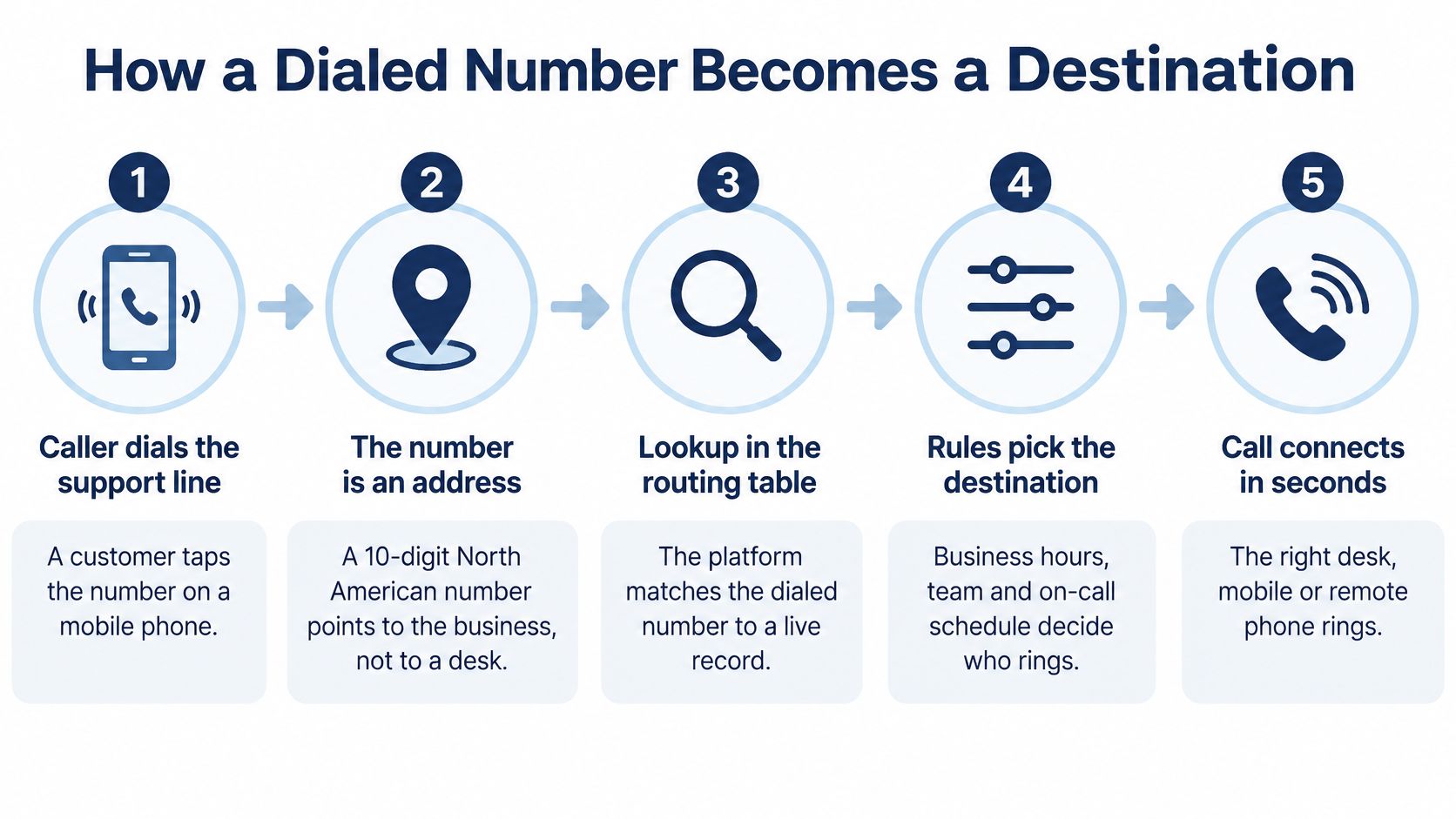
A customer dials your support line, selects technical help, and reaches an available agent. To the caller, it feels like a simple connection. Behind the scenes, the telephone network and your business phone platform have made different decisions.
The number provides the starting address. According to NANPA's overview of the North American Numbering Plan, a North American telephone number contains 10 digits, comprising a three-digit area code and a seven-digit local number. Those digits identify a destination within a standardized numbering system, not necessarily a particular handset.
Think of a receptionist at a switchboard. The receptionist checks a directory, considers who handles the request, and transfers the caller. Automated routing performs a similar job, using records and rules rather than a paper directory.
The diagram follows the caller from dialing to connection.
The decisions behind the ring
- Find the serving platform. The originating network uses routing information to reach the network serving the number. Your business platform then matches the dialed number to its configuration.
- Evaluate the business rules. The platform checks conditions such as opening hours, menu selections, and agent availability. A support selection should lead somewhere different from a billing enquiry.
- Try the selected destination. That destination might be an extension, a shared queue, or a mobile device. The public number and the answering device don't have to be the same thing.
- Handle an unanswered call. If the destination can't answer, the configured fallback determines whether the caller reaches voicemail, another team, or an alternative endpoint.
A direct inward dialing number, explained in our guide to what a DID number is, can give a person or department a public entry point without requiring callers to pass through reception.
Try it yourself: Call your business line from a mobile phone. Note the greeting, menu selection, ringing destination, and unanswered-call outcome, then identify the rule responsible for each transition.
Routing Options Compared at a Glance
| Routing option | How it picks the destination | Best for | Main risk |
|---|---|---|---|
| Direct extension | One named extension | A fixed desk with one owner | Calls go unanswered when that person leaves |
| Simultaneous ring group | Rings several phones at once | Small teams sharing incoming calls | Excessive ringing interrupts staff and can delay ownership |
| Sequential hunt group | Tries each member in a set order | Clear coverage order across a team | Slow when the first person is away |
| Time-of-day routing | Changes destination by clock time | After-hours handoff to a mobile or voicemail | Holiday exceptions need maintenance |
| Auto attendant or IVR menu | Caller presses a number to choose | Mixed enquiries with clear categories | Long menus frustrate callers |
| Skill-based queue | Matches the call to an agent with the right skill | Support and sales teams | Needs accurate staffing and skill data |
| Mobile or find-me forwarding | Rings a person's cell phone | Field staff and managers on the move | Relies on signal and the person answering |
| Failover to backup destination | Sends calls elsewhere when the primary route fails | Continuity during outages | Untested backups may fail when needed |
Choose the simplest option that answers the caller's most common need. Add complexity only when a real call type requires different treatment, not because a setting is available.
Match the method to the work
Direct extension routing fits a role with a clear owner, but use a shared destination when callers need the function rather than that individual. An employee's departure shouldn't make the billing department unreachable.
A simultaneous ring group suits a small reception team because anyone can pick up. A sequential hunt group preserves a coverage order, but callers must wait while the system tries unavailable people.
Time-of-day routing works well when responsibility changes at closing time. Check the platform's time zone and maintain holiday exceptions rather than assuming a weekday schedule covers every closure.
An auto attendant, also called an interactive voice response or IVR menu, helps callers identify their needs. Use language customers recognize, such as billing or technical support, rather than internal department names.
A skill-based queue is useful when the person answering needs particular knowledge or language skills. It won't help if the designated agents aren't signed in or their skill assignments are wrong.
Mobile forwarding fits field staff, but decide whether an unanswered call should reach business voicemail or the mobile carrier's voicemail. Otherwise, customers may hear a personal greeting.
Failover addresses an unavailable route rather than ordinary workload distribution. A backup needs its own reachable destination and an operational trigger, not merely another extension on the same failed system.
A menu sorts requests. A queue manages waiting. A ring group shares ringing. Use each for the problem it actually solves.
Designing Rules for Hours, Callers and Skills
Build your routing map before changing settings in the administrator portal. A spreadsheet works well because you can compare the intended behavior with the configuration rather than relying on memory.
Build the map in order
- List every inbound number and its purpose. Include published departmental numbers and campaign numbers so a forgotten entry point doesn't bypass your intended flow.
- Write the opening hours and exceptions. Record the applicable time zone, holidays, and temporary closures because a correct clock rule can still use the wrong calendar.
- Group caller intentions into clear categories. Sales, support, billing, and general enquiries are useful starting labels, but keep only categories that lead to meaningfully different handling.
- Assign a primary destination. Name the responsible person, ring group, or queue so someone can confirm that the destination is staffed.
- Set an unanswered-call outcome. Choose voicemail, an alternate team, or a callback option, and specify when that transition should happen.
- Check for dead ends. Follow each path until a person answers or the caller reaches a useful final destination, not another unattended loop.
A worked routing schedule
Say a six-person firm has a sales line and a support queue. The following hypothetical schedule shows how time windows, caller needs, and fallbacks can combine.
| Time window | Caller type | Primary destination | Fallback |
|---|---|---|---|
| Weekdays 9:00-17:00 | Sales enquiry | Sales ring group | Voicemail to sales inbox after two rings |
| Weekdays 9:00-17:00 | Support request | Support queue with skill match | Callback offer after three minutes |
| Weekdays 9:00-17:00 | Billing | Billing extension | Message to billing inbox |
| Weekdays 17:00-9:00 | Any | After-hours greeting with menu | On-call mobile for urgent support |
| Weekends | Any | On-call mobile | Voicemail with next opening time |
| Public holidays | Any | After-hours greeting | Updated holiday greeting and on-call mobile |
These are example settings, not recommended waiting times for every business. Many platforms configure ringing duration in seconds, so translate the intended caller experience into the controls your platform provides.
Define rule precedence explicitly. In this example, a public holiday should override the normal weekday schedule, and the weekend rule should override the overnight weekday rule.
A particularly damaging mistake is leaving a broad rule that sends every call to a departed employee. Read the map row by row and ask who currently owns each destination, who monitors its messages, and what happens if that person is unavailable. Also check whether an early catch-all rule prevents more specific rules from ever running.
Reaching Desk, Mobile and Remote Phones
A business number works like a receptionist's switchboard. Callers dial one published number, and the routing layer decides which desks, apps and laptops to buzz. The number is the public identity. Each device is only a place where someone might currently be available to answer.
For a hybrid worker, the answering location can change without changing the number customers dial.

The SIP specification describes a location service that maps a user's address to the contact addresses where that user can currently be reached. A routing server weighs those registered contacts against authorization and provider policy before choosing where to send each call. Think of registrations as short-term leases rather than permanent records: a device renews its lease while it stays online, and the platform keeps offering it calls only while that lease is valid.
For example, a sales representative's business number might ring an office handset, a mobile app, and a home laptop simultaneously. If the laptop disconnects, its registration eventually expires and the platform stops treating it as an available contact. Disconnection is not always detected immediately, which is why registration expiry and reachability checks matter. Until the lease lapses, the platform may keep ringing a dead device, and the caller experiences those wasted seconds as unexplained silence.
Control which devices receive calls
- Set device priority. Use simultaneous ringing for equal-priority devices or sequential ringing when one should be preferred, such as the desk phone first and the mobile app after a few rings.
- Remove retired devices. Revoke access when a handset is replaced or an employee leaves, rather than waiting for an old registration to disappear. A departed employee's still-registered app can keep answering customer calls, which is a trust problem, not just a housekeeping one.
- Define no-contact behavior. Route to business voicemail or an alternate team when no valid device contact exists, so a registration gap never becomes a dead end for the caller.
This accompanying video provides another way to follow the calling workflow.
Registered doesn't always mean ready to answer. A reachable app may be muted, and a working desk phone may sit in an empty office. Combine device reachability with user availability and an unanswered-call policy, so every call that finds no person still finds a destination.
Accurate contact records let the platform try useful destinations first. Stale records burn ringing time on devices that will never pick up, or worse, send customer calls toward phones that should no longer participate at all.
What Happens to Your Number When Providers Change
Say a company with several offices moves to a new cloud provider. The administrator replaces the desk phones and expects the published numbers to follow automatically. But changing equipment doesn't change the telephone network's record of where those numbers are served.
Number portability separates the number customers know from the provider currently serving it. NANPA's annual report describing the Number Portability Administration Center identifies NPAC as the system that facilitates local number portability. Routing systems may therefore need portability information rather than relying solely on the number's original area code and exchange.
Move the number and rebuild the behavior
- Confirm account control. Identify the account holder, authorized requester, and current service records for every number.
- Coordinate the transfer. Confirm the porting request, agreed cutover timing, and arrangements for ending the old service.
- Capture the existing configuration. Export or document hours, menus, queue membership, voicemail destinations, and fallback settings before access changes.
- Keep service continuity coordinated. Don't cancel the old service before the transfer completes and inbound testing succeeds; confirm any remaining services separately.
- Restore the caller experience. Rebuild greetings, recording settings, queue destinations, and message delivery on the new platform.
Our guide to VoIP phone number porting provides a practical starting point for planning the transfer. Treat the port and the phone-system configuration as related workstreams, not interchangeable tasks.
Migration safeguard: Keeping the same telephone number doesn't mean your old menus, call history, recordings, or voicemail settings move with it.
Before cutover, decide which historical records you need to retain and export them while you still have access. Also check services that share the old account, since cancelling an account can affect more than voice calling.
After the move, place inbound calls from mobile, landline, and international origins where practical. Confirm the intended destination and record any origin-specific failures, because a successful call from your own mobile doesn't prove every network has the correct route.
Keeping Calls Answered When Something Fails
Automatic failover isn't the same as continuity. A backup route helps only if the system can invoke it, the destination remains reachable, and someone can handle the arriving calls.
The FCC's proposal addressing caller-ID authentication gaps examined weaknesses involving older non-IP portions of call paths. That's an important reminder that a business call depends on more than the cloud platform shown in an administrator dashboard.
| Failure point | What callers experience | Remedy |
|---|---|---|
| Local desk phone or device | Ringing with no answer | Forward to a mobile or ring a second device |
| Office internet outage | Calls drop or fail to connect | Failover to cellular or a second site |
| Provider outage | Platform-dependent routes may stop working | Pre-agreed backup provider or independently arranged forwarding |
| Carrier interconnection fault | Some callers or regions cannot connect | Escalation path with the carrier and a status contact |
| Empty ring group or unmanned queue | Long ringing with no pickup | Fallback to voicemail or an alternate team |
Test the dependency, not just the destination
A second desk phone won't solve an office internet outage if both phones use that connection. Likewise, forwarding configured only inside an unavailable provider's platform may not protect you from that provider's outage. Establish where the failover decision happens and which infrastructure it still needs.
Check operational capacity, too. Sending every location's calls to a single receptionist can replace a network failure with an overloaded answering point.
During a planned quiet period, disable the primary route in a controlled test. Measure the caller's wait, listen to the backup greeting, leave a voicemail, and confirm that the team receives it. Repeat after material configuration changes and on a regular review schedule.
- Preserve identity. Check the published number's reachability and the callback number recipients see.
- Verify service behavior. Confirm whether queues, recordings, and message delivery still operate on the backup path.
- Plan emergency handling. Verify emergency-calling arrangements through the provider's approved process, not an unannounced live emergency test.
Document restoration steps and escalation contacts. For carrier interconnection faults, useful evidence includes the calling number, called number, timestamp, and observed result so the responsible network can investigate.
Caller ID Trust and Answer Rates
A routing plan can deliver calls correctly while recipients still see a spam warning or never receive the ring. Outbound identity is a separate operational concern, not proof that follows automatically from successful inbound routing.
The recipient's experience deserves its own test.
STIR/SHAKEN authenticates caller-ID information on IP calls; it doesn't guarantee that a recipient will answer or that a carrier won't label the call. The FCC's requirements for service providers include rules effective September 18, 2025, requiring the obligated provider, rather than merely its third-party vendor, to make attestation decisions.
Check the identity chain
- Number authorization. Confirm that the business controls or is authorized to use each displayed number. Keep supporting account records available.
- Attestation responsibility. Identify which provider signs outbound calls and how it verifies your right to use the number. Don't assume the phone-system software vendor performs that role.
- Carrier handoffs. Establish how the route handles legacy network segments, where authentication information can be lost.
- Recipient testing. Call destinations on different mobile networks, landlines, and relevant international networks, recording the displayed number and any warning label.
Say a contact center introduces a shared outbound number without checking its authorization records. If customers stop answering, the team shouldn't immediately blame agent performance. Check number presentation, signing arrangements, carrier treatment, and whether callbacks reach the business.
Authentication supports caller-ID trust. It isn't a certificate of good calling behavior or a promise of delivery.
Keep test results separate from assumptions about reputation. An unfamiliar displayed name, an incorrect callback number, and a spam label are different symptoms, so document exactly what the recipient sees before requesting remediation.
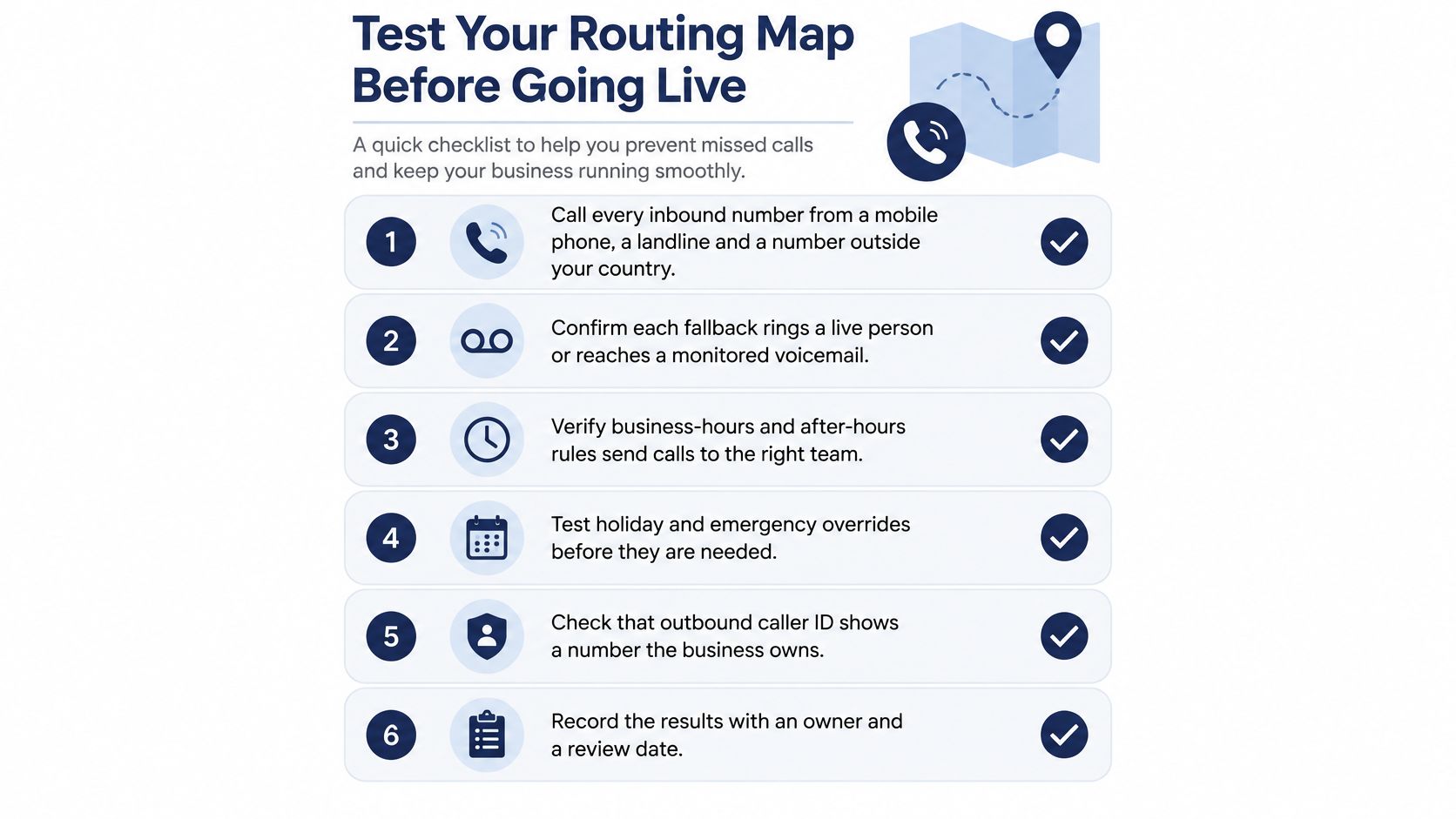
Test Your Routing Map Before Going Live
- ✓ Call every inbound number. Use mobile, landline, and international origins where practical, and record which destination answers.
- ✓ Exercise every fallback. Let the primary destination go unanswered and confirm the caller reaches a live person or monitored voicemail.
- ✓ Check calendar rules. Test after-hours and holiday behavior when those rules apply, or use a controlled temporary schedule.
- ✓ Review device priority. Confirm the intended ringing order and remove obsolete devices and user access.
- ✓ Inspect outbound caller ID. Record the number, displayed name, and any warning recipients see.
- ✓ Run a controlled failover test. Choose a quiet period, notify the answering team, and verify restoration afterward.
Keep a test log with the expected result, actual result, responsible owner, and review date. Our guide to choosing a test number to call can help with basic calling checks, but it doesn't replace testing your actual inbound numbers and destinations.
Use this checklist as a handover aid for the people who will maintain the configuration.
If you're planning a move, bring the completed map to our team before configuration starts. We can walk through the intended call paths with you; request a quote, call (888) 881-7495, or email help@snap-dial.com.
Our Unlimited Lines feature lets incoming calls go to employee lines, gives employees individual numbers, or lets outbound calls share the same number, while Mobile Office sends incoming calls to any location. Visit SnapDial to request a quote and discuss a routing setup that matches your staffing, locations, and backup plan.