
An ATA for VoIP is a small bridge device that lets your old analog phones or fax machines work on an internet phone system, and a typical unit such as Cisco's ATA 192 gives you 2 ports with two standard FXS ports that can be set up as two independent SIP registrations. If you only need to keep a few legacy devices alive during a move to cloud calling, an ATA is often the right short-term tool. If you want your primary users on modern calling, messaging, mobile apps, and unified communications, it usually isn't the right long-term answer.
A lot of businesses are in the same spot right now. The old desk phones still work. The fax machine still matters for at least one process. There may be a lobby phone, a warehouse courtesy phone, or a door system nobody wants to touch unless they have to.
That's where an Analog Telephone Adapter, or ATA, earns its keep. It connects an analog device to a modern VoIP platform by converting analog voice signals into digital data that can travel over the internet. The key question isn't whether an ATA works. It does. The main question is whether you're using it as a smart transition step or letting it become a long-term compromise.
Why We Still Talk About Analog Adapters in a Digital World
If you're replacing a legacy phone system, one of the first questions is usually practical, not technical. Do all these old phones need to be thrown out?
Sometimes the answer is no. Not because analog is better, but because ripping out every endpoint at once can create cost, downtime, and retraining problems that small businesses don't need. In brownfield environments, an ATA works as the boundary device between old analog equipment and a packet-based IP network. That's why it keeps showing up in real deployments where companies want to preserve handsets, fax machines, and other analog endpoints while moving call control onto SIP and IP infrastructure, as explained by VOCAL's overview of ATA architecture.
Why the category still matters
This isn't some leftover corner of telecom. Industry coverage cited by Premier Broadband projects the global VoIP adapter market to grow from USD 2,172.7 million in 2025 to USD 4,500 million by 2035, a 7.6% CAGR, which is a strong signal that many organizations still need a low-friction migration path for analog assets while adopting IP telephony, according to this VoIP adapter market summary.
That matters because it reflects a common business reality. Plenty of offices aren't starting from a blank slate. They're carrying years of hardware decisions, niche devices, and operational habits that don't disappear just because the phone service moves to the cloud.
Practical rule: If the device is still useful and not feature-critical, an ATA can buy you time. If the user depends on modern calling features every day, start planning for replacement instead.
The strategic choice
Owners and IT managers often make the wrong call. They treat an ATA as either outdated junk or a permanent cost-saving hack. It's neither.
Used correctly, an ATA is a transition tool. It helps you move services without forcing a same-day hardware refresh across the whole business. Used carelessly, it can freeze your team on old workflows while the rest of the business expects mobile access, simple management, and cloud PBX features.
The smartest way to look at an ATA for VoIP is this: preserve what must stay, replace what should change.
How an ATA Bridges Analog Phones to VoIP
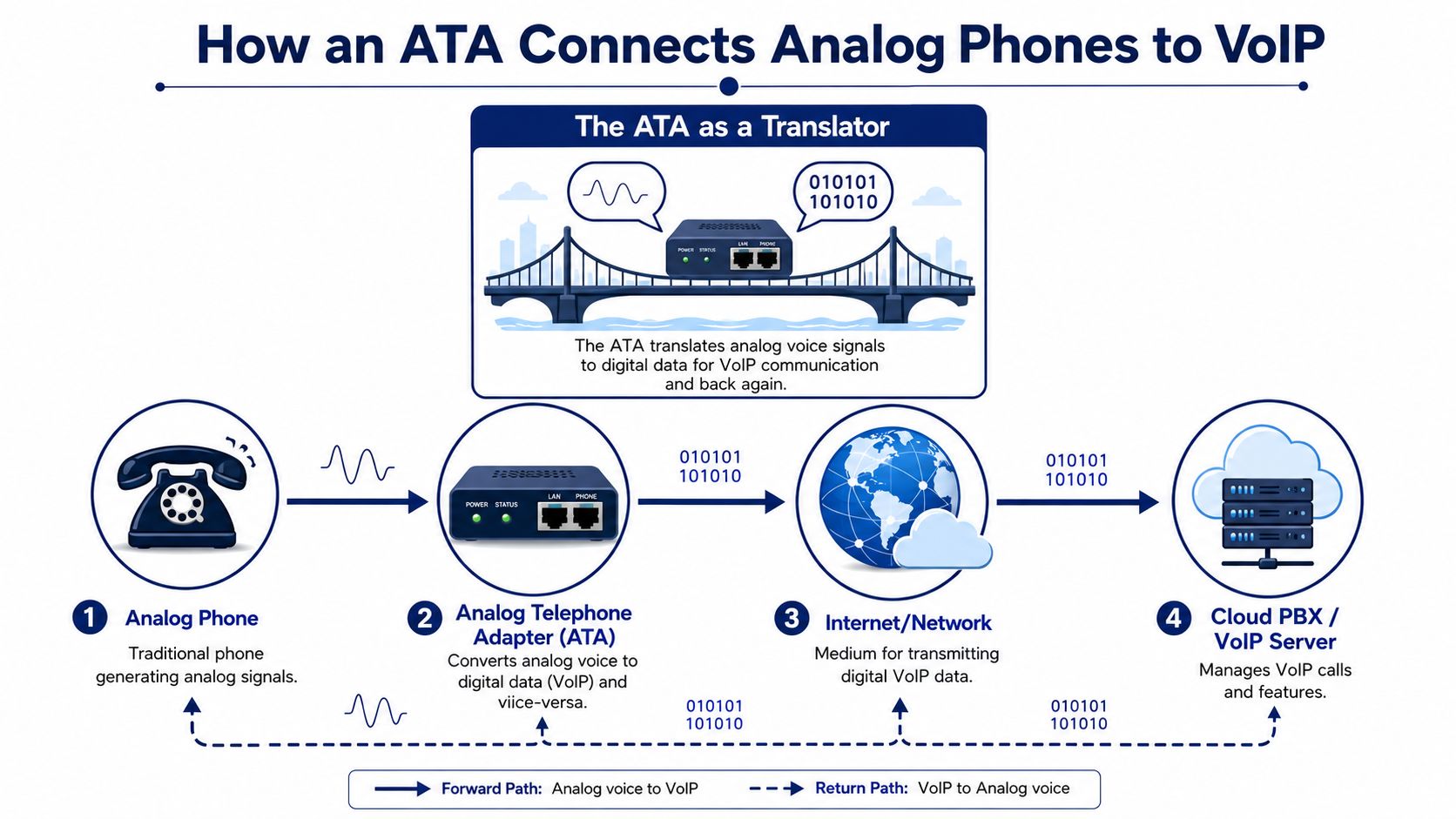
The easiest way to understand an ATA is to think of it as a translator. Your analog phone speaks one language. Your cloud phone system speaks another. The ATA stands in the middle and converts the conversation both ways.
An analog handset produces an analog voice signal. A VoIP system carries calls as digital IP packets. The ATA converts the analog voice from the handset into digital traffic for the network, and it converts incoming digital traffic back into something the analog handset can play through the receiver. That protocol-conversion role is the whole point of the device.
What plugs into what
In a basic setup, you usually have three physical connections:
- Analog device connection: Your old phone or fax machine plugs into the ATA's phone port.
- Network connection: The ATA connects to your router or switch with Ethernet.
- Power connection: The ATA needs its own power adapter.
Once connected, the ATA registers to your VoIP service using SIP credentials. After that, the analog device behaves like an endpoint on the phone system, even though the handset itself hasn't become “smart.”
If you want a plain-language refresher on the bigger call path, this guide on how VoIP phones work is useful context.
A real hardware example
Cisco's ATA 192 is a good concrete example because it shows what these devices are built to do in practice. Cisco describes it as a handset-to-Ethernet device with 2 ports and two standard FXS ports, and those ports can be configured as two independent SIP registrations, as shown in the Cisco ATA 190 series datasheet.
That tells you two important things right away:
- One ATA can often keep more than one legacy device in service.
- The ATA is meant to bridge existing endpoints into a SIP environment, not to turn an analog phone into a full-featured modern business phone.
An ATA extends the life of the hardware you already own. It does not upgrade that hardware into a modern unified communications endpoint.
What the ATA does not do
Confusion often arises. An ATA can get dial tone to an old phone. It can connect a fax machine, courtesy phone, or analog device to a cloud system. What it doesn't do is add the richer experience that comes with purpose-built IP endpoints and soft clients.
The analog phone on the far side of the ATA is still an analog phone. The adapter handles compatibility. It doesn't change the user experience much beyond making the device work on VoIP.
That's why ATAs are usually strongest at preserving function, not expanding capability.
ATA vs IP Phone vs Softphone Which Is Right for You
Most buying mistakes happen when businesses compare only the upfront hardware cost. That's too narrow. The better comparison is between what you save today and what you give up over time.
The short version is simple. An ATA makes sense when the device matters more than the user experience. An IP phone makes sense when the desk needs dependable business calling hardware. A softphone makes sense when mobility and cloud features matter most.
The market has already narrowed the ATA's job
By 2026, the buying decision is more specific than it used to be. ATAs are mainly for essential analog devices such as fax machines, alarm or door systems, and courtesy phones. For primary business users, the market has shifted toward softphones and mobile clients that integrate with cloud PBX features that ATAs can't support, as described in VoIP-Info's review of analog telephone adapters.
That matches what works in the field. The problem isn't that ATAs fail. The problem is that they solve a narrower problem than many buyers think.
ATA vs. IP Phone vs. Softphone A Quick Comparison
| Criterion | ATA + Analog Phone | IP Phone | Softphone |
|---|---|---|---|
| Best use | Keeping an existing analog device in service | Dedicated desk user | Mobile, hybrid, and laptop-first users |
| Upfront hardware cost | Usually lower if you already own the analog phone | Requires new phone hardware | Often lowest hardware requirement |
| Cloud PBX feature access | Limited by the analog endpoint | Strong | Strong |
| Mobility | Poor | Moderate | Strong |
| Remote work fit | Weak | Depends on setup | Strong |
| Ease of scaling | Fine for a few legacy devices | Good for standard desk deployments | Very good for distributed teams |
| Management overhead | Higher than many expect | Usually easier in modern deployments | Usually easier once standardized |
| Long-term fit | Transitional or niche | Strong for office users | Strong for modern UC environments |
If you're weighing desk hardware, this overview of a business desktop phone helps frame where a dedicated IP endpoint fits.
How to choose without overthinking it
Use an ATA when you answer yes to most of these:
- You already own the analog device: Replacing it now creates unnecessary expense or hassle.
- The device has a narrow job: It rings in the lobby, handles occasional faxing, or supports a door entry point.
- The user doesn't need modern UC tools: No one expects presence, mobile continuity, or rich feature keys from it.
Choose an IP phone when these points sound more familiar:
- The phone sits at a primary workstation: A receptionist, office manager, coordinator, or salesperson uses it constantly.
- The business wants standardization: You want the same setup across desks and locations.
- You want easier lifecycle management: Modern desk phones fit better into cloud provisioning and support workflows.
Softphones are the right answer when this is your environment:
- Staff work from anywhere: Home, office, road, or a mix of all three.
- The laptop and smartphone are the primary endpoints: The desk phone is optional, not central.
- You care about flexibility more than legacy preservation: That usually describes newer teams and growing multi-site companies.
Don't ask whether an ATA is cheaper than an IP phone. Ask whether preserving an old phone is worth limiting the user who depends on it.
Where businesses get stuck
A common pattern is to start with an ATA for a good reason, then it gradually becomes the default. One hallway phone becomes five desk phones. A stopgap becomes policy. Then the business wonders why users aren't adopting the phone system's better features.
That's the wrong direction.
ATAs work best when they're intentionally scoped. Keep the analog gear that serves a specific purpose. Move primary users onto endpoints designed for the phone system you're paying for.
Common Business Use Cases and Their Limitations
The ATA looks smartest when it solves a specific problem and stays in that lane.
Where an ATA earns its keep
A fax machine is the classic example. Maybe your accounting team still receives documents that way, or one customer insists on sending forms to that number. Replacing the whole process may be possible later, but not today. An ATA can keep that workflow alive while the rest of the business moves to cloud voice.
Courtesy phones are another good fit. A break room phone, warehouse wall phone, loading dock handset, or simple lobby phone usually doesn't need advanced features. It just needs to ring, dial, and stay available.
Door and alarm-related analog endpoints also fall into this category. These are often functional devices first and “phones” second. If they already exist and they do the job, preserving them through an ATA can be sensible.
Where it becomes a liability
The trouble starts when businesses try to make an ATA-backed analog phone serve as a primary tool for a busy employee.
A front desk user needs more than dial tone. They usually need call handling that's quick and visible, easier transfers, better interaction with the phone system, and a cleaner day-to-day workflow. An old analog set connected through an ATA usually feels limited in that role.
The same is true for remote and hybrid staff. If someone needs to answer calls on a laptop, switch to a mobile app, stay reachable away from the office, or work across locations, an ATA doesn't help much. It preserves a device tied to a place.
Keep analog where the job is stationary and simple. Move away from analog where the user is mobile, high-volume, or feature-dependent.
A practical yes or no filter
Use this quick test before you deploy one:
- Yes to ATA: The endpoint is legacy, useful, low-touch, and physically tied to one location.
- No to ATA: The endpoint belongs to a user who handles a lot of calls or needs modern communication tools.
- Maybe: The device is temporary, and you already have a replacement plan.
That last case matters. If you know you're using an ATA as a bridge for the next phase of migration, it's doing exactly what it should.
If there is no replacement plan, the ATA can turn into technical debt faster than most owners expect.
Integrating Your ATA with a Cloud PBX System
Connecting an ATA to a cloud PBX is usually straightforward in concept and more manual in practice.
What the process usually looks like
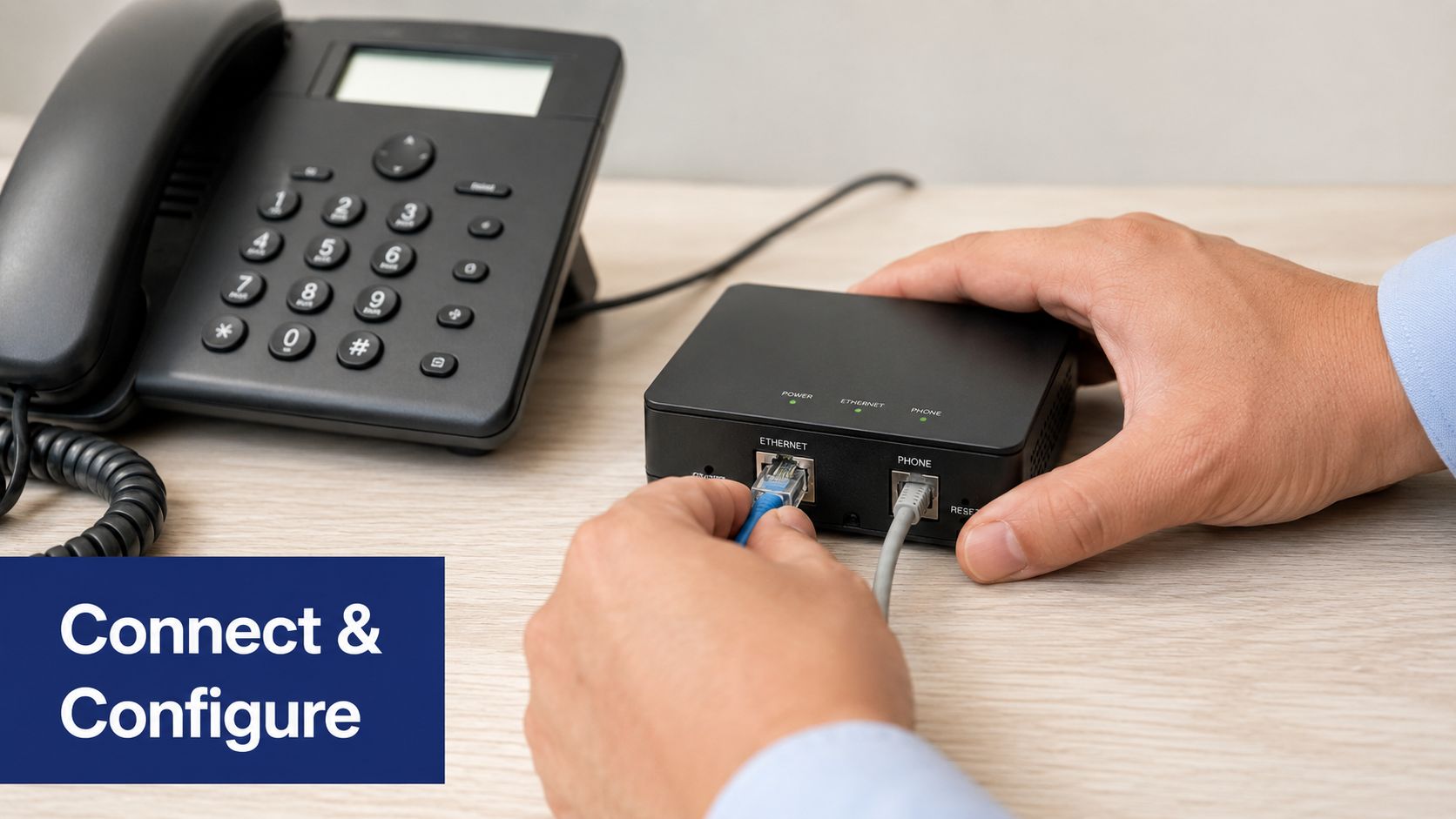
You start by connecting the analog device to the ATA, then connecting the ATA to your network and powering it on. After that, you log into the ATA's web interface and enter the SIP account details provided by your phone service.
In broad terms, you're matching the ATA to an extension or endpoint profile in your hosted phone system. If your provider offers a cloud phone system, the ATA becomes one more registered device on that platform, just with more setup work than a modern managed desk phone.
Most modern VoIP providers, including SnapDial, use zero-touch provisioning for IP phones, but ATAs almost always require manual configuration. That usually means logging into the device's web interface and entering SIP credentials yourself, which is one of the biggest differences in setup complexity and ongoing management.
What to have ready before you begin
Before you touch the ATA, make sure you have:
- Your assigned SIP credentials: Username, authentication details, and server information from your provider.
- A clear device purpose: Know whether this ATA port is for a fax machine, courtesy phone, or another analog endpoint.
- A network path that's already working: The ATA can't register if the network side isn't healthy.
The biggest time-waster is starting setup before the service-side information is ready.
A realistic setup flow
A simple deployment usually follows this order:
- Wire the hardware and confirm the ATA powers up normally.
- Access the ATA interface using the management method provided by the manufacturer.
- Enter the SIP registration details exactly as supplied by your provider.
- Assign the analog device to the correct extension or service role.
- Test inbound and outbound calling before you consider the job finished.
One good test call doesn't mean the setup is solid. Try the actual use case. If it's a lobby phone, call it from outside. If it's a fax machine, test that workflow. If it's a door device, confirm the trigger and response path.
A visual walkthrough can help if you're doing this for the first time:
The hidden cost of an ATA isn't usually the hardware. It's the extra device management you accept every time you keep analog gear in the system.
What surprises first-time buyers
The surprise is rarely the initial setup. It's the fact that ATAs add another management layer later.
If a user changes locations, if credentials need updating, if you standardize across multiple sites, or if you're supporting mixed hardware, the ATA can become one more edge device to document and maintain. That's manageable in small numbers. It gets annoying when the deployment grows without a plan.
Troubleshooting and Buying Your First ATA
Most ATA problems come down to three buckets. Registration, wiring, or expectation mismatch.
Quick troubleshooting checks
If there's no dial tone, start simple. Confirm the analog device is plugged into the correct phone port on the ATA, not a network port or the wrong jack. Then confirm the ATA itself is powered and connected to the network.
If calls won't complete, look at registration next. Many failures come from incorrect SIP details entered during setup. Recheck the credentials exactly as provided by your service.
If the device “works” but users complain, the issue may not be a fault at all. It may be the natural limit of using an analog endpoint on a modern platform. In that case, replacing the endpoint is often the proper fix.
What to look for when buying
Don't buy an ATA by price alone. Buy it by fit.
- Port count: Decide how many analog devices you need to keep. A common example is a 2-port model with two standard FXS ports, which can be useful when you have a pair of legacy devices to preserve.
- Provider compatibility: Make sure your VoIP provider supports the ATA model and setup style you plan to use.
- Use-case match: Choose an ATA for fax machines, courtesy phones, and niche analog devices. Don't buy one to avoid replacing primary user endpoints if those users need modern features.
- Management tolerance: Be honest about whether your team wants more web interfaces and manual endpoint administration.
The buying decision that saves trouble later
The best first ATA purchase is usually a small, intentional one. Keep one or two necessary analog devices online. Don't build the entire user environment around preserving old phones.
That approach protects your budget without locking your team into yesterday's endpoint strategy.
If you're moving from legacy phones to hosted calling and need to decide where ATAs fit, SnapDial is one option for cloud PBX service, business calling, conferencing, mobile apps, and cloud fax. The practical approach is to keep analog only where it still serves a clear purpose, then move primary users onto endpoints that match how your business works now.