
A lot of small businesses reach the same point with their phones. The owner answers calls between jobs. The office manager fields sales, support, billing, and vendor calls from the same main line. If two people call at once, one goes to voicemail. If the team is out in the field, the caller hears ringing, dead air, or a generic mailbox greeting that doesn't inspire much confidence.
That setup works until it doesn't. A missed call might be a new customer. A sloppy transfer might turn a simple question into an annoyed prospect. Over time, the phone system stops being a tool and starts acting like a bottleneck.
A well-designed auto attendant fixes that. Not the bloated version people dread. A practical one. The kind that greets callers clearly, routes them fast, and still gives them a clean path to a real person when they need one.
Your First Impression Over the Phone
Most owners think of their website as the first impression. In many industries, the phone still wins. A prospect sees your truck, your ad, your Google listing, or your referral mention, then calls. What happens in the first few seconds tells them whether your business feels organized.
If the line rings too long, they assume you're busy. If someone answers breathlessly and says, “Hold on, let me see who handles that,” they hear friction. If they hit a smart greeting that gets them where they need to go, the business feels structured, even if the team is small.
Why this matters more now
The shift away from old PBX setups isn't just a tech trend. It reflects how small companies now need to handle calls across mobile devices, remote staff, and multiple locations. The global auto attendant systems market is projected to reach $9.1 billion by 2034, up from $3.8 billion in 2025, according to DataIntelo's auto attendant systems market report. That tells you this has moved into the standard operating toolkit for modern businesses.
An auto attendant is the phone equivalent of a front desk that never leaves. It answers every time, follows the same rules every time, and doesn't depend on one employee remembering where to transfer a caller.
Practical rule: If your main number still depends on whoever happens to pick up first, your customer experience is too fragile.
The phone system is part of the customer journey
This is also where many businesses make a planning mistake. They treat phone handling as separate from customer communication. It isn't. Calls, texts, voicemails, scheduling, and follow-up all shape how customers experience your company. If you're thinking more broadly about that ecosystem, this guide on what is a customer engagement platform is useful context.
A good auto attendant doesn't make you sound bigger than you are. It makes you sound easier to do business with. That's the primary value.
What Is an Auto Attendant and How Does It Work
An auto attendant is a digital receptionist. It answers incoming calls, plays a greeting, offers options, and sends the caller to the right destination. For most small businesses, that destination is a person, a ring group, or a voicemail box.
That's the simple version, and for many companies, it's enough.
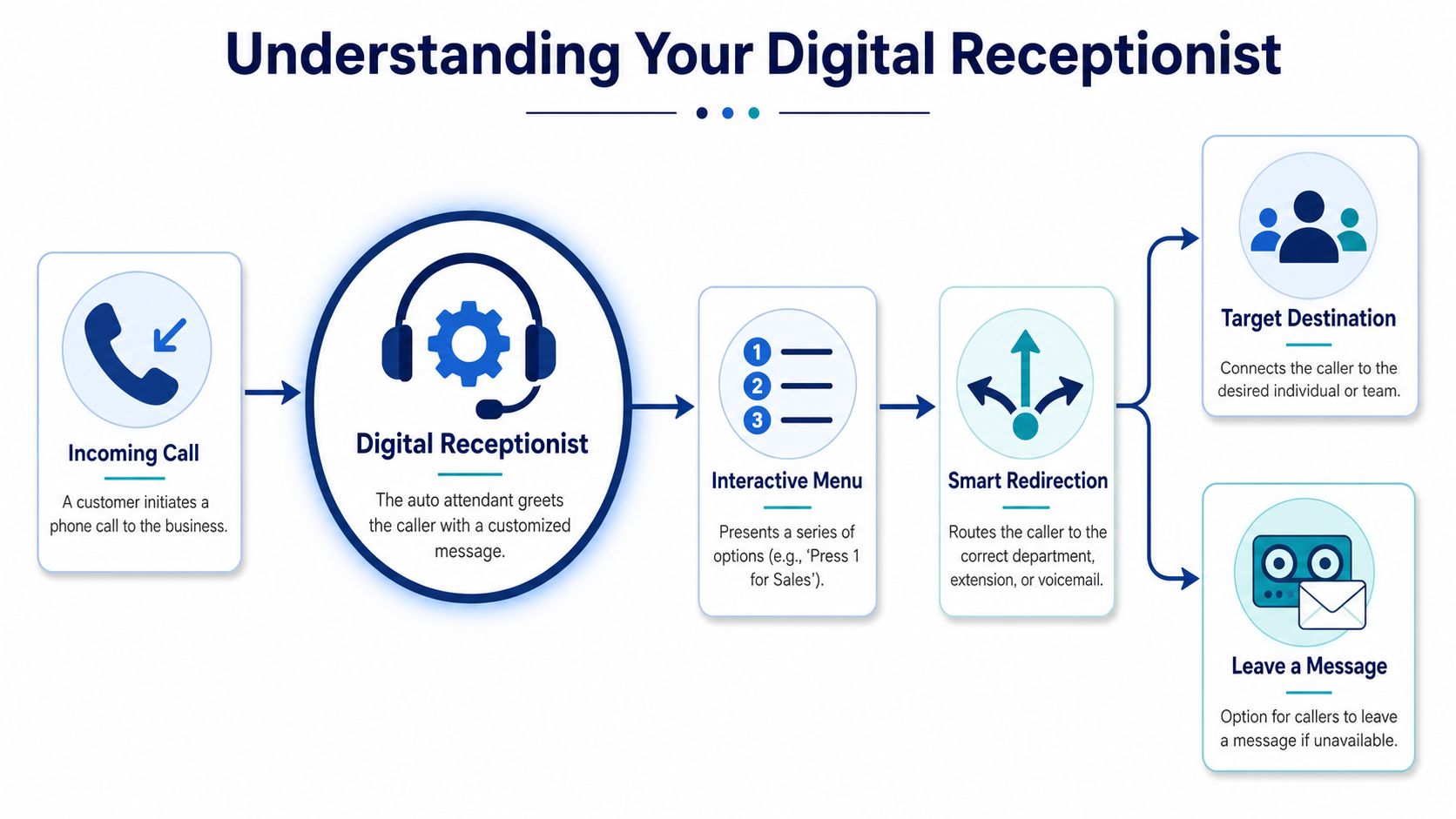
The basic call flow
Think of an auto attendant phone system for small business as a traffic cop at a busy intersection.
The call comes in
The system picks up with a recorded greeting instead of letting the line ring endlessly.The caller hears choices
“Press 1 for sales, 2 for service, 3 for billing.”The system routes the call
Based on the selection, it sends the caller to the right phone, group, or mailbox.
That's the core job. Receive, identify, route.
Auto attendant versus IVR
People often use auto attendant and IVR interchangeably, but they aren't quite the same. A basic auto attendant usually handles keypad-based routing with fixed menu options. IVR usually refers to a broader logic layer that can branch with greater complexity and support more advanced routing rules. If you want a plain-English breakdown, this guide on what an IVR system is is a good reference.
For a small company, the distinction matters because it keeps buying decisions grounded. You may not need a complicated enterprise workflow. You may just need a clean front door for your phone calls.
The best phone trees don't feel like phone trees. They feel like clear directions.
What happens behind the scenes
A modern cloud system ties the greeting and menu to routing rules. That means the same business number can send calls one way during office hours and another way after hours. It can ring a sales group, then overflow to voicemail. It can send support calls to a technician's mobile app. It can direct billing questions to one mailbox instead of cluttering the owner's phone.
That's why the underlying business communications platform matters. If you want a practical overview of how VoIP and business phone systems fit together, Finchum Fixes IT on business communications gives useful context without drowning the topic in jargon.
Core Benefits for Your Small Business
The biggest mistake I see is evaluating an auto attendant as a feature. It's better to evaluate it as labor saved, calls protected, and confusion removed.
A small business usually feels phone pain in predictable places. Calls interrupt staff who are trying to do actual work. Customers land with the wrong person. After-hours callers get no direction. The owner ends up acting as the human switchboard.
It makes a small team sound organized
Callers don't need marble floors and a reception desk. They need confidence that they reached the right business. A polished greeting and a short, clear menu create that confidence right away.
That matters whether you run a law office, HVAC company, med spa, property management firm, or wholesale operation. The phone experience tells the caller whether your internal operation is likely to be calm or chaotic.
It stops staff from doing avoidable phone triage
Without routing, your team spends time answering calls that should have gone somewhere else. That sounds minor until you watch it happen all day.
Here's what a basic menu can remove:
- Repeat explanations that force callers to tell the same story to multiple employees
- Cold transfers where the receiving person wasn't expecting the call
- Interruptions that pull field staff or front office staff away from their main work
- Voicemail sprawl where every missed call ends up in one mailbox no one owns clearly
It creates coverage outside normal hours
A live receptionist goes home. A good system doesn't.
That doesn't mean every call gets answered by a human at night. It means every caller gets acknowledgment, direction, and a next step. For many businesses, that's enough to preserve the lead and set expectations.
| Business problem | What the auto attendant does |
|---|---|
| Calls hit a busy line | Answers immediately with a greeting |
| Customers ask for the wrong person | Routes by department or function |
| Staff miss after-hours calls | Sends callers to the right mailbox or message |
| Owner fields everything | Distributes calls to the team |
It supports growth without forcing a rebuild
A simple setup can expand without changing your public number. You can add departments, locations, or menu branches as the business matures. That's a lot cleaner than retraining customers every time your staffing changes.
The practical benefit isn't just professionalism. It's consistency. A phone system should reduce dependency on memory, luck, and whoever happens to be near the handset.
Essential Auto Attendant Features to Look For
Not every phone menu is worth having. Some systems give you just enough to sound automated and still leave callers stranded. The useful features are the ones that remove friction for both callers and staff.
Start with routing controls
The first thing to check is how calls move after the greeting. You need more than “press 1, press 2.” You need control over where those choices go and what happens if no one answers.
A modern setup should support:
- Multi-level menus for businesses with more than one department or service line
- Ring groups so a team can share inbound calls
- Department voicemail instead of one overloaded general mailbox
- Fallback routing when a person or group doesn't answer
If a provider can't explain those clearly, you're buying a toy, not a business phone system.
Time-based routing is not optional
The most useful feature for many businesses is schedule-aware call handling. Modern cloud-based auto attendant systems use time-based routing that changes the call path based on defined schedules, such as business hours versus after-hours, without human intervention, as described in VistaNet's guide to setting up an auto attendant.
That means one menu can behave differently depending on the time:
| Time | Caller presses 1 | Result |
|---|---|---|
| Business hours | Sales | Routes to a live ring group |
| After hours | Sales | Routes to a sales voicemail box |
| Holiday | Any option | Plays a closure message and routes accordingly |
That's the difference between a system that helps and one that just answers.
Look for tools that make administration easier
A strong phone system should be easy to update when your staffing changes. If your office manager needs to submit a support ticket every time a greeting changes, you'll avoid making useful updates.
Features worth prioritizing include:
- Web-based management for greetings, users, routing, and voicemail
- Mobile support so staff can receive routed calls away from the office
- Call routing controls that don't require technical work to understand. This overview of call routing is a solid primer if you want to understand the logic before shopping
- Dial-by-name directory if callers often know who they need but not the extension
One option in this category is SnapDial, which offers cloud PBX features including auto attendant, routing controls, mobile access, and web-based administration. That kind of package tends to fit small businesses that want business-grade structure without maintaining on-site phone hardware.
Best Practices for a Customer Friendly Experience
The technology isn't what frustrates callers. Bad design does.
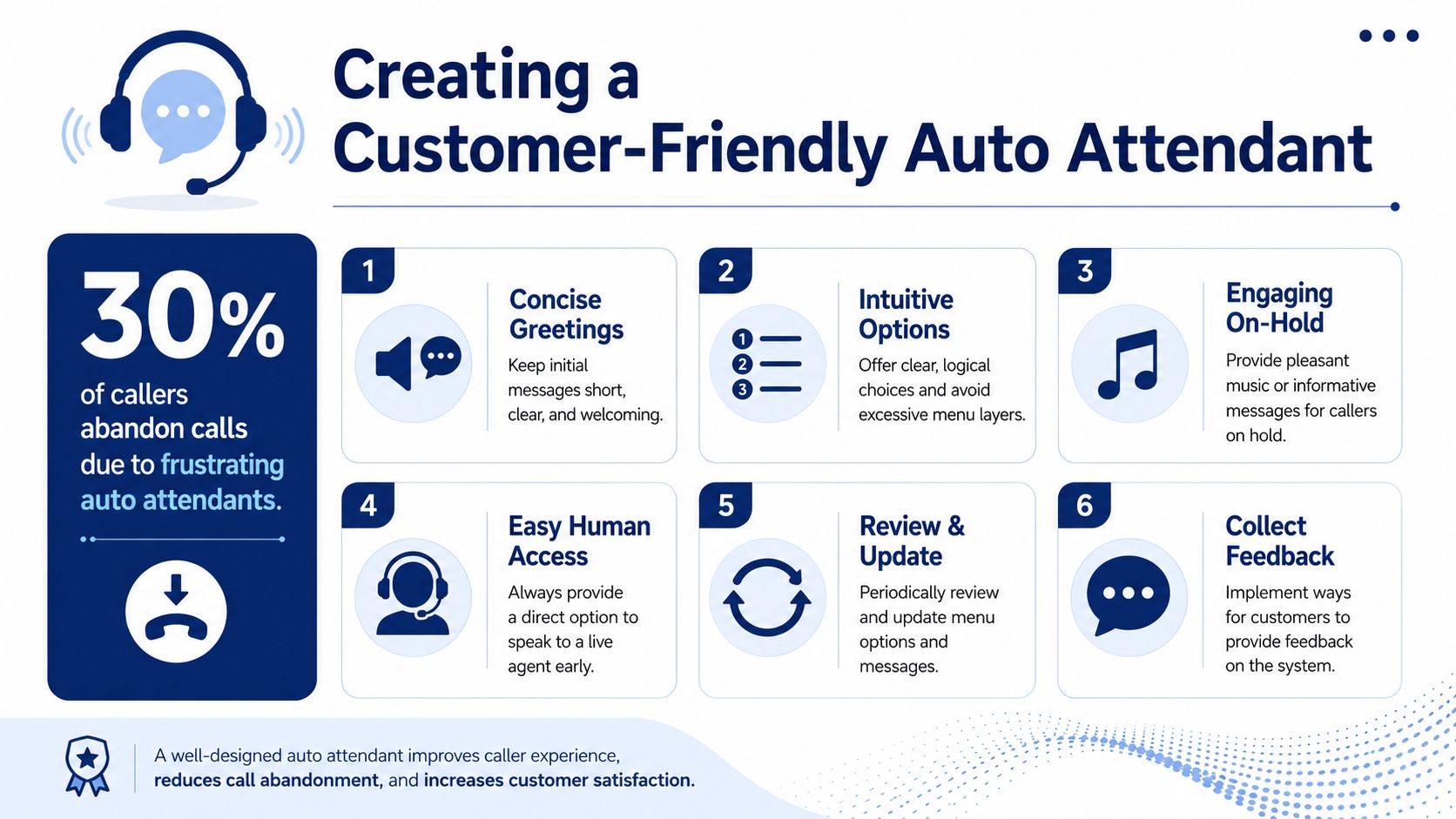
The clearest warning sign comes from consumer behavior. In a 2019 Vonage survey cited by Numa's business phone statistics roundup, 85% of respondents said they abandoned a call after reaching an auto attendant, and 51% abandoned a business altogether after a bad experience. That's why menu design deserves more attention than feature count.
Keep the menu short
For small business auto attendants, the benchmark is a primary menu with exactly 3 options, with a hard cap of 5, to reduce menu fatigue and keep callers from bouncing around too long, according to Alliance Virtual Offices' automated phone system guide.
That benchmark lines up with what works in practice. When callers hear too many options, they stop listening. They wait for “operator,” mash zero, or hang up.
A good main menu sounds like this:
- Press 1 for sales
- Press 2 for support
- Press 3 for billing
- Press 0 to speak with the front desk
A bad one tries to sort every possible intent at the top level.
Give callers a human escape route
Always provide a clear path to a live person, especially early in the menu. If your system traps callers in self-service, they'll punish the business, not the phone tree.
If a caller can't figure out your menu in one listen, the menu is the problem.
That doesn't mean every call should hit an employee immediately. It means the caller should feel there's a safety valve.
Write greetings like signage, not speeches
Your greeting should do three jobs. Confirm the business name. Tell the caller what to do next. Set expectations if no one is available.
Use plain language. Skip slogans. Skip legalese. Skip the owner's life story.
Sample daytime greeting
Thank you for calling Harbor Street Dental. For scheduling, press 1. For billing, press 2. For the front desk, press 0.
Sample after-hours greeting
Thank you for calling Harbor Street Dental. Our office is currently closed. If you'd like to leave a message for scheduling, press 1. For urgent matters, press 0.
A short visual demo can help if you're building your first menu:
Build for error handling
People won't always press a button right away. Some will press the wrong one. Your system should replay the menu, return them to the main menu after an invalid choice, or route them to an operator. Don't let calls die because the caller hesitated.
Review the menu like an owner, then like a customer
Test your own system from a mobile phone. Call after hours. Press wrong keys. Let it time out. Listen for anything that sounds slow, confusing, or stiff.
A clean checklist helps:
- Trim the greeting if it takes too long to reach options
- Rename options if callers routinely choose the wrong department
- Update seasonal messaging for holidays, closures, or temporary staffing changes
- Listen for dead ends where no one answers and no useful voicemail option exists
Implementation and Pricing Expectations
Implementation usually succeeds or fails before anyone logs into the admin portal. The hard part is deciding how calls should flow so customers reach the right person without getting trapped in a maze. For a small business, that planning is the difference between sounding organized and sounding understaffed.
A good rollout starts with a few operational decisions that owners and office managers can make quickly if they know their call patterns:
- Business-hours greeting that gets to the options fast
- After-hours and holiday handling so callers are not left guessing
- Menu choices based on the top reasons people call
- Routing rules for users, ring groups, voicemail boxes, or mobile phones
- Failover behavior if no one answers or a caller presses the wrong key
This part is less technical than people expect. It works like setting up a front desk script, then making sure the phone system follows it every time. I usually tell clients to spend more time on the call flow than on the voice prompt itself. A polished greeting cannot fix bad routing.
Provider setup support matters here. Some vendors give you a blank admin page and expect you to build the tree yourself. Others will take your hours, departments, and escalation rules and configure it for you. For a five-person office, that can save hours of trial and error and prevent common mistakes like sending after-hours sales calls to a dead extension.
Pricing is usually tied to your broader phone service, not sold as a separate appliance. Small business VoIP plans commonly bundle auto attendant into a monthly per-user package. Industry pricing published by Nextiva's business phone system pricing overview is a useful reference point for what hosted plans generally include and how costs rise as features and support levels increase.
Budget for the whole call-handling system, not just the menu. Monthly cost often reflects user seats, call routing options, voicemail, mobile apps, and support. If you want a clearer picture of how that packaging works, reviewing a hosted VoIP seat helps separate what belongs to an individual user from what belongs to the phone system itself.
One more pricing variable gets overlooked. Your phone number choice affects how callers perceive the business before anyone answers. A local number can feel familiar and community-based. A toll-free number can make sense if you serve multiple cities or run campaigns across a wider region. This guide to strategic toll-free number acquisition is useful if you're weighing local versus toll-free presentation.
Expect a basic setup to move quickly if your call flow is clear. Expect delays if no one has decided who should answer what, when calls should roll to voicemail, or how after-hours callers should be treated. The software is usually the easy part. The customer experience design is where the core work sits.
How to Choose the Right Auto Attendant Provider
A provider can check every feature box and still leave your callers stuck in a phone maze. That is the test that matters. You are not buying a menu builder. You are choosing the company behind a daily customer touchpoint that shapes how organized and responsive your business sounds.
Start by listening for how the provider talks about call flow. A good one asks who answers sales calls, where service calls should go, what happens after hours, and how to handle callers who press the wrong option or say nothing at all. If the conversation stays at the feature level, expect to do the hard thinking yourself later.
A practical shortlist
Support quality
If routing breaks on a Monday morning, you need a real support path. Good support matters more than a flashy admin portal.Administration
The system should be easy to maintain when staff changes, responsibilities shift, or holiday schedules come up. If simple edits require a ticket every time, small problems turn into caller frustration fast.Scalability
A five-person office can outgrow a basic setup quickly. Choose a platform that can add departments, locations, and call rules without forcing a replacement project.Reliability and call handling logic
Ask exactly what happens on no answer, invalid input, busy users, and timeouts. Those edge cases define the caller experience more than the greeting does.
Here is a simple rule I use with clients. Buy from the provider that can map your call flow in plain language before you sign. If they cannot explain how your calls will move, they will struggle to support the system when something goes wrong.
For small businesses, the right provider combines stable hosted calling, flexible routing, and responsive human support. That mix keeps the phone system useful for your team and easy for customers to get through.
If you're replacing an aging PBX or trying to stop missed calls from slipping through the cracks, SnapDial is worth a look. It offers cloud-based business calling with auto attendant, call routing, mobile-ready access, white-glove setup, and 24/7 Texas-based support, which fits the needs of small businesses that want a cleaner caller experience without managing phone hardware themselves.