
Many start with the wrong advice: automate as much of the phone experience as possible. That sounds efficient, but a caller doesn't measure your auto attendant phone system by the calls it deflects. They measure it by how quickly they reach the right person, find a useful answer, or escape to a human without getting trapped.
An auto attendant is a menu-driven call-routing system. It can send callers to extensions, voicemail, queues, submenus, reception, or recorded information without a live operator, as described in Asterisk's technical treatment of deterministic call deflection. The technology is straightforward. The design work isn't.
The strongest deployments treat the menu as a caller experience system, not a receptionist replacement. Sales callers may need a fast human connection. Repeat-service callers may prefer a directory, order information, or a support queue. After-hours callers need a clear next step, not a dead end. This guide focuses on those trade-offs, because a shorter path to the right outcome matters more than a longer menu with impressive automation.
Why Most Auto Attendants Fail Callers
More automation doesn't automatically create a better phone experience. A menu that asks callers to work through several layers, listen to irrelevant choices, and wait without a human escape route may reduce interruptions for staff while increasing frustration for everyone outside the business.
The failure usually begins with an internal org chart. Someone builds options around departments, job titles, or software labels, then assumes callers understand the same structure. Callers don't think, “I need the operations submenu.” They think, “I need help with an invoice,” “I want to buy,” or “I need a person.”
Practical rule: Design the first menu around caller intent, not your company directory.
A good auto attendant makes the next action obvious. A poor one forces callers to remember options, repeat themselves, or guess which department owns their problem. That friction matters most for sales and urgent support calls, where delay can change whether the caller stays engaged.
Automation versus human access
The best system isn't necessarily the most automated one. It gives callers a reliable fallback to reception, a queue, voicemail, or an approved after-hours destination when the automated path doesn't fit.
An independent setup guide recommends limiting the first menu to 3 options, never exceeding 5, and including a “Press 0” escape route because callers abandon calls when they can't reach a person quickly. See the small-business automated phone system guidance for that caller-first recommendation.
Success should therefore include more than call deflection. Track whether callers reach the correct team, whether sales calls connect quickly, whether support callers complete their task, and whether people abandon the interaction. A system that keeps callers away from staff but sends them to voicemail unnecessarily isn't efficient. It has merely hidden the failure.
How Auto Attendant Call Flows Work
An auto attendant answers incoming calls and routes them through a decision tree based on caller input. It plays a greeting, accepts a keypad selection or spoken command, then applies configured rules to choose the next destination.
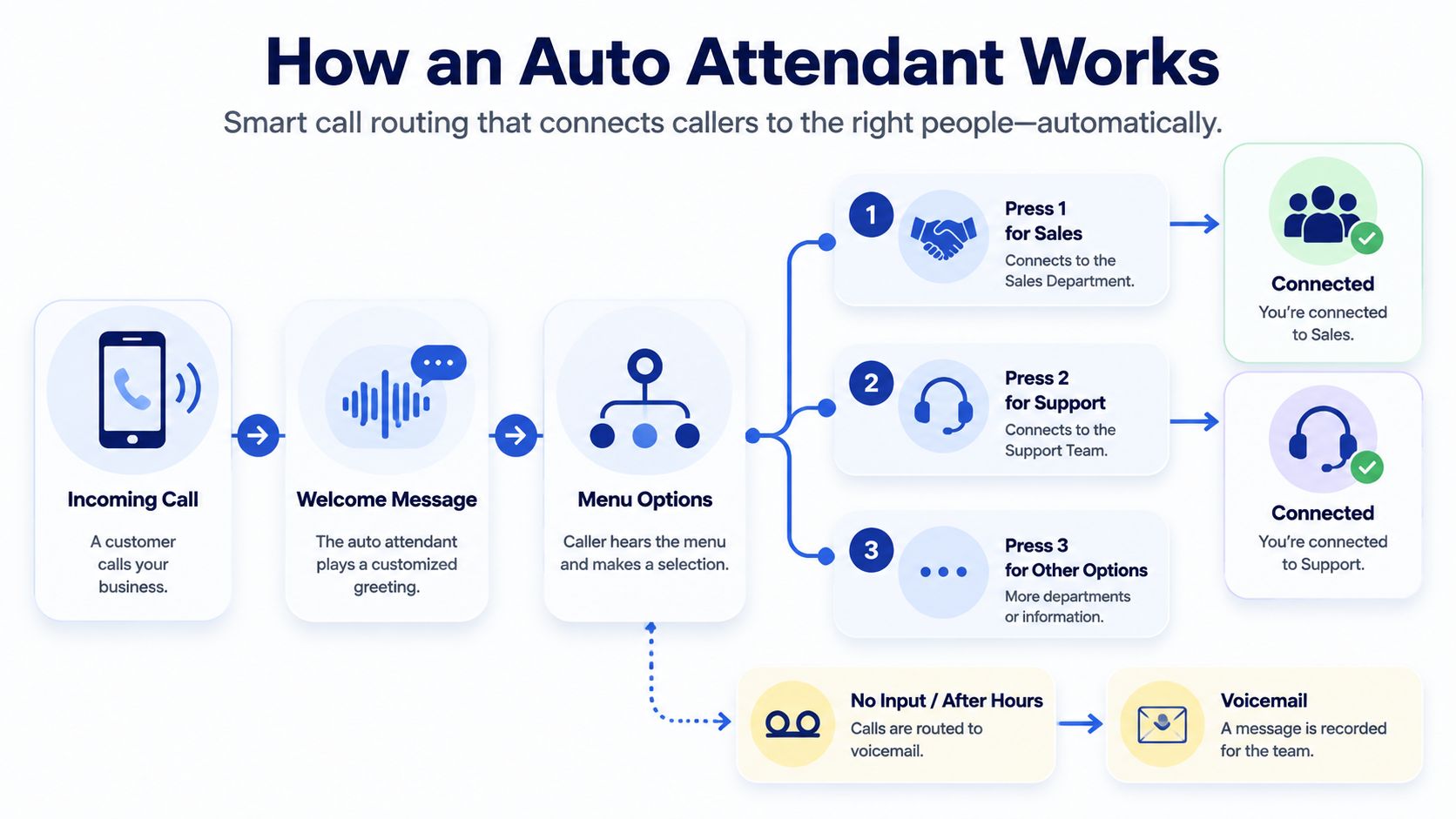
A basic flow works like this:
- Greeting: The system identifies the business and sets expectations.
- Primary menu: The caller selects sales, support, billing, reception, or another clear intent.
- Destination: The call reaches an extension, ring group, queue, voicemail box, or recording.
- Exception handling: Invalid input, silence, busy agents, and unanswered transfers trigger a defined fallback.
- Completion: The caller reaches a person, leaves a message, or receives useful information.
The flow follows the logic configured by the administrator. That predictability can reduce receptionist workload and improve first-contact routing when the menu remains shallow and explicit. Submenus help with specific support requests, but every extra layer increases the chance that callers lose context or abandon the call.
Routing should match the call type. Sales callers usually need a direct path to a person or sales queue. Support callers may benefit from issue-based choices, account lookup, or a callback option. After-hours callers need a clearly stated destination, such as on-call support, voicemail, or recorded instructions, rather than a menu that still promises unavailable departments.
For a closer explanation of how numbers, users, queues, and destinations connect, read this guide to what call routing means in business telephony.
Auto attendant versus IVR
The terms overlap, but they can describe different capabilities. A traditional auto attendant presents a static menu, such as “Press 1 for Sales.” A fuller interactive voice response system may support voice input, data lookups, caller identification, or task-specific interactions.
Voice recognition helps when callers need to describe an intent that does not fit neatly into a department label. Keypad input remains a reliable fallback in noisy environments and gives callers a familiar way to respond.
A hybrid design accepts speech or keypad input, then offers a clear human fallback when recognition fails or the request falls outside the configured flow. Teams handling WhatsApp conversations alongside voice calls can also use an AI call assistant for WhatsApp as another route for routine communication.
The following video provides a visual introduction to automated call routing:
Core Features That Drive Business Value
Feature value depends on the caller's next action. A sales prospect needs a fast route to a qualified person. A support caller may need a queue, self-service option, or callback. An after-hours caller may need on-call coverage or clear instructions. Build each path around that outcome, because a technically correct menu can still drive abandonment.
Time-of-day routing prevents the daytime menu from running after staff leave. During business hours, sales calls can go directly to the sales group, while support calls can enter a queue. After hours, route urgent requests to an on-call employee and send routine callers to a useful recording or voicemail that explains the callback process.
Queues and overflow rules control demand when several people share responsibility. A queue helps only when callers understand what will happen next. Set limits, announce the available options, and provide a defined path to voicemail, callback, or a human fallback. For sales, a short wait may protect a valuable opportunity. For support, a callback option can be less frustrating than indefinite hold music.
Directory and extension dialing work well for repeat callers who already know the employee or department they need. They should not replace an intent-based first menu for new prospects. A directory can also expose outdated names or extensions, so assign ownership for keeping employee records current.
Voice input and smarter routing help when callers describe varied needs, locations follow different rules, or the phone system connects activity with customer records. These capabilities require testing and governance. Recognition errors, stale employee data, and unclear escalation rules can add friction instead of removing it. Keep keypad input available, especially for noisy environments, and make the human fallback easy to reach.
| Feature | SMB Priority | Call Center Priority | Business Impact |
|---|---|---|---|
| Business-hours routing | High | High | Prevents closed-office menus from sending callers down invalid paths |
| Press 0 or live fallback | High | High | Gives callers an escape when the menu doesn't match their need |
| Queues and overflow | Medium to high | High | Controls shared demand and defines what happens when agents are busy |
| Directory dialing | Medium | Medium | Helps repeat callers reach known employees quickly |
| Voice recognition | Situational | High when intents vary | Supports natural input, but requires careful testing |
| Historical reporting | High | High | Shows whether routing decisions produce usable operational data |
Historical reporting belongs in the requirements discussion because it shows whether routing choices produce usable operational data. Microsoft documents auto attendants alongside call queues and historical reporting in its historical reporting documentation. Review available fields, retention, and access limits before designing a workflow around them.
Cloud deployment has expanded the category, but market size should not decide the purchase by itself. The automated attendant market overview reports estimates for market growth, cloud adoption, and software revenue. For an SMB, the practical evaluation is narrower: check administration, reporting, integrations, failover, and the number of callers likely to abandon each route. A polished greeting cannot compensate for a slow sales path, an unsupported after-hours request, or a support queue without an escape option.
Configuration Best Practices and Sample Scripts
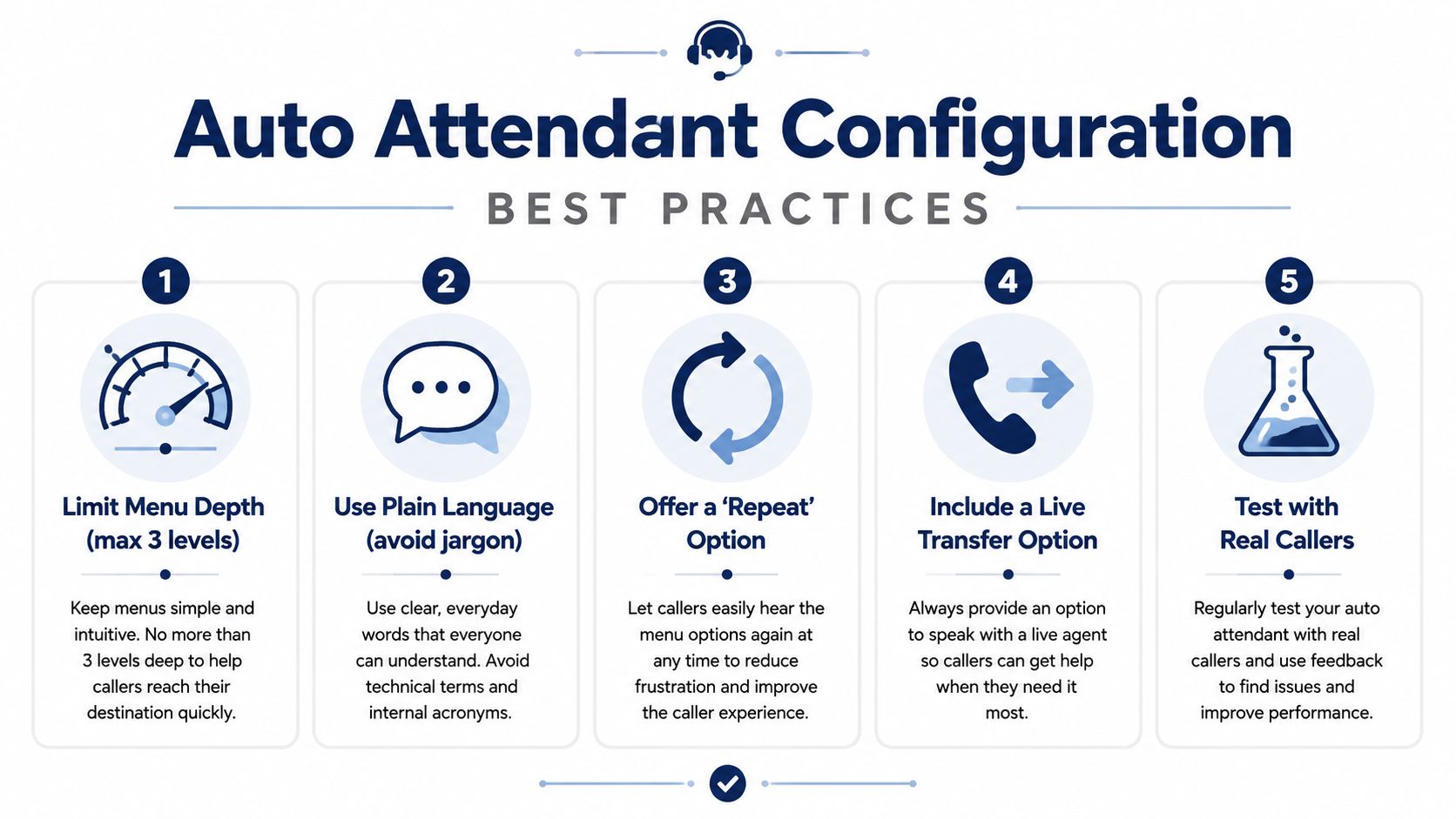
A shorter menu can still lose callers if its labels do not match their reason for calling. Start by listing caller intents, group only related requests, and remove choices that do not lead to a distinct action. Use language callers recognize, not internal department names.
Keep the opening menu to 3 options and never exceed 5. Include a route to a person, as recommended in the small-business auto attendant setup guidance. Announce that escape route early, then repeat it where callers may need help. A caller who cannot identify the right option should not have to wait through the entire recording.
Match the script to the call type
Sales-focused routing
“Thanks for calling Northstar Services. If you're calling about a new project or pricing, press 1. For existing customer support, press 2. For billing, press 3. To reach a team member, press 0.”
Sales callers need a quick path to someone who can qualify the opportunity. Send new prospects directly to sales or a suitable ring group. Avoid a long product-information submenu unless it answers a common question and prevents an unnecessary transfer.
Support-focused routing
“Thanks for calling Northstar Services. For technical support, press 1. To check an existing request, press 2. For billing questions, press 3. To repeat these options, press 9. To reach reception, press 0.”
Support callers may benefit from a focused queue, case lookup, or a recording for a common request. Self-service should remain optional. Complex or urgent issues need a clear transfer path, and a busy queue needs an understandable fallback.
After-hours routing
“You've reached Northstar Services outside normal business hours. For urgent service issues, press 1. To leave a message for the support team, press 2. For business hours and location information, press 3. To repeat these options, press 9.”
State what happens after each selection. If an urgent call reaches an on-call employee, say so. If the team returns messages later, set that expectation plainly instead of suggesting immediate service.
Multi-location routing
“For our Austin office, press 1. For our Dallas office, press 2. For sales serving any location, press 3. To reach a team member, press 0.”
Use a location menu only when offices have different destinations, hours, or services. Otherwise, route by intent first and let staff identify the correct office.
For adaptable wording and additional examples, use this auto attendant script resource. Test each script with people who did not design it. Ask where they expected each option to lead, then revise wording that causes hesitation.
Implementation Checklist for IT Teams
An auto attendant deployment rarely fails because someone can't create a greeting. It fails because the organization hasn't decided who owns the routing policy, what happens when staff are unavailable, or how the system behaves across locations and schedules.
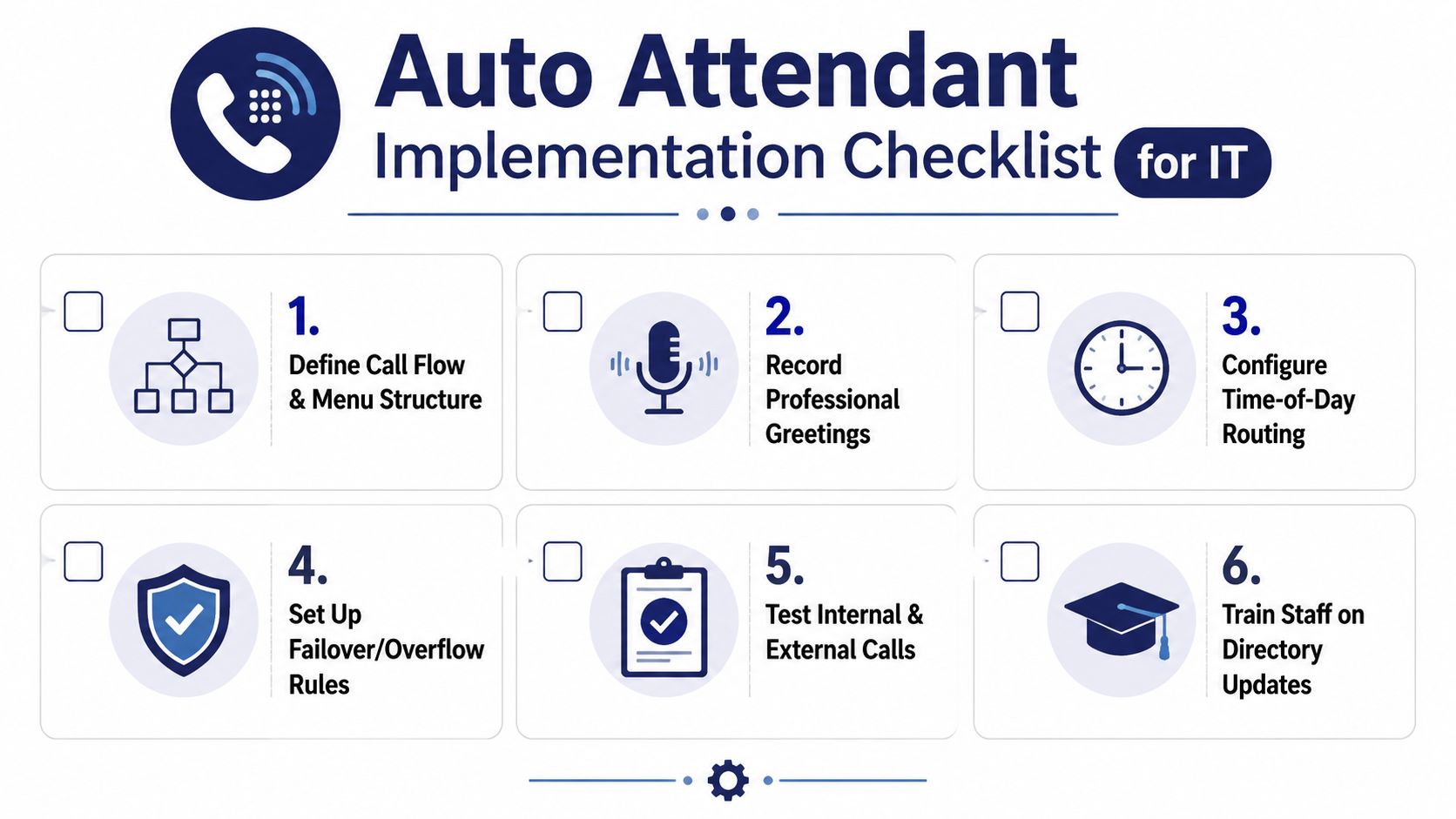
Before configuration
Document the call flow in plain language before opening the administration portal. Identify the main business number, department destinations, extensions, ring groups, queues, voicemail boxes, holidays, and after-hours contacts.
Assign an owner for each item. Someone should maintain employee names and extensions, someone should approve greetings, and someone should review routing reports. Without ownership, directories become stale and callers reach people who have changed roles or left the company.
During configuration
- Build the primary menu: Use caller-friendly labels such as sales, support, billing, or appointments.
- Create schedules: Configure open, closed, lunch, holiday, and location-specific rules where needed.
- Set overflow behavior: Decide whether unanswered calls move to another group, voicemail, an external number, or a live backup.
- Protect the fallback: Confirm that Press 0, operator routing, and invalid-input handling reach a monitored destination.
- Record professional greetings: Use a calm pace, plain language, and consistent pronunciation of names and departments.
- Connect business tools: If the platform supports CRM, helpdesk, mobile, or reporting integrations, define which data staff need.
Multi-location and hybrid teams need special attention. A remote employee may be available through a mobile app while the local office is closed. A regional holiday may affect one menu but not another. Test policies by location and schedule instead of assuming a single global calendar will work.
Before and after launch
Call from internal extensions, external mobile phones, and noisy environments. Test every valid selection, invalid input, silence, queue overflow, voicemail path, holiday schedule, and emergency route. Then ask staff to verify that names, extensions, and transfer destinations are correct.
For a broader deployment roadmap, consult this guide to business phone system installation. After launch, review failed transfers, abandoned calls, repeated inputs, and complaints. Make one controlled change at a time so your team can identify which adjustment improved or weakened the experience.
Common Pitfalls and How to Troubleshoot Them
Auto attendants rarely fail because a button is broken. They fail when a caller reaches the wrong next step, hears silence, or has no practical way to recover. A caller who selects support, hears the same menu again, and hangs up is experiencing a loop. Trace the call from the main number through every transfer, then assign a clear terminal destination for each failure state. Unanswered calls should end at a queue, voicemail, or monitored human fallback, not return to the opening menu.
Busy periods expose a different weakness. The menu may accept input correctly while the support queue grows, callers hear long silence gaps, and repeated selections increase abandonment. One contact-center study reported an average queue time of 47 seconds and a median of 31 seconds across 2.5 million IVR minutes. The figures appear in VCC's IVR study summary. Treat queue announcements, hold audio, and overflow behavior as part of the caller journey.
Diagnose the symptom, not the feature
Wrong-department calls usually indicate an intent problem before they indicate a routing-engine problem. “General inquiries” may make sense to staff but tell a caller little about where to go with an invoice, delivery question, or product issue. Name options by caller task, then test the wording with people unfamiliar with the business.
Sales, support, and after-hours calls also need different routing choices. Sales callers may need a quick live connection, while support callers may benefit from a queue with position updates or a callback option. After-hours callers need a clearly stated on-call path or a monitored voicemail. A single routing policy creates friction when urgency and staffing differ by call type.
Slow responses require a technical check. Review platform performance, prompt delivery, queue settings, and network conditions. Performance guidance notes that response latency can reach 5 to 8 seconds under heavy load, producing silence that encourages repeated inputs and hang-ups. Test with realistic concurrent calls rather than relying on one successful call.
After-hours failures often come from schedules. Verify the time zone, holiday calendar, daylight-saving behavior, on-call number, and voicemail notification process. An accurate menu still fails when an urgent caller reaches an unmonitored inbox.
Troubleshooting sequence: Reproduce the call, log each prompt and transfer, identify the first unexpected branch, then test the fix from an outside number.
Review complaints and recordings where lawful and appropriate. “I couldn't reach anyone” points to fallback or staffing friction. “I didn't know which option to choose” points to unclear intent mapping. Fix that branch instead of adding another menu layer.
Measuring Success with KPIs and ROI
A call deflection number can hide a failed caller experience. Someone who hears a recording but calls back has not completed the task. Measure the phone system against outcomes, then compare those outcomes by call type.
Track containment with a clear definition. A contained call should end with the caller receiving the requested information, leaving a usable message, or reaching the correct self-service path. First-contact routing accuracy shows whether the initial destination handled the request or transferred it elsewhere. Sales calls may justify a fast live connection, while support calls may need a queue, callback, or status update. After-hours calls need a monitored fallback. Their success criteria differ.
The metrics that expose friction
- Abandonment: Shows where callers leave before reaching a useful destination.
- Queue time: Reveals whether staffing and overflow rules match demand.
- Transfer rate: Highlights menus that route callers to the wrong team.
- First-call resolution: Connects routing quality with support effectiveness.
- Average handle time: Shows whether pre-routing gives agents enough context.
- Caller satisfaction: Captures frustration that call logs may miss.
- Fallback usage: Shows how often callers need reception, Press 0, voicemail, or another route.
Set a baseline before changing the flow. Compare the same call categories during comparable operating periods, then review recordings, transfer logs, and queue outcomes together. A shorter queue is not a win if callers abandon before entering it.
As noted earlier, Microsoft reports that call data is typically available within 30 minutes of completion. Reporting retention can also limit how far back your team can compare results for some government cloud tenants. Treat that retention window as an operational constraint when reviewing seasonal or location-specific behavior, and confirm the available history before changing your measurement plan.
ROI should include reduced manual transfer work, fewer misrouted calls, lower repeat-contact effort, and sales or support conversations that remain connected to the right team. Do not assign financial value to every deflected call. Count only outcomes supported by your records, then simplify or reroute the paths with high abandonment, repeated transfers, or frequent fallback use.
Choosing the Right Vendor for Your Needs
Vendor selection should begin with call-flow reality, not a feature brochure. A small office with one location may need a clear menu, mobile forwarding, voicemail, schedules, and simple administration. A contact center may require queue controls, overflow, reporting, skills-based routing, integrations, and governance across many teams.
Evaluate providers against the work your administrators will perform after launch:
| Evaluation area | Questions to ask |
|---|---|
| Configuration | Can staff edit greetings, schedules, destinations, and prompts without vendor intervention? |
| Routing | Can the system handle queues, ring groups, external numbers, voicemail, and human fallback? |
| Administration | Can you manage locations, roles, directories, and audit changes centrally? |
| Reporting | Can you inspect abandonment, transfers, queue behavior, and historical data at the level you need? |
| Resilience | What happens when an agent, location, device, or primary route is unavailable? |
| Integrations | Does it connect with the CRM, helpdesk, mobile apps, and collaboration tools your team already uses? |
| Support | Can you reach a person who understands call-flow troubleshooting? |
Standalone tool or cloud PBX
A standalone auto attendant may work when the business needs only basic inbound routing. An integrated cloud PBX makes more sense when the same platform must manage users, extensions, mobile workers, call recording, voicemail, queues, and reporting. The trade-off is administrative breadth. More capability can create more policy decisions, so ask the vendor to demonstrate a complete failure path rather than only the happy path.
Request a live demo using your own scenarios. Ask the representative to show a sales call, a support overflow, an after-hours emergency route, an unanswered transfer, a directory update, and a multi-location schedule. Also ask which capabilities are included, which require add-ons, how reporting is retained, and how support handles an outage.
For a broader buying review that includes VoIP system pricing and security tips, compare the full operating model rather than the advertised license alone. SnapDial is one cloud PBX option that combines auto attendant and IVR routing with web administration, mobile calling, voicemail transcription, call recording, queue management, and support for distributed teams. The right choice is the platform your staff can govern accurately and your callers can use effortlessly.
The practical standard is simple: callers should understand what to do, reach the right destination, and find a human fallback when automation doesn't fit. Before choosing a provider, map your real call types and make each vendor prove that flow in a working demo.
SnapDial helps small and mid-sized businesses configure cloud phone systems with auto attendant and IVR routing, mobile-ready calling, voicemail, queues, and web-based administration. Visit SnapDial to discuss a caller-friendly setup that fits your teams, locations, schedules, and fallback requirements.