
Your phones probably still work. That's part of the problem.
A lot of small and mid-sized businesses wait too long to replace an aging phone setup because the pain arrives gradually. Calls hit voicemail during lunch rushes. Remote staff can't see who already spoke with a customer. Managers pull reports from one system, recordings from another, and customer notes from somewhere else entirely. By the time leadership starts a serious call center software comparison, the underlying issue isn't just phone service. It's lost context, missed opportunities, and a team working harder than it should.
Early in the buying process, many owners focus on feature lists. That's understandable. Vendors make that easy. But in practice, the better question is simpler: which platform fits how your business operates, and which pricing model stays sensible as call volume, locations, and staff change?
| Platform | Pricing approach | Best fit | Common trade-off |
|---|---|---|---|
| Genesys Cloud CX | Per-user monthly tiers | Large enterprise operations | Broad capability, but can be costly and complex |
| NICE CXone | Per-user monthly tiers | Regulated and large-scale teams | Strong control, heavier implementation |
| Five9 | Per-user monthly tiers with add-ons | Established support and sales teams | AI and extras may change the total cost |
| Talkdesk | Per-user monthly tiers | Enterprise CX programs | Powerful, but not always simple for SMBs |
| Amazon Connect | Pay-as-you-go | Teams with variable usage and technical resources | Flexible billing, less predictable budgeting |
| RingCentral | Per-user monthly pricing | Businesses wanting unified communications plus contact center | Can require careful plan selection |
| Udesk | Per-user monthly tiers | Mid-market to enterprise global teams | Fit depends on workflow and support needs |
| Concurrent-call models such as 3CX-style pricing | Based on simultaneous usage | Businesses with many occasional users | Great for some patterns, poor fit for others |
Why Your Call Center Software Choice Matters More Than Ever
If your business has grown beyond a front-desk phone and a hunt group, your next system decision has revenue implications. The software now shapes how fast customers reach a person, how well agents resolve issues, and whether managers can spot trouble before complaints pile up.
That's one reason the market has moved well beyond basic telephony. The global contact center software market was valued at USD 63.88 billion in 2025 and is projected to grow to USD 77.82 billion, according to Fortune Business Insights on the contact center software market. The same report notes that buyers increasingly evaluate cloud systems on omnichannel communication, AI-driven analytics, and remote agent management, and that the category now spans modules such as IVR, automatic call distribution, call recording, reporting and analytics, dialer, and workforce optimization.
The upgrade is no longer just a telecom project
That shift matters for SMBs because the old buying logic no longer holds. A decade ago, many companies asked a narrow question: “How much for phones and voicemail?” Today the software often becomes part of the operating system for service, sales, and multi-location coordination.
A business owner replacing a PBX is rarely just replacing a PBX. They're trying to fix broken handoffs, reduce dropped inquiries, support hybrid work, and get one view of customer interactions. That's why a useful call center software comparison has to include workflow fit, not just line items on a brochure.
Practical rule: If two products appear similar in a demo, compare how each one handles your busiest hour, your newest employee, and your messiest customer handoff.
Cloud changed the buying criteria
Cloud delivery changed expectations. Teams now assume agents can work from home, supervisors can monitor performance without being onsite, and call flows can be adjusted without waiting for a telecom vendor to visit the office.
That creates opportunity, but it also creates confusion. More vendors can serve SMBs now, and many of them sound alike at first glance. The way through that noise is to treat the decision as part of a broader operating plan, not an isolated software purchase. If you're mapping technology changes across communications, support, and internal processes, Networking2000's digital roadmap is a useful companion resource because it frames phone system upgrades inside wider business transformation decisions.
Why “best features” is the wrong target
The most expensive mistake I see is buying for hypothetical future needs while ignoring daily operating realities. A ten-person team ends up with enterprise complexity it never uses. A fast-growing service company picks a cheap entry plan, then gets boxed in when queues, reporting, and mobile support become essential.
The strongest choice is usually the platform that your team can run well, your managers can measure clearly, and your finance team can predict confidently.
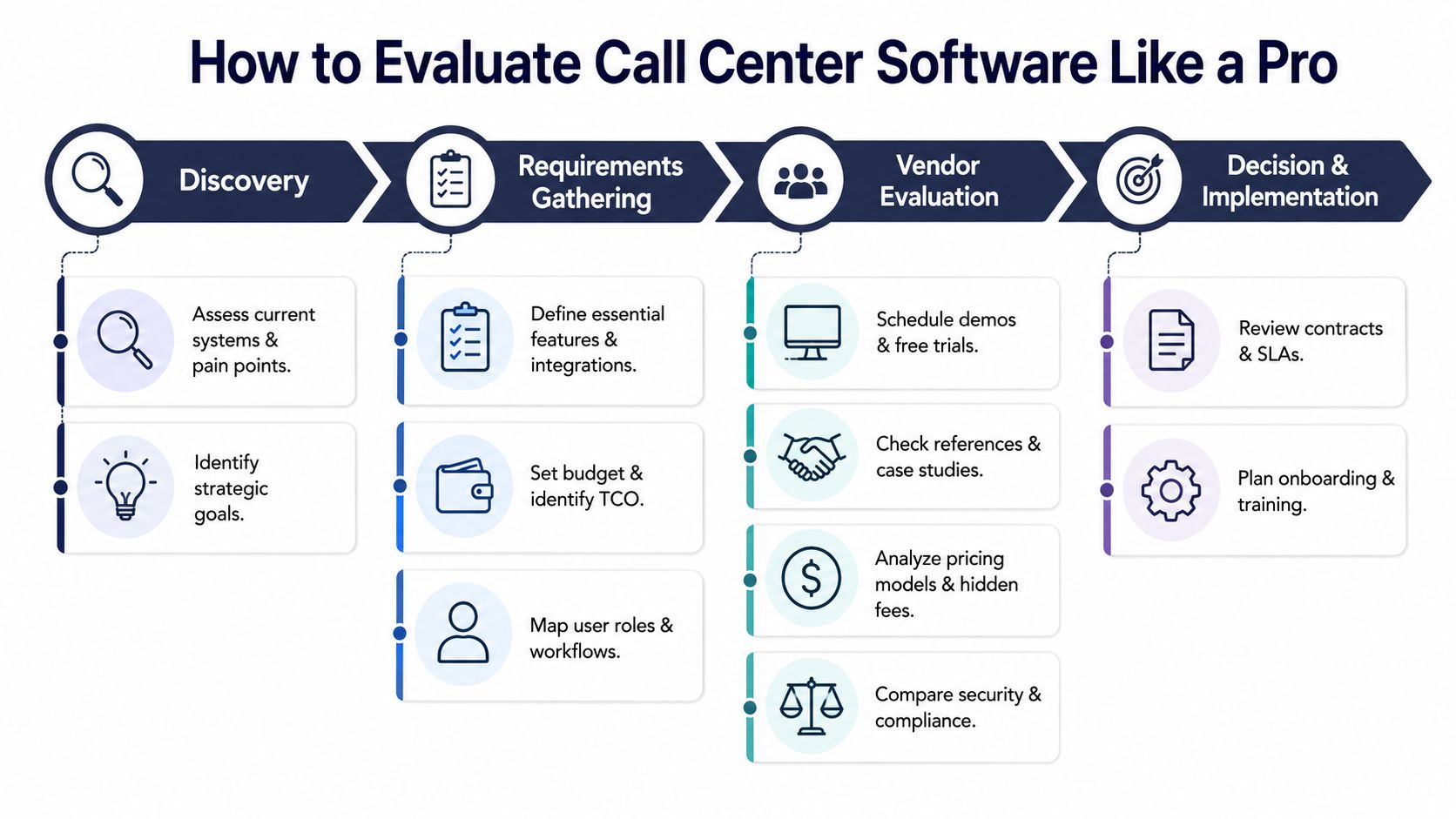
How to Evaluate Call Center Software Like a Pro
A proper call center software comparison starts with performance, not branding. Before you worry about AI summaries or polished dashboards, ask whether the platform helps your team answer faster, route smarter, and resolve issues cleanly.
Start with the KPI bundle that actually matters
For software comparison, the standard KPI set is service level, average speed to answer, abandonment rate, average handle time, and first call resolution, as outlined in Abstrakt's call center efficiency benchmark guide. Those metrics tell you whether the system supports responsiveness, queue health, efficiency, and quality at the same time.
For practical benchmarking, use these yardsticks from CloudTalk's benchmarking guide:
- Service level: 80% of calls answered in 20 seconds
- Average speed to answer: around 28 seconds
- First call resolution: around 70% to 75%
- Best-in-class direction: sub-15-second waits and 80%+ FCR
Those numbers don't guarantee success by themselves. They do give you a grounded way to test vendor claims.
What to ask in demos
Don't let the vendor drive the whole meeting. Bring real scenarios and make them show the workflow.
Ask them to demonstrate:
- Peak-hour routing: How the system behaves when multiple queues fill at once.
- Agent context: What an agent sees when a repeat caller reaches the team.
- Supervisor visibility: Whether managers can spot queue trouble in real time.
- Recovery options: Callback handling, overflow routing, and after-hours logic.
- Reporting depth: Whether you can measure the KPI bundle without exporting everything into spreadsheets.
A polished demo can hide operational friction. If the rep clicks through a canned environment, push for a practical walk-through using your call flows.
Don't ask, “Do you have reporting?” Ask, “Show me how my supervisor would identify why our abandonment rate spiked on Monday morning.”
Score the platform on fit, not just features
A simple evaluation sheet works better than a giant checklist. I'd score each vendor on four areas:
Operational fit
Does it match your call patterns, staffing model, and escalation paths?Administrative simplicity
Can a manager or office admin update routing, users, and schedules without opening a support ticket?Performance visibility
Can you track service level, ASA, abandonment, AHT, and FCR clearly?Commercial fit
Does the pricing model still make sense when your team grows, shifts remote, or adds occasional users?
Watch for the quiet failure mode
Some systems look strong in procurement and weak in daily use. The usual signs are overcomplicated interfaces, fragmented reporting, or workflows that require too many clicks for routine tasks.
That's why trials matter. Don't use a trial to confirm that phones ring. Use it to see whether supervisors, agents, and administrators can run the business inside the platform.
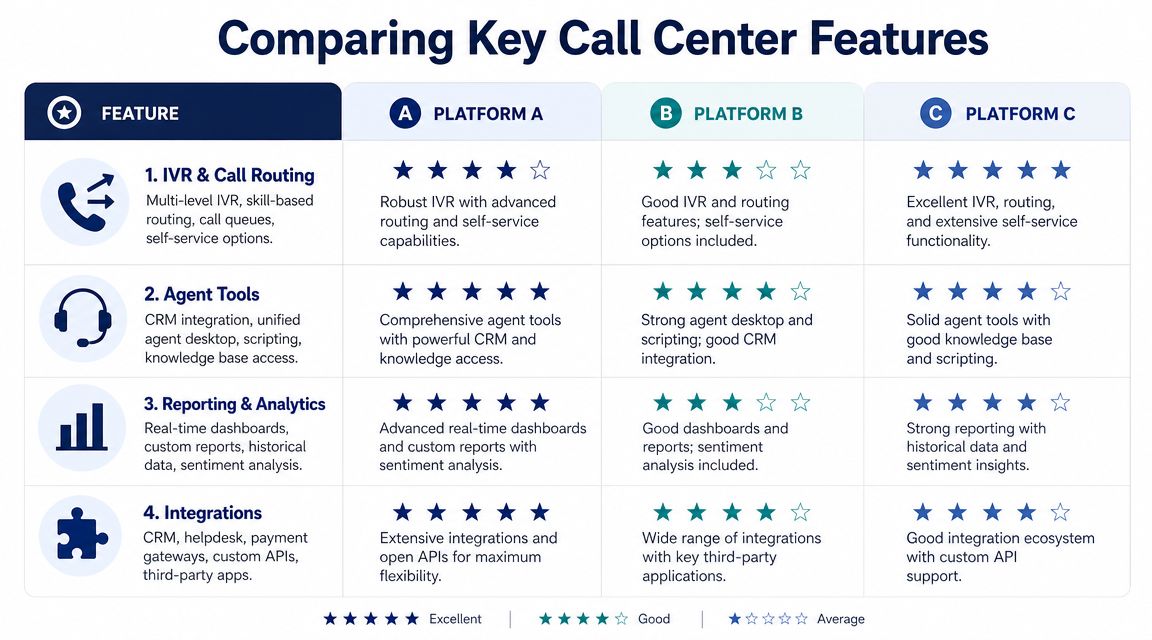
Comparing Key Features Across Leading Platforms
Features matter. The problem is that many comparison pages treat every feature as binary. Either the platform has IVR or it doesn't. Has analytics or it doesn't. Has CRM integration or it doesn't.
Real buying decisions aren't that simple.
Three broad platform types show up again and again in SMB evaluations:
| Platform type | Strength | Weak spot | Best for |
|---|---|---|---|
| Enterprise suite such as Genesys-style platforms | Deep customization and broad functionality | More setup, more administration, more cost pressure | Complex environments with dedicated support teams |
| Pay-as-you-go platform such as Amazon Connect-style tools | Flexible usage billing and developer control | Requires more technical ownership | Teams with variable demand or in-house technical resources |
| SMB-friendly unified platform | Faster rollout and simpler administration | May be less customizable at the far enterprise edge | Growing businesses that need practical capability fast |
IVR and call routing
Here, many systems separate quickly.
A basic platform can route by time of day, department, or simple queue order. That's enough for a lot of smaller teams. A more advanced system can support skills-based routing, layered queue logic, overflow paths, and self-service options that reduce agent load.
What works:
- Simple routing for simple teams: If your business has one support queue and one sales queue, keep it readable.
- Skills-based routing for mixed teams: If product support, billing, and service scheduling all land in one environment, smarter routing pays off.
- Queue callback for busy periods: Customers often prefer a callback to waiting on hold.
What doesn't:
- Overbuilt IVRs: Long menus create caller drop-off and frustrate repeat customers.
- Routing logic nobody can manage: If only one outside consultant understands the call flow, changes become risky.
Reporting and analytics
Reporting should help managers make decisions during the day, not just explain problems after the fact. The best systems make queue health, agent status, and trend lines obvious. Weak systems bury insight behind exports and static reports.
If reporting is a key buying factor, look closely at call center analytics software capabilities such as real-time dashboards, queue visibility, and historical reporting depth. The difference between “we have reports” and “our supervisor can act on reports” is large.
A practical addition here is quality monitoring. If your team is trying to coach consistency, improve customer satisfaction with QA offers a good framework for how review processes connect to better service outcomes.
Here's a useful explainer before you compare vendors in detail:
CRM and helpdesk integrations
This is another area where “yes” can mean very different things.
Some platforms provide a clean screen pop, automatic logging, and a unified workspace that keeps agents inside one pane of glass. Others technically integrate, but the user still bounces between browser tabs and duplicate records. That hurts handle time and increases errors.
A native integration that agents actually use is worth more than a long connector list that creates extra steps.
Agent management tools
Managers often focus on what customers hear. They should also focus on what agents live inside all day.
Useful agent tools include:
- Unified desktops: Less app switching, less confusion.
- Knowledge access: Agents need answers in reach, not in a separate maze.
- Call recording and review tools: Essential for coaching and compliance workflows.
- Mobile and remote flexibility: Critical when hybrid staffing becomes normal.
When I compare platforms for SMBs, I put less weight on whether the feature exists and more weight on whether a normal team can use it effectively without constant admin help.
Understanding Pricing and Calculating True ROI
Pricing is where many SMB software decisions go sideways. Buyers see one monthly number, compare it to another monthly number, and assume they're close to the full picture. They usually aren't.

A 2026 comparison from UdeskGlobal's expert review of contact center platforms shows just how wide the range is. Udesk is listed at $25 to $40 per user/month, Genesys Cloud CX at $75 to $240, NICE CXone at $71 to $209, Five9 at $119 to $159+, and Talkdesk at $85 to $225+. The same comparison notes that RingCentral starts at $65+ and Amazon Connect uses pay-as-you-go pricing.
Headline price is only step one
Those numbers are useful, but they don't answer the most important question: what will this cost your business once you're live?
As Dialpad's guide to contact center software points out, software comparisons often miss how concurrency-based versus seat-based pricing, international calling, and paid AI add-ons can materially change the total cost. That's the part many buyers underestimate.
For a lot of SMBs, the choice isn't “Which platform is cheapest?” It's “Which pricing model matches how we work?”
The three pricing models that matter
| Pricing model | How it works | Usually works well for | Risk to watch |
|---|---|---|---|
| Per-seat pricing | Fixed monthly charge per named user | Stable teams with predictable staffing | Paying for inactive or occasional users |
| Concurrency-based pricing | Cost tied to simultaneous usage | Many users with staggered call patterns | Can get tight during unexpected peaks |
| Pay-as-you-go | Charges tied to usage | Seasonal or highly variable demand | Harder to forecast monthly spend |
A team with steady daily staffing often prefers the clarity of per-seat billing. A business with lots of occasional users may do better with concurrency pricing. A company with irregular spikes may like usage-based billing, but finance teams often dislike the unpredictability.
Build your ROI around operating reality
When estimating ROI, I'd work through these questions before signing anything:
- Who uses the system every day? Named agents, part-timers, managers, overflow staff.
- When do calls peak? A pricing model can look cheap until all departments get busy at once.
- What's included? International calling, recordings, analytics, QA tools, AI features, support.
- What extra admin work appears? Some cheap systems push more burden onto your internal team.
- What does a missed call cost you operationally? Not as a spreadsheet fantasy. As a real service or sales interruption.
If you're comparing platforms built for queue handling, reporting, and team performance, call center management software gives a clearer picture of what should be included in a mature environment.
Cost check: A predictable bill with the right features often produces better value than a low entry price that grows every time you add reporting, AI, support, or international coverage.
Which Software Fits Your Business Type
The easiest way to get a call center software comparison wrong is to shop as if every business needs the same system. They don't. The right fit changes based on staffing pattern, customer expectations, and how complicated the daily workflow is.
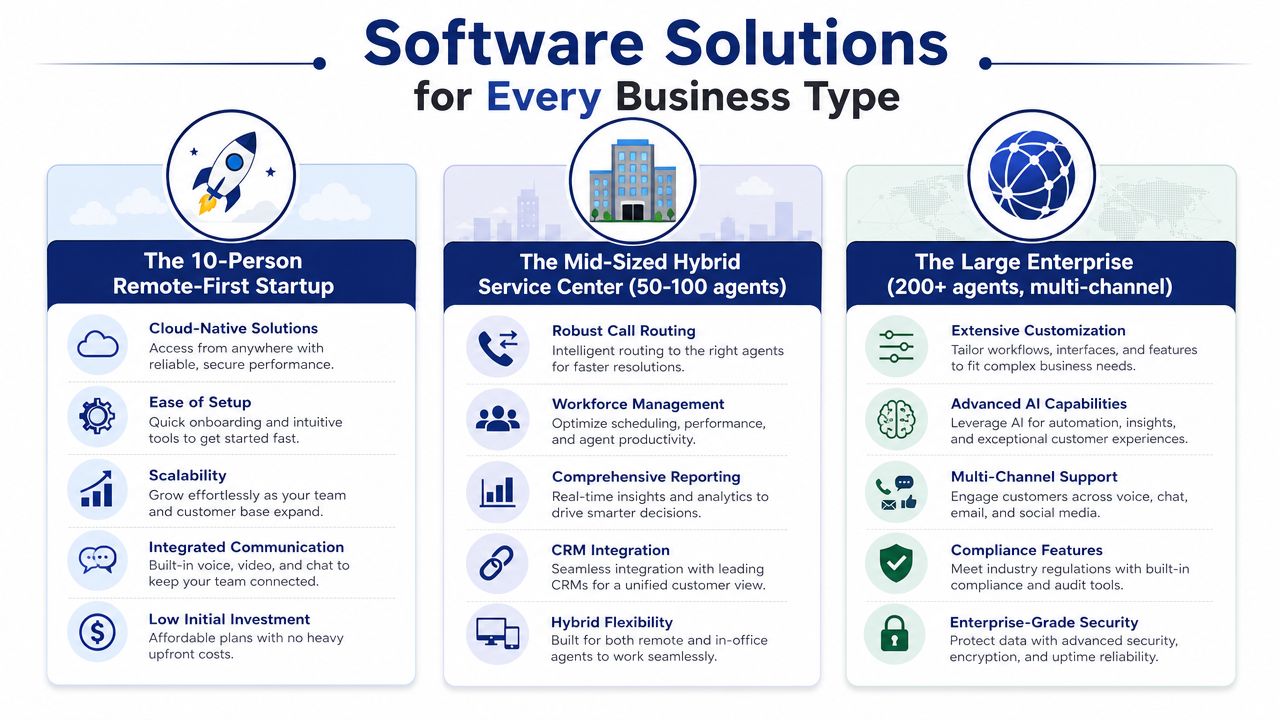
The 10-person remote-first startup
This team usually needs speed, simplicity, and flexibility. Founders and early managers don't want a heavy implementation project. They want calls answered, mobile access that works, basic routing, and enough reporting to know whether customers are slipping through the cracks.
The biggest mistake here is buying an enterprise suite because it looks impressive in a demo. That often creates admin overhead the team can't support. A cloud-native system with straightforward setup, clean call routing, and easy user management usually wins.
Good fit:
- Fast deployment
- Mobile and desktop parity
- Simple reporting
- Low-friction administration
Poor fit:
- Complex queue design that nobody maintains
- Add-on pricing for basics
- Tooling that assumes a full-time telecom admin
The five-location retail or service business
This business has a different problem. It needs consistency across locations without forcing every site to improvise. Calls must route correctly by store, department, or service area, and managers need enough visibility to know where customer experience is breaking.
Here, the winning platform usually balances central control with local flexibility. Auto attendants, business-hours routing, shared visibility, and easy call handling across multiple sites become more important than advanced enterprise customization.
That's also where the line between a traditional phone system and a richer customer operation starts to blur. If you're weighing that distinction, this guide on call center vs contact center is a practical way to frame what level of complexity your business needs.
The dedicated support team with heavier call volume
A business with a larger support group has more operational pressure. Supervisors need real queue visibility. Routing logic matters more. Call recording, callback, reporting depth, and agent management tools become central, not optional.
This is often where buyers should seriously compare stronger contact center platforms. But they still need discipline. More capability is useful only if the team has the process maturity to use it.
A capable support environment should make it easier to:
- Manage queue pressure: Supervisors need real-time visibility and overflow options.
- Coach agents consistently: Recordings and review workflows matter.
- Preserve customer context: Repeat callers shouldn't have to start over.
- Support growth: New agents and new queues shouldn't require a redesign every quarter.
A good fit feels boring in the best way. Calls route correctly, managers can see what's happening, and the team doesn't need workarounds.
Match the software to the operating model
When businesses choose well, the software aligns with the shape of the operation. Startups need speed. Multi-location businesses need coordination. Heavier support teams need control and visibility. The software category matters less than the fit between your workflow and the system's design.
Why SnapDial is the Smart Choice for Growing Businesses
For growing businesses, the hardest part of this decision usually isn't finding software with enough features. It's finding a platform that gives you the right level of capability without forcing enterprise complexity, unpredictable billing, or a painful migration.
That's where SnapDial stands out.
It solves the SMB version of the problem
Most SMBs replacing a legacy setup need three things at once. They need reliability for day-to-day calling, call routing that works across real business scenarios, and a way to support office, remote, and mobile users without making administration harder. SnapDial is designed around that operating reality.
Its platform combines hosted VoIP and Cloud PBX simplicity with the queue, routing, recording, and reporting features that many growing businesses start needing once basic phone service stops being enough.
The commercial model is easier to live with
A lot of platforms look affordable until the contract expands. Add-ons appear. Feature tiers shift. Support quality changes. Forecasting gets messy.
SnapDial's all-inclusive, predictable pricing addresses the issue at the source. That matters for SMBs because budgeting discipline matters just as much as technical fit. Leaders can plan around a stable model instead of re-learning the bill every time the team grows or needs another operational feature.
Implementation support matters more than brochures admit
Migration is where many projects create avoidable disruption. Number porting, call flow setup, device rollout, user onboarding, and continuity planning all matter. SnapDial's white-glove setup and migration approach is valuable because it removes a big part of the burden from internal teams that don't have telecom specialists sitting around.
That's not a luxury. For many SMBs, it's the difference between a controlled upgrade and a stressful cutover.
It gives growing companies room to mature
SnapDial also fits the middle ground that many vendors miss. It's not a bare-bones phone product, and it's not an oversized enterprise stack built for a dedicated contact center engineering team. It gives businesses room to improve routing, reporting, queue handling, mobile access, and administration as they grow.
For companies that want one communications foundation they can manage, that balance is hard to beat.
Common Questions About Choosing Call Center Software
What's the difference between a cloud PBX and call center software
A cloud PBX handles core business telephony such as extensions, auto attendants, voicemail, and call routing. Call center software adds queue management, reporting, supervisor visibility, call recording workflows, and tools built for teams handling structured customer interactions at scale.
A lot of SMBs don't need a massive enterprise contact center. They need a business phone platform that also covers queue handling, reporting, and customer-facing workflows well. That middle ground is often the practical sweet spot.
How disruptive is migration
It depends on the provider and the planning discipline. Migrations go smoothly when number porting, call flows, user setup, and training are handled in sequence with clear ownership. They go badly when businesses treat the project like a simple license swap.
The risk isn't just downtime. It's confusion during the first week after go-live. Good migration support reduces both technical issues and user frustration.
Do I need to buy all new phones
Not always. Some businesses move heavily toward softphones and mobile apps. Others still benefit from desk phones in reception, shared workspaces, service counters, and executive offices.
The right answer depends on how your staff work. A provider that can support both modern apps and a curated hardware approach usually gives you more flexibility than one that pushes everything into a single device model.
If you're replacing an outdated phone system and want a platform built for real-world SMB operations, take a close look at SnapDial. It combines predictable pricing, white-glove setup, strong call routing, and practical call center capabilities without the usual enterprise headaches.