
You know the moment when the front desk is already on hold with one customer, a sales rep is answering support calls on a personal mobile, and nobody can tell you how many callers gave up before reaching a human. That's the point where a basic phone setup stops being “good enough” and starts costing you business.
Most SMBs don't hit this problem because they did something wrong. They hit it because they grew. More locations, more products, more service requests, more after-hours calls, more handoffs. The old setup was built to ring phones. It wasn't built to manage demand, track outcomes, or give managers any control over what happens between “incoming call” and “issue resolved.”
Why Your Business Needs More Than a Phone Line
A customer calls with a billing problem. The first person who answers cannot help, so the call gets transferred. Then it gets parked. Then it goes to voicemail because the billing specialist is already on another call. From the customer's side, your business sounds disorganized. From your side, it feels like a busy day. Those are not the same thing.
A standard business phone system handles calls. It does not manage demand. Once volume increases across locations, departments, or service lines, the gap shows up fast in missed calls, longer handle times, repeat contacts, and staff pulled away from revenue-producing work.
A key issue is control. Owners and managers need to see what is happening inside the queue, which call types are backing up, which employees are absorbing the most interruptions, and where customers are getting stuck. Call center support software gives you that operating layer.
Growth exposes process problems your phone system cannot fix
Small teams can get by on tribal knowledge for a while. The office manager knows who handles refunds. The dispatcher knows which tech can calm down an upset customer. The owner jumps in when the phones light up. That system works until call volume becomes inconsistent, staffing changes, or a second location starts handling calls differently from the first.
At that point, the costs stop being abstract:
- Calls get missed or abandoned: Customers hang up instead of waiting.
- Good employees become switchboard operators: Sales, admin, and service staff lose time to call interruptions.
- Transfers go up: Customers repeat the same issue to multiple people.
- Managers are left guessing: Complaints surface, but there is no reliable record of where the breakdown started.
This is why support software matters for SMBs. It turns ad hoc call handling into a process you can measure and improve.
This is an operations decision, not just a telecom purchase
If you're also rethinking the physical setup, the benefits of call center office cubicles are worth reviewing because noise control, supervision, and agent focus still affect answer rates and call quality.
For teams replacing an older PBX, it also helps to understand how a cloud phone system works before comparing contact center platforms. The phone system carries the call. The support platform decides how that call gets routed, tracked, prioritized, and resolved.
A common mistake is treating support software like a nicer phone menu. It is the system that decides how customer demand gets handled.
That shift is one reason the category keeps growing. Giva's industry summary estimates the call center software market at more than USD 41.7 billion in 2026, with projected growth of 21.9% annually through 2033. For an SMB buyer, that does not mean you need the biggest platform on the market. It means vendors are investing heavily, feature sets are expanding, and the right purchase should be judged by business results such as lower abandonment, faster response times, and better agent utilization.
What Is Call Center Software Really
Monday at 9:07 a.m., three callers are waiting, one agent is asking who should take a warranty issue, and a manager is walking the floor trying to sort out a billing complaint that already bounced twice. That is the point of this software. It gives your team a defined way to handle demand when call volume, priorities, and staffing do not line up neatly.
A phone system carries the call. Call center support software controls what happens after the call hits your business. It routes the interaction, applies priority rules, shows customer context, records the conversation, and logs what happened so supervisors can fix recurring problems instead of guessing.
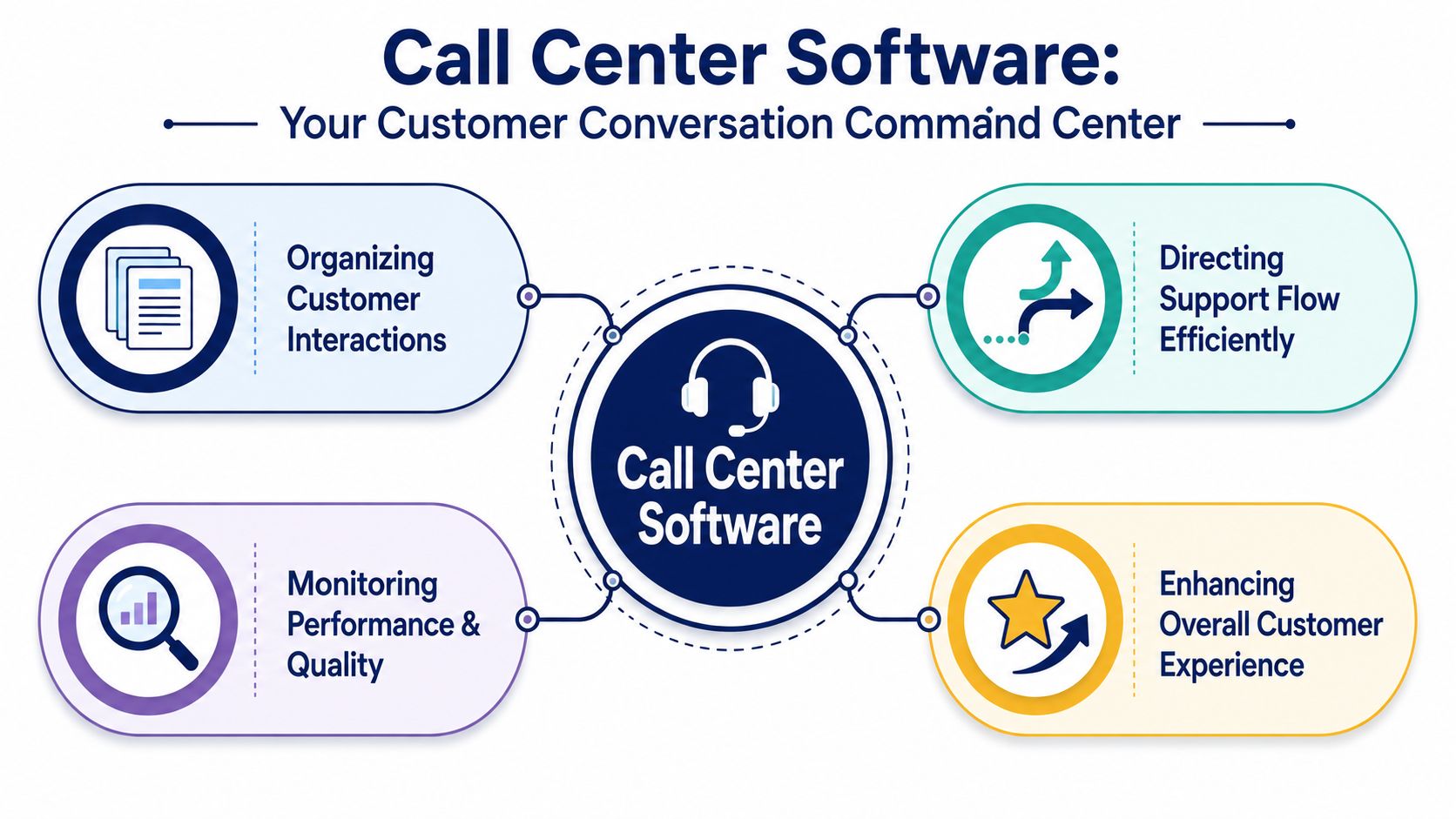
The software sits between the customer and your team
When a customer calls, the platform applies rules your business has chosen ahead of time. It can send a service request to dispatch, move a payment question to billing, prioritize high-value accounts, or present the agent with order history before hello. For an SMB, that matters because small teams cannot afford wasted touches. Every transfer, repeated explanation, and manual lookup adds cost.
This is also where the difference between features and results becomes clear. Routing rules are not just a technical setup choice. They affect first-call resolution, average handle time, abandonment rate, and how many calls each agent can handle in a shift.
Good software turns tribal knowledge into process.
Without that process, performance depends too heavily on who happens to answer first, who remembers the workaround, or which manager is available to step in.
What it is, in practical terms
The easiest way to judge the category is to separate basic calling from support operations.
| Tool | What it does |
|---|---|
| Business phone system | Provides calling, extensions, voicemail, and basic call handling |
| Call center support software | Manages queues, routing, performance, customer context, and service outcomes |
That distinction matters during software selection. A business phone system can be enough for a low-volume office where every call goes to the same few people. It stops being enough when you need queue management, service rules, reporting by team, or visibility into why customers are waiting, transferring, or calling back.
The platform's core function
A useful platform does four jobs well:
- Standardize the workflow: Calls are handled according to rules, service levels, and queue logic instead of individual habit.
- Keep context attached to the interaction: Agents see the customer record, prior contact history, or ticket details without asking the caller to start over.
- Show where the operation is breaking down: Supervisors can spot long holds, repeat transfers, uneven workloads, and unanswered queues.
- Support accountability: Recordings, timestamps, and reporting make coaching, QA reviews, and staffing decisions much easier.
There is a trade-off here. More rules and automation create more consistency, but they also require discipline to set up and maintain. A poorly configured platform can send calls to the wrong queue faster than a receptionist ever could. For SMBs, the best setup is usually simple at first: a few clear queues, sensible priorities, basic reporting, and workflows your team will follow.
Practical rule: If service quality changes from one employee to the next, your operation is still running on individual effort instead of system design.
That is what call center software really is. It is the operating layer that turns inbound demand into a process you can measure, manage, and improve.
Core Features Every Support Team Needs
Most feature lists are too abstract. Owners don't buy “ACD” because they love acronyms. They buy it because customers are getting transferred too much and nobody can tell which team should answer first.
The best way to judge core features is to ask one question. What headache does this remove on Monday morning?
Routing that stops the extension roulette
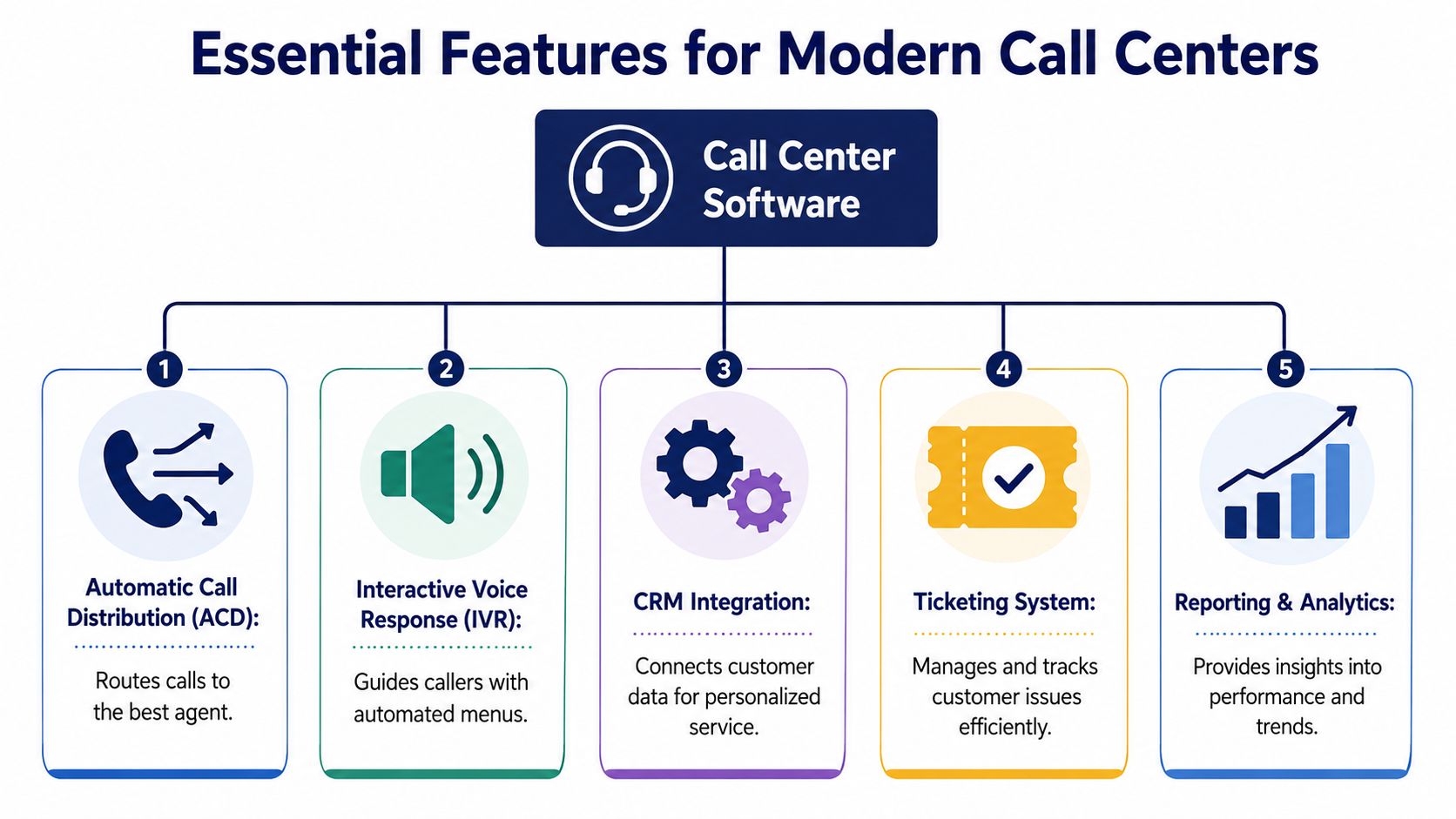
Modern platforms are built around a routing-and-analytics core. ACD and IVR classify interactions, while CTI pushes customer data to the agent's screen before pickup, reducing handle time and eliminating manual lookup steps, as described in Nextiva's overview of contact center architecture.
That sounds technical, but the business effect is simple.
Before, a caller reaches the wrong person, gets placed on hold, gets transferred, explains the issue again, and starts the interaction irritated.
After, the system uses rules to send the caller to the best available person with the right context already on screen.
Four foundational tools and the problems they solve
Automatic Call Distribution
ACD is intelligent matchmaking. It routes calls by skill, queue, availability, or business rules. If your service desk and billing line both ring the same group, ACD fixes that mess.
Interactive Voice Response
IVR acts like a digital receptionist. It qualifies intent before a human gets involved. Used well, it saves agent time and gets callers where they need to go faster. Used badly, it traps callers in menu hell. Keep it short and purposeful.
Call Recording
Recording is a quality and accountability tool. It helps with coaching, dispute review, compliance needs, and spotting broken processes. If the same misunderstanding keeps happening, recordings usually show whether the issue is agent behavior, unclear policy, or bad routing.
Computer Telephony Integration
CTI is what makes the agent look prepared. Customer data appears when the call arrives, so the agent doesn't waste the first minute asking for information that should already be visible.
What works and what fails
Here's the trade-off many SMBs learn the hard way:
| Feature | Works when | Fails when |
|---|---|---|
| IVR | Menus are short and map to real departments | Every edge case gets buried under too many options |
| ACD | Skills and queue priorities are maintained | Everyone gets dumped into one giant pool |
| Recording | Managers review calls for coaching | Files are stored but never used |
| CTI | CRM and customer records are clean | Agents see stale or incomplete records |
Don't ignore two practical items
A lot of platforms focus on routing, but support teams also need the basics around the call:
- CRM integration: Agents need customer history without switching tabs all day.
- Ticketing workflow: If the issue can't be solved immediately, ownership has to persist after the call ends.
A support queue breaks down when the phone system and the customer record live in separate worlds. Agents waste time toggling, customers repeat details, and managers can't trace what happened.
For most SMBs, these features aren't “advanced.” They're the minimum set required to stop calls from turning into expensive interruptions.
Advanced Capabilities for Modern Teams
Once the foundation is stable, the next challenge is scale. Not scale in the enterprise sense. Scale in the SMB sense. More locations, more channels, more remote staff, more complexity than your supervisors can manage by walking the floor.
That's where advanced capabilities matter. Not because they sound modern, but because they help a lean team maintain standards when support no longer happens in one room on one channel.
Omnichannel only helps if you govern it
Voice is still central for many businesses, but it's rarely the only channel anymore. Customers expect chat, SMS, email, and sometimes social messaging. The software can unify those streams. The harder part is deciding who owns them and how context carries across each one.
According to Salesforce's call center software guide, remote and hybrid teams now rely on features like real-time AI summaries and conversational insights, but leaders still need a plan to govern those channels without creating tool sprawl or overwhelming agents.
That warning is important. Adding channels without changing management habits creates a hidden cost. Every new channel adds queue rules, training needs, quality review work, and reporting complexity.
AI is useful when it removes friction
There's a lot of noise around AI in contact centers. The practical uses are narrower and more valuable than most sales demos suggest.
Useful examples include:
- Real-time summaries: Agents don't have to reconstruct every interaction manually.
- Conversation insights: Supervisors can spot recurring issues, handoff failures, or coaching needs faster.
- Routing recommendations: The system flags queue patterns that suggest you need different staffing or skills coverage.
If you're evaluating automation, it helps to understand where AI voice agents fit and where they don't. They can handle routine intake and common questions well. They usually struggle when your process is full of exceptions, policy judgment, or emotionally sensitive conversations.
Workforce management is what keeps remote teams from drifting
In an office, a supervisor can hear queue pressure building. In a remote setup, that signal disappears. You need software to replace what physical proximity used to tell you.
A disciplined team uses advanced tools to manage three things:
Coverage
Not just who is scheduled, but whether the right skills are scheduled when demand hits.
Quality
Reviews, recordings, summaries, and coaching loops have to stay active across every channel.
Context
A customer who starts on chat and moves to voice shouldn't restart the story from scratch.
More channels don't automatically mean better service. They often mean more fragmented service unless one system governs the journey.
The strongest platforms support omnichannel work without forcing agents into five different applications. That's the line to watch. If “advanced” features create more tabs, more handoffs, and more admin work, they're not helping.
Measuring Success with the Right KPIs
Most buying decisions go sideways when a team demos queue dashboards, hears about AI summaries, sees recording and routing rules, and then signs off because the platform “has a lot of features.”
Features don't prove return. Outcomes do.
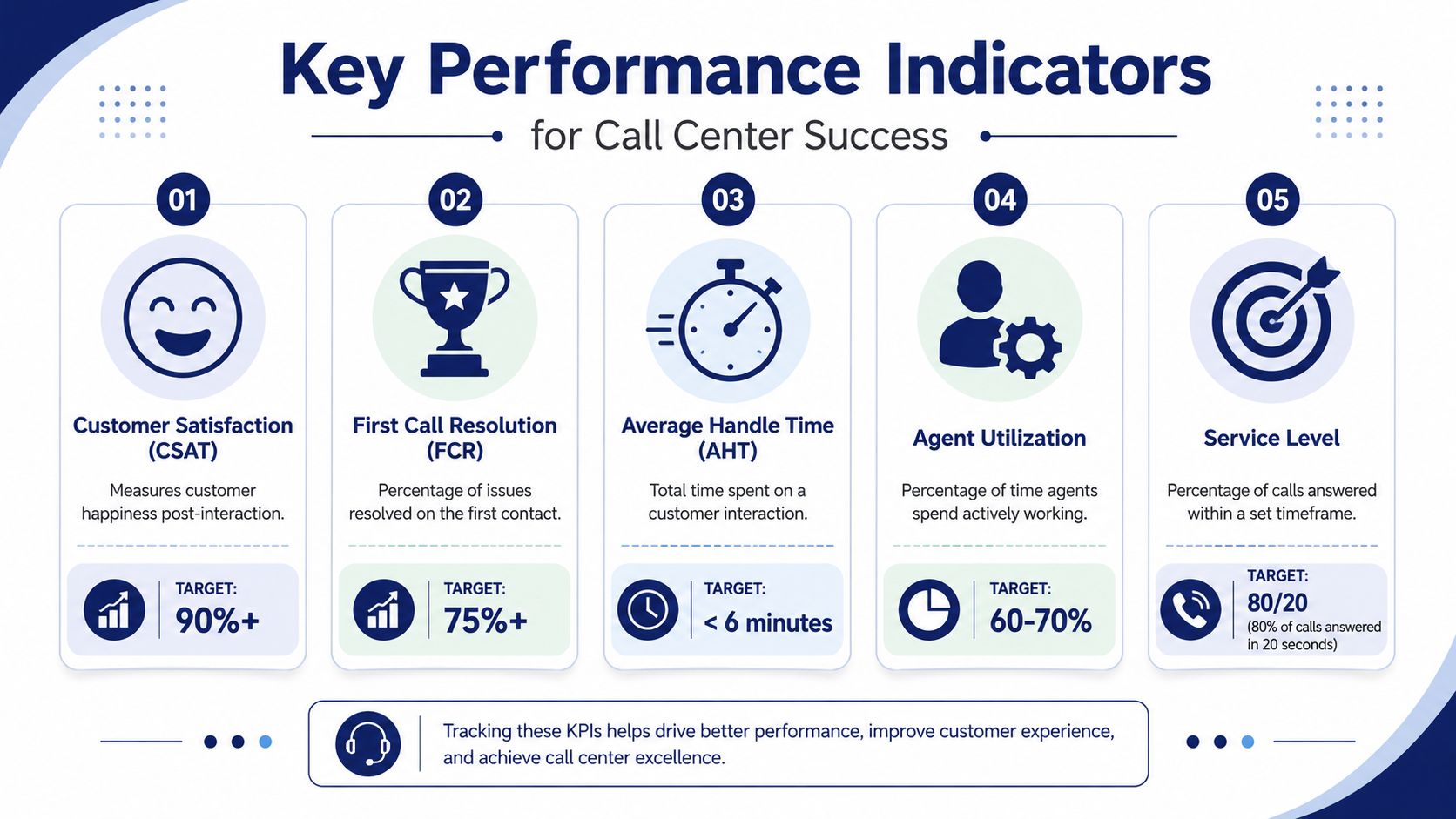
A better way to measure call center support software is to ask whether it reduces friction, improves utilization, and lowers repeat work. Vonage's guidance on choosing call center software makes that point clearly. Buyers need to look beyond basic call metrics and track outcomes such as reduced transfers, lower repeat-contact rates, and better agent utilization.
The KPIs that actually matter to an SMB
Forget vanity numbers for a minute. Start with these:
First-call resolution
If the issue gets solved the first time, the customer is happier and your queue stays cleaner. Routing quality, agent context, and CRM access all affect this.
Repeat-contact rate
This tells you whether customers have to come back because the first interaction failed. It's one of the clearest signs that your process is leaking.
Transfer rate
High transfers usually point to weak IVR design, bad queue logic, poor skill mapping, or unclear ownership between teams.
Agent utilization
This shows whether staffing and workflows are balanced. If some agents are buried while others sit idle, the software configuration may be wrong.
Customer satisfaction
CSAT matters, but don't read it in isolation. Pair it with repeat contacts and transfers. Otherwise, you may mistake polite agents for efficient operations.
Tie each KPI to a feature and a business decision
| KPI | Software lever | What management should ask |
|---|---|---|
| First-call resolution | ACD, CTI, CRM integration | Are calls reaching the best-equipped agent first? |
| Repeat-contact rate | Recording, ticketing, analytics | Are we solving root issues or just closing interactions? |
| Transfer rate | IVR design, queue rules | Which call types are being misrouted? |
| Agent utilization | Queue reporting, scheduling tools | Is workload balanced by skill and time of day? |
| CSAT | Omnichannel context, coaching tools | Are customers getting a consistent experience? |
What not to do
A common mistake is chasing lower handle time without understanding why calls are long. Long calls can mean poor tools, weak training, or complex issues. They can also mean an agent is doing excellent work.
Another mistake is measuring only service level. Fast answer times matter, but fast answers to the wrong person don't help the customer.
If you're refining management habits, this guide on how to boost agent productivity and satisfaction is useful because it connects performance improvement to coaching and operating discipline, not just software settings. And if you want a better reporting foundation, a dedicated look at call center analytics software helps clarify how raw data becomes management decisions.
If you can't connect a feature to reduced transfers, lower repeat work, or better utilization, treat it as optional until proven otherwise.
That mindset protects SMB budgets. It also gives owners a cleaner way to justify the investment internally.
How to Choose and Implement Your Software
Buying the wrong platform is expensive. Buying the right platform and implementing it poorly is often worse, because the team blames the software when the actual problem was a rushed rollout.
Start with selection. Then slow down and build the call flow properly.
What to look for before you sign
An SMB doesn't need the biggest platform. It needs one that's manageable, supportable, and predictable in cost.
Use this checklist:
- Scalability: Can you add users, queues, locations, and channels without rebuilding everything?
- Pricing clarity: Do you understand what's included, what triggers extra cost, and how reporting or recording is billed?
- Ease of administration: Can a normal office admin or IT generalist manage routing changes without opening a support ticket every time?
- Integration fit: Will it connect cleanly to your CRM, help desk, or line-of-business tools?
- Support quality: When something breaks, will you get a real technician or a knowledge-base article?
What a practical rollout looks like
Implementation is where abstract buying criteria become very concrete. Good deployments usually follow this order:
- Map your call types
List the actual reasons customers call. Billing, dispatch, order status, technical support, scheduling, returns, urgent escalation. Don't build menus around your org chart. Build them around customer intent.
Design the queue logic
Decide who should answer what, in what order, during which hours, and what happens when nobody is available.
Clean up user roles
Many SMBs discover during rollout that job titles and actual responsibilities don't match. Fix that before routing goes live.
Train agents on screens, not slides
Agents learn faster by taking mock calls in the system than by sitting through a generic product demo.
Keep the first version simple. You can always add branches, channels, and automation later. Untangling an overbuilt call flow is harder than improving a clean one.
Don't hide number porting and cutover risk
Porting numbers, changing carriers, and replacing a legacy PBX all create anxiety for owners because downtime feels unacceptable. That concern is valid. It's why implementation support matters as much as software features.
A useful walkthrough of the deployment mindset is below.
Common mistakes during go-live
| Mistake | Result |
|---|---|
| Building too many IVR options at launch | Callers get lost and staff can't troubleshoot the logic |
| Skipping live call testing | Hidden routing problems show up with real customers |
| Failing to define overflow rules | Queues back up when one team is short-staffed |
| No owner for reporting | Data exists, but nobody uses it to improve operations |
The best implementations usually have one internal owner, one clear call-flow map, and one realistic launch plan. Fancy features can wait. Stable routing and trained users can't.
Frequently Asked Questions
How does call center software integrate with my existing CRM
There are three common setups: a native integration, a middleware connection, or a custom API build. The practical question is not whether a vendor says it "integrates." The question is what your agents will see and what your managers can trust.
A useful CRM connection should do four things well: screen-pop the caller record, log the call automatically, sync notes or dispositions back to the contact, and give supervisors reporting they can tie to revenue or case outcomes. If the integration only shows a name on screen, your team still ends up retyping notes and hunting for history.
Ask for a live demo using your CRM, not a generic sandbox. Have the vendor show what happens when a known customer calls, when a new caller comes in, and when an agent transfers the interaction. That is where weak integrations show up.
What's the difference between per-user and usage-based pricing
Per-user pricing is easier to forecast. If you have 12 agents, 2 supervisors, and one seasonal hire, you can model your monthly cost without much guesswork. That matters for SMB owners who do not want phone bills bouncing around every month.
Usage-based pricing can be cheaper if call volume swings sharply by season or if you run a very lean team with low talk time. It can also surprise you. I have seen owners approve a low headline rate, then find extra charges for call recording storage, toll-free minutes, analytics, SMS, or additional local numbers.
Ask each vendor for the same exercise: price my current team, my busy month, and my expected headcount six months from now. Then compare the actual invoice structure, not the starting price.
Can a team of five benefit from call center support software
Yes. Small teams often feel the pain first because one missed call can mean a lost sale, an upset customer, or work piling up for the next day.
A five-person team is a good example. Say one person handles billing, two handle service, and two handle sales. Without proper routing, service calls interrupt the sales reps all day, billing questions land with the wrong person, and nobody has a clear view of missed calls. A basic support platform fixes that fast. Set a service queue to ring the two service reps first, then overflow to the full team after 30 seconds. Route billing directly to the office manager during business hours. Record calls so the owner can review problem interactions without standing over the team.
That is not enterprise complexity. It is simple control over who gets which calls, how long customers wait, and what gets missed.
How do I handle after-hours support with a small team
Start by deciding which calls need a human response the same day. For many SMBs, after-hours support does not mean live coverage for every issue. It means separating urgent calls from everything else.
A practical setup is a short after-hours greeting with two choices: press 1 for urgent service, press 2 to leave a message for the next business day. Urgent calls can ring an on-call mobile, a rotating manager, or an answering service. Non-urgent calls go to voicemail-to-email or create a ticket automatically.
Keep the menu short. If callers are dealing with an outage, they do not want to listen to six options.
What's the biggest mistake SMBs make when setting up their first IVR
They build it for the org chart instead of the customer.
Owners often try to include every department, every edge case, and every future need on day one. The result is a phone tree that sounds organized internally but slows callers down. A better first version usually has three paths at most: sales, support, and billing or operator. If a caller cannot tell where to go in a few seconds, the menu is too complex.
Write the prompts in plain language. Then test them with someone outside the company. If that person hesitates, your customers will too.
How long does implementation usually take for an SMB
A straightforward setup can move quickly if your call flows, users, and numbers are organized before kickoff. A messy setup takes longer, usually because the business has not agreed on routing rules, business hours, voicemail ownership, or who should receive overflow calls.
The software rarely causes the delay. Internal decisions do.
Before you commit to a date, make sure one person owns the project on your side. That person should approve call flows, gather user details, coordinate number porting, and sign off on testing. Without that owner, go-live drifts.
If you're replacing a legacy PBX, opening new locations, or trying to bring support, sales, and mobile staff into one system, SnapDial is worth a close look. Its cloud phone platform combines core business calling with queue management, reporting, call recording, mobile access, and white-glove setup, which is especially useful for SMBs that need a smoother cutover and predictable monthly costs.