
At 9:47 a.m., a patient calls a clinic to confirm an appointment. The phone system answers, plays a greeting, and places the caller in a loop of hold music and repeated assurances that the call matters. Three minutes later, the caller hangs up and tries another clinic. The business may record that as a missed call, but the customer experienced it as a decision to stop waiting.
That distinction matters. Call queue management software isn't just a digital waiting line. It coordinates the path a caller takes before entering a queue, the rules that govern the wait, the agent who receives the call, and the data managers use to improve the next interaction. If you only make the hold line more polished, you may be treating the symptom while leaving the routing problem untouched.
This guide explains how queue management works inside a hosted VoIP environment, how callback and analytics change the experience, which capabilities matter for different teams, and how to evaluate providers without getting distracted by a flashy demonstration.
The Moment a Caller Almost Hangs Up
The clinic's phone system has a capacity problem, but “capacity” doesn't necessarily mean the clinic needs more staff. The caller may have selected the wrong department, moved through an IVR menu that doesn't reflect the clinic's actual workflow, or entered a general queue even though a specialist elsewhere could have answered the question. The hold line is where the failure becomes visible. It may not be where the failure begins.
That's why abandonment deserves more attention than a simple missed-call count. A caller who hangs up before speaking with anyone has entered the system, consumed part of the business's opportunity to help, and left without a confirmed outcome. Teams reviewing their call abandonment rate should ask not only how long callers waited, but also which routes, times, intents, and agent groups produced the abandonment.
Practical rule: Treat the queue as a diagnostic point. If many callers reach it, wait, and leave, inspect the path into it before adding more hold options.
A modern queue system creates a feedback loop. Routing determines whether the caller reaches the right team. Queue controls determine whether the caller waits, receives an estimated delay, chooses a callback, or moves to self-service. Analytics then show whether those decisions produced an answered call, an abandoned call, a successful callback, or an SLA breach.
The rest of the buying decision follows that logic. First, understand the queue engine. Then place it inside the cloud PBX, match its depth to your team shape, plan implementation, and compare commercial models. The most useful question isn't “How can we make callers wait better?” It's “Why did this caller enter this queue, and what should happen next?”
What Call Queue Management Software Actually Does
Call queue management software is the routing and orchestration layer between inbound calls and available agents. In a hosted VoIP or cloud PBX environment, it receives a call after the carrier and phone platform accept it, applies configured rules, and keeps track of what happens until the call is answered, redirected, abandoned, or completed through another path.
A restaurant host stand provides a useful analogy. The host doesn't cook the meal, but controls who gets seated, which table fits the party, and what happens when every table is occupied. A queue manager performs a similar job for calls. It knows which agents are available, which callers need a specific skill, and which alternative should be offered when the expected wait becomes unacceptable.
Three jobs sit at the center
Accept the call. The platform answers the inbound session and identifies the destination, business hours, caller information, and any selections made in the IVR.
Place the caller according to rules. A basic queue may use first-in, first-out sequencing. A more capable system can consider department, skill, priority, time of day, agent presence, or customer context.
Connect the caller when capacity appears. When an eligible agent becomes available, the software selects the next appropriate interaction and bridges the call.
The important difference between a simple hunt group and a queue manager is control. A hunt group can ring extensions in a pattern. A queue manager can manage agent login state, queue position, announcements, overflow, callback, voicemail, and reporting. It can also route a caller to another team when the first team can't respond, rather than allowing the interaction to circle through unavailable endpoints.
The path before the queue matters
An auto-attendant or IVR gathers intent. The queue then manages the selected destination. If the IVR asks confusing questions or sends billing callers to general support, the queue may perform perfectly while the customer experience remains poor.
For teams handling repetitive phone questions, an AI layer can also help reduce unnecessary live-queue demand. A resource on how to automate phone support with AI can help buyers think through which requests should be resolved conversationally and which require an agent.
Core Features That Turn a Hold Line Into a Workflow
A real queue manager should connect routing, caller choices, agent state, and reporting. Treating each feature as an isolated checkbox creates a system that looks capable in a demo but gives managers little guidance during a busy period.
| Feature | What It Does | Caller Benefit | Business Benefit |
|---|---|---|---|
| Skill and priority routing | Sends calls to agents or queues based on expertise, urgency, or customer status | A better chance of reaching someone qualified | Fewer transfers and more deliberate workload allocation |
| Wait-time announcements | Communicates queue position or estimated delay when configured | Clearer expectations during the wait | Better visibility into congestion |
| Callback | Lets callers request a return call instead of remaining connected | Less time spent listening to hold audio | A measurable alternative to abandonment |
| Overflow and failover | Sends calls to another queue, voicemail, an alternate number, or self-service | A defined exit when the primary path is full | More resilient coverage during spikes and outages |
| Wallboards and live statistics | Shows queue depth, agent status, active calls, and delays | Faster intervention when service deteriorates | Supervisors can adjust coverage while demand is occurring |
| Historical reporting | Tracks answered calls, wait time, abandonment, SLA performance, and callback outcomes | More consistent service over time | Evidence for staffing and process decisions |
| Supervisor controls | Supports whisper, monitor, or barge-in where permitted | Faster escalation for complex interactions | Coaching and intervention without guessing |
Callback is particularly important because it changes the unit being managed. Instead of forcing a caller to remain connected while waiting for an agent, the system can preserve the request and create an outbound task. A documented callback-reporting model separates successful, failed, total callbacks, and total queue calls, while another vendor's callback summary exposes nearly 30 metrics, including accepted, declined, attempted, connected, cancelled, abandoned, and successful callbacks, alongside time and money saved. Those models are described in the queue callback summary documentation.
Why averages aren't enough
Average speed of answer can hide a difficult tail. Two queues may have the same average while one gives most callers a quick response and leaves a smaller group waiting far longer. Queueing research recommends using percentiles as well as averages, because percentile views reveal those severe delays and help managers control SLA risk. The call-center queueing review also treats abandonment as a measurable loss process, not merely an anecdotal complaint.
The workflow should therefore run as a loop:
- Route by intent and capability.
- Watch live wait conditions.
- Offer a callback when the configured situation calls for it.
- Record the outcome.
- Change staffing or routing based on the evidence.
Music on hold still has a place, but it shouldn't be the strategy. Transparency, a credible alternative to waiting, and operational visibility do more than a new audio track.
How Queue Management Fits Inside a Cloud PBX
A queue isn't a standalone island in a hosted phone system. It sits inside a call path that typically begins with an inbound number, passes through the cloud PBX, and uses several connected services before an agent answers.
The sequence may look like this:
- A SIP trunk delivers the call to the hosted platform.
- An IVR collects the caller's intent or department choice.
- An ACD, or automatic call distributor, selects the relevant queue or hunt group.
- The queue manager checks agent state, skills, priority, and current workload.
- The system connects the caller, offers an alternative, or applies an overflow rule.
Presence data is central to that process. An agent marked unavailable shouldn't receive a new queue call. A supervisor's wallboard may display who is available, who is on a call, and where delays are accumulating. Call recording, voicemail-to-email, CRM screen-pops, and post-call notes sit beside the queue, but they can also feed it useful context.
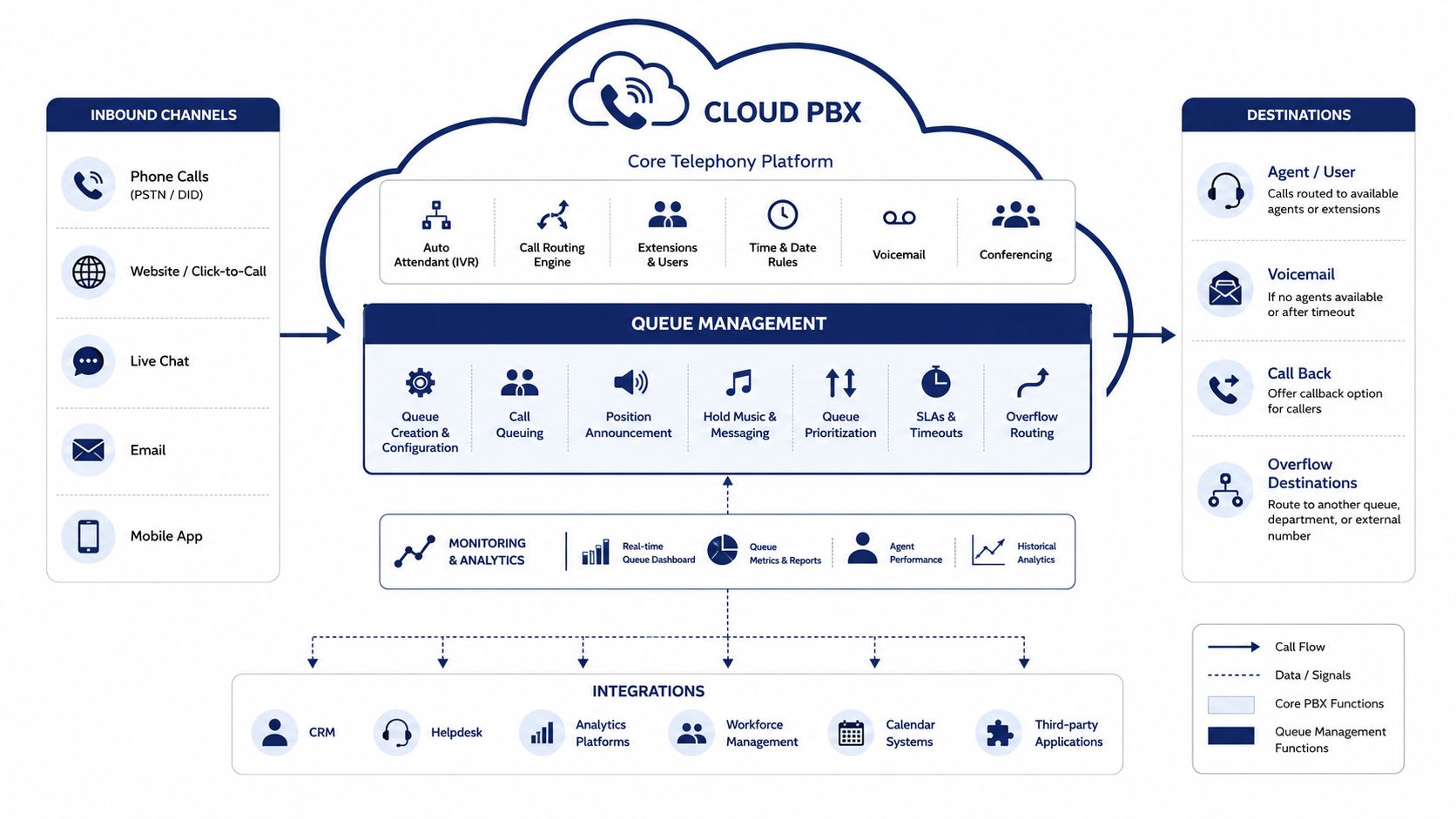
An on-premise ACD traditionally requires dedicated hardware, software licensing, maintenance, and internal administration. A cloud-native queue is delivered as part of the hosted PBX, so the provider manages the underlying service while administrators configure users, devices, schedules, and routing through a web portal. The commercial model varies, but buyers should understand whether they are paying for seats, queues, concurrent calls, or separately licensed modules.
Events make the system measurable
Modern platforms can expose events such as queue entry, answer, abandonment, callback request, and SLA breach through APIs or built-in reporting. Those events can flow into analytics tools, CRM records, or workforce planning processes.
That integration closes the gap between telecom and IT. A manager doesn't need one system to inspect extensions and another disconnected system to understand queue performance. Changes to business hours, agent membership, overflow destinations, and routing rules can be managed alongside the rest of the organization's communications environment.
For a practical explanation of the broader architecture, see this guide to a cloud PBX system.
Matching the Software to Your Team Shape
The same queue engine can support a small office, a distributed company, or a dedicated contact center. The configuration burden and buying priorities change sharply between those environments.
A small business with one site
A small team often needs a simple path that doesn't create another administrative job. Skill-based routing may be enough to distinguish sales from support, while mobile apps can extend coverage when employees work away from desks. Voicemail-to-email and straightforward after-hours rules may matter more than advanced proficiency scoring.
The risk is buying a contact-center configuration that agents won't maintain. If people forget to change status or can't understand the queue behavior, the system's theoretical intelligence won't improve availability.
A multi-location organization
A company with several branches needs centralized control without erasing local context. Time-of-day rules may vary by location, callers may need geographic caller ID, and a central service team may need to absorb overflow from a branch.
The buyer should verify whether queue policies can follow the caller across locations. A customer shouldn't have to repeat information just because the first office is closed and the second office receives the overflow.
A contact center
A contact center needs deeper ACD logic, including priority queues, longest-idle distribution, skill groups, proficiency levels, and detailed service-level reporting. It may also require recording controls, CRM connections, quality workflows, and supervisor visibility that a small office doesn't need.
Organizations building outbound prospecting alongside inbound support may also review specialist resources such as Hire SDRs, while keeping the phone platform decision focused on routing, agent state, reporting, and customer records.
| Feature | SMB | Multi-Location | Call Center |
|---|---|---|---|
| Routing | Simple department or skill rules | Branch, schedule, and shared-team rules | Priority, skill, proficiency, and workload logic |
| Visibility | Basic queue status | Centralized wallboards | Real-time and historical operational dashboards |
| Mobility | Mobile app and softphone coverage | Consistent experience across sites | Managed agent states and supervisor controls |
| Integrations | Voicemail and core CRM | CRM, branch systems, and shared records | CRM, helpdesk, QA, recording, and workforce tools |
| Growth requirement | Easy administration | Policy consistency | Routing and reporting depth without a platform replacement |
Teams expecting expansion should test the next stage before signing. A platform that handles today's simple queue but can't support richer routing or reporting later may force an expensive migration at an inconvenient time.
Implementation, Integrations, and Day-Two Operations
A queue project usually fails through small omissions rather than difficult technology. The provider may configure the platform correctly, but the business still needs an accurate inventory and a clear operating design.
Start with discovery
Document every public number, current carrier, department, business-hours schedule, CRM, ticketing platform, handset, and softphone. Identify which numbers should remain separate and which should feed a shared queue. Ask agents where calls go wrong today, because the existing call flow often contains undocumented workarounds.
Number porting and PBX provisioning should be scheduled as a project, not treated as a same-day switch. Keep temporary forwarding and a tested fallback plan available until inbound and outbound calls have been verified.
Design the queue before configuring it
Define skills, priority rules, service-level objectives, overflow destinations, callback conditions, and after-hours behavior. Decide what happens when no agent is logged in, when the queue reaches a chosen limit, and when a callback attempt fails.
CRM integration should be part of the initial design. Native connectors or webhooks can trigger screen-pops, associate the interaction with a customer record, and pass disposition data to the next workflow. Test both the normal path and the fallback path. Legacy IVRs may need DTMF support if speech recognition fails, and recording announcements may require consent language for the jurisdictions you serve.
Roll out in a controlled way
Provision headsets and softphones, train agents on login state and callback handling, and give supervisors access to live dashboards. A soft launch on a lower-risk queue lets the team validate greetings, routing, recording, screen-pops, and overflow before moving the busiest line.
The work continues after launch. Review service-level and abandonment reports, adjust queue weights, confirm agent schedules, and tune callback triggers. The call queue documentation can help administrators map those settings to the platform's operating model.
A queue that nobody reviews becomes a fixed guess about a changing business.
Buying Criteria and Pricing Models Worth Comparing
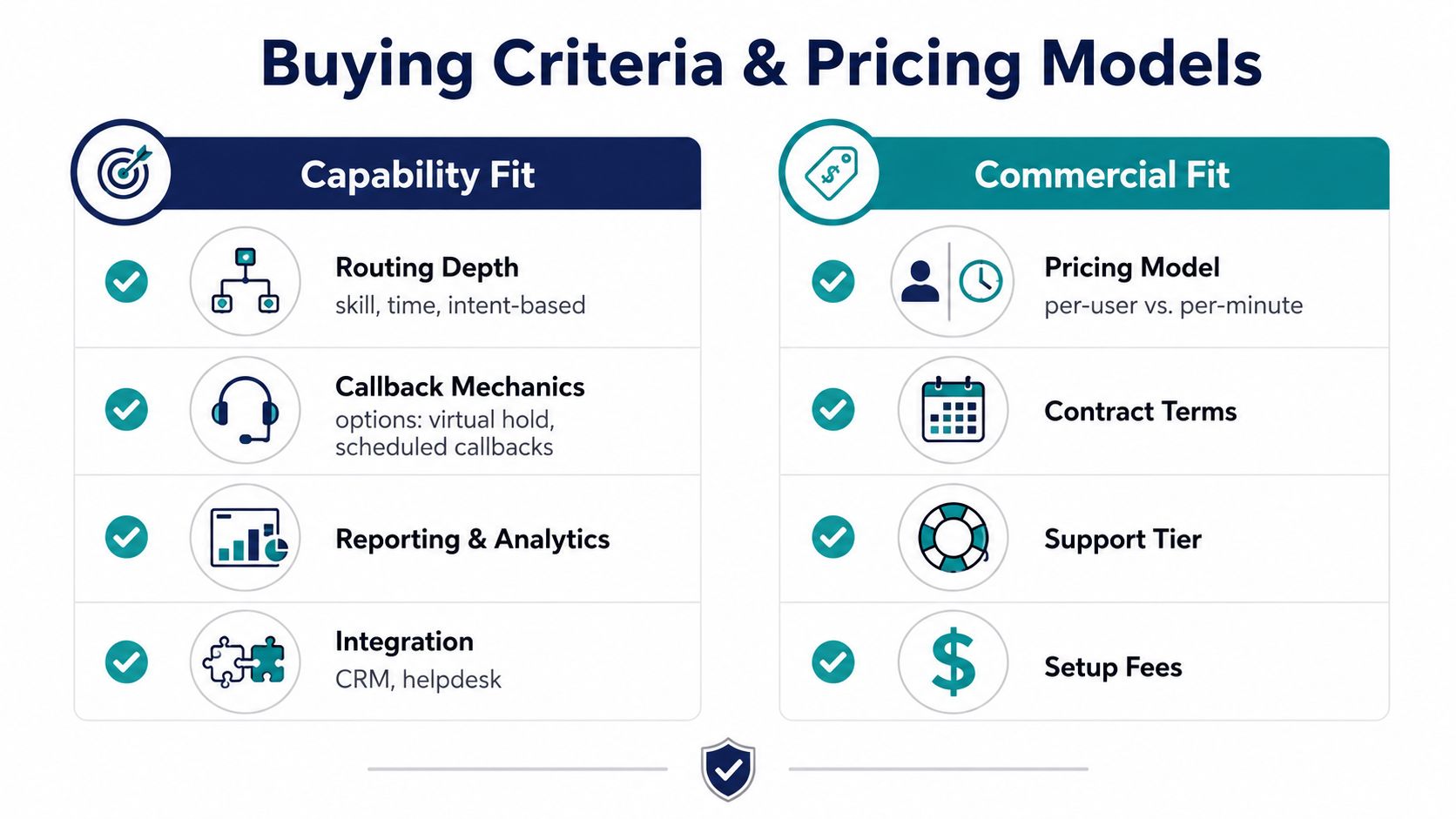
Evaluate queue software on two tracks. Capability fit asks whether the system can manage your actual call paths. Commercial fit asks whether the bill remains understandable after you add the features required to operate those paths.
Capability fit
Start with routing depth. Can the platform route by skill, schedule, customer priority, and detected intent? Can it distinguish the path into a queue from the behavior inside the queue? A system that only offers fixed hunt patterns may be adequate for a small reception team but limiting for support operations.
Callback deserves a detailed demonstration. Ask whether callers can request an immediate or scheduled return call, whether the system preserves queue position, how retries work, and whether reports distinguish accepted, connected, cancelled, failed, and abandoned callbacks. The earlier callback research describes a model in which 50.1% of callers were offered a callback, 37.5% of those offered accepted, and 93% of accepted callbacks were successfully answered, based on 1,215,776 calls. The same study reported an average wait of 6:55 minutes for all calls and 10:55 minutes for callers offered a callback, suggesting that callback offers are often deployed during heavier demand rather than uniformly. See the callback queue research for the full context.
Check analytics at the event level. You need queue entries, answers, wait distributions, abandonment, SLA performance, agent state, and callback outcomes. Also verify CRM and helpdesk integrations, multi-location administration, support coverage, security controls, recording behavior, and the provider's uptime commitments.
Commercial fit
Pricing may be based on seats, queues, concurrent calls, minutes, or feature modules. Compare:
- Base access: What users, queues, numbers, and devices are included?
- Operational features: Are recording, callback, wallboards, and analytics included or separate?
- Setup and migration: Who handles configuration, training, porting, and testing?
- Contract structure: Can you change capacity without a disruptive renegotiation?
- Support: Does the SLA cover only the software, or the carrier and integrations too?
Low per-seat pricing can become expensive once required modules, numbers, recording, analytics, and implementation services are added. A managed, all-inclusive option such as SnapDial packages cloud business calling with queue functions including callback, wait-time announcements, real-time statistics, reporting, recording, and administration. That model can suit buyers who prefer one provider to coordinate the carrier, platform, setup, and support rather than assembling separate components.
My recommendation is straightforward. Prioritize routing flexibility and analytics depth over a polished interface demo. The interface affects adoption, but routing determines whether callers reach the right destination, and analytics determines whether you can prove what needs to change.
Frequently Asked Questions Buyers Actually Ask
Is call queue management software the same as an IVR?
No. An IVR gathers information and directs the caller toward a destination. The queue manages what happens after that destination is selected, including agent eligibility, sequencing, wait announcements, callback, and overflow. Poor IVR design can overload a queue that is otherwise configured correctly.
Do small businesses need a queue?
They may, once a single line, voicemail box, or informal ring group stops handling demand consistently. A small business doesn't need every contact-center feature, but it may benefit from orderly routing, after-hours handling, callback, and basic reporting.
Can queue software replace a full call-center platform?
Only for some smaller operations. A mature contact-center environment may also require workforce management, quality assurance, coaching, outbound dialing, compliance controls, and deeper customer-service workflows. Queue management is an important component, not the entire discipline.
When does a callback help, and when can it backfire?
Callback reduces the discomfort of staying connected, but customers don't always prefer it. A Management Science study found that callers experienced three to six times less discomfort per unit of time while waiting for callbacks, while also finding that callers generally preferred staying in the queue after expected wait time was controlled. The study reported that callbacks could reduce average online waiting by up to 71%, improve service quality by up to 46%, and increase throughput by up to 2.1%, as detailed in the callback and virtual-hold study. Offer callback when it provides a clear, reliable alternative, not as a way to hide uncertain service.
Should you optimize the queue or redesign the path into it?
Audit the path first. A 2026 benchmark reported that hunting time before reaching a queue fell 54% year over year, connection rates rose 8.1 percentage points to 60.6%, and average queue ringing time improved only 12% as organizations adopted CRM-native and conversational AI routing. Those figures point to a practical lesson, cited in the 2026 contact-center benchmark: better intent detection and upstream routing may create more value than adding another hold feature.
How is queue software priced?
Common models include per seat, per queue, per minute, and per concurrent call. Compare the complete operating cost, including numbers, recording, analytics, integrations, setup, and support. A low entry price isn't meaningful if the functions your team needs are separate add-ons.
Why consider a managed provider?
A managed provider can combine carrier service, cloud PBX configuration, queue features, integrations, and support under one operating relationship. That reduces the number of teams involved when a call route fails and gives administrators a clearer path for making changes.
Audit your current routing before you request another demo. List the caller intents that enter each queue, identify where agents lack the required context, and review every abandonment and overflow destination. Then choose software that can measure and improve that path, not merely keep callers on hold.
SnapDial provides a managed cloud phone system with smart queue management, queue callback, wait-time announcements, real-time statistics, detailed reporting, and related hosted VoIP features. Visit SnapDial to review how its platform can help you redesign the path into your queues and manage the caller experience from one system.