
A call routing service is an automated telephony system that analyzes incoming calls and directs them to the right department, agent, or device based on predefined rules. It combines routing logic, queues, availability decisions, and reporting so your business can manage calls rather than merely forwarding them.
The need usually becomes obvious after a familiar failure. A prospective customer calls after the office closes, an existing customer reaches the wrong department, or a remote employee's softphone rings without a clear fallback. Your team may still have a phone system, but callers experience silence, full voicemail boxes, unnecessary transfers, and unanswered requests.
Modern routing gives those calls a defined path. It can account for business hours, department selection, agent availability, overflow conditions, location, and specialist skills. It also creates operational evidence, including calls waiting, abandoned calls, and talk time, so managers can identify service problems while they're happening. For a small or midsized business replacing a legacy PBX, that distinction matters. Routing isn't just a convenience feature. It's the control layer that determines whether your phone system supports the way your company works.
The Missed Call That Almost Cost You
A prospective client calls the main line late on a Friday. The receptionist has left, the voicemail box is full, and the caller has no clear way to reach the person who can answer a technical question. The call ends without a conversation, a callback request, or useful context. A competitor with a properly configured after-hours route may connect the caller with an on-call employee or capture the inquiry for prompt follow-up.
That failure isn't usually caused by a broken handset. It comes from a routing design that stops at the front desk.

A call routing service analyzes each inbound call and sends it to a department, queue, agent, or other approved destination according to rules you define. That makes it different from basic call forwarding. Forwarding normally sends a call to another number. Routing decides which destination is appropriate, what happens when that destination is busy, and how the interaction should be recorded.
The operational difference
A well-designed route might send a billing request to a billing queue during office hours, an urgent maintenance call to an on-call engineer after hours, and an unanswered sales call to a backup group. If nobody is available, the system can offer voicemail, a callback request, or another approved fallback.
The architecture also creates useful management information. Digital.gov's contact center guidance describes real-time visibility into incoming calls, calls waiting, abandoned calls, and talk time as core management capabilities. That information helps a supervisor see congestion before missed calls become a normal part of the customer experience.
Practical rule: If your only fallback is “leave a voicemail,” you haven't finished designing the route.
Understanding How Call Routing Works
A call routing service has two distinct layers. The first is your business logic, which decides where a call should go. The second is carrier and network infrastructure, which helps deliver the call to the correct network destination.
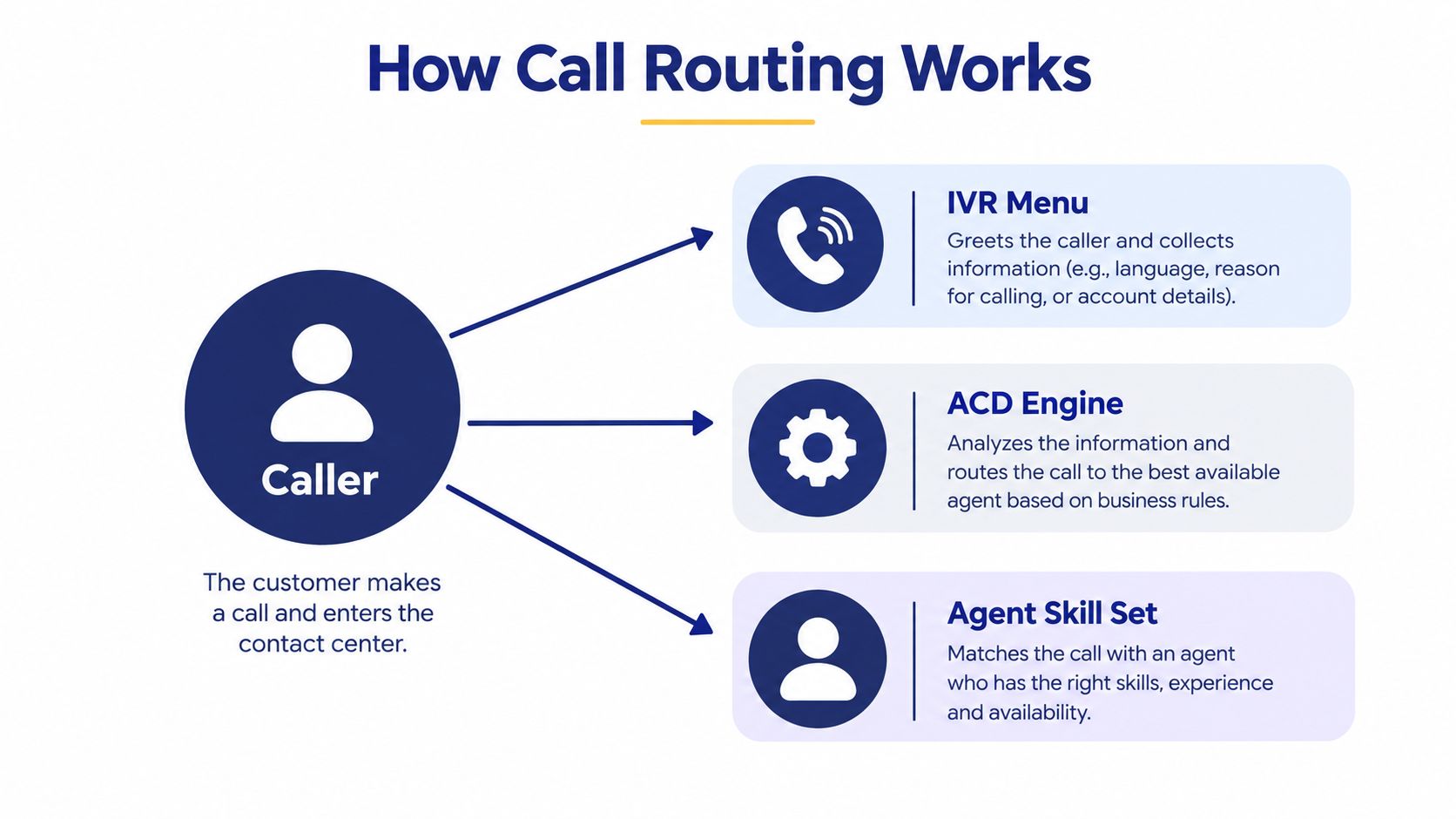
Automatic Call Distribution, or ACD, provides the foundation for the business layer. It uses computerized telephony to analyze incoming calls and distribute them according to predefined handling instructions. An ACD can route callers to departments or agents while working with interactive voice response, voicemail, and database systems. It can also maintain queue information when employees aren't immediately available.
The business logic layer
A typical call follows a sequence like this:
- Identify the entry point: The system recognizes the number the caller dialed and any information available from the telephony platform.
- Collect intent: An IVR menu, spoken response, or department selection helps classify the request.
- Apply rules: The routing engine checks hours, queues, agent availability, skills, location, and overflow instructions.
- Connect or continue: The caller reaches an agent, waits in a queue, receives a callback option, or follows a defined fallback path.
- Record the outcome: The platform retains operational data such as queue activity, abandoned calls, and talk time.
The strongest implementations keep these rules understandable. If an administrator can't explain what happens during lunch, after hours, an unanswered call, or a queue overload, the configuration is too complicated to trust.
The carrier layer
Routing doesn't end inside your PBX. In the United States, local number portability requires carriers to determine which network switch currently serves a ported number. FCC technical documentation explains that an originating carrier generally queries a portability database to identify the number's Location Routing Number, then uses that information to send the call toward the responsible terminating carrier and route. See the FCC technical documentation on number portability routing for the network-level detail.
That separation explains how a business can keep its telephone number while changing providers or moving locations. Your routing rules may select an employee, queue, or office, while carrier signaling determines how the call reaches the relevant network switch. Treating these layers separately makes troubleshooting easier and prevents the common mistake of assuming that call routing is merely an office phone feature.
Comparing Time-Based and Skills-Based Routing Strategies
A routing plan that works during business hours can still fail when an urgent caller reaches the wrong person, or when an internet outage removes the normal path altogether. Match each rule to staff availability, caller intent, emergency requirements, and the fallback method your team can operate under pressure.
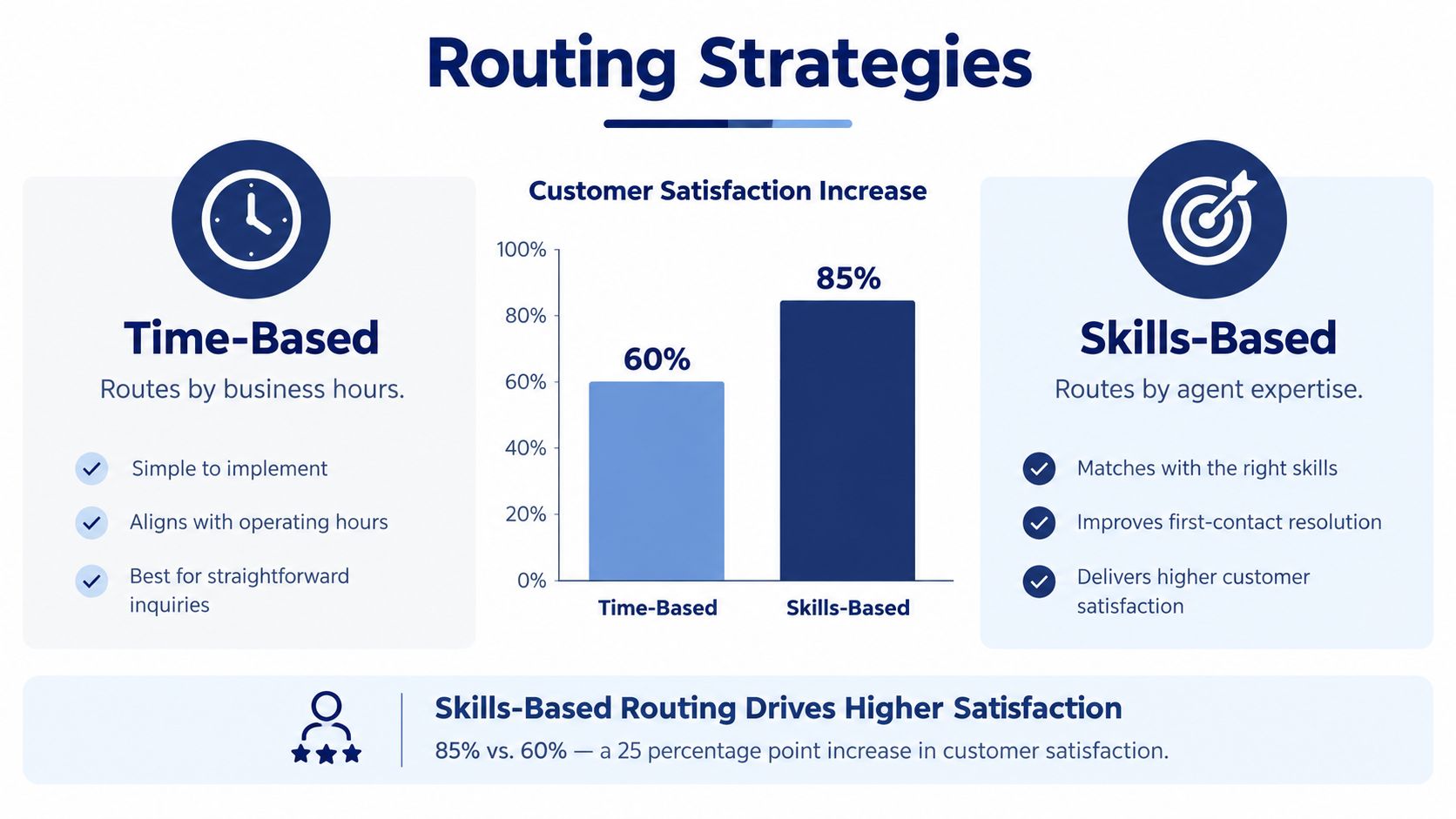
Time-based routing follows business hours, holidays, breaks, and scheduled periods. During open hours, calls can enter a receptionist group or sales queue. After hours, they may go to an on-call employee, an answering service, or voicemail. This approach is straightforward to administer and suits professional offices, clinics, contractors, and other businesses with defined service windows.
Skills-based routing considers expertise as well as availability. It can send a caller to someone with the right language capability, product knowledge, or account responsibility. A software company might separate billing questions from technical incidents. A field-service organization could send a complex equipment issue to a technician familiar with that model, rather than to the first available employee. Use skills-based call routing when incorrect first transfers create repeated explanations or lost time.
Geo-based routing connects callers with a nearby branch, regional team, or location-specific queue. It can help organizations with multiple offices, but administrators should validate location data and define the fallback when a caller is traveling or using a mobile number. Do not rely on geographic routing alone for emergency calls. The system must preserve accurate 911 location information and provide a tested path if the internet or primary carrier fails.
Choosing the right combination
A single-location office with one queue rarely needs more than a time path and one overflow rule on day one. Add skills rules when you can name the specific transfer that is costing calls.
- Set the time path. Define open hours, holidays, breaks, and after-hours ownership.
- Add expertise where transfers hurt. Route specialist requests to the appropriate group.
- Use location only when it helps. Do not let a local route override a specialist without a clear reason.
- Define overflow behavior. Choose another group, a callback workflow, or a message that sets an accurate expectation.
Document the route and test it during an outage, including emergency calling and manual fallback procedures. Keep menus short enough for staff to explain and maintain.
Integrating Call Routing with Cloud PBX Systems
A routing service is easier to manage when it shares a platform with the rest of the business phone system. Routing rules, auto attendant menus, queues, call recording, user administration, and call logs should provide a consistent view of the caller journey.
A unified cloud PBX can let an administrator change business hours, add a remote user, adjust an overflow destination, or review a recording without switching between unrelated systems. That matters during staff changes and service disruptions, when a rule has to change quickly and the person making the change may not be a telephony specialist.
Why the endpoint matters less
Cloud systems can extend business calling to desk phones, computers, mobile applications, and remote locations while keeping routing under centralized control. A remote employee can remain part of a ring group or queue instead of becoming an isolated mobile number. Visual voicemail with transcription, web-based administration, call logs, and recording access can also reduce the operational gaps associated with legacy PBX hardware.
That flexibility has a condition. Every endpoint needs a clear owner, availability status, fallback path, and emergency location record. A system that lets employees work anywhere but doesn't let administrators govern those details creates mobility without control.
The platform should also expose the information managers need. Queue activity, abandoned calls, callback requests, recordings, and agent availability belong in the same operational picture. If routing occurs in one product and reporting occurs somewhere else, the business may lose the context needed to explain why callers waited or where calls disappeared.
For organizations comparing hosted options, review how a cloud PBX system handles user changes, routing updates, reporting, and mobile extensions together. Then test the administration workflow with a real scenario, such as an employee leaving unexpectedly or a department closing early.
Security and Reliability in Modern Routing
The most dangerous routing mistake is assuming that mobility and failover are automatically safe. A call can reach the right employee and still create a serious problem if the system sends emergency responders to the wrong location or leaves administrators unable to verify what happened.
In the United States, interconnected VoIP providers must transmit 911 calls with a callback number and a registered or dispatchable location. Fixed services must provide automated dispatchable location, while non-fixed services must do so when technically feasible or otherwise provide a user-maintained registered location. The FCC guidance on VoIP and 911 service also addresses limitations providers must explain to customers.
Treat location as routing data
A business with multiple offices, home workers, softphones, and mobile endpoints needs an endpoint-to-location process. Administrators should know which address belongs to each device, how a location change is submitted, who validates it, and how the record is tested.
A remote worker shouldn't assume that a softphone automatically communicates the correct emergency location. Likewise, a call routed through another office shouldn't inherit the location of the employee's usual site. The business must understand what the provider supports and document the operational procedure around it.
Plan for degraded service
VoIP calling can be interrupted by power loss or broadband failure. A fallback route may reduce unanswered calls, but it can also bypass the normal queue, recording, caller identity, or quality process. That trade-off needs to be visible before an incident.
Safety constraint: The most flexible route isn't automatically the best route if nobody can confirm where an emergency call originates.
Ask vendors how emergency behavior works for each endpoint type. Ask what happens when the primary office loses power, when an employee changes address, and when a call moves from a queue to a mobile destination. Then test those answers with the people responsible for IT, facilities, and employee safety.
Designing for Failover and Business Continuity
Failover isn't a checkbox. It's a set of decisions about what the business will preserve when part of the calling environment stops working.
An internet service outage, a cloud platform disruption, a carrier failure, a mistaken business-hours rule, and an overloaded destination don't require identical responses. Sending everything to a mobile number may keep some calls moving, but it can also remove queue visibility, recording, caller context, and callback tracking.
Compare the failure modes
| Failure condition | Useful response | Risk to examine |
|---|---|---|
| Primary ISP outage | Use independent backup connectivity or a preconfigured alternate route | The backup may not support every endpoint or application |
| Cloud-service disruption | Use an alternate destination or provider-supported continuity path | Normal queues, recordings, and reporting may not carry over |
| Carrier outage | Use alternate carrier routing where available | Caller identity and number presentation may change |
| Incorrect business-hours rule | Maintain an administrative correction process | A configuration error can affect every inbound call |
| Overloaded destination | Cascade to another queue or approved answering resource | The second destination may lack the required skills |
The continuity plan should define recovery objectives that management understands. Examples include the maximum acceptable number of missed calls, the expected restoration time, and the conditions under which customer messaging changes. These are business decisions, not merely technical settings.
Test the route under pressure
Run staged exercises instead of waiting for a real outage. Disconnect the primary broadband path, verify that calls follow the documented route, check whether caller identity remains usable, and reconcile the resulting call logs. Test queue behavior, recordings, callback requests, operating hours, and emergency calling separately.
Continuity principle: A fallback that answers calls but destroys your records may protect availability while weakening accountability.
Tell customers what to expect when service is degraded. Give staff a clear escalation procedure, keep backup connectivity independent from the primary path where practical, and review every incident afterward. A route is reliable only when people can operate it, verify it, and improve it.
A Practical Buyer Checklist for SMBs
A vendor comparison should begin with operational priorities, not a long feature list. The right call routing service must fit your staffing model, locations, devices, and tolerance for disruption.
Use this checklist during demonstrations and contract discussions:
- Routing logic: Confirm support for time-based, skills-based, and geo-based rules if your operation needs them. Ask to see how an administrator edits each rule.
- Overflow handling: Test a full queue, an unanswered agent, an after-hours call, and a destination that becomes unavailable.
- Emergency calling: Ask how the provider manages registered and dispatchable locations for offices, softphones, mobile applications, and home workers. Confirm who updates and validates those records.
- Continuity: Request a written explanation of behavior during power loss, broadband failure, carrier disruption, and provider downtime. Ask whether queues, recordings, callback requests, caller identity, and operating hours survive the switch.
- Administration: Check whether one web portal manages users, numbers, voicemail, routing, call logs, and recordings, or whether staff must maintain separate systems.
- Integrations: Verify compatibility with your CRM, helpdesk, and identity tools. Don't accept “integration available” without seeing the workflow that your agents will use.
- Support and deployment: Clarify onboarding responsibilities, escalation channels, training, and how changes are approved after launch.
- Reporting: Review the actual dashboards for waiting calls, abandoned calls, talk time, agent availability, and route outcomes.
For a broader comparison of capabilities, use a call routing software evaluation framework, then score each vendor against your own failure scenarios. A simple system your team can govern will outperform a complex system nobody trusts enough to update.
Final Thoughts and Common Questions
A well-designed call routing service aligns telephony with the actual structure of your business. It accounts for hours, departments, expertise, locations, queues, remote endpoints, emergency addresses, and infrastructure failures. That makes it a measurable operating system for customer access, not just a replacement for a desk phone.
The practical path is straightforward. Map the caller journeys that matter, define ownership for every destination, test normal and degraded conditions, and review the resulting call data. Keep the first version understandable, then add complexity only when the operation can maintain it.
Can routing connect with an existing CRM?
Often, yes. Many modern cloud PBX platforms support native integrations or APIs, but the useful question is what information moves between systems. Confirm whether the agent sees caller context, whether call outcomes return to the CRM, and how permissions protect customer records.
What happens to recordings during failover?
It depends on the provider and the route used during the incident. A call that remains inside the hosted platform may follow the normal recording process, while a call sent directly to an outside mobile number may not. Ask the vendor to demonstrate access to recordings and logs after a simulated failure.
What happens during a broadband outage?
A resilient design can use mobile applications, alternate connectivity, another office, or a preconfigured forwarding destination. The important issue is what the fallback preserves. Verify queue behavior, caller identity, recordings, callback requests, and emergency-calling treatment instead of assuming that any answered call represents a successful recovery.
SnapDial provides a hosted business phone platform with auto attendant and IVR menus, queues, recording, mobile extensions, routing controls, and a web portal for administration. Visit SnapDial to review whether its cloud PBX approach fits your routing, emergency-location, and continuity requirements.