
The most popular advice is also the riskiest: turn on always-on forwarding, send the office line to a cell phone, and assume you're covered. You'll hear a ring, and that's exactly the problem. A ring proves one device made a noise. It doesn't prove the right person answered, the caller ID survived, voicemail stayed in the business system, or 911 knows where that employee is sitting.
Forwarding keeps a published number alive, but it doesn't carry your infrastructure with it. Queues, recording, location data, and failover logic live behind the number, and a blunt always-on rule can route callers around all of them.
If you need to forward phone calls, treat the public number as the stable part and the answering point as the variable part. Choose the trigger first, set it in one place, test every leg, and keep a rollback you can restore in a minute. That order takes longer than a star code, but it's the difference between continuity and a second, quieter failure.
Choose a Forwarding Mode That Matches the Call
Start with the decision, not the handset menu. Individuals who want to forward phone calls usually do not want every call moved permanently. They want the published number to stay the same while the desk, site, or person answering changes for a defined reason. Always-on is only one answer to that problem, and often not the best one.
| Mode | When it fires | Best for | Main risk |
|---|---|---|---|
| Always | Every inbound call | Closure or evacuation | Skips IVR, queue, and recording |
| Busy | Line already in use | Backup for a solo receptionist | Misses unanswered calls |
| No answer | After the ring timer expires | Desk plus mobile backup | Timer too short or too long |
| Unreachable | Phone offline or unregistered | Carrier or power outage | Depends on device registration |
| Simultaneous ring | Desk and mobile at once | Hybrid staff who must not miss calls | Two voicemails or two answers |
| Hunt or sequential | Next extension if the first does not answer | Small team coverage | Forwarding loops between extensions |
| Site failover | Primary site cannot take the call | Second office or answering point | Single person or single carrier still a failure |
Read the Table by Trigger, Not by Habit
Always sends every call to one destination, which fits a planned closure or an evacuation. The cost is control. Callers skip your auto attendant, queue, and recording, and they may land in a personal voicemail box with a personal greeting.
Busy only fires when the line is already in use. That helps a solo receptionist who's on another call, but it does nothing when she steps away and doesn't pick up. No-answer covers that gap by waiting for your ring timer, commonly about four to six rings or 15 to 25 seconds in a typical setup, then diverting to a mobile, a colleague, or voicemail. Set it too short and the desk user can't reach the handset. Set it too long and callers hang up before the backup rings.
Unreachable is the outage case. The phone is offline, unregistered, or without power, so the platform sends the call elsewhere. Simultaneous ring alerts desk and mobile together, which suits hybrid staff, provided only one side owns voicemail. A hunt tries extensions in sequence for team coverage. Site failover points the main number at another office only when the first site can't take the call, which beats sending a whole company's calls to one manager's pocket.
Practical rule: Circle one row and write the destination next to it before you open any phone or portal. If you can't name the trigger in one sentence, you're not ready to configure it.
There's also a governance reason to slow down. The Federal Communications Commission order lists call forwarding with features such as speed dialing, call waiting, caller ID, and Centrex functions, treating it as an "adjunct-to-basic" capability that extends basic voice service. It also notes forwarding may appear as a distinct charge on a bill alongside three-way calling, call waiting, voicemail, and Caller ID. In plain terms, carriers have long treated this as its own service, not a casual handset trick. Permission it, log it, and review the charge like any other routing change.
Set Up Forwarding on a Desk Phone App or Portal
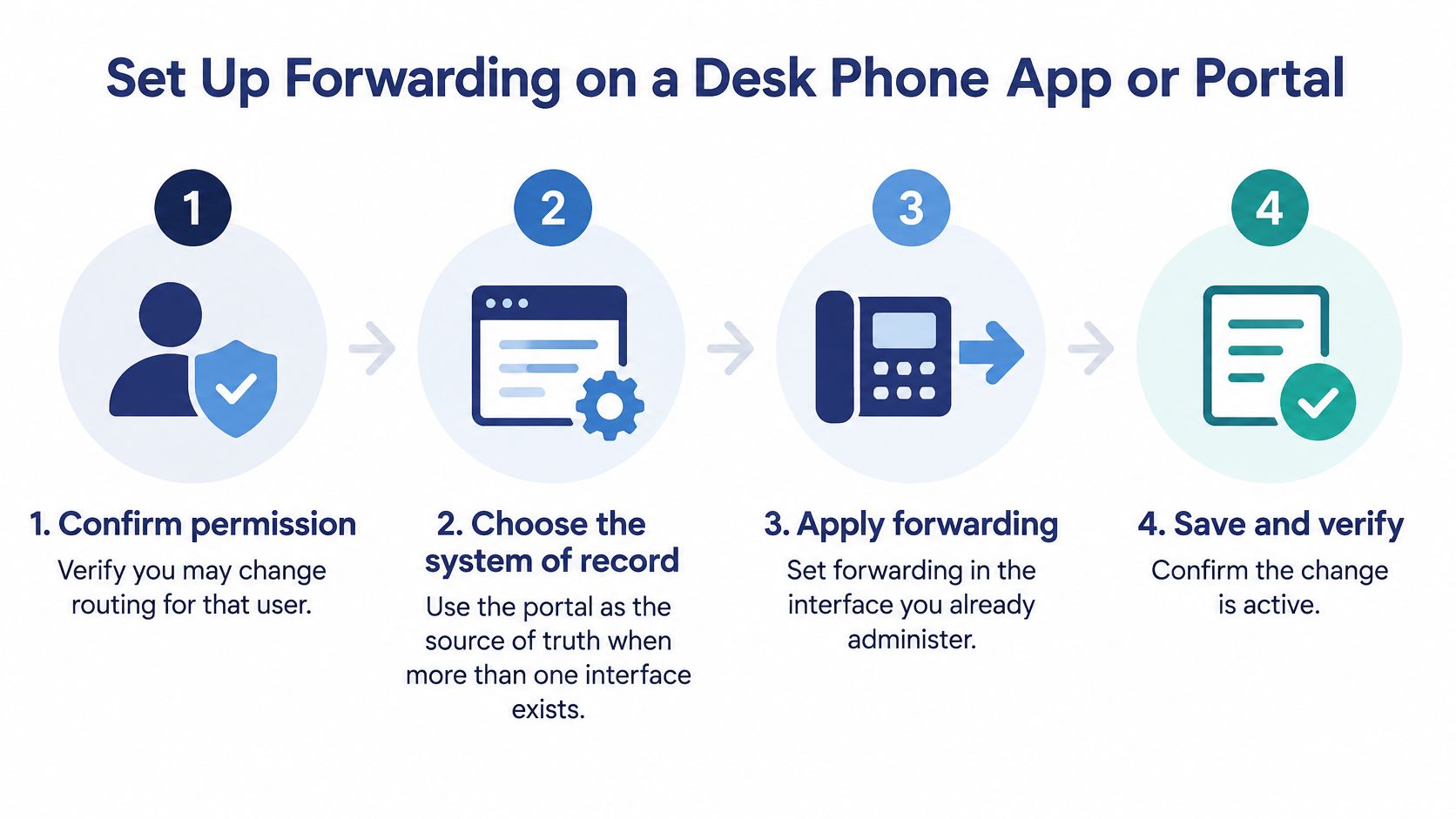
Use the interface you already administer, but pick one as the source of truth. If a desk phone, a mobile app, and a web portal can all change the same user, they will eventually disagree. I'd make the portal win, because it's where another admin can see, audit, and undo the rule after hours.
One Procedure, Three Places You Might Apply It
- Confirm permission and capture the current state. Check you're allowed to change routing for that user or main number. Write down the existing destination, trigger, and ring time so you can restore them without guessing.
- Set it on the desk phone only if that's your chosen system of record. Open the call-forward menu, select the mode you circled, enter the destination as a full 10-digit or E.164 number, and save. A partial extension entered where an external number is expected is a common silent failure.
- Use the mobile app for the same user, not a second rule. Open that user's forwarding option, choose the cell number or another extension, and don't swap away the business caller ID customers should see on callbacks. If staff call back from a personal number, clients keep that number and bypass your system later.
- Prefer the web portal for main numbers. Open the user or main-number routing page, set the trigger, ring seconds, and destination, then save. The portal is also where you can confirm the rule sits on the number customers dial, not on a direct line nobody publishes.
- Call in from outside the system. Use a personal cell phone or another external line, dial the published number, and confirm only the intended destination rings. An internal extension-to-extension test can pass while the public route is still wrong.
- Record the owner and date. Put the rule owner, reason, and date next to the number in your admin notes. Future you needs to know whether this was a vacation cover, an outage workaround, or a permanent design.
A later handset change can overwrite a portal rule on some platforms, and a portal save can overwrite a handset setting on others. That's not a reason to avoid either interface. It's a reason to edit in one place and tell the team which place that is.
Forwarding also creates records you need to protect. The FCC guide on protecting phone and cable records states that local, long-distance, wireless, and IP-service providers track services customers use, specifically including call forwarding and voicemail. It defines protected customer network information as including phone numbers called, and the frequency, duration, and timing of calls, plus services purchased. Providers may use or disclose that information when required by law, with customer approval, or while providing the service.
That makes shared admin logins a bad idea. If three people share one credential, you can't prove who sent the main number to an external cell phone last Tuesday. Give named admins their own access, require authentication, and treat routing changes like billing changes.
A working setup looks boring from the caller's side. The published business number rings, the new destination answers, and the caller never learns which desk, app, or site picked up.
Don't stop at the save confirmation screen. Screens confirm data entry. Only an external call confirms routing.
Build Conditional Simultaneous and Failover Rules
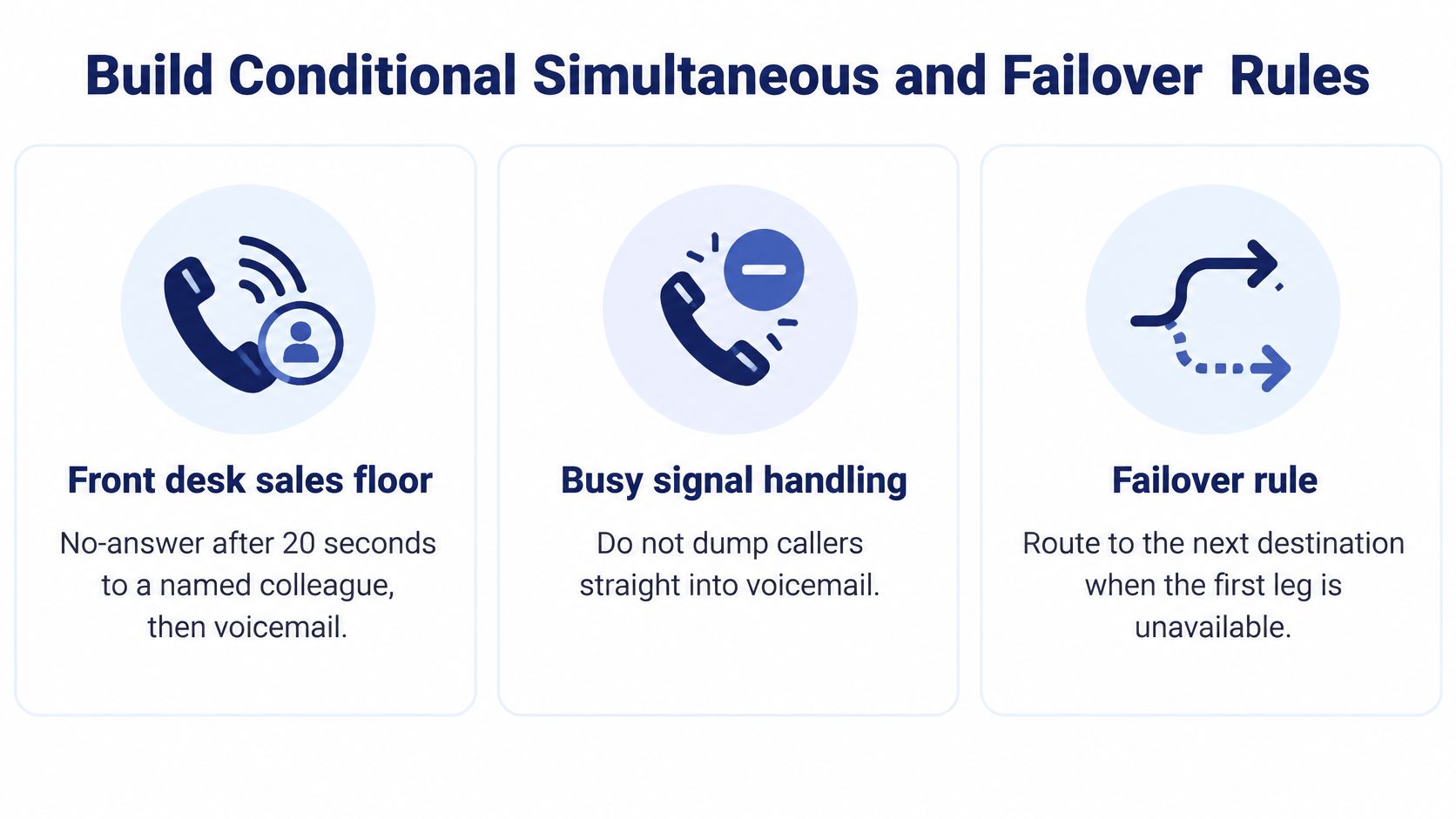
Conditional rules earn their complexity when they match a real room, a real shift, and a real second choice. Three common office setups show the trade-offs better than a feature list does.
Three Setups That Hold Up in Practice
A front desk on a sales floor. Use no-answer after 20 seconds to a named colleague, then business voicemail. The receptionist gets a fair chance to answer, the colleague covers a walk-away, and callers don't get dumped straight onto a personal cell phone just because the first line was busy. Name the colleague. "Someone in sales" isn't a destination your phone system can ring.
Say a hybrid employee splits the week between home and office. Use simultaneous ring to the desk set and the business app during work hours, then a time-of-day change after 6 p.m. to voicemail only. She can answer from either place without giving out a personal number, and her phone doesn't become an unpaid night shift. Log out or schedule the change. Don't rely on her remembering to toggle forwarding every evening.
Two offices covering each other. Keep a hunt group at the primary site for normal days. Add an unreachable condition or a manual failover flag that sends the main number to reception in the other city. That's sturdier than one manager's mobile, because the second site has people, power, and a different local network. If you're comparing architectures while you design this, understanding cloud-based PBX systems helps clarify which parts live on site and which follow the user.
The loop check fits in one sentence. A must not forward to B if B already forwards to A. Draw the chain on paper for hunts with more than two stops. Loops rarely announce themselves in the portal. They announce themselves to a customer who hears ringing that never resolves.
What Failover Does Not Carry With It
Be candid about what you lose when a call leaves the normal path. The FCC and FEMA emergency communications tips recommend forwarding a home landline to a wireless number during an evacuation so incoming calls keep reaching the user. For a business, that same move can preserve reachability while bypassing the auto attendant, queue, recording, caller identification, call monitoring, and compliance controls, unless you rebuild those controls at the destination.
A dead mobile battery or a down wireless network still drops the call if that one phone is the only target. Forwarding alone isn't a continuity plan. It's one leg of one. Geographically separate destinations, queue callback, and voicemail that staff monitor all reduce the single-person and single-carrier risk.
For a plain-language refresher on how these paths fit together, see how call routing directs inbound calls before you stack rules on top of each other.
Leave the previous rule disabled, not deleted, and name who may flip the failover during an outage. That person needs portal access tested in advance, not a password reset during a storm.
Finish with a drill cadence you can keep:
- After every routing edit: Place one controlled external call.
- Quarterly: Test the second site during business hours with staff expecting it.
- After staffing changes: Replace named destinations for anyone who left or changed roles.
Test Every Call Leg Before You Go Live
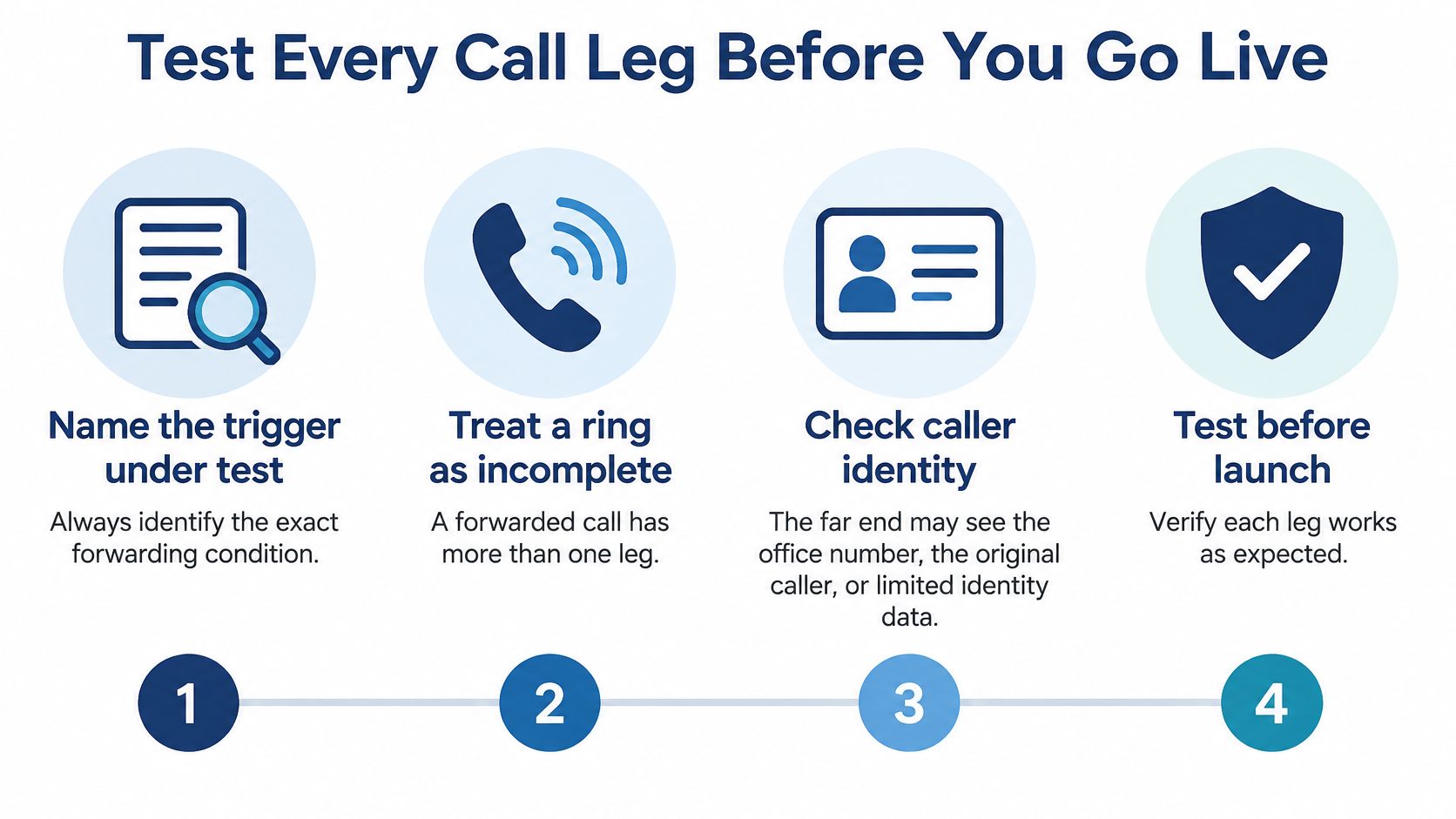
A ring can still be a failed test. A forwarded call has more than one leg, and each leg can rewrite what the next network sees. The person who answers may see the original caller, your office number, or limited identity data, depending on carrier policy and signaling. If your team screens calls by caller ID, that difference changes whether they pick up at all.
Test in a Fixed Order
- Name the trigger under test. Say always, busy, no-answer, or unreachable out loud and test only that one. Mixed tests produce mixed evidence.
- Call from different carrier types. Place one call from a mobile carrier and one from a landline or another VoIP service, preferably from outside your office city. Identity presentation can differ by carrier.
- Force each outcome one at a time. Check live answer, busy, timeout to the next step, voicemail, and unreachable by unplugging or unregistering a test set where it's safe to do so.
- Read the call record. Look for a duplicate leg, a wrong duration, or a failed transfer. Compare the log line with the rule you saved.
- Ask the person who answered what they saw. Confirm the caller identity displayed matches what you promised the team, not just that audio worked both ways.
You can use a dedicated test number to call for checking call paths as part of that routine, but don't let one successful tool call replace real carrier calls. Split results by device, carrier, and forwarding condition. One aggregate success rate hides the exact combination that fails for customers on a particular network.
Caller-ID integrity deserves its own pass criterion. The FCC page on call authentication explains that STIR/SHAKEN authenticates caller-ID information on IP networks and supports provider blocking and labeling decisions. It also notes U.S. providers must participate in the FCC Robocall Mitigation Database or risk having traffic rejected by other providers. You can't control every carrier's handling, but you can measure answer rate, post-dial delay, transfer-failure rate, voicemail capture rate, and the percentage of calls presented with the expected caller ID.
Symptoms That Still Count as Failures
| What you see | Usual cause | What to check |
|---|---|---|
| Rings, but the wrong person answers | Stale or overlapping rule | Disable every other forward on that number |
| Two voicemails pick up | Simultaneous ring with voicemail on both ends | Leave voicemail on one destination only |
| Caller ID shows the office, not the customer | Diversion leg rewrote identity | Compare presentation by carrier on a test call |
| Call still hits the old desk | Port or device registration not updated | Retest after the port and reboot the set |
| Extension A and B ring each other | Forwarding loop | Break one direction and retest |
| Minutes or an international charge spike | Open destination with no restriction | Block premium and unapproved international targets |
Repeat the full set after any number port, routing change, or carrier change. Ports are especially deceptive because the number looks identical to callers while the underlying path is new.
Pass criteria you can tick: The intended endpoint answers, the expected identity appears, there's no loop, only one voicemail owns the call, and the log matches the rule. Anything less is a promising ring, not a finished setup.
Update 911 Location When Calls Follow Someone
Sending the business line to someone at home does not move 911 with them. This is the assumption that causes the most trouble, because inbound reachability feels like portability. Customers can reach the employee anywhere, so it's natural to assume emergency services can locate the employee anywhere too. Those are different systems with different records.
Separate the Inbound Forward From the Emergency Record
Leave the inbound forward exactly as you tested it. Then open the emergency-location setting for that user or site as a separate task with a separate check.
The FCC consumer guide on VoIP and 911 service warns that portable VoIP can send a 911 call to the wrong answering point or fail to transmit the caller's current number or location. For multi-line systems, U.S. rules require direct 911 dialing, notification to a central location, and, where technically feasible, a dispatchable location such as street address, floor, and room. Forwarding replaces none of those three items.
Work through the location checklist on the same day the forward goes live:
- Open the registered location for the user, handset, or site and read it character by character. Don't trust a label like "Office" without the street address behind it.
- Confirm direct dialing and notification. The user should reach 911 without a prefix, and your central contact point should receive the notification your platform provides.
- Add dispatchable detail where the platform supports it, including floor and room for larger sites. A street address alone can still leave responders searching a building.
- Update the record when the person moves. If she changes branch or starts working from home, change the registered location that day. A phone carrying the old office address will present that office, not the new room.
- Check the address on file through a non-emergency method your provider supports, and write the result next to the forward rule. Record registered site, current site, who checked, and the date.
For background on how this differs from ordinary inbound routing, how E-911 works with VoIP service is worth assigning to whoever owns office moves, not just whoever owns phones.
Tell the team the distinction in plain words. Customers still dial the published number and reach them wherever the forward points. A 911 call from the handset or app uses the registered location unless someone changed that record. Posting that sentence near shared phones and in your hybrid-work guide prevents confident guessing during an emergency.
During a PBX cutover, put the location check in the same drill as the forwarding test. Otherwise the project ends with excellent reachability and untested emergency records, and nobody notices until the worst possible day.
Maximum mobility can reduce emergency-location certainty unless an admin deliberately designs and maintains the location rules. Treat every move, branch change, and work-from-home approval as a location event, not just an HR event.
Lock Destinations and Keep a Rollback
After the test call passes, your job changes from making it work to keeping it from drifting. An ungoverned forward is a standing instruction to send company calls, and potentially company-paid minutes, to whatever number sits in that field. Lock it while you still remember why it's there.
Controls to Set Before You Walk Away
- Inventory every forward. List the rules on the main number and on each user, including old ones nobody remembers creating. Name one owner who must authorize a change to each published number.
- Restrict destinations. Block premium-rate, international, and unfamiliar targets unless a rule specifically needs them and a named person approved them. An open destination field is how a diverted line runs up minutes.
- Add spend and schedule guardrails. Set a spending limit where your platform allows it, apply a time-of-day window to after-hours forwards, and turn on alerts for a sudden jump in call volume or duration. A spike is often the first visible sign of a bad rule or abuse.
- Place one controlled call to the approved endpoint. Confirm the caller reaches it without a loop. If extension A forwards to B, B must not forward back to A, even through a hunt group that eventually returns to A.
- Assign voicemail to one destination. On simultaneous ring, leave voicemail on only one side, preferably the business system, so messages stay visible to the team and keep the professional greeting.
Keep the work in one place. Our Web Portal lets businesses manage voicemails, call logs, call recordings, and call routing changes from anywhere, and Mobile Office lets incoming calls be sent to any location. Used together, that means the routing edit, the alert you investigate, and the call record you check aren't scattered across three tools. I'm not suggesting the portal makes the decisions for you. It makes the decisions auditable.
Leave the previous rule disabled rather than deleted, with its destination and ring timer intact. If an alert fires or the new destination goes silent, rollback becomes re-enabling a known rule, which takes about a minute, instead of rebuilding one from memory under pressure. Write the rollback steps where the on-call person can find them without you.
Review the rule list weekly for the first month, then on a regular cadence, and again after any number port or carrier change. Remove vacation forwards that outlived the vacation. Replace destinations for staff who changed numbers or left.
Stop when one condition holds. The single live rule for that number is still the one that passed your external test, owned by a named person, restricted to approved destinations, with the old rule waiting disabled beside it. That's a forward you can defend to a customer, a finance lead, and the next admin.
If you're rebuilding call forwarding while replacing a legacy system, SnapDial can help you keep the published number, route calls to the right desk, app, or site, and manage the rules and records in one web portal. Request a quote or schedule a call, and bring your current forwarding list so we can turn each rule into a tested route with a rollback.