
At 9:14 on Tuesday morning, the front desk phone goes silent halfway through a caller's sentence. The office manager tries again, finds a voicemail from last week that never synchronized, and then gets a message from finance: four remote hires need working numbers by Friday. The local technician who knows the old PBX has stopped responding, and the replacement parts are no longer easy to source.
That's when “how to set up business phone system” stops being a buying question and becomes an operational project. A reliable rollout has to account for numbers, users, devices, network quality, call routing, security, training, and the legacy system you still depend on until the new one proves itself. The objective isn't just to make calls through the internet. It's to create a documented communications layer that keeps working when people are remote, sites are busy, and the first configuration assumption turns out to be wrong.
When an Old Phone System Stops Being Good Enough
The office manager's problem didn't begin with one failed call. It accumulated through unsupported firmware, aging handsets, vendor consolidation, awkward mobile forwarding, and a phone system designed for a workplace that no longer exists. The old PBX may still complete ordinary calls, but every exception now requires specialist knowledge that the business doesn't have.
That pattern is common in replacement projects. A widely cited SMB communications white paper summary reports that 70% to 80% of businesses were still using TDM-based legacy telephony in 2015. It also distinguishes between smaller SMBs that commonly used key systems and midsized businesses that were more likely to operate PBX deployments. That history matters because migration work differs depending on whether you're replacing a small key system, a site-wide PBX, or several linked systems.
A new system also has to support people who aren't sitting beside the reception desk. A number that once rang a physical extension may now need to reach a desk phone, desktop application, mobile application, or an after-hours fallback. Teams researching a hosted phone system for UK SMBs will find the same operational questions, regardless of location: who owns each number, who answers it, and what happens when the primary route fails.
Practical rule: Replace the old system because it creates operational risk, not because a feature list looks modern.
The choice between keeping hardware and moving to hosted VoIP or cloud PBX should follow discovery, not a sales demonstration. A comparison of VoIP and landline systems can clarify the broad architecture, but it won't reveal which fax line still feeds a machine room or which executive depends on a specific handset.
Treat the rollout as a controlled replacement. Document the current state, define the target state, preserve a fallback path, and give staff a clear way to report failures. That turns a stressful cutover into a project with owners, acceptance criteria, and a recovery plan.
Mapping What You Actually Have Before You Buy Anything
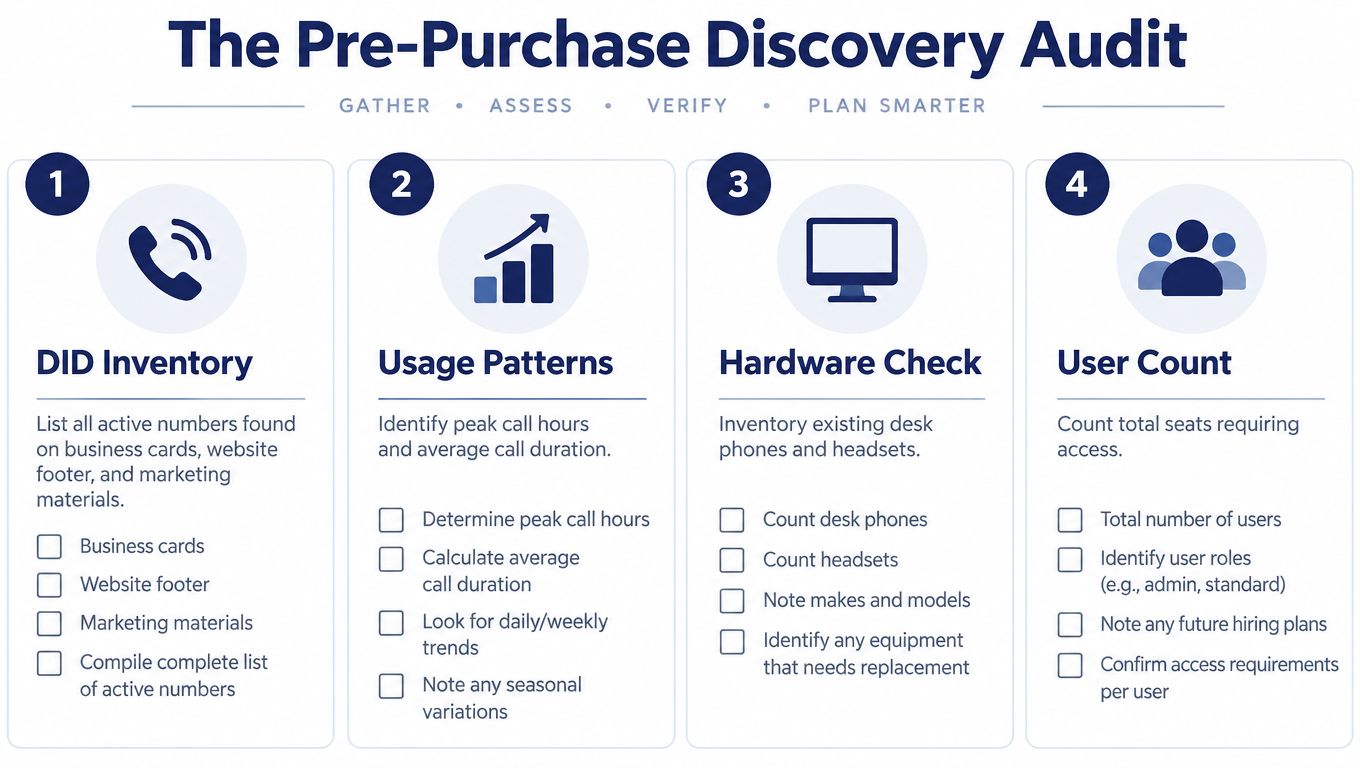
Discovery is the part most buyers rush, even though it determines whether the deployment is predictable. Start with the numbers. Export every active DID, main line, direct number, fax line, toll-free number, and temporary forwarding number. Then compare that list with the website, email signatures, business cards, invoices, advertising, door signage, and old call-flow documentation.
A number inventory should answer practical questions:
- Public identity: Where does the number appear, and what does a caller expect it to reach?
- Current destination: Does it terminate on a handset, voicemail box, hunt group, analog device, or mobile forward?
- Business owner: Which department or person is responsible for answering it?
- Retirement status: Is the number still needed, or has it been forwarding to someone who left the company?
- Porting risk: Does the carrier record match the legal business name and service address?
Trace real call behavior
Don't design the new system from the organization chart alone. Call the main number from an outside mobile, follow the menu, test the operator option, wait through the queue, and call outside business hours. Record what happens, including dead ends and routes that nobody remembers configuring.
List every user's extension, location, handset model, headset, desktop client, mobile app, and special requirement. Mark executives, receptionists, queue agents, on-call staff, and users who need recording or CRM logging. Include non-human endpoints such as alarms, elevator phones, payment terminals, door entry systems, fax machines, and paging equipment.
Establish the network baseline
Collect the public connection details, firewall model, voice VLAN design, QoS settings, switch capacity, wireless coverage, and upload capacity at every site. For home workers, document the connection type and whether calls will use a desk phone, laptop, or mobile application.
Use a VoIP bandwidth calculator as an estimate, but don't treat bandwidth as the only acceptance test. A connection can have plenty of capacity and still produce poor calls because of latency, jitter, packet loss, congestion, or incorrect firewall behavior.
Discovery should produce a map, not a spreadsheet nobody opens again. Keep the inventory under version control and attach each number, device, flow, and dependency to an owner.
The output should include a current-state diagram, a number register, a user and device list, call-flow recordings or transcripts, network findings, and a list of systems that cannot be moved without an adapter or separate service. If the vendor can't review those materials with you, you haven't finished discovery.
Choosing the Right Deployment Model for Your Team
The deployment model determines where failure occurs and who has to fix it. Hosted cloud PBX moves switching, software maintenance, and much of the administration into a provider platform. Hybrid deployment keeps part of the call path or local survivability on site. Full on-premise deployment gives the business more control, but also returns hardware lifecycle, patching, backups, SIP expertise, and local failure management to the IT team.
Recent IP PBX research forecasts the global market at USD 7.5 billion in 2024, rising to USD 12.2 billion by 2030, with an 8.5% CAGR, according to Cloud PBX market research. The same report assigns 42.0% of the market to hybrid deployment and 34.0% of 2024 end-user share to SMBs. It projects that about 62% of SMBs will adopt cloud-based IP PBX solutions by 2026, representing nearly USD 1.1 billion in incremental deployment value globally. These are market projections, not a reason to choose cloud automatically, but they explain why hosted and hybrid designs now dominate many modernization discussions.
| Factor | Hosted Cloud PBX | Hybrid | On-Premise |
|---|---|---|---|
| Cost shape | Predictable operating expense, often tied to seats and features | Combines service charges with local hardware and support | Higher responsibility for hardware, licenses, maintenance, and upgrades |
| Administration | Web portal and provider-managed infrastructure | Shared responsibility between provider and internal team | Requires internal SIP, network, server, and dialplan expertise |
| Migration risk | Depends on clean porting, routing, and internet readiness | Legacy system can remain active while new services stabilize | Familiar control, but the replacement project can inherit old complexity |
| Site resilience | Depends on provider design and local connectivity | Can preserve local calling or survivability | Local calling may continue during internet loss, but equipment can fail |
| Best fit | Distributed, remote, or lean IT teams | Businesses needing staged migration or local dependencies | Organizations with strong telecom operations and specific control requirements |
Hosted services aren't automatically simpler. Per-seat pricing can rise as headcount grows, and the business becomes dependent on provider support and site connectivity. On-premise systems can be economical for a stable environment with skilled staff, but they recreate the hardware and firmware burden that often triggered the project.
Hybrid is useful when a full cutover would create unacceptable risk. The existing PBX can continue handling calls while new trunks, devices, and call flows are tested, though the design must avoid confusing users with two competing sources of truth.
For a broader comparison of hosted VoIP and PBX architectures, focus on your actual constraints. Can your sites sustain voice traffic during peak use? Do compliance rules require specific recording or retention controls? Does the provider offer failover that matches your operating needs? Are you prepared to administer local equipment at every location?
Even vendor research can be messy. If you're trying to string to replace while comparing providers, ignore generic feature counts and ask for a migration design, test plan, porting responsibilities, and rollback procedure. The provider that explains failure handling clearly is usually more useful than the one that promises the shortest setup.
Building the Foundation Account, Numbers, and Devices
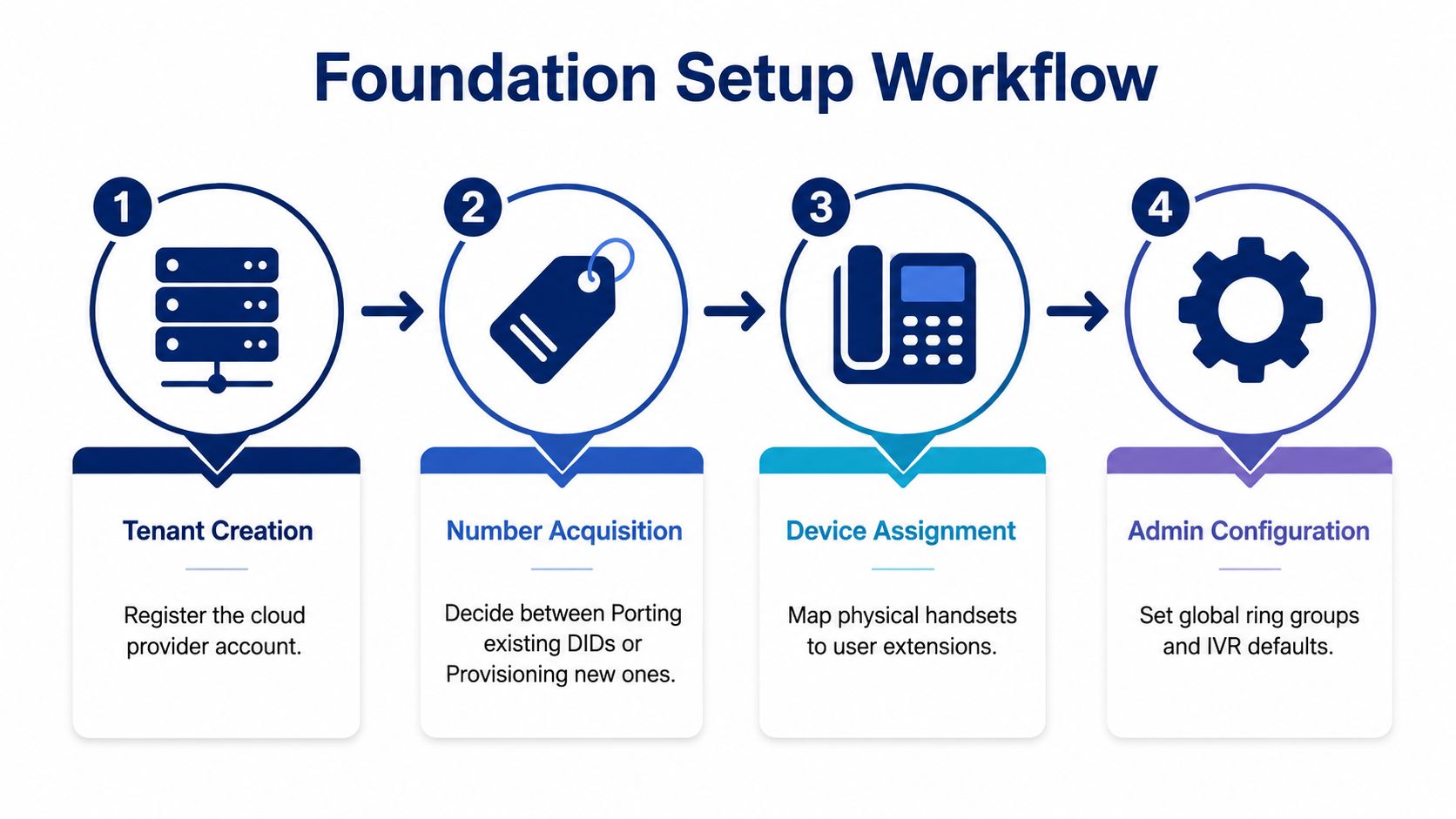
Create the tenant only after the target architecture and inventory have been approved. The account should reflect the business structure you intend to operate, not a temporary collection of trial users and improvised numbers. Assign administrative roles carefully, enable strong authentication, and separate people who configure the system from people who only answer calls.
Number strategy comes next. Decide which DIDs will be ported, which new local numbers are needed, and whether a temporary forwarding number will protect the business while carrier paperwork is processed. Reserve numbers for overflow, emergency routing, after-hours service, and other controlled failover paths. Don't port every obscure number until you know whether an alarm, fax, or machine depends on it.
Build the user and device model
Map each user to an extension, license, department, caller ID policy, device profile, and emergency location before sending invitations. Provision desk phones, desktop softphones, and mobile applications in the order that matches the rollout, then confirm firmware and configuration are controlled through the provider portal.
Standardized handset models reduce troubleshooting variation. A mixed fleet can work, but it forces administrators to learn different provisioning behavior, menu layouts, firmware practices, and headset compatibility. For remote staff, test the application on the operating systems and networks they use in their day-to-day operations rather than relying on an office-only trial.
Validate the voice path
Review the voice VLAN, QoS markings, firewall rules, SIP ALG behavior, jitter buffer settings, and switch configuration before broad deployment. Baseline acceptance criteria from independent migration checklists commonly use about 100 Kbps per concurrent call, latency under 150 ms, jitter under 30 ms, and packet loss under 1%, as documented in this VoIP migration checklist. Use those values as engineering thresholds, not promises about the quality of every network.
The first test user should place and receive calls through every planned device class. Check internal transfer, external transfer, voicemail, caller ID, hold, recording, mobile handoff, and emergency routing. If you need a practical reference for how to fix dropped calls and echo issues, use it alongside packet captures and provider diagnostics, not as a substitute for measuring the network.
A short demonstration can help staff understand the interface, but it isn't a deployment test.
The foundation is ready when a test user can complete an end-to-end call on each device type, administrators can trace the call in logs, and the business knows which route to use if the primary service becomes unavailable.
Designing Call Flows That Sound Professional From Day One
A phone system can be technically healthy and still sound careless. Callers judge the organization through the greeting, menu speed, transfer behavior, queue message, and the ease of reaching a person. Good call-flow design starts with caller intent rather than the internal department chart.
Write the main route on paper before touching the admin portal. Identify the common reasons people call, group only related work, and give each path a clear owner. Keep the opening menu short, use plain language, and include a direct route to a person or receptionist fallback.
Keep the menu shallow
Record the greeting in a quiet room with a consistent microphone. State the company name, explain the options, and repeat important choices once. Avoid internal terms that customers won't recognize, and don't make callers listen to a long list of individual employees.
A practical daytime structure might route sales, support, and billing to separate groups, with an operator option for callers who aren't sure where they belong. A medical office, law firm, contractor, or distributor may need a different arrangement, but the principle stays the same: the first menu should answer the caller's question, not display the company hierarchy.
Use ring groups only when people share responsibility. Simultaneous ringing can work for a small team that monitors the same queue. Sequential hunting is more appropriate when one person owns the first response and another provides backup. Neither method works if the listed users are unavailable, poorly trained, or rarely monitor the application.
Make queues and schedules explicit
Define queue entry, estimated wait messaging, comfort announcements, agent timeout, overflow destination, and voicemail behavior. If a queue reaches a point where nobody can answer, route it to a receptionist, callback process, or shared mailbox rather than leaving the caller in a loop.
Time-of-day rules deserve their own test matrix. Check normal hours, lunch coverage, holidays, early closures, weekends, and emergency periods. An after-hours caller should hear the correct schedule and reach the designated on-call route when the business requires live response.
A failover route isn't complete until someone answers it. Test the secondary SIP route, mobile forwarding, and voicemail destination with a real caller.
Document the primary carrier failure path, internet outage behavior, and administrator recovery steps. Then test every branch from an external number. A menu that looks correct in the portal can still transfer incorrectly because of time-zone settings, group membership, licensing, or a stale forwarding number.
Cutover Without Chaos and What Breaks Anyway
Cutover isn't the finish line. It's the start of the period when real callers, real traffic, and forgotten dependencies expose assumptions that laboratory testing missed.
Run a pilot with a small group of heavy users before moving the main number block. The pilot should include reception, a queue agent, a manager, a remote worker, and anyone dependent on recording, transfers, or CRM logging. Keep the legacy PBX available while the pilot runs, and define exactly which system owns each number during the trial.
Porting preparation should begin early. Confirm the carrier account details, legal business name, service address, authorized contact, number list, and letter of authorization. Schedule the change during a low-traffic window, publish the support contact, and give the team a written rollback instruction that doesn't depend on memory.
A phased migration methodology should inventory every DID, main line, fax line, and toll-free number, verify network readiness, pilot with a small group, and cut over in batches with a rollback plan. The VoIP migration guidance from SpectrumVoIP also emphasizes testing call quality, routing, voicemail, auto-attendant prompts, failover routing, and E911 details before broad rollout.
Expect the forgotten endpoints
The first failures are often not ordinary desk phones. Look for fax machines, alarm panels, credit-card processing modems, elevator phones, door systems, paging adapters, and analog lines that nobody listed during discovery. Some need an ATA, a dedicated service, a different codec policy, or continued operation on the legacy platform.
Internal transfers can fail even when inbound calls work. Voicemail-to-email can deliver but misidentify names. Softphones can stutter on home Wi-Fi while desk phones remain clear. A queue can ring correctly but send abandoned calls to the wrong mailbox. These failures need separate test cases and named owners.
Create a war-room channel for the first operating period, record each incident with time, user, device, call direction, location, and symptom, and distinguish provider faults from local network problems. Don't let staff solve issues through scattered private messages, because undocumented workarounds become the next system's hidden configuration.
Review the incident log regularly until recurring faults have a root cause and a permanent fix. A successful cutover isn't the one with no tickets. It's the one where the business detects, prioritizes, and closes problems before callers experience the same failure repeatedly.
A 30 60 90 Plan to Make the New System Stick
The first operating period should stabilize the service, not launch every available feature. Listen to recordings where policy allows, check greetings, inspect voicemail delivery, review queue routing, and correct the gaps that appeared under real conditions. Ask reception and support agents which transfer or status actions still feel unclear.
By the next phase, introduce capabilities that support the business case for the replacement. Remote staff may need desktop and mobile applications, presence, status integration, recording policies, analytics, or CRM and ticketing connections. Add features in a controlled sequence, with training and an owner for each configuration.
The final phase should connect adoption with administration. Review license utilization, user activity, support-ticket themes, missed-call handling, recording access, and the remaining reasons to keep the legacy platform online. Remove abandoned users and routes, but retain evidence before deleting numbers or recordings.
| Phase | Focus | Key Deliverables | Owner |
|---|---|---|---|
| First 30 days | Stabilization | Correct greetings, queue routes, voicemail delivery, device issues, and incident patterns | Phone-system administrator with department leads |
| Days 31 to 60 | Capability rollout | Enable remote applications, presence, recording policies, reporting, and approved integrations | IT or communications owner |
| Days 61 to 90 | Adoption and rationalization | Review usage, licenses, missed calls, support trends, legacy dependencies, and next priorities | Operations leader with finance and IT |
| Ongoing | Governance | Schedule quarterly reviews for routing, access, emergency details, carrier performance, and feature changes | Named system owner |
A phone system becomes dependable through review, not installation. Give it an owner, an incident history, and a regular change process.
For teams comparing managed platforms, SnapDial provides hosted VoIP and cloud PBX capabilities including auto-attendant and IVR, call routing, mobile applications, visual voicemail, call recording, cloud faxing, queue management, and web-based administration. Its white-glove setup model can handle user, routing, voicemail, and pre-provisioned Yealink phone configuration as part of a replacement project.
Use the 30/60/90 rhythm to decide what the organization should keep, simplify, or retire. A quarterly review can catch stale access, untested failover routes, outdated greetings, and new site or staffing requirements before they become another unsupported phone system.
If your current PBX is creating missed calls, fragile forwarding, or a risky hiring deadline, start with a number and dependency inventory rather than a provider demo. SnapDial can help configure a hosted business phone system, migrate users and call flows, and keep the rollout organized around testing and continuity. Visit SnapDial to review the platform and discuss a practical replacement plan.