
A call starts breaking up during a busy morning. The customer hears clipped words, the employee hears robotic audio, and everyone assumes the internet plan is too small. Often, the headline download speed isn't the problem. The network may have enough capacity in theory, but not enough reliable, symmetric, prioritized capacity for voice when Wi-Fi traffic, cloud applications, and simultaneous calls compete for the same link.
A VoIP bandwidth calculator gives you a useful starting point. It translates codec choice, packetization, protocol headers, and concurrent calls into a voice-load estimate. The mistake is treating that estimate as the final answer. Real offices need a practical buffer for jitter, packet bursts, wireless overhead, and peak-hour congestion.
Why Calculating VoIP Bandwidth Matters for Your Office
The first sign of trouble usually arrives during a call, not during an internet speed test. A file download may complete normally while a customer conversation freezes because voice packets must arrive continuously and in sequence. A brief interruption can produce clipped speech, one-way audio, or a call that drops altogether.

Voice traffic behaves differently
Web browsing can tolerate delay. A browser waits for missing content, then displays the page. Voice has no such luxury. Packets that arrive late may be useless, even if the connection eventually delivers them. Congestion, packet loss, and jitter therefore matter alongside the advertised bandwidth.
That distinction catches offices during hosted VoIP migrations. The provider activates the phones, calls work in a quiet test, and then quality deteriorates when employees start video meetings, synchronize cloud files, or use wireless devices. The issue isn't necessarily the phone service. It may be an unmeasured peak in the local network.
Measure the calls you actually need
Bandwidth planning should follow concurrent calls, not the number of handsets on desks. A business can have many phones but only a smaller number of active conversations. Conversely, a call queue, ring group, conference, or shared reception line can create more simultaneous voice sessions than a simple handset count suggests.
Start with the busiest operating period and identify the maximum number of calls likely to overlap. Then calculate the on-wire requirement for the selected codec and packet settings. Documentation for modern calculators explains why a G.711-style call at 20 ms packetization is commonly estimated at about 80–87 kbps in one direction, or roughly 160–174 kbps full duplex, after protocol and link overhead are included (VoIP bandwidth calculator documentation).
Practical rule: Treat the calculator result as the voice baseline, not as the amount of internet capacity you can safely promise to users.
If you're comparing hosted providers before doing the network work, a guide to the best business VoIP phone systems 2026 can help you evaluate features and deployment models. Keep the network assessment separate from the provider comparison. A strong phone platform can't compensate for an overloaded uplink.
Understanding Codec Bitrate and Packet Overhead
A codec converts voice into digital packets. Its advertised bitrate covers the audio payload, not the complete packet sent across the network. Every packet also includes IP, UDP, and RTP headers, followed by link-layer framing.
That overhead becomes significant because VoIP sends small packets at a high frequency. A low codec bitrate does not automatically mean a proportionally low network requirement. A useful VoIP bandwidth calculator must account for payload size, packetization interval, packets per second, and the connection's framing assumptions.
The calculation behind the estimate
The calculation follows a defined sequence:
- Choose the codec. G.711 carries a higher audio payload than compressed codecs such as G.729.
- Choose packetization. With a 20 ms interval, the system places a short segment of audio in each packet. Changing the interval changes packet frequency and overhead.
- Add protocol headers. IP, UDP, and RTP information travels with every packet.
- Apply link overhead. Ethernet and other Layer-2 technologies add their own framing requirements.
- Convert direction and call count. Capacity must cover outbound and inbound voice traffic.
The relationship is straightforward: more packets per second mean more repeated headers. A longer packetization interval can reduce header overhead, but it can also affect latency and call quality. Use a calculator that lets you set the codec, packet size, and overhead assumptions instead of relying on one universal figure.
Why codec comparisons can mislead
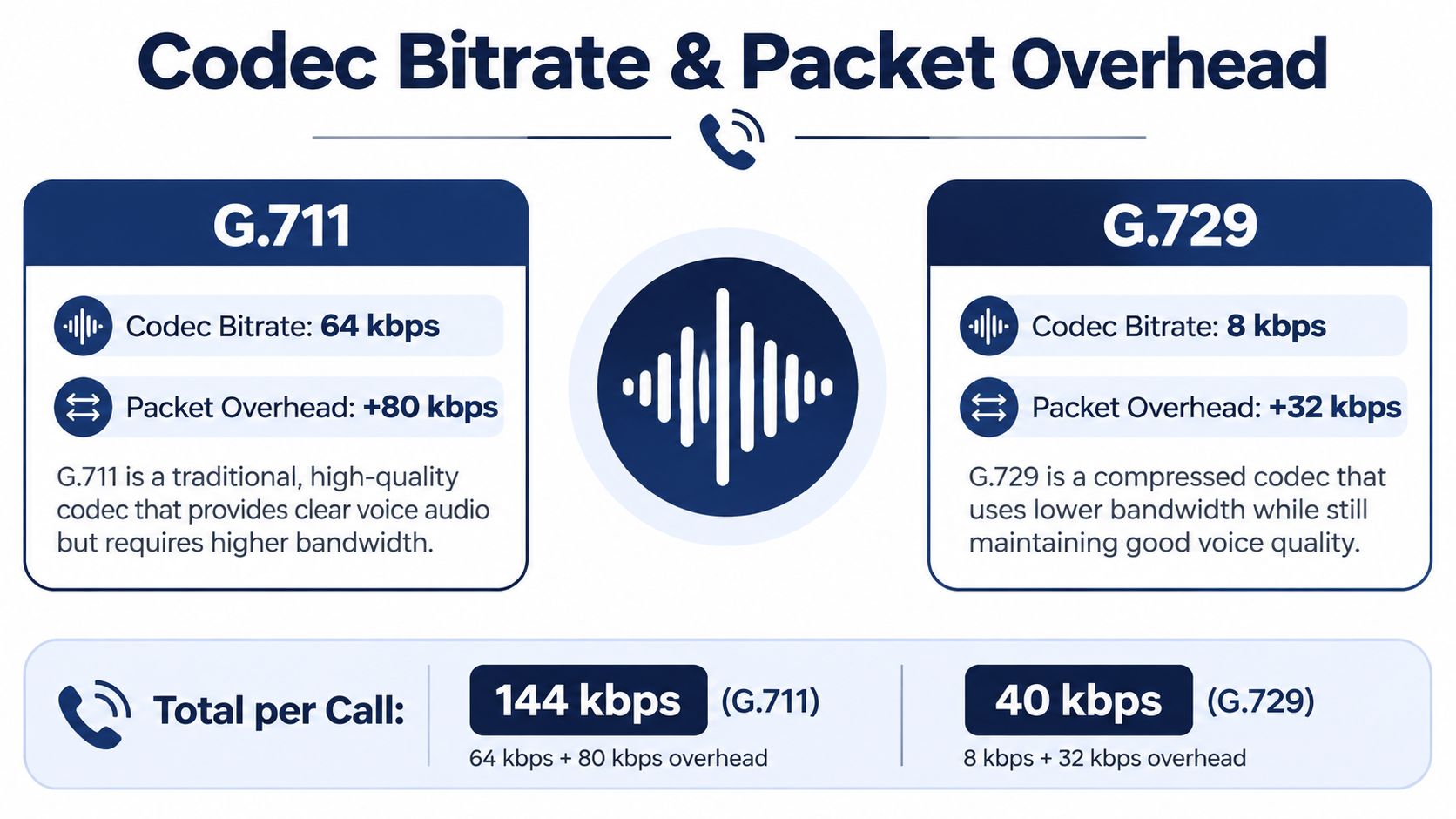
G.711 is often selected for its high-quality, uncompressed audio. Its payload rate is higher, but planning should use the complete on-wire rate, including headers and framing.
G.729 shows the other side of the trade-off. Its payload is much smaller, and documented calculator guidance estimates an 8 kbps G.729 payload at about 31.2 kbps per direction after IP, UDP, and RTP headers, or about 62.4 kbps full duplex before Ethernet overhead (VoIP codec and bandwidth calculator guidance). Compression can reduce demand on constrained WAN links and larger deployments, while introducing different audio characteristics, licensing considerations, or provider support limits.
Packetization settings change the result as well. Calculator implementations commonly expose 10, 20, and 30 ms intervals because the same codec can use different capacity under different packet schedules. Select the settings supported by the provider and phones. A precise estimate based on the wrong codec or interval remains inaccurate.
The practical workflow is to obtain the hosted VoIP provider's supported codec profile and recommended packetization. Then calculate the complete per-call rate, leaving headroom for Wi-Fi jitter, burst traffic, and simultaneous call peaks in a mixed office environment. The calculator provides a baseline, not the safe capacity of the internet connection.
Calculating Total Voice Requirements for Your Team
A speed test can show plenty of capacity at 9 a.m. and still fail during the busiest calling window. Total voice demand depends on concurrent media sessions, available capacity in both directions, and the traffic competing with those calls.
Start with concurrency
Count simultaneous calls, not employees, extensions, or handsets. Include inbound and outbound calls, transfers, conference participants, queue agents, and any call flow that can establish a separate media session. A small reception team may still create high overlap during a service surge, while a larger office may have lower demand.
Use call records from the phone platform when available. Review the busiest intervals rather than relying on a daily average, then record the highest realistic overlap. If records do not show concurrency, observe the office during its busiest period and document active calls at regular intervals. Average usage conceals the short peaks that usually expose weak capacity.
Build the worksheet around observed operations:
- Codec and packetization: Record the settings phones and the provider negotiate.
- Peak concurrent calls: Use the highest credible overlap, including queues and conferences.
- Per-direction rate: Keep upload and download requirements separate.
- Total voice load: Multiply the applicable per-call rate by peak concurrency.
- Other traffic: List cloud applications, video, backups, updates, and Wi-Fi activity independently.
- Available capacity: Record usable capacity during the same busy period.
Read the result in both directions
For a G.711 deployment, use the per-direction result from the G.711 bandwidth calculation documentation, then multiply it by peak concurrent calls. The worksheet should show separate uplink and downlink totals, because a connection with strong download performance can still have an overloaded upload path.
Keep voice demand separate from general internet demand. Add the traffic generated by file transfers, cloud synchronization, video meetings, operating-system updates, and wireless clients. Those workloads can arrive in bursts, so an average throughput figure may hide short periods in which voice packets queue behind larger transfers.
Validate the worksheet against the office
Do not compare the voice total only with the internet package's advertised download speed. Check usable upload capacity during peak hours, WAN-edge utilization, switch uplinks, and wireless access-point capacity. Run tests while normal office traffic is active, not only on an idle connection, and compare results with call records from the same period.
The calculator answers one question: how much traffic the voice workload generates. The network plan must answer another: how much capacity remains when calls, Wi-Fi clients, and business applications peak together. That remaining capacity is the practical headroom that theoretical Mbps calculations do not show.
Adding Safety Margins for Jitter and Wi-Fi Overhead
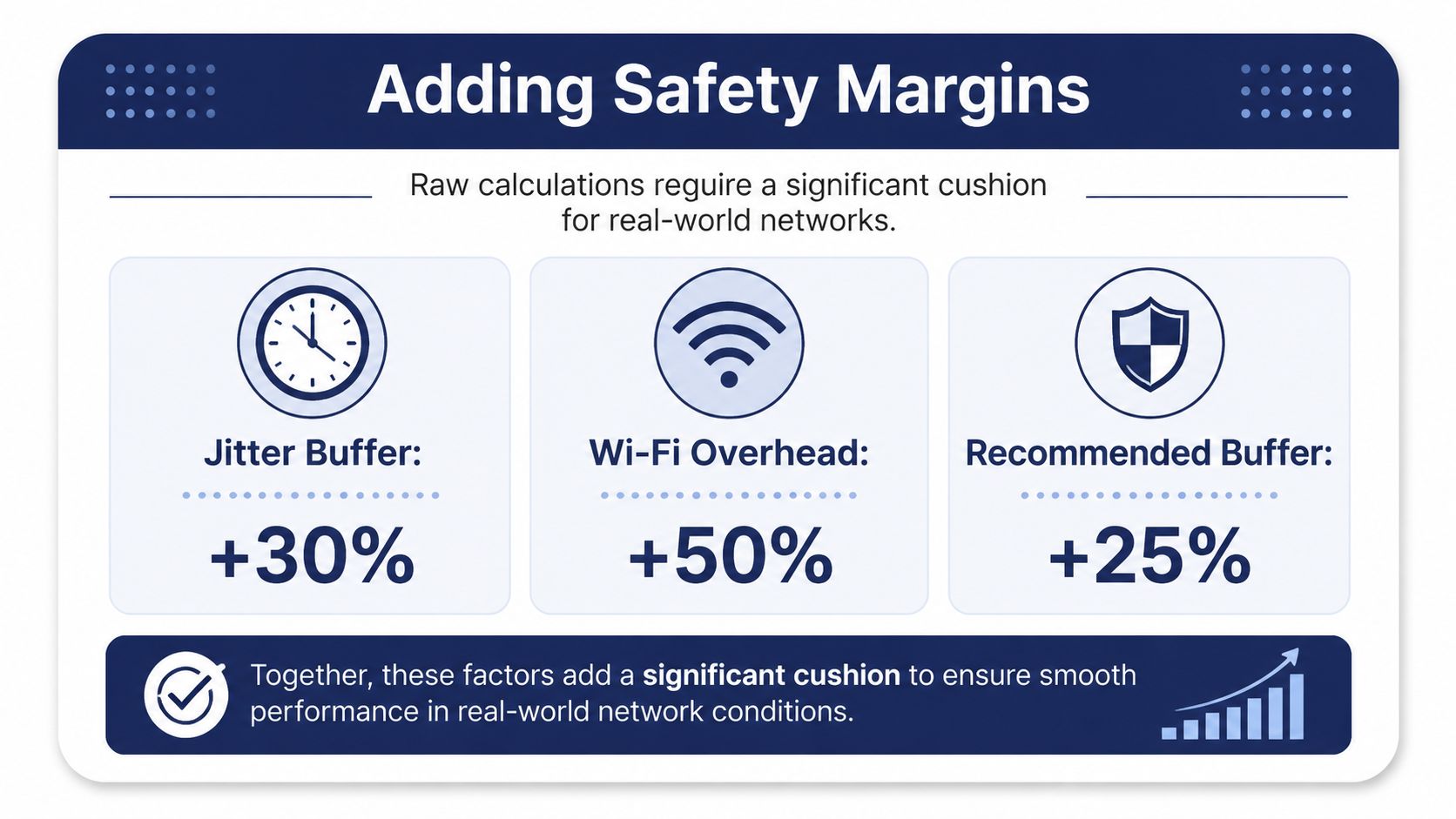
A raw bandwidth result describes a controlled model. An office network changes from minute to minute. Employees upload files, use cloud applications, roam between access points, start video meetings, and trigger background synchronization. These activities create bursts that can harm call quality even when average throughput looks sufficient.
The practical gap is headroom. Calculators account for codec bitrate, packetization, and per-call totals, but planning also needs room for jitter, packet loss, burst traffic, and variability from silence suppression. Use the VoIP bandwidth planning guidance for jitter and headroom as a planning reference, then validate the result against actual office conditions.
Treat margin as protection, not waste
Do not copy a universal percentage from a generic worksheet. A wired phone network with controlled traffic has different risks from a busy Wi-Fi environment serving roaming users and cloud workloads. The more variable the network, the more conservative the operating range should be.
The guidance identifies jitter under 50 ms as an acceptable target and describes a 50–150 ms jitter buffer range. Those figures help establish a baseline, but they do not replace checks for packet loss, congestion, or queueing. A calculator can stop at theoretical Mbps, while a mixed office needs capacity for simultaneous calls, Wi-Fi contention, and short traffic bursts.
Build a practical safe range
Use the calculator's voice total as the floor. Then evaluate three separate conditions:
- Jitter exposure: Check whether queues form during uploads, backups, or busy application periods.
- Wireless variability: Account for contention, roaming, signal quality, retransmissions, and other clients sharing each access point.
- Peak bursts: Test the moment several users demand bandwidth together, rather than relying on a quiet-period speed test.
A safety margin cannot compensate for a weak design. If the uplink is frequently saturated, additional capacity may help, but traffic control and correct queue handling often matter more than a larger headline speed. Offices deploying cordless or wireless voice devices should review the network design alongside Wi-Fi VoIP phones, including access-point placement, coverage, and client contention.
Calculators establish a baseline. Real-world stability depends on headroom and testing.
Test the result under load. Start a large upload, place several calls, and monitor jitter, loss, queueing, and call clarity. Immediate call degradation indicates insufficient margin, a congested path, or an incorrectly configured traffic policy.
Implementing QoS Settings for Priority Traffic
Bandwidth alone won't guarantee clear calls. Quality of Service, or QoS, determines which packets move first when multiple applications compete for a congested link. Without traffic classification, a cloud backup can fill the upload queue and force voice packets to wait.
Configure the policy in the right order
Start at the router or firewall that controls the WAN connection. Identify the voice traffic using the provider's documented classification method, which may use DSCP markings, VLAN membership, known service classes, or provider-managed rules. Don't guess at ports or markings, because an incorrect rule can prioritize unrelated traffic or fail to match the phone packets.
Then configure the LAN equipment:
- Trust approved markings: Allow the switch to preserve voice markings from managed phones when the provider supports that design.
- Separate voice where appropriate: Use a voice VLAN if the switch, phones, and DHCP design support it.
- Assign a strict priority queue carefully: Give real-time voice preference over bulk transfers, but avoid starving essential network control traffic.
- Shape the WAN edge: Configure outbound shaping slightly below the actual usable uplink so the business router controls the queue instead of an upstream device.
- De-prioritize bulk traffic: Backups, operating-system updates, and large file transfers should yield to interactive voice.
Verify the behavior
A QoS rule isn't complete when it appears in the configuration screen. Test it while generating congestion. A large upload should cause the transfer to slow or queue, while calls remain intelligible. Check both directions, because download congestion can affect inbound audio and application performance even when the upload policy works correctly.
The SIP and IP port overview can help administrators understand the traffic paths they may need to permit or classify, but provider documentation remains the authority for a specific deployment.
A short visual walkthrough can also help teams understand how packet prioritization fits into a broader network configuration.
Document the final policy. Record which devices mark traffic, which queue handles voice, what happens to unclassified packets, and how the team will test changes. That documentation prevents a later firewall replacement or switch upgrade from removing the protection without notice.
Troubleshooting Common Bandwidth and Quality Issues
Voice symptoms often point to different network faults. Robotic audio usually suggests packet loss, jitter, or queueing. One-way audio more often indicates a signaling or media-path problem, although congestion can make diagnosis harder. Background noise may originate at the handset or headset rather than the WAN.
Start with the simplest comparison. Ask whether the issue affects every phone, only Wi-Fi users, one location, or calls during a specific busy period. A problem that appears only when someone starts a large upload points toward queueing or insufficient uplink headroom. A problem isolated to one wireless area points toward coverage, interference, or access-point contention.
Use a focused checklist
- Confirm the call peak: Compare the active call count with the concurrency used in the calculator.
- Check both directions: Measure upload and download behavior during the actual business peak.
- Inspect loss and jitter: A fast connection can still deliver poor voice if packets arrive late or fail to arrive.
- Review queues: Confirm that the router is classifying voice and that the WAN shaper matches the usable link.
- Test wired and wireless separately: A clean wired call alongside a degraded Wi-Fi call narrows the fault quickly.
- Check the endpoint: Swap the handset, headset, cable, or switch port before blaming the provider.
- Repeat under load: Place calls while transferring a large file or running a scheduled cloud task.
For a deeper explanation of the symptom most commonly confused with ordinary slowness, review what jitter means in networking. Don't increase the internet package before identifying the bottleneck. More capacity won't fix a bad QoS match, a failing access point, or a local cabling fault.
Final Checklist for a Stable VoIP Network
A dependable deployment begins with the traffic model, then validates that model against the office. Keep the process practical:
- Identify the codec and packetization interval: Use the settings supported by the hosted provider.
- Calculate on-wire traffic: Include IP, UDP, RTP, and Layer-2 overhead rather than relying on raw codec bitrate.
- Size for concurrent calls: Use the busiest realistic call overlap, not the number of extensions.
- Check symmetry: Confirm that usable upload and download capacity can support the voice load.
- Reserve headroom: Leave room for jitter, bursts, Wi-Fi variability, and normal business traffic.
- Configure QoS: Classify voice, prioritize it at the WAN edge, and prevent bulk transfers from filling the queue.
- Test under congestion: Make real calls while uploads, backups, and collaboration traffic are active.
- Monitor after launch: Review call quality, jitter, loss, and peak utilization instead of assuming the first test proves stability.
The best VoIP bandwidth calculator is a planning instrument, not a guarantee. It gives you a defensible baseline, while testing and QoS determine whether that baseline survives a busy office. Recheck the design when you add locations, call-center agents, wireless phones, or new cloud workloads.
SnapDial helps businesses replace legacy PBXs with a managed cloud phone system that includes calling, conferencing, routing, mobile apps, and white-glove setup at no cost. Visit SnapDial to discuss a reliable VoIP deployment and get help matching the platform to your network capacity.