

The business phone decision got a lot simpler. The global VoIP services market is projected at US$ 201.97 billion in 2026 and projected to reach US$ 472.21 billion by 2033, with 36% of new business phone buyers choosing VoIP versus 24% choosing traditional landlines, according to Coherent Market Insights on the VoIP services market. That's not a niche shift. It's a market verdict.
If you're still weighing VoIP vs Landline as if both are equally smart long-term options for an SMB, you're asking the wrong question. The pertinent question is whether you want a phone system that helps the business move faster, costs less to run, and supports how people work now.
Here's the quick comparison most owners need first.
| Category | VoIP | Landline |
|---|---|---|
| Core infrastructure | Internet-based calling using digital packets | PSTN-based calling over physical telephone wiring |
| Monthly cost profile | Lower, more bundled, more predictable | Higher per-line costs plus extra feature charges |
| Business flexibility | Works across desk phones, laptops, and mobile apps | Tied to fixed physical locations |
| Scalability | Add users and locations quickly | Expansion usually requires physical changes |
| Features | Integrations, routing, transcription, analytics, queues | Basic calling and limited add-ons |
| Remote work support | Strong | Weak |
| Long-distance costs | Often included or reduced | Commonly higher and variable |
| Best fit | Growing, distributed, customer-facing businesses | Narrow use cases where legacy lines are still required |
The End of the Line for Traditional Phone Systems
36% of new business phone buyers now choose VoIP, while 24% choose traditional landlines, as noted earlier. That gap is the clearest signal in the market. Small businesses are not replacing old phone systems with more old phone systems. They are buying flexibility, lower operating costs, and software that fits how the business runs.
Landlines dominated for decades because they matched a different operating model. Staff worked from one location. Calls stayed separate from sales, service, scheduling, and reporting. That model is gone. Phone systems now sit inside the revenue engine and the service workflow. A system that cannot support mobile staff, distributed teams, call routing, and software integration adds cost, slows response times, and makes growth harder than it needs to be.
Keeping a landline as your main business system in 2026 usually protects a habit, not the business.
Why landlines now create drag
A landline still serves a narrow purpose well. It gives you a fixed-location line with familiar hardware. For a modern SMB, that is not a strong enough reason to keep it as the default.
The problem is opportunity cost. Every limitation turns into a business expense.
- Mobility is restricted: Calls stay tied to desks and locations instead of following your staff.
- Response times suffer: Missed calls often sit until someone gets back to the office phone.
- Admin work stays manual: Changes, routing, voicemail handling, and user management take more effort than they should.
- Customer data stays disconnected: Call activity does not flow cleanly into the systems your team uses to sell and support customers.
If you need a basic refresher on how business calling fits into the broader communications stack, this telephony overview from SnapDial is a useful primer. For context on the legacy network VoIP is replacing, FaxZen's PSTN and VoIP guide explains the old framework clearly.
My recommendation
If your business has reliable internet, choose VoIP as the primary phone system. Treat a landline as a backup or a compliance-specific exception, not the standard setup.
That decision is not about chasing a newer tool. It is about total cost of ownership, faster customer response, easier hiring, and a phone system that stops blocking growth. Landlines are no longer the benchmark. They are the fallback for edge cases.
Understanding the Core Difference Beyond the Wires
Your phone system either behaves like infrastructure or like software. That is the fundamental divide.
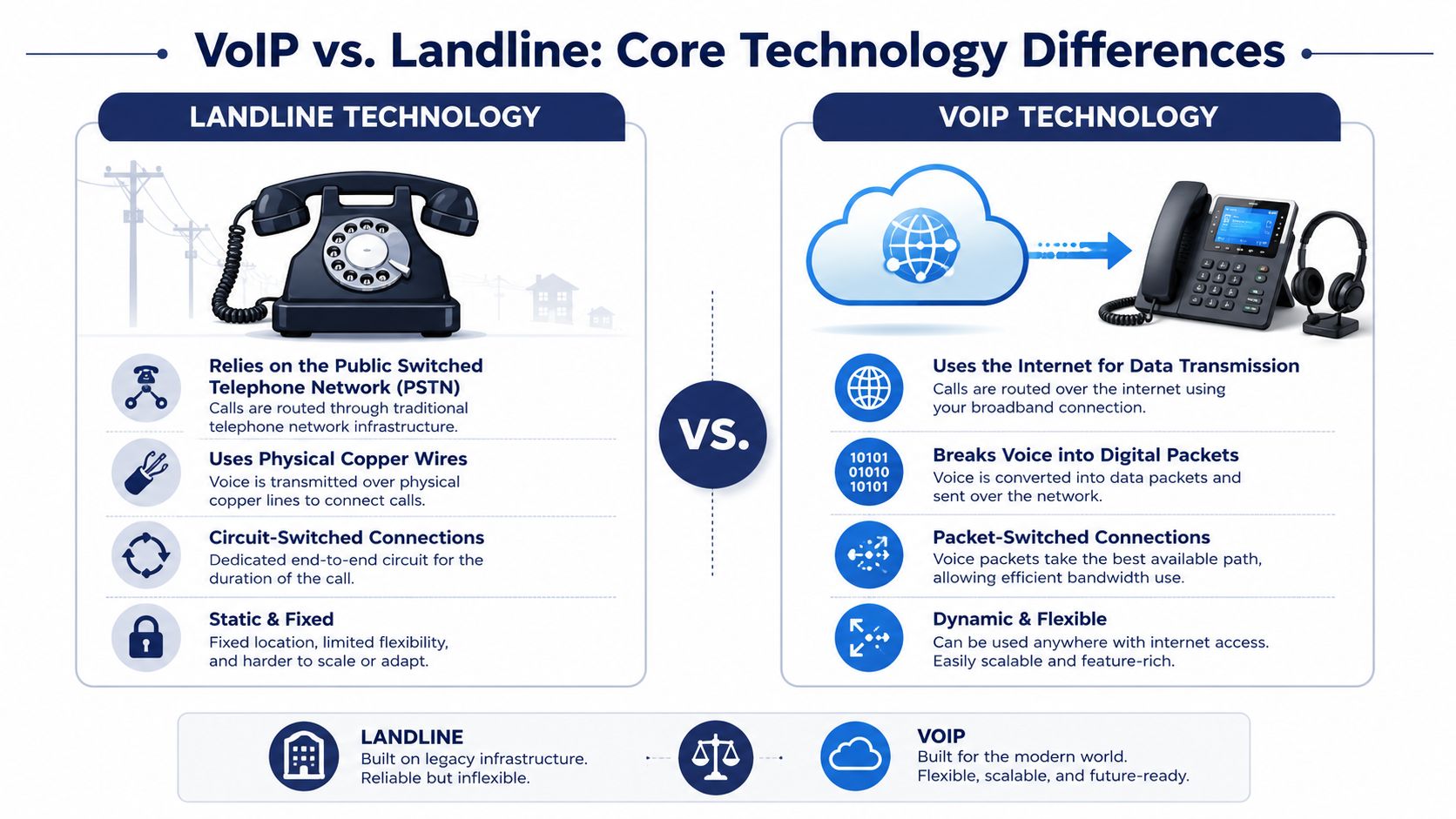
A landline runs on the Public Switched Telephone Network, or PSTN. It was built for fixed locations, fixed hardware, and predictable office setups. That design made sense when staff sat at assigned desks and business calling was mostly isolated from the rest of the company's systems.
If you want a quick refresher on that legacy network, FaxZen's PSTN and VoIP guide explains the PSTN clearly.
VoIP changes the operating model. It turns calls into data and routes them over your internet connection, which means your phone system is managed in software. That one shift affects staffing, expansion, reporting, customer response, and how quickly you can change course without waiting on a carrier or replacing hardware.
Here is the practical difference:
| Business function | Landline | VoIP |
|---|---|---|
| Adding a user | Often requires physical setup and provider support | Usually done in an admin portal |
| Opening another location | New telecom project with separate line planning | Extend the same system to the new site |
| Remote and hybrid work | Limited and awkward | Built for mobile apps, softphones, and IP phones |
| CRM and help desk integration | Rare or bolt-on | Standard expectation for many providers |
| Call routing changes | Manual and slower | Fast to update in software |
That matters because SMBs do not buy phone systems for dial tone. They buy them to support sales, service, staffing, and growth. A landline handles calls. VoIP helps your team answer faster, route calls better, log activity automatically, and manage users without turning every change into a small IT project.
This is why I treat VoIP as the default business system and landlines as a niche exception.
The strongest argument for VoIP in this section is not a feature checklist. It is business flexibility with lower administrative drag. If you hire remote staff, open a second office, use a CRM, or need visibility into call activity, a software-based system produces a better return because it fits how modern companies already operate.
Even vendor selection reflects that difference. Businesses comparing pricing are usually not just shopping for a phone line. They are choosing how much control they want over setup, scaling, and future costs. If you are evaluating options, this guide to finding the cheapest VoIP service for business use is a useful starting point.
A landline is a fixed utility. VoIP is an operating system for business communications. For a small business owner making a long-term decision, that is the distinction that affects TCO and ROI.
Cost and ROI A Definitive Financial Breakdown
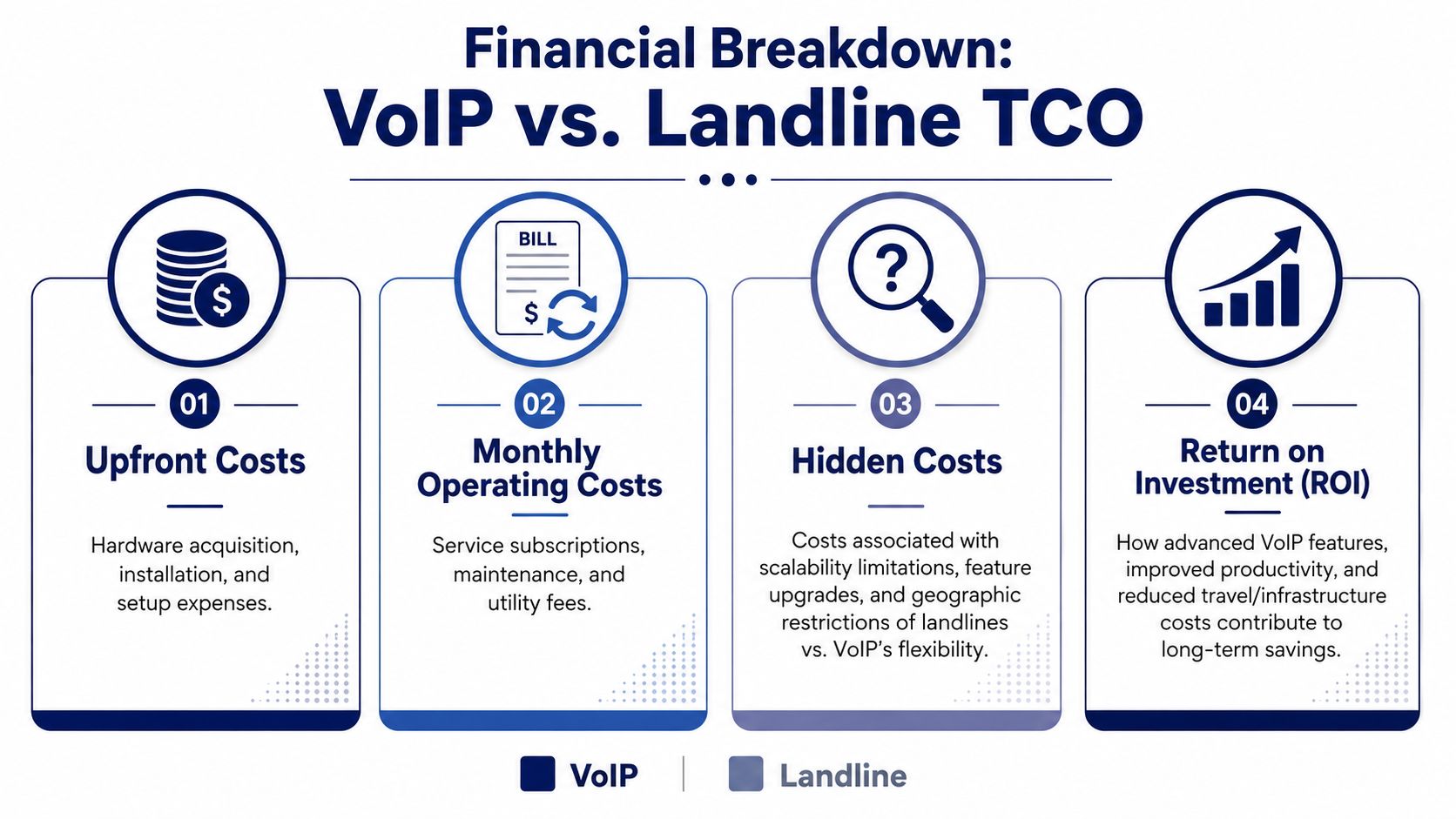
Most owners compare phone systems the wrong way. They look at the monthly bill and stop there. That misses the primary issue, which is total cost of ownership.
The obvious costs
The headline numbers already make the case. Businesses typically save between 30% and 50% on monthly phone bills after switching to VoIP, with some seeing savings up to 75%, according to Tech.co's VoIP statistics roundup. That same source notes traditional landlines often cost £30 to £80 per line monthly, with extra charges for features.
If you're paying for separate voicemail features, forwarding, extra lines, or long-distance usage, your system isn't cheap. It's just familiar.
The hidden costs owners forget
Landlines create expenses that don't always show up as a clean telecom line item.
Expansion cost
Adding staff to a legacy setup often means physical work. New ports. More devices. More coordination. More waiting.
VoIP removes most of that friction because user management happens in software. If you grow seasonally, add a location, or hire remote staff, that difference shows up fast in both labor and downtime.
Feature cost
Many landline environments charge extra for capabilities that modern businesses now treat as standard. Call forwarding, voicemail handling, auto attendants, and routing logic often become paid add-ons or hardware projects.
VoIP platforms usually package these capabilities into the service itself. That changes your cost structure from piecemeal spending to predictable operating expense.
Opportunity cost
This is the one most owners ignore. If your team misses calls because the system is tied to a desk, or if admins waste time making simple changes through a carrier, you're paying for delay.
Cheap phone service that slows your staff is not cheap.
A simple ROI lens for SMBs
Use this framework when comparing VoIP vs Landline:
- Monthly service cost: Compare recurring charges line by line.
- Feature spend: Count what you pay extra for today.
- Admin burden: Estimate how much time staff spend managing the current setup.
- Growth friction: Factor in the cost of adding users, locations, and temporary workers.
- Missed-call risk: Assess whether your current system limits responsiveness.
If you want another business-focused take on the economics and practical tradeoffs, this VoIP vs landline business comparison from Networking2000 adds useful context.
For teams shopping specifically on budget, this guide to finding the cheapest VoIP service is a sensible next step.
My financial recommendation
For nearly every SMB, VoIP wins on cost structure, not just sticker price. You spend less, you avoid feature nickel-and-diming, and you stop paying for physical limitations. If you're still on landlines, you're likely carrying higher monthly costs and slower operating mechanics at the same time. That's the worst combination.
Feature and Capability Comparison for Modern Business
Every missed call has a cost. For an SMB, the phone system should help capture revenue, route work, and protect staff time. If it cannot do those jobs, it is a constraint, not an asset.

Landlines still handle basic calling. That is the full story. VoIP supports the way small businesses operate now: staff split between office and field, shared ownership of inbound calls, and managers who need to change routing in minutes instead of filing a carrier request.
That difference matters because features are not cosmetic. They shape labor costs, response times, and close rates.
What a modern business actually needs
Use this comparison as an operating guide, not a spec sheet.
| Capability | VoIP | Landline |
|---|---|---|
| Mobile office setup | Yes | No practical equivalent |
| Auto attendant and routing | Common | Often limited or add-on dependent |
| Visual voicemail and transcription | Available on modern systems | Rare in legacy setups |
| CRM and software integration | Native possibility | Not native |
| Shared business identity across devices | Strong | Weak |
| Queue handling for support teams | Strong | Limited |
A landline system can ring a desk. A VoIP system can route calls by schedule, team, location, and availability, then tie the result back to your sales or service workflow. That is a business system.
Where VoIP creates a clear return
Sales teams that work from the road
A business number should follow the rep, not the desk. With VoIP, calls can ring a desk phone, laptop, and mobile app at the same time or in sequence. The customer sees one company number. The business keeps call records, reporting, and continuity if that employee leaves.
That protects pipeline visibility.
Front-office teams that need call control
Medical practices, law firms, contractors, and local service businesses do not need bloated enterprise software. They do need rules. Route new leads one way, urgent service calls another, and after-hours calls to voicemail or an on-call manager.
Landlines usually force a person at the front desk to act as the routing engine. That is expensive and error-prone. VoIP replaces that manual triage with menus, schedules, ring groups, and voicemail transcription, which also helps staff skim messages faster.
If your network is part of the decision, review the basics of network jitter and how it affects voice calls before you buy.
Support teams that handle volume
Once call volume rises, queue management stops being optional. You need hold queues, overflow rules, basic analytics, and callback options. Landline setups often treat those functions as bolt-ons. VoIP platforms usually include them as part of the core service, which gives small teams a faster path to better call handling without a custom PBX project.
A good example is field-service operations and relocation companies. MoveJoy's look at automated answering for moving businesses shows how routing, response speed, and missed-call prevention directly affect booked jobs.
If your team handles frequent inbound calls, the phone system should reduce admin work and help convert demand into revenue.
Later in the buying process, it helps to see a plain walkthrough of how internet-based calling works in practice.
The strategic takeaway
VoIP wins because it improves the economics of communication. One platform can cover office staff, remote workers, and frontline teams while adding routing, reporting, and integrations that would cost more or remain unavailable on landlines.
If you are deciding based on growth, not nostalgia, choose the system that shortens response time, cuts manual handling, and scales without new wiring. That system is VoIP.
Reliability Security and Call Quality Explained
Poor phone reliability costs money fast. A dropped sales call, a dead main number, or choppy audio during support conversations hurts conversion, service quality, and staff efficiency. Treat this part of the decision like an operations issue, not a nostalgia test.
Call quality depends on your network discipline
The old belief that landlines always sound better is outdated. Business VoIP can deliver excellent audio, but it rewards clean network setup and punishes sloppy configuration.
The main call quality problems are predictable. Latency creates delay. Packet loss cuts words. Jitter makes conversations sound broken or robotic. If you want a plain-English explanation of one of the biggest causes, read this guide to network jitter and why it affects VoIP audio.
That gives you a practical rule. If your internet is stable, your router is business-grade, and voice traffic gets priority through QoS settings, VoIP call quality is consistently strong enough for frontline sales and support work.
Reliability is a business continuity question
Landlines built their reputation on dedicated copper lines. That matters less than it used to, because dedicated does not mean flexible. If the physical line fails at your office, the failure is tied to that location.
VoIP gives you better recovery options. Calls can ring desk phones, mobile apps, laptops, and backup sites at the same time or in sequence. If one device or office goes down, service can keep running through another endpoint. That reduces downtime risk and protects revenue during internet outages, office closures, and local service disruptions.
This is the point small business owners should focus on. Reliability is not just uptime on paper. Reliability is how quickly your team can keep answering calls when something breaks.
The better system is the one that keeps revenue-facing conversations alive during a disruption. For most SMBs, that is VoIP with proper failover planning.
Security is a vendor selection issue
Landlines avoid many internet-based threats, but they also give you fewer controls, less visibility, and fewer ways to monitor misuse. VoIP requires security discipline. In return, you get tools that are easier to manage at scale.
Check for these protections before you sign a contract:
- Encryption for signaling and voice traffic: Protects calls while they move across networks.
- Role-based admin access: Limits who can change routing, users, and recordings.
- MFA and account security controls: Reduces account takeover risk.
- Fraud monitoring and alerting: Helps catch unusual calling activity before charges climb.
- Compliance support: Necessary if your business handles regulated customer data.
A cheap provider can turn VoIP into a support headache. A serious provider makes security manageable and auditable.
The TCO and ROI view
This section is not only about whether calls sound clear. It is about the cost of failure.
A landline outage often means waiting on a carrier to repair a physical line. A well-planned VoIP setup can reroute calls in minutes, keep remote staff live, and avoid missed opportunities. That operational resilience has real ROI. Fewer missed calls. Fewer abandoned support interactions. Less downtime for revenue teams.
My recommendation is simple. If your internet is unreliable, fix the connection first. Then move to VoIP with failover, mobile routing, and clear security standards built into the purchase decision. For a growing SMB, that is the stronger long-term bet on service quality, risk reduction, and total return.
Making the Switch A Migration Checklist and Vendor Guide
Most SMBs delay the move because they think migration will be chaotic. It doesn't have to be. A good rollout is mostly planning, not heroics.
Start with an audit, not a quote
Before you talk to vendors, write down what your current system does.
Include:
- Numbers and extensions: List every main number, direct line, fax line, and hunt group.
- Call flow: Identify how calls should route during business hours, after hours, holidays, and overflow periods.
- User types: Separate front desk users, remote staff, managers, sales reps, and support agents.
- Critical features: Note what must be preserved, such as recordings, menus, ring groups, or mobile access.
This step prevents the most common migration problem, which is copying a bad old setup into a new system.
Port numbers carefully
Most businesses want to keep existing numbers. That's normal. Number porting is routine, but it requires clean records and timing discipline.
Use a simple checklist:
- Confirm exactly which numbers are active.
- Match business details to carrier records.
- Decide which lines will port and which can be retired.
- Keep old service active until the port is complete.
- Test inbound and outbound calling immediately after cutover.
The safest migration is boring. Clean inventory, clean paperwork, controlled cutover.
Roll out in phases when possible
You don't need to switch every user at once. In many SMB environments, a phased launch is smarter.
A practical rollout often looks like this:
| Rollout phase | Focus |
|---|---|
| Phase one | Main business number, reception, and core routing |
| Phase two | Managers, sales, and mobile users |
| Phase three | Support queues, advanced routing, and reporting |
| Phase four | Cleanup of unused lines and old hardware |
That approach reduces stress and gives the team time to adapt.
What to look for in a provider
A hosted VoIP provider should remove work from your team, not create more of it.
Prioritize these criteria:
- Setup help: You want guided onboarding, not a login and a support article.
- Porting support: Number transfer should be managed closely.
- Predictable pricing: Avoid plans that unbundle every useful feature.
- Admin portal: Day-to-day changes should be easy for your office manager or IT lead.
- Real support: When calls matter, chatbots aren't enough.
- Scalability: The same provider should support one office, several offices, and remote workers without forcing a redesign.
If a vendor can't explain the cutover plan clearly, don't buy from them.
The best migration mindset
Don't approach VoIP as a phone replacement project. Treat it as an operating upgrade. The businesses that get the best result rethink call handling, mobile access, routing, and accountability while they migrate. That's where the value shows up.
VoIP vs Landline FAQ Answering Your Final Questions
What happens if the internet goes down
This is the first objection I hear, and it's fair. The answer is planning. A well-designed VoIP setup can redirect calls to mobile devices, alternate locations, or backup connectivity. That means an outage doesn't have to mean silence.
If your business can't tolerate any interruption, keep a narrow backup plan. Don't keep an outdated primary system just because outages are possible.
Is VoIP secure enough for business use
Yes, if you choose a serious provider and manage it properly. Security isn't automatic, but neither is it a reason to avoid VoIP. Look for encryption, strong admin controls, and support for your compliance requirements.
The bigger risk for many SMBs isn't that VoIP is insecure. It's that they choose a cheap provider with weak support and poor configuration discipline.
Is call quality good enough to replace a landline
Yes, on a stable network. The quality objection is mostly outdated. Modern VoIP can sound better than a traditional line when the network is healthy.
If your calls sound bad, don't blame the concept first. Check the network, the devices, and the provider.
Is switching difficult
Not if the provider knows what they're doing. The hard parts are inventory, number porting, and call-flow planning. All of those are manageable with a clear migration process.
What makes a switch painful is not VoIP itself. It's vague onboarding, sloppy records, and poor support.
Should any business still keep landlines
A few should. If you're in a location with unreliable internet, or you need a very specific fixed-line backup for operational reasons, keeping a limited landline presence can make sense.
For most SMBs, though, the right answer is simpler. Use VoIP as the primary system and stop paying for the limits of old infrastructure.
If you're replacing an aging phone system and want a provider that handles setup, number porting, and day-to-day support without turning the project into an IT headache, take a look at SnapDial. It's built for businesses that want modern calling, mobile flexibility, and predictable service without the usual telecom mess.