
A customer calls back upset. They say your team promised delivery on Friday, waived a setup fee, and approved a change order over the phone. Your employee remembers the conversation differently. The CRM has partial notes. Someone wrote “confirmed details” in a hurry, but nobody captured the exact wording.
That's the moment most small businesses realize memory is not a system.
Verbal conversations move fast. Sales closes details on the fly. Support agents troubleshoot under pressure. Dispatch, billing, intake, and account management all rely on spoken information that can affect revenue, liability, and customer trust. When the only record is handwritten notes or a recap typed after the call, disagreements become hard to untangle.
Phone call recording gives a business a factual record of what was said. Used well, it becomes a safety net for service quality, staff training, dispute resolution, and internal accountability. Used poorly, it creates legal exposure, storage headaches, and employee resistance.
Most articles stop at “one-party vs. two-party consent.” That's necessary, but it's not enough for a business with remote staff, mobile workers, or customers in multiple states or countries. The practical question is harder: How do you build a workflow that records the right calls, gives proper notice, handles exceptions, and keeps your team out of trouble?
Introduction Why Every Call Can Be a Critical Record
In real operations, the problem usually isn't lack of communication. It's lack of verifiable communication.
A service manager might hear one version from the customer and another from the technician. A billing dispute might turn on a single sentence about approval. A new rep might repeat the same mistake for weeks because nobody can replay the calls and coach the issue directly. These aren't unusual edge cases. They're ordinary business moments that become expensive when nobody has a reliable record.
Where businesses get stuck
Many owners delay call recording because they assume it means surveillance, legal complexity, or a messy technical rollout. That hesitation is understandable. Nobody wants to create a compliance issue while trying to solve an operations issue.
But the bigger operational risk is often doing nothing.
Practical rule: If spoken information affects service, money, scheduling, or compliance, your business needs a repeatable way to preserve that conversation.
The point isn't to record everything blindly. The point is to stop treating important calls like disposable events.
What a usable system looks like
A workable phone call recording setup does four things at once:
- Captures the right calls: not just random conversations, but the interactions that matter to sales, support, intake, and management.
- Provides notice and consent workflows: especially when your staff and customers may be in different jurisdictions.
- Stores recordings where managers can use them: alongside call details, not buried in scattered files.
- Supports exceptions: sensitive calls, payment conversations, legal matters, or cases where recording should pause or stop.
That's where modern business phone systems have changed the game. What used to be a separate recording device is now part of the daily operating environment. Administrators can often access logs, metadata, and recordings from the same dashboard, which turns recording from a passive archive into an active management tool.
What Is Phone Call Recording and Why It Matters
Phone call recording is the practice of capturing a business call so your team can review the audio later, store it with the rest of the call record, and use it in day-to-day operations. In a small business, that matters because important decisions are often made on the phone, then remembered differently by the people involved.
A recording gives managers, supervisors, and owners a shared record of what was said. That changes how teams handle disputes, coaching, customer complaints, intake errors, and handoffs between employees. For remote and multi-state teams, it also creates a consistent process around calls that would otherwise disappear after they end.
The technology is old. The operational use case is not.
A patent for a “Telephone Answering Machine” was filed in 1903, an early milestone in recorded voice communication. Recording later moved from physical media such as wax cylinders and magnetic tape to the digital systems businesses use now, as described in this history of call recording technology.
Why recordings become business records, not just audio files
Businesses rarely keep recordings just to archive conversations. They keep them because the recording becomes part of the working record for the account, sale, service issue, or employee review.
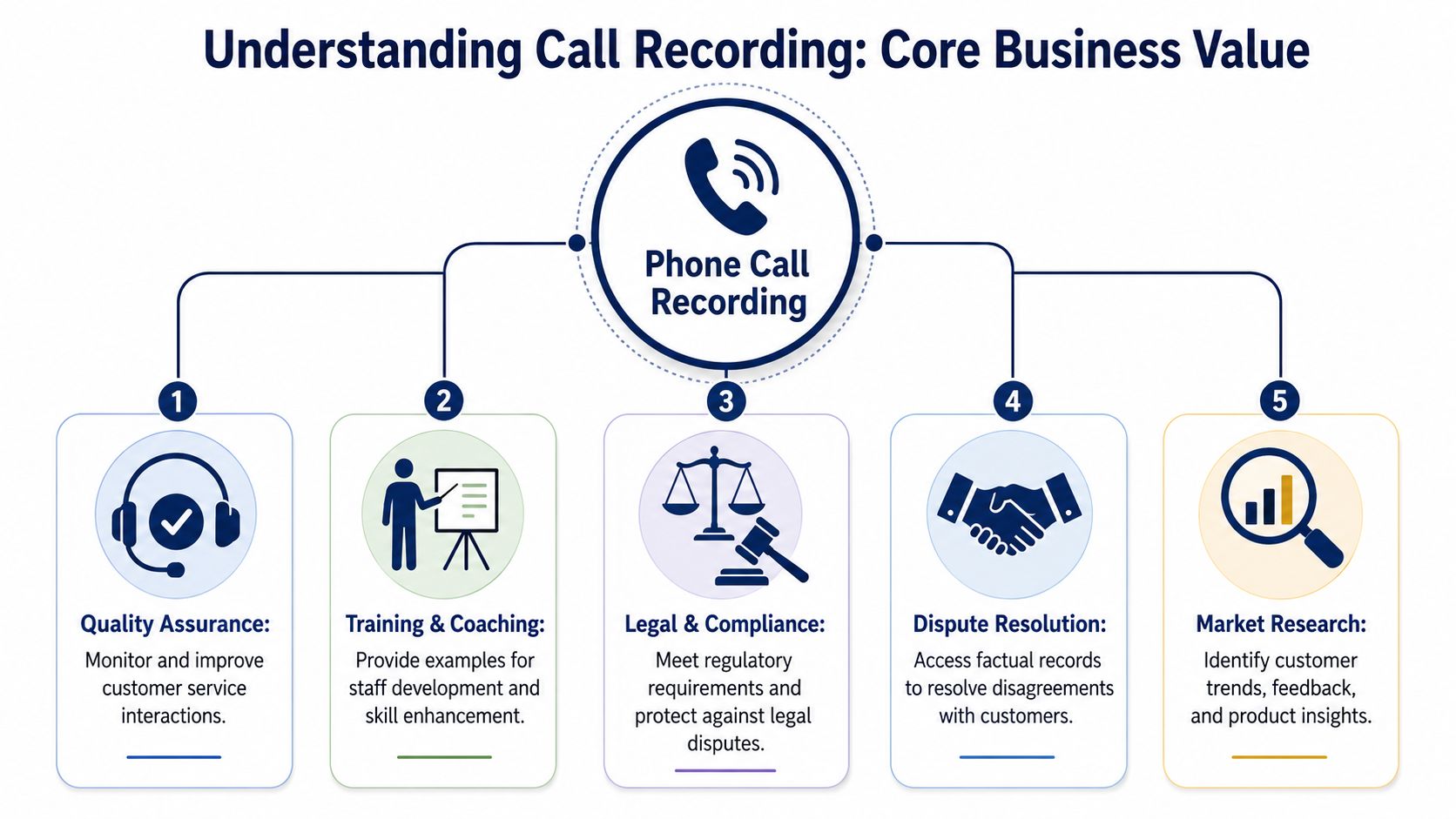
Used well, recordings support several jobs at once:
- Quality assurance: Supervisors can review the actual interaction, not a shortened summary.
- Training: New hires hear how experienced staff handle objections, intake questions, and tense customer moments.
- Dispute resolution: A replayed call settles what was promised, approved, declined, or misunderstood.
- Compliance support: Teams can confirm whether required disclosures were read and whether the call was handled according to policy.
- Operational insight: Calls surface recurring friction points in scripts, routing, staffing, and handoff procedures.
That last point gets overlooked. If three reps handle the same issue badly, the problem may not be the reps. It may be the script, the queue setup, or the lack of a clear escalation rule.
What recordings capture that notes miss
Notes are useful, but they are incomplete by design. Staff summarize. They omit tone, hesitation, interruptions, side questions, and exact wording.
A CRM note might say, “customer approved the change.” The recording may show a customer agreeing only if delivery happens by Friday, or sounding confused, or asking a question the rep never answered. In billing, sales, healthcare intake, legal intake, field services, and property management, that distinction can decide whether the next step is valid or risky.
This is why recording should be tied to workflow, not treated as passive storage.
For a distributed team, the practical value is even higher. A manager in one state can review how a remote employee handled notice, consent language, escalation, or payment discussion without relying on memory or secondhand explanations. That is how recording shifts from “nice to have” to an operational control.
Why modern VoIP recording is more useful than standalone recording
Old call recording systems produced audio files. Modern VoIP platforms usually attach recordings to call details such as timestamp, caller ID, duration, queue, agent, transfer path, and call outcome. That context makes the recording usable.
A supervisor does not have to hunt through folders to find one conversation from last Tuesday. They can filter the call log, open the record, review the audio, and compare it with what the employee entered in the CRM or ticket. For owners and operations managers, that makes recordings easier to use in coaching, QA reviews, and incident follow-up.
Audio alone is evidence. Audio paired with call metadata becomes an operating record.
That distinction matters if your business has remote staff, multiple locations, or calls crossing state lines. At that point, recording is no longer just about saving conversations. It becomes part of how you document process, apply policy consistently, and reduce avoidable mistakes across the team.
Navigating the Legal Maze of Call Recording
The legal issue isn't just “Can we record calls?” The harder and more important question is, under what conditions can your team record this specific call, with this caller, from this location, for this purpose?
That's why broad policies fail.
For U.S. businesses, the starting point is consent. Some jurisdictions allow recording with one participant's consent. Others require everyone on the call to consent. The challenge gets sharper when your support rep works remotely, your sales team travels, or your customer calls from a different state or country.
The practical problem for multi-state teams
A lot of businesses make one of two mistakes:
- They assume their office location controls every call.
- They assume a general “this call may be recorded” message solves every scenario.
Neither assumption is safe on its own. A remote workforce changes the legal map. So does a mobile employee taking calls outside the office. So does an international customer.
HubSpot notes that 13 U.S. states require all-party consent, while GDPR generally requires a lawful basis and affirmative opt-in, and Germany treats unauthorized recording as a criminal offense under Section 201. That's why one blanket recording rule is risky for a diverse caller base, as explained in this call recording laws guide.
Call Recording Consent Models at a Glance
| Consent Model | What It Means | Common Jurisdictions |
|---|---|---|
| One-party consent | One participant in the conversation can consent to the recording | Common in many U.S. jurisdictions |
| All-party consent | Everyone on the call must know about and agree to the recording | Applies in 13 U.S. states, with additional stricter cases in some regions |
| Data-protection-based consent | Recording requires notice plus a lawful basis, and often explicit opt-in and handling rules | GDPR environments and certain international contexts |
Build a workflow, not just a policy
If your team may cross jurisdictions in real time, use the stricter rule as your operating default unless legal counsel tells you otherwise.
A practical workflow usually includes:
- Pre-call notice: Use an announcement before the conversation begins.
- Agent script: Train staff to restate the recording notice clearly when needed.
- Consent checkpoint: If the caller objects, the agent needs a defined next step.
- Non-recorded fallback path: Route the call to a non-recorded line, stop recording, or move the issue to another approved channel.
- Sensitive-call exclusions: Payment data, legal advice, HR matters, or protected categories may require special handling.
The compliance mistake isn't only recording unlawfully. It's failing to prove that your process gave notice, captured consent where required, and handled exceptions consistently.
What works in practice
For small and midsize teams, the most durable approach is simple:
- Default to transparency.
- Use system-level announcements instead of relying only on memory.
- Train agents on when to pause, stop, or transfer.
- Document retention and deletion rules before you turn recording on.
What doesn't work is telling staff to “just be careful.” If agents have to guess when recording is allowed, they will guess differently. That creates legal inconsistency and uneven customer treatment.
Comparing Call Recording Technical Methods
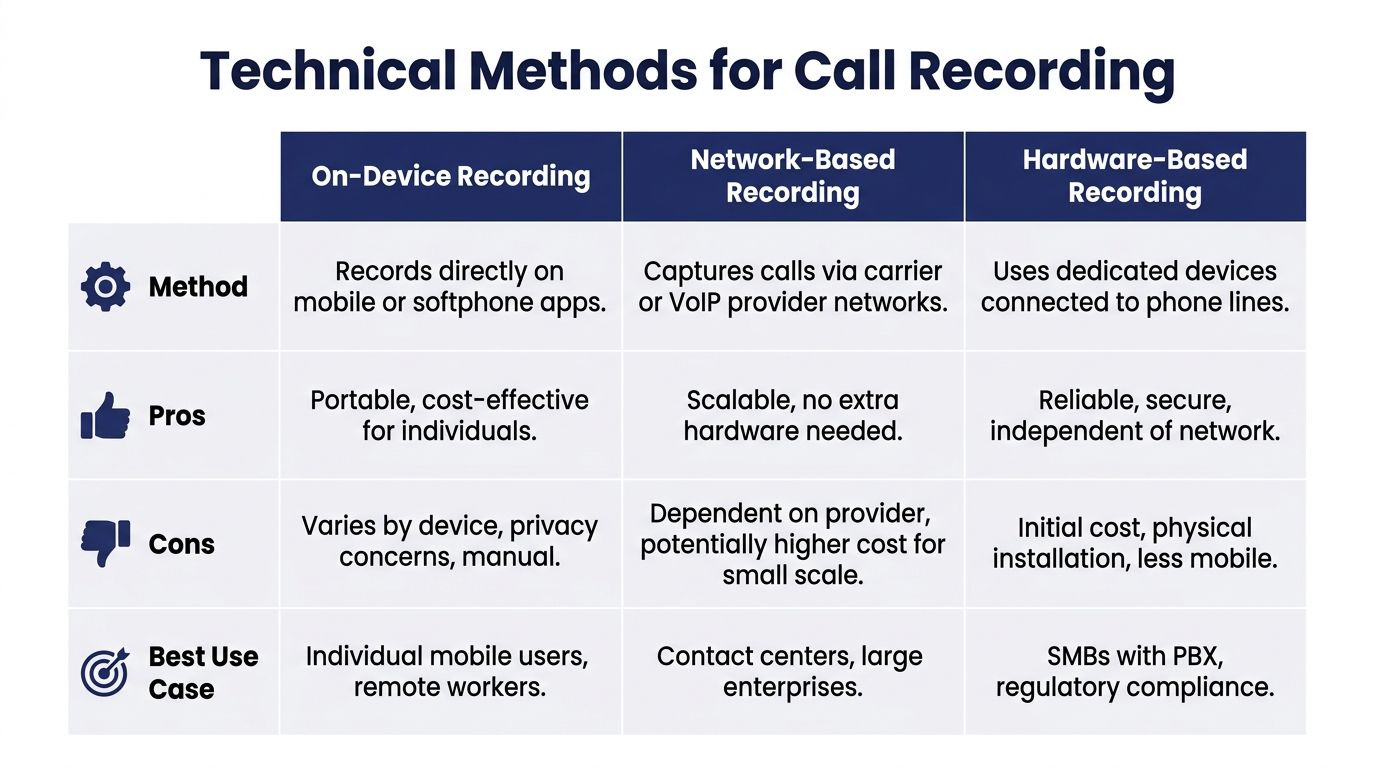
Businesses usually encounter three recording approaches in the wild: recording on the device, recording through the network or provider layer, and recording through dedicated hardware. Each can work. Each also breaks in predictable ways.
On-device recording
This is the most familiar option for solo users and ad hoc mobile work. A phone app or built-in calling app captures the audio locally.
The upside is convenience. The downside is control.
When businesses depend on on-device recording, they run into fragmented storage, inconsistent settings, and weak administrative oversight. One employee saves files carefully. Another forgets. Someone switches phones. Someone uses a personal device. Somebody disables the feature.
This method can help in narrow cases, but it's a poor foundation for a team that needs centralized retention, compliance, and review.
Network or provider-based recording
In this model, calls are captured at the service or VoIP provider layer rather than on each handset. For most business environments, this is the more scalable option because the company can apply rules from a central admin view.
Modern enterprise VoIP recording is often policy-driven. Administrators can set rules at the company, group, or user level, including always record, on-demand, or pause/resume. One platform also supports up to 32 separate tracks for conference-call multitrack recording, which improves speaker attribution because each participant can be stored independently rather than mixed into one channel, as described in this VoIP call recording overview.
That matters more than many buyers realize. Mixed audio is hard to review in escalations. Separate tracks are much easier to analyze.
Hardware-based recording
Dedicated recording hardware still appears in some legacy environments, especially where businesses want a separate physical system connected to lines or PBX infrastructure.
Hardware can be reliable, but it introduces its own friction:
- Installation overhead: somebody has to deploy and maintain it
- Limited mobility: remote and hybrid teams don't fit neatly into line-based hardware
- Separation from modern workflows: recordings may not appear naturally with your call logs and user controls
Which method fits most SMBs
For most growing teams, central platform recording is the practical middle ground. It offers administrative control without the operational mess of managing recordings on individual devices.
If you're evaluating setup options, this guide on how to record a phone call is a useful starting point for comparing business-friendly approaches.
What usually does not work is mixing methods casually. A few calls on mobile apps, a few through the office system, some on speakerphone with another recorder. That creates blind spots, inconsistent consent handling, and an ugly records trail when someone needs an answer fast.
Implementing Call Recording A Practical Checklist
A service manager in Texas reviews a complaint from a customer who spoke with an agent in California, then got transferred to a remote closer in Florida. The recording exists, but the notice language was inconsistent, nobody is sure who approved retention, and the file is buried under a generic filename. That is the kind of failure that turns a useful recording into an operational problem.
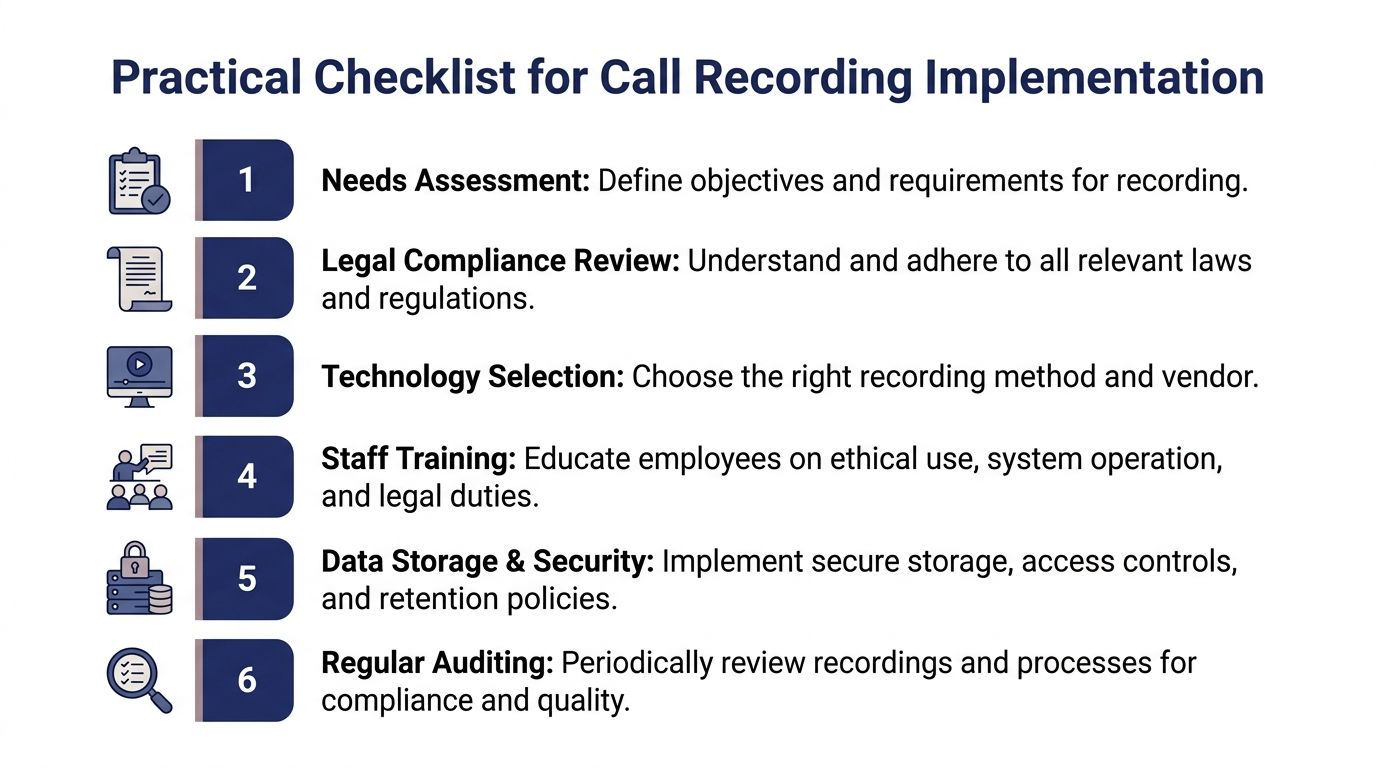
Set up call recording as a workflow, not a feature toggle.
A checklist that holds up in daily use
Define the call types that warrant recording
Start with actual business risk and value. Sales calls, support escalations, intake, scheduling, collections, and complaint handling rarely need the same rule set. A small business with one office can sometimes apply one policy across the board. A remote or multi-state team usually cannot. Set the recording rule by queue, department, or role so the policy matches how calls are handled.
Document the consent path before launch
Recordings break down fast when notice depends on agent memory. Write the script. Decide whether notice is delivered by system prompt, live agent, or both. Then decide what happens if the caller objects, hangs up, or asks to continue on an unrecorded line. For teams handling calls across state lines, the safer operational default is a stricter notice process until legal counsel approves exceptions.
Choose a platform admins can control centrally
The platform should let admins turn recording on or off by user, group, or call flow, then review activity in one place. SnapDial, for example, includes call recording in its cloud phone system and lets admins manage users, routing, call logs, voicemails, and recordings through a web portal. If you want the operational side of that review process, this guide to call detail records for business phone systems helps connect recordings to the metadata around each call.
Before you configure retention, it helps to see a visual walkthrough of how business phone tools are managed in practice.
Build for retrieval, access control, and exceptions
Storage is the easy part. Retrieval is where teams feel the difference between a workable setup and a messy one.
Recordings should sit alongside call logs so a supervisor can search by date, number, queue, user, or dispute ticket and find the right file without guesswork. Set access roles before the first recording is created. Decide who can listen, who can download, who can export for a complaint review, and who can delete. Then set retention rules that match your business use, storage budget, and legal requirements.
Create an exception path too. Complaint investigations, HR reviews, and legal holds should not depend on somebody remembering an informal process.
Train for edge cases and audio quality
Staff need more than a one-line notice script. They need to know what to do when a caller refuses consent, when payment details come up, when a transfer crosses teams, and when a pause-and-resume rule applies. That matters even more with remote teams, where supervisors cannot catch bad habits by overhearing calls on the floor.
Poor audio creates its own risk. A recording with background noise, cross-talk, or muffled speech may not help much in a dispute or coaching review. If your team works from home or in shared spaces, this roundup of top software for crystal-clear sound is a useful reference when you are evaluating cleanup options and microphone discipline.
The practical rollout is straightforward. Define the call categories, standardize notice, assign admin ownership, test retrieval, and train for exceptions before you record at scale. That is how a small business builds a recording process that still works once the team spans states, devices, and job functions.
Best Practices for Recording Calls in Your Business
After the technical setup, the question is cultural and procedural: how will your business use recordings responsibly?

Write the policy people can follow
A formal written policy should answer practical questions, not just legal ones.
Include:
- When calls are recorded: by department, queue, user, or situation
- Why calls are recorded: quality, training, documentation, compliance, or dispute handling
- How notice is delivered: system message, agent script, or both
- Who can access recordings: supervisors, QA staff, compliance leads, or executives
- When recording must pause or stop: payment details, confidential matters, or caller objection where required
A policy becomes useful when a frontline employee can read it and know exactly what to do on a live call.
Use recordings to coach, not just police
If recording only appears when somebody makes a mistake, employees will resent it. If managers use it for coaching, calibration, and recognition, staff will treat it as part of professional development.
Review a mix of strong calls, weak calls, and unusual calls. If you only audit failures, your team learns defensiveness instead of skill.
For service teams, a structured review process matters more than the recording feature itself. Businesses building that layer should also look at how call center quality monitoring fits into scorecards, coaching, and repeatable evaluations.
Keep the legal process operational
Legal compliance becomes manageable when it lives inside the workflow.
That means:
- Train employees on notice language
- Document exceptions and special handling
- Review recordings periodically for process adherence
- Align retention with legal and business needs
If your leadership team is comparing tools that help formalize policy, review obligations, and legal workflows more broadly, this guide to AI legal solutions for professionals can be a practical reference.
What doesn't work is treating legal review as a one-time launch task. Recording policies need periodic checks because teams change, channels change, and real-world call patterns always expose gaps.
Frequently Asked Questions About Phone Call Recording
How long should we store call recordings
Store recordings according to your legal requirements, internal policy, and actual business use. There isn't one universal retention period that fits every company. What matters is that your rule is documented, applied consistently, and aligned with deletion practices. If your business handles sensitive or regulated conversations, get legal guidance before setting the retention window.
Can I record business calls on my personal mobile phone
You can in some situations, but it's usually a weak business process. Personal devices create gaps in storage, access control, offboarding, and compliance. Mobile recording is also increasingly controlled by the device OS and calling app. Google's Android Phone app, for example, supports always-recording for unknown or selected numbers, per-call recording, auto-deletion controls, and an in-call notification that recording is active, as described in Google's Android Phone app recording guidance. That may work for an individual user. It's not the same as a centralized business workflow.
What's the difference between call recording and call monitoring
Call recording stores the conversation so someone can review it later. Call monitoring usually refers to listening during the live call. Businesses often use monitoring for coaching, escalation support, or supervisor intervention, while recordings support training, dispute review, and documentation after the fact.
Are transcriptions legally binding
A transcription is usually best treated as a working reference, not the sole authoritative record. It helps with search, note-taking, and follow-up. But if there's a dispute about exact wording, the original recording usually matters more than the transcript. If your business depends heavily on transcripts, make sure staff understands they are aids, not substitutes for policy, consent handling, or source audio review.
What should an employee do if a caller refuses to be recorded
The answer should already exist in your policy. In many businesses, the right move is to stop recording, transfer to a non-recorded path, or offer another channel if that fits your compliance model. The worst option is improvisation. If one employee keeps going, another stops recording, and a third promises something different, your process is already broken.
If you're replacing an older phone system or trying to bring order to scattered recording practices, SnapDial is one option to evaluate for centralized call recording, call logs, routing, voicemail, and admin controls in a cloud phone environment. The biggest benefit isn't the feature itself. It's giving your team one place to manage calls, notice workflows, and the records you may need later.