
You know the feeling. A caller reaches your business, hears a menu that feels a little too long, picks the wrong option, and hangs up before anyone on your team even knows they were there. That's the test of a phone system with auto attendant, not whether it sounds modern on a sales page, but whether it helps a real person get help fast without friction.

A good setup acts like a calm front desk that never sleeps. A bad one turns every inbound call into a small obstacle course. The difference matters because the caller isn't comparing your menu to a telecom checklist, they're comparing it to the fastest way to reach a human being.
The Moment a Caller Hangs Up
The caller usually doesn't announce the problem. They just stop pressing buttons.
A small business owner may think the auto attendant is doing its job because calls are being answered. In practice, the only question that matters is whether the caller reaches the right person quickly enough to stay engaged. That's why a phone system with auto attendant should be judged like a customer experience surface, not just a telecom feature.
For many businesses, the first 15 to 30 seconds of an inbound call decide whether the interaction becomes a sale, a support ticket, or a lost lead. A long menu, a stale greeting, or a dead-end branch makes the caller work too hard. When the menu feels like a maze, the caller doesn't complain, they disappear.
Practical rule: if a caller has to think twice, your menu is already too heavy.
The concept changes from “phone feature” to “caller journey.” The menu isn't there to impress the business owner with options. It's there to guide a stranger, often in a hurry, to the right outcome with the least possible effort.
The image is of a receptionist replacement. That's only partly right. A modern auto attendant is more like the first conversation your business has with every caller, and it needs to sound organized, human, and brief. If it doesn't, the rest of your phone system can be perfectly configured and still lose the call.
If you're trying to evaluate one for your business, that's the right lens. The question isn't whether the system can route calls. It's whether it can route calls without making people regret calling in the first place.
What An Auto Attendant Actually Is
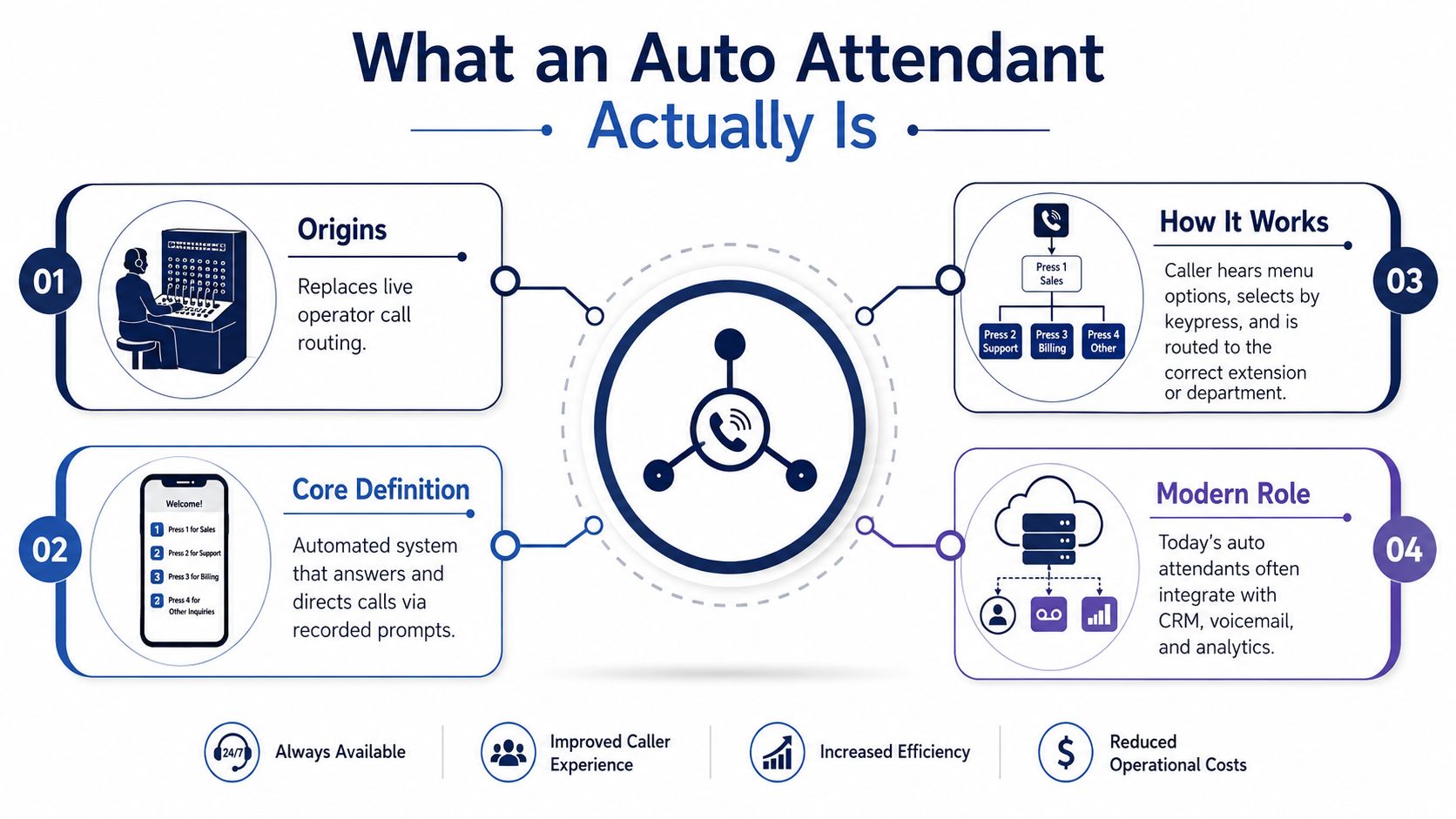
The idea behind the auto attendant goes back to removing a live operator from routine call routing. The first automatic telephone exchange entered public use on November 3, 1892, in La Porte, Indiana, after Almon B. Strowger developed the automatic switching concept and received his first patent in 1891 (Richmond Fed historical overview). That history matters because the basic promise hasn't changed, callers should be able to reach the right destination without a human manually connecting every call.
Today's auto attendant is the software menu that answers the call, plays a greeting, and routes the caller to the right extension, department, or queue. In a simple setup, the prompt might sound like this, “For Sales, press 1. For Support, press 2. To speak with someone, press 0.” The caller's input becomes the trigger for a transfer, voicemail, or live answer.
Auto attendant and IVR are related, but not identical
The easiest way to separate the two is to think in layers. Auto attendant is the front door, it greets the caller and offers menu choices. IVR, or interactive voice response, is the broader system that can handle keypad input, spoken input, and more advanced routing logic.
That distinction matters when you're comparing providers. A basic auto attendant is enough for many SMBs because it keeps the call flow simple. A richer IVR system is useful when the caller needs more steps, more data capture, or more dynamic routing. If that distinction still feels fuzzy, a simple primer like this explainer on IVR system basics can help you separate the terminology before you shop.
The practical takeaway is simple. The caller experiences one voice and one menu first, even if a larger routing engine is working behind it. If that first voice sounds rushed, confusing, or overloaded, the caller won't care how advanced the backend is.
The same historical shift that removed live operators eventually made business call handling software-driven. The first fully automated Bell System office didn't open until December 10, 1921, and Britain's first automatic exchange on the public network opened in May 1912 at Epsom (Richmond Fed historical overview). In other words, the path from switchboard to software was long, but the logic stayed consistent, make call routing faster, not harder.
How Auto Attendants Became A Small-Business Feature
For decades, auto attendant style routing lived inside enterprise PBX hardware. Smaller businesses usually didn't buy that kind of system because it was tied to on-premise infrastructure, specialist setup, and a pace of change that fit large offices better than lean teams. The feature became much more practical once hosted PBX and VoIP matured in the 1990s and 2000s (OnSIP industry history).
That shift changed the economics and the admin model at the same time. Instead of treating call routing as a hardware project, businesses could manage it through software, which made the feature available to smaller organizations that needed professionalism without a full telecom stack. By 2008, VoIP PBX had already changed business telephony for a significant share of companies, which is why auto attendant moved from “enterprise luxury” to standard expectation in many business phone plans (OnSIP industry history).
The business impact is operational, not just technical
Once the routing lives in software, changes stop being a technician-only task. Microsoft notes that historical reporting for voice applications is typically available within 30 minutes after a call ends, though it can take several hours in some cases, which shows how much call handling now depends on software visibility rather than hardware guesswork (OnSIP industry history).
That matters for a small business owner because the front desk is no longer just a person or a desk phone. It's a configurable system that can change with hours, staffing, and call volume. A receptionist can still be part of the workflow, but the phone system no longer depends on one person sitting still to keep the business reachable.
A business phone system only feels “simple” when the routing logic is hidden from the caller and easy for the admin to change.
You also start to see why hosted VoIP is the natural home for auto attendants. The same web portal that manages users and extensions can usually manage greetings, call flows, and schedules. That's a very different world from the old model where a call tree had to match the physical PBX layout in the closet.
Features That Actually Matter For SMBs And Call Centers
The strongest feature set is the one that solves caller problems without creating new ones. A phone system with auto attendant should make routing clearer, not more theatrical. That means evaluating features by the experience they create for a caller who's in a hurry, confused, or calling after hours.
| Feature | Caller Problem Solved | Best For |
|---|---|---|
| Time-based routing | The caller reaches the right branch during business hours or after hours | Offices with changing schedules |
| Multi-level menus | Different callers need different destinations without overloading one greeting | Firms with separate departments |
| Language routing | The caller needs to hear the menu in a language they understand | Multilingual and regional teams |
| Overflow to mobile | A call shouldn't die because the desk is busy | Small teams and on-call staff |
| Queue callback | The caller wants help without waiting on hold | Support teams with bursty demand |
| Smart queue announcements | The caller needs context while waiting | Call centers with live queues |
The features above are useful because they reduce caller friction. A menu that sends sales to one team, support to another, and after-hours calls to voicemail is useful only if it feels obvious to the caller. If the structure mirrors your org chart instead of caller intent, it usually becomes harder to use.
What a practical admin experience looks like
In a sensible setup, the admin opens the web portal, edits the greeting, and chooses routing rules without touching any hardware. A menu can route by time of day, send unanswered calls to mobile, and push overflow into voicemail with transcription instead of dropping the call entirely. That's the difference between a rigid phone tree and a system that flexes with the workday.
This is also where broader automation tools start to overlap with phone handling. If your team is using an AI employee platform, you'll probably recognize the same tension between convenience and over-automation. The caller still needs a clean path to a human, especially when the request is urgent or emotionally loaded.
For teams that need more direct routing logic, skills-based call routing can help match callers with the right person faster. That's especially useful when the menu is only the first layer and the goal is getting the caller to someone who can solve the issue.
The main lesson is counterintuitive. The best system isn't the one with the longest feature list. It's the one that makes it easiest for a caller to get the right answer on the first try, and the easiest for staff to intervene when the menu can't help.
A Walkthrough Of SnapDial's Auto Attendant In Practice
An admin starts in the web portal, not in a wiring closet. A new greeting can be recorded or uploaded, then assigned to the main business number, and the routing rules can be tied to business hours so callers hear a different path after closing. That workflow is exactly why cloud PBX systems became practical for smaller teams, because the call flow can be edited by the people who know the schedule.
For a five-person office, the setup often starts with a simple daytime menu. The caller hears a short greeting, then just a few choices, with a Press 0 path to a live person when the issue can't wait. If the desk is busy, the overflow rule can send the call to mobile or voicemail, and voicemail transcription can make the message usable without forcing someone to listen later.
What the caller should experience
The caller should hear a greeting that identifies the business, then a menu that's easy to remember. Three options is usually enough for the first layer, because the caller's memory and patience are both limited. If the menu needs to grow, the second layer should stay tightly focused rather than becoming another maze.
A sensible flow feels almost invisible. The caller presses once, hears confirmation, and lands in the right place. If the caller lands in voicemail, it should be because they chose to, or because every live option is legitimately unavailable.
One reason this matters in real life is that callers don't all arrive in calm conditions. Some are calling from a noisy parking lot, some are on mobile, and some are already frustrated because they've called twice. That's why testing the menu from different devices and environments is part of the design, not a bonus task.
Where SnapDial's broader call handling fits
SnapDial's hosted VoIP setup makes the auto attendant part of a larger call management system. That includes call queues, real-time reporting, and a mobile-forward experience for teams that aren't tied to desks. In a support operation, those pieces matter because a caller who doesn't get through immediately still needs a visible, managed path instead of a silent dead end.
The practical point is that the same call flow can scale from a small office to a busier support team without changing the basic logic. The menu stays simple, while the backend handles smarter routing, queue behavior, and fallback paths. That's the kind of setup that keeps the front door usable when call volume gets messy.
Configuration Best Practices And A Migration Checklist
The menu should be designed for impatience, not admiration. Guidance in recent setup advice consistently recommends keeping the first menu to 3 options and never exceeding 5, while always giving callers a Press 0 route to a live person or fallback (CloudTalk setup guidance). That advice works because it matches how callers behave when they're confused, hurried, or calling from somewhere noisy.
If a caller can't figure out the menu quickly, the problem isn't the caller.
Plain language helps more than clever branding. Say “Sales,” “Support,” and “Billing” if those are the destinations, or use the words your customers use when they call. Then test the greeting from a mobile phone, a landline, and a noisy room, because a menu that sounds clear in an office can become surprisingly hard to follow outside it.
A migration checklist that avoids avoidable pain
- Map the main call reasons first. Write down what people ask for, then build the menu around those reasons instead of your org chart.
- Record the greeting before launch. If the recorded prompt sounds stiff when read aloud, rewrite it before a caller hears it.
- Set after-hours rules separately. Callers need to know when the office is closed and what happens next.
- Train staff on the mobile app. If overflow calls are going to mobile, the people receiving them need to know how to answer, transfer, and return missed calls.
- Confirm voicemail transcription and call logging. If the system captures a message but nobody sees it, the caller experience still breaks.
The process matters as much as the software. A receptionist, owner, or on-call employee still has to honor the routing logic, answer the transferred call, and follow up on messages. If people don't match the menu, the menu loses trust fast.
For teams moving off older infrastructure, VoIP on the cloud is the bigger change behind the auto attendant. The phone system stops being a fixed box and becomes something you can tune around staffing, seasons, and call spikes without waiting on hardware changes.
ROI, Pricing, And The Real Cost Of Staying With Legacy PBX
Pricing looks different once you stop comparing sticker prices and start comparing total cost of ownership. A hosted VoIP plan usually concentrates the basics into a predictable subscription model, while a legacy PBX can spread its cost across hardware, licensing, maintenance, and technician time. The older system often feels familiar, but it can be harder to change when the business grows or the team goes hybrid.
A buyer should ask a simple question. Which setup keeps calls moving without making the office depend on a box, a specialist, or a restart ritual? If the answer is “only one person knows how to fix it,” the cheap option may not be cheap at all.
The ROI levers are usually operational rather than flashy. Missed-call reduction matters because every abandoned call is a possible lost lead or unresolved problem. After-hours capture matters because callers don't always care when your office closes. Mobile-ready calling matters because hybrid teams need to answer while moving, not only from a desk.
What to compare in a quote
- Included routing features because auto attendant, queues, and voicemail are often more valuable together than separately.
- Setup support because a white-glove migration can save internal admin time.
- Call recording and transcription because those features can reduce follow-up work.
- Support availability because the phone system is only useful when someone can help you fix it.
SnapDial fits as one option. It's a cloud-based business phone system with all-inclusive pricing, white-glove setup, and 24/7 Texas support, so the migration work doesn't sit entirely on your team. For a business replacing legacy PBX, that combination can matter more than a long feature sheet because the setup burden is often the cost.
The decision usually comes down to this. If your callers need a short, clear path to the right person, and your staff needs a system they can manage without constant technical help, the auto attendant becomes part of the operating model, not a cosmetic add-on.
If you're comparing options for your own business, visit SnapDial and look at how its hosted VoIP, auto attendant, and support tools fit a real call flow. If the menu still feels like the front door of your business, that's the right place to start.