
A caller reads out an account number, and you ask them to repeat it. A video call briefly cuts out, and part of the room misses the decision. Real-time transcription is useful when the text arrives early enough to keep the exchange moving.
The software converts speech into words while people are still speaking. In English, streaming systems typically trail the speaker by a few seconds and lose some accuracy compared with a finished offline transcript. That gap is the basic trade-off: the sooner text appears, the less context the system has available for interpreting it.
Speed is the visible benefit, but two larger questions determine whether the feature works. How much correction and uncertainty can the workflow tolerate? A live prompt for an agent differs from a record someone may cite later. And where do the audio and transcript go, who can open them, and how long are they kept? Real-time transcription is therefore a reliability and data-governance decision as much as a faster way to read speech.
What Real-Time Transcription Means in Plain Terms
A live captioner at a conference types as the speaker talks, and the words land on screen a beat behind the voice. A court reporter works the opposite way: the room finishes, the record gets built, and the transcript comes out near-perfect because nothing arrives late. Real-time transcription is the first pattern, automated.
The output is a rolling stream, not a document. Early words appear fast as interim text, then get revised as more audio arrives, which is why live captions occasionally rewrite a name you already read. That revision isn't a bug. It's the system admitting it guessed with incomplete information, then improving the guess.
Batch transcription is the second pattern. You hand over a finished recording, the model reads the whole thing with context on both sides of every word, and the transcript comes back more accurate but useless for anything happening right now.
Three everyday examples make the distinction concrete:
- A support agent sees the caller's account details appear on screen while the caller is still explaining the problem, so nobody repeats an order number twice.
- A meeting participant follows captions in the moment, then searches the finished transcript a week later for the decision that was made.
- A voicemail lands in an inbox as readable text moments after the caller hangs up, so staff scan six messages instead of dialing into six recordings.
The test for which category you need is simple. If the text has to be useful while the conversation is still happening, you need real time. If a recording can wait, batch processing usually gives you a better transcript with less infrastructure.
Speed, Accuracy and Latency Numbers to Know
Three numbers decide whether a transcription system is usable or just impressive in a demo. The reference values below come from published benchmarks, and they're worth keeping next to any vendor's claims.
| Metric | What it measures | Reference value | How to read it |
|---|---|---|---|
| Word error rate (WER) | Substitutions, deletions and insertions against a human transcript | WhisperX 2.37%; production configuration 3.12% | Lower is better; check names and numbers separately |
| Real-time factor (RTF) | Processing time per second of audio | Whisper.cpp 0.136 (about 7.4x faster than real time) | Below 1.0 keeps up with live speech |
| Latency, English | Delay before words are committed | 3.3 s (Whisper-Streaming, NVIDIA A40) | Sets how far captions trail the speaker |
| Latency, German | Delay before words are committed | 4.4 s (Whisper-Streaming, NVIDIA A40) | Higher than English at the same chunk size |
| Latency, Czech | Delay before words are committed | 4.8 s (Whisper-Streaming, NVIDIA A40) | Highest of the three tested languages |
A 2026 benchmark of open-source ASR frameworks found Whisper.cpp running at an RTF of 0.136, roughly 7.4 times faster than real time, while WhisperX posted a 2.37% WER, the lowest error among the systems tested. A production-oriented configuration in the same evaluation delivered 3.12% WER with a workable balance of accuracy and deployment practicality. A system can be very fast and less accurate, or very accurate and computationally heavy.
What Word Error Rate Actually Counts
A 3% word error rate sounds tiny until you apply it. Three words go wrong in every hundred, and the model has no idea which three matter. On a support call, the damaged tokens are usually names, account numbers, product identifiers and commitments, exactly the information an agent reads back to a customer.
Two systems with identical averages can behave very differently on that shortlist. One spells every street name correctly and fumbles only filler words. Another drops digits. That's why a single vendor accuracy figure tells you less than a sample of your own calls scored by hand.
Why Latency and Accuracy Pull in Opposite Directions
Accuracy wants future audio. Latency forbids it. A model that waits before committing a word hears the rest of the sentence and guesses better; a model that commits instantly shows text sooner and rewrites more of it.
A 2023 study built Whisper-Streaming to measure the size of that trade. On the English European Parliament Speech Interruption Corpus, running on an NVIDIA A40 GPU with a 1-second minimum chunk, the system averaged 3.3 seconds of latency in English, 4.4 seconds in German and 4.8 seconds in Czech. Its English and German word error rates ran about 2 percentage points above offline processing, while Czech rose about 6 points. Same model, same machine, different cost per language.
The trade-off in one sentence: every extra beat you give the model is context it can use, and every beat you take away is delay your listeners stop tolerating.
That's why the right wait depends on the job. Live conference captions want the shortest commitment window that stays legible. A support call absorbs a little more delay because the agent is also reading an account record. A legal deposition shouldn't treat live text as its record at all; record the audio, run it through batch processing afterwards, and treat the live version as a convenience.
Questions That Separate a Good Demo From a Good Deployment
- How long do words stay provisional? If the answer is vague, ask for the chunk size. Chunk length, not marketing copy, sets the floor on latency.
- Do users see interim text? Showing early hypotheses feels faster. Hiding them until they're stable feels more precise. Both are legitimate choices, and you should know which one you bought.
- Was it tested in your language? Latency and accuracy both move with language, so a system tuned on English isn't automatically tuned on anything else.
- What does the accuracy figure measure? Ask for WER on call audio with accents, background noise and your own product names, not on clean read speech.
If the transcript also has to land inside the tools your agents already use, the collaboration stack guidance for IT leaders from MR2 Solutions maps how calling, meetings and messaging fit together.
Real time isn't a yes or no. It's a setting you tune, and the accuracy and delay you get both fall out of that tuning. Before you compare vendors, score WER and RTF on twenty of your own calls and time each stage of the round trip separately. A vendor's benchmark shows what the model can do. Your own audio shows what it will do for you.
How the Pipeline Turns Speech Into Text
A sentence leaves a caller's mouth and passes through several hands before it becomes a line of text on an agent's screen. Knowing where each hand-off happens tells you which delay you're paying for.
Here's the condensed view of that journey, stage by stage.
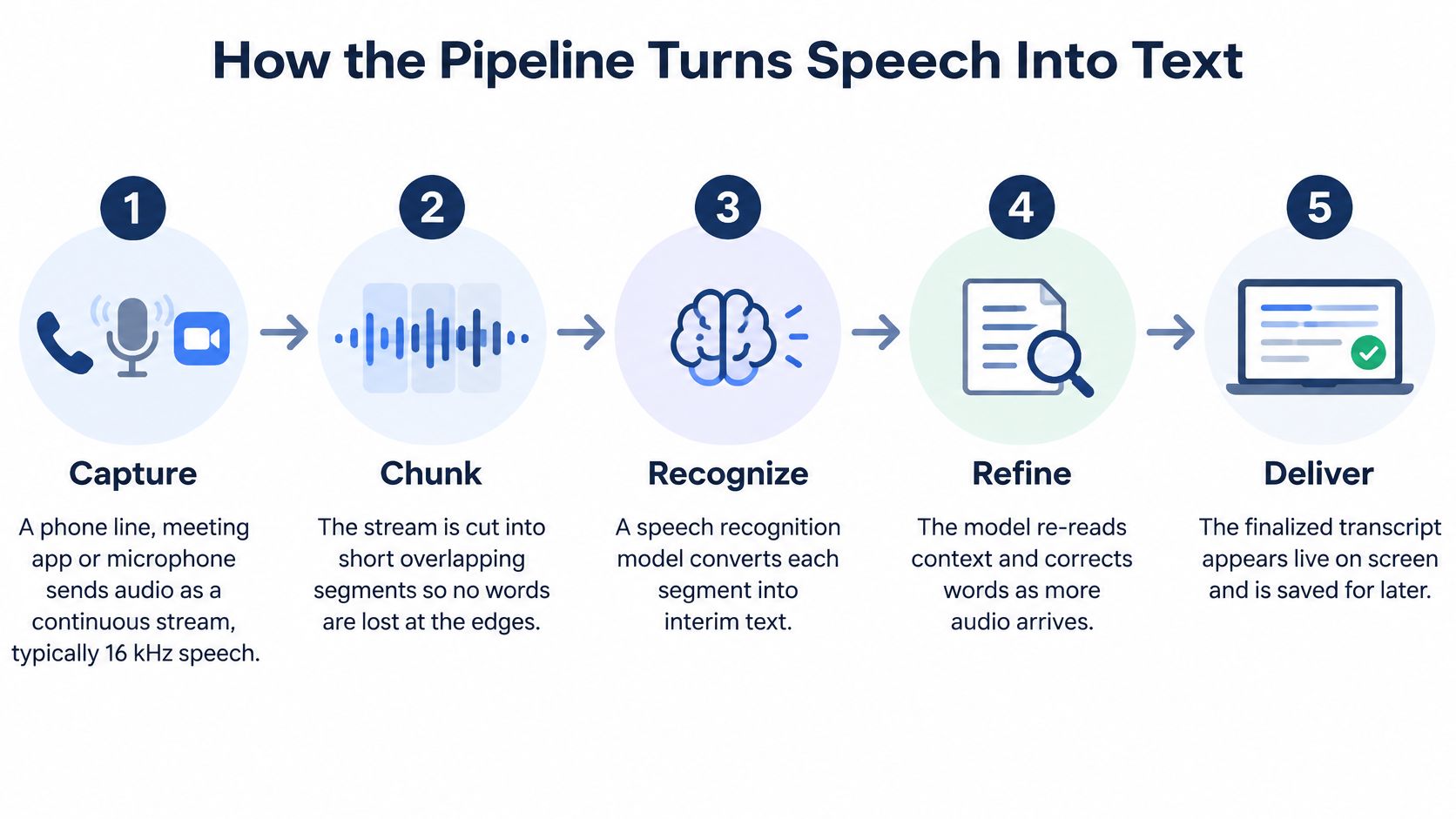
The diagram groups the middle stages. In practice the pipeline breaks down like this:
- Capture. The phone line, meeting app or microphone hands over a continuous audio stream, typically at 16 kHz. Nothing waits for silence, because the conversation doesn't pause for the software.
- Chunk. The system cuts that stream into short windows so the model can start work before the speaker finishes a sentence. Overlapping the windows slightly keeps a word at the boundary from being lost.
- Recognize. Each window becomes text, and the early output is a hypothesis rather than a verdict. The model is guessing with the audio it has.
- Revise. As later windows arrive, the model re-reads context and can change earlier words. This is what makes a caption shift a name after you already read it.
- Commit. Words the system considers stable get fixed, punctuation and capitalization are applied, and that segment stops changing. Committed text is what's safe to store or act on.
- Label. Diarization tags who is speaking so the transcript reads as dialogue instead of an unattributed wall. Two people talking at once remains the hardest case, since the model gets no clean single stream.
- Deliver. Finished text reaches a screen, an app, a CRM record or a voicemail inbox. On a phone platform, this last step is where configuring speech to text determines whether the output lands in the customer record, the inbox or a shared queue.
Where the Delay Accumulates
Delay builds across the pipeline rather than appearing in one place. A cache-based Conformer analysis of a 17-layer model with a 10 ms frame rate, 4x temporal subsampling and two look-ahead frames measured approximately 1,360 ms of algorithmic latency under that configuration, because a small context window compounds layer by layer. The same body of work reports LibriSpeech streaming experiments at roughly 640 ms average latency with 2.7% WER on test-clean and 6.4% on test-other, where a dynamic-latency Emformer cut relative WER by 6.0% on test-clean and 3.0% on test-other at the same 640 ms.
The practical lesson is to budget each stage separately: audio chunking, network transport, model inference, punctuation, diarization and finalization. Shrinking the chunk size alone lowers perceived delay, but it also raises compute overhead and produces more unstable partial words. Cache-based state with a bounded look-ahead usually buys a better balance than brute force.
A check you can run: when a live transcript lags, ask which stage is late instead of asking how fast the model is. The answer is often the network or the post-processing, not the recognition step.
Streaming research makes the same point about measurement, arguing that latency should be tracked as frame latency, word-commit latency and final-segment latency rather than compressed into one response-time number. Track the three separately and you'll know whether you're waiting on transport, inference or cleanup.
Business Workflows for Calls, Meetings and Voicemail
A transcript that never reaches a decision is a transcript nobody reads. Four workflows carry most of the value, and each one has an owner, an output field and a delay it can tolerate.
Inbound Support and Live Supervision
In a support queue, the live transcript sits beside the caller's account record. The agent confirms names, order numbers and commitments without asking twice, and the finalized text attaches to the CRM case so the next person who calls doesn't start from zero. The owner is the agent, the output field is the case record, and the delay tolerance is a couple of seconds.
Supervisor review runs on the same stream from the other direction. Teams flag keywords such as cancellation, refund or a competitor's name during live calls and route the call to a lead while it's still open. Here the owner is the queue supervisor, the output is an alert, and the tolerance is tighter than anyone reading a transcript would guess, because a flag that arrives after the caller hangs up is just history.
Meetings and Voicemail
In team meetings, captions help people follow along and the finished transcript becomes the searchable record for action items. The owner is whoever runs the meeting, and the output is usually a document or task list rather than a system field. In 2024, 47% of organizations surveyed said they used automatic captions to create a foundational transcript before human review, according to 3Play Media's State of Captioning report. That instinct is right: the transcript is a first pass, not the final word.
Voicemail is the workflow with the least patience for delay. The message should reach an email inbox or mobile app as text shortly after it's left, so staff scan it without playing audio. The owner is whoever monitors the shared inbox, and the output is the written message itself.
Keep the transcript inside the system where the decision gets made. A text file in a separate tool becomes one more place nobody looks. And the moment a workflow needs an authoritative record, for a legal, medical, HR or billing dispute, stop treating the transcript as a convenience and put the controls from the next section around it.
When Transcripts Fail and How to Catch It
The accuracy figure on a vendor page is an average across many speakers, microphones and rooms, and averages hide exactly the calls that hurt. Accuracy varies from vendor to vendor, speaker to speaker and language to language, sometimes by a wide margin. For a Deaf or hard-of-hearing participant, a dropped word isn't an inconvenience; it's the whole message.
The failures cluster into predictable categories, which means you can test for them deliberately before trusting the system with live calls:
- Accents and regional dialect. A model trained mostly on broadcast English degrades fastest here.
- Overlapping speakers. Two voices at once give the model no clean stream to decode, so names and decisions spoken over each other are the most likely to disappear.
- Technical vocabulary and product names. Your catalogue isn't in the training data. Expect substitutions and budget time for a custom vocabulary list.
- Background noise. A warehouse, a moving vehicle or a busy shop floor raises error rates well above the clean-audio figure.
- Multilingual calls. Speakers who switch languages mid-sentence break models that expect one language per session.
That list doubles as a test plan. Run a trial call with an accented speaker, a noisy room, a product demo full of jargon and two people talking over each other, then read the transcript against the audio. Wherever the text breaks is where your workflow needs a control.
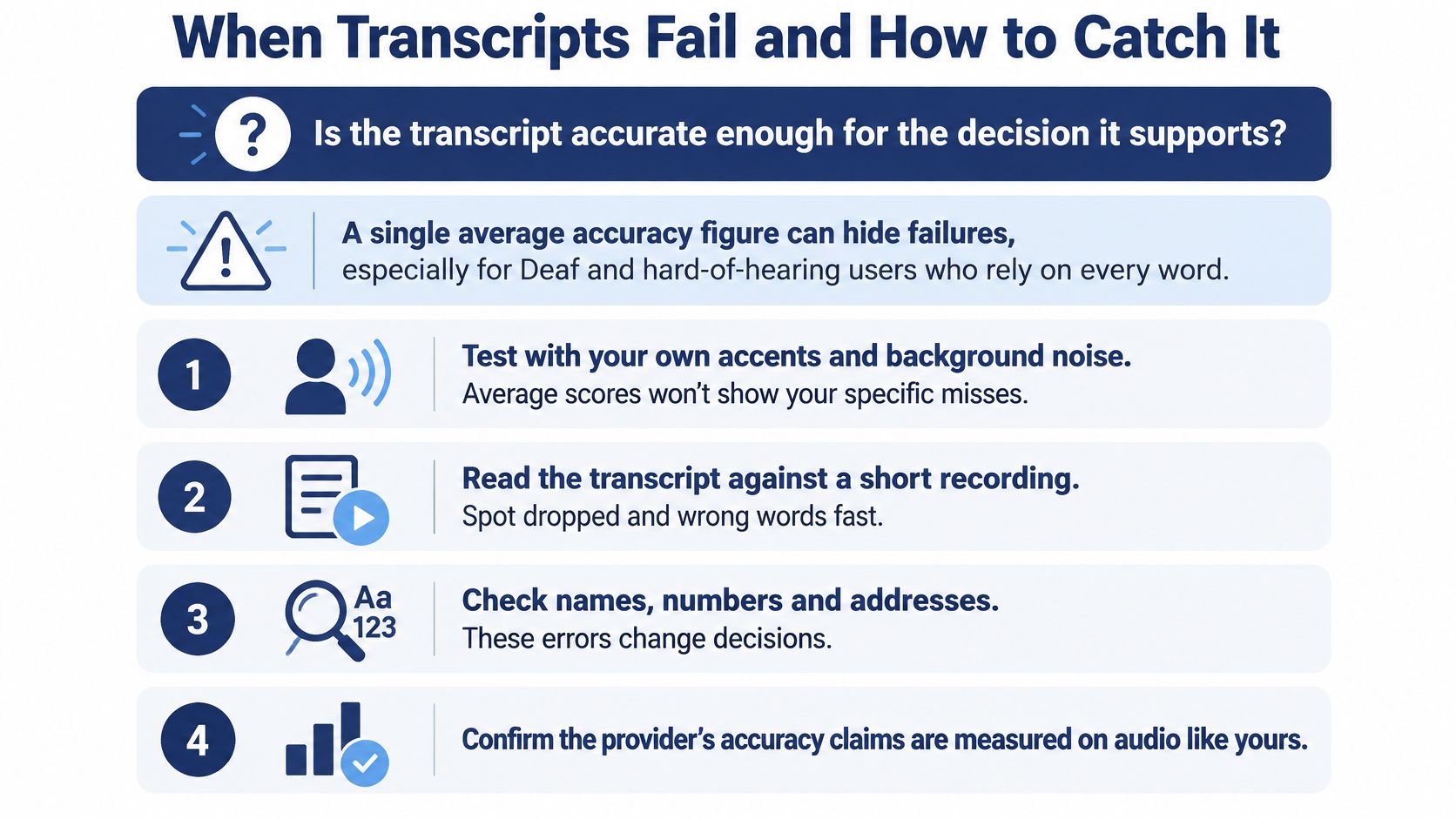
The numbers behind that caution are consistent. Independent testing of ASR as an accessibility tool concluded that reliability should be considered weak when the technology runs without human supervision, and clinical captioning research in the same body of work recorded word error rates between 12.7% and 22.8% across simulated scenarios, while 90% of participants still found captions easy to follow and 76% were satisfied. People forgive errors. They just need to know the errors exist.
Conditions matter more than the engine. A 2025 systematic review of AI-based clinical documentation, published in BMC Medical Informatics and Decision Making, reported word-error rates from 0.087 in controlled dictation to more than 50% in conversational or multi-speaker scenarios. Same technology, wildly different outcomes depending on who's talking and how.
For a look at how live text behaves while a conversation is still running, the walkthrough below is worth a few minutes.
The Controls That Make an Imperfect Transcript Safe
Each control answers a different failure mode, so treat them as a set rather than a menu:
- Visible confidence markers. Flag low-confidence segments so a reader knows which lines to verify rather than trusting every word equally.
- A correction workflow. Give someone the ability to fix a transcript after the call, and log who changed what.
- Human review for high-stakes calls. Legal, medical, HR and customer-dispute conversations get a second pair of ears before anyone acts on the text.
- A written rule about reliance. State plainly that unverified transcripts aren't the authoritative record, so no one cites a machine guess in a formal response.
Voicemail is the easiest case to get right: usually one speaker, a short message, and a reader who can flag a garbled name before acting on it. The guide to visual voicemail transcription covers how that setup works in practice.
The question isn't which engine scores best in a lab, but how much reliance each transcript earns. Confidence markers tell a reader where to look twice, correction logs preserve an audit trail, and a written reliance rule decides what happens when the text and the audio disagree. Imperfect captions still help people follow a conversation, but only when the limits are visible and someone owns the fix.
Where Your Audio and Transcripts Go
"Transcription" isn't one privacy category. It's at least five, and they carry different risks.
The distinctions that matter start with what the system holds: live text that exists for a few seconds, stored transcripts that live in a database, raw audio that preserves every voice characteristic, speaker identification built from that audio, and the question of whether your conversations end up in model training. Four questions sort any provider: where is audio processed, how long is it retained, who can access the transcript, and can it be used to train models?
Data transparency is the point where most procurement conversations should start.
The risks are concrete. Analysis of governance in real-time speech capture identifies voice-biometric retention, vendor access, cross-border transfers, unclear training policies and re-identification of speakers from supposedly anonymized transcripts. It also notes that GDPR and HIPAA don't provide detailed guidance for every AI-mediated real-time speech scenario, which means the contract carries weight the regulation doesn't.
| Data type | Question to ask | Control to look for |
|---|---|---|
| Live captions | Are they stored after the call ends? | Ephemeral mode or a no-retention setting |
| Stored transcripts | How long are they kept, and who can read them? | Retention schedule and role-based access |
| Raw audio or recordings | Where is audio processed and stored? | Regional data residency and deletion options |
| Speaker identification | Does it create voice biometrics? | Opt-out or disabled biometric processing |
| Model training | Can the provider train models on our conversations? | Written no-training clause in the contract |
Local Processing Versus Uploads
Running recognition locally or on your own network reduces exposure, and the 2026 benchmarking work describes external-server audio uploads as a privacy and regulatory concern. Local processing usually costs something in accuracy or hardware, so treat it as a trade-off rather than a free upgrade. For a distributed team handling customer, employee or health-related conversations, that trade-off is often worth making explicit in the deployment plan.
The controls to look for are unglamorous and effective: redaction of sensitive fields, role-based access so supervisors see more than frontline staff, deletion schedules that match your retention policy, and regional data residency if your calls cross borders.
One more control sits outside the software. If call recording isn't a fit for a company, we can disable the feature on request, which lets a team keep transcription where it helps and skip the recording archive where it doesn't. The broader point stands: call recording compliance is a decision to make deliberately, per jurisdiction and per workflow, not something that happens by default when someone switches a feature on.
Decide Whether Real-Time Transcription Fits Your Calls
Two questions settle most of it. Everything after that is verification.
- Does text need to exist during the call? If nobody reads the transcript until the call ends, batch processing on the recording gives you a better document with less infrastructure to maintain.
- Do people need captions or live monitoring? Accessibility, agent assist and keyword alerts all lose their value on a delay, which means they need the streaming path.
- Are names, numbers, account IDs or commitments in play? These are the tokens that break first, so they set the accuracy bar you test against.
- Does the transcript feed a legal, medical, HR or dispute decision? If yes, the transcript is evidence and needs human review before anyone relies on it.
Yes to the first two means real-time transcription, full stop. Yes to the first only means run live text for the interaction and batch-process the recording for the record. No to all four means batch transcription on finished recordings is enough, and you can spend the savings elsewhere.
Where Most Small Teams Meet It First
Visual voicemail is usually the entry point, because the value is obvious in the first week. Visual voicemail lets you access voicemails in real time through email, a mobile app or online access, and transcribes voicemails into text, so a receptionist scans six messages in the time it takes to listen to one. No queue of recordings, no dialing in to hear a number twice.
Set the accuracy bar before you shop, not after. A transcript that's good enough for a callback list is not good enough for a refund decision, and those two workflows rarely need the same system.
A Pilot You Can Run This Week
- Pull twenty recent calls from the workflow you care about most, including the messy ones with background noise and accented speakers.
- Score names and numbers by hand, separately from overall word error rate. Those are the tokens that change outcomes.
- Time the round trip from the end of a sentence to the moment a stable line appears on screen.
- Get retention and training terms in writing, including what happens to audio after the call and whether it feeds a model.
- Write the human-review rule for any high-stakes conversation before the first transcript is saved.
Pick the one workflow you'd pilot first, and pick it because a decision currently waits on someone listening to a recording. That's the workflow where live text pays for itself.
SnapDial's visual voicemail turns messages into text you can read in email, in the mobile app or online, and call recording is included at no cost when you need the audio behind the words. If you'd rather test transcription against calls your team takes than read another benchmark table, SnapDial is a straightforward place to start. Set up a small pilot group, run it against your own recordings, and let the transcripts make the argument.