
Over 32.6 million Americans, about 22% of the U.S. workforce, are working remotely as of 2025, and 83% of employees prefer a hybrid setup that mixes home and office work, according to Chanty's remote work statistics roundup. That changes the phone system conversation completely.
A desk phone used to be part of the office furniture. Now it can become a bottleneck. If calls only work well when someone is sitting at one building, on one network, during one schedule, the system isn't supporting the business. It's holding it back.
A modern remote work phone system solves a simple business problem. Customers still expect a real company to answer, route, transfer, follow up, and keep context. Employees need to do that from home, from a branch office, from a client site, and from the road without giving out personal numbers or juggling three apps just to return one call.
That's why the right buying question isn't “Which phones should we buy?” It's “How do we make the business reachable anywhere without creating chaos for staff or callers?”
The New Reality of Work Demands a New Phone System
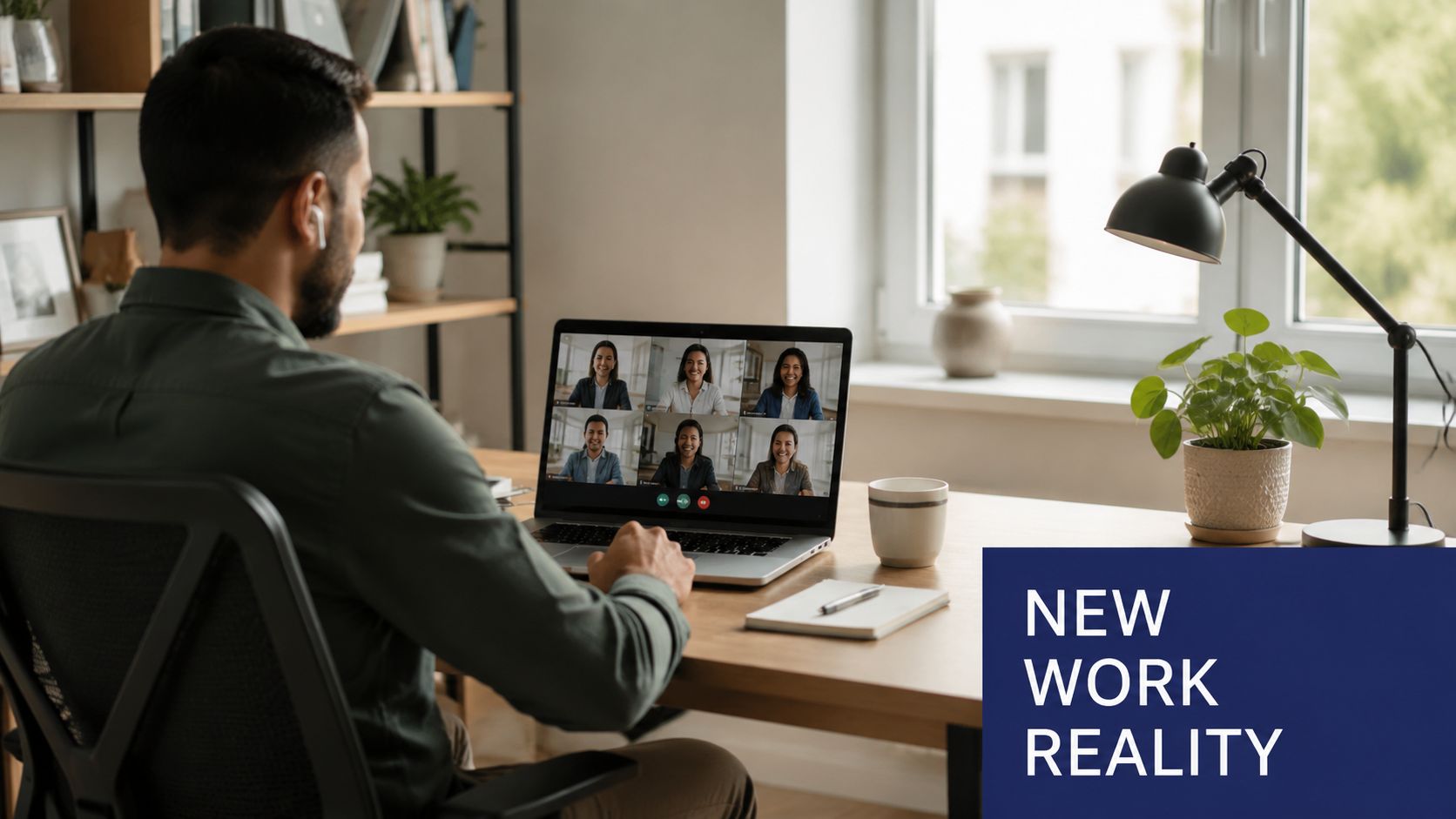
Remote work isn't a temporary accommodation anymore. It's part of how companies operate, hire, and serve customers. When a large share of the workforce is no longer tied to one office, communication systems have to follow the people doing the work.
Legacy phone systems were built for a different layout. They assume the business lives inside four walls. Calls come into a front desk, ring fixed extensions, and depend on hardware in a closet or on a rack somewhere in the office. That setup starts to break down fast when your sales manager is at home, your service coordinator is in another city, and your owner needs to answer urgent calls while traveling.
Where old systems fail
The failure usually isn't dramatic at first. It shows up in small friction points that add up:
- Missed handoffs because transferring a call to a remote employee feels clumsy or unreliable
- Personal number sprawl when staff start using their own cell phones to fill the gaps
- Inconsistent customer experience because callers get different greetings, voicemails, and response patterns depending on who happens to be available
- Slow changes when every routing update requires old hardware, a specialty vendor, or office access
Those are operational problems, not just IT problems.
A phone system should match how your team actually works. If your team is distributed and the phone system isn't, customers feel the mismatch first.
Why mobility now matters more than hardware
A good remote work phone system turns availability into a process instead of a lucky accident. Calls can follow schedules, departments, devices, and locations without exposing personal numbers or forcing people to sit at one desk.
For a small business, that means you can sound organized even if your team is spread across homes and offices. For a larger company, it means one communication standard across departments and locations.
The shift is less about replacing a handset and more about replacing the operating model behind it. Once you see that clearly, the upgrade stops looking optional.
What Exactly Is a Remote Work Phone System
A remote work phone system is a business phone service built to run over the internet rather than relying on old copper lines and office-bound PBX hardware. In practice, that means your business number, extensions, routing rules, voicemail, and call management live in software.
The easiest way to think about it is this. It's like moving the old phone closet into the cloud.
Think cloud PBX, not just call forwarding
A traditional PBX is the traffic controller for your office phones. A cloud PBX does the same job, but the control layer sits in a hosted platform instead of a box in your building. Employees connect through desk phones, laptops, mobile apps, or browser-based apps depending on how they work.
If you want a plain-language overview of the model, this guide on what a cloud phone system is is useful.
This matters because basic call forwarding is not the same thing. Forwarding is a patch. It sends calls from one number to another. A real remote setup gives you business routing, call logs, shared visibility, voicemail handling, recordings, user management, and a consistent caller experience across the whole team.
What runs where
Here's the practical breakdown:
| System part | Traditional setup | Remote-ready setup |
|---|---|---|
| Call control | Office hardware | Cloud platform |
| User access | Desk phone in one location | Mobile app, desktop app, desk phone, browser |
| Changes and admin | On-site vendor or office access | Web portal from anywhere |
| Business continuity | Vulnerable to site-specific issues | More flexible across locations and devices |
That's why many businesses stop thinking in terms of “phone lines” and start thinking in terms of users, devices, and call flows.
Why SMBs usually prefer this model
The biggest advantage isn't technical elegance. It's control. A manager can add a user, adjust business hours, update a greeting, or reroute overflow calls without rebuilding the office around the phone system.
For business owners, that means fewer surprises. For IT teams, it means fewer one-off workarounds. For staff, it means the business number travels with them instead of trapping them behind a front desk model that no longer fits.
Core Features That Power Hybrid Teams
The right features aren't the ones that look impressive on a pricing page. They're the ones that remove friction in daily work.
Calling that survives real-world internet conditions
Call quality is the first test most owners care about, and for good reason. If people can't hear each other clearly, nothing else matters. Modern systems handle this better than many buyers realize. They use adaptive codecs and jitter buffers, which can reduce audio distortion and dropped calls by up to 40% on variable home WiFi or mobile data networks, as explained in Business Broadband Hub's remote VoIP overview.
That sounds technical, but the effect is simple. The system is comparable to suspension on a vehicle. You still drive over rough roads, but the ride stays usable.
The features that actually change daily operations
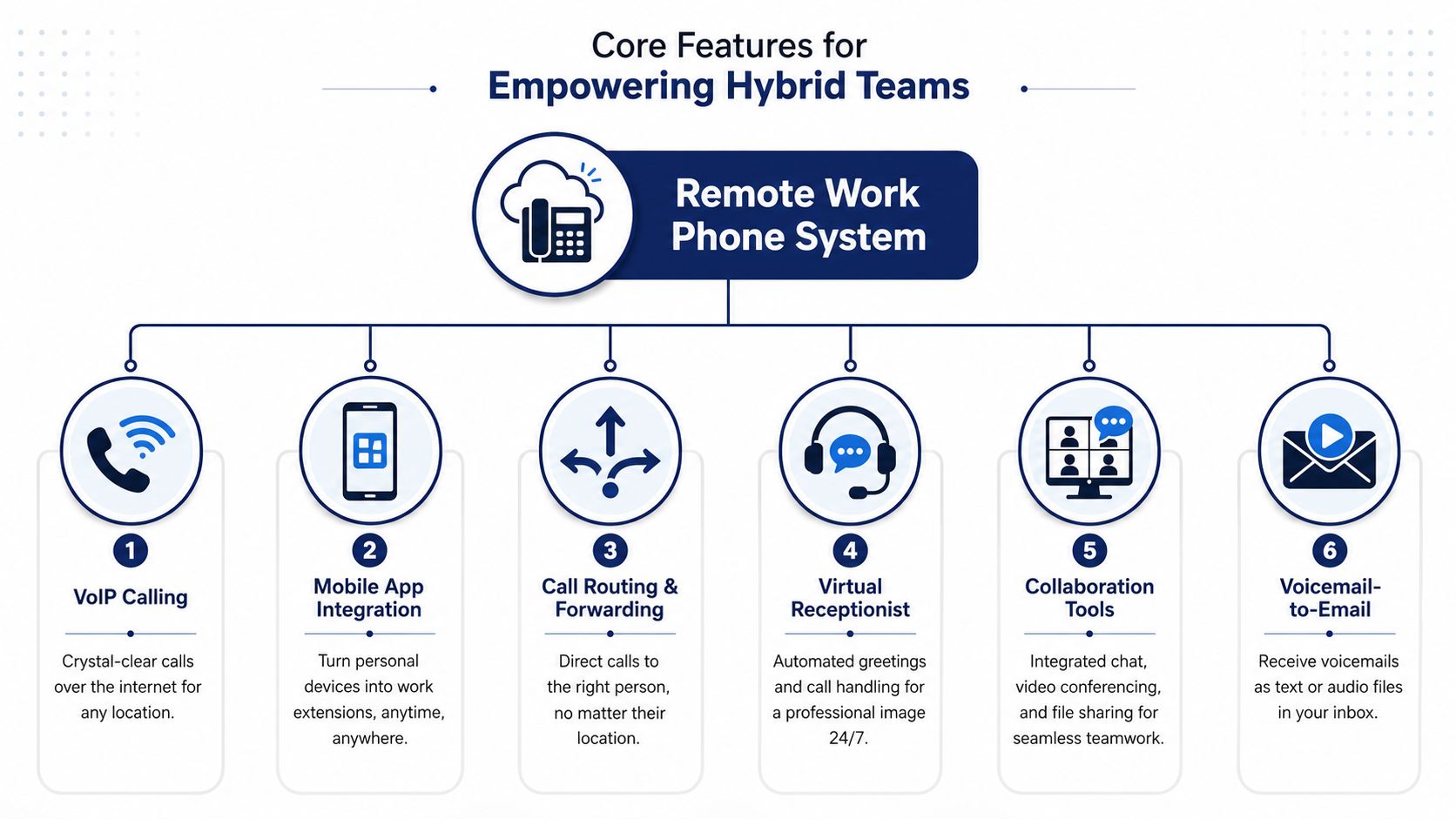
A strong remote work phone system usually includes these core tools:
- Mobile app access so an employee can answer and place calls using the business identity from a personal smartphone without exposing a private number
- Desktop or softphone support for users who work primarily from a laptop and headset. If you're comparing this option, a quick explainer on a softphone for VoIP helps clarify what to expect
- Auto attendant or virtual receptionist to greet callers and route them without a live receptionist handling every first touch
- Call routing and forwarding rules that send calls by department, time of day, availability, or escalation path
- Voicemail-to-email and transcription so messages don't sit unheard in a general mailbox
- Shared logs and communication history so multiple people can see what happened with a caller
What these features solve in practice
A mobile app isn't just convenience. It prevents the common remote-work mistake of mixing business and personal calling. An auto attendant isn't just polish. It stops a small team from sounding scattered when nobody is physically “at the front desk.”
Call routing is where many systems start paying for themselves operationally. A customer shouldn't need to know whether accounting is in the office, at home, or traveling that day. The system should handle that.
Hybrid teams also run into scheduling friction fast. Sales, support, implementation, and leadership often keep separate calendars. In those environments, tools for syncing multiple calendars can help reduce missed callbacks and scheduling confusion around phone follow-ups.
Practical rule: If a feature doesn't make it easier to answer, route, document, or return calls from anywhere, it's probably not core. It's decoration.
The Business Case for Switching to a Modern System
The strongest reason to switch isn't fashion. It's economics.
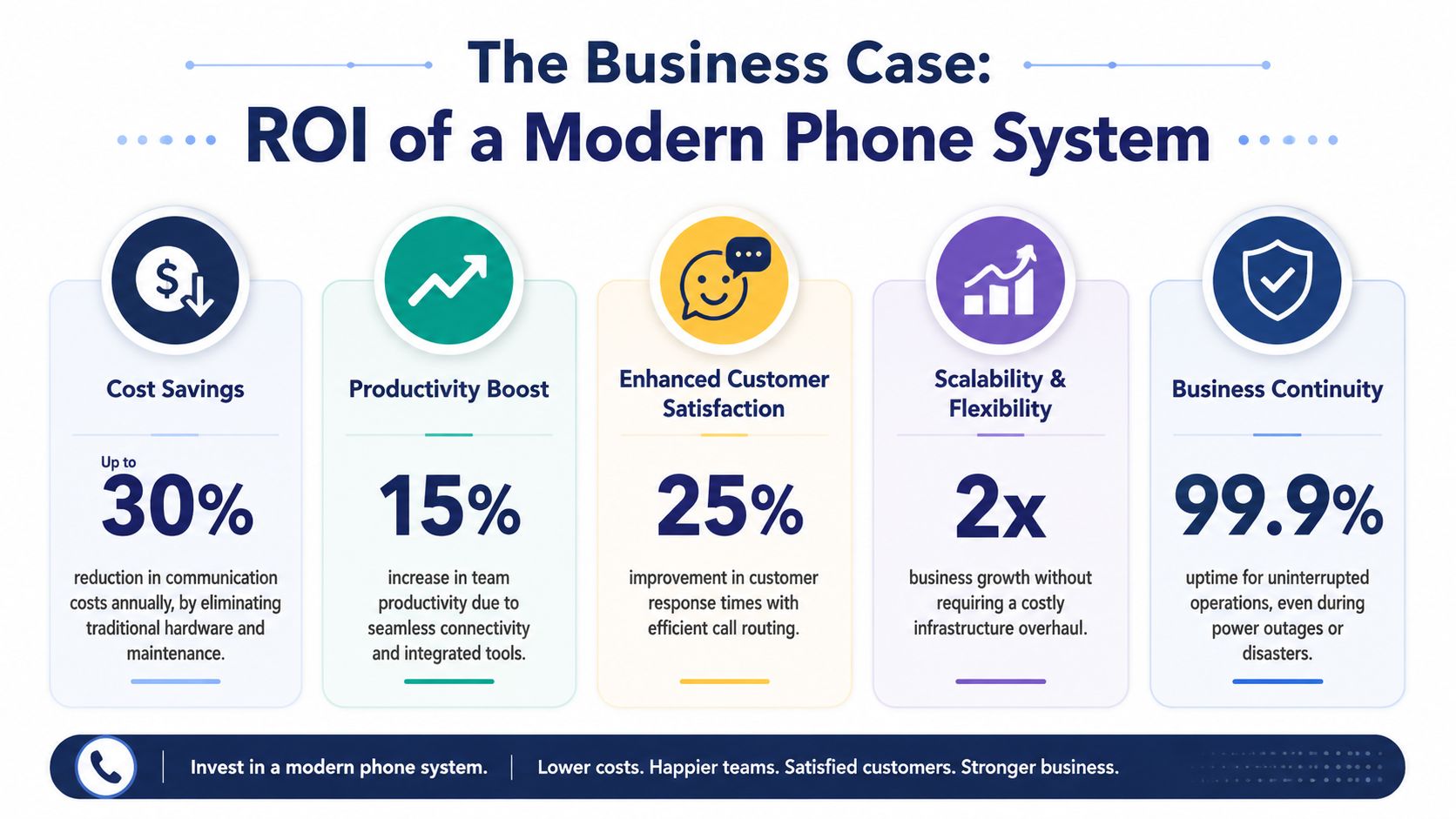
Businesses that move to cloud-based VoIP systems typically save between 30% and 50% compared to legacy phone systems, and these tools can increase employee productivity by 20% through features like call forwarding and CRM integration, according to Intelecom's VoIP business phone statistics.
That's the headline. The business case gets clearer when you break it into cost, productivity, and customer handling.
Cost becomes predictable
Old systems often look cheaper than they are because costs are scattered. Hardware, maintenance, vendor visits, moves, adds, changes, and line quirks show up over time instead of on one neat invoice.
A cloud model shifts that into a more predictable operating expense. You're paying for users and service, not trying to preserve aging hardware because replacing it feels disruptive.
If you have mobile employees, the device side matters too. Teams that travel internationally or activate lines across different regions may also benefit from understanding eSIM advantages with Simsima, especially when business communication depends on flexible mobile connectivity.
Time savings are usually more valuable than line-item savings
The line-item savings get attention. The workflow savings usually matter more.
When calls route correctly, voicemails arrive where people already work, and customer context is easier to access, staff spend less time chasing information and less time cleaning up missed communication. That changes the day-to-day pace of work.
Here's a simple view:
| Business area | Legacy pattern | Modern pattern |
|---|---|---|
| Inbound calls | Manual handoffs, desk dependence | Rules-based routing across locations |
| Messages | Separate voicemail silos | Messages delivered into active workflows |
| Remote staff | Workarounds and personal phones | Business identity on approved devices |
| Changes | Slow and vendor-dependent | Faster admin control |
This video gives a helpful visual walkthrough of how cloud calling fits modern operations:
Customer experience improves when the system carries context
Customers don't care what network your employee is on. They care whether the call was answered, routed well, and handled without repetition.
That's why phone modernization is really service modernization. The system becomes part of your response discipline. It helps the business look coordinated even when the team is distributed.
A Practical Checklist for Choosing the Right System
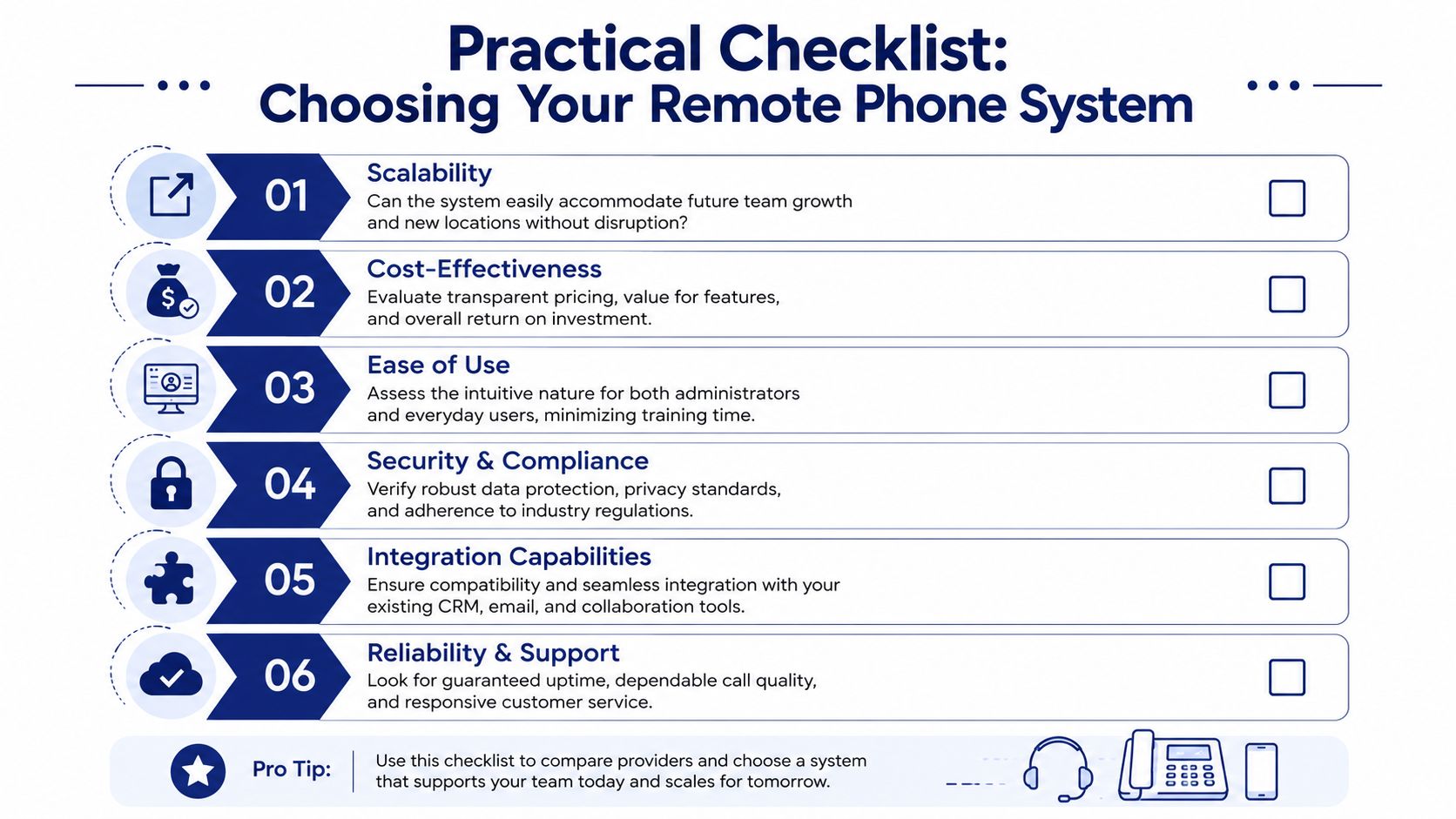
Most buyers compare feature lists first. That's understandable, but it's not enough. A feature sheet won't tell you how a system behaves on a weak upstairs WiFi signal, during a mobile handoff, or when three people try to transfer calls at once from different locations.
The non-negotiable test most companies skip
This is the gap I see most often. Teams test in a clean office demo, then deploy to messy real life. That's backwards.
As noted in Aircall's discussion of phone systems for remote teams, the most overlooked issue is testing under actual remote network conditions. A system that sounds fine on an office LAN can degrade on home broadband or mobile data, and that often becomes the most important test for a distributed deployment.
Test the system where your team actually works. Home WiFi, guest WiFi, mobile data, and branch offices matter more than the conference room demo.
The shortlist that matters
When evaluating providers, I'd use this checklist:
- Real-world call testing: Have several employees test from home networks, not just headquarters. Include someone with average internet, not only your cleanest connection.
- Admin control: Check whether your team can update users, greetings, call flows, and schedules without opening a support ticket for every small change.
- Support quality: Ask what happens when calls fail after hours, during a port, or during a live routing problem. You want support that can troubleshoot both user behavior and system settings.
- Integration fit: Confirm the system works cleanly with your CRM, email, and collaboration stack. “Works with” and “works well with” are not the same thing.
- Security and policy controls: Review access permissions, user roles, and device management practices if staff will use personal hardware.
- Scalability: Make sure adding a user, location, or department doesn't require redesigning the whole call flow.
Questions worth asking on a live demo
Use the demo to pressure-test operations, not admire the interface.
| Ask this | Why it matters |
|---|---|
| Can we simulate a home WiFi user and a mobile user during this test? | Shows whether the vendor understands remote deployment reality |
| How do after-hours and holiday rules work? | Prevents basic customer-facing mistakes |
| Who owns number port timing and cutover coordination? | Reduces migration confusion |
| What changes can our staff make without vendor intervention? | Tells you how much control you really have |
A polished demo is nice. A system that works from a kitchen table is better.
Real-World Setups for Remote and Hybrid Teams
A good phone design should fit the business shape. Here's what that looks like in the field.
Fully remote consulting firm
A 15-person consulting company usually needs one main business number, a clean front-door greeting, and fast routing by practice area. Incoming calls can ring an auto attendant first, then go to a live consultant, a shared team queue, or voicemail based on business hours and availability.
Consultants work from laptops and mobile apps, so the caller sees the company identity rather than a personal cell number. Shared call logs help when one consultant picks up where another left off.
This kind of setup also supports distributed hiring. Companies expanding beyond one city often look for the best place to hire LATAM remote talent or similar remote staffing options. A cloud phone environment makes that expansion easier because new hires don't need to be near the original office to become reachable under the same business number.
Hybrid business with multiple offices
Now take a 40-person company with two offices and a mixed schedule. Some people sit at desks full time. Others rotate home and office days. A few travel constantly.
The phone system should make location irrelevant to the caller. Sales can ring by round-robin during business hours. Support can use queues and overflow rules. Leadership can receive priority call routing for urgent accounts. Desk phones may still exist in both offices, but they're endpoints, not the center of the system.
For teams mapping this out, guidance on remote team communication helps frame the operational side, not just the telephony side.
One practical platform example
One option in this category is SnapDial. It's a hosted VoIP and cloud PBX service with mobile apps, call routing, a self-service web portal, visual voicemail with transcription, and white-glove setup. That combination fits companies that want centralized control while still supporting remote users, office users, and mixed-device environments.
The exact vendor matters less than the design choices. If the call flow matches the business, staff can work anywhere without sounding like they work everywhere.
Answering Your Top Questions
Is an AI receptionist worth it for a small business
Sometimes yes. Sometimes it creates more friction than it removes.
A common but poorly answered SMB question is when an AI receptionist becomes cost-effective. As noted in CallHippo's write-up on remote phone systems, AI receptionists are often included in top-tier plans, but businesses still need to weigh implementation cost and the effect on first-contact resolution against the savings from human staff.
The practical test is simple. If your callers ask predictable routing questions, need after-hours intake, or frequently call outside staffed hours, AI can help. If your callers often need judgment, reassurance, or complex issue triage, AI can frustrate them fast.
Use AI to handle repeatable front-door tasks. Don't ask it to fake human judgment where callers clearly need a person.
Is it secure if employees use personal devices
It can be, if the business treats the app and account as part of its security policy. The main issue usually isn't the phone number itself. It's access control, user permissions, and what happens when someone leaves the company or changes roles.
Keep business calling inside the approved app, set clear offboarding procedures, and avoid informal workarounds like text chains from personal numbers.
Will migration cause downtime
It doesn't have to, but migration needs planning. The highest-risk moments are usually number port timing, routing cutover, and user training.
The best transitions have a call flow map, a user list, a cutover plan, fallback routing, and support available when numbers move. Businesses often underestimate the training piece. Even a simple new app creates confusion if staff don't know how to answer, transfer, check voicemail, or switch devices.
If you're replacing an older PBX, choose a provider that can manage the transition carefully, not just sell the service. Good migrations feel boring. That's the point.
If you're comparing options and want a practical second opinion, take a look at SnapDial. It's a cloud-based business phone system built for companies replacing legacy setups, with hosted VoIP, mobile-ready calling, white-glove setup, and 24/7 Texas-based support. For SMBs and multi-location teams, that combination can make the move to a remote work phone system much easier to manage.