

If you're still relying on desk phones scattered around the office, you probably already know the pain points. Calls ring at empty desks. Someone works from home and uses a personal cell number because the office line can't follow them. Moving one employee to a different seat somehow turns into a small IT project. Even simple changes, like routing after-hours calls or adding a new extension, feel slower than they should.
That setup worked when business happened in one building and everyone sat near the same handset all day. That's not how most small businesses operate now. Teams move between office, home, job sites, and mobile devices, and customers still expect a fast answer and a consistent experience.
A softphone for VoIP is the practical answer for that shift. It replaces the hardware-first model with a software-first one, so your phone system lives on the devices your team already uses. The primary upgrade isn't just that calls happen through an app. It's that your business stops treating calling like fixed equipment and starts treating it like a flexible service.
The Future of Business Calling Is Here
Legacy phone systems create friction in places owners don't always notice at first. The cost isn't only in the desk phone sitting on each workstation. It's in the time spent managing moves, dealing with aging hardware, and trying to keep customer conversations flowing when your team isn't physically in the office.
A modern business phone setup has to do more than ring a desk. It has to travel with the employee, connect with other communication tools, and stay manageable without a pile of hardware decisions every time the business changes. That's why softphones have moved from a nice option to a serious operational tool for SMBs.
The bigger market tells the same story. A Zoom VoIP market roundup cites the global VoIP market at $169.38 billion in 2025, with a projection of $264.27 billion by 2029 and an 11.8% CAGR through 2029. That matters because it shows software-based calling isn't an edge case anymore. It's the direction business communications are already moving.
Why the shift matters to SMBs
Small businesses don't get much value from being tied to fixed equipment. They get value from speed, reachability, and simpler administration.
A software-first phone system changes the day-to-day reality:
- Employees stay reachable: Calls can follow the person instead of the desk.
- Owners gain flexibility: Routing, users, and call behavior can change without waiting on hardware swaps.
- Customer experience improves: Fewer missed calls and fewer handoff problems usually mean smoother service.
- Growth gets easier: Adding staff or supporting a new location becomes a software task, not a cabling project.
Softphones matter because they remove the physical limits that old business phone systems quietly impose on a growing company.
For many businesses, the old phone system isn't broken enough to force an immediate replacement. It's just slow, rigid, and increasingly out of step with how the team operates. That's often the clearest sign it's time to move.
What Is a VoIP Softphone
If VoIP is the road system for internet-based calling, a softphone is the vehicle your team drives on it. VoIP is the underlying technology. The softphone is the application people use to place, receive, hold, transfer, and manage calls.
That distinction helps because many business owners hear "VoIP" and "softphone" used as if they mean the same thing. They don't. A softphone for VoIP is the user-facing endpoint. It's the software layer that gives your team a phone interface without requiring a dedicated desk handset for every user.
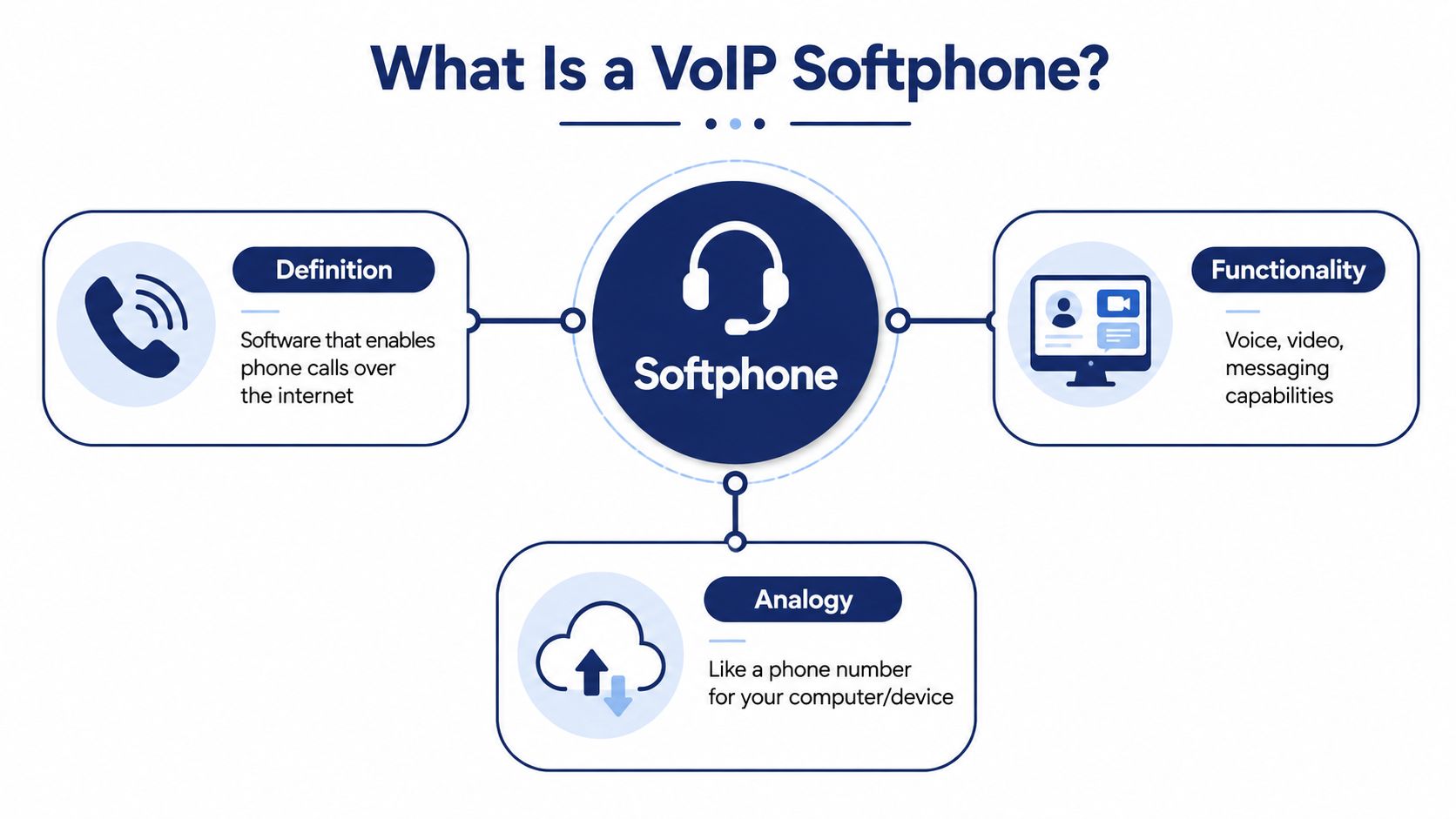
A VoIPstudio softphone overview describes a softphone as a software endpoint, not a physical desk phone, and notes that it runs on common operating systems like Windows, macOS, Android, and iOS. In plain terms, that means your business number can live on a laptop, tablet, or smartphone instead of being trapped on one piece of desk hardware.
How it works in plain English
When someone speaks into a headset or phone microphone, the app converts that voice into digital data. That data travels over an IP network through your VoIP provider, then gets turned back into sound for the person on the other end.
Consider it email for voice. You aren't mailing a physical letter. You're sending information across a network, and software handles the delivery and presentation.
A typical softphone setup includes:
- The app itself: Installed on a desktop or mobile device.
- A business number or extension: Assigned through your provider.
- Audio hardware: Usually a headset, built-in speakers, or a microphone.
- An internet connection: Wired, Wi-Fi, or mobile data depending on the device and environment.
Why software beats a desk-bound endpoint
The biggest difference isn't technical. It's operational.
With a physical phone, the identity of the call experience is attached to a device on a desk. With a softphone, the identity follows the user. That changes how businesses think about mobility, coverage, and continuity.
If you want a broader look at how internet-based business calling fits into a hosted setup, this guide to cloud phone systems for business is a helpful companion.
Practical rule: If your employees already work from laptops and smartphones, forcing calling to stay on desk hardware creates a disconnect you feel every day in missed flexibility.
For small businesses, that's the appeal. You're not buying a different kind of phone. You're changing where the phone system lives.
Key Business Benefits of Using a Softphone
Most SMBs don't switch because the technology sounds modern. They switch because the old setup costs too much, limits mobility, or takes too much effort to manage.
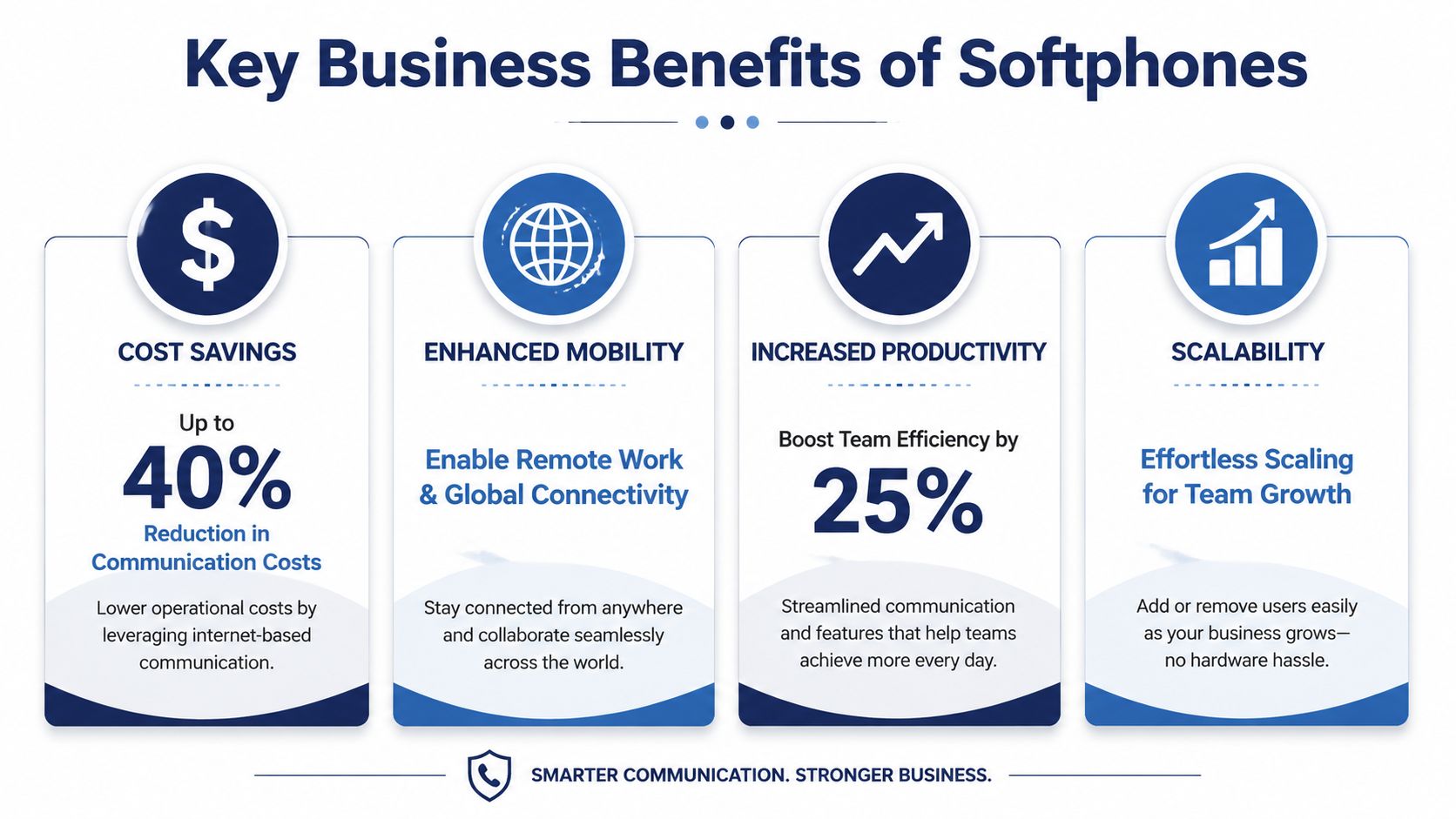
The strongest business case usually starts with cost. A CloudTalk comparison of softphones and VoIP phones reports that 82% of companies save money when they switch to softphone calling, with most businesses cutting phone bills by about 50% and some reducing them by as much as 90%. Those savings come from avoiding physical hardware costs and the maintenance and replacement cycle that comes with it.
Where the savings really show up
Desk phones don't just cost money to buy. They create overhead around provisioning, support, repairs, replacements, and office changes.
Softphones reduce or remove a lot of that friction:
- Lower hardware dependency: Fewer dedicated handsets to purchase and maintain.
- Simpler onboarding: New users can often get set up on existing devices instead of waiting for equipment.
- Less waste during changes: Team moves, remote work, and temporary workspaces don't require the same physical rearrangement.
- Easier replacement planning: If a laptop or phone changes, the service can move with the user more easily than a legacy handset setup.
Productivity benefits owners notice fast
There are also practical gains that don't always show up as a line item on a bill. When calling, voicemail, messaging, and meetings live in one app, employees waste less time switching between disconnected tools.
That convenience translates into very real day-to-day outcomes:
| Business need | Hardware-first model | Software-first model |
|---|---|---|
| Employee mobility | Calls stay at a desk unless forwarded manually | Calls can follow the user across devices |
| Adding staff | Often requires more hardware planning | Usually easier to provision in software |
| Multi-location consistency | Can feel fragmented | Easier to standardize workflows |
| Hybrid work support | Often awkward | Built for laptop and mobile use |
Better customer coverage
Customers don't care whether your team uses a softphone or a desk phone. They care whether someone answers, whether the transfer works, and whether the conversation continues smoothly.
That's where softphones often make a visible difference. A sales rep can return a business call from a laptop. A service manager can answer from a mobile app while off-site. A front desk team can route calls without being tied to one physical bank of phones.
A good phone system should reduce the chance that business gets trapped behind an empty chair.
The main point is simple. A softphone for VoIP doesn't just change how calls are placed. It changes how reachable your company is.
Essential Features to Evaluate in a Business Softphone
Not every softphone is a good business softphone. Some apps cover the basics and stop there. Others are built for serious business use, where call handling, security, and user consistency matter just as much as making the call itself.
The biggest mistake I see SMBs make is shopping only by feature count. They see a long list, assume more is better, and miss the harder questions. Does the mobile app work as well as the desktop version? Can users stay secure on personal devices? Will the system fit into existing workflows instead of creating a second layer of work?
Start with daily-use call handling
The first test is simple. Can your team work from the app all day without frustration?
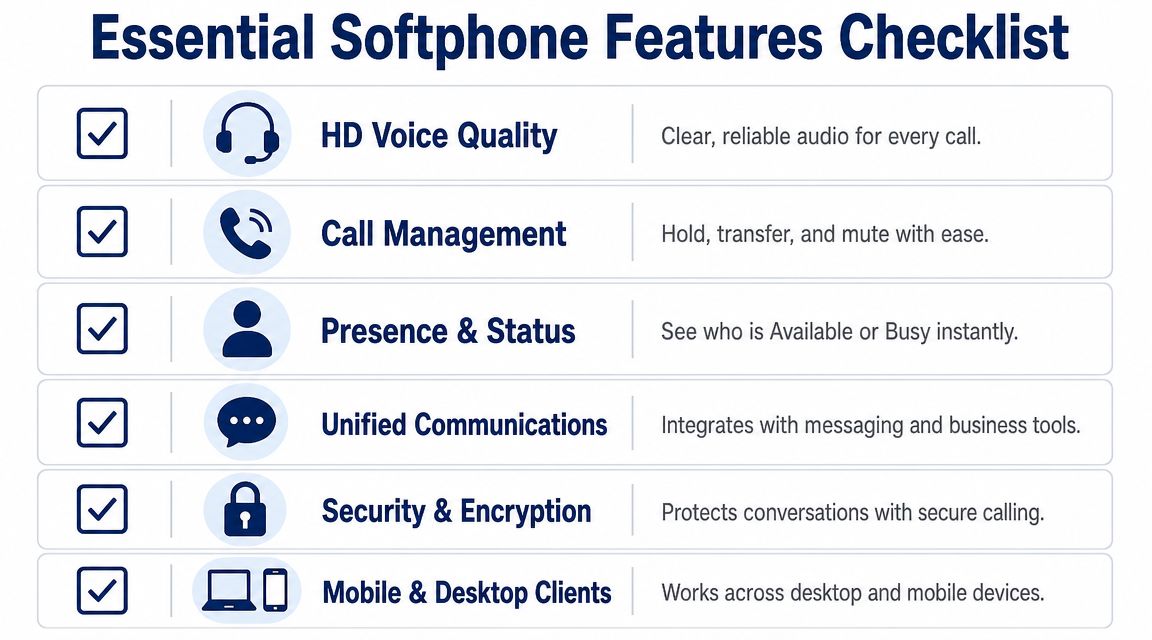
Look for the basics done well:
- Call controls that are easy to use: Hold, transfer, mute, forwarding, and voicemail access should be obvious.
- Presence or status visibility: Staff should be able to see who's available, busy, or away.
- Reliable desktop and mobile clients: A softphone that works well only on one platform creates support headaches.
- Unified communication tools: Messaging, meetings, and related calling tools should feel connected rather than bolted on.
If your business handles a larger volume of customer conversations, it also helps to review broader contact center requirements. This breakdown of CallZent on call center technology is useful for comparing features like queue handling, reporting, and supervisor controls that may matter beyond a standard office phone setup.
Security isn't optional anymore
Security is where many SMBs underestimate the shift from hardware to software. Once calling moves onto laptops and mobile devices, especially personal ones, you need to think beyond "can it make calls?"
An Acrobits article on softphone security notes that enterprise security controls are becoming a key differentiator, including secure protocols, end-to-end media encryption, and SSO, with buyers also evaluating compliance needs such as HIPAA-style privacy expectations and risks in BYOD environments.
That matters for a few reasons:
- BYOD introduces risk: Personal phones and laptops don't always follow the same control standards as managed office hardware.
- Users change networks constantly: Home Wi-Fi, office internet, public hotspots, and mobile data create different exposure points.
- Identity matters as much as encryption: SSO and multi-factor access controls help confirm the right person is using the service.
- Compliance questions show up early: If your team handles customer or sensitive information, you need clear answers before rollout.
Buying advice: Ask how the app protects signaling, media, and user identity. If the answer is vague, keep looking.
Evaluate the feature set by business impact
A practical way to compare vendors is to map each feature to an operational outcome.
| Feature | Why it matters |
|---|---|
| Mobile and desktop parity | Reduces training problems and inconsistent workflows |
| CRM or app integrations | Gives staff context without jumping between tools |
| Encryption and SSO | Lowers risk when calls happen on distributed devices |
| Presence and transfer controls | Helps teams route calls cleanly and avoid internal confusion |
| Call recording or tagging | Supports follow-up, quality review, and documentation |
Features aren't valuable because they sound advanced. They're valuable when they remove friction, protect data, or help employees serve customers faster.
Common Softphone Use Cases for Modern Teams
The easiest way to judge a softphone for VoIP is to look at how it fits real work. Not feature lists. Actual days, actual interruptions, actual handoffs.
The remote salesperson
A sales rep starts the morning on a laptop, taking follow-up calls and checking voicemail in the same app. Before heading to an appointment, that rep moves to a mobile device without giving out a personal number. The customer still sees the business identity, and the rep still works inside the company system.
That sounds small, but it's a real upgrade. It keeps sales activity tied to the business instead of drifting into personal call logs and one-off workarounds.
The support team handling customer context
Support teams benefit when calling doesn't live in isolation. If an incoming call can connect to customer records and notes, agents spend less time asking the customer to repeat basic details.
Phone and business software need to cooperate. If you're evaluating that workflow, this look at VoIP CRM integration for customer-facing teams gives useful context on how calling data and customer systems can work together.
A support agent with caller context can greet the customer more intelligently, route faster, and pick up the thread of a previous issue with less friction. Even when the technology behind it is complex, the customer experience should feel simple.
The owner managing multiple locations
A business owner with more than one site often needs consistency more than anything else. One location shouldn't answer calls one way while another handles voicemail and routing completely differently.
A software-first model makes it easier to centralize those rules. Admins can manage users, extensions, routing behavior, and availability from a portal instead of relying on whatever happens to be plugged into each office.
Here are three situations where softphones usually make immediate sense:
- Field and mobile teams: Staff can stay on the business system while away from a desk.
- Customer support groups: Call handling and business context can work together more cleanly.
- Multi-site businesses: Leadership can apply more consistent routing and availability rules across locations.
The best softphone deployments don't feel like new technology after a week. They just feel like the phone system finally matches how the company already operates.
Softphone Deployment and Optimization Guide
A softphone rollout goes well when businesses treat it like an operations project, not just an app install. The software may be simple to download, but call quality and user adoption depend on what sits underneath it.
The biggest technical factor is the network. A CounterPath guide on business softphones explains that reliable voice quality depends heavily on the underlying IP network, and that poor conditions can create latency and jitter, which lead to dropped or patchy calls. In plain English, latency is delay. Jitter is uneven delivery. If voice packets arrive late or out of rhythm, the conversation breaks up.
Check readiness before rollout
Many SMBs make the same mistake. They deploy the app first and troubleshoot later. That's backwards.
Use a readiness checklist:
- Review internet stability: Don't assume "fast enough for browsing" means "good enough for voice."
- Test the actual user environment: Home offices, Wi-Fi-heavy spaces, and shared networks often behave differently from the main office.
- Standardize headsets where possible: Bad microphones create support tickets that look like network problems.
- Decide on device policy early: If employees will use personal devices, define the security and access rules before launch.
- Map your call flows: Auto attendants, ring groups, routing schedules, and voicemail rules should be designed before users log in.
If your business needs extra networking guidance, especially in regional office environments, resources on IT networking solutions for Philippine companies can help frame the infrastructure side of voice readiness.
Train for behavior, not just buttons
User training often gets reduced to a quick demo of where the mute and transfer buttons sit. That isn't enough.
Teach employees how the new model changes their work:
- When to use desktop versus mobile
- How to transfer without dropping context
- What to do when network quality drops
- How business identity is preserved on outbound calls
- Why personal-device security rules matter
A short rollout guide and a few role-specific examples usually work better than a giant manual nobody reads.
Poor softphone adoption usually isn't a software problem. It's a workflow problem that nobody explained clearly.
Optimize after go-live
The first week tells you where the friction is. Listen for repeated complaints. Audio quality in one department may point to a local network issue. Missed mobile calls may point to notification settings or inconsistent app use.
Bandwidth planning also matters. This practical guide to how much bandwidth VoIP needs is worth reviewing before rollout, especially if you're supporting remote staff, multiple simultaneous calls, or a busy front-office team.
The businesses that get the best results don't treat deployment as a one-time cutover. They tune the setup, reinforce usage habits, and fix the weak points early.
Is a Softphone Right for Your Business
A softphone makes sense when your business has outgrown the limits of desk-bound calling. That usually means your team works in more than one place, your current phone setup is cumbersome to manage, or you want business communications to move faster without adding more hardware complexity.
For SMBs, the decision usually comes down to a few practical questions.
A softphone is likely a strong fit if
- Your team is remote, hybrid, mobile, or spread across locations
- You want to reduce dependence on desk phones and aging PBX hardware
- You need calling to work alongside messaging, meetings, or CRM workflows
- You want simpler user management when staff join, leave, or move roles
- You understand that security and device policy need attention, especially with BYOD
It may need more planning if
- Your network quality is inconsistent
- Your team resists workflow changes
- You haven't decided how personal devices will be governed
- You expect software alone to fix broken call routing or poor internal processes
The right way to think about a softphone for VoIP is not "Should we replace a desk phone with an app?" The better question is, "Should our business keep treating calling like fixed hardware when the rest of our work already happens in software?"
For a lot of growing businesses, that answer is no.
If you're ready to replace legacy phone hardware with a managed cloud system, SnapDial is worth a look. It offers hosted VoIP and Cloud PBX service with white-glove setup, business calling features, mobile-ready access, and support designed for companies that want a smoother transition instead of a DIY phone migration.