
Your business probably isn't starting from scratch. You may have a legacy PBX that still works, a main number customers recognize, a few employees taking calls from home, and an internet connection that was never designed with voice traffic in mind. Replacing that system with hosted VoIP can simplify calling, but the dangerous assumption is that buying licenses equals completing the project.
The technology is mature. SIP became the core signaling foundation for modern internet phone systems after RFC 3261 was published in June 2002, helping businesses combine cloud PBX platforms, softphones, and equipment from multiple vendors. By June 2025, U.S. interconnected VoIP subscriptions had reached 63.4 million, and interconnected VoIP represented about 80.8% of U.S. fixed voice connections, according to industry VoIP subscription reporting. The risk isn't whether VoIP works. The risk is moving numbers, call flows, emergency services, devices, and people without testing the dependencies between them.
Why Most VoIP Rollouts Fail Before They Start
A 22-person dental practice recently bought a popular hosted VoIP bundle because the sales process was painless. The provider promised fast activation, the office selected desk phones, and the practice scheduled the number port for a Friday afternoon.
By Monday morning, the technology had exposed every planning gap. Fax traffic had stopped. The main inbound number still reached the old voicemail system. Three remote employees experienced dropped calls throughout the day because the office network and home connections had never been validated. Staff blamed VoIP, but the actual failure happened earlier, when the business treated a cutover as an order rather than a controlled migration.
That pattern is common. A provider can provision extensions correctly and still deliver a poor outcome if the customer hasn't inventoried its numbers, mapped its call flows, or confirmed which devices and services depend on the old phone system.
Practical rule: Never schedule a port until someone has documented every number, route, device, emergency address, and fallback path affected by the change.
The business case for migration remains strong. Survey-based reporting placed small-business VoIP adoption at about 36% in 2019, while newer industry roundups placed SMB adoption between 61% and 67% in 2025 and 2026. Those figures and the reported potential for new businesses to reduce initial communications costs by as much as 90% are summarized in small-business VoIP adoption and buyer research. VoIP replaces much of the capital-heavy PBX model with software-driven communications, but lower infrastructure cost doesn't remove migration work.
The rest of this guide focuses on the failure points that sales brochures minimize:
- Planning: Count actual users, numbers, call paths, and retained features.
- Network readiness: Measure voice conditions during busy periods, not just on a quiet morning.
- Provider selection: Compare support, security, integrations, and total pricing.
- Endpoint choice: Match phones and apps to roles.
- Porting: Treat number transfer as a project with an owner.
- Cutover: Pilot the riskiest users, run both systems together, and define rollback triggers.
- Operations: Verify E911, train staff, and monitor the new system after launch.
This is a practical setup guide, not a sales pitch for one stack. The right recommendation depends on your call flows, network, compliance requirements, and tolerance for doing the work internally.
Planning and Prerequisites Before You Buy Anything
Don't begin with a provider demo. Begin with a one-page requirements sheet that describes how the business communicates.
Count users and call paths
Separate people who need a dedicated desk phone from people who occasionally use a desktop or mobile app. A receptionist, sales representative, warehouse supervisor, and remote consultant may all be called “users,” but they need different endpoints, permissions, and routing.
Count simultaneous call paths, not just employee seats. A small office can have many users but modest concurrent demand, while a customer-support team may require queues, overflow rules, supervisor monitoring, and callback handling. Include shared lines, conference bridges, fax traffic, and any automated services connected to the current phone environment.
Audit numbers and dependencies
Pull a current carrier bill and create an inventory containing:
- Main numbers: Include published business numbers, department numbers, and direct inward dialing numbers.
- Special services: List toll-free numbers, fax lines, alarm connections, elevator phones, and door-entry systems.
- Emergency records: Document the physical address associated with each location and number.
- Existing features: Record auto-attendant menus, hunt groups, call recording, after-hours schedules, voicemail, and call forwarding.
- Integrations: Identify CRM, helpdesk, Microsoft 365, Google Workspace, answering service, and fax dependencies.
Don't assume a number is unimportant because it rings rarely. A fax line or alarm connection can be operationally critical even when it generates little traffic.
Draw the call flows
Map what happens to a call from start to finish. Write down who answers the main line, what happens when nobody answers, how transfers move between offices, where calls go after hours, and which queue receives a caller who selects a department from the menu.
Gather the paperwork before the provider asks for it. That usually includes the billed account number, a recent phone bill, authorization documents, tax information where required, and the details of an authorized signer. Poor paperwork is a common reason a port order stalls.
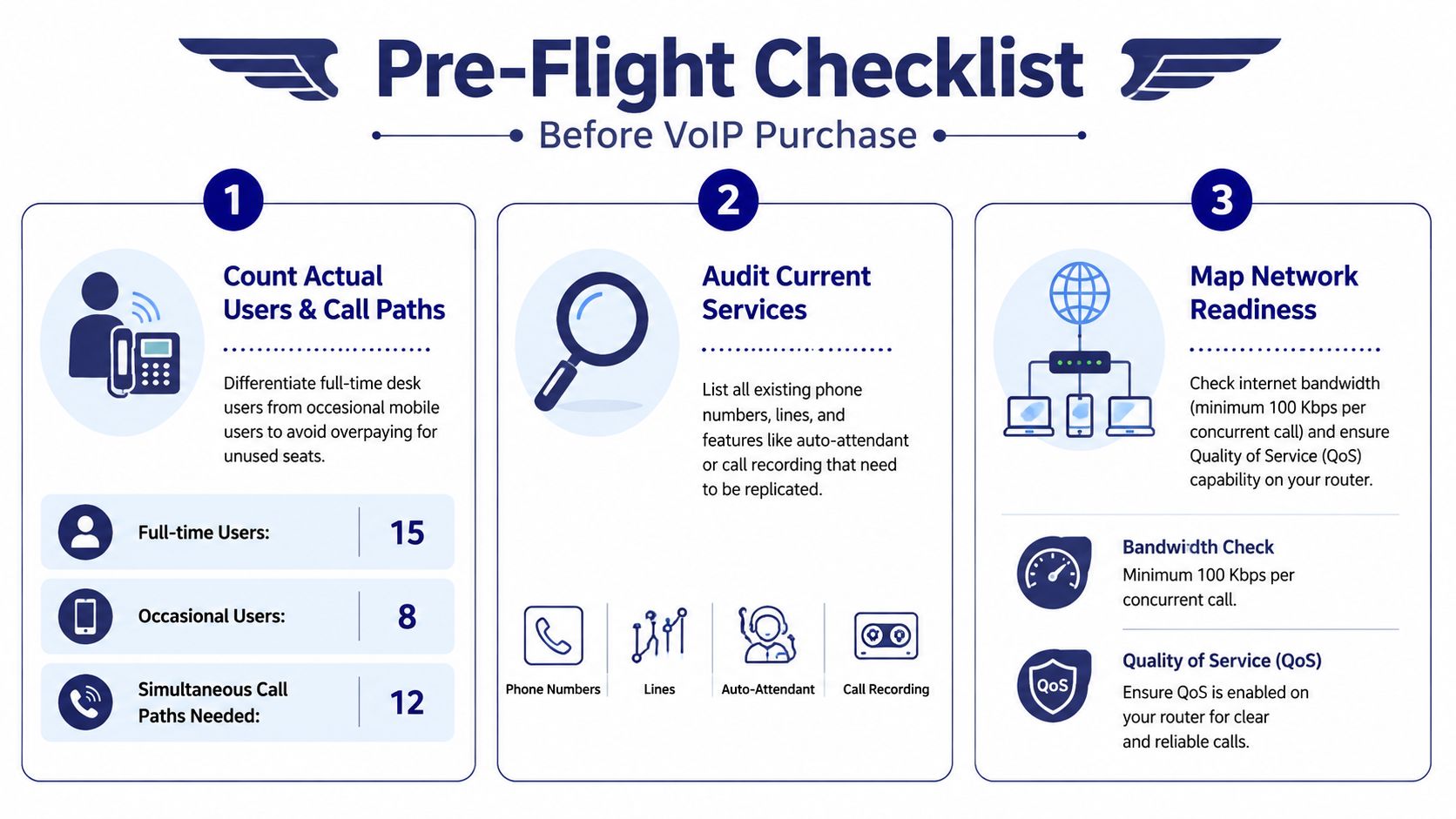
Your final document should state what the business must keep, what would be useful, how many users need each type of access, which numbers must move, and who owns the migration. That sheet will keep providers from defining the project for you and will expose scope creep before it becomes an invoice.
Getting Your Network Ready for Voice Traffic
A VoIP phone doesn't need a huge amount of bandwidth, but it does need a stable path. Voice packets compete with video meetings, cloud backups, large downloads, guest Wi-Fi, and ordinary web traffic. A connection that looks fast in a speed test can still produce poor calls when queues fill and packets wait in overloaded buffers.
Measure the four conditions that affect calls
For G.711, plan around 100 kbps per concurrent call in one direction. G.729 uses about 30 kbps per concurrent call in one direction, based on the VoIP rollout and capacity guidance. Use the VoIP bandwidth calculator to model expected simultaneous calls, then add room for normal business traffic.
The more important measurements are latency, jitter, and packet loss. The cited operational targets are less than 150 ms one-way latency, less than 30 ms jitter, and under 1% packet loss, with higher values capable of materially degrading voice quality.
| Metric | Acceptable | Warning | Failure |
|---|---|---|---|
| One-way latency | Less than 150 ms | Approaching the limit during busy periods | Above the target with noticeable delay |
| Jitter | Less than 30 ms | Variable results under load | Above the target with choppy audio |
| Packet loss | Under 1% | Intermittent loss under load | Persistent loss and broken audio |
| Capacity | Adequate for concurrent calls and normal traffic | Little headroom at peak times | Oversubscribed uplink or downlink |
Test during working hours and peak periods. A sustained ping helps reveal latency variation, iperf can help compare traffic behavior across a network, and PingPlotter can expose recurring route problems over several days. A single quiet test isn't evidence of readiness.
Configure the network for priority traffic
QoS should prioritize RTP media and SIP signaling over less time-sensitive traffic. Use a dedicated voice VLAN on managed switches, confirm that the router and firewall support QoS and VLAN tagging, and check whether the equipment handles queues without excessive buffering.
Ethernet remains the safer choice for reception, executives, and high-volume users. Wi-Fi can work for softphones and mobile devices, but desk phones connected through unstable wireless coverage create troubleshooting work that a wired connection would have avoided. Confirm PoE availability, switch-port capacity, cabling quality, and the condition of the router before ordering handsets.
A business that can't meet the readiness targets should upgrade the network first. Don't ask a phone provider to compensate for a congested WAN, weak access points, double NAT, or a consumer router that drops voice packets whenever someone uploads a large file. A broader business network setup guide can help organize the infrastructure review before the VoIP project begins.
Choosing a Hosted VoIP Provider That Fits
The cheapest monthly seat price is a poor buying criterion if the provider leaves your team to configure every route, troubleshoot every registration issue, and interpret every unexpected fee. Compare providers against the work they remove, not only the features they list.
Demand clarity before signing
Ask each provider to show the complete recurring price, including taxes, regulatory charges, E911, number fees, recording, analytics, mobile access, and usage that isn't included. Clarify whether toll minutes are included, pooled, or metered. Ask for the treatment of international calls, toll-free traffic, conference usage, and add-on numbers.
Support also needs a precise definition. “Available support” means little without documented response expectations, escalation procedures, phone access, and coverage for porting and cutover day. A provider that answers basic configuration questions but can't support a failed port at the agreed time isn't offering the level of service a business migration requires.
Security should be part of the evaluation, not an afterthought. Ask about TLS for signaling, SRTP for media, administrator MFA, role-based permissions, fraud controls, audit logs, SOC 2 coverage where relevant, and geographic redundancy. Confirm whether international dialing can be restricted by policy or PIN.
Compare the operating models
A fully self-service platform may suit a technically confident office with simple call flows. It can provide flexibility, but the customer owns the design, provisioning, testing, and troubleshooting.
A traditional carrier may provide dependable connectivity and familiar billing, yet its portal and integrations can be rigid. A managed VoIP provider sits between those models, handling more of the design and migration while retaining cloud features and remote-user support.
SnapDial is one reference profile for comparison. Its published offering combines hosted VoIP and cloud PBX functions with all-inclusive pricing, white-glove setup, U.S.-based 24/7 Texas support, call routing, recording, visual voicemail with transcription, mobile apps, cloud faxing, and queue management. Review the wider cloud VoIP provider comparison while building your shortlist, then verify every current commitment directly with the provider.
| Criterion | Weight | What to Look For | SnapDial Reference |
|---|---|---|---|
| Price | High | All-in recurring price and disclosed usage charges | All-inclusive pricing is presented as part of the service profile |
| Support | High | Phone access, escalation, and cutover assistance | 24/7 Texas support is described |
| Security | High | TLS, SRTP, MFA, fraud controls, and redundancy | Verify current controls during due diligence |
| Features | Medium | IVR, queues, recording, fax, transcription, and mobile apps | These capabilities are included in the published profile |
| Onboarding | High | Assisted design, porting, provisioning, and testing | White-glove setup is described |
Score each provider using the same evidence. Marketing claims should lose weight unless the provider can demonstrate them through documentation, a status history, a support conversation, and a realistic implementation plan.
Picking Phones, Headsets, and Mobile Apps
Don't buy identical phones for every employee. Hardware should follow the job.
Reception and high-volume users need dependable desk phones with Gigabit Ethernet, color displays, programmable busy lamp field keys, and electronic hookswitch support for wireless headsets. Poly, Yealink, and Cisco all offer business-grade options, but the model matters less than compatibility, provisioning support, and the user's call volume.
Executives often benefit from a premium speakerphone and a laptop softphone. That combination supports office calls, travel, and video or collaboration workflows without forcing every conversation through a desk handset.
Remote and hybrid staff usually need a certified headset, a desktop softphone, and a mobile application that presents the business number over Wi-Fi or cellular service. Test Bluetooth behavior, headset controls, call transfer, voicemail access, and the handoff between office and mobile devices before standardizing the experience.
Verify the physical installation
Check that switches provide Power over Ethernet if the phones need it. Count available switch ports, verify that the cabling supports Cat5e or newer, and confirm whether phones can pass a computer connection through their integrated switch without creating a bottleneck.
Auto-provisioning is essential for a multi-user deployment. The provider should apply templates centrally so administrators aren't entering credentials and feature codes by hand on every device. Manual configuration increases inconsistency and makes replacement work slower.
BYOD can reduce immediate hardware spending, but it can also create support and security problems. If you reuse existing handsets, confirm their compatibility and ownership status. Negotiate equipment bundles carefully, because bundled hardware can simplify deployment while increasing lock-in if the contract makes devices difficult to move later.
Skip consumer-grade routers and untagged voice traffic. A well-priced phone won't repair a network that has no traffic priority or a wireless signal that disappears when staff move between rooms.
Porting Numbers Without Losing Customers
Number porting deserves its own project owner. That person should maintain the inventory, collect paperwork, coordinate the carrier contacts, approve the port date, and confirm every number after the transfer.
Start by exporting all numbers from the current carrier. Include the main line, direct numbers, fax lines, toll-free numbers, and any service that customers, suppliers, alarm systems, or building equipment may use. Ask the new provider to confirm portability before you submit the order.
Porting can take 2 to 4 weeks, or 5 to 12 or more business days, depending on the carrier and paperwork quality, according to VoIP implementation planning guidance. Submit the order early with the required letter of authorization, customer service record, recent bill, and account details. A mismatch in the service address or account name can delay the request.
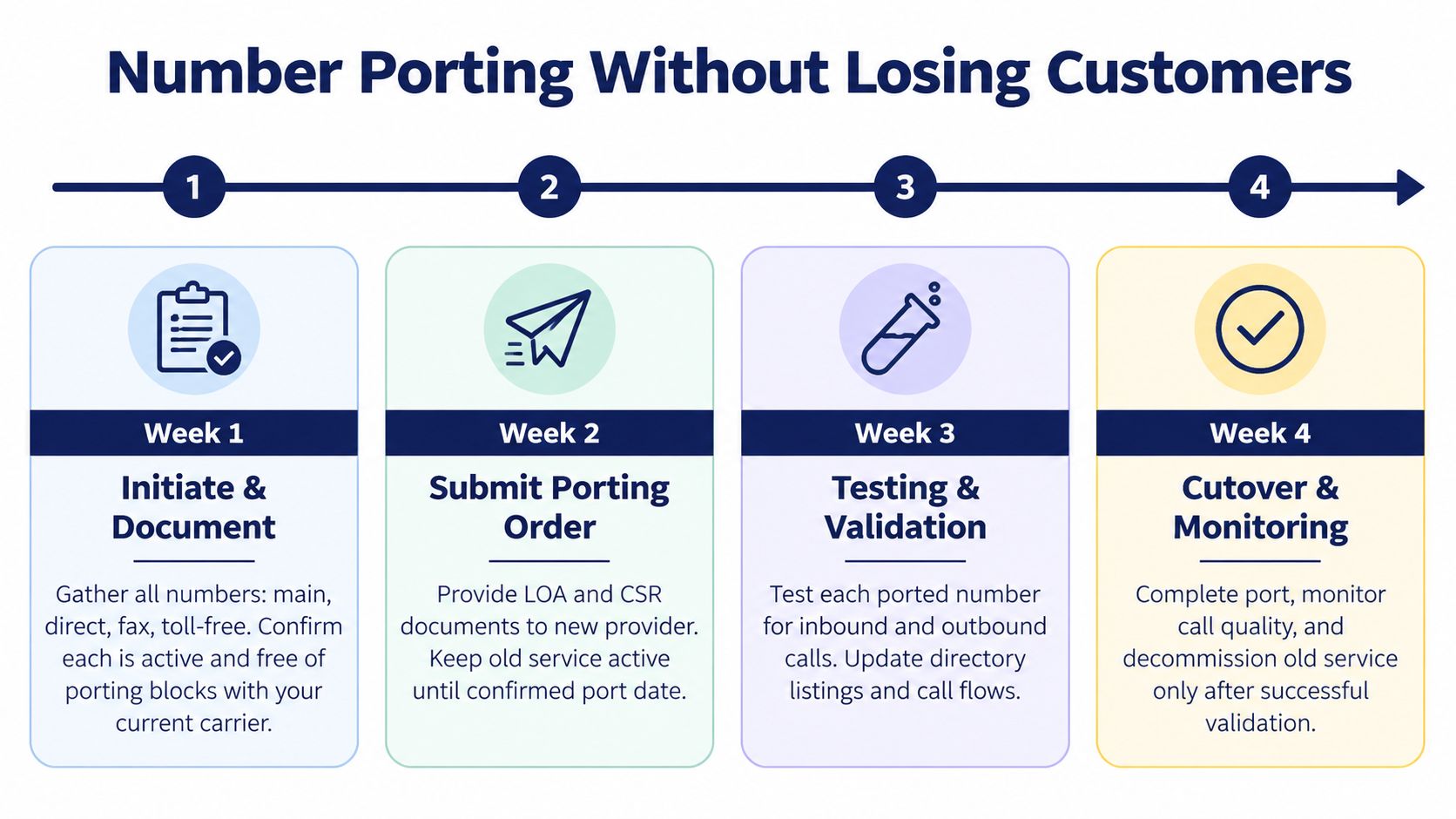
Use a parallel-run arrangement. Keep the old service active while the new system is configured, and use forwarding or temporary routing to test inbound calls before the port completes. A 1 to 2 week parallel operation is recommended in the rollout guidance, giving the team time to catch routing and device errors before everyone depends on the new platform.
Schedule the change during a low-volume business window, not late on Friday. Test inbound and outbound calling, caller ID, voicemail, fax services, directory listings, and emergency routing. Don't cancel the old carrier until validation is complete and the fallback path has been exercised. The detailed VoIP phone number porting guide is useful for organizing the paperwork and sequence.
Provisioning, Pilot Testing, and Cutover Day
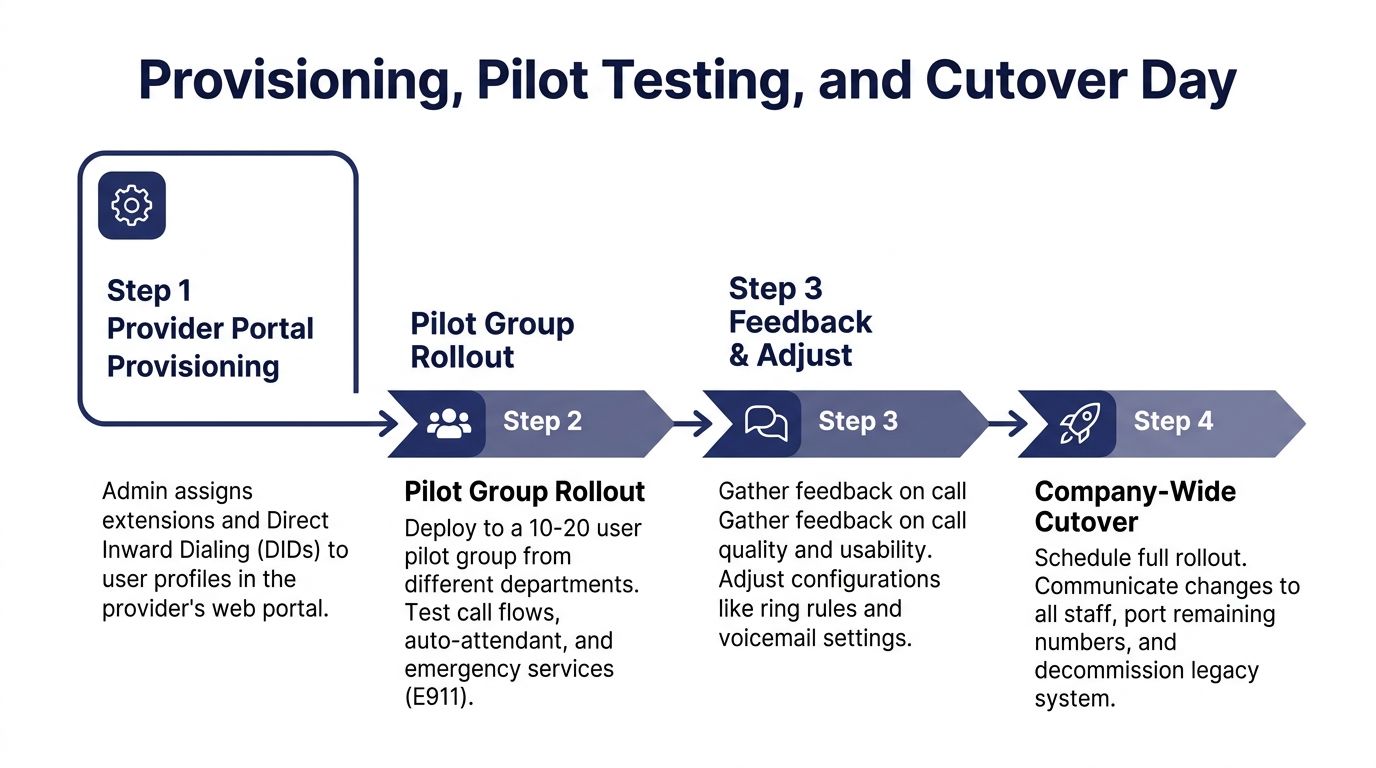
Cutover day exposes weak VoIP plans quickly. A system can look correct in the provider portal and still fail when a receptionist transfers a caller, a remote employee answers over cellular service, or an emergency call sends the wrong address. Treat provisioning, pilot testing, number-porting overlap, and rollback planning as one controlled migration.
The provider portal turns the design into working call service. Assign extensions, direct numbers, permissions, devices, voicemail rules, queues, schedules, and call-flow destinations deliberately. Review every default setting before users receive credentials. Defaults are convenient for testing, but they should not become your production design.
Build a pilot that can find real failures
Start with a pilot of 10 to 20 users, a practical recommendation in the VoIP rollout sequence guidance. Select people from different departments and skill levels. Include reception, an executive or manager, at least one remote worker, and a high-volume queue. A pilot made only of cooperative office users will miss the failures that affect customers.
Give every pilot user a written script. Test the calls customers make:
- IVR navigation: Press every DTMF option, including invalid choices, timeout behavior, and transfers to queues.
- Caller ID: Call mobile networks, landlines, and major business carriers, then confirm the displayed identity.
- Voicemail: Leave messages, test transcription, verify email delivery, and confirm storage and retention settings.
- Transfers: Test blind transfers, attended transfers, failed transfers, and return-to-operator behavior.
- Queues: Confirm agent login, overflow, hold announcements, callback behavior, supervisor visibility, and after-hours routing.
- Remote access: Test desktop and mobile apps over office broadband, home internet, Wi-Fi, and cellular service.
- Resilience: Trigger the documented backup route and confirm that calls forward to a mobile or secondary number during an internet outage.
- Conferencing: Open the conference bridge with the expected mix of participants and verify audio controls.
Record each result, owner, and correction. Do not accept verbal approval from a pilot group that has not completed the scripts.
Sign off on E911 separately
Emergency calling requires its own approval. Register the correct physical address for every location and provisioned number. Then place a real test call from each physical address through the provider's approved process. Confirm that the emergency answering point receives the correct location information and recognizes the callback number.
For U.S. multi-line systems, Kari's Law and the RAY BAUM's Act make direct emergency access and accurate dispatchable location particularly important. E911 is not complete because an address appears in an administrator portal. The migration guidance on downtime and emergency calling explains why overlap and address validation belong in the cutover plan.
Keep both systems available
Run both systems for at least 3 to 5 business days during the pilot and cutover period, with a controlled fallback route. Keep the old PBX available on a defined failure or busy path where feasible. Staff must know which system is primary, how to use the fallback, and who can pause the rollout.
Write rollback triggers before cutover. Repeated registration failures, sustained one-way audio, broken IVR transfers, failed fax delivery, or incorrect E911 routing should stop the change. Assign one person authority to call it off. Schedule pressure is not a reason to continue a failed migration.
Cut over during a low-volume business window, not late on Friday. Confirm inbound and outbound calling, caller ID, voicemail, fax services, directory listings, and emergency routing. Keep the old carrier active until validation is complete and the fallback path has been exercised. Number porting, parallel service, and E911 verification are the points where a small business either protects continuity or creates a customer-facing outage.
Price the first year realistically
The advertised seat price is only one line in the migration budget. A 2026 pricing guide notes that taxes and regulatory fees can add about 15% to 25% above the monthly sticker price. Number porting may cost $5 to $40 per number, and E911 may cost $0.30 to $3.00 per line per month. Use the business phone system cost guide for 2026 to identify the categories in your estimate.
Include hardware purchases or financing, mobile softphone licenses, recording and analytics add-ons, international or toll-free overages, network remediation, training, integration work, and the cost of running old and new systems together. Request a first-year worksheet, not only a monthly quote. If the provider cannot itemize it, you do not yet know the migration cost.
Harden access and train each role
Enable TLS and SRTP where supported. Separate voice traffic on a VLAN, require MFA for administrator access, and restrict international dialing with permissions or PIN controls. Disable unused features and review generic auto-attendant behavior. Exposed calling features can be probed for toll fraud, so dialing permissions need an owner and regular review.
Train by role. End users need call handling, transfers, voicemail, mobile access, and outage procedures. Managers need queue status, reports, recordings, and permission rules. Administrators need user lifecycle procedures, device replacement steps, fraud alerts, and emergency-address maintenance.
Use this checklist before full release:
- Network: Capacity and quality were measured during peak periods.
- Pilot: Selected users completed scripted tests and signed off.
- Porting: Every required number has a confirmed port status.
- E911: Physical addresses and emergency routing were verified.
- Rollback: Failure triggers, ownership, and fallback routes are documented.
- Security: Encryption, MFA, VLAN separation, and dialing restrictions are active.
- Training: Each role knows the new workflow and outage procedure.
- Monitoring: Someone owns the first days of call-quality and routing review.
Monitor the system after launch. Review registration failures, one-way audio reports, missed calls, queue abandonment, fax delivery, and emergency-address changes. If your team cannot run the inventory, network baseline, port coordination, pilot, E911 validation, and post-cutover monitoring, hire a managed VoIP installer. The labor cost may be lower than the operational cost of a failed migration, especially if the old PBX is canceled before the replacement proves reliable.
SnapDial provides hosted VoIP and cloud PBX service with white-glove setup, number-porting assistance, mobile calling, call routing, recording, cloud fax, and 24/7 support. If you're replacing a legacy PBX and want help managing the pilot, parallel run, and cutover details, visit SnapDial to discuss the setup with its team.