

A customer calls your main line at 4:47 p.m. Sales is still open, support is still working, and your best account manager is answering from a mobile phone in a parking lot. But the call rings a desk phone on the second floor, hits a basic voicemail box, and the caller moves on.
That problem usually isn't about staff effort. It's about the phone number itself being tied to the wrong model of work.
Most growing companies don't operate from one fixed desk bank anymore. They have hybrid staff, regional sales coverage, shared support queues, and leaders who need one number to follow the work instead of trapping the work in one building. That's why VoIP phone numbers for business matter. They turn the phone number from a piece of office wiring into a managed business asset.
Why Your Business Needs to Rethink Its Phone Number
A traditional business number was built for a world where people sat near the same handset every day. That setup breaks fast when you have remote staff, multiple offices, field teams, or even just a front desk that gets overloaded during busy hours.
The biggest mistake I see is treating the number as a utility line instead of a workflow tool. If your number can't route by team, location, schedule, or device, it creates friction everywhere. Customers wait longer. Employees miss calls they should've taken. Managers patch over the gap with personal mobiles and manual forwarding.
The old problem is now a growth problem
When a company outgrows a basic landline or an aging PBX, the symptoms show up in ordinary moments:
- Missed opportunities: A live caller reaches voicemail because the call only rings one endpoint.
- Fragmented ownership: Sales, support, and operations all improvise their own call handling.
- Poor mobility: Staff can answer from anywhere in theory, but the system still assumes they're at a desk.
- Messy expansion: Opening a new location means another patchwork of lines, forwarding rules, and carrier dependencies.
A better phone strategy isn't a nice-to-have. It's operational plumbing.
The market shift confirms that. The global VoIP services market was valued at about $176 billion in 2025 and is projected to reach $389 billion by 2034, with a 10.4% CAGR, and SMBs are projected to see the fastest growth in that market, according to VoIP market statistics and forecasts.
Why the timing matters
This isn't fringe tech anymore. It's the default direction for businesses that need flexibility without building telecom complexity in-house. If you're weighing options, this ultimate guide to small business VoIP is a useful companion because it helps frame the broader system decision, not just the number itself.
Practical rule: If your phone number only works well when people are in one office, during one schedule, on one device, you've outgrown it.
A modern business number should route intelligently, survive team changes, and let you manage growth without replacing your communications stack every time the org chart changes.
Deconstructing the VoIP Business Phone Number
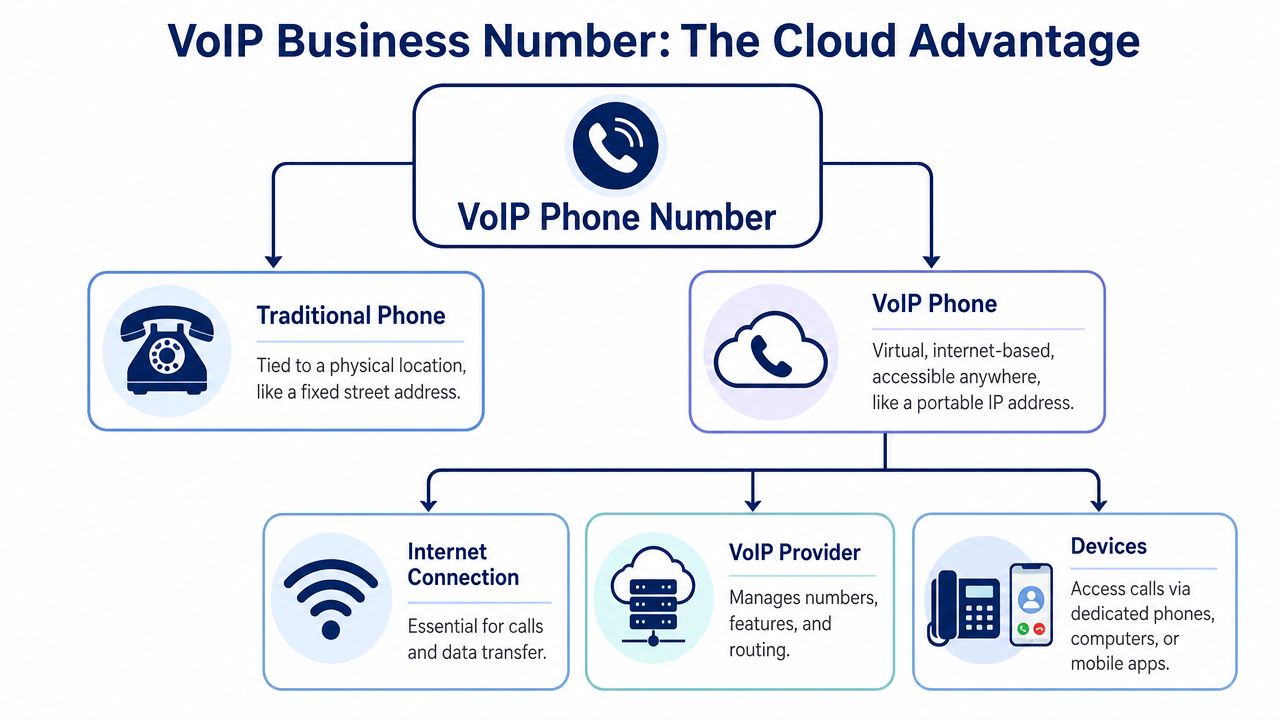
A traditional phone number is like a street address for a building. It points to one place, and the assumption is that the person you want is inside that place near a specific device.
A VoIP number works more like an email address for a role or person. The identity stays the same, but the endpoint can change. That difference is the whole story.
What it actually is
A VoIP business phone number is a virtual 10-digit identifier that works like a normal business line but routes calls over the internet instead of copper wiring, according to Business.com's explanation of VoIP phone numbers.
That means the number isn't married to one physical handset. It can ring a desk phone, a laptop app, a mobile app, or several of them based on your routing rules.
If you need a basic primer before getting into routing strategy, this overview of what a VoIP phone number is gives a clean definition.
What changes in daily operations
Once the number is decoupled from the desk, your call flow becomes much easier to manage.
| Model | What the number is tied to | What happens when staff move |
|---|---|---|
| Traditional line | A location and physical circuit | You forward, rewire, or miss calls |
| VoIP number | A user, team, or routing policy | Calls follow the rule, not the desk |
That shift matters more in practice than in theory. A receptionist can work from home. A regional manager can keep the same public number while moving between devices. A support team can share one front-door number even if agents are spread across cities.
The trade-off most articles skip
VoIP gives you freedom, but it also changes your dependencies. Because it rides on internet connectivity and local power, a VoIP setup will stop working during a power loss unless you have backup power such as a UPS in place. Legacy landlines handled power differently.
A flexible phone number is only as resilient as the network and power behind it.
This is why good VoIP planning isn't just about features. It's also about internet stability, failover thinking, and deciding which users need physical phones versus softphones.
What works and what doesn't
What works well
- Role-based design: Numbers assigned to departments, locations, and queues instead of one person's desk.
- Device flexibility: Desktop phones for front desks, mobile apps for managers, laptops for hybrid staff.
- Admin control: One place to change routing when staffing changes.
What usually fails
- Treating VoIP like a landline replacement only: You keep old habits and get only a fraction of the benefit.
- No backup planning: A cloud system still needs local resilience.
- Mixing personal and business calling loosely: It creates accountability and support headaches later.
Choosing the Right Type of VoIP Number
Most buyers ask the wrong first question. They ask, “Which number type should I buy?” The better question is, “What job should each number do?”
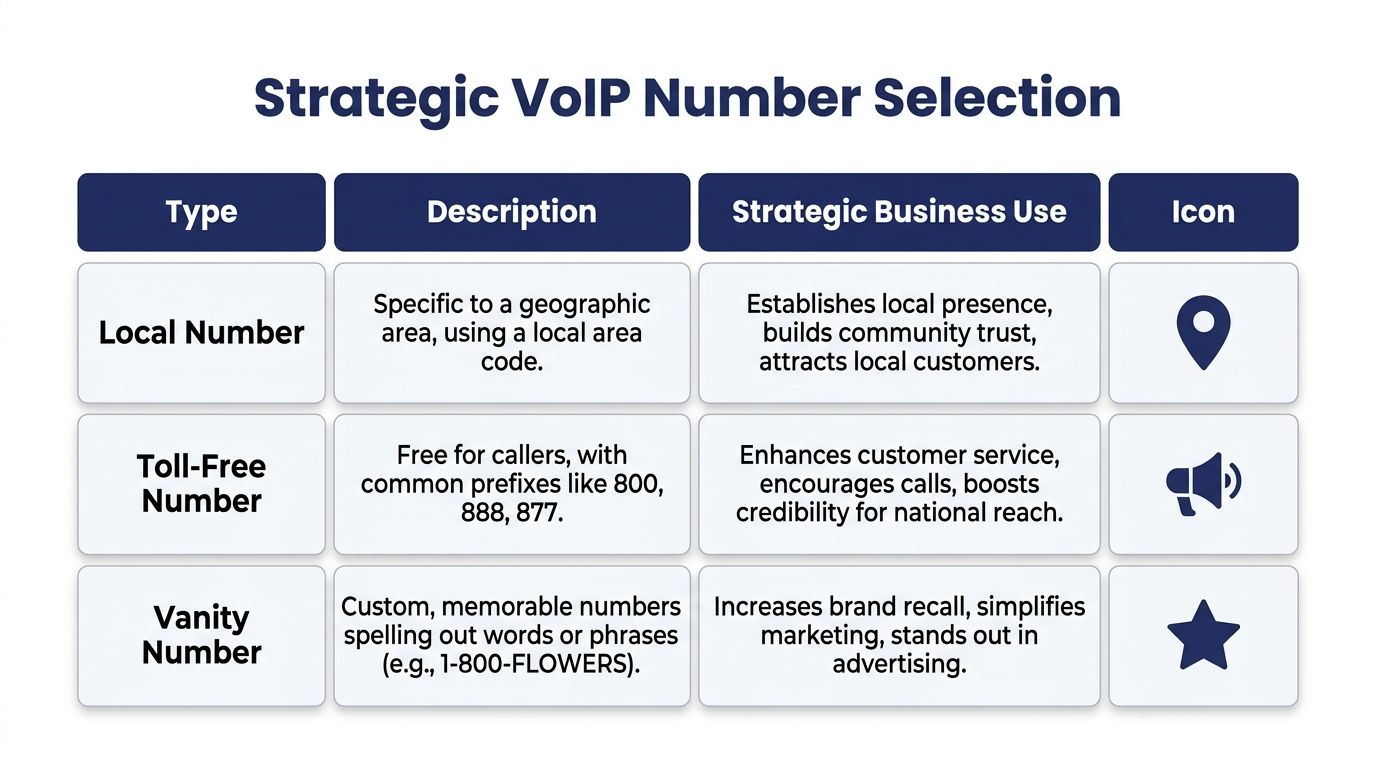
A business can use local, toll-free, and vanity numbers at the same time. The important part is assigning each one a strategic purpose instead of collecting numbers without a routing plan.
Local numbers and the trust advantage
For regional selling, local numbers still matter. A 2025 to 2026 shift in customer behavior found that 78% of consumers trust a local area code over a toll-free number for regional businesses, based on Phone.com's discussion of multiple virtual numbers.
That has real implications for distributed teams. A company can serve customers from one centralized platform while presenting local numbers in several cities. The challenge isn't buying those numbers. It's managing them so calls land in the right queue, reports stay unified, and voicemail doesn't get scattered across departments.
For the telecom side of direct inward dialing, this explainer on what a DID number is is worth reading because DID inventory is often the building block behind multi-number strategies.
When local numbers beat a single national line
A lot of multi-location firms try to force everything through one main number. That sounds tidy, but it often creates two problems:
- Regional callers don't see local presence
- Internal teams lose visibility into which market generated the call
A better setup for distributed operations often looks like this:
- City-specific local numbers: Each market gets its own public entry point.
- Shared central routing: Calls still flow through one cloud system.
- Unified reporting: Managers can compare markets without juggling separate carriers.
- Overflow logic: If one region is busy, another team can answer.
If you operate in several cities, your number strategy should reflect your service footprint, not your office lease.
The source above also notes the operational challenge of maintaining 10+ local numbers for different cities while keeping routing and analytics unified. That's where cloud-based number management matters more than the number itself.
Toll-free and vanity numbers have different jobs
A toll-free number still makes sense when you want a national front door, centralized support identity, or one memorable line for broad campaigns. It works especially well for customer service and brands that don't want to signal one specific city.
A vanity number is a marketing asset. It's useful when radio, print, vehicles, or repeat recall matter and the brand can benefit from something easier to remember.
Here's the practical split:
| Number type | Best use | Common mistake |
|---|---|---|
| Local | Regional trust and market presence | Treating one local number as enough for every city |
| Toll-free | National support and broad brand identity | Using it as the only number in local markets |
| Vanity | Campaign recall and memorability | Buying one without a routing plan behind it |
What doesn't work is picking a number type based only on appearance. The right choice depends on who calls, what they expect to see, and where you want those calls to go after they arrive.
How to Get Your VoIP Phone Numbers
There are two paths. You either get new numbers from a provider, or you move your existing numbers over. Neither is difficult when the project is organized, but each path needs different prep.

Option one is new number acquisition
This is the cleaner route when you're launching a new team, entering a new market, or separating departments that currently share one line.
The usual process is straightforward:
- Pick the number type that matches the job. Local, toll-free, or a mix.
- Map the destination before activation. Decide whether it rings a user, hunt group, queue, or auto attendant.
- Set business rules such as hours, voicemail, overflow, and mobile app access.
- Test caller experience before publishing the number anywhere.
This path works best for new branches, campaign tracking, and companies that want to keep the old system running while building the new one discreetly in parallel.
Option two is porting your current number
Porting matters when your existing public number has customer recognition, appears on signage, or sits in directories and ad campaigns. In that case, changing the number creates more disruption than the phone migration itself.
The core steps usually look like this:
- Submit a port request: Your new provider starts the transfer.
- Provide authorization: This is commonly handled with a letter of authorization and recent account details.
- Match records carefully: Small mismatches in service address or account information can slow approval.
- Stage the new system first: Routing, users, devices, and voicemail should already be ready.
- Cut over only when confirmed: The safest ports happen after testing is complete.
A competent provider coordinates the handoff so the switch happens when the new environment is prepared. That's how you avoid customer-facing disruption.
For a visual walkthrough of the switching mindset, this short video is helpful:
What usually causes trouble
Ports rarely fail because the telecom is mysterious. They fail because the business side is sloppy.
Common avoidable issues
- Billing records don't match: Old account details are outdated or inconsistent.
- Teams publish a new temporary number too early: Customers start using the wrong line.
- No parallel testing: The company ports first and configures later.
- No ownership: Nobody is responsible for carrier communication, user setup, and cutover approval.
If your number is revenue-critical, treat porting like a managed change window, not a casual admin task.
Navigating E911 SMS and Security Rules
A lot of VoIP buying decisions focus on price and features. That's understandable, but it misses the part that can create the biggest operational risk: emergency services behavior, texting capability, and compliance controls.
These aren't edge cases. They're part of what separates a consumer-grade tool from a business communications system.
E911 is not set-and-forget
With a traditional line, the service location was obvious because the number lived at a physical site. VoIP changes that. The number can move with the user, which is useful for hybrid work but also creates responsibility.
If employees use a business number from different places, you need a clear process for managing emergency location information. Otherwise, the convenience of mobility becomes a safety problem during a crisis.
Watch for this: The more portable the number is, the more disciplined you need to be about administrative controls around emergency address data.
That issue is especially important for organizations with rotating desks, remote users, and field staff.
SMS isn't automatic just because the number exists
Many buyers assume every VoIP number can text by default. That's not always true. SMS and MMS support depend on the provider, the number type, and how the service is configured.
Before rollout, verify:
- Which numbers support texting: Not every line in your inventory may behave the same way.
- Who owns inbound messages: Shared text workflows need assignment rules.
- How records are retained: If texts are business communications, they need the same governance mindset as calls.
- Whether the number will be public-facing for voice only or voice plus messaging: That decision affects staffing and expectations.
If your team plans to use texting for support, appointment reminders, or lead response, don't treat it as an add-on detail.
Consumer VoIP can become a compliance problem
Many SMBs often encounter challenges. A cheap non-fixed VoIP service can look fine on the surface, but non-fixed VoIP can complicate SOC 2 and HIPAA audits, and the line between a secure business platform and a risky consumer one often comes down to end-to-end encryption, MFA, and centralized administration, as outlined in Alliance Virtual Offices' discussion of non-fixed VoIP risk.
That last piece, centralized administration, matters more than people think. If users can scatter business calls and texts across unmanaged apps and personal devices, the company loses control over access, retention, and offboarding.
A useful reminder comes from outside telecom marketing. InsecureWeb's breach report is worth reading because it reinforces a simple point. Phone-related data should be handled like sensitive business data, not casual contact info.
What a business-grade setup should include
You don't need a giant enterprise stack to be responsible. You do need discipline.
- Central admin controls: One place to manage users, permissions, and number assignments.
- Strong authentication: MFA shouldn't be optional for admin access.
- Clear device policy: BYOD can work, but only when it's governed.
- Encryption expectations: Know how calling, messaging, and stored data are protected.
If your provider can't explain those controls clearly, keep shopping.
Unlocking Features with a Hosted VoIP System
A VoIP number gives you identity. A hosted VoIP system gives that identity a brain.
That's the distinction many businesses miss. Buying a number alone doesn't solve missed calls, uneven coverage, or poor handoffs between teams. The number has to sit inside a platform that can route, queue, log, and adapt.
The number is the front door. The platform runs the building
A hosted VoIP or cloud PBX system takes the inbound call and decides what happens next. It can send the caller to a menu, ring several users, push overflow to another group, drop a voicemail into an inbox, or hand the call to a mobile app when the desk phone isn't available.
That system layer is where business outcomes improve. Businesses adopting VoIP phone numbers can achieve cost savings between 30% and 50%, and 67% of mobile workers say VoIP helps them resolve problems faster and improve efficiency, according to Tech.co's VoIP statistics roundup.
Features that actually change operations
The most useful hosted features aren't flashy. They're the ones that remove routine failure points.
- Auto attendant: Stops a main number from depending on one receptionist.
- Call queues: Keeps support and service teams organized during spikes.
- Visual voicemail with transcription: Makes follow-up faster when staff are away from their desk.
- Mobile apps: Turn a company number into a working extension on the go.
- Call routing rules: Send calls by time, team, location, or availability.
A good primer on this broader architecture is Cloudvara's small business cloud PBX guide, especially if you're comparing a simple number service against a full hosted system.
Don't judge a business phone platform by whether it can make calls. Judge it by what happens when the right person isn't at the first endpoint.
What works for hybrid and multi-location teams
For distributed businesses, the best setups usually share a few traits:
| Need | Hosted VoIP approach |
|---|---|
| One number, many answering options | Ring groups, apps, and desk phones together or in sequence |
| Several office locations | Centralized routing with location-aware call flows |
| Better service visibility | Shared logs, recordings, and queue statistics |
| Fewer missed calls | Overflow rules and after-hours handling |
That's where VoIP phone numbers for business become more than a replacement line. They become part of a managed communications system that supports how the company works.
Your Go-Live Checklist for VoIP Service
Before you sign anything, run through a short operational checklist.
- Confirm number strategy: Decide which teams need local, toll-free, or campaign-specific numbers.
- Validate porting readiness: Make sure current account records are accurate before transfer starts.
- Check E911 processes: Know who maintains emergency location data for mobile and hybrid users.
- Verify SMS support: Confirm which numbers can text and how messages are assigned and retained.
- Inspect security controls: Look for MFA, centralized administration, and clear access policies.
- Test routing logic: Review business hours, overflow rules, queues, and voicemail destinations.
- Evaluate admin usability: The system should be manageable without carrier-level gymnastics.
- Place a real test call: Use a VoIP test number to call before rollout so you can hear quality and experience the call path yourself.
A good VoIP rollout doesn't depend on luck. It depends on clean number planning, disciplined setup, and choosing a system that matches the way your team already works.
If you're replacing an old PBX or trying to manage business calling across offices, remote staff, and mobile devices, SnapDial is built for that exact transition. It combines hosted VoIP, Cloud PBX features, number management, mobile-ready calling, and white-glove setup so growing teams can modernize without turning the cutover into an IT fire drill.