

A reliable VoIP connection generally requires about 100 Kbps of dedicated bandwidth per active call in each direction, so a team making 10 simultaneous calls needs roughly 1 Mbps of stable upload and download speed. That's the practical starting point, but codec settings, packet overhead, congestion, and connection quality determine whether calls sound clear.
Your office may already have a “fast” internet plan. Web pages load quickly, streaming works, and large files download without complaints. Then a busy afternoon arrives, several employees join calls, someone uploads a backup, and customers start hearing clipped words or robotic audio.
That situation usually isn't caused by raw download speed alone. VoIP sends small voice packets continuously in both directions, so upload capacity, latency, jitter, packet loss, and traffic management matter as much as the advertised Mbps figure.
The Real Baseline for VoIP Internet Speed
A small business can have plenty of download capacity and still experience poor calls. Consider an office where employees browse cloud applications and stream training videos without difficulty. When several people begin speaking through a cloud phone system, the calls become choppy because the connection's upload path is busy or inconsistent.
Traditional downloads can tolerate delay. A file may take longer to arrive, but the user usually receives the complete file. Voice conversations work differently. The network must deliver packets continuously and in the correct rhythm. Delayed or missing packets can remove parts of words, create gaps, or make two speakers talk over one another.
Start with the per-call rule
A widely used business planning baseline is about 100 Kbps per active call in each direction, according to AT&T's VoIP bandwidth guidance. Because a call sends and receives audio, one simultaneous call represents roughly 200 Kbps total when upload and download are counted together.
That gives an initial planning model:
- One call: About 100 Kbps upstream and 100 Kbps downstream.
- Five concurrent calls: About 500 Kbps in each direction.
- Ten concurrent calls: About 1 Mbps in each direction.
These figures describe voice capacity, not the entire internet plan. Employees still need capacity for email, web applications, file transfers, video meetings, updates, and other traffic. The access service must support those activities while preserving enough stable capacity for peak voice usage.
Practical rule: Size VoIP around the number of calls happening at the same time, not the number of employees or phone numbers on the account.
Upload deserves equal attention
Internet packages often emphasize download speed because consumers use it heavily. Business voice is bidirectional, so upload performance deserves the same scrutiny. A connection with strong download capacity but weak upload capacity can still struggle when employees send voice packets while other systems upload files.
Connection type also affects consistency. Compare the upstream and downstream characteristics of your options in this DSL versus fiber optic comparison, rather than looking only at the headline download figure.
The right question isn't, “How many Mbps do we have?” Ask instead: How much reliable upload and download capacity remains during the busiest calling period? That answer gives you a more useful picture of whether your network is ready for VoIP.
Understanding Codec Payload and Network Overhead
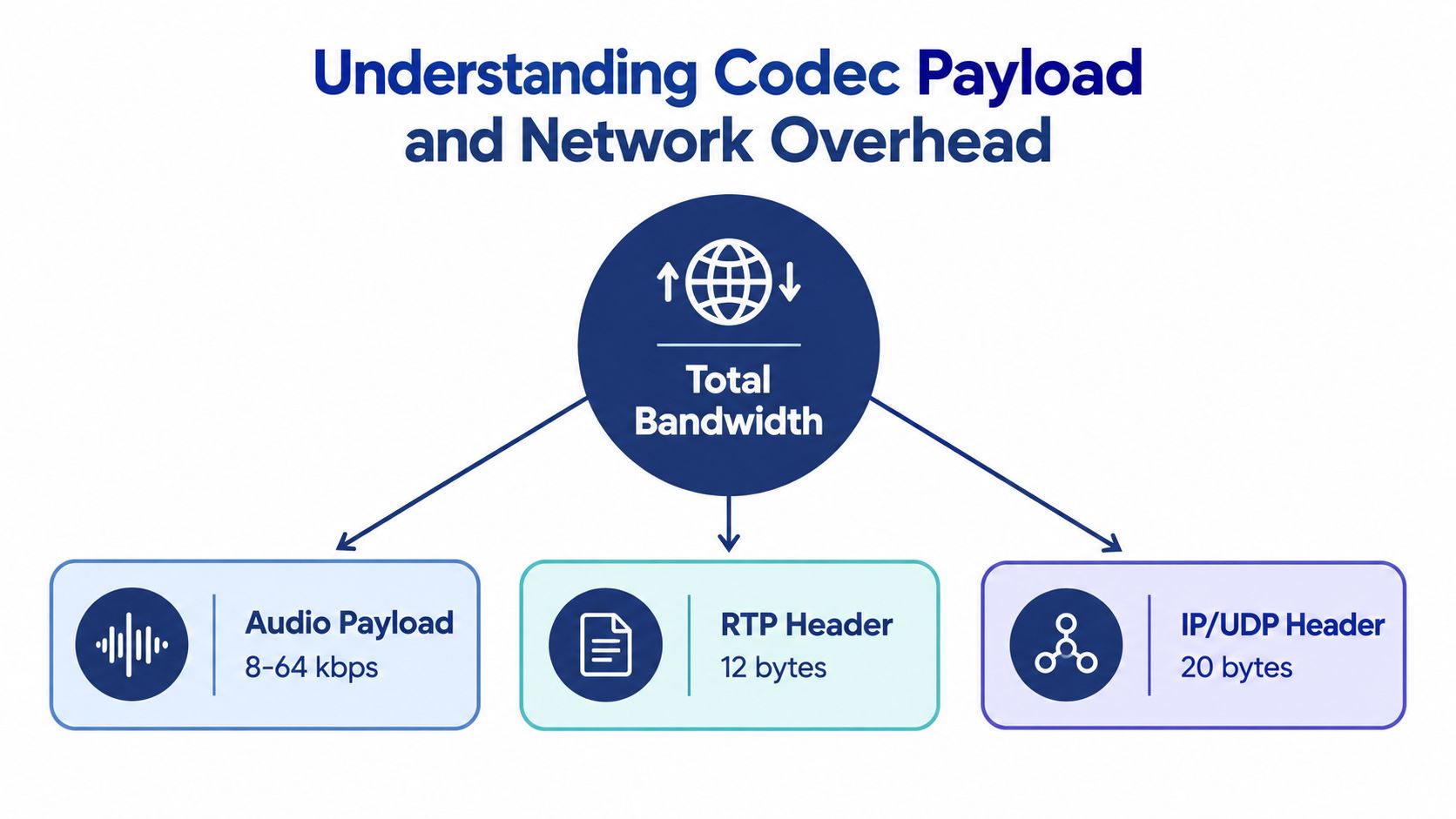
A codec converts speech into digital data and reconstructs it at the other end of the call. Its published bitrate describes the audio payload, but the network carries more than the audio itself. Every voice transmission is divided into packets, and those packets need addressing and transport information.
IP, UDP, and RTP headers accompany the payload. Ethernet framing adds another layer around the packet as it moves across the local network. The result is a difference between the codec's raw audio rate and the bandwidth the connection consumes.
Raw payload isn't the planning figure
ITU-recognized G.711 uses a 64 Kbps audio payload, while compressed G.729 uses an 8 Kbps payload. G.722 wideband voice is commonly listed at 48, 56, or 64 Kbps, depending on its operating mode, as described in technical guidance on VoIP requirements and codecs.
Those raw figures can mislead an administrator who is sizing a connection from codec specifications alone. With packet overhead included, one technical estimate places G.711 at approximately 87.2 Kbps per direction and G.729 at about 31.2 Kbps per direction.
The headers are attached to packets repeatedly throughout a call. That's why the overhead becomes material, especially when a business has many simultaneous calls. A low-bitrate codec may use less capacity, but it still incurs transport overhead for each packet.
Apply overhead before multiplying calls
Use the real network bandwidth per call, not merely the audio payload, in your capacity calculation. Then multiply that figure by peak concurrent calls and assess the result separately for upload and download.
For example, a G.711 deployment should be planned within its practical per-call range rather than treated as a 64 Kbps stream. The commonly used 100 Kbps planning baseline already provides a simple way to avoid underestimating the connection.
For a deeper explanation of packet movement, endpoints, and call signaling, review this guide to how VoIP works. The operational lesson is straightforward: codec bitrate describes the voice, while overhead determines more of the network bill.
How Audio Quality Choices Impact Bandwidth
Codec selection sets the starting point for a call's bandwidth budget. A business using high-quality, less-compressed speech can consume considerably more capacity than one using compressed audio, even when both teams place the same number of calls.
The choice also affects how much flexibility the network has during busy periods. A codec with a wide or configurable range may support different quality settings, but the administrator must know which configuration the phone system uses.
Compare the common options
Obkio's VoIP quality metrics guide lists practical bandwidth ranges that include overhead. G.711 generally sits around 80 to 100 Kbps per call, G.729 around 24 to 40 Kbps, and Opus can range from approximately 6 to 128 Kbps, depending on configuration.
| Codec Type | Audio Quality | Raw Payload | Total Bandwidth with Overhead |
|---|---|---|---|
| G.711 | High-quality, narrowband voice | 64 Kbps | Roughly 80 to 100 Kbps per call |
| G.729 | Compressed speech | 8 Kbps | Roughly 24 to 40 Kbps per call |
| Opus | Configurable wideband audio | Varies by configuration | Roughly 6 to 128 Kbps per call |
Match quality expectations to network design
G.711 is often attractive when voice clarity is important and the network has sufficient capacity. It uses a larger per-call budget, so the effect becomes more noticeable as simultaneous calls increase.
G.729 can reduce the bandwidth requirement substantially through compression. That may help a constrained connection, although codec support and audio preferences should be confirmed with the phone-system provider before deployment.
Opus requires more careful planning because its range is broad. A configuration designed for efficient speech may have very different requirements from one designed for richer or wider-band audio. Don't size the connection from the codec's name alone. Identify the active profile, include packet overhead, and preserve capacity for the rest of the office.
The same call volume can require different access capacity when the phone system changes codec or audio settings.
Calculating Concurrent Call Capacity for SMBs
The useful unit for planning is peak concurrent calls. Total employee count provides context, but it doesn't tell you how many people are speaking at the same moment. Call records, phone-system dashboards, and queue reports can reveal the actual peak.
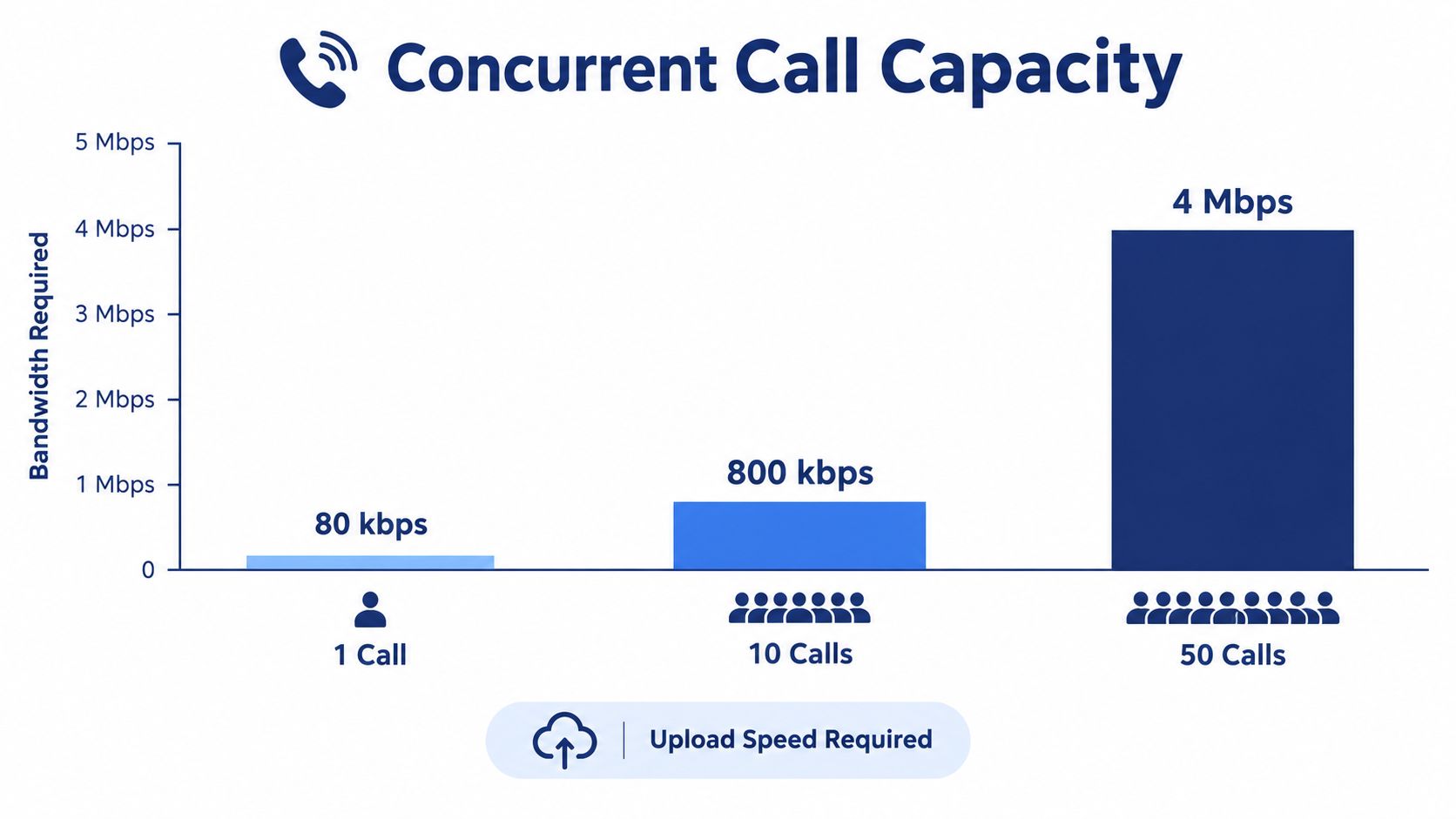
Begin with the per-call planning figure. For a general baseline, use about 100 Kbps in each direction per active call, then adjust if your provider confirms a different codec or configuration.
Use a simple capacity calculation
Find the peak. Review the busiest calling period and record the highest number of simultaneous calls. Include desk phones, softphones, mobile clients, and active queue calls if they share the same connection.
Choose the bandwidth figure. Use the provider's documented per-call requirement when available. If you don't have that information, the widely used 100 Kbps per direction baseline is a reasonable starting point, as explained in SnapDial's VoIP bandwidth calculator.
Multiply by concurrent calls. Ten simultaneous calls multiplied by 100 Kbps requires roughly 1 Mbps upstream and 1 Mbps downstream for voice. Five calls require roughly 500 Kbps in each direction.
Account for other applications. Add the capacity needed by file uploads, cloud services, web traffic, video meetings, backups, and updates. Voice should not consume every available bit during normal operations.
Example planning profiles
A small office with five peak calls would begin with about 500 Kbps of voice capacity per direction. A busier team with ten simultaneous calls would begin with about 1 Mbps per direction. A larger operation with fifty concurrent calls scales to roughly 5 Mbps per direction using the same baseline.
Those are voice-only planning figures. They aren't recommendations for the total access plan, because every workplace has a different workload. A call center that uploads recordings, synchronizes cloud files, or runs video applications needs additional capacity beyond the voice calculation.
Upload is often where the calculation exposes a problem. A provider may advertise a large download tier while offering much less upstream capacity. Ask for the actual upload rate, check whether it remains stable under load, and verify that the service is symmetrical enough for your peak calls and other business traffic.
Managing Network Traffic and QoS Priorities
Adequate capacity doesn't guarantee clear calls. If a router treats voice packets exactly like a large file upload, a backup or synchronization job can fill the available queue and delay real-time audio.
That delay produces jitter, which is variation in packet arrival timing. Congestion can also increase latency or cause packets to be discarded. Callers may hear gaps, clipped phrases, or distorted audio even though an internet speed test reports an impressive download result.
Give voice a controlled path
Quality of Service, or QoS, lets a network administrator classify traffic and assign priority. A practical policy gives voice packets preferential treatment over bulk transfers, while still allowing ordinary business applications to operate.
Useful controls include:
- Traffic classification: Identify voice packets by the phone system's documented rules rather than guessing from application names.
- Queue priority: Place real-time voice ahead of downloads, backups, and other delay-tolerant traffic.
- Upload shaping: Control outbound traffic at the point where the office connects to the provider, because that's where queues commonly form.
- Network separation: Use a voice VLAN or equivalent segmentation when the switches and handsets support it.
- Wireless planning: Keep desk phones on a stable wired connection where possible, and design Wi-Fi carefully for mobile or softphone users.
QoS can protect voice from competing traffic, but it can't create bandwidth that the connection doesn't provide. If the access link is undersized, prioritization may preserve calls by slowing other applications, but the business still needs a capacity review.
Don't overlook guest traffic
Guest devices can compete with business voice for airtime and internet capacity. Separating visitor access from internal systems and applying appropriate guest Wi-Fi quality of service policies can reduce that competition.
Review the entire path, not just the router. A managed switch, wireless access point, firewall, or local gateway can introduce congestion or misclassification. Test during realistic conditions, including the applications employees use during the busiest calling window.
Simplifying Deployment with Managed Cloud PBX
Many growing businesses don't need to turn IT staff into telephony specialists. They need a phone system that fits the available network, supports their call flows, and gives someone clear responsibility for setup and troubleshooting.
A managed cloud PBX can reduce the amount of local hardware and manual configuration involved in deployment. The provider can help confirm codec settings, assess the connection, configure call routing, and validate phones or softphone applications before users depend on them.

What managed support should include
Look for a deployment process that covers more than account creation:
- Network assessment: The provider reviews upload capacity, expected concurrency, device types, and traffic conditions.
- Call-flow design: Auto attendants, queues, schedules, routing rules, voicemail, and overflow paths are configured around the business.
- Endpoint preparation: Desk phones, mobile apps, and desktop clients receive consistent settings.
- Operational guidance: Administrators understand how to change users, routing, call logs, recordings, and voicemail without rebuilding the system.
- Ongoing assistance: Staff have a clear support channel when call quality changes after a network or application update.
SnapDial is one example of a cloud-based business phone system offering white-glove setup, call routing, conferencing, mobile applications, call recording, visual voicemail with transcription, cloud faxing, and queue-management features. That model can suit SMBs replacing a legacy PBX, multi-location teams, and hybrid workforces that need a centrally managed calling environment.
Security should remain part of the selection process. A unified communications review should consider how the platform helps teams protect calls texts and emails, alongside its bandwidth and routing capabilities.
A managed service won't eliminate the need for a reliable connection. It does, however, move much of the codec, endpoint, routing, and troubleshooting guesswork to a team that works with the platform every day.
Testing and Troubleshooting Your Voice Network
A conventional speed test gives you useful throughput information, but download speed alone doesn't explain a bad call. Test the connection from the location and device where calls occur, and compare quiet periods with busy periods.
Use a wired computer where practical, pause large transfers, and then repeat the test while normal office activity is running. If the results change sharply under load, congestion is a stronger suspect than a simple lack of advertised speed.
Check the conditions that speech needs
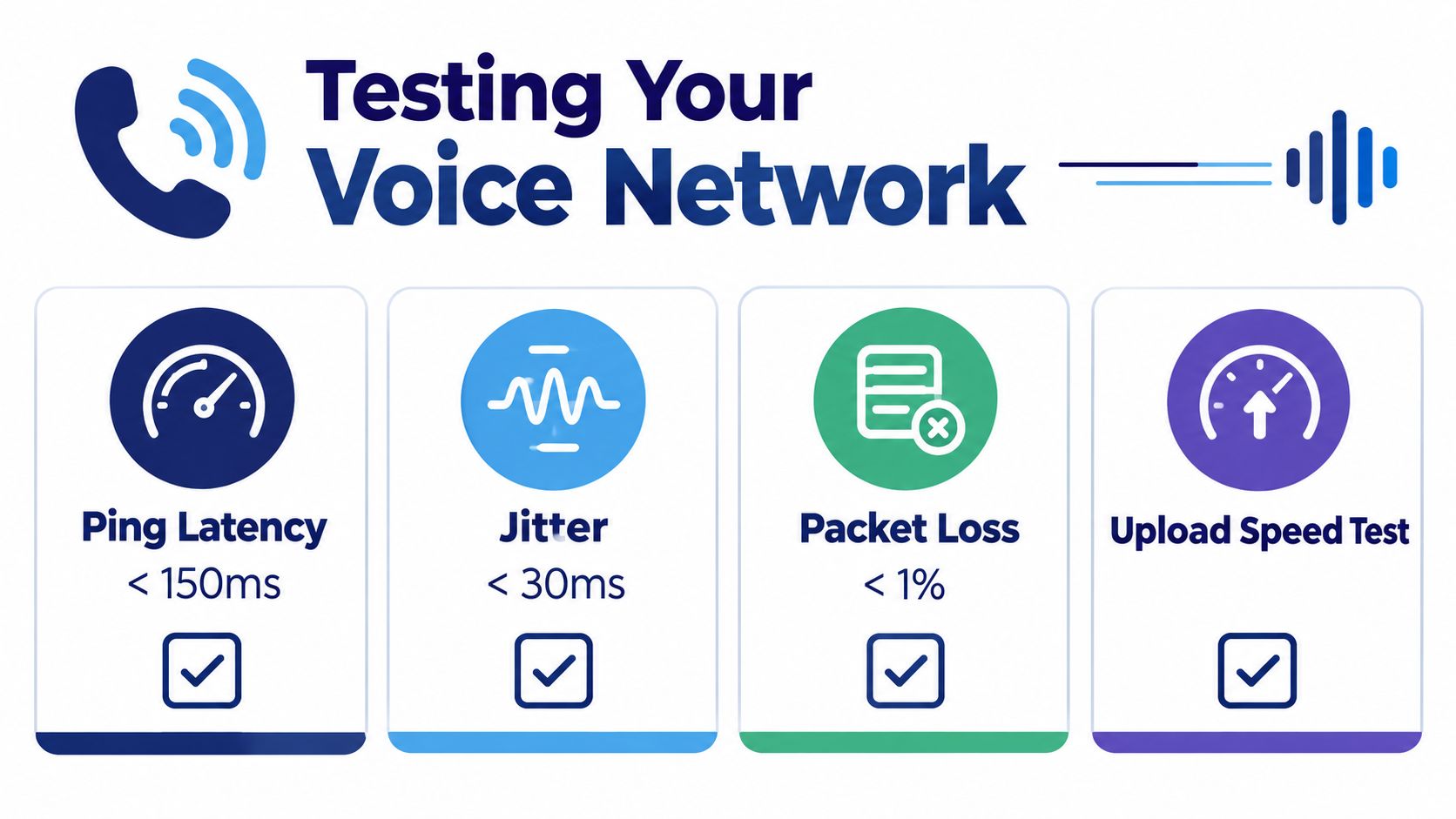
A useful voice test examines more than throughput:
- Latency: Measure how long packets take to travel. Long delays make natural conversation difficult.
- Jitter: Look for variation in packet arrival times. Inconsistent delivery can create gaps and robotic audio.
- Packet loss: Check whether packets fail to arrive. Lost voice packets usually can't be recovered in time for a live conversation.
- Upload stability: Run the upstream test during ordinary work activity, not only when the office is quiet.
- Peak concurrency: Place or observe calls when the largest number of employees are likely to be speaking.
The visual checklist above shows commonly used voice-network reference points, including latency below 150 ms, jitter below 30 ms, packet loss below 1%, and an upload-speed check. Treat those values as diagnostic reference points, not a substitute for your provider's requirements or a full network assessment.
Troubleshoot the source before upgrading
Start at the endpoint. Replace a damaged cable, test a wired connection instead of Wi-Fi, inspect switch-port errors, and check whether only one handset or softphone is affected. A localized problem shouldn't lead directly to a more expensive internet tier.
If every user reports trouble at the same time, compare the timing with backups, file synchronization, video meetings, or other scheduled transfers. Review QoS rules and router queues before changing the phone platform.
Persistent problems across multiple locations may indicate an ISP path, firewall, or service issue. Document the time, affected users, call symptoms, test results, and concurrent applications, then give that record to the network or VoIP provider.
For a visual overview of the testing process, use the embedded guide below.
Visit SnapDial to review a managed cloud phone system with white-glove setup, call routing, mobile apps, and business communication features. Use your concurrent-call estimate and upload results to discuss a VoIP deployment sized for your team's real network conditions.