

Your phone system usually gets attention only when it starts causing problems. Calls ring to the wrong person. A customer hears a busy signal. A manager can't transfer a call from home. Someone leaves the office early and suddenly their desk number might as well not exist.
That's when most owners start asking a deceptively simple question: what is telephony, really? Not in a textbook sense. In the practical sense. The kind that affects whether customers reach you, whether staff can work from anywhere, and whether replacing an old system will create chaos.
For a modern business, telephony isn't just a phone on a desk. It's the full system behind how calls are placed, routed, answered, recorded, transferred, and recovered when something goes wrong. If you're evaluating a legacy PBX replacement, that distinction matters a lot.
What Is Telephony and Why Does It Matter for Your Business
For a business owner, telephony is the system behind every call that needs to reach the right person without delay. It covers how calls come in, where they go, how staff answer them, what happens after hours, and how the business keeps operating if someone is working remotely or the office has an outage.
That matters because phone calls still carry the conversations that are hardest to postpone. New sales enquiries, appointment changes, urgent support issues, payment questions, and dispatch calls usually need a live response. If the call flow is weak, the problem shows up fast in missed revenue, frustrated customers, and staff wasting time working around the system.
Telephony as a business function
In practice, telephony sits in the middle of operations and customer experience. A caller does not care whether your team uses desk phones, softphones, or mobile apps. They care whether someone answers, whether they get transferred correctly, and whether they have to repeat themselves.
Older systems struggle when the business outgrows the original setup. A company adds a second location. Staff start taking calls from home. A front-desk role gets split across shifts. Suddenly the phone system has to support routing rules, voicemail, call queues, ring groups, and after-hours coverage that match how the business runs.
Common pressure points show up quickly:
- Remote and hybrid work: Numbers tied to one handset or one office create gaps when staff move between locations.
- Operational complexity: Sales, service, billing, and reception often need different call handling, business hours, and escalation rules.
- Growth: Adding users or sites can turn a simple setup into a hard-to-manage patchwork of carriers, extensions, and forwarding rules.
A modern phone platform gives you more control over those moving parts. If you are weighing replacement options, it helps to understand how a cloud phone system supports day-to-day business calling.
A simple test works well here. If missed or mishandled calls affect bookings, cash flow, service levels, or recordkeeping, telephony deserves the same attention you give your CRM, help desk, or internet connection. It is part of how the business runs.
The Evolution of Telephony From Copper Wires to the Cloud
A lot of owners feel the age of their phone system during a change. The second office opens. A receptionist starts covering calls from home. A provider says a line move will take days instead of minutes. That is usually when telephony stops feeling like a utility bill and starts looking like an operating constraint.
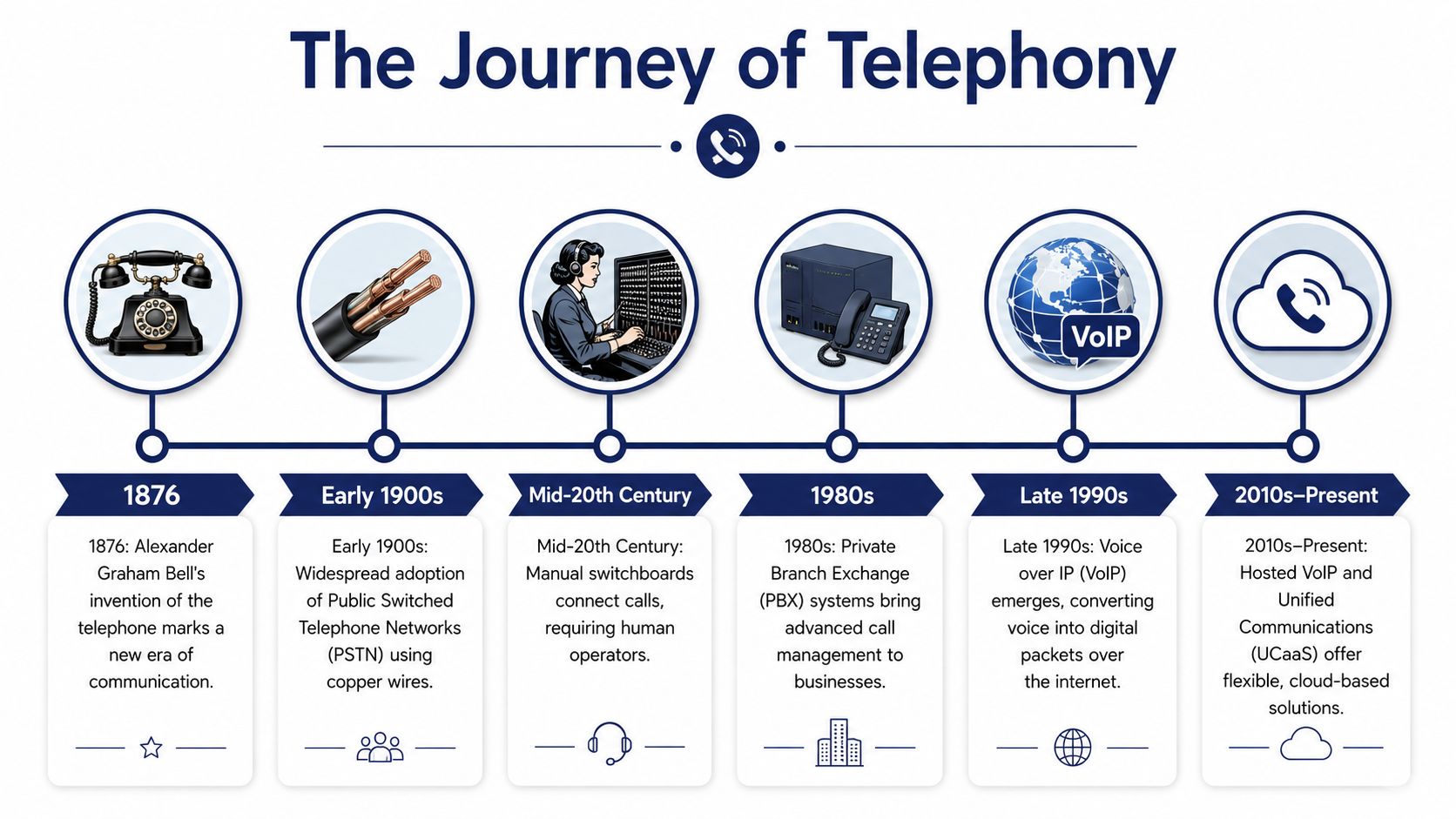
Telephony began as fixed infrastructure. Early telephone service depended on dedicated lines, manual switching, and equipment tied to a physical location. For decades, that was a reasonable fit for how businesses worked. Staff were in one building, the main number belonged to that building, and changing anything often meant a carrier visit, new wiring, or both.
How telephony became a utility
As telephone service spread, it became standard business infrastructure rather than a specialist tool. By the late twentieth century, voice service was expected. Customers assumed every serious business had a reachable number, and internal operations started to depend on extensions, transfers, hunt groups, and voicemail.
That legacy still matters. Traditional telephony was built for reliability and predictable call delivery, but it was also built around place. The phone number belonged to the office. The PBX belonged to the office. The support model often belonged to the local carrier.
That design created trade-offs. Fixed systems were stable, but they were slower to change. They worked well for a single site with consistent staffing. They became awkward once a company added remote employees, temporary locations, shared front-desk coverage, or teams that needed to answer the same number from different devices.
What changed when voice moved to IP
The fundamental shift occurred when telephony began to operate independently of a dedicated voice-only network.
Once voice could travel over IP, the phone system no longer had to live in one box in one comms closet. Call control could sit in software. Numbers, users, and routing rules could be managed centrally. A sales rep could answer on a desk phone, laptop, or mobile app without the business rebuilding its phone setup around that person.
For owners, the practical difference is change management. On a legacy system, opening a branch, moving extensions, or reworking after-hours routing often meant coordination with carriers, hardware vendors, and onsite support. In a hosted model, those changes are usually configuration tasks. The work does not disappear. Someone still needs to design call flows properly. But the business gets faster change cycles and fewer hardware dependencies.
This is also why migration planning matters. Cloud telephony gives more flexibility, but it also shifts attention to internet quality, device policy, number porting, and user training. Businesses that treat it as a simple line replacement often run into avoidable problems. Businesses that map call flows, failover rules, and frontline workflows before cutover usually get a much better result. If you want the technical version behind that change, this overview of how VoIP works in business phone systems is a useful next step.
A modern system supports things older setups handled poorly or expensively:
- Location independence: Users keep working if they are at home, on the road, or rotating between offices.
- Software-based call handling: Auto-attendants, business hours, voicemail, and ring groups can be changed without rewiring the office.
- Shared operations across sites: Multiple locations can run under one dial plan, one directory, and one reporting view.
The business value is straightforward. Telephony moved from fixed infrastructure to a service layer that can follow your staff, your hours, and your process. That change is what makes modernization worth examining, especially if you need to upgrade without downtime or support a workforce that no longer sits behind one front desk.
How Modern Business Telephony Actually Works
A customer calls your main number at 8:02 a.m. The office manager is out sick, two sales reps are on the road, and support is working from home. The caller does not care which device rings or where your staff are sitting. They care that someone answers quickly, the audio is clear, and the handoff does not fail halfway through.
That is the practical job of modern telephony. It connects call routing, voice transport, and business rules so calls reach the right person without forcing everyone back to one office or one phone system.
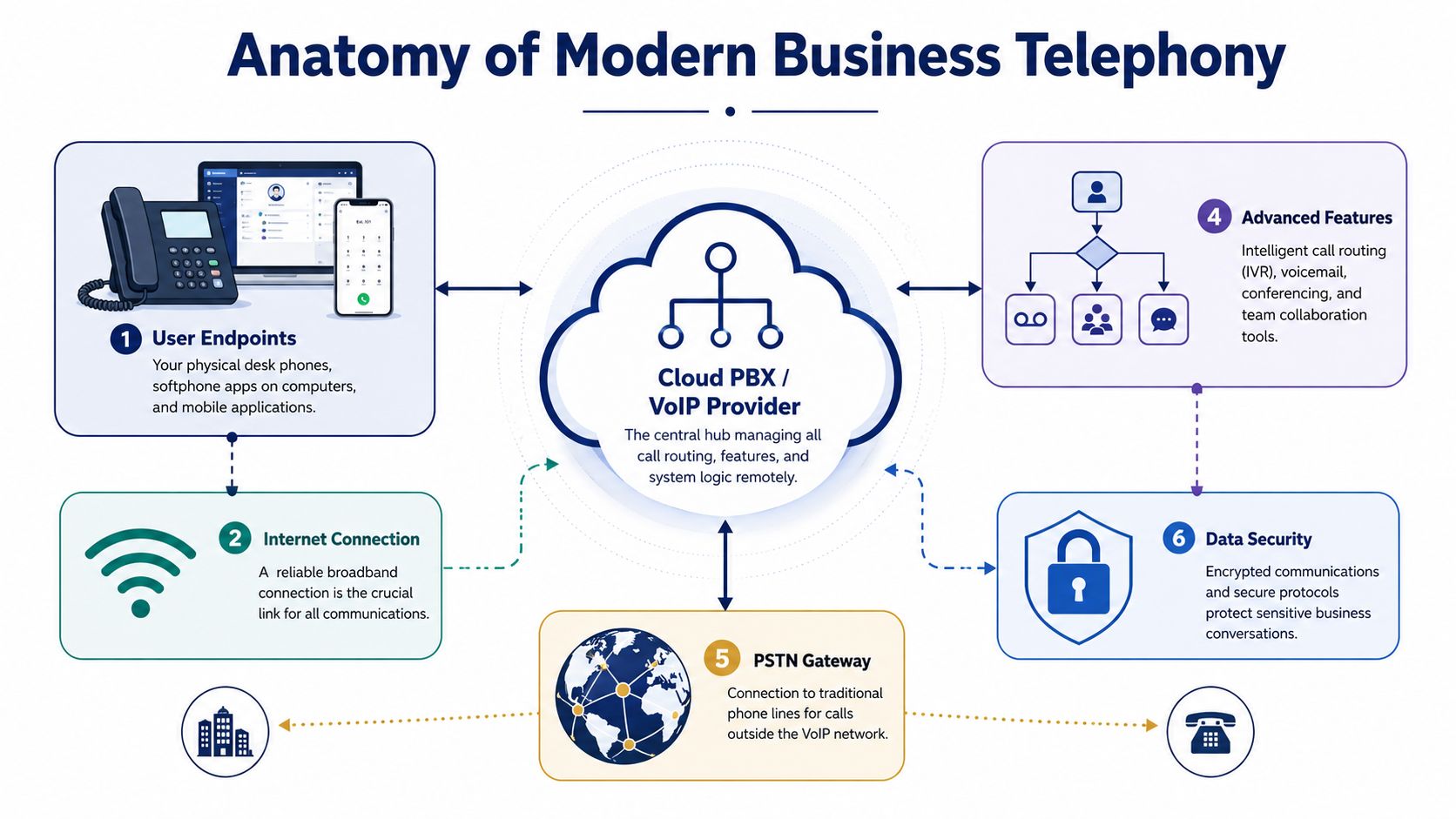
In current business systems, voice is handled as a packetized real-time service. One layer sets up and manages the call. Another carries the conversation. In plain terms, SIP is commonly used to start, change, and end sessions, while the voice stream usually travels as RTP over IP networks, as explained in Spectralink's guide to basic telephony terminology.
SIP and RTP handle different parts of the call
A simple way to explain the split is to look at the job each one performs.
| Component | What it does in plain English | Why the business should care |
|---|---|---|
| SIP | Handles the setup and control of the call | It affects dialing, transfers, forwarding, and call routing behavior |
| RTP | Carries the live voice audio | It affects whether users hear a clear, stable conversation |
SIP works like the control desk. It decides where the call should go, which devices ring, and what happens if no one picks up.
RTP is the audio path. Once the call is connected, RTP carries the voice between endpoints.
This distinction matters during troubleshooting. If calls are reaching the wrong person, dropping during transfer, or failing to follow business hours, the problem is often in call control. If users report choppy audio, echo, or one-way speech, the issue is usually in the media path or the network carrying it.
For a quick visual breakdown, this short explainer is helpful:
Why call quality rises or falls
Voice traffic is sensitive to delay, jitter, and packet loss. Email can tolerate a short delay. A phone call cannot. If the network delivers voice packets late or out of order, people hear clipped words, pauses, echo, or silence in one direction.
That is why a phone migration is not just a matter of replacing handsets. Internet performance, router configuration, Wi-Fi design, and failover planning all affect call quality. Businesses that want a plain-English explanation can use this guide on how VoIP works in a business phone system.
What a cloud PBX does
A cloud PBX is the control layer for your phone system. It applies the rules behind the call, independent of whether the user answers on a desk phone, laptop, or mobile app.
Common functions include:
- Call transfer and forwarding: Send calls to the right user, team, or backup destination.
- Conferencing: Let multiple people join the same conversation without separate bridge hardware.
- Voicemail and auto-attendants: Give callers options and route missed calls in a structured way.
- Hunt groups and routing logic: Decide which users ring, in what order, and under what conditions.
The business case takes concrete form. A field team can answer from mobile apps, a front desk can route calls by time of day, and a second office can share the same number plan without a separate PBX in each location. The trade-off is that the system now depends more on network readiness, device policy, and clean configuration.
Good telephony design starts with call flow, not hardware. The right question is simple. When a customer calls, what should happen next?
Key Business Benefits and Modern Use Cases
Businesses don't replace phone systems because the acronym changed. They replace them because the old setup gets in the way of work.
Modern telephony is increasingly endpoint-agnostic. The same number, call logic, and compliance controls may need to follow a user across a desk phone, softphone, and mobile app. That shift reflects a broader move toward software-defined routing and analytics for a mobile, AI-augmented workforce, as described in Decagon's overview of modern telephony as a service layer.

The benefits that matter in day-to-day operations
The strongest business case usually comes down to flexibility and control.
- Effective mobility: Staff can answer from a desk phone, laptop app, or mobile app without exposing personal numbers.
- Cleaner call handling: Auto-attendants, ring groups, voicemail routing, and queues reduce the “who was supposed to answer this?” problem.
- Simpler administration: Adding users and changing call flows becomes a configuration task instead of a hardware project.
A field service company sees this immediately. Dispatch might answer in the office, route to a technician on mobile, then escalate to a supervisor without the caller feeling bounced around.
A multi-location business gets a different win. It can present one main number and route calls intelligently across sites instead of maintaining separate islands of telephony.
Features that used to be hard to justify
Older business systems often treated advanced features like extras. In modern hosted environments, they're part of normal operations.
Consider these common use cases:
| Business situation | Telephony capability that helps |
|---|---|
| Front desk gets overloaded | Auto-attendant and queueing direct callers without constant manual transfers |
| Team works remotely | Softphones and mobile apps keep the business number attached to the employee |
| Managers need visibility | Call logs, recordings, and reporting make performance issues easier to spot |
| Business has multiple departments | Call routing rules send calls based on schedule, team, or caller intent |
A modern phone system should let the business adapt to how people work now, not force people back into the limitations of an old switchboard mindset.
There's also a softer benefit that owners often undervalue at first. Confidence. When calls route cleanly and staff can answer from anywhere, the company feels more organized to both customers and employees.
Navigating Security and Compliance in Telephony
A phone system can sound fine on a normal Tuesday and still fail the business in ways owners do not see until something goes wrong. A manager finds out former staff still had access to recordings. A billing spike points to unauthorized international calling. A compliance review uncovers that calls were recorded without a clear retention policy. Those are telephony problems, but they are also operational problems.
That is why security in telephony starts with governance, not just encryption settings.
Privacy and platform security
There are really two things to protect. First, the call itself. Second, the admin layer that controls users, routing, recordings, devices, and access rights.
For a business owner, the practical questions are straightforward:
- Who can listen to recordings or voicemail
- How access changes when someone joins, changes roles, or leaves
- Whether admin accounts use strong authentication
- Where call data is stored and who at the provider can reach it
- What happens on employee-owned mobile devices
In real projects, the bigger risk is often weak process rather than a dramatic breach. Shared logins, broad admin rights, and unclear ownership create avoidable exposure. A provider can offer good calling features and still leave the business exposed if access control is sloppy.
Mobile and hybrid work add another layer. If staff answer business calls from laptops and mobile apps, the security review has to cover those endpoints too. Ask how devices are enrolled, how access is revoked, and what remains on the device after an employee leaves.
Reliability is part of risk control
If customers cannot reach you, the problem is not only technical. It affects revenue, service levels, and reputation.
Voice traffic is less forgiving than email or chat. A small amount of delay, jitter, or packet loss can turn a live conversation into clipped audio, echo, or one-way speech. On paper, the system is up. In practice, the call has failed.
That is why experienced buyers look past uptime promises and ask harder questions. How does the provider handle failover? What happens if an internet circuit drops at one site? Can calls reroute to mobile phones or another office? How quickly can staff keep working during an outage? Those details matter more than a generic claim that the platform is secure.
Compliance questions to settle before purchase
Compliance work gets expensive when it starts after rollout. It is far easier to set the rules before the first number is ported.
Focus on a few decisions early:
- Call recording policy: Which teams record calls, whether consent is required, and how long recordings are retained
- Data access and audit trails: Who accessed recordings, exports, transcripts, or voicemail, and whether that activity is logged
- Regional and industry obligations: Healthcare, finance, legal services, and cross-border operations each bring different handling requirements
- Retention and deletion: How data is removed when it is no longer needed
- Business continuity: How the provider supports emergency routing and service restoration during an incident
A good provider should be able to explain these controls in plain English. If the answers stay vague, assume the operational model is vague too.
If a provider cannot show clear policies for access, recording, retention, and failover, the business will end up carrying that risk itself.
Planning Your Migration From a Legacy Phone System
Most businesses aren't afraid of new telephony. They're afraid of a bad cutover.
That fear is justified. A migration touches published numbers, customer habits, staff workflows, after-hours routing, voicemail, and sometimes door intercoms, fax, or analog edge cases. The technical change is only half the project. The operational continuity is the other half.
Vendor-neutral guidance makes this point clearly: for many SMBs, the key issue isn't defining telephony, it's moving from a legacy PBX without downtime, while preserving numbers and maintaining call routing continuity, as noted in Verizon's practical overview of telephony modernization and migration risk.
The migration plan that works best
The safest migrations usually follow a staged approach instead of a hard overnight swap.
Map the current call flow
Document every main number, extension, ring group, voicemail box, after-hours rule, and failover destination. Most projects go wrong because the business discovers hidden routing after the move starts.Decide what should change and what should not
Some workflows deserve cleanup. Others should stay familiar until staff settle in. Don't redesign every process at once.Handle number porting carefully
Keep an inventory of all numbers, billing records, and ownership details. Porting mistakes often come from bad records, not bad technology.
Cut over with continuity in mind
A business-grade migration protects inbound calls first. That means your plan should answer a few operational questions before go-live:
- What happens if porting is delayed
- Where calls should route during the transition
- Which users need parallel access to old and new systems
- Who confirms success on launch day
Some businesses do better with a phased rollout. A front office or pilot group moves first, then the rest of the company follows after routing and training are validated.
Train users on the few things that matter
Don't overload staff with a giant manual. Teach them the tasks they'll use immediately.
A focused rollout usually covers:
- Answer, transfer, park, and voicemail
- How to use the mobile or desktop app
- How to change presence, forwarding, or greetings
- Who to contact when something behaves unexpectedly
The best migration is the one customers barely notice and employees learn in a day.
That outcome doesn't come from luck. It comes from preparation, testing, and keeping the initial design practical.
How to Choose the Right Hosted VoIP Solution
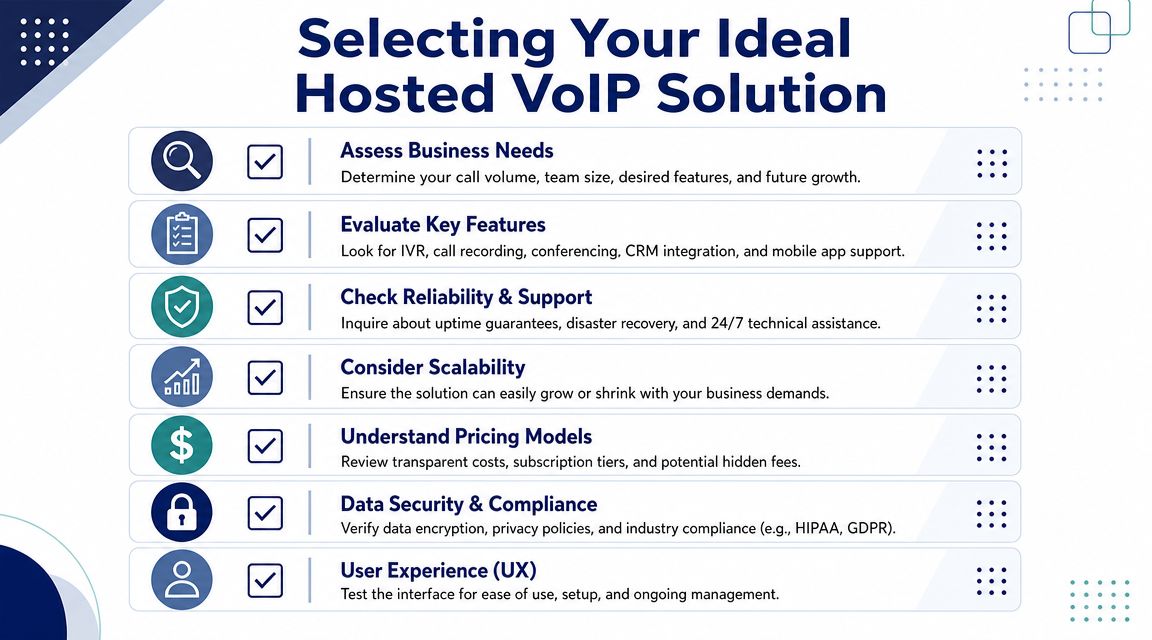
A hosted VoIP provider will sit in the middle of your customer conversations every day. That makes this a business operations decision, not a simple line-item purchase. Price matters, but support quality, admin simplicity, and call handling under pressure usually matter more once the system is live.
A good provider should fit the way your business already works, while giving you room to clean up weak spots over time.
Use a practical evaluation checklist
Start with your real call patterns, not the feature sheet.
Ask these questions during evaluation:
Does the system match your call flows
Your front desk, sales team, service queue, and after-hours routing all have different needs. A provider should be able to map those flows clearly and explain how calls will move without forcing awkward workarounds.Is voice quality treated as an engineering issue
Clear audio depends on how the provider handles delay, jitter, packet loss, and routing between networks. As noted earlier, telephony quality is measurable. Ask how the provider monitors performance, what happens when quality drops, and whether they can explain their network approach in plain language.Can users work across devices cleanly
Staff who move between office, home, and mobile should be able to answer, transfer, and continue calls without confusion. If the mobile app feels like an afterthought during testing, adoption usually suffers after rollout.Can your team make normal changes without waiting on support
Simple tasks such as updating holiday hours, changing call forwarding, or adding a new user should not turn into a multi-day ticket.
Look beyond the phone system itself
The phone platform is only part of the operating picture. Contact data quality affects outbound efficiency, reporting, and customer experience long before a call reaches the provider. A neutral roundup like this B2B phone validation API comparison can help teams that depend on accurate numbers for sales, onboarding, or CRM cleanup.
Poor data creates practical problems. Reps waste time dialing dead numbers, managers get misleading activity reports, and automated workflows break in ways that look like a telephony issue but are really a data issue.
The shortlist questions that separate providers
Once a provider passes the basic fit test, the next step is to examine execution. This is usually where strong options separate from attractive demos.
| Evaluation area | What to ask |
|---|---|
| Support | Can you reach a real support team quickly when inbound routing fails or users cannot make calls |
| Administration | Can office managers or IT staff handle everyday changes without specialist help |
| Migration help | Will the provider actively help with setup, number porting, testing, and cutover planning |
| Scalability | Can the system add users, locations, and departments without rebuilding the dial plan |
| Pricing clarity | Are licensing, support, onboarding, and extra features explained clearly before you sign |
It also helps to compare a few hosted VoIP solutions for business telephony so you can see how providers package the same category in very different ways.
The best choice is usually the provider that can answer three practical questions without jargon. How will calls be handled on a normal day? What changes when volume spikes? What is the backup plan when something fails?
If a provider cannot answer those clearly during sales, expect the same confusion during implementation and support.
If you're planning a phone system replacement and want a provider that handles setup, porting, and day-to-day support with a business-first approach, SnapDial is worth a close look. It's built for companies that need reliable hosted VoIP, practical call management, mobile-ready access, and a smooth move away from legacy PBX hardware without unnecessary disruption.