

Your front desk line rings, but nobody gets to it because the receptionist is helping a walk-in customer. A sales rep returns a missed call from a personal cell phone because that's the only way to reach the customer quickly. Your office manager gets another bill for hardware support on a phone system nobody fully understands. None of these problems look dramatic on their own. Together, they slow revenue, frustrate customers, and make your business feel harder to run than it should.
That's usually the moment business owners start searching for what is voip phone system and whether switching is worth the disruption.
A VoIP phone system is not just a cheaper dial tone. It's a different operating model for business communication. Instead of tying your calls to copper lines and a box in a closet, it moves calling onto your internet connection and puts control into software. That change affects far more than your phone bill. It changes how your team answers calls, works remotely, opens new locations, and keeps customers from falling through the cracks.
Your Old Phone System Is Costing You More Than Money
An older phone system rarely fails all at once. It chips away at the business in small, expensive ways.
A caller hears a busy signal because your setup can only handle so many simultaneous calls. A manager wants after-hours calls routed to an on-call employee, but the change has to wait for outside support. A remote team member gives out a personal cell number because the company line does not travel with them. Each workaround looks minor. Together, they create friction for customers and extra work for staff.
That is why phone decisions belong in the same conversation as customer service, sales follow-up, and day-to-day operations.
Where Hidden Costs Appear
The monthly bill is easy to see. The operating cost is harder to spot because it shows up as lost time, missed conversations, and avoidable delays.
A business phone system works a lot like plumbing. When pressure is weak or a pipe is hard to reach, people start finding their own workarounds. Phones work the same way. If the system is rigid, employees route around it.
Common costs show up in a few places:
- Missed calls can turn into missed revenue, especially when a prospect reaches a competitor before your team calls back.
- Office-bound phone service makes hybrid work harder because employees have to improvise instead of using one business identity everywhere.
- Simple admin changes eat time when greetings, extensions, and call routing depend on vendor tickets or aging hardware.
- Older equipment creates support risk because replacement parts and qualified technicians become harder to find.
Industry analysts have documented a long-term shift away from legacy voice infrastructure. The FCC order on the retirement of copper loops and legacy voice networks reflects a market that is steadily moving toward IP-based communications, which matters for any SMB still relying on older systems.
If you want a plain-English explanation of that shift, this guide on how VoIP works for business phone systems is a useful next step.
Even call quality expectations have changed. Staff now move between desk phones, laptops, mobile apps, earbuds, and headsets all day. The basics of audio still matter, and the science behind how headphones work helps explain why device quality can affect the calling experience your team delivers.
Customers do not separate a phone problem from a company problem. They just notice that reaching you felt harder than it should.
For an SMB owner, that is the practical case for change. Replacing an old system is not only about lowering telecom costs. It is about making your business easier to reach, easier to manage, and easier to scale without adding more operational drag.
What Is a VoIP Phone System and How Does It Work
VoIP stands for Voice over Internet Protocol. In plain English, it means your business phone calls travel over the internet instead of traditional copper phone lines.
A simple analogy helps. Traditional phone service is like mailing a paper letter through a physical route. VoIP is more like sending an email. The message is still delivered, but it moves digitally, faster, and with much more flexibility built in.
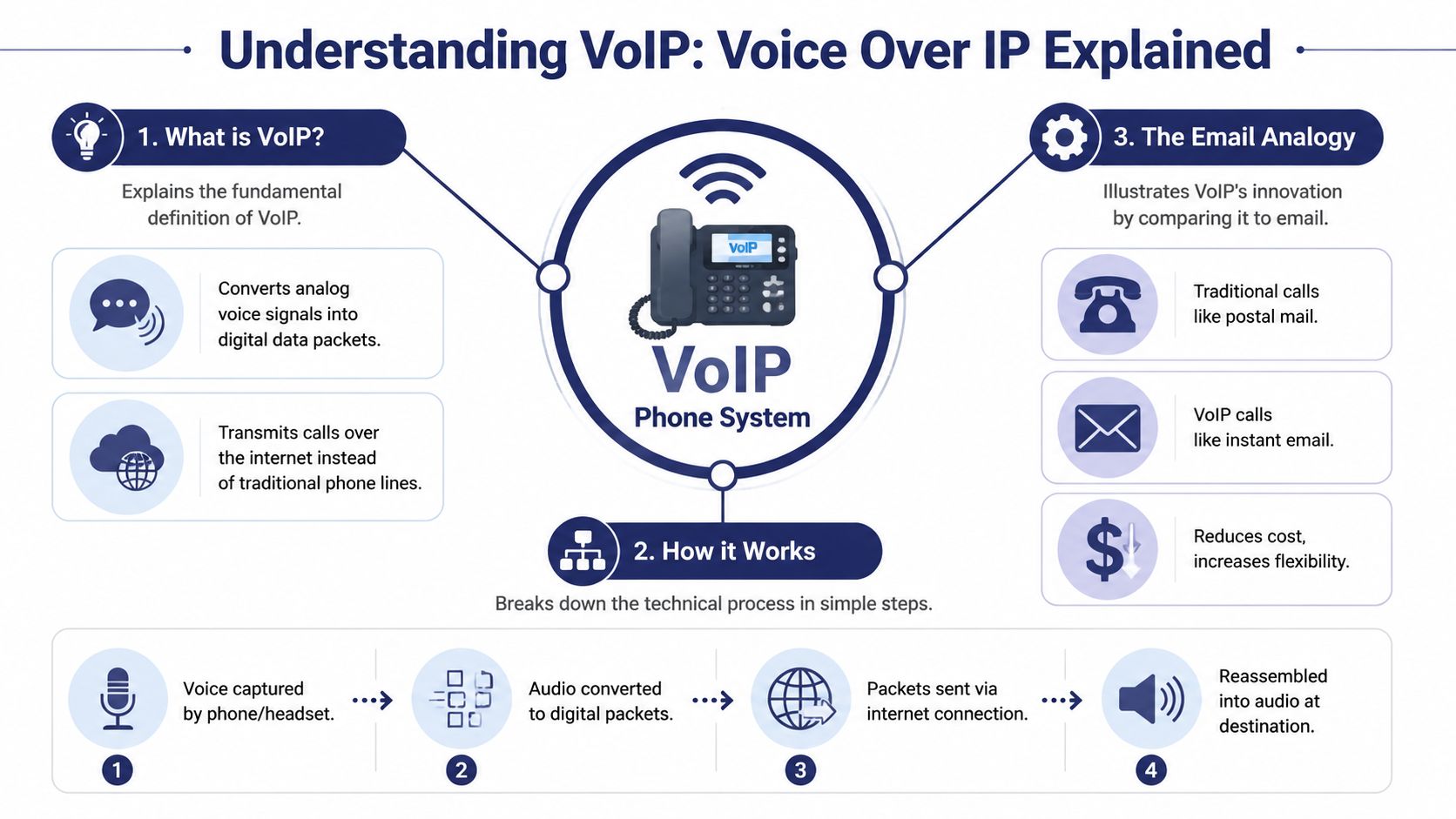
The basic definition in plain language
When you speak into a VoIP phone, headset, or mobile app, the system converts your voice into digital data packets. Those packets travel across your network and internet connection to the other person. On the receiving end, the packets are reassembled into audio almost instantly.
If that sounds technical, the practical version is simpler. You talk. The system digitizes your voice. The internet carries it. The other person hears you as a normal phone call.
Business adoption shows this is already mainstream. In the United States, business VoIP lines grew from 6.2 million in 2010 to 41.6 million by 2018, adding over 35 million lines in eight years, according to Tech.co's summary of Statista data.
The three pieces most owners need to understand
Most SMBs only need to grasp three moving parts:
The endpoint
This is what your employee uses to talk. It might be a desk phone, a laptop softphone, or a mobile app.The internet connection
This replaces the old physical phone line as the transport layer for your calls.The cloud PBX
Think of this as the brain of the system. It handles extensions, voicemail, routing, auto attendants, ring groups, and call rules.
If you want a more technical walkthrough, this plain-English guide to how VoIP works is a useful companion.
What happens during a call
Under the hood, VoIP commonly uses SIP to set up the call and RTP to carry the live audio stream. That sounds more intimidating than it is.
A simple flow looks like this:
- You dial a number on a desk phone or app.
- The system sends a setup request to the PBX so it knows where the call should go.
- Audio begins streaming in both directions over the internet.
- If the call is going outside your system, it can connect through SIP trunks and gateways to reach traditional numbers.
Voice quality depends on clean delivery. The source material behind VoIP performance notes that poor network conditions can create jitter, delay, or dropped audio, and that clear voice generally depends on good latency and enough bandwidth.
Practical rule: VoIP isn't “internet magic.” It's a business application that performs well when your network is prepared for real-time voice.
If you're curious about the physical side of audio gear, the science behind how headphones work is helpful for understanding how microphones, speakers, and sound conversion fit into the full call experience.
For a quick visual explanation, this video does a good job of showing the basics:
Core Features That Modernize Business Communication
A modern VoIP system improves business communication in the same way email improved letters. It gets information to the right person faster, with less manual handling, and it gives you better records afterward.
For an SMB planning a migration, that matters. Features are not just extras on a pricing page. They determine whether your new system saves staff time, protects missed revenue, and gives customers a better experience on day one.

Auto attendant gives small teams a bigger presence
A customer calls at 12:15. Your receptionist is at lunch, a sales rep is on another call, and support is helping someone at the front desk. With an auto attendant or IVR, the caller still reaches a clear menu and can choose sales, support, billing, or a staff directory.
That does two practical jobs. It gives callers direction, and it stops one employee from spending half the day transferring calls manually.
It also creates one front door for the business. If you have multiple departments or locations, callers use one main number and the system routes them to the right place. If you want more background on how that routing fits into a PBX phone system for business calls, that guide helps connect the pieces.
Mobile apps make the business number portable
This is often the feature owners appreciate first.
Your office number is no longer trapped at one desk. Staff can answer calls from a mobile app or laptop while still showing the company caller ID. The estimator in the field, the bookkeeper at home, and the manager between locations can all stay reachable without giving out personal cell numbers.
The business benefit is straightforward. Calls get answered faster, handoffs are easier, and customers get a consistent experience even when your team is spread out.
Call recording helps with training and disputes
Call recording sounds like a tool for large call centers, but small businesses often get value from it quickly.
A manager can review how staff handle new leads. A service team can confirm what was promised on a scheduling call. A billing dispute becomes easier to resolve when you can check the conversation instead of relying on memory.
There is one caution here. Recording laws vary by state and country, so your setup should match the consent rules that apply to your business.
Call routing keeps customers from hitting dead ends
Routing rules decide what happens to a call based on time, department, availability, or location, making a VoIP rollout start to feel practical instead of theoretical.
A few common examples:
- After-hours calls go to voicemail, an answering service, or the on-call person.
- Sales calls ring a group so one missed desk does not mean a lost lead.
- Support calls go to the employee or queue best prepared to help.
- VIP customers can be sent to a priority path.
Good routing reduces hold time and cuts down on transfers. It also removes a common problem in older systems. The customer calls the main number, reaches one person, and then starts over from scratch.
Visual voicemail, transcription, and web management reduce admin work
These are the quiet time-savers.
Instead of checking voicemail from one desk phone, managers can review messages in email or a web portal. Instead of waiting on a phone vendor to make a simple change, an office admin can often update greetings, users, and routing rules directly. In a hosted platform such as SnapDial, that can include features like call recording, mobile apps, IVR, and a self-service portal for managing users and call flows.
That shift matters during a migration. You are not just replacing dial tone. You are replacing a piece of office equipment that used to require specialist help with software your team can manage day to day.
The best feature set for an SMB is not the longest one. It is the set that helps customers reach the right person faster and helps your staff handle calls with less friction.
VoIP vs Traditional PBX A Clear Business Comparison
If you're choosing between keeping an old PBX and moving to hosted VoIP, the biggest difference is control over cost and complexity.
A traditional PBX usually means hardware on-site, specialized maintenance, and changes that often require outside help. Hosted VoIP moves most of that burden into software and provider-managed infrastructure.
VoIP vs. Traditional PBX at a Glance
| Factor | Hosted VoIP System | Traditional PBX System |
|---|---|---|
| Setup model | Uses internet-based calling with provider-managed infrastructure | Relies on on-premise phone hardware and legacy wiring |
| Upfront investment | Typically lower because you're not buying and maintaining a full PBX cabinet | Often higher because hardware, installation, and maintenance are tied to the site |
| Scalability | Add users, phones, and locations through software changes | Expansion may require cards, cabling, and technician support |
| Remote work | Built for desk phones, laptops, and mobile apps | Usually awkward and limited without extra workarounds |
| Maintenance | Handled largely by the provider in a hosted model | Falls on internal IT or outside phone vendors |
| Feature rollout | Faster to update greetings, routing, and user settings | Changes can be slower and more dependent on hardware constraints |
| Business continuity | Can route calls across devices and locations | More tied to the physical office and the PBX on site |
The cost model is fundamentally different
One verified TCO data point is especially useful here. A 2025 Nemertes Research study found that cloud VoIP has a 37% lower total cost of ownership over three years than an on-premise PBX for a mid-sized firm, as summarized in Twilio's VoIP overview.
That doesn't mean every hosted system is automatically cheaper in every scenario. It does mean business owners should stop comparing only monthly line items and start comparing the full operating model: hardware, maintenance, support time, flexibility, and the cost of making changes.
Why growth is easier on hosted systems
Old PBX systems were built for stable offices with fixed desks. Many SMBs don't look like that anymore. They add locations, hire remote staff, share responsibilities across departments, and need calls to follow the employee instead of the building.
If you need a quick primer on the older architecture, this overview of what a PBX system is helps clarify what hosted VoIP is replacing.
A traditional PBX is often a capital project. Hosted VoIP is usually an operating decision.
That distinction matters for growing companies. You want your phone system to scale with the business, not become another piece of infrastructure that has to be defended every budget cycle.
Addressing VoIP Security and Reliability
The two objections most owners raise are sensible.
What happens if the internet goes down? And is internet calling secure enough for business conversations?
The short answer is that these are real considerations, but modern VoIP platforms are built with safeguards that older systems often lack.
Reliability depends on failover planning
VoIP uses your network, so internet quality matters. But that doesn't mean an outage has to equal silence.
According to Vonage's VoIP system overview, 42% of VoIP downtime historically stemmed from internet failures, and modern providers mitigate that with automatic rerouting to cellular backups, a feature shown to reduce dropped calls by 65% in multi-location business setups.
That's the reliability concept to ask about when evaluating providers: automatic failover.
If the office internet drops, the system can send calls to mobile devices, another site, or alternate numbers. Customers still reach a human. Your business keeps moving.
Security is mostly about provider design and admin discipline
VoIP security isn't one setting. It's a combination of encrypted signaling, encrypted media, account controls, and provider-side monitoring.
You don't need to become a telecom engineer to evaluate it. Ask simpler questions:
- How are calls protected in transit
- How are user accounts secured
- Who can access recordings and call logs
- What admin controls exist for permissions
- What happens during a service interruption
If you're troubleshooting quality issues, network conditions matter too. Problems like delay and choppy audio often relate to jitter, and this plain-English explainer on what jitter means in networking helps clarify why call quality can suffer even when general internet browsing seems fine.
Security concerns are valid. The mistake is assuming old hardware in a closet is automatically safer than a professionally managed cloud system.
A hosted VoIP system should be judged by its failover approach, account security, management controls, and support responsiveness. That's a more useful standard than asking whether it uses the internet.
Making the Move A VoIP Migration Checklist
Most VoIP migrations go smoothly when the business treats the move as an operations project, not a phone purchase.
The companies that struggle usually skip the planning and try to “just install it.”
Start with a needs audit
Before you compare vendors, write down how your business uses phones now.
A useful audit includes:
Who needs a number or extension
Count employees, shared lines, departments, and common area phones.Which call flows matter most
Think sales, service, after-hours calls, overflow handling, and how calls should move between locations.Which features are must-haves
Common examples include mobile apps, auto attendant, call recording, voicemail transcription, call queues, and number porting.What can be retired
Many businesses pay to maintain old behaviors they no longer need.
This exercise keeps you from overbuying and helps vendors recommend a setup that fits your real workflow.
Check network readiness before rollout
VoIP doesn't require a perfect network, but it does require a prepared one.
Have your IT person or provider check call quality readiness, especially if your team shares bandwidth with video meetings, cloud apps, and guest Wi-Fi. If users already complain about buffering, lag, or unstable Wi-Fi in certain rooms, address that before launch.
Field advice: Test the network in the places people will actually take calls, not just from the server room or front office.
Plan your number port and cutover carefully
Most businesses want to keep their existing numbers, and they usually can. The key is timing.
Coordinate these items with the provider:
- Current billing records need to match exactly.
- Porting windows should avoid peak business periods.
- Temporary call routing should be ready in case part of the transition takes longer than expected.
- Voicemail greetings and call menus should be prepared before the cutover date.
A good migration plan reduces downtime by treating number porting, user setup, and routing design as one coordinated process.
Train the team on day one behaviors
Don't stop at installation.
Give employees a short, role-specific walkthrough. Show them how to answer on the app, transfer calls, check voicemail, update presence, and handle after-hours routing if that applies to their role. Most adoption problems are not technical failures. They're training failures.
A successful migration feels boring in the best sense. Customers keep calling the same number. Staff answer from the right device. The business sounds more organized on day one than it did the week before.
How to Choose the Right VoIP Vendor for Your Business
Price matters, but it shouldn't be your first filter.
The wrong vendor can make a low monthly rate expensive through poor support, messy onboarding, weak call routing design, or vague billing. For SMBs, the provider is not just a carrier. They're part implementation partner, part support desk, and part business continuity plan.
The non-negotiables to look for
Use this checklist when comparing providers:
Support that matches business hours and urgency
If phones go down, you need real help quickly. Ask how support is delivered and when live assistance is available.A clear implementation process
You want a provider that can explain porting, user setup, device rollout, and call flow design in business terms, not just technical terms.Transparent pricing
Ask what is included, what triggers extra charges, and whether setup help, training, and core features are part of the plan.Administrative simplicity
Make sure everyday changes such as greetings, users, routing, and recordings are manageable without opening a ticket every time.Reliability and continuity features
Ask specifically about failover, mobile access, multi-location routing, and how the system behaves during an outage.
A good vendor conversation should feel practical. They should ask about your front desk, remote users, busy hours, after-hours handling, and how you want customers routed. If the discussion stays at the level of handsets and seat pricing, keep looking.
The right provider doesn't just sell VoIP. They help you run a more reachable business.
If you're replacing an aging phone system and want a managed cloud option, SnapDial provides hosted VoIP, white-glove setup, mobile-ready calling, call routing, and business features like IVR, recording, and cloud management tools. It's worth evaluating alongside other providers if your priority is moving off legacy hardware without turning the migration into a DIY telecom project.