
A missed call usually doesn't look expensive. It looks like a badge on a mobile app, a voicemail icon, or a note someone meant to return after lunch.
For a business, that's the wrong way to think about it. A missed call notification isn't just a convenience feature. It's the difference between a call that disappears into one person's phone and a call your team can recover, assign, and act on.
Most advice online stops at consumer troubleshooting. Turn notifications on. Restart the phone. Check app permissions. That helps when a single device is the problem. It doesn't solve what hurts businesses: shared numbers, ring groups, remote staff, after-hours calls, and the confusion that starts when multiple people see different versions of the same event.
Why Every Missed Call Is a Hidden Cost
A familiar pattern plays out in small and mid-sized businesses every week. Someone finds a scribbled phone number on a desk, asks whether anyone called this lead back, and nobody knows. The front desk thought sales had it. Sales thought the mobile app would log it. The manager assumed the phone system would show it somewhere.
That gap is where business gets lost.
A missed call is rarely just one person failing to answer. Often, it's a system problem. The number rang more than one device. One employee was already on another call. Another had notifications muted. A third saw a missed call alert even though a coworker answered first, so now everyone ignores the alerts because they look unreliable.
The business impact starts with confusion and ends with poor follow-up.
Practical rule: If your team can't agree where missed calls are recorded, you don't have a missed call process. You have guesswork.
This gets worse in shared environments. In an 8×8 community discussion on missed-call notification noise, admins describe a common problem: when a call rings multiple users, everyone except the first responder may receive a missed-call notification. That's not a minor annoyance. It trains teams to ignore alerts because they stop trusting what the alert means.
Why consumer fixes don't solve business problems
For an individual user, a missed call notification is personal. For a business, it's operational.
You need to answer questions like these:
- Who owns the callback: Is it the person who saw the alert first, the queue supervisor, or the account owner?
- What counts as missed: A call to the main number? A ring group? A shared line that another employee handled?
- Where is the record stored: In the handset, the phone app, the PBX portal, voicemail, email, or CRM?
- How much noise is acceptable: Should everyone get notified, or only the person responsible for follow-up?
A business phone system should answer those questions by design. If it doesn't, missed calls stay invisible until a customer has already moved on.
The Four Types of Missed Call Notifications
Missed call notification didn't start as a slick smartphone feature. The idea was already formalized in a U.S. patent application for Missed Call Alert published in 2006, which described notifying one device about a call missed in another network. That matters because it shows how long this problem has existed. The difference now is that businesses can route those alerts into workflows instead of leaving them trapped on a handset.
Not every alert belongs in the same channel. Good setups use different notification types for different response patterns.
Comparing Missed Call Notification Types
| Notification Type | How It Works | Best For | Consideration |
|---|---|---|---|
| Push notification | Sends an alert through the mobile or desktop app when a call isn't answered | Individual reps, field staff, on-call employees | Easy to miss if app permissions, battery settings, or focus modes interfere |
| Email alert | Sends call details to an inbox or shared mailbox | Managers, audit trails, searchable records | Slower than app alerts for urgent callbacks |
| SMS alert | Sends a text with basic call details to a designated user or team phone | High-priority lines, after-hours coverage, urgent escalations | Can create noise if too many people receive the same text |
| Visual voicemail | Surfaces voicemail in an app or portal, often with transcription | Fast triage when callers leave messages | Only helps if the caller actually leaves a voicemail |
When push notifications work best
Push alerts are best when speed matters and one person owns the response. Sales reps, mobile technicians, and managers on rotation usually need the call event on the same device they already carry.
They're weak when responsibility is shared. If five people get the same alert, nobody feels accountable.
Why email still matters
Email isn't glamorous, but it's useful because it creates a searchable record. A missed call alert in a team inbox can be sorted, forwarded, tagged, and revisited later. That's valuable for businesses that need a paper trail or a lightweight audit path.
Email alerts aren't the fastest lane for callbacks. They are the safest lane for accountability.
Where SMS fits
SMS is still effective for urgent exceptions. If the main number goes unanswered after hours, a text to the owner or on-call manager can be the right move. The key is restraint. If SMS becomes the default for every unanswered ring, people start swiping it away.
Why visual voicemail belongs in the mix
Visual voicemail changes how teams triage calls. Instead of dialing in and listening line by line, they can scan messages and decide what needs immediate attention. It's not a replacement for missed call notification. It's the backup layer that adds context when a caller leaves more than a number.
How VoIP Systems Capture Every Missed Call
A modern VoIP system works like a digital receptionist with a memory. It doesn't just ring devices and hope someone notices what happened. It watches the call state, records the outcome, and uses rules to decide whether a missed call notification should go to one person, a team, or another business system.
That distinction matters because handsets are inconsistent. A call log on a phone tells you what that device believes happened. A cloud phone system tells you what the call system recorded.
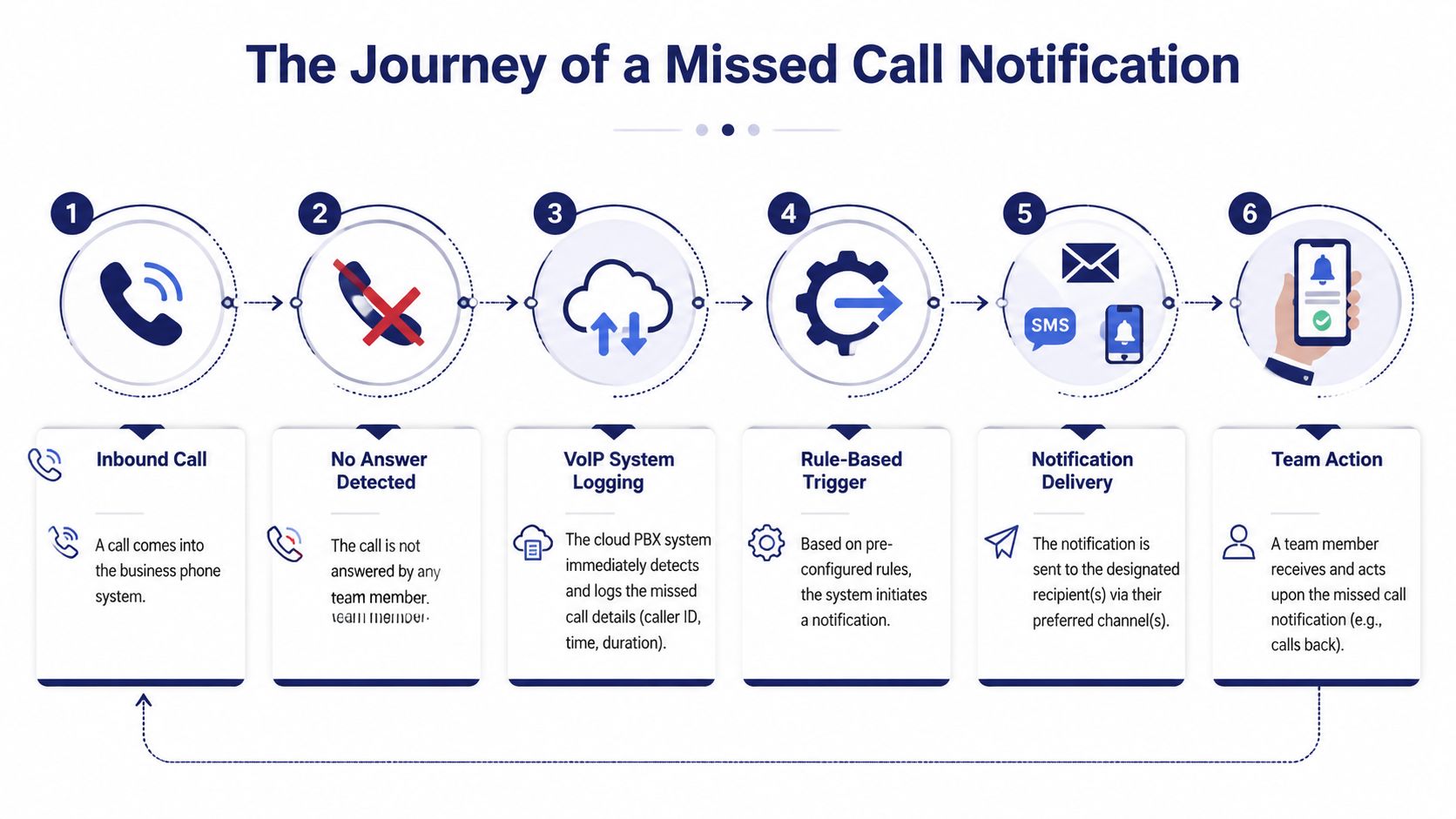
A simple visual helps:
What actually triggers the alert
Carrier-grade missed call alerts are based on network events, not guesswork. The ETSI technical specification for missed call notification describes the application registering for calls that become busy, no-answer, or not-reachable, then sending an SMS with the caller number, the time, and the reason the call was missed. Just as important, it does this without changing the original call path.
For business owners, that means the alerting layer and the call handling layer are related but separate. Your routing decides where the call goes. Your notification logic decides who gets told that the call failed to connect.
The basic flow inside a business phone system
A reliable system usually follows this sequence:
- The call arrives at your main number, direct line, queue, or ring group.
- Routing rules apply based on time of day, user status, queue logic, or device availability.
- Nobody answers within the configured window, or the network marks the call busy or unreachable.
- The system logs the event with details such as caller ID and timestamp.
- A rule fires and sends the missed call notification through app, email, SMS, or another channel.
- The team acts by calling back, assigning ownership, or launching a follow-up workflow.
If you're evaluating platforms, look closely at how they handle call routing logic in a cloud phone system. Bad routing creates missed calls. Good routing reduces them before alerts ever need to fire.
After the call is classified and logged, the next question is what the user sees. This walkthrough gives a useful visual example of how missed call alerts appear in practice:
The best systems don't just show that a call was missed. They preserve enough context for the next person to know what to do with it.
That's the difference between an alert and an operational record.
Setting Up Notifications for Your Team
Most failed missed call setups aren't caused by bad intentions. They're caused by defaults. The phone system was installed, users were added, calls started flowing, and nobody revisited the notification rules after the business added remote staff, shared numbers, or ring groups.
You need a design, not a checkbox.

Start with the backend before the alert rules
Reliable missed call notifications depend on the system recording unanswered calls. In enterprise VoIP environments, that often means enabling backend logging such as Call Detail Record integration and zero-duration call logging so silent unanswered attempts become auditable events that can trigger an alert, as described in Call Telemetry's missed call documentation.
If that logging isn't enabled, the front end can look fine while the alerting layer has nothing to work with.
Check these prerequisites first:
- CDR or equivalent call logging: The platform must record the call attempt even when nobody answers.
- Zero-duration call support: Unanswered calls often have no talk time, but they still need to be captured.
- Shared-line awareness: Teams using common numbers need call events tied to the line or queue, not just one endpoint.
- Notification permissions: Mobile and desktop apps still need permission to present alerts.
Map notifications to real roles
Don't configure by device first. Configure by ownership.
A practical team setup often looks like this:
- Main business number: Send an email alert to a monitored inbox and a push alert to the front-office lead.
- Sales line: Route missed calls to the assigned sales manager or the active rep on duty.
- Support queue: Post the event into the team's collaboration channel so someone can claim the callback.
- After-hours line: Trigger SMS only for the on-call person, not the whole company.
Many businesses overcomplicate things. They notify everyone. Then nobody owns the callback.
Field advice: One missed call should have one clear owner, even if several people can see the record.
Build a follow-up path, not just an alert
Notifications are useful only if they produce action. Pair each missed call rule with a response rule.
For example:
- Sales inquiries: Callback task within your CRM or sales inbox.
- Existing customer support: Queue review plus voicemail check.
- High-value service calls: Immediate push alert plus backup email.
- General reception calls: Shared mailbox review every set interval.
If you're aligning phone alerts with lead handling, this guide to immediate lead insights for sales is useful because it focuses on the handoff problem that often starts right after the missed call is recorded.
Voicemail also needs a business workflow. Forwarding messages to email helps teams review and assign callbacks without relying on a physical desk phone. A setup that includes voicemail to email delivery usually closes more gaps than a setup that leaves everything inside one handset.
Avoid the most common setup mistakes
These are the mistakes I see most often:
- Duplicated alerts: Multiple users receive the same missed call notification, but nobody is assigned to respond.
- No escalation path: If the first owner doesn't call back, the alert goes stale.
- Device-first design: Teams build notifications around personal phones instead of around business numbers and roles.
- No review cycle: Rules stay frozen even after headcount, hours, or departments change.
Set the rules around accountability. Then test them with real calls during business hours, after hours, and across multiple devices.
Integrating Notifications with Business Software
A missed call notification becomes much more valuable when it leaves the phone system and enters the tools your team already works in. That's where it stops being a reminder and starts becoming part of an operating process.
If a sales call is missed, the next step shouldn't depend on someone remembering to open the PBX portal later. The better move is to push that event into the CRM, the help desk, or the team chat where work already gets assigned.
What good integrations actually do
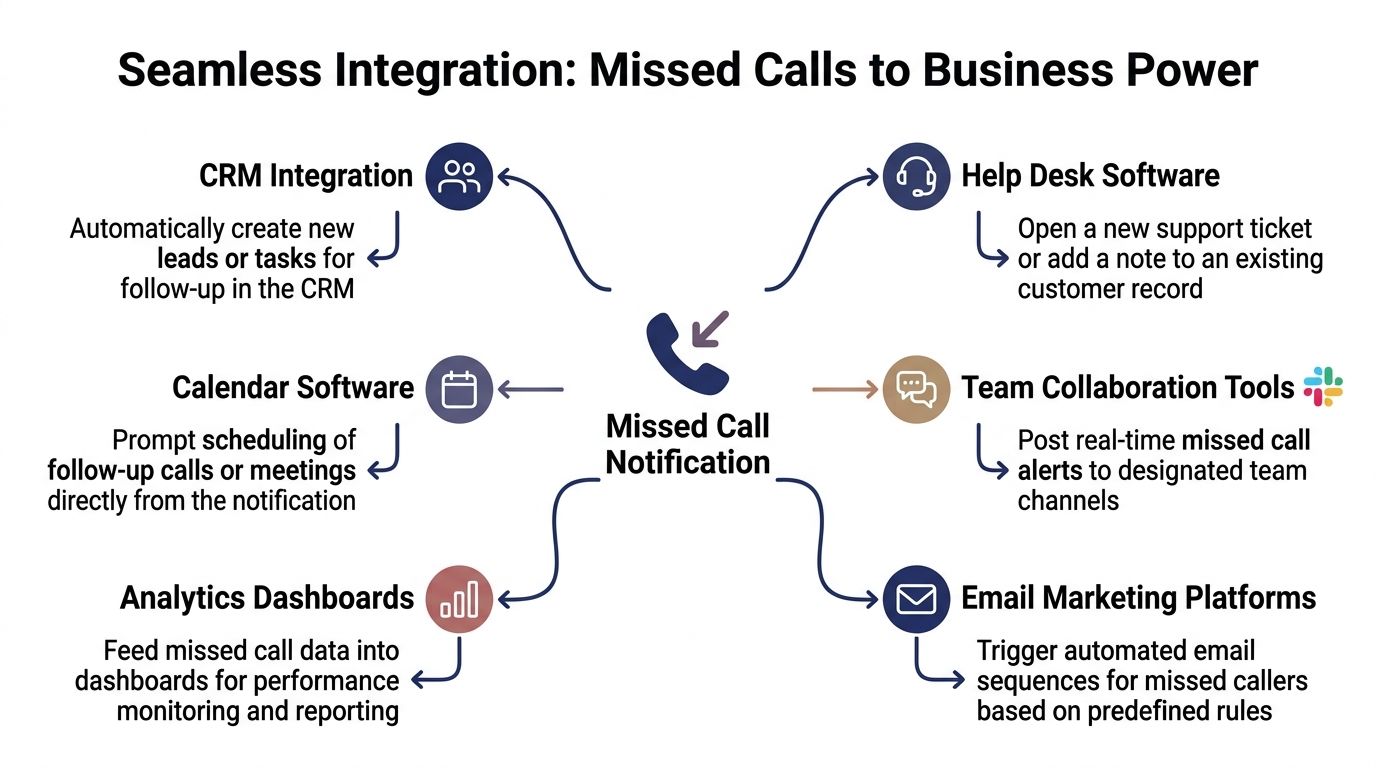
The most useful integrations usually handle one of these jobs:
- CRM updates: Create a new lead, open a callback task, or attach the call event to an existing contact.
- Help desk actions: Add the missed call to a customer record or trigger a support ticket review.
- Team collaboration: Post an alert to Slack, Microsoft Teams, or another shared channel for immediate triage.
- Calendar and scheduling: Prompt a follow-up appointment or callback block.
A missed call to sales shouldn't die in the phone app when your reps live inside the CRM. A support callback shouldn't depend on a personal voicemail badge when your agents work from ticket queues.
Why this changes the business outcome
Integration creates accountability because it moves the event into a system with owners, timestamps, and follow-up steps. It also reduces the split-brain problem where the phone system knows one thing, the CRM knows another, and the team chat knows nothing.
This matters most for businesses with remote staff or mixed roles. One person may answer live calls, another may return calls, and a manager may need visibility into both. Integration is what ties those roles together.
For teams planning that workflow, FranFunnel's guide to CRM with VoIP integration is a practical reference because it focuses on how call activity should feed revenue systems, not just phone logs.
A missed call notification on its own is a signal. Connected to your business software, it becomes a task with consequences.
The right integration doesn't flood your stack with noise. It routes the right missed call to the right system, with enough context for someone to act quickly.
How to Reduce and Troubleshoot Missed Calls
When businesses complain that missed call notification is unreliable, the phone system isn't always the culprit. A surprising amount of confusion starts on the device itself.
Many issues that look like alert failures are call-screening or notification-policy problems. On iPhone, Silence Unknown Callers can route unfamiliar numbers away from the normal incoming-call flow. On Android, vendor battery optimization or Do Not Disturb settings can suppress alerts before users ever see them, as covered in this video on common missed call notification causes.
Troubleshoot the silent filters first
Before you blame the PBX, check these items:
- Call screening settings: Unknown or suspected spam callers may be filtered before they become a normal missed call event.
- Focus and DND modes: Users often silence business alerts without realizing how broadly those rules apply.
- Battery optimization: Some Android devices restrict background behavior for calling apps.
- Notification categories: App badges, lock-screen alerts, and call pop-ups may be configured differently.
If users say their phone never rang, start there. If calls also fail to appear consistently, review device behavior alongside system logs. This is especially important when diagnosing situations where the phone doesn't ring but calls still route oddly.
Reduce missed calls before they happen
Troubleshooting fixes symptoms. Call handling design fixes the cause.
Use these preventive measures:
- Auto-attendant menus: Direct callers quickly to sales, support, billing, or on-call staff.
- Call queues: Hold callers in an organized path instead of dumping overflow to voicemail immediately.
- Find me follow me rules: Let calls ring desk phones, softphones, and mobile apps in sequence or simultaneously.
- Clear ownership rules: One team or person should own each callback path.
- Phone number hygiene: If your outbound team is calling back invalid or malformed numbers, use tools that validate phone numbers before those records circulate through your workflow.
The goal isn't to eliminate every missed call. That's not realistic. The goal is to make sure a missed call never becomes an unmanaged one.
If missed calls are slipping between desk phones, mobile apps, ring groups, and voicemails, it's time to fix the system behind them. SnapDial gives businesses a cloud phone platform built for real-world call handling, with routing, visual voicemail, mobile access, reporting, and hands-on setup support so missed calls turn into follow-up opportunities instead of lost conversations.