
The cloud telephony service market is projected to grow from US$26.8 billion in 2026 to US$48.4 billion by 2033, at a CAGR of 8.8%, according to Persistence Market Research's cloud telephony market outlook. That projection matters because it signals something bigger than vendor hype. Businesses aren't just replacing old phone systems. They're rebuilding how sales, support, and internal communication work.
If you're still running an aging PBX, you already know the friction points. Moves and changes feel slower than they should. Supporting hybrid staff takes workarounds. A simple routing update turns into a ticket. When the office has a connectivity or power issue, the phone system often becomes the first thing everyone notices and the last thing anyone wants to troubleshoot.
A cloud phone service for business changes the role of telephony. It stops being a fixed utility bolted to a closet wall and becomes an operating system for conversations. Calls can follow employees across devices. Customer-facing teams can route and track interactions with more control. IT can manage users, call flows, and policies from a browser instead of through scattered hardware and carrier dependencies.
That doesn't mean every cloud system is automatically a good fit. Some are easier to administer than others. Some handle growth well. Some advertise AI features that look better in demos than in live call environments. The right decision comes from treating voice as part of your five-year communications strategy, not as a line-item replacement project.
The Inevitable Shift to Cloud Communications
A lot of technology categories claim to be the future. Business phone systems rarely need that kind of language. The direction is already clear. Organizations are moving from hardware-bound phone infrastructure to hosted platforms because they want scalability, predictable costs, and modern call handling, not another round of patching and extending equipment they've already outgrown.
The shift is operational as much as technical. Legacy systems were built for a central office and a relatively fixed workforce. Most businesses no longer work that way. Staff move between offices, homes, client sites, and mobile devices. Customers expect consistent service regardless of where the employee answers from. A phone system that depends on one physical location creates drag in every one of those situations.
Why timing matters now
Waiting used to be defensible. You could keep the PBX alive, renew support, and postpone the disruption of a migration. That logic gets weaker each year because the business downside compounds. Old systems make routine changes harder, tie capital to infrastructure, and limit access to features that teams now expect as standard.
Practical rule: If your phone system can't adapt as quickly as your staffing model, your communications stack is already behind your business.
The strategic question isn't “Should we modernize telephony someday?” It's “Do we want communications to help the business scale, or do we want it to remain a maintenance burden?”
What business leaders actually gain
The gains usually show up in three areas:
- Cost structure: Cloud systems replace large hardware commitments with recurring service costs that are easier to forecast.
- Administrative control: IT can manage numbers, routing, and users without depending on box-by-box maintenance.
- Customer experience: Better routing, mobile access, and integrated communications reduce the odds that calls bounce around or go unanswered.
That's why a cloud phone service for business belongs in strategic planning discussions. It affects how clients reach you, how employees stay reachable, and how quickly your team can change course when the business changes.
What a Cloud Phone Service Actually Is
The easiest way to explain it is this. A legacy PBX is like owning a wall of DVDs. You bought the shelves, you maintain the collection, and everything lives in one place. A cloud phone system is closer to Netflix. The service lives elsewhere, updates happen behind the scenes, and your team can access it from wherever they are.
At the technical level, cloud phone services use Voice over Internet Protocol, or VoIP, to send calls over the internet instead of traditional analog lines. That means the system doesn't depend on copper-based phone infrastructure in the way older business telephony did. According to Business News Daily's explanation of cloud phone systems, VoIP plans can start at less than $15 per user per month, compared with an average landline cost of $50 per line monthly, while also including features such as unlimited calling and video conferencing.
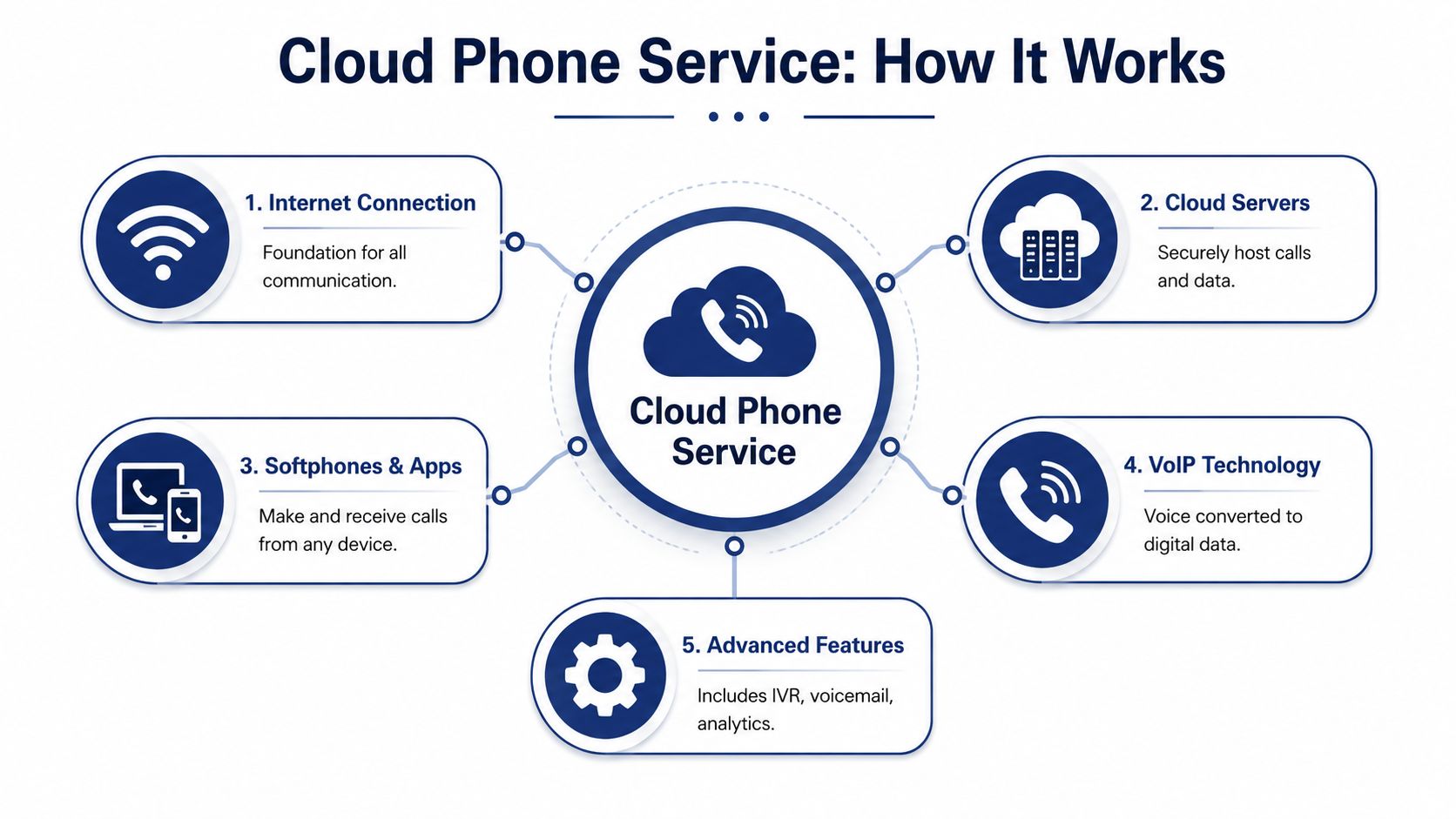
Here's the core architecture at a glance.
What sits in the cloud
When people hear “cloud,” they sometimes picture something vague. In practice, it means the provider hosts the phone system in managed data centers. Those systems handle call routing, voicemail, user management, failover, and feature delivery. Your office doesn't need to host the PBX brain onsite.
That changes the support model. Instead of maintaining the switchboard locally, IT manages policies and endpoints. Users can answer from desk phones, laptops, or mobile apps using the same business identity.
How calls actually move
A simple call flow looks like this:
- A caller dials your business number.
- The hosted platform receives the call in the provider's environment.
- Rules decide where the call should go, such as an auto attendant, queue, ring group, or direct extension.
- The selected user answers on a connected device, which might be a desk phone, desktop softphone, or mobile app.
- Voicemail, recordings, and analytics stay tied to the system, not to one physical handset.
A short video can make that model easier to visualize.
Why this matters in day-to-day operations
The advantage isn't that calls travel over the internet. The advantage is that the business phone system becomes software-driven. Software is easier to update, easier to scale, and easier to extend into things like voicemail transcription, app-based calling, and unified messaging.
A good cloud phone platform should feel less like telecom hardware and more like a managed business application.
That's the shift many teams miss. They compare line replacement to line replacement. The better comparison is fixed infrastructure versus flexible service delivery.
Cloud Systems vs Legacy PBX A Strategic Comparison
The cleanest way to evaluate a PBX replacement is to stop talking about “phones” and start talking about operating model. One model puts capital, maintenance, and feature delivery inside your building. The other pushes infrastructure to a hosted platform and lets your team consume communications as a service.
If you need a refresher on the traditional architecture, this overview of what a PBX system is is useful context before you compare options.
The decision in plain business terms
A legacy PBX can still be workable in a stable office with fixed staffing, limited mobility needs, and internal expertise to maintain it. That's a narrower use case than it used to be. Most growing companies need simpler administration, easier multi-site support, and less hardware dependency.
The financial contrast is often what gets leadership's attention first. According to Nextiva's VoIP market analysis, traditional on-premise systems often cost approximately $11,000 per user because of large upfront hardware purchases, while cloud systems replace that model with predictable monthly costs.
Side-by-side comparison
| Criterion | Legacy On-Premise PBX | Cloud Phone Service for Business |
|---|---|---|
| Cost structure | High upfront capital expense for hardware, licensing, and installation | Recurring subscription model with more predictable operating expense |
| Scaling users | Often requires hardware planning, cards, licensing checks, or physical changes | Usually handled by adding or removing users in an admin portal |
| Remote work support | Often possible, but usually with extra complexity or bolt-on tools | Built for users answering from multiple devices and locations |
| Maintenance burden | Internal team or third party must maintain onsite equipment | Provider handles core platform maintenance |
| Feature rollout | New capabilities may require upgrades or separate systems | Features are generally delivered within the hosted platform |
| Business continuity | Greater dependence on local equipment health | Better suited to distributed operations and flexible routing |
| Administrative effort | More telecom-specific management tasks | More centralized, software-style administration |
Where cloud wins and where it doesn't
Cloud wins when your business changes often. New hires, role changes, office moves, seasonal staffing, and distributed teams all favor a hosted model. It also wins when the business wants enterprise-grade capabilities without building telecom expertise in-house.
PBX can still make sense when the environment is static and highly controlled, or when a company has unusual dependencies tied tightly to legacy infrastructure. Even then, the decision should be tested against the next five years, not the last five.
Here's a blunt way to frame it for leadership:
- Choose PBX if you want to own infrastructure and accept the responsibility that comes with ownership.
- Choose cloud if you want communications delivered as a managed service that can adapt faster than your floor plan.
The wrong phone system doesn't usually fail all at once. It fails one inconvenience at a time, through slow changes, routing workarounds, and calls that don't reach the right person.
That's why the comparison shouldn't stop at monthly rates. It should include admin time, flexibility, outage exposure, and the cost of being hard to reach.
Essential Features That Drive Business Growth
Feature lists usually make buyers less clear, not more. Fifty checkboxes don't tell you whether the system will improve customer response, help staff work faster, or reduce communication gaps. The practical way to evaluate a cloud phone service for business is to group features by the business problem they solve.
Modern platforms do more than route calls. According to Aircall's guide to cloud business phone systems, they now combine real-time analytics, automated call routing, visual voicemail with transcription, and a unified UCaaS environment that brings together SMS, fax, calling, and video conferencing. That same source notes 99.999% reliability as a benchmark for enterprise-grade systems.

Features that improve customer experience
If callers can't reach the right person quickly, the rest of your stack doesn't matter much. Good routing removes friction before an employee even picks up.
- Auto attendant and IVR: These features direct callers to the right department or person without relying on a receptionist to manually transfer every call.
- Smart routing: Calls can follow business rules such as time of day, location, team availability, or overflow conditions.
- Queue management: Support and sales teams can distribute inbound demand more consistently instead of letting calls pile up on a main line.
These aren't luxury features. They're how you stop a growing business from sounding disorganized.
Features that raise employee productivity
A cloud phone system should cut admin noise, not just modernize the dial tone.
Visual voicemail with transcription helps because employees can scan messages instead of replaying them one by one. Real-time analytics and AI assistance can help managers spot missed-call patterns, queue pressure, and workflow gaps. Integrations with tools like Salesforce or Zoom also matter because they reduce the handoffs between conversations and follow-up work.
Features that support hybrid and mobile teams
The biggest operational gain for many companies is continuity across devices. Employees keep the same business identity whether they answer from a desk phone, a laptop, or a mobile app. That's what turns a phone number into a company resource instead of a fixed office endpoint.
Three capabilities usually matter most here:
- Mobile and desktop softphones: Staff can make and receive business calls without being chained to a physical handset.
- Unified messaging: Calling, messaging, video, and fax sit in one environment instead of scattered tools.
- Presence and accessibility: Teams can stay reachable without exposing personal numbers or improvising with consumer apps.
The best feature isn't the flashiest one. It's the one employees use every day because it removes a small point of friction from every conversation.
That's the standard worth applying in vendor demos. If a feature looks impressive but won't change daily execution, it shouldn't carry much weight.
Your Implementation and Vendor Selection Checklist
Most cloud phone migrations go wrong for ordinary reasons, not dramatic ones. The business doesn't define call flow clearly. IT underestimates network readiness. Number porting gets treated like paperwork instead of a dependency. Training is rushed because everyone assumes “it's just phones.”
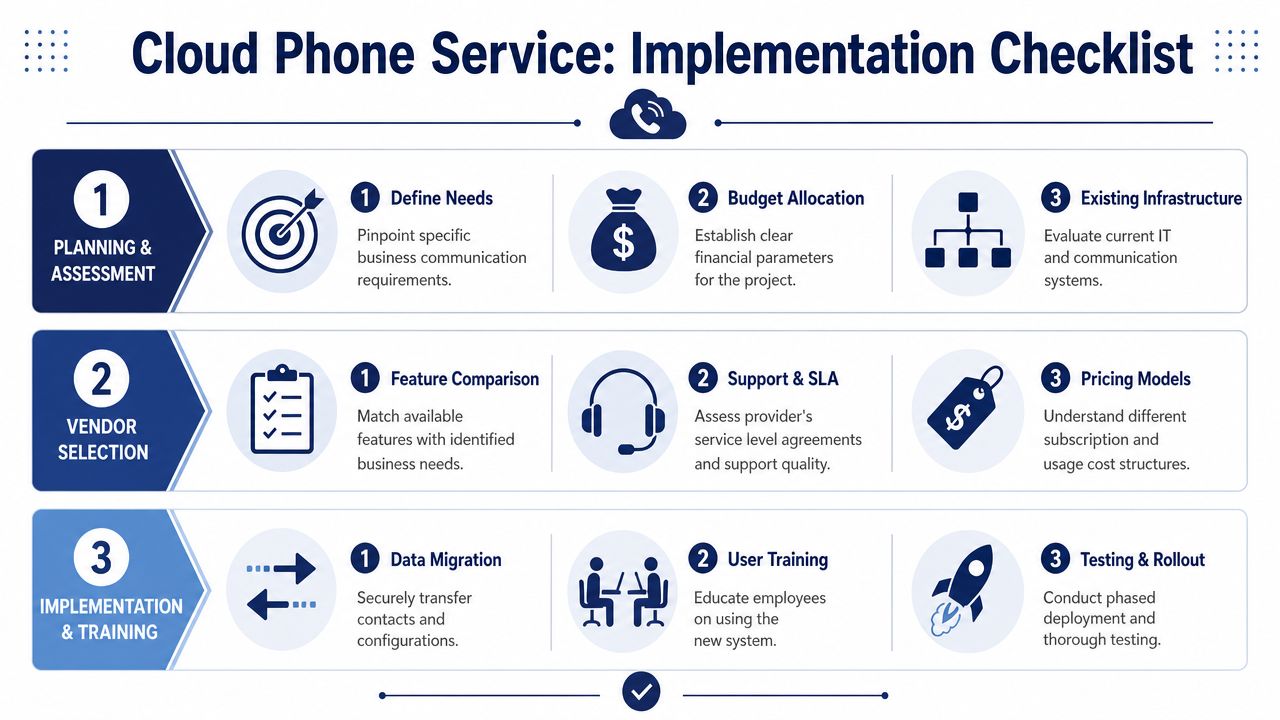
A better approach is to run the project in phases and force decisions early.
Planning and assessment
Start with business requirements, not vendor brochures. Document who answers what, which numbers matter, what call paths exist today, and where the current system frustrates employees or customers.
At minimum, define:
- Critical call flows: Main number routing, after-hours behavior, ring groups, hunt groups, executive handling, and failover expectations.
- User profiles: Front desk, mobile sellers, support agents, managers, and remote staff don't need identical setups.
- Device strategy: Decide where desk phones still make sense and where softphones are the better fit.
- Network readiness: Voice quality depends on the network it rides on, so check capacity and traffic priorities before rollout. This guide on how much bandwidth you need for VoIP is a useful planning reference.
Vendor selection
Vendor selection is where many teams get distracted by feature volume. A shorter checklist works better.
Reliability and support
Ask how the provider handles uptime, failover, service incidents, and support escalation. You want clear answers on who responds, when they respond, and what happens during an outage or degraded call-quality event.
Administration and onboarding
Some platforms are easy to live with after the sale. Others bury basic tasks in confusing admin interfaces. Ask for a live walkthrough of user management, call routing changes, reporting, and number assignment. If the admin portal feels clumsy in the demo, it won't feel better under pressure.
Security and compliance
Voice now sits inside a broader communications stack. Review how the vendor handles access control, data protection, recordings, retention settings, and any compliance obligations your industry carries.
Selection test: Don't ask only “Can the platform do this?” Ask “How many steps does it take my team to manage this after go-live?”
Migration and deployment
Deployment succeeds when you break it into controlled pieces. Porting numbers, configuring routing, provisioning devices, and validating user experience should happen in a sequence that allows rollback if needed.
A pragmatic rollout often looks like this:
- Build and test the call flows in advance
- Pilot with a small group from different roles
- Validate voicemail, forwarding, hunt groups, and mobile apps
- Schedule number porting with buffers
- Stage the wider cutover by team or location
Don't let porting day be the first day users see the platform. By then, everyone should already know where to click, how to answer, and how to transfer calls.
Training and adoption
End-user adoption gets underestimated because telephony feels familiar. The platform may be intuitive, but your workflows are new. Receptionists need transfer confidence. Managers need reporting fluency. Sales staff need mobile app habits. Support teams need queue discipline.
A few short, role-based training sessions work better than one generic orientation. Keep them practical. Show users how to do the actions they repeat most, then give supervisors a separate session for admin and reporting.
Post-launch review
After launch, collect feedback fast. Look for missed calls, routing errors, voicemail confusion, mobile app friction, and extension naming issues. Most of the cleanup isn't technical. It's operational tuning.
That's normal. A good deployment isn't “install and forget.” It's “launch, observe, and refine.”
Putting It All to Work Real Use Cases and ROI
The value of a cloud phone service for business shows up differently depending on the company. The technology can be the same while the business case changes completely.
A multi-location professional services firm
A regional legal or accounting firm often has one recurring problem. Clients call the main office expecting a consistent experience, while staff work across several locations with different schedules and specialties.
A cloud platform helps unify that front door. The firm can route calls by practice area, office, or attorney availability without forcing callers to know the internal org chart. Staff can answer from their office phone, laptop, or mobile app and still present the same business identity. The client experience feels like one firm, not a cluster of loosely connected offices.
A growing e-commerce support team
E-commerce teams usually feel pain during peak periods. Inbound order questions, returns, and shipping issues spike quickly. If the phone setup is primitive, managers end up improvising with shared lines, manual transfers, and a lot of voicemail cleanup.
Hosted call queues, routing rules, and reporting create order where there used to be scramble. Supervisors can see where calls are stacking up. Teams can direct billing issues to one queue and fulfillment problems to another. Remote agents can help without the company building another office-based telephony layer.
A fully remote consulting business
Consulting firms often need to look polished without forcing everyone into one location. Partners travel. Account managers work from home. Specialists join calls from client sites.
A cloud system makes that workable because the company number doesn't live at a front desk anymore. It lives in the platform. Employees can call out from the business number, receive client calls from any approved device, and keep voicemail and message history inside one business system rather than across personal phones.
ROI isn't only about replacing old telecom costs. It's about reducing missed opportunities, shortening response time, and making your staff easier to reach.
A practical ROI framework
You don't need a complicated model to justify the move. Start with four buckets.
| ROI Area | What to Measure |
|---|---|
| Direct cost change | Hardware avoided, maintenance contracts retired, line and service consolidation |
| IT time saved | Fewer manual moves, adds, changes, and onsite telecom tasks |
| Productivity gain | Faster message handling, cleaner routing, less time chasing missed calls |
| Customer impact | Fewer dropped handoffs, better call response, improved consistency across locations |
The trap is focusing only on telecom spend. For most businesses, the larger payoff comes from reducing friction around customer conversations. If your team misses fewer calls, transfers less blindly, and responds faster, the system is doing more than replacing hardware. It's improving revenue protection and service quality.
Answering Key Questions for IT Administrators
Experienced IT managers usually aren't worried about whether cloud voice is possible. They want to know where it breaks, what it depends on, and how much of the vendor story holds up under real conditions.
How reliable is call quality on shared internet?
Call quality depends less on the phrase “cloud” and more on network discipline. If the office network is congested and voice traffic has to compete with everything else, users will hear that immediately. The fix is planning, not wishful thinking. Validate bandwidth, look at peak usage patterns, and decide where traffic prioritization is needed before rollout.
This is also where architecture choices matter. If you're comparing delivery methods, understanding the role of SIP trunking in business telephony helps clarify how voice sessions are carried and how providers connect calls into modern environments.
What are the real security concerns?
The practical risks are familiar: weak access controls, poor admin hygiene, overexposed recordings, and loose integration practices. Most problems come from configuration and governance, not from the basic concept of hosted voice itself.
For small businesses without deep internal bench strength, it often helps to get outside operational guidance from a team that already supports business infrastructure day to day. A resource like Edmonton small business IT is useful because it frames communications decisions within broader endpoint, network, and support realities rather than treating telephony as a silo.
Can advanced AI features be trusted?
Sometimes yes. Sometimes not enough to automate decisions without human review.
Buyers need to stay skeptical. The strongest example is sentiment analysis. According to 8×8's discussion of cloud phone systems and AI limitations, 60% of SMB call centers experience a 15% drop in sentiment accuracy when call volume exceeds 50 concurrent lines or when 30% of calls are in non-primary languages. That's a meaningful limitation for global teams, multilingual support operations, and any environment where managers expect AI to interpret tone reliably at scale.
How should IT evaluate AI in a phone platform?
Use AI where it clearly reduces effort. Transcription, summaries, and routing assistance are easier to validate than emotional interpretation. Treat sentiment scoring as advisory unless your environment has been tested thoroughly with your actual call mix, language patterns, and concurrency levels.
Don't buy AI because it sounds advanced. Buy it if your team can prove it improves a workflow they already care about.
That mindset keeps evaluation grounded. A cloud phone platform should solve communication problems first. Anything branded as AI should earn its place after that.
If you're evaluating a cloud phone service for business and want a provider that handles migration cleanly, keeps pricing predictable, and supports teams after go-live, take a close look at SnapDial. It's built for companies replacing legacy PBXs without downtime and includes the practical features businesses use, backed by white-glove setup and 24/7 support.