
You're answering a customer call while helping someone at the counter, checking an order, or trying to keep a technician on schedule. Another call arrives, waits, and goes to voicemail. By the time you call back, the customer may already have found a competitor.
An IVR system for small business can prevent that situation without turning your phone line into a maze. At its simplest, IVR answers calls, gives callers clear choices, and sends each person to the right destination. More advanced systems can recognize spoken intent, connect with business software, and complete routine tasks without staff involvement.
The practical question isn't whether IVR exists. It's how much IVR your business needs. A short auto-attendant may be enough for a small office with straightforward call patterns. A growing service company, clinic, or online retailer may need smarter routing and self-service. This guide helps you choose without paying for complexity that won't improve the customer experience.
Stop Juggling Calls and Start Growing
A small business phone line often carries more responsibility than its equipment suggests. It may be the sales desk, reception area, support channel, appointment line, and emergency contact number all at once. When one employee answers every call manually, normal interruptions quickly become missed opportunities.
The problem isn't limited to unanswered calls. A customer who reaches the wrong person may be transferred several times. Someone calling after hours may not know whether to leave a voicemail, send an email, or try again tomorrow. Employees lose focus because routine questions interrupt work that requires concentration.
An IVR creates a consistent front door. A caller hears a clear greeting, selects a department, and reaches the appropriate person or information path. The system can also provide business hours, capture voicemail, route urgent calls, and offer an after-hours alternative.
Practical rule: Use IVR to remove avoidable interruptions, not to make every caller navigate a complicated decision tree.
That distinction matters. A basic menu can make a small company sound organized, but an overbuilt menu can make customers work harder. The right design depends on the reasons people call and the actions your team can safely automate.
The technology has moved well beyond a niche telecommunications feature. The global IVR market was valued at $4.2 billion in 2020 and is projected to reach $6.7 billion by 2026, representing a 7.9% compound annual growth rate, according to industry IVR market data from Fit Small Business. That scale reflects how widely businesses now use automated call handling.
The history also explains why IVR feels familiar. Speech technology research in the 1930s produced the Voder, an early electronic voice synthesis attempt. Bell's tone-dialing system, introduced at the Seattle World Fair in 1962, became a blueprint for modern IVR, while basic speech recognition entered IVR systems by the end of the 1980s, as described in this history of IVR technology.
For professional practices that can't afford to miss a prospective client, it can also help to compare IVR with virtual receptionist services for lawyers. The two approaches solve related problems, but they differ in how much human involvement callers receive.
Beyond the Auto-Attendant What IVR Means Today
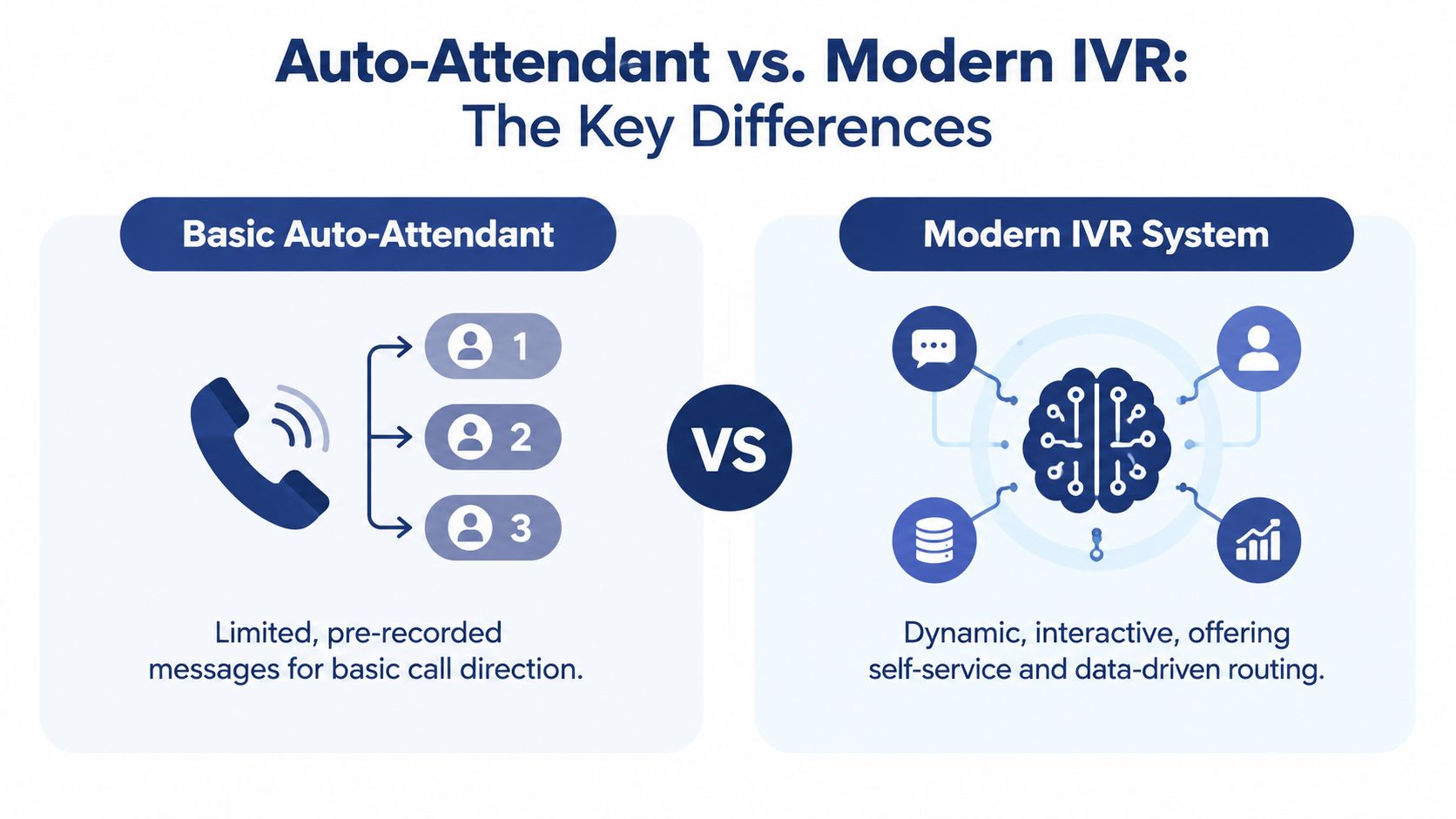
A basic auto-attendant is like a directory mounted beside a receptionist's desk. It says, “Press 1 for sales, press 2 for support,” then follows the selection. That's useful when your departments are clear and callers already know where they need to go.
A modern IVR is closer to a smart office manager. It can combine keypad input and speech, apply rules based on business hours or caller details, connect with customer records, and guide people toward an outcome rather than a department.
When a simple menu is enough
Choose a basic auto-attendant when your call flow is predictable. A small office may only need:
- Department routing: Send callers to sales, billing, scheduling, or support.
- Business-hours handling: Play different greetings during open and closed hours.
- Voicemail capture: Give callers a dependable place to leave details.
- Overflow routing: Send unanswered calls to another employee or team.
- Basic announcements: Provide location, hours, or holiday information.
This approach works well when call volume is modest, the business has few departments, and callers rarely need to complete transactions by phone. It's easier to write, test, and maintain. It also avoids making customers speak to a recognition system when a simple button press gets them where they need to go.
A telephone auto-attendant guide can help clarify this entry-level use case before you compare more advanced platforms.
When modern IVR earns its place
A smarter IVR becomes worthwhile when navigation is only part of the problem. For example, an online retailer may want callers to check order status without waiting for an employee. A clinic may need to identify whether a caller wants scheduling, billing, or prescription information. A service company may want urgent calls routed differently from routine requests.
Current market coverage describes a shift from fixed menu trees toward conversational, AI-driven workflows, with cloud deployment and speech-enabled IVR among the fastest-evolving areas, as explained by CloudTalk's overview of IVR software. The important decision isn't whether conversational AI sounds modern. It's whether your customers need resolution automation or only straightforward navigation.
Use advanced capabilities selectively. Speech recognition can reduce friction when callers naturally describe their need, but poor recognition creates repetition and frustration. If the system can't understand callers reliably, a short keypad menu with an immediate agent option may deliver a better experience.
How an IVR Transforms Your Business Operations
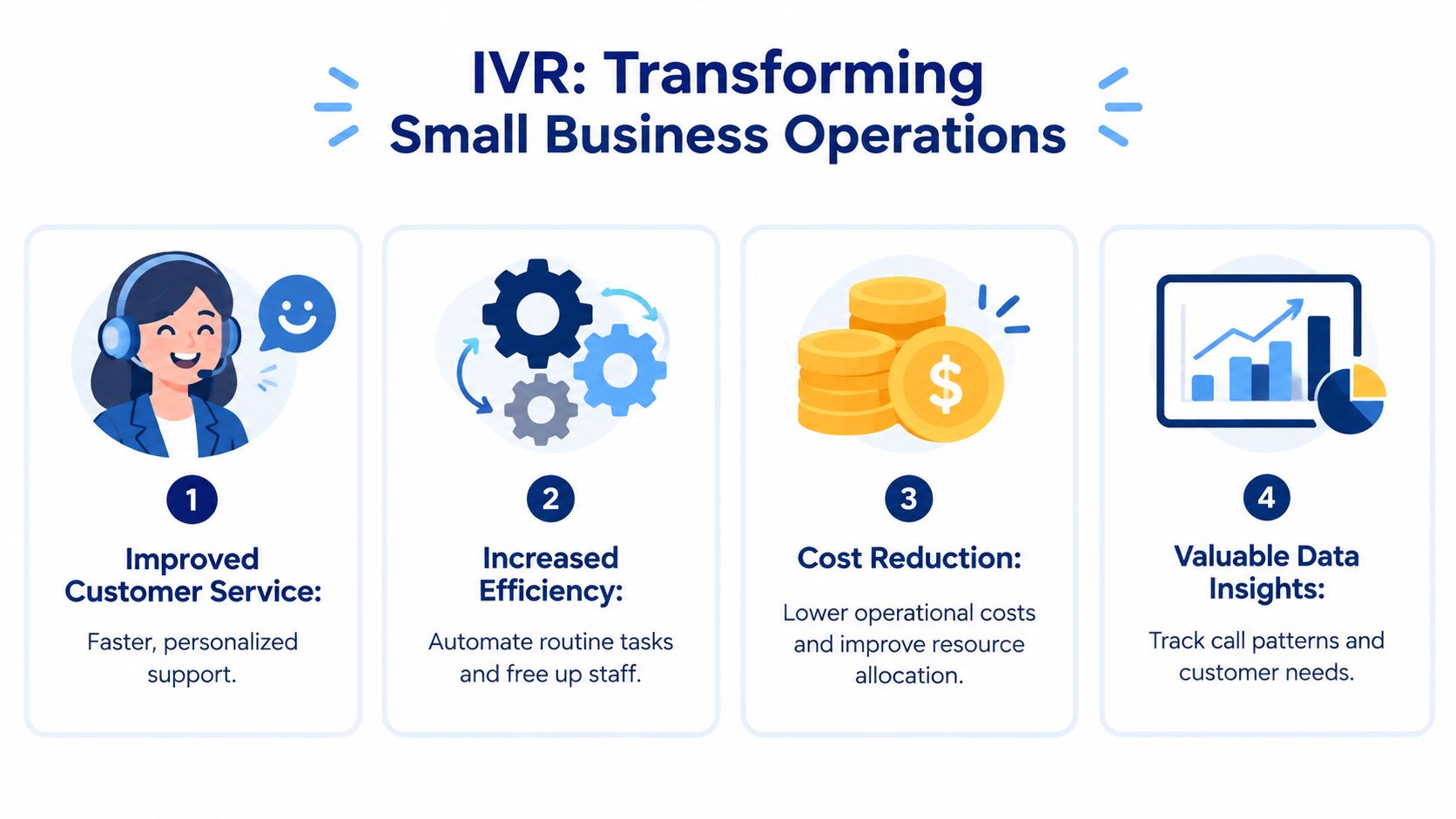
IVR changes the phone line from a shared interruption into a managed workflow. Before implementation, every call competes for the attention of whoever happens to answer. After implementation, the system can collect basic intent and direct the call before an employee becomes involved.
That shift improves the customer's first impression. A caller hears the same clear greeting whether the owner is available, an employee is helping another customer, or the office is closed. Consistency matters because callers judge operational competence from small interactions, including whether they can quickly find the right person.
From missed calls to controlled access
After-hours routing is one of the clearest operational improvements. The system can explain when the office reopens, capture a detailed voicemail, provide an emergency path, or direct callers to approved information. That doesn't mean the business must promise round-the-clock live support. It means customers receive a useful next step instead of silence.
A service company might send urgent requests to an on-call employee while directing general estimates to voicemail. A professional office might separate new inquiries from existing-client matters. A retailer might route delivery questions away from the sales queue.
From interruptions to productive work
Employees shouldn't spend their day repeating information that the phone system can provide consistently. IVR can handle simple announcements, gather caller selections, and route routine requests to the correct queue. Staff then spend more time on conversations that require judgment, empathy, or technical knowledge.
The benefit depends on sensible boundaries. A system that forces every customer through multiple prompts doesn't create efficiency. It moves work from the business to the caller. Keep automated paths focused, and make human assistance easy to reach when the issue falls outside the script.
From guesswork to useful call patterns
Call records can reveal which departments receive the most demand, when queues become difficult to manage, and which prompts send callers down the wrong path. Those patterns help an owner adjust staffing, rewrite greetings, or decide whether a self-service option is worth building.
The data is only useful if someone reviews it. Treat IVR reporting as an operational aid, not as a dashboard to admire. Look for repeated transfers, abandoned paths, and questions that employees answer again and again.
A short video can help visualize how automated menus and routing fit into a broader business phone workflow.
Core Features of a Modern IVR System
Start with the customer's task, then select features that make that task easier. A vendor may offer a long list of capabilities, but a small business usually needs a focused combination of routing, fallback options, and useful context.
Routing that reflects the real business
Multi-level menus can separate broad departments from specific needs, but depth should follow actual caller behavior. A caller might choose support, then select an existing order or a technical issue. If callers frequently get lost, the menu is reflecting the organization rather than helping the customer.
Look for time-of-day rules, holiday schedules, overflow paths, and the ability to route calls to mobile employees. Skills-based routing can send a billing question to someone who handles accounts, while a technical request reaches a team member with the right knowledge.
Keypad input and speech recognition
DTMF keypad input remains dependable in noisy environments and for callers who prefer clear, mechanical choices. Speech input feels more natural when it works well, especially when customers need to describe an intent that doesn't fit neatly into department names.
A usability study comparing DTMF and automatic speech recognition found similar task completion but a significant difference in task duration, which means speech can improve the experience only when recognition quality prevents repeated prompts, as reported in the DTMF and ASR IVR study. The safest design supports both methods and offers a human escape path.
CRM and business-software integration
An IVR becomes more useful when it passes context to the employee who receives the call. CRM integration can display a customer record, associate call activity with an account, or help the agent avoid asking for information the caller already provided.
VoIP CRM integration matters as an operational feature rather than a technical checkbox. Ask whether the connection can write information back into your system, not merely display a contact record.
Reporting and administration
Choose a provider that shows route selections, queue activity, voicemail behavior, and failed recognition attempts in a form a manager can understand. A self-service editor also matters because business hours, staff assignments, and departments change.
The best interface isn't the one with the most controls. It's the one an office administrator can update safely without waiting for a developer.
IVR in Action Scenarios for Small Businesses
The value of IVR becomes clearer when the call flow matches a specific business problem. The technology doesn't need to transform every interaction. It needs to remove the bottleneck that repeatedly consumes staff time or causes callers to abandon the business.

A heating and cooling company separates emergencies from estimates
A local HVAC company receives calls about broken equipment, maintenance requests, installation estimates, and billing. Treating every call identically creates a problem after hours, because an urgent repair needs a different response from a routine quote.
The IVR opens with a clear choice for emergency service. Those callers go to the on-call technician's mobile phone, while estimate requests enter a voicemail or callback workflow. Billing questions route to the office team during business hours and receive a specific after-hours message when the staff is unavailable.
The owner gains a practical distinction between urgent and routine work without asking one employee to monitor every call.
An online retailer handles order questions
A small e-commerce store may receive many calls from customers who only want to know whether an order shipped. An IVR connected to order information can ask for an order identifier and provide an automated status response, while unusual delivery problems move to an employee.
This design works when the status data is accurate and the handoff includes the caller's information. If the system can't retrieve a reliable answer, it should transfer the customer rather than repeat a generic message.
A dental practice organizes scheduling and billing
A dental office often receives calls for appointments, cancellations, insurance questions, prescription requests, and treatment follow-up. A short menu can direct each caller to scheduling or billing, while an after-hours message explains how urgent dental concerns should be handled.
The practice doesn't need a conversational AI agent just because it serves patients. It may need one only if callers frequently ask questions that staff can answer safely through an automated workflow. For many clinics, clear routing and dependable voicemail create more value than an elaborate voice interface.
Your Implementation Roadmap and Best Practices
A successful IVR launch starts with the call flow, not the vendor dashboard. Write down why customers call, who handles each reason, what happens outside business hours, and where an employee must take over.
Map the routes before writing prompts
List the main call intents and assign one destination to each. Include an overflow path for busy staff and a fallback for callers who make no selection. If a caller can't reach a person after making a reasonable attempt, the design is incomplete.
Keep the first menu short. Put the most common choices first, use familiar words, and avoid department language that customers may not understand.
Write for listening, not reading
Phone prompts should sound natural when heard once. Say what the caller can do, then pause long enough for the choice to register. Avoid long introductions, promotional messages, and unnecessary explanations.
Professional voice talent can create a polished sound, while text-to-speech makes updates faster and easier. Either option can work if the pronunciation, pace, and wording are clear. Record prompts in a quiet environment and listen through an ordinary mobile phone, not only through studio headphones.
Caller-first test: If a customer can't predict what happens after pressing an option, rewrite the option.
Build in human exits
Give callers a direct route to an employee where practical. Support keypad input even when speech is available, and create a clear response to silence, invalid entries, and recognition failure. A fallback should move the conversation forward, not send the caller back to the beginning.
Also test every time-based rule. A menu that works during office hours may send calls nowhere when the schedule changes.
Pilot with real callers
Synthetic tests won't reproduce background noise, accents, interruptions, and peak-hour behavior. One expert guide recommends a 30-day pilot using 500 to 1,000 live calls, or at least 10% of monthly volume, and identifies misroutes above 10%, recognition errors above 15%, and repeated transfers above 1.2 per caller as warning signs that the design needs refinement, according to this IVR testing guidance for small businesses.
Track the routes callers take, not only the routes you intended to create. Review failed selections, abandoned calls, transfers, and employee feedback during the pilot. Use the findings to simplify the flow before making the system permanent.
For a realistic budget conversation, review an IVR system cost guide and separate recurring service charges from setup, recording, integration, and support requirements.
Selecting the Best IVR System Provider
Vendor selection should follow the level of IVR you actually need. A business that only requires department routing shouldn't buy a contact-center platform filled with functions no one will administer. A company with repeat self-service requests may outgrow a basic auto-attendant quickly, even if the first quote looks attractive.
Compare the operating model
Cloud IVR usually suits small businesses because the provider manages the underlying phone infrastructure and lets the team adjust routing through a web interface. Ask how number porting, failover, recordings, updates, and user changes are handled.
A low price can become expensive if every script change requires professional services. Confirm which features are included, whether usage charges apply, and whether essential functions such as call queues, voicemail transcription, analytics, or speech recognition sit behind an upgrade.
Test the administration experience
Request a demonstration that uses your call flow, not a polished generic example. Ask the vendor to show how an administrator changes business hours, adds an employee, redirects an after-hours call, reviews a voicemail, and checks route performance.
Support quality also deserves close attention. A small business may not have a telecom specialist available when a number stops routing or a holiday schedule needs correction. Look for clear escalation procedures, accessible support channels, and documentation your staff can use without technical translation.
Match capabilities to the decision
Use this practical filter:
- Choose basic auto-attendant routing when your departments are stable and callers mainly need a person or voicemail.
- Choose a hybrid IVR when you need keypad menus, time-based routing, queues, CRM context, or selective self-service.
- Consider conversational IVR when customers describe varied intents, multilingual access matters, or repeated requests can be resolved automatically.
- Demand strong fallback controls when a failed recognition attempt could delay urgent service or create a compliance concern.
- Run a live pilot when the vendor's claims depend on speech accuracy, routing quality, or integration behavior.
SnapDial offers a cloud business phone system with Auto Attendant and IVR, call routing, call recording, visual voicemail with transcription, mobile applications, a self-service web portal, and support through a Texas-based support center. It's one option to evaluate alongside other hosted providers when you want IVR included within a broader communications platform.
The best provider is the one that fits your call patterns, gives your team control over ordinary changes, and makes failure visible. Start with the smallest workflow that solves a real problem, test it with live traffic, and add intelligence only when the evidence shows customers need it.
If your business is losing time to missed calls, repeated transfers, or unclear after-hours handling, visit SnapDial to review a cloud phone system with Auto Attendant and IVR capabilities. Use your actual call flow to discuss the right level of routing, self-service, and staff handoff before you commit to a larger rollout.