
Your office probably doesn't own a fax machine anymore, but someone still needs to send a signed contract, medical form, insurance document, or legal filing before the day ends. The usual scramble involves scanning the file, finding a service, checking whether the recipient's number works, and hoping the confirmation arrives before somebody asks for proof of delivery.
That situation creates a more important choice than finding the lowest page rate. You can buy a standalone online fax application, or you can put fax inside a cloud PBX that already handles business calls, users, routing, and voicemail. The right answer depends on whether fax is an occasional utility or part of a wider communications workflow.
Why Online Faxing Still Matters in 2026
A small accounting firm may need to send a signed authorization, receive a response, and keep proof of delivery before the workday ends. The fax requirement remains even when the office has replaced paper files, desk phones, and local servers. Clinics, insurance offices, and legal departments still exchange documents with organizations that rely on traditional fax numbers.
Email and e-signature tools reduce fax volume, but they have not removed every established workflow. Online faxing provides the bridge between digital files and those external processes without bringing back a physical machine or dedicated line.
The market remains commercially meaningful. The global online fax market was valued at USD 2.88 billion in 2026 and is projected to reach USD 5.18 billion by 2035, with a projected compound annual growth rate of 6.76%, according to market data on online fax usage. That growth does not justify a fax subscription for every business. It does show that online faxing remains an active business service, not a forgotten remnant of older offices.
The more useful decision is architectural. A standalone online fax application handles sending, receiving, and delivery records as a focused tool. A cloud PBX with built-in fax can place those functions alongside business calling, user management, routing, voicemail, and administration. If fax is occasional, the dedicated app usually creates less overhead. If the company is replacing a legacy PBX, combining communications functions can reduce duplicate tools and conflicting administration.
The practical question: Are you buying fax as a single-purpose tool, or replacing an old communications stack?
Healthcare makes the trade-off clear. An MGMA poll reported that 89% of healthcare organizations still use fax, as summarized by healthcare fax transmission data. For regulated offices, the selection must cover security, audit trails, user permissions, and ownership of the document workflow. A low page rate means little if staff cannot control access or prove what happened to a transmission.
Choose a dedicated provider for straightforward document exchange. Choose integrated fax when unified communications, fewer overlapping systems, and predictable administration matter more than a narrowly priced fax plan.
How Online Faxing Works Today
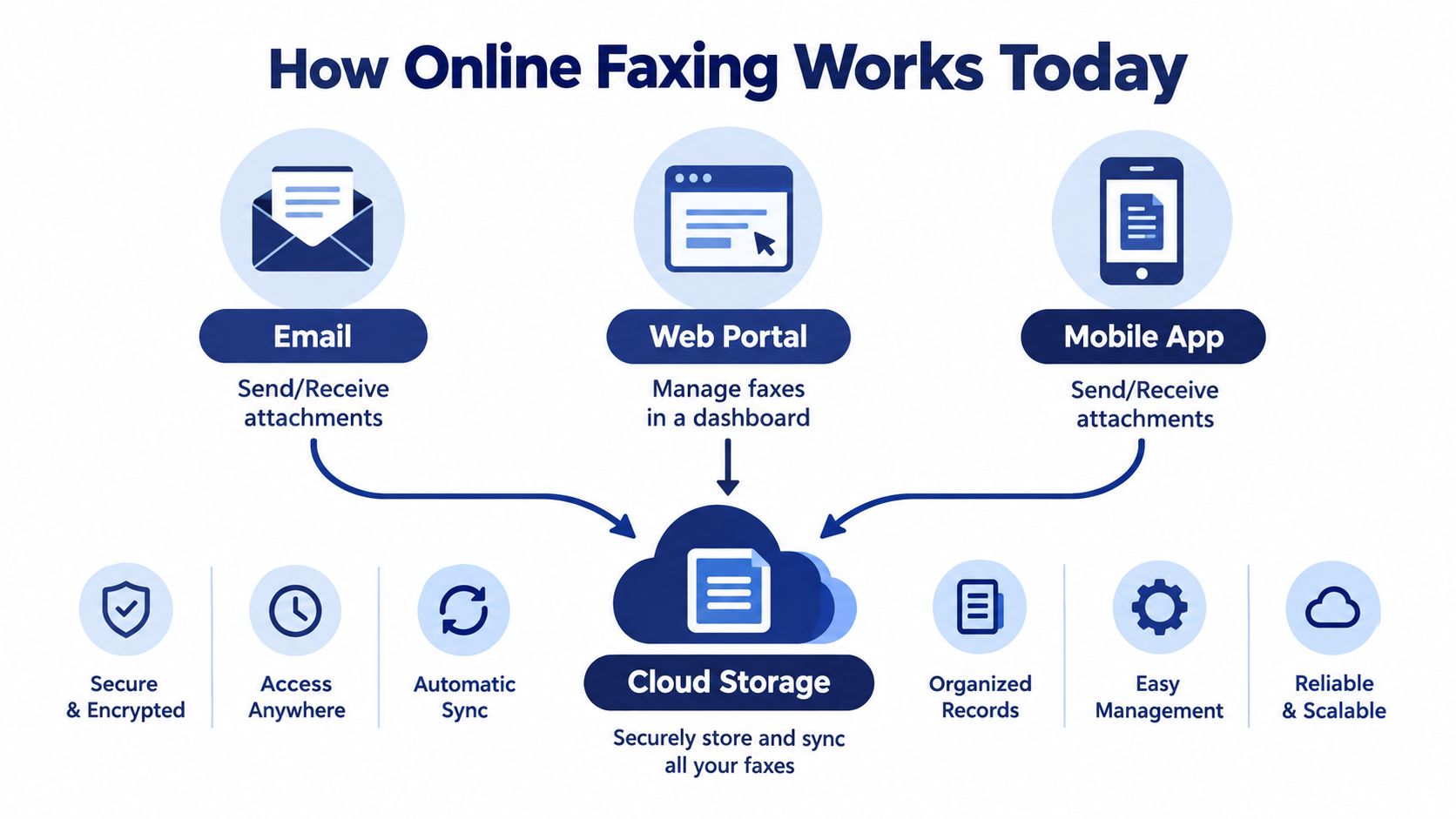
An employee can send a fax from an inbox, browser, or phone without standing beside a machine. Online faxing converts a digital document into a transmission that reaches a conventional fax number, while the provider handles the fax infrastructure.
The workflow is simple:
- Prepare the document. Attach a PDF, image, or office file from a computer or mobile device.
- Choose the sending method. Use email, a browser dashboard, or a mobile application.
- Enter the recipient details. Add the destination fax number and optional cover information.
- Let the provider transmit it. The service converts and sends the document through its cloud infrastructure.
- Review the result. A delivery receipt, status update, or failed-transmission notice records what happened.
The three interfaces people use
Email-to-fax suits employees who manage documents in Outlook or Gmail. They attach the file, address the fax destination in the provider's required format, and receive status notifications without opening another application.
Web portals give administrators a central inbox, shared access, delivery history, number management, and user controls. They also make failed transmissions easier to review and older documents easier to retrieve.
Mobile apps serve field staff, traveling managers, and remote employees who need to scan and send documents from a phone. The workflow varies by provider, so test it before making mobile access a core requirement.
Why fax sits inside broader software
Online fax platforms connect with email and document management systems, turning fax into part of a document workflow rather than a machine replacement. That connection can reduce manual downloads, re-uploads, and separate status checks.
The security baseline matters just as much as the interface. A provider should protect documents in transit and storage with TLS 1.2 or TLS 1.3 in transit, AES-256 at rest, multifactor authentication, audit logs, and role-based access controls, consistent with online fax security guidance. These controls support sound administration, but they do not replace permission reviews or sensible retention rules.
Use choose an online fax service as a practical starting point, then test the interfaces employees will use each day. If fax must share administration with business calling, user accounts, routing, and voicemail, evaluate a cloud fax solution before adding another standalone application. That setup can reduce tool collisions and make communications costs easier to predict than separate per-page plans.
What to Look for in the Best Online Faxing Service
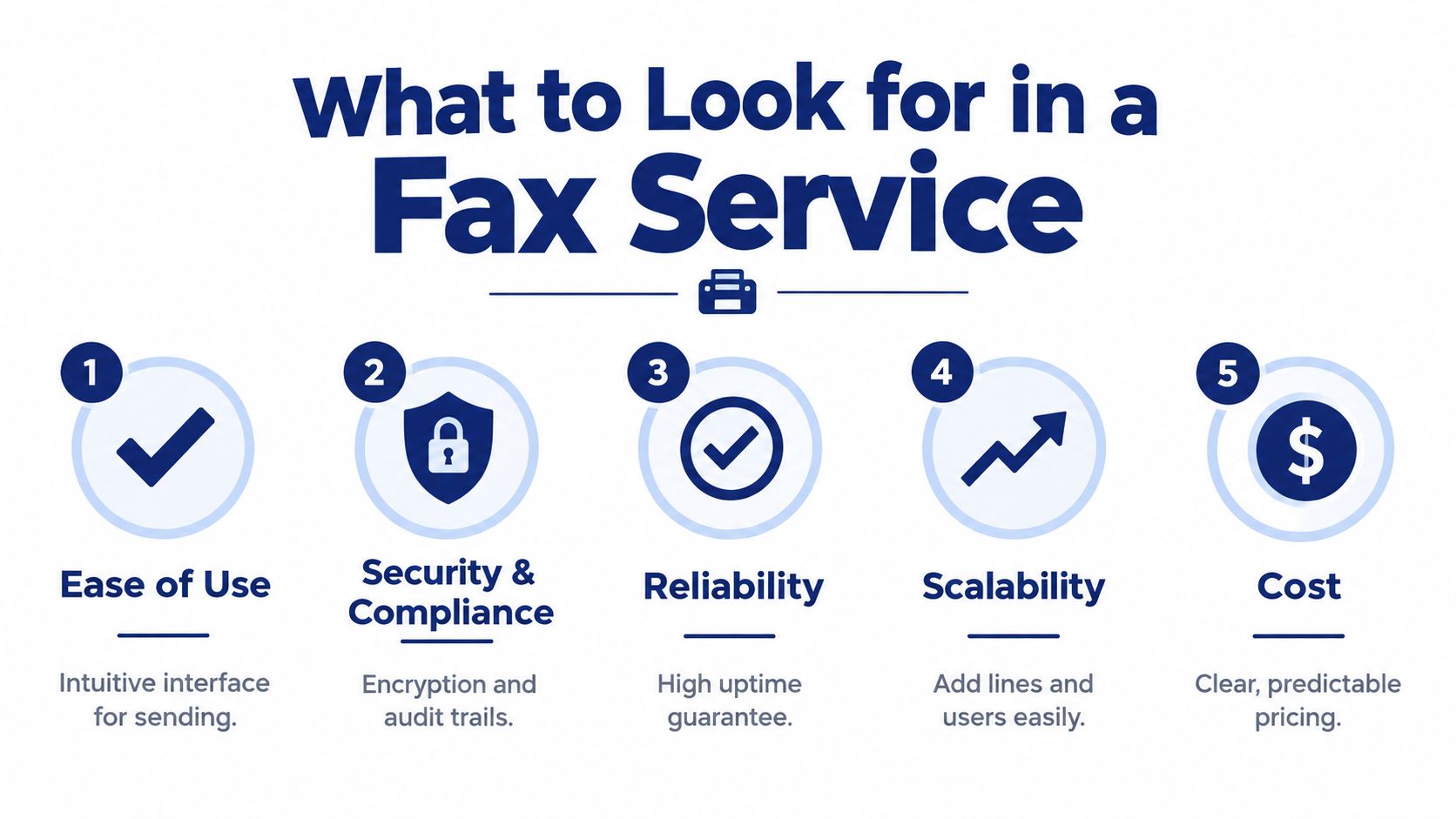
A low monthly price won't rescue a service that loses delivery records, makes users share credentials, or charges unexpected overages. Evaluate the provider against the operational problems your team faces.
Security and compliance
Start with the data, not the interface. Ask whether the provider supports encrypted transmission and storage, MFA, access roles, audit logs, delivery receipts, and configurable retention. If protected health information is involved, ask for a Business Associate Agreement, not just a marketing statement about encryption.
Security baseline: Look for TLS 1.2 or TLS 1.3 in transit, AES-256 at rest, MFA, audit logs, and role-based access controls.
For compliance-focused deployments, BAA availability and full auditability are more useful differentiators than a long list of generic security badges. Confirm who can view documents, how administrators export logs, how delivery receipts are retained, and whether the provider offers zero-retention or configurable-retention options.
Workflow fit
Your employees shouldn't need a special ritual to send a fax. Test email-to-fax, browser sending, inbound delivery, mobile access, document retrieval, and failed-transmission handling. Then check whether the service connects to the storage or document systems your staff already use.
A dedicated fax app may be ideal when one department owns all transmissions. It becomes less attractive when several teams need separate permissions, shared numbers, or a common administrative console.
Pricing transparency
Ask for the complete pricing model in writing. Clarify whether pages are pooled across sending and receiving, whether overages apply, whether international destinations cost more, and whether number porting or additional users carry separate charges.
Don't compare a headline subscription against an all-inclusive communications quote. Compare the monthly cost of the entire workflow, including users, numbers, storage, support, administration, and any existing phone platform.
Reliability and support
A fax that fails without notice is an operational problem. Look for visible transmission states, delivery confirmations, retry behavior, incident communication, and support channels that match your needs.
If fax supports a revenue or compliance process, phone support can matter more than a polished dashboard. Ask how the provider handles a failed page, a busy destination, a missing confirmation, or a number that must be ported quickly.
Collision avoidance
Cloud PBX fax earns attention here. If the same line or number must send and receive at the same time, ask how the platform prevents one transmission from blocking the other. A service that can't explain simultaneous activity clearly shouldn't be trusted with a busy office workflow.
Use this scorecard during vendor calls:
- Access: Can each user have their own login and permissions?
- Evidence: Can administrators export delivery and access records?
- Workflow: Can employees send from email, web, and mobile channels?
- Cost: Are page limits, overages, users, and numbers easy to understand?
- Concurrency: Can the system manage simultaneous sending and receiving?
Dedicated Online Fax Providers Versus Cloud PBX With Built In Fax
Standalone fax providers and cloud PBX platforms solve different problems. A dedicated service focuses on document transmission. A cloud PBX combines calling, fax, user administration, routing, and other communications functions in one environment.
A dedicated provider usually wins on simplicity. You create an account, assign a fax number, invite users, and start sending. This makes sense for a small office that rarely faxes and doesn't need a new phone system.
The drawback is fragmentation. Employees may have one login for calls, another for fax, and a third for document storage. Administrators must manage separate users, billing records, retention settings, support tickets, and security policies.
A cloud PBX with built-in fax takes a different route. Fax becomes another channel in the same communications environment as voice, IVR, call recording, mobile apps, call routing, and voicemail. SnapDial, for example, provides built-in cloud faxing with collision-avoidance as part of its business phone platform, alongside those communications functions.
Where each architecture fits
Dedicated online fax provider
- Best for fax-only requirements.
- Usually quicker to deploy.
- Easier to keep separate from the phone system.
- May offer specialized fax APIs or document features.
- Can create another administrative and billing system.
Cloud PBX with built-in fax
- Best when the business is already replacing a legacy PBX.
- Keeps calling and fax administration together.
- Reduces the number of platforms employees must learn.
- Can support mobile and remote workflows under the same communications model.
- May require more planning because the platform covers more than fax.
Architecture beats feature count: A standalone fax app is simpler when fax is isolated. Integrated fax is stronger when the business is consolidating communications anyway.
| Evaluation Criteria | Dedicated Online Fax Provider | Cloud PBX With Built In Fax Like SnapDial |
|---|---|---|
| Primary purpose | Document transmission | Unified business communications |
| Deployment | Fast, fax-focused setup | Phone and fax planning together |
| Administration | Separate fax users and policies | Shared communications administration |
| Voice integration | Usually separate | Built into the same platform |
| Collision avoidance | Must be verified with the provider | Designed as part of the integrated fax workflow |
| Remote access | Web, email, or mobile options vary | Mobile and web access can align with calling |
| Pricing | Often tied to pages, users, or plans | May be part of an all-inclusive communications model |
| Best fit | Occasional or department-specific faxing | SMBs replacing PBXs or consolidating systems |
The cloud phone system model is especially relevant when the existing phone platform is already due for replacement. Don't adopt a PBX merely to obtain fax. Do consider it when your business is paying for separate voice, fax, voicemail, and administration tools that employees experience as one communications problem.
Best Online Faxing Options by Real World Use Case
The right option depends on who sends documents, how often they arrive, and what happens after transmission. A solo professional with occasional paperwork shouldn't buy the same architecture as a multi-location healthcare organization.
Healthcare and compliance-heavy offices
Choose a provider that offers a signed BAA, access controls, auditability, delivery receipts, and retention settings that match your policy. Don't accept a provider's claim that it uses encryption as a substitute for contractual coverage and administrative evidence.
Healthcare communication remains heavily dependent on fax, so workflow reliability matters as much as document security. Businesses evaluating wider records workflows can also review healthcare document digitisation Australia for context on how document handling fits into broader administrative systems.
Multi-location businesses
A cloud PBX with built-in fax is usually the better architecture when several offices share users, numbers, routing, or support. Centralized administration prevents every location from inventing its own fax process, while shared reporting gives the IT team one place to investigate delivery problems.
Look for number porting, role-based administration, location-aware routing, and a clear approach to inbound document ownership. If each branch needs a separate fax identity, confirm that the platform can represent those identities without multiplying administrative work.
Remote and hybrid teams
Prioritize email-to-fax, mobile access, browser sending, and secure inbound delivery. Employees shouldn't need to return to a physical office to retrieve a document or verify a transmission.
Email-based sending is often the fastest adoption path because it fits existing habits. Review how to send a fax by email before rollout, then test attachments, status notifications, delegated access, and mobile document capture with real users.
Low-volume occasional faxers
Choose a simple standalone service with transparent usage rules. If fax happens only when a customer or public agency requires it, a full communications platform may add unnecessary complexity.
Still, don't ignore privacy. Occasional use often leads employees to upload sensitive files to whichever free tool appears first in search results. Establish an approved service and a basic retention policy before the next urgent request.
High-volume sales and administrative teams
Consolidation becomes more attractive when teams send and receive documents throughout the day. A cloud PBX with built-in fax can reduce context switching, support shared administration, and address simultaneous activity through collision-avoidance.
The evaluation should include failed transmissions, queue behavior, delivery evidence, user onboarding, and support responsiveness. A cheaper page plan can become expensive operationally if staff spend time chasing missing confirmations or moving files between disconnected systems.
Pricing and Total Cost Breakdown You Should Expect
Online fax pricing usually falls into several models. Per-page billing suits occasional users but makes busy months harder to predict. Tiered bundles offer a monthly allowance, then charge for usage beyond it. Unlimited plans simplify budgeting but may include acceptable-use restrictions or exclude particular destinations. All-inclusive PBX pricing can bundle fax with voice, users, numbers, support, and administration.
Compare plans using the same worksheet. Record the base subscription, included sending and receiving capacity, overage terms, number fees, user charges, international charges, retention options, support level, and setup costs. If one quote combines voice and fax while another prices fax alone, separate the services before comparing them.
The costs that hide in plain sight
- Overages: Exceeding an included allowance can turn a low headline rate into an unpredictable bill.
- Page direction: Some plans treat sent and received pages differently, while others pool them.
- User additions: A service may charge for each account, shared inbox, or administrator.
- Number services: New numbers, toll-free numbers, and porting can carry separate terms.
- Retention: Longer document storage or expanded archives may cost more.
- Support: Basic ticket support and direct phone assistance have different operational value.
- Migration: Moving an established fax number or importing users takes time, even when the vendor doesn't list a separate fee.
The correct calculation is simple:
Total monthly cost = base plan + usage charges + users + numbers + storage or retention + support + administration time.
That last item is routinely ignored. If staff must manage separate calling and fax systems, the invoice may look acceptable while the operating model becomes harder to support. A predictable all-inclusive cloud PBX quote can change the comparison when the company needs fax alongside business calling, especially if setup and ongoing support are handled as part of the communications relationship.
Our Recommendation and How to Choose Your Next Step
If you need fax and nothing else, choose a dedicated online fax provider with strong security, clear billing, reliable delivery records, and the interfaces your users prefer. Keep the deployment narrow. Don't buy a full phone platform to solve a small document-transfer problem.
If you're replacing a legacy PBX, choose a cloud PBX with built-in fax when voice, fax, mobile access, routing, voicemail, and administration belong together. The main advantage isn't a longer feature list. It's fewer disconnected systems, one user model, one support relationship, and a better answer to simultaneous send-and-receive activity.
Use this decision test:
- Fax-only office: Shortlist dedicated providers.
- Phone replacement underway: Evaluate integrated cloud PBX fax first.
- Healthcare or regulated documents: Require a BAA, audit logs, access controls, delivery receipts, and retention answers.
- Multiple locations: Prioritize centralized administration and number management.
- Remote workforce: Test email, browser, and mobile workflows before signing.
- Uncertain volume: Compare total monthly cost, not just the advertised page allowance.
Before committing, run a controlled trial with representative documents. Test inbound and outbound faxing, failed deliveries, user permissions, mobile access, delivery receipts, simultaneous activity, number porting, and document retention. Ask the vendor to show the administrative workflow, not just the employee send screen.
For an SMB already moving away from a legacy PBX, SnapDial's built-in cloud faxing, collision-avoidance, unlimited lines, self-service portal, mobile apps, call routing, and support model make the integrated approach worth evaluating alongside fax-only services. The choice should follow your communications architecture, not a promotional page rate.
SnapDial combines cloud business calling with built-in faxing, mobile access, routing, voicemail, and centralized administration for SMBs replacing legacy phone systems. Visit SnapDial to evaluate whether an integrated communications platform fits your fax workflow and next PBX replacement.