
Tuesday at 9:14 a.m. starts badly for a lot of growing teams. A customer calls the main number and gets put on hold because the only technician who can answer is between job sites. An accountant misses a voicemail because it landed on the wrong device. A new sales rep waits for someone to set up a desk phone before they can start taking calls. None of that is a phone problem. It's an operations problem.
That's why business phones mobile matters now. Once your team works across offices, homes, vehicles, client sites, and personal devices, the old model breaks. Numbers tied to a building slow everything down. Calls bounce to voicemail when they should hit the right person. Basic changes turn into tickets, delays, and avoidable customer frustration.
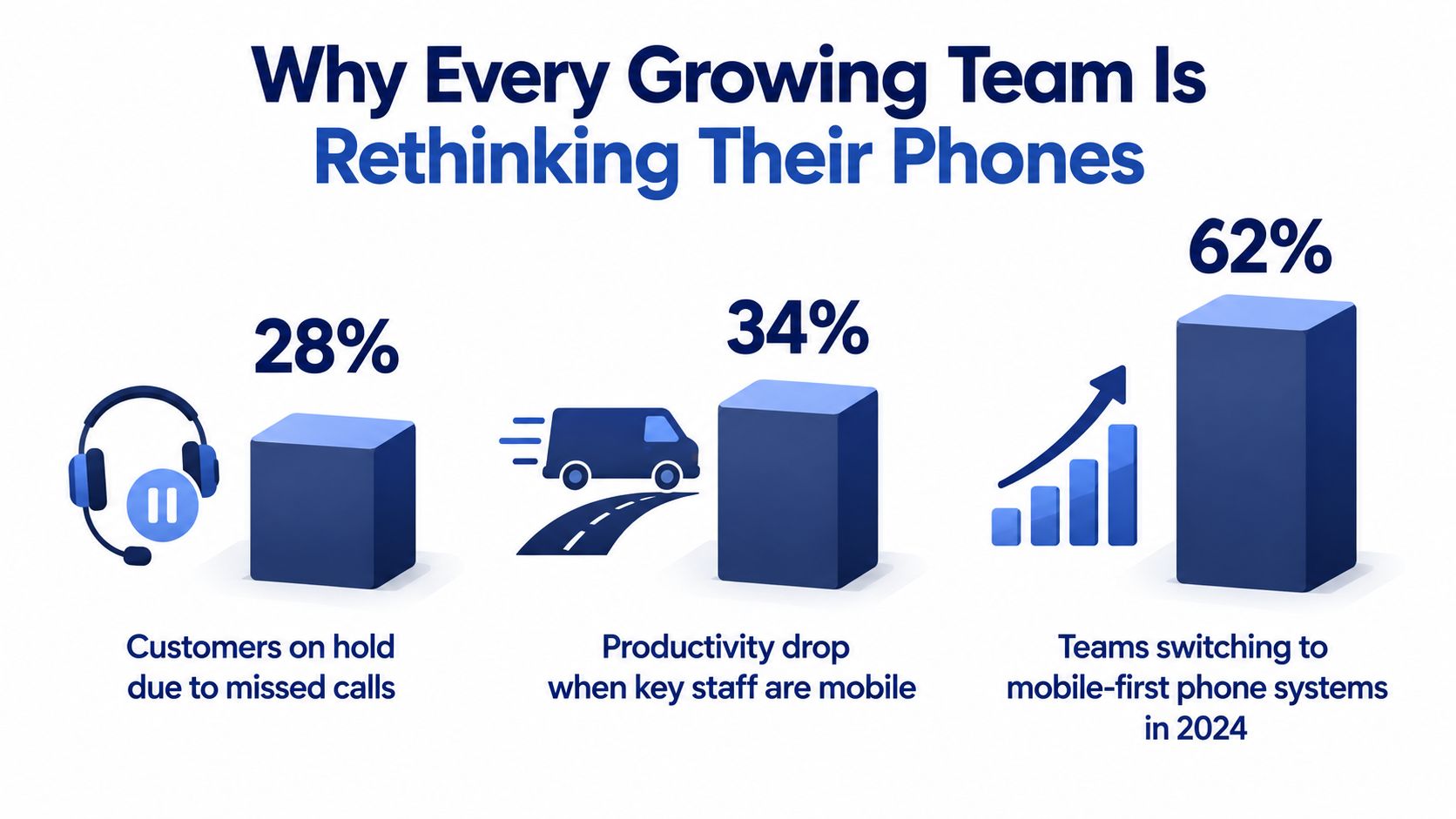
Why Every Growing Team Is Rethinking Their Phones
The shift is already underway. The mobile unified communications market was valued at USD 17.48 billion in 2024, is projected to reach USD 19.42 billion in 2025, and is forecast to grow to USD 44.98 billion by 2033 at a CAGR of 11.07%, according to mobile workforce market data from WorldMetrics. That isn't happening because companies suddenly fell in love with phone apps. It's happening because business calling has moved away from desk-bound PBX systems and toward cloud communication stacks that follow employees wherever they work.
The old setup fails the moment you scale
A single office with a front desk can get away with a clunky phone setup for a while. The moment you add remote staff, field staff, or a second location, every weakness gets exposed. Calls wait for people instead of flowing to the next qualified person. Voicemails become private silos. Onboarding depends on whether someone remembered to order hardware.
Customers don't care where your staff happens to be sitting. They expect the business number to reach the right human fast. If that means a call rings a mobile app first, then a desktop softphone, then a backup queue, that's fine. What matters is that the business stays reachable.
Practical rule: If a customer can hit a dead end because one employee is away from a desk, your phone system is undersized for your business.
Mobile calling is no longer optional
Mobile use at work is already normal. Industry reporting that cites independent workplace research says 98% of enterprises report employees using smartphones for business purposes, 93% report tablet use, and 75% report wearable-device use. The same reporting notes that only 20% of businesses say most employees use company-provided smartphones, which means employee-owned devices dominate many business calling workflows. It also found that Android made up about 37% of company-owned enterprise smartphones, versus roughly 24% for iOS and other platforms, which is why cross-platform support matters so much in practice, as covered in Samsung's summary of Frost & Sullivan enterprise mobile usage findings.
If you're still treating mobility as a nice extra, you're designing for a workplace that no longer exists. A better model is a mobile office setup for business calling where the number, routing, voicemail, and call history belong to the company, not the handset.
What Business Phones Mobile Actually Means
Most buyers make the same mistake first. They think business phones mobile means “which phones should we buy?” Wrong question. It's not a device category. It's a calling system built so the business identity stays consistent while the endpoints move around.
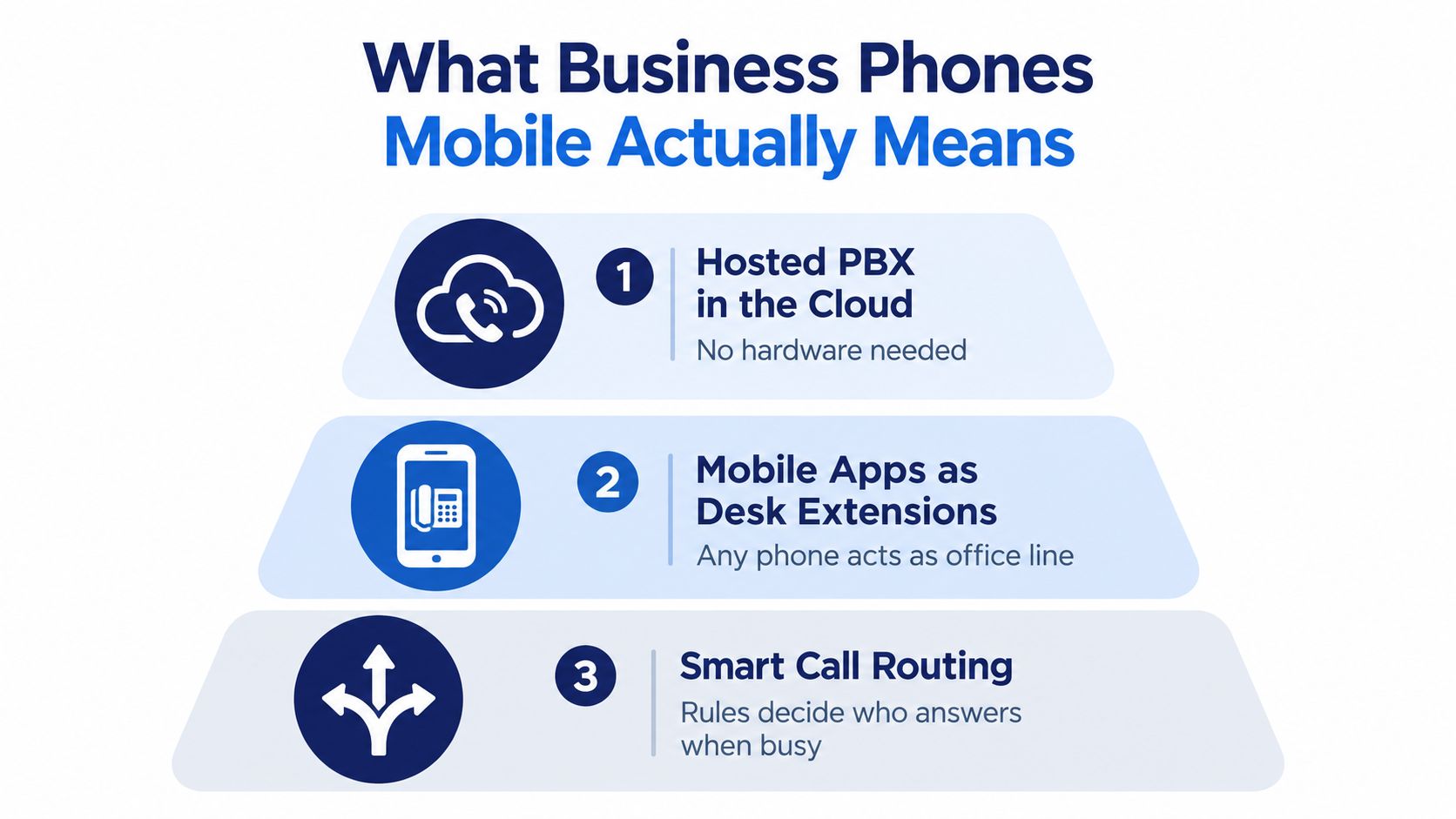
Think of it as a moving office
The hosted PBX is the building. It holds the company numbers, extensions, ring groups, call queues, auto attendants, voicemail boxes, and call policies. Because it lives in the cloud, it doesn't care whether the person answering is in headquarters, on home Wi-Fi, or parked outside a customer site.
The mobile app is the desk that travels with each employee. It turns a smartphone into a business extension. Staff can place calls from the company number, receive transferred calls, check voicemail, and stay part of the same call flow without exposing their personal mobile number.
The routing logic is the receptionist. It decides what happens when someone calls sales at lunch, support after hours, or the owner while they're in a meeting. Good routing is what makes a business feel organized, even when the team is scattered.
The stack that actually matters
Business phones mobile usually includes these layers working together:
- Hosted calling core: Extensions, direct numbers, ring groups, queues, and admin controls.
- Mobile and desktop endpoints: Native apps on iOS and Android, plus softphones for laptops and desktops.
- Call handling rules: Time schedules, hunt groups, overflow routing, failover numbers, and presence status.
- Customer-facing polish: IVR menus, recorded greetings, and shared business caller ID.
- Operational memory: Call recording, searchable logs, and visual voicemail with transcription.
A cell plan gives you a number on a handset. A mobile-ready phone system gives your company a repeatable way to answer, route, record, and manage calls across people and places.
This is software, not just dial tone
That distinction matters. A cellular voice plan can ring a phone. It can't easily act like a business system with controlled routing, admin visibility, department menus, and centralized policy. Business phones mobile sits on top of VoIP and cloud telephony so the company keeps control of the call, even when the employee answers on a personal device.
That's the reason a call can start on a smartphone, continue under the same extension, and still land in the right voicemail box if nobody picks up. Without that architecture, you don't have a mobile office. You just have employees improvising.
The Core Features That Power a Mobile Office
Features matter less than what each one prevents. I tell clients to score every capability as a job to be done. If a feature doesn't stop a real failure mode, it's decoration.
Start with the failure you're trying to avoid
A mobile app isn't just about convenience. It prevents staff from using personal numbers for business calls, keeps the company caller ID consistent, and gives the team a fallback when the office internet or desk hardware isn't the active path.
Call routing isn't “advanced.” It's the difference between a customer reaching the right person and getting trapped in voicemail because somebody is away from their desk. IVR isn't about sounding big. It's about sorting calls early so billing doesn't wait behind support and new leads don't sit in a general mailbox.
If you want a deeper breakdown of the architecture behind this, a solid primer on how a cloud phone system works helps frame the feature set correctly.
Core Mobile Office Features at a Glance
| Feature | Job to Be Done | What Goes Wrong Without It |
|---|---|---|
| Mobile apps | Let employees answer and place business calls from smartphones without exposing personal numbers | Staff use personal lines, customers call the wrong number back, and call history gets fragmented |
| Call routing | Send calls by schedule, skill, department, or backup path | Callers hit dead ends, calls pile up on one person, and simple absences cause missed opportunities |
| IVR | Greet callers consistently and direct them before a human gets involved | Front-desk bottlenecks form, transfers multiply, and callers wait for basic triage |
| Call recording | Preserve conversations for training, dispute review, and process improvement | Managers coach from memory, customer disagreements turn into guesswork, and service standards drift |
| Visual voicemail with transcription | Turn voicemail into searchable, shareable text | Messages get ignored, forwarding is clumsy, and urgent requests stay buried in audio files |
| Presence and status | Show who's available, busy, offline, or on another call | Teammates blind-transfer, callers get bounced around, and supervisors lose visibility |
| Softphone support | Keep calls flowing on laptops and desktops as well as phones | Home-office users depend on one device, and recovery options shrink during outages |
Buy capabilities, not buzzwords
Some vendors pile on labels. Ignore the labels. Ask what happens when a salesperson is on another call, when support closes for the evening, or when a manager needs to find a voicemail from two days ago. If the answer involves manual forwarding, personal mobiles, or “someone should check that mailbox,” move on.
The right feature set reduces handoffs. The wrong one creates them.
A mature mobile office also needs sane administration. If routing rules, greetings, user permissions, and recordings are hard to manage, the system will decay fast. Businesses outgrow bad administration long before they outgrow basic calling minutes.
Why Mobile-Ready Cloud Calling Beats a Legacy PBX
A legacy PBX assumes people work where the cable ends. That assumption is now the problem.
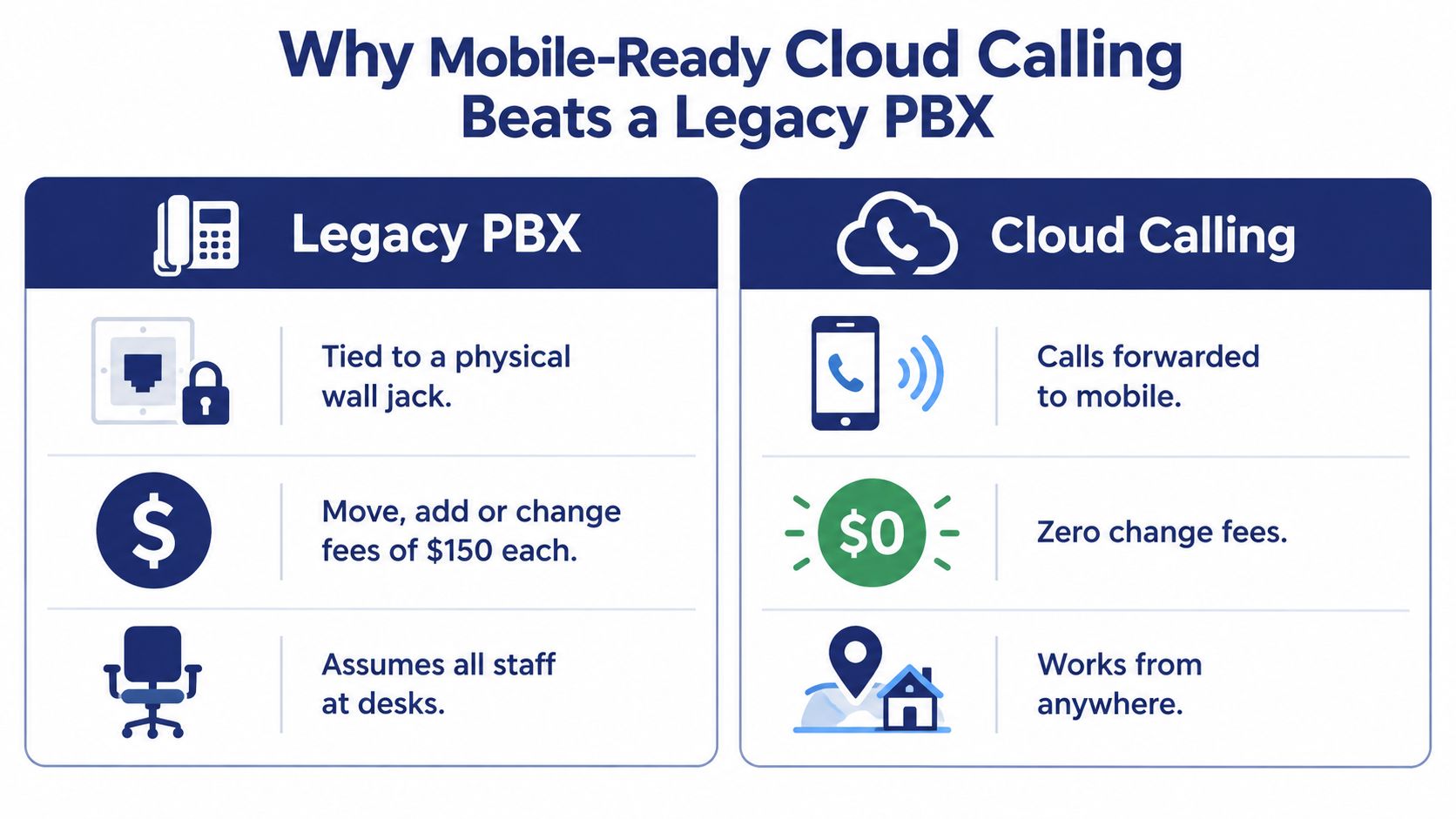
Here's the practical difference. With old hardware, numbers and extensions are treated like physical assets. Moves, adds, and changes often turn into projects. With cloud calling, the extension follows the employee. That one change removes a surprising amount of friction.
Three moments where the gap becomes obvious
Opening a second office. A PBX-first setup pushes you toward duplicate hardware, local wiring decisions, and awkward number management. A cloud setup lets both locations live under one call flow, one directory, and one admin view.
Hiring remotely. The old model asks when the desk phone will arrive. The cloud model asks whether the user needs a mobile app, a softphone, a Yealink handset, or all three. That's the right question.
Handling busy seasons. Legacy systems often force capacity decisions into hardware planning. Mobile-ready systems let you change routing, add temporary users, shift overflow, and keep the same customer-facing numbers in play.
The biggest win isn't feature count. It's speed. A mobile-ready system lets the business adapt without rewiring how calls move.
The market already chose mobility
This is also where a lot of SMB content still underserves buyers. Mobility isn't just a convenience checkbox. Industry reporting notes that 22% of PBX users say their current system lacks adequate mobility options, and 55% of respondents value full-featured mobile apps most in cloud phone service, based on RingCentral's coverage of cloud phone buying priorities.
That tracks with what I see in rollouts. Teams don't complain that the phone system lacks another handset model. They complain that they can't answer the business number cleanly from wherever work happens.
Security, Compliance, and Admin Visibility
Security decisions around business phones mobile should be boring, strict, and documented. If a vendor gets vague here, stop the demo.
Score the system in four areas
Use this matrix and mark pass or fail. Don't let anyone distract you with UI polish until these basics are covered.
| Area | What to Require | Legacy PBX Risk | Hosted Mobile Win |
|---|---|---|---|
| Transport encryption | TLS and SRTP, plus a documented key rotation policy | Older deployments may rely on weak or inconsistent protection between endpoints and trunks | Modern hosted systems can standardize encrypted signaling and media across supported clients |
| Identity and access | SSO, MFA, role-based permissions, and immediate device revocation | Shared credentials, weak separation of duties, and slow offboarding | Centralized identity controls reduce risk when staff join, leave, or lose devices |
| Compliance posture | Support for HIPAA and HITECH where needed, PCI-DSS awareness for card workflows, GDPR and CCPA data handling, and retention controls for regulated recordings | Compliance often depends on manual process and scattered storage | Hosted tools can centralize policy, retention, and audit handling if configured correctly |
| Admin visibility | Real-time call states, change logs, recording access controls, and exportable CDR reporting | Blind spots make troubleshooting and accountability harder | Admins can see call flow, user state, and history without touching every endpoint |
Governance matters more than hardware
A company-owned phone can still be insecure. A personal phone can be workable if access is controlled, business data stays within the app, and lost devices can be cut off fast. That's why the operating model matters more than whether the handset came from your IT closet.
For UK teams or firms working with UK partners, practical guidance on how to protect your Sheffield business data is worth reviewing alongside your phone rollout. The same principles apply. Identity, encryption, access control, and documented process beat wishful thinking.
Don't buy a mobile phone system that hides logs, permissions, or recording controls behind support tickets. Admin visibility is part of security.
Compliance isn't optional by industry
Healthcare teams need to think about patient information. Financial services teams need to think about retention and supervision. Any business touching payment data needs to know exactly where sensitive data appears in a call workflow and when recording should pause.
If your vendor can't explain those controls clearly, they're not ready for a serious SMB environment.
How to Pick the Right System for Your Business
Most phone demos are too easy to pass. Everyone can show you an app making a test call. What matters is whether the system survives real operating conditions.
Must-haves
These are baseline requirements for any serious business phones mobile deployment:
- Native mobile apps: Require solid iOS and Android apps that preserve business caller ID and support inbound and outbound calling cleanly.
- Routing depth: You need time-based rules, department routing, overflow logic, and after-hours handling.
- Usable IVR: The menu should be easy to manage and deep enough to mirror how your business handles calls.
- Recording controls: Recording should be straightforward to enable, review, and govern.
- Visual voicemail with transcription: Staff should be able to scan and forward messages instead of replaying audio all day.
- Presence and softphone support: Users need status visibility and a desktop option that works without weird workarounds.
Nice-to-haves
These features usually signal a more mature platform:
- CRM connectors: Helpful if sales and service teams live inside a CRM.
- Business SMS and MMS: Useful when customers prefer text follow-up.
- Queue analytics: Necessary if your team handles steady inbound volume.
- Webhook or API access: Valuable when you want to tie phone events into other workflows.
Deal-breakers
Walk away fast if you hear any of these:
- Per-feature nickel-and-diming: Core calling functions shouldn't be scattered across add-ons.
- Locked devices only: You want deployment flexibility.
- No BYOD path: That's disconnected from how many teams work.
- Long contracts without a good reason: Commitment should match confidence.
- Support hidden behind premium tiers: If calling is critical, support can't be a luxury item.
SMB Selection Checklist at a Glance
| Tier | Capability | Why It Matters | Score (1-3) |
|---|---|---|---|
| Must-have | Native iOS and Android apps | Keeps staff reachable on the devices they already use | |
| Must-have | Smart call routing | Prevents missed calls and bad transfers | |
| Must-have | IVR and auto attendant | Gives callers structure and consistent entry points | |
| Must-have | Call recording | Supports training, review, and accountability | |
| Must-have | Visual voicemail transcription | Makes voicemail actionable instead of buried | |
| Must-have | Presence and desktop softphone | Improves handoffs and backup answering paths | |
| Nice-to-have | CRM integration | Reduces context switching for reps | |
| Nice-to-have | Business texting | Matches how many customers prefer to communicate | |
| Nice-to-have | Queue analytics | Helps managers adjust staffing and routing | |
| Nice-to-have | API or webhooks | Enables automation and custom workflows | |
| Deal-breaker | Device lock-in | Limits rollout options and increases friction | |
| Deal-breaker | Expensive support access | Slows issue resolution when calls matter most |
One practical note on procurement. IDC's 2026 forecast says business-use smartphone shipments contracted 10.2% and corporate refresh cycles stretched to 3.3 years, according to IDC's reporting on business smartphone procurement trends. That means you should choose a phone system that tolerates longer device lifecycles and mixed fleets, not one that assumes everyone gets a fresh handset on a tight schedule.
Migrating From a Legacy PBX Without Downtime
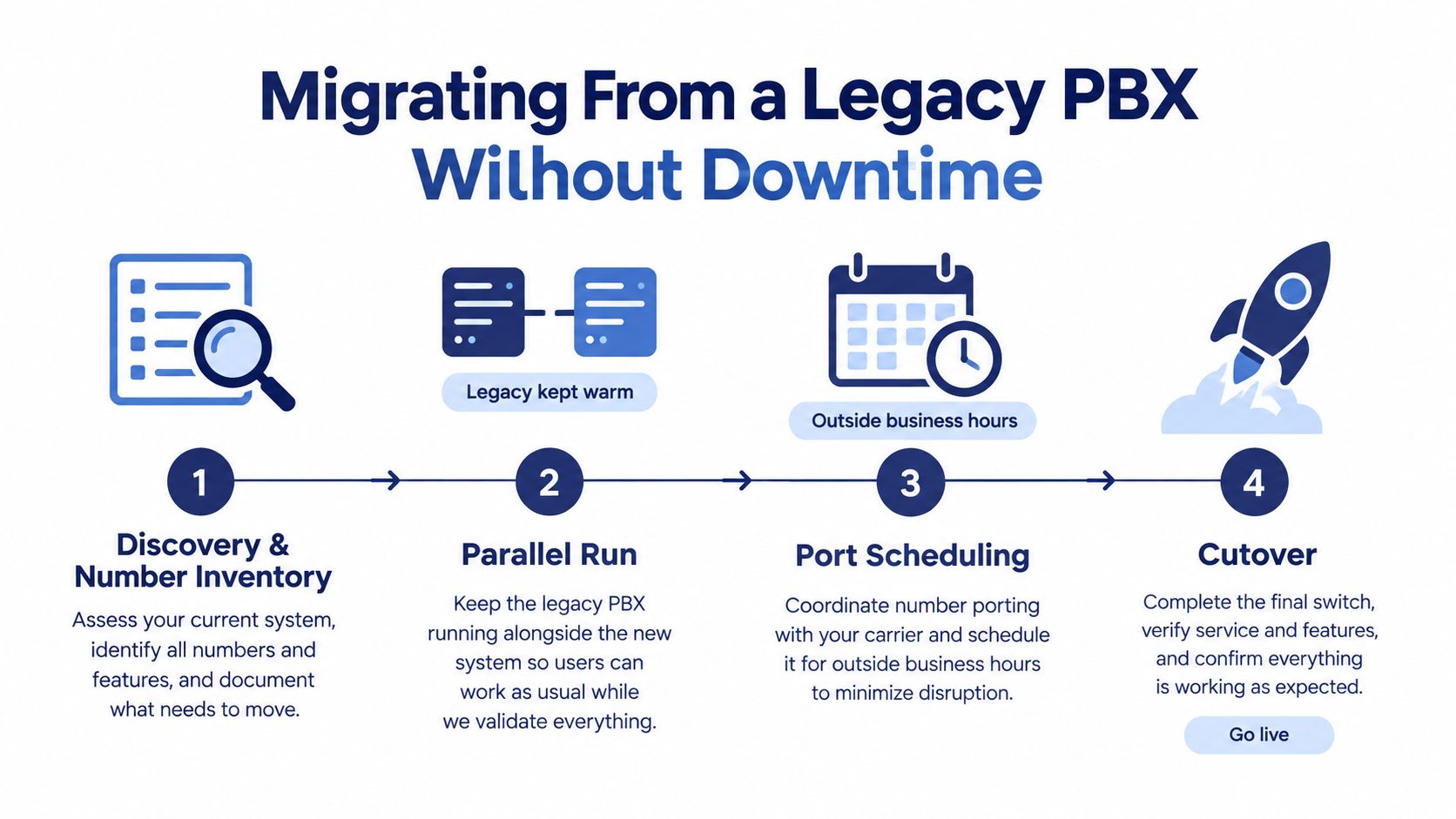
Zero-downtime migrations aren't magic. They're staged cutovers with overlap, testing, and a rollback plan that somebody wrote down.
The four phases that keep calls alive
Start with discovery. Inventory every main number, direct inward dial, hunt group, fax line, alarm path, elevator line, and weird exception nobody remembers until cutover week. If it can ring, route, or fail, document it.
Then run old and new in parallel. Keep the legacy PBX warm while the hosted system is configured, tested, and piloted with a small user group. That overlap is what gives you safety.
Schedule number porting outside peak hours and use temporary forwarding where needed. If you haven't worked through the mechanics before, read up on VoIP phone number porting for business systems before you set the date.
Finally, do the cutover with support on standby and a rollback path ready. Friday afternoon can work well for a soft cut if your traffic is lighter and your team is available for quick fixes.
The mistakes that cause avoidable outages
Most downtime comes from boring misses:
- Forgotten lines: Fax numbers, entry systems, alarms, and spare DIDs often get skipped.
- Untested failover: Teams assume overflow routing works because it was configured.
- No hypercare window: Users find issues after go-live, but nobody is actively watching.
- Bad ownership: If no one owns the call flow map, problems linger too long.
Keep temporary forwarding available until you're satisfied that every critical path is working. Customers should never hear a dead line because your project plan looked tidy on paper.
Putting It Together and Your Next Steps
The cleanest way to think about business phones mobile is this. You're not buying phones. You're designing how calls move through your company.
A solid setup gives each employee one business identity across mobile app, desktop softphone, and optional desk handset. The system answers, routes, records, and stores messages consistently whether the person is in the office or not. That's why hybrid teams get tighter call control, multi-location companies drop hardware headaches, and managers regain visibility.
One option in this category is SnapDial, which packages hosted PBX calling, mobile apps, call routing, IVR, recording, visual voicemail transcription, cloud faxing, and admin controls in one platform. That kind of bundle is useful when you want fewer moving parts, but it still needs to be measured against your own routing, security, and support requirements.
Do four things this week:
- Audit your current bills and numbers: Build the inventory, not the one people think exists.
- List the five worst calling problems: Missed leads, routing confusion, voicemail delays, remote access, whatever hurts.
- Run a short pilot: Put a few users on mobile apps with real call flows and see where the cracks are.
- Pick a low-volume cutover window: Migrations succeed when the calendar cooperates.
If your current system depends on where people sit, it's already behind your business.
SnapDial offers a hosted business phone system built for the exact problems covered here: mobile-ready calling, smart routing, centralized admin control, and legacy PBX replacement without a messy overhaul. If you want to compare your current setup against a cleaner mobile office design, visit SnapDial and map your requirements before you book a demo.