

A customer calls about a refund they swear was promised last Tuesday. Your agent remembers a different amount, and the ticket notes are thin. Without a file, the argument is two memories and a lost account. Business phone call recording exists so that moment has an objective audio record, tied to a date, a number, and a person. The hidden cost is not the record button. It is consent, who can open the file, and how long you keep it. Each cloud PBX capture method also decides which calls ever reach the archive.
What Business Call Recording Is, Benefits and Risks
Suppose a customer disputes a fee after a phone order, while the agent recalls agreeing to a different term. If the call was recorded, an authorized reviewer can check what was said instead of relying only on memory or incomplete notes. That can resolve a dispute, but the audio also becomes a record that needs a defined purpose, access controls, and a deletion date.
Business phone call recording captures conversations between staff and customers, vendors, or colleagues. The system stores audio and can associate each file with details such as the date, time, phone numbers, extension, and agent. A recording does not prevent a mistake. It gives staff a source to review afterward, provided the relevant call was captured and the file is available.
Companies can record every call, selected calls, or a mix. In a survey of more than 80 professionals, respondents cited dispute resolution and risk management most often, followed by training and coaching. They could select multiple reasons, so the shares overlap.
Why companies record calls, by share of respondents
| Reason | Share of respondents | What it lets you prove or improve |
|---|---|---|
| Dispute resolution and risk management | 69% | What was said during a disputed call |
| Training and coaching | 56% | Real examples for agent feedback |
| Regulatory or internal compliance | 43% | Evidence that required steps were followed |
| Order verification | 33% | Customer confirmation of quantities, prices, and terms |
| Sales-performance optimization | 19% | Which pitches and objections close deals |
| Staff motivation | 11% | Recognition of strong calls |
| Product-development insights | 10% | Complaints and feature requests to investigate |
What the table doesn't name
The table lists common reasons, but the operating value depends on what a team does with recordings. A manager can review a disputed interaction, use a suitable call as a coaching example, or flag a product issue for investigation. These uses require judgment: one recording may not represent a broader pattern, and a call selected for coaching should be handled with appropriate access and context.
Recorded examples may help new agents hear how experienced staff handle a conversation. Whether that improves onboarding depends on how the examples are selected and used. Pair them with clear guidance, rather than treating a recording as a substitute for training.
Risks that arrive with the file
Recording creates responsibilities along with the audio. Each file can contain personal, financial, or health information, and the risk continues while it remains stored or accessible.
- Consent failures: A call involving someone in an all-party consent state may be unlawful to record without the required consent. A notice and a process for handling refusal matter.
- Sensitive data in the audio: Card numbers or health details become part of the recording if someone says them. Use appropriate controls to prevent unnecessary capture or exposure.
- Identifiable voices: A compromised file can reveal a person's voice and the details discussed, not just a ticket number.
- Over-retention: Keeping recordings indefinitely “just in case” extends exposure and makes deletion harder to manage.
- Employee distrust: If staff feel watched without clear limits, they may move work conversations to personal phones, leaving the business without the intended record.
- Unbounded storage: Audio, transcripts, and backups accumulate unless the organization sets retention rules and applies deletion to each copy.
Practical rule: If you can't name the purpose for a call category, don't record that category yet.
Legal Rules for Consent, HIPAA, PCI, GDPR and State Laws
Consent is a workflow, not a sentence you play once and forget. Guidance on AI meeting assistants and recording treats it as jurisdiction-, participant-, and data-sensitive. U.S. federal law generally permits one-party consent. Some states require consent from everyone on the call. Verify current statutes for every state involved before you publish a notice. States commonly discussed in this group include California, Florida, Illinois, Maryland, Massachusetts, Montana, New Hampshire, Pennsylvania, and Washington.
A single "this call may be recorded" line is a weak control when the caller, the agent, and the office sit in different places. Continuing after a clear notice is often treated as implied consent, but that depends on the law that applies to the people on that call.
Why a transcript changes the file
AI transcription and summaries create a second, searchable record. You aren't only storing audio. You're processing text that can be queried by name, account, or complaint. Neutral guidance is to tell participants that recording or AI assistance is active, explain outputs and limits, control vendor access, and set retention and deletion. UK guidance says monitoring must be explained to workers and callers, including its purpose, and warns that routinely recording call content may not be proportionate. A deeper walk-through of notices and exclusions sits in this call recording compliance guide.
Recording rules by jurisdiction and regulation
| Rule | Who it covers | What it requires | Practical action |
|---|---|---|---|
| US federal law | Calls in the United States | Generally one-party consent | Don't rely on it alone; announce recording to everyone |
| All-party consent states | Calls with a participant in a state such as California, Florida, or Illinois | Every participant must consent | Play a notice and get affirmative consent, or stop recording |
| HIPAA | Healthcare providers and their vendors handling health information | Safeguards for recordings containing protected health information | Sign a business associate agreement with the vendor and restrict access |
| PCI DSS | Any call where card details are taken | Card validation codes must not stay in audio after authorization | Pause recording or mask tones before card details are spoken |
| GDPR | EU residents or EU-based operations | Lawful basis, transparency, data minimization, and defined retention | Document the purpose, publish a notice, and set deletion dates |
| UK GDPR and ICO guidance | UK callers and staff | Monitoring explained, with routine recording justified as proportionate | Record targeted call types and explain the purpose |
| Employee monitoring notices | Staff who take or make calls | Clear notice of monitoring and its purpose | Put recording rules in the employee handbook and collect acknowledgment |
Calls a single greeting can't cover
The table is a lookup. Operations still need decisions a greeting can't make.
- Inbound versus outbound: Inbound can use the auto attendant. Outbound needs the agent to speak the notice before the substance of the call.
- Transfers: The second agent inherits the recording. Confirm the notice already played, or play it again.
- Late joiners: A supervisor who joins mid-call needs a fresh line before they speak.
- Refusals: Offer another channel and flag the call so it isn't recorded.
For distributed teams, the notice should follow the caller's or agent's location, not the head office. A mobile app in another state can put you under a stricter rule than the office address on your website.
On a mixed-jurisdiction call, apply the strictest notice that covers any participant.
Cloud PBX Recording Methods from Server-Side to Integrations
A remote agent answers on a mobile app while a colleague handles the same queue on a desk phone. If recording runs only on the agent's app, the desk-phone call may never reach the archive. The capture point determines which audio is saved, while consent, access, and retention rules determine how each recording is handled afterward.
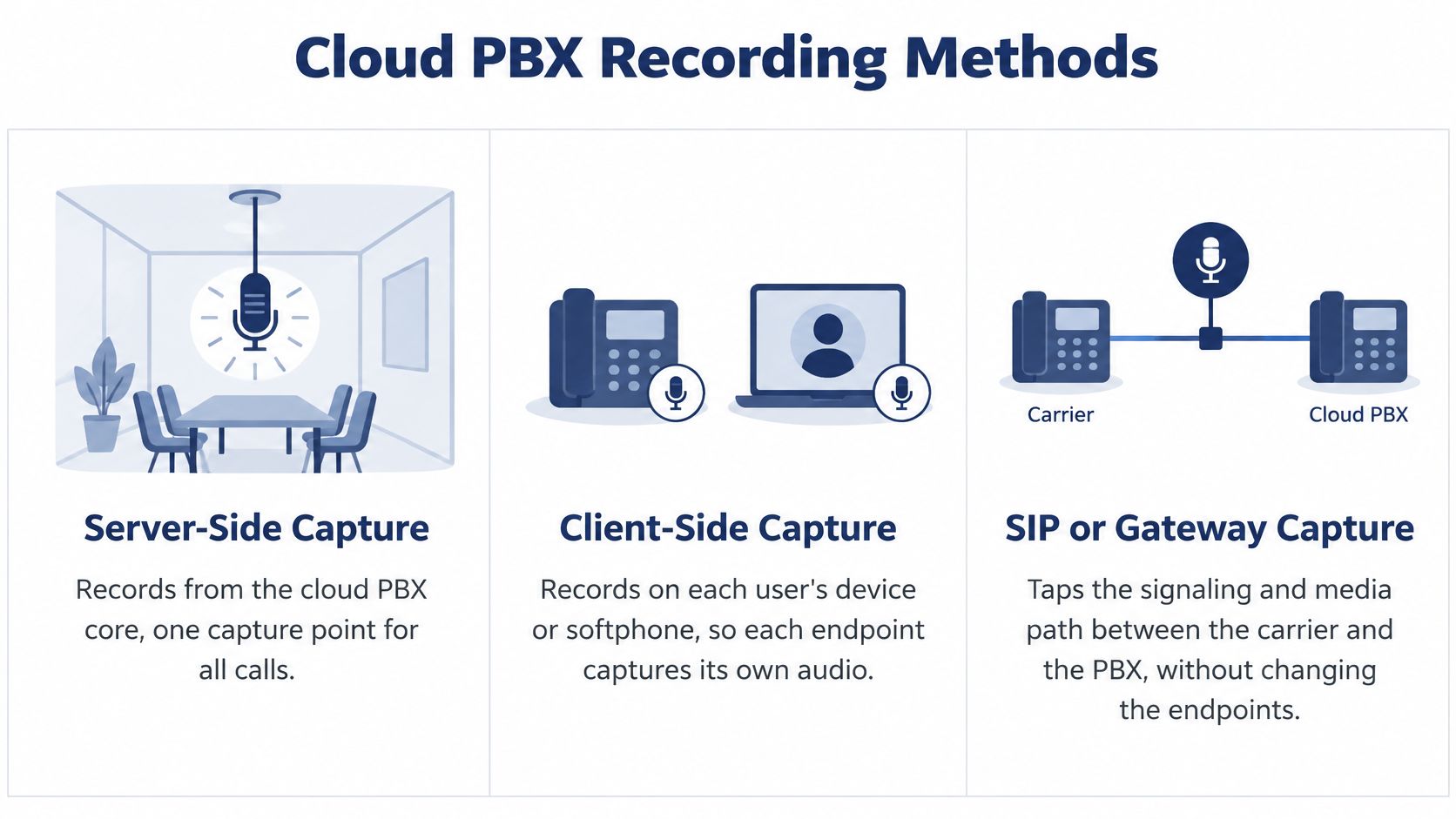
Cloud PBX recording methods compared
| Method | Where audio is captured | Best fit | Main limitation | Calls that reach the archive |
|---|---|---|---|---|
| Server-side (native cloud PBX) | Platform media server | Multi-location teams and mixed devices | Depends on the platform's retention and rule options | Every call routed through the platform |
| Client-side (softphone or desktop) | The user's app or device | Remote agents working in a single app | Misses calls handled on other devices | Only calls handled on that app or device |
| SIP or gateway capture | Traffic mirrored or tapped on the SIP path | Regulated centers needing independent capture | Extra hardware or virtual appliance to maintain | Calls crossing the tapped SIP path |
| CRM and helpdesk integration | Recordings linked to contact records through connectors | Sales and support teams searching by customer | Permissions and data mapping must match in both systems | Only recorded calls that the connector links to a contact |
| Hybrid cloud with offsite archive | Primary capture in the cloud, copy stored elsewhere | Disaster-recovery requirements | Added storage cost and copy-sync checks | The same calls as the primary capture, plus an offsite copy |
These methods capture audio at different points. Server-side recording takes audio on the PBX media server, covering calls routed through the platform across supported devices. Client-side recording captures audio within a specific app or device, so calls handled elsewhere can be missed. SIP or gateway capture monitors traffic on a defined network path, which can provide an independent copy but excludes calls that do not cross that path.
For an office with mixed devices, server-side capture can reduce gaps caused by staff switching between desk phones and softphones. Still, check which routes pass through the PBX and whether its recording rules cover each queue and number. A CRM connector adds another step: it links an existing recording to a customer record, but a failed or missing match can leave the audio out of the CRM search results.
A ContactBabel industry study reports call-recording adoption and deployment patterns among its surveyed respondents. The figures describe shares of respondents or recording users, depending on the measure, so they should not be treated as a universal benchmark for every business. Use the study as context, then check your own call paths, device mix, and archive requirements before choosing a capture method.
SnapDial includes call recording with a web portal for users, routing, and recordings. Before committing, ask whether recording rules can be set by number or queue, and check how a cloud PBX system routes calls across sites. A routing change can alter which calls reach the archive.
Match the capture point to the calls you need to retain. Then confirm who can access each file and how long it remains available.
Deployment Checklist and Admin Controls to Set Up
Purpose comes before the toggle. Every later setting, from who is recorded to when the file dies, hangs on that sentence.
- Write one purpose statement per recording category, because every later setting depends on it.
- Map every call path, including extensions, ring groups, queues, the auto attendant, mobile apps, and outbound dialing, because an unmapped path is a silent gap.
- Choose all-call or selective recording for each path based on purpose and caller location, because blanket capture fights selective rules.
- Build notices into the flow, such as a greeting before routing and a spoken notice on direct lines, because agents forget under pressure.
- Turn recording on and assign roles, because capture without an owner is an open folder.
- Test inbound, outbound, transfer, voicemail, late-join, and mobile calls, and confirm each recording plays back, because a green status isn't audio.
- Set retention and deletion dates, then confirm offsite copies exist, because a policy nobody configured isn't a policy.
- Review playback and configuration logs after 30 days, because early misuse shows up in the log, not in a complaint.
If you are still drawing those paths, it helps to configure call routing and transfers before you decide which legs get recorded. A transfer that leaves the platform can also leave the archive.
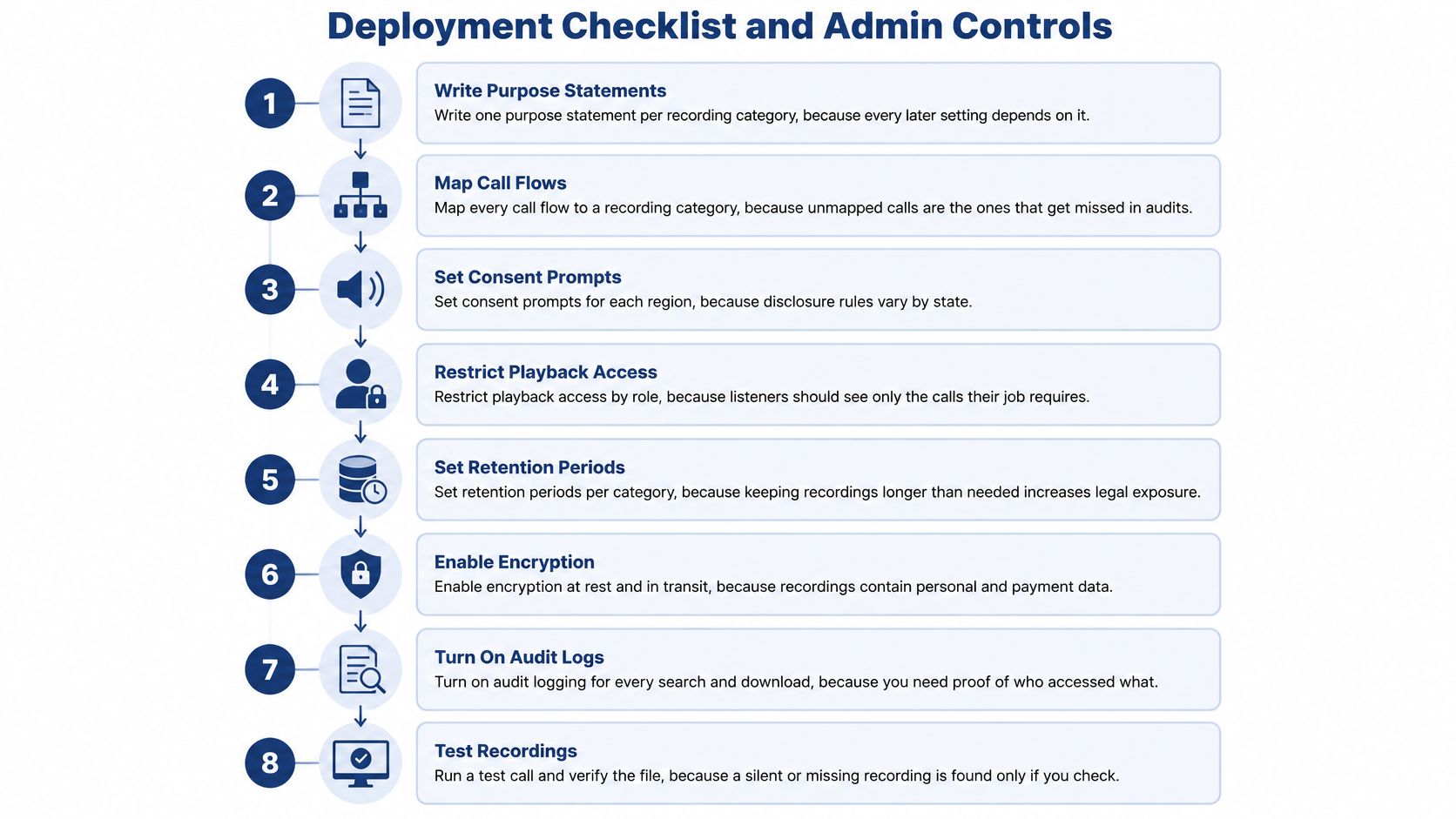
Controls auditors ask about first
NIST VoIP security guidance recommends strong authentication and access control because compromise of the voice gateway can expose communications and recording functions. Treat recordings as sensitive enterprise data, not ordinary call logs.
- Role-based access: Separate administrator, supervisor, quality-assurance, and export permissions so a listener sees only the calls their job requires.
- Multi-factor sign-in: Require it on the portal so a stolen password isn't enough.
- Audit logs: Log every playback, download, deletion, and configuration change.
- Encryption: Protect audio, transcripts, and backups in transit and at rest.
- Retention tied to purpose: A schedule limits how much a storage compromise can expose, and for how long.
Least privilege cuts the chance that one broad admin account becomes an unauthorized disclosure. Confirm role, log, and retention options during setup before go-live. Auditors ask about those settings first.
A compromised voice gateway can expose the recordings themselves, so access control matters as much as capture.
Best Practices for QA, Privacy, Retention and Disaster Recovery
After launch, the program lives or dies on habits. Sample a fixed set of calls per agent each week, score them on a short scorecard, and calibrate scores across reviewers each month. A huge unreviewed archive doesn't coach anyone. Search works when each call carries a disposition, a customer ID, and a reason, transcripts support keyword search, and file names stay consistent. Teams that want a scoring model can start from call center quality monitoring and keep the scorecard shorter than the call.
Card data doesn't belong in the archive
PCI Security Standards Council guidance states that card-validation codes and other sensitive authentication data must not remain in digital audio after authorization, even when the recording is encrypted. If that data is captured, delete it securely right after authorization, or document a risk assessment and compensating controls. Suppress recording before verbal card details are spoken, mask DTMF tones, and check redacted audio, transcripts, backups, and exports for residual payment data. That turns the archive into a quality file instead of a cardholder vault.
Example retention schedule by recording type
| Recording type | Example retention | Deletion trigger | Note |
|---|---|---|---|
| General service calls | 90 days | Automatic deletion after the period | Adjust to match your complaint window |
| QA-sampled calls | Through the review cycle | Deletion after the review cycle closes | Keep scorecards even after audio is removed |
| Disputed calls and legal holds | Until the hold is released | Written release from legal or management | Suspend automatic deletion for these calls |
| Calls with card details | Not retained | Pause or redact at capture | Verify transcripts and backups contain no card data |
| Healthcare-related calls | Set by counsel and state rules | Confirmed retention policy | Don't apply the general period by default |
The 90-day row is an example, not a legal minimum. Point your written policy at this schedule and change the cells with counsel. Pause automatic deletion when a legal hold applies.
Copies you can restore
Keep an offsite copy. Define how much data loss you can accept and how fast recordings must come back, then test a restore every quarter. A copy you have never restored is a hope, not a plan.
Assign an owner to scoring, tagging, payment suppression, retention, and the restore test. Unowned tasks are the ones that stop without anyone noticing.
Confirm Your Recording Policy Before the First Recorded Call
Before recording starts, decide which calls enter the archive and who can access them. A one-page policy can cover the purpose, scope, notice method, access roles, retention periods, deletion process, legal-hold exceptions, and review schedule. Refer to the retention schedule above rather than duplicating dates that may later diverge.
Adapt each notice to the call type and recording method. Make the notice clear and deliver it before recording begins.
Inbound, small office: “Thank you for calling Riverside Dental. This call is being recorded for quality and training. If you prefer not to be recorded, let me know, and I will arrange another way to help you.”
Outbound: “Hello, this is Maria from Riverside Dental. This call is being recorded for quality purposes. Are you comfortable continuing?”
Late joiner: “Before we continue, I want to let you know this call is being recorded.”
If someone declines, offer a callback on a non-recorded line or written support, then flag the interaction so it does not enter the archive. For a contact center, name the queue and direct callers to the privacy notice when giving the recording notice.
Assign a policy owner and publish the notices. Before enabling recording for a call category, place a test call and confirm the notice plays, the file is captured as intended, and access is limited to the right roles. Treat each recording as a sensitive record, with a defined route from capture through access and deletion.
SnapDial is a cloud business phone system with call recording and a web portal for managing recording rules, file access, and pauses. If you are replacing a legacy PBX, visit SnapDial to discuss how its settings can support your recording policy.