
The problem usually starts small.
A customer walks into your office, store, clinic, or branch and sees three people near a desk, two more sitting with no idea whose turn it is, and one employee trying to answer a ringing phone while checking someone in. Nothing is technically broken. But the experience already feels disorganized. On the phone, the same thing happens in a different form. Callers hear hold music, wonder if anyone's there, and start deciding whether to hang up.
That's why queue management software matters. It isn't just a nicer way to hand out numbers or display a waitlist on a screen. It's an operating system for customer flow. It helps businesses decide who gets served next, where they should wait, how they're updated, and how managers respond when demand spikes.
The End of Waiting in Line as We Know It
A messy queue changes how people judge your business.
In retail, it makes a staffed store feel understaffed. In healthcare, it adds stress before the appointment even starts. In a service business, it makes customers think nobody owns the process. And in support teams, a long hold queue tells callers that their issue is entering a black box.
Waiting is no longer just a front-desk problem
Businesses used to treat lines as an unavoidable side effect of being busy. That mindset doesn't hold up now. Customers compare your waiting experience to every polished digital interaction they've had elsewhere, whether that's checking into a clinic from a phone, reserving a pickup slot, or getting a callback instead of staying on hold.
That shift is one reason queue management software has become its own serious category. The global queue management system market was valued at USD 793.8 million in 2023 and is projected to reach USD 1.22 billion by 2030, growing at a 6.4% CAGR, according to Grand View Research's queue management system market report.
That doesn't mean every company needs a bank-style ticket dispenser. It means more organizations now treat customer flow as a measurable business function.
Customers rarely complain about “the queue” in technical terms. They complain that nobody told them what was happening.
The old line has been replaced by a managed journey
A good queue system changes the experience before service even begins. People know they've been registered. They know the process. They know whether they should wait nearby, come back later, or expect a call. Staff stop improvising and start working from a shared operating view.
That's true in obvious high-traffic settings, but it also applies in more complex environments. Airports are a good example because movement, timing, and accessibility all matter at once. If you want a useful look at how navigation design and digital guidance can improve airport passenger flow, that broader perspective helps explain why queue design is really a customer movement problem.
Chaos creates hidden costs
The visible issue is a line. The hidden issue is what staff do because the line exists.
They answer the same status question repeatedly. They try to remember who arrived first. They make exceptions on the fly. Managers pull people from other tasks without knowing whether the bottleneck is temporary or structural. None of that shows up on a traditional waitlist, but it drains service quality fast.
Queue management software fixes that by turning waiting into something the business can see, control, and improve.
How Queue Management Software Actually Works
The easiest way to understand queue management software is to compare it with the difference between a crowded lobby and a well-run digital waitlist.
In the old model, the customer's place in line is physical. They stand there, watch the desk, and hope nobody cuts in. In the modern model, their place in line is recorded by the system. That one shift changes everything.
The customer journey from join to service
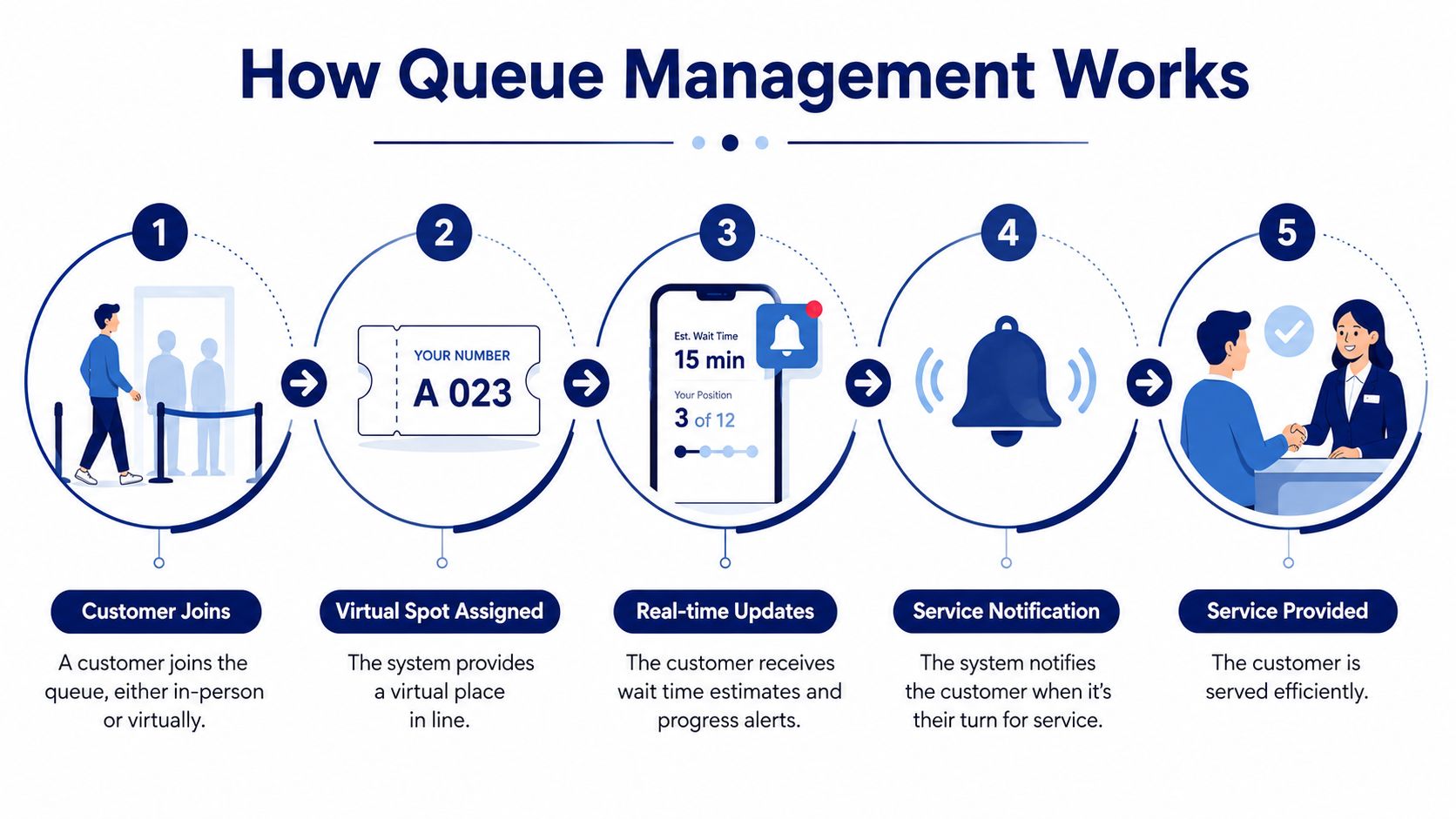
Most systems follow a simple flow:
Check-in happens through a defined entry point
That might be a kiosk, QR code, front-desk tablet, web form, or phone prompt. The goal is to capture enough information to route the customer correctly.The system assigns a place in line
The customer doesn't need to defend their position physically. The software logs arrival, service type, and often priority rules.Waiting becomes virtual or semi-virtual
Instead of hovering near the counter, customers can sit down, shop, finish paperwork, or leave the immediate area if the workflow allows it.The queue updates in real time
Wait-time estimates, service pace, and queue order adjust as staff availability changes.Notification triggers the handoff
A screen, text, desk call, or phone callback tells the customer it's time.
Why the software is more than a digital number dispenser
Much of the value sits behind the scenes. Effective systems rely on real-time operational telemetry, tracking live wait times, queue lengths, and service speeds. That gives managers a live read on where delays are forming and whether they need to reassign staff. Qminder describes this operational use of queue data in its overview of real-time queue management software.
That matters because queues don't fail all at once. They usually fail in stages:
- Arrival spikes faster than expected
- One service category starts taking longer
- A specific desk or team falls behind
- Staff continue working, but throughput drops
- Customers begin asking for updates or abandoning the process
A basic line can't tell you where that happened. Queue management software can.
Practical rule: If your team only notices a queue problem when customers start complaining, you're already managing too late.
Phone queues use the same logic
This is where many businesses miss the bigger picture. A phone queue follows the same operating model as a front-desk queue. The customer checks in by calling. The system identifies intent. It places the caller into the right service path. Then it updates, routes, and notifies.
That's why voice systems and queue systems increasingly overlap. If you need a plain-language primer on how menu-based call routing fits into that process, this guide on interactive voice response explained is a useful companion.
On the phone, the “virtual wait” may be hold, a scheduled callback, or a transfer to the right group. The principle stays the same. Good queue management software protects order, improves visibility, and prevents service requests from turning into unmanaged waiting.
Core Features and Their Business Benefits
Features only matter if they solve a real operating problem.
That's the mistake many buyers make. They compare software checklists without asking what each feature changes in labor usage, customer perception, or throughput. Queue management software earns its keep when it reduces avoidable friction and gives managers better control during busy periods.
Four features that affect ROI
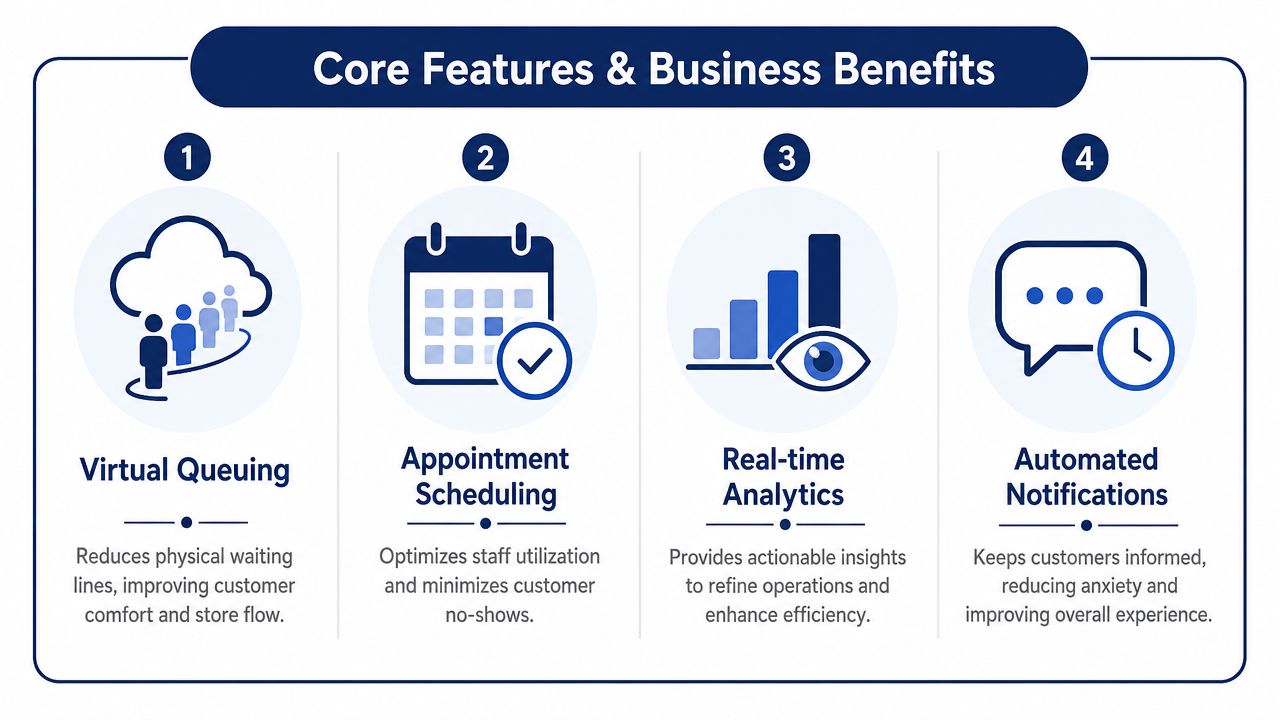
Here's the feature-to-outcome view that matters in practice:
| Feature | What it changes for the business |
|---|---|
| Virtual queuing | Reduces crowding at the service point and lowers the stress that builds when customers have to physically defend their place in line. |
| Appointment scheduling | Shifts some demand out of pure walk-in mode and gives managers a better shot at matching staffing to expected service types. |
| Real-time analytics dashboards | Helps managers see developing bottlenecks instead of reacting after the line has already become visible to customers. |
| Automated notifications | Cuts down on repeated status questions and gives customers clearer expectations about when they'll be served. |
The strongest ROI comes from measurement
Queue management software performs best when teams track operational KPIs consistently. Industry guidance highlights average wait time, service time, queue length, customer abandonment rate, and staff utilization as core metrics. Notably, a Wavetec business guide citing data from over 5,000 retail locations reports that effective queue management can reduce average wait times by 40%, improve peak-hour efficiency by 60%, and deliver average productivity gains of 22% within six months, as outlined in its article on queue management analytics.
Those numbers are persuasive, but the practical lesson is even more useful: you need enough visibility to know whether your queue problem is a staffing issue, a routing issue, or a check-in issue.
What works and what usually disappoints
Some features sound good in demos but don't carry much weight unless the workflow around them is solid.
- A kiosk without good routing logic becomes a prettier bottleneck.
- SMS updates without reliable wait estimates can frustrate people faster, because now the system is wrong in a more official way.
- Dashboards nobody checks during peak periods don't improve service.
- Scheduling without queue coordination creates conflict between booked customers and walk-ins.
A better standard is to ask whether the feature changes a decision in real time.
The best queue feature is the one that helps staff act sooner, not the one that looks best on a sales slide.
For businesses that handle a large volume of inbound requests, this same principle applies in contact centers. Queue data becomes more useful when it's tied to routing and automation rather than sitting in a separate reporting tool. That's why buyers looking at service operations often end up comparing queue tools with broader platforms such as call center automation software.
Scheduling is part of that picture too. In appointment-heavy environments, lessons from specialized tools can be instructive. For example, platforms built around tutoring scheduling software show how much smoother operations become when availability, reminders, and service timing are coordinated instead of handled in separate systems.
Queue Management in Action Across Industries
Queue management software looks different depending on the setting. The underlying job stays the same. Organize demand, route people to the right service point, and keep the waiting experience from turning into confusion.
Retail and branch operations
A retail location often has more than one queue hidden inside it. There's the obvious checkout line, but there may also be a pickup queue, a returns queue, and a queue for specialist help. If all of those collapse into one desk with no routing, the business creates avoidable friction.
Modern systems support multi-modal intake and routing, such as QR codes, mobile check-ins, kiosks, and web portals. That lets the queue engine combine arrival data with routing rules and estimated wait-time calculations so businesses can offer virtual queuing and callback-style options, as summarized in G2's category overview of queue management platforms.
A practical retail setup might look like this:
- Click-and-collect customers check in from the parking lot.
- In-store shoppers scan a QR code for product help.
- Returns customers select a service reason at a kiosk.
- Managers see which queue is growing and move staff accordingly.
Healthcare and public service desks
In clinics and government offices, the queue problem isn't just speed. It's uncertainty.
Patients and visitors need to know they're checked in, that their turn won't be lost, and that the process is moving. A waiting room feels calmer when the system provides order without requiring constant desk interaction. Staff also benefit because they stop fielding the same “Have I been called yet?” question all day.
What works here is controlled intake and clear status communication. What doesn't work is forcing every visitor into the same generic line when service types are different.
Call centers and support teams
Phone support is a queue environment whether companies label it that way or not. The caller joins a line, waits for an available agent, and judges the business based on what happens during that wait.
That's why the strongest queue strategies treat voice as part of the same customer-flow discipline as the front desk. A good phone queue can:
- Route by issue type so billing calls don't sit behind technical support requests
- Announce expected wait conditions so callers know the line is active
- Offer callbacks instead of trapping people on hold
- Show supervisors live queue conditions so they can intervene before service levels slide
Businesses moving from older phone setups to cloud systems often see this clearly once they review practical examples of VoIP in everyday operations. The queue isn't separate from communications. It is one of the core communications workflows.
A line at the counter and a caller on hold are the same business problem. One is visible in the lobby. The other is hidden in your phone system.
Integrating Queues with Your Business Phone System
For many businesses, the most important queue isn't in the building. It's in the phone system.
A customer calling sales, support, dispatch, scheduling, or billing is entering a service queue the moment the call connects. If that experience is clumsy, the business feels clumsy, even if the in-person workflow is polished.

Why a cloud phone platform changes queue management
Standalone queue tools can manage visits, appointments, and front-desk traffic. But phone queues require something else. They need routing, call control, status visibility, and agent availability to work together in one system.
That's where a modern cloud PBX or VoIP platform has an advantage. Instead of treating queue handling as a bolt-on feature, it can make queue logic part of the communications stack itself.
In practical terms, that means businesses can manage:
- Intelligent call routing based on department, time, or caller input
- Wait-time announcements that reduce uncertainty
- Queue callback options so callers don't have to stay on hold
- Real-time supervisor views of active call queues
- Reporting tied directly to call behavior
The result is simpler administration and fewer handoffs between disconnected systems.
What good call queue design looks like
A well-designed call queue doesn't just hold people in order. It decides what should happen next with the least effort from the caller.
That may start with IVR menus, continue through skill-based routing, and end with a live handoff or callback. It may also pull in customer context from connected systems so the call lands with the right person faster. That integration layer is one reason businesses evaluating unified communications also look at computer telephony integration software.
A few design choices make a big difference:
Short menu trees beat clever menu trees
If callers have to decode your structure, routing slows down before the queue even starts.Callbacks should preserve the customer's place
Otherwise they feel like a deflection tactic, not a service feature.Announcements should be useful
Repeating generic apologies without context makes hold time feel longer.Queue reporting should lead to action
Supervisors need enough live visibility to move people, not just enough history to explain what went wrong later.
Here's a brief walkthrough of how call queues fit into a cloud communications workflow:
The unified model is easier to run
This is the overlooked advantage. When queues live inside the same platform as calling, voicemail, routing, mobile access, and reporting, operations get easier for both IT and frontline managers.
You're not trying to reconcile one dashboard for the front desk, another for the call center, and a third for the phone vendor. You have one environment for inbound demand, whether the customer walked in, booked online, or called your main number.
That's why queue management software increasingly belongs in the broader conversation about cloud communications, not just customer lines in a lobby.
How to Choose and Implement Your Queue System
Most buying mistakes happen because teams shop for features before they define the operating problem.
If you're choosing queue management software, start by identifying where the experience currently breaks. Is the issue unclear check-in, overloaded phones, poor routing, crowded waiting areas, or inconsistent handling across locations? A tool that solves one of those well will beat a platform with a longer feature list that solves none of them cleanly.
What to evaluate before you buy
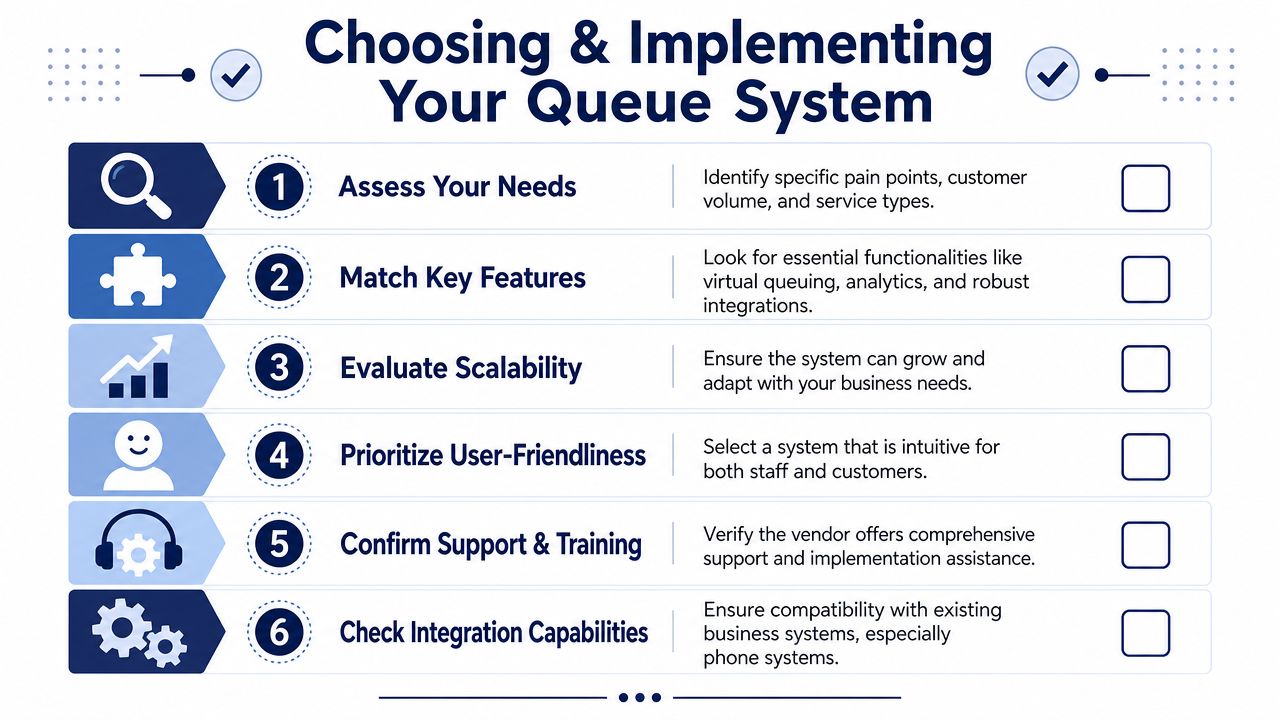
Decision-makers should look beyond convenience features. QueueAway's guidance stresses that buyers should assess ADA-friendly access, multilingual workflows, centralized control across locations, and hardware reliability, especially when kiosks or tablets are involved, in its guide to evaluating queue management systems for US businesses.
Use that as a practical checklist:
- Accessibility: Can all customers use the system without needing staff intervention?
- Governance: Can headquarters manage settings across multiple sites consistently?
- Integration: Will the system connect with scheduling, CRM, POS, or phone workflows?
- Hardware reality: If the setup depends on kiosks or displays, are those devices durable enough for daily use?
- Usability: Can staff learn it quickly during a busy week, not just in a calm demo?
Buy for the workflow you need on your busiest day, not the demo you saw on a quiet afternoon.
A simple implementation plan that works
Implementation doesn't need to be dramatic, but it does need ownership.
Define the service goal
Pick the operational outcome you care about most. Faster check-in, cleaner routing, fewer hold complaints, or better visibility across locations.Choose the few KPIs that matter
Keep the dashboard focused. If the team can't act on the metric, don't center the rollout around it.Train to the actual customer journey
Staff shouldn't just learn the interface. They should practice what they say, when they reroute, and how they handle exceptions.Pilot and tune
Start with one location, one department, or one queue type if possible. Fix workflow issues before scaling.Review live patterns regularly
Queue systems improve when managers use the data to adjust staffing, routing, and service windows, not when reports are filed away.
The best implementations feel quieter after launch. Fewer interruptions. Fewer status questions. Fewer customers wondering whether the system noticed them at all.
If your busiest queue now lives on the phone, SnapDial is worth a look. Its cloud business phone platform includes smart call queue management, queue callback, wait-time announcements, real-time statistics, and reporting in one managed system, so teams can replace legacy PBXs with a cleaner, more unified customer experience.