

A sales representative checks the phone after a busy morning and finds no voicemail alert. A prospective customer called, left a message, and moved on before anyone noticed. In another office, a support manager discovers that an escalation sat unheard because the desk phone's message lamp never changed and the mobile app had been restricted in the background.
These failures are rarely caused by one bad setting. The voicemail platform, PBX, SIP endpoint, mobile operating system, carrier configuration, email service, and user preferences all have to cooperate. A reliable voicemail notification strategy treats that entire chain as a business process, not as a single checkbox.
Why Voicemail Notifications Matter for Modern Business
Voicemail used to follow a pull-based workflow. Employees manually dialed into a mailbox, entered a PIN, and checked whether a message was waiting. Modern phone apps and business communications platforms can surface a new message through a visual list, an alert, a transcript, or an email, shifting awareness toward a push-based model. Google's phone app guidance reflects this broader transition from checking manually to receiving message status and content through supported devices and carriers.
That change affects more than convenience. A business caller may be asking for a quote, reporting an outage, confirming a delivery, or escalating a customer issue. If the notification arrives late, the organization loses the opportunity to respond while the conversation is still active.
Operational rule: A voicemail that exists but isn't surfaced to the right person has almost the same practical value as a voicemail nobody recorded.
Consumer behavior makes that interface especially important. One 2026 compilation reported that 80% of phone calls go to voicemail, while only about 20% of those callers leave a voicemail; it also estimated that only 33% of voicemails are ever listened to. The same compilation cites response rates from unknown numbers falling below 3%, with 82% of people ignoring voicemails from unknown callers. These figures come from SellCell's voicemail statistics compilation, and they point to a practical conclusion for business teams: the notification must make the scarce message easy to recognize, prioritize, and retrieve.
The distinction between inbound and outbound calls also helps clarify ownership. Inbound calls create opportunities and service obligations, while outbound calls often depend on a timely callback or follow-up. A team that wants to reduce missed-call notification failures should map voicemail alerts to those workflows, rather than leaving every user with the same default behavior.
How Voicemail Notification Systems Work
A voicemail can be recorded correctly while the user sees no alert. In office deployments, the failure often crosses several layers: the PBX may update the mailbox, SIP MWI may target the wrong extension, and a mobile operating system may suppress the application notification. Troubleshooting works best when each layer is checked separately.
A SIP voicemail notification usually starts with Message Waiting Indication, or MWI. MWI functions as a digital message-waiting light. The phone or softphone subscribes to mailbox state, and the PBX sends an update when that state changes. RFC 3842 defines the message-waiting event information exchanged between the messaging system and the user agent.
The notification path has five stages:
- Message creation: A caller reaches voicemail and leaves an audio message.
- Mailbox update: The voicemail service stores the message and changes the mailbox status.
- SIP signaling: The PBX sends a SIP
NOTIFYupdate to a subscribed endpoint, or uses an unsolicited notification where supported. - Endpoint display: The desk phone interprets the payload and updates its lamp, icon, or special dial tone.
- Secondary delivery: Email, SMS, a mobile application, or a web portal may deliver a separate alert.
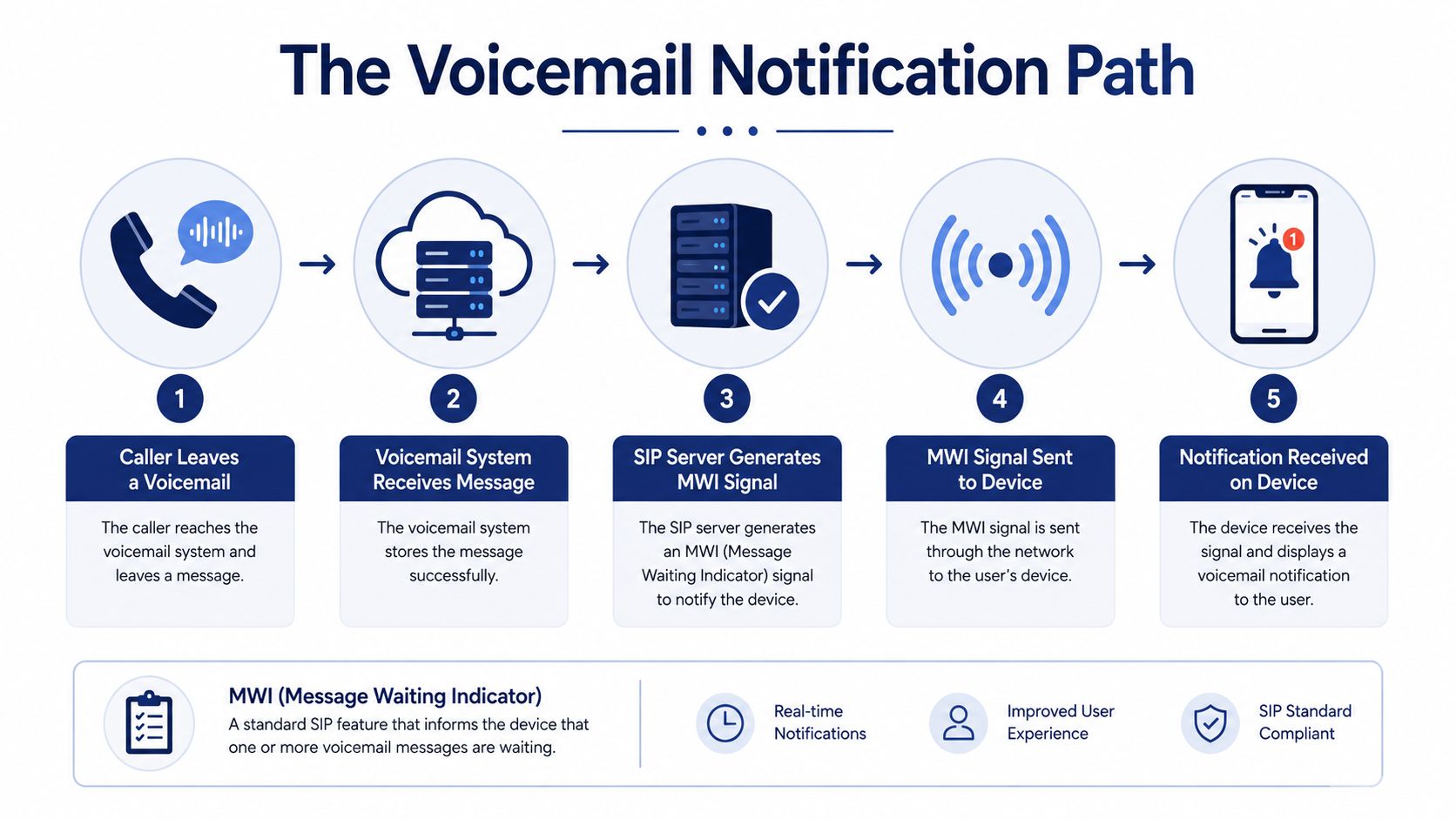
The NOTIFY payload can include Message-Waiting and Voice-Message counts. These values distinguish new messages from saved messages, although phone firmware and PBX mailbox mapping determine how the endpoint uses them.
Where deployments commonly break
The endpoint must subscribe to the correct mailbox, and the PBX must associate that mailbox with the intended extension. A mismatch can leave a working voicemail box with a dark message lamp. The reverse also occurs: the lamp remains lit after deletion because the endpoint and server disagree about mailbox state.
MWI is one delivery channel among several. A PBX may send email through SMTP or call a web or HTTP callback. Mobile alerts add more dependencies, including application permissions, operating-system battery optimization, background execution, carrier settings, and push-service delivery.
The diagnostic question is where did the notification pipeline stop? If the mailbox count changed but the phone did not, inspect SIP subscription, NOTIFY handling, and mailbox mapping. If the phone updated but the mobile alert did not, check application permissions, battery policy, carrier settings, and push delivery.
Types of Voicemail Notifications and When to Use Each
No single channel fits every employee. A desk-based finance team may prefer a visible MWI lamp, while a mobile sales group needs an alert that appears away from the office. The right choice depends on response urgency, device control, privacy requirements, and whether users need the audio, a transcript, or only an indication that a message exists.
| Notification Type | Best For | Response Speed | Reliability |
|---|---|---|---|
| MWI lamp or icon | Desk-phone users | Fast when the phone is nearby | Depends on SIP subscription and mailbox mapping |
| Visual voicemail | Users who triage messages from an app or portal | Fast, with direct message access | Depends on app, carrier, and platform support |
| Email with audio | Documentation and shared operational workflows | Moderate, depending on inbox habits | Depends on SMTP and mail filtering |
| Email with transcription | Quick scanning and accessibility | Fast for readable summaries | Depends on transcription quality and language support |
| SMS alert or summary | Mobile teams needing a short prompt | Fast | Depends on carrier and service support |
| Push notification | Remote and hybrid workers using a business app | Fast | Depends on OS permissions and background execution |
MWI remains efficient in an office. It gives the user a direct visual cue without creating another inbox, but it's weak when employees move between locations or use a mobile device as their primary endpoint.
Email delivery works well when the organization already manages work through shared mailboxes, ticketing rules, or retention policies. Audio attachments preserve the original message, while transcripts help a manager decide whether to listen immediately. Email isn't ideal for urgent response if messages are filtered, buried, or forwarded to an unattended account.
SMS and push alerts suit mobile workers who need awareness away from a desk. They should usually act as an alert layer, not the only record of the voicemail. Users need a secure way to open the actual message and confirm that the alert corresponds to a new, not previously handled, item.
Visual voicemail brings the mailbox into an app or portal, often with transcription and playback controls. The practical distinction between a list of messages and ordinary dial-in access is covered in this guide to visual voicemail. For sensitive departments, confirm where audio and transcript data are stored before enabling automatic forwarding.
Configuring Voicemail Notifications in Your Phone System
Start with a test extension, not the whole organization. Create a repeatable call path, leave a message, and verify each expected channel independently. If MWI, email, and mobile push all fail at once, the problem is probably upstream. If only one channel fails, isolate that channel before changing unrelated settings.
Administrator configuration
Enable voicemail for the relevant users and confirm that each mailbox is mapped to the intended extension. On IP phones, enable MWI and verify that the device supports the PBX's subscription behavior. Check whether the platform expects the endpoint to send SUBSCRIBE or whether it sends unsolicited NOTIFY, then confirm that the phone firmware handles that mode.
For email alerts, configure the platform's SMTP delivery and define the sender, recipient, attachment behavior, and transcript policy. Keep notification addresses role-specific. A support queue should not depend on one employee's mailbox, and a private executive message shouldn't automatically go to a broad distribution list.
For mobile users, enable push notifications in the business calling app and establish a documented enrollment process. A user who installs the app but denies notification permission has a functioning voicemail service and a broken alert path.
User configuration
Give employees control over sensible preferences, such as whether they receive email, SMS, push alerts, or only in-app updates. Ask them to confirm notification sounds, lock-screen visibility, background permissions, and the account used by the phone app.
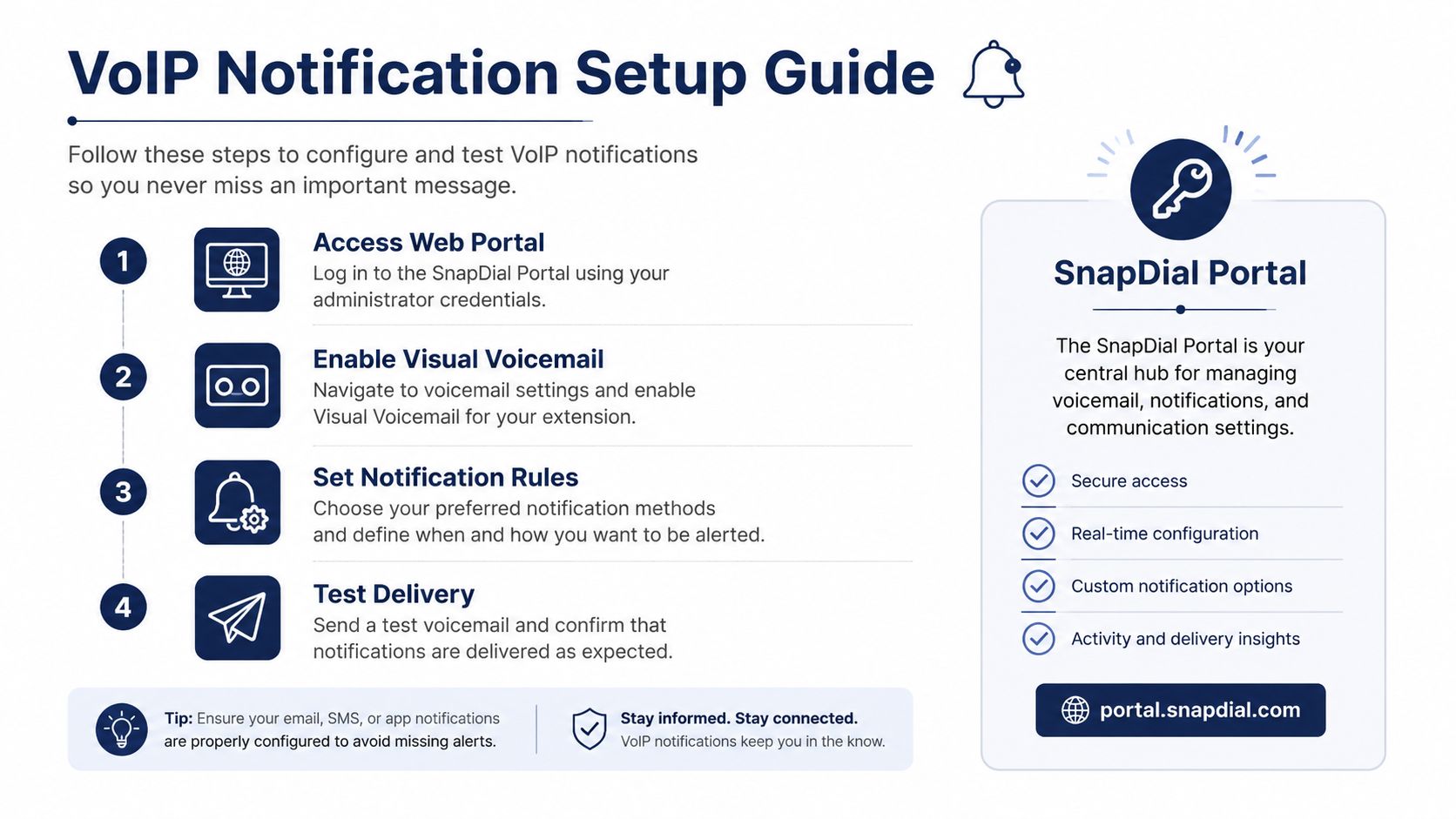
A practical rollout checklist looks like this:
- Map ownership: Identify who receives individual, shared, after-hours, and escalation voicemails.
- Enable the primary signal: Turn on MWI for desk phones or visual voicemail for app users.
- Add a secondary channel: Use email, SMS, or push so a single endpoint failure doesn't hide the message.
- Test retrieval: Confirm that the recipient can open, play, and mark the message handled.
- Document changes: Record mailbox mappings, notification rules, and escalation contacts.
For teams using SnapDial, the self-service portal can be used to manage users, routing, voicemails, call logs, and recordings, while its visual voicemail and transcription features support app and portal-based review. Administrators should still test the complete delivery path rather than assuming a portal setting guarantees mobile delivery. Guidance on forwarding voicemail to email is useful when email needs to remain part of the workflow.
Troubleshooting Common Voicemail Notification Failures
The common assumption is that a missing alert means voicemail wasn't configured. In real deployments, the mailbox often works correctly while the operating system suppresses the notification, the carrier breaks visual voicemail synchronization, or the SIP phone subscribes to the wrong state.
Start with the symptom
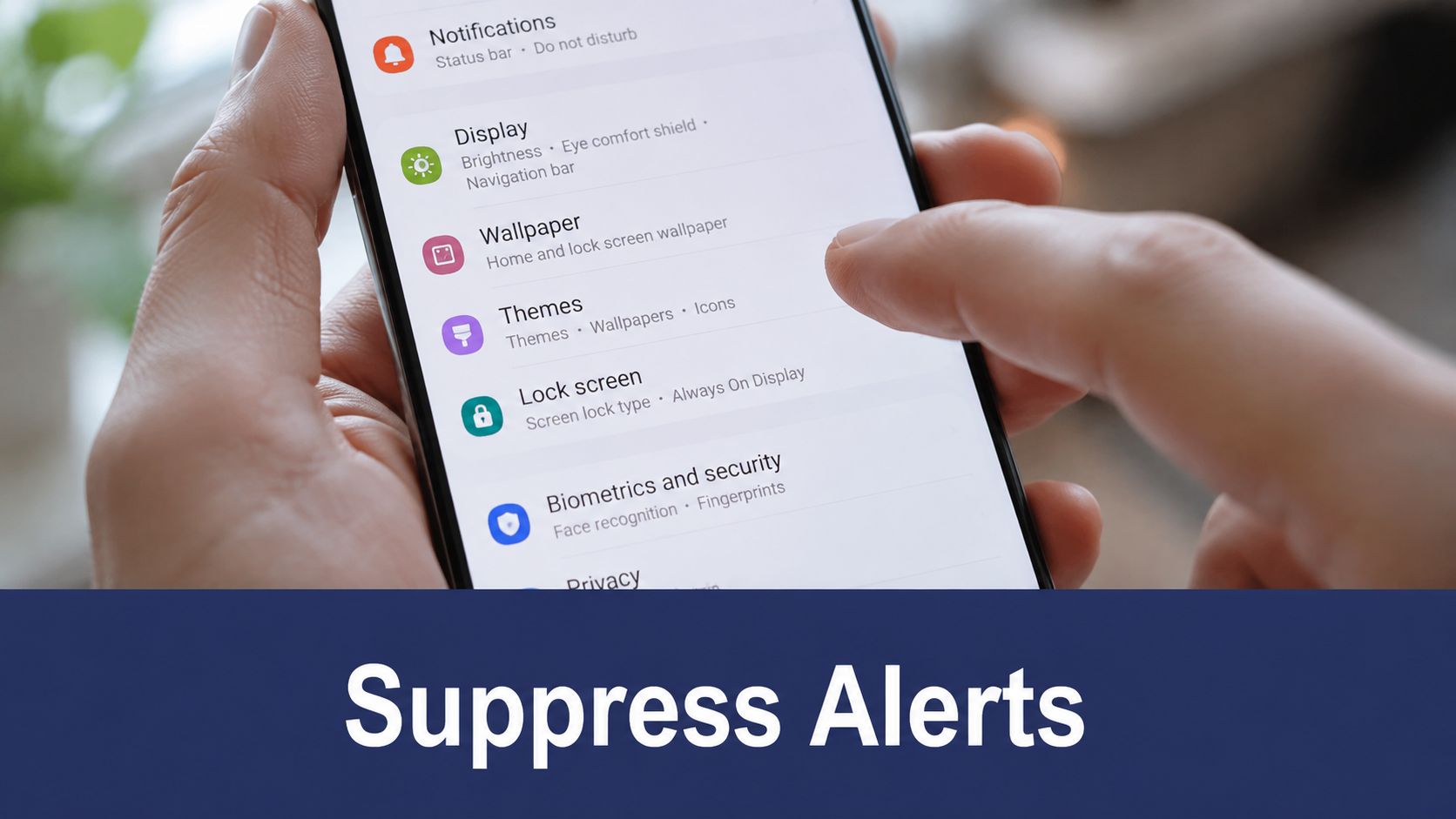
Android shows no alert: Open the voicemail or business calling app's notification settings and confirm that alerts are allowed. Then review battery optimization. Android may restrict background activity, so remove the voicemail app from aggressive battery-saving rules where the device policy permits it. Also check background data, Do Not Disturb, notification categories, and whether the user is signed into the correct account.
iPhone visual voicemail stopped updating: Check carrier settings and install any pending update offered by the device. Confirm cellular service, restart the phone, and test standard carrier voicemail separately from the business calling app. If the carrier recently changed provisioning, the mobile operator may need to reinitialize visual voicemail.
The importance of these checks is reflected in Verizon's support discussion about voicemail notifications, where users describe notification permissions, Android battery optimization, and carrier settings as possible parts of the fix. The recurring lesson is that the failure may sit outside the PBX.
Troubleshooting rule: Test the mailbox, the signal, and the device separately. Don't change all three layers at once.
The desk-phone lamp is wrong: Check whether the phone is subscribed to the correct voicemail URI or mailbox identifier. Capture the SIP event behavior if your provider supports diagnostics, then compare the server's new-message state with the endpoint's display. A stale lamp often indicates a synchronization or mapping problem, not a missing recording.
Email arrives inconsistently: Inspect spam quarantine, attachment filtering, recipient aliases, and SMTP delivery logs. Test with a plain notification before testing audio and transcript attachments. Security gateways may accept the alert but strip the recording, creating the impression that the voicemail itself failed.
Watch this walkthrough for a device-level notification troubleshooting example:
If one user fails while colleagues on the same PBX work normally, prioritize that user's device and account. If an entire location fails across desk phones and apps, escalate toward PBX provisioning, carrier service, or a platform-wide notification policy.
Best Practices for Reliable and Secure Voicemail Notifications
Reliable notification starts with work patterns, not indiscriminate forwarding. During business hours, route a new voicemail to the assigned employee and, where appropriate, a shared queue. After hours, send urgent support messages through an escalation path, while routine calls can wait for the next working period.
Notification policies may support SMS, email, SIP lamp alerts, and automatic outbound calls, with schedules based on day and time. The carrier notification guidance summarized by Genesys illustrates why channel selection must be matched with endpoint compatibility. Google Voice also separates missed-call alerts from voicemail transcript settings, a useful reminder to check each control independently.
Build the policy around four controls
- Routing: Send urgent messages to the accountable person, then specify a backup recipient or queue. Avoid circular forwarding that alerts everyone while assigning responsibility to nobody.
- Security: Treat voicemail audio and transcripts as business data. Limit recipients, protect app access, and decide whether email attachments suit confidential or regulated conversations.
- User experience: Give employees a notification pattern they can follow. Duplicate alerts often lead users to mute the app, disable sounds, or ignore the channel.
- Auditing: Review mailbox ownership, forwarding addresses, mobile enrollment, and test results after staffing, carrier, or operating-system changes.
Cross-layer checks belong in every review. A PBX can report a successful notification while the operating system suppresses the app in the background, the carrier blocks a text, or a SIP MWI subscription uses a different mailbox identifier. Document which system owns the message state, then verify each delivery channel against that source.
Transcription can speed triage because a manager can scan the subject and content before opening the audio. Poor recording quality, background noise, unsupported languages, and difficult accents can reduce accuracy. Use the transcript to prioritize work, while retaining the original recording when exact wording matters.
Define what “handled” means. Reading a message in an app may not clear a desk-phone lamp, and deleting an email attachment may leave the server copy intact. Train users to retrieve or archive messages through the approved system, and record the authoritative mailbox in the operating procedure.
Making Voicemail Notifications Work for Your Business
Treat voicemail notification as a maintained service. The initial setup is only the first checkpoint, because handset firmware, mobile operating systems, carrier provisioning, employee roles, and business hours all change over time.
A sensible rollout follows this order:
- Stabilize the core: Confirm mailbox ownership, MWI behavior, greetings, and retrieval from the primary phone or app.
- Add redundancy: Introduce email or mobile push for users who work away from their desks.
- Apply routing policy: Separate individual, shared, urgent, and after-hours handling.
- Use transcription carefully: Let teams triage messages quickly, while retaining the original audio for context.
- Test after changes: Repeat delivery tests after device updates, carrier changes, PBX modifications, and staffing changes.
Measure the workflow with operational observations rather than vanity metrics. Ask whether the intended recipient received the alert, whether the message was retrieved, whether the callback had a clear owner, and whether urgent messages reached the escalation path. A short test message from an internal extension can reveal more than a long configuration review because it exercises recording, signaling, delivery, and retrieval together.
Escalate to the VoIP provider when multiple endpoints fail, SIP MWI states remain inconsistent after mailbox mapping is checked, or email and app channels fail across a location. Give support the extension, approximate test time, affected channels, device types, and the exact symptom. That information helps the provider inspect the correct layer instead of repeating basic setup instructions.
SnapDial provides a cloud-based business phone system with visual voicemail and transcription, mobile apps, call routing, and a self-service portal for managing users and voicemail workflows. If you're reviewing your current alert path or replacing a legacy PBX, visit SnapDial to evaluate how its hosted VoIP tools can support consistent voicemail delivery across office and mobile users.