
A support queue has a gap in its call log and nobody can explain it. A sales manager wants to hear yesterday's discovery call, a compliance lead wants to know who else has already listened to it, and the agent swears recording was switched on the whole time. Somewhere in the admin portal, a scope setting left that queue out, a retention timer deleted the file, or an access role was never granted.
Call recording isn't a switch. It's a stack of decisions about consent, scope, retention and access, and each one ships with a default that can work against you. What follows is how I set those decisions up for small offices, in the order I'd click them.
Call Recording Settings at a Glance
Before you open the configuration screen, know what you're choosing. These are the switches you'll meet in a call recording setting, with the starting point I'd use for a typical small business. Match on meaning rather than wording, because labels shift between admin screens and vendors.
| Setting | Options | What it controls | Typical starting choice |
|---|---|---|---|
| Recording mode | Automatic or on-demand | Whether every call or only selected calls are captured | Automatic for support queues, on-demand for sales |
| Scope | Per user, per number, per queue or all calls | Which lines and people are recorded | Queues first, then key users |
| Call direction | Inbound, outbound or both | Which direction of calls gets recorded | Both, unless outbound calls follow a script |
| Consent announcement | On or off, with a notice message | Whether callers hear a notice before recording starts | On for every line |
| Retention period | Days or years, set by policy | How long audio stays before automatic deletion | 30 to 90 days as a first setting |
| Access rights | Admin, supervisor, agent or none | Who can play, download or export recordings | Supervisors and admins only |
| Playback and export | Portal playback or file download | How recordings are reviewed and shared | Portal playback, download only when needed |
Recording mode decides whether capture is exhaustive or deliberate. Scope is where most mistakes begin, because a rule applied to a user rarely covers a queue that user answers calls in.
Call direction deserves a moment. Inbound-only is the common default, but if your outbound team reads a script or quotes pricing, you want both directions captured.
Consent announcement is not decoration. It's the only piece of evidence you'll have that the caller was told.
Retention is a deletion timer whether or not you think of it that way, and access rights with playback and export are what stop a recording from spreading past the people who need it.
Consent Rules That Change by Location
A caller in one state may bring a stricter consent rule into a call handled elsewhere. Federal law generally permits recording when at least one participant consents under 18 U.S.C. § 2511(2)(d). State laws can require consent from every party in some circumstances. California, Connecticut, Florida, Illinois, Maryland, Massachusetts, Montana, New Hampshire, Pennsylvania and Washington are among the states with such requirements. Check the current rules for the locations involved before setting a recording policy.
For calls involving people in multiple locations, use a rule that accounts for the strictest applicable requirement. Configure it by call type and location where your phone system allows, and decide what happens when a caller's location is unknown. A notice can help establish consent, but its wording and timing should match the laws that apply to your calls. Review call recording compliance requirements with legal counsel before setting the policy.
Outside the United States, requirements differ. For calls involving Canada, consider the applicable privacy rules for notice, purpose and consent. For callers in the EU or UK, make clear why the call is recorded, who may receive the recording, how a caller can object and how to access it. Have counsel review the rules for the jurisdictions where you operate.
A practical setup starts with four checks:
- Map call locations. Account for both the caller's location and the agent's. A remote agent may bring another jurisdiction's rules into play.
- Set the notice by call type. Make sure the notice is given before recording begins and covers the purpose of recording.
- Define an alternative. Decide how callers who do not consent can receive service, such as through a callback on a non-recorded line.
- Record the decision. Keep track of the notice, the caller's response, the recording purpose and the retention rule that applies.
Transfers and conference calls need their own consent procedure. A participant who joins after a transfer may not have heard the original notice. Set a process to pause recording or provide the notice again before continuing. SnapDial can disable Call Recording for a company upon request if the feature is not a fit.
Choosing Between Automatic and On-Demand Recording
Three realistic cases separate the two modes faster than any feature comparison.
The support team of eight. Calls get reviewed weekly by a team lead. Automatic recording on the support queue captures every call, and a 60-day retention window comfortably covers the review cycle. Nobody has to remember to press anything, and there's no argument later about which calls exist.
The sales rep and the prospect who shares financials. On-demand recording lets the rep start and stop capture deliberately. The cost is discipline: if the rep forgets to start, the call that mattered most is the one you don't have.
The payment line. Callers read card numbers to an agent. On-demand pausing looks like the safe answer and is the weakest one, because it depends on an agent's memory at the worst possible moment.
The PCI Security Standards Council guidance on telephone payment card data is direct about this: block cardholder data from entering the recording rather than relying solely on an agent-controlled pause button. It identifies DTMF masking or suppression as effective when keypad entry is the only acceptance channel. If you do use pause-and-resume, recordings should be checked regularly, preferably weekly, to confirm that cardholder data and sensitive authentication data weren't captured.

Test the four failure modes
Delayed pauses: the agent hits pause after the caller has already started reading digits. Forgotten resumption: recording stays off for the rest of the shift. Spoken numbers: the caller says the card number instead of typing it, walking straight past keypad masking. Leaking legs: a transferred leg or a backup recording captures what the primary recording blocked.
The same PCI guidance states that if blocking fails, sensitive authentication data must be deleted as soon as the transaction is processed, and interactions with recordings should be logged. Encryption alone doesn't solve any of it. A recording that contains a card number is still a recording that contains a card number, encrypted or not.
What holds up: automatic for quality and training queues, on-demand where agents handle sensitive moments by nature, and never on-demand alone for a line that takes card payments.
Retention, Storage and Who Can Play Recordings
Retention is a policy decision wearing the costume of a number field. One industry summary of call recording retention practice describes common business retention periods of 30 to 90 days, while noting that regulated sectors may require years of retention. Set the number per call type instead of account-wide.
| Call type | Typical retention | Who can play | Main rule |
|---|---|---|---|
| Sales calls | 30 to 90 days | Sales manager and the rep on the call | Delete after the coaching window |
| Support calls | 30 to 90 days | Team lead and QA reviewer | Review within the retention window |
| Billing and payment calls | Shortest justifiable period | Named billing supervisor only | Never store card numbers |
| HR and employee calls | Shortest period, confirmed with legal review | HR staff only | Check local rules before recording |
| Regulated sectors (health, finance) | Years, set by the regulator | Compliance officer | Confirm the period with counsel |
Why transcripts need their own expiry rule
Audio and text carry different risk. A transcript is searchable, so a sensitive term buried forty minutes into a call becomes findable in a second. Transcripts, summaries and searchable metadata also get copied into CRM records and AI tools, where they outlive the audio file that produced them.
Treating audio retention and transcript retention as identical is the trap. Set deletion so transcripts, summaries, metadata and downloaded copies expire with the source recording. If the platform stores them as separate objects, that's two expiry rules to configure, not one.
Access rules worth writing down
- Role-based permissions: an agent sees their own calls, a team lead sees the team's, an admin sees the account.
- Logged playback: every play and every download writes an entry you can review later.
- Export limited to named roles: a downloaded file leaves every control your portal enforces, so treat it as the riskiest path.
- Redaction where feasible: strip payment or health details before anyone outside a named role can listen.
Run one test after the retention window passes. Confirm the audio, the transcript and any exported copy are gone, rather than trusting the field that says 30 days. You can check the recording history directly and compare it against what the storage layer still holds.
How to Turn On Call Recording in the Web Portal
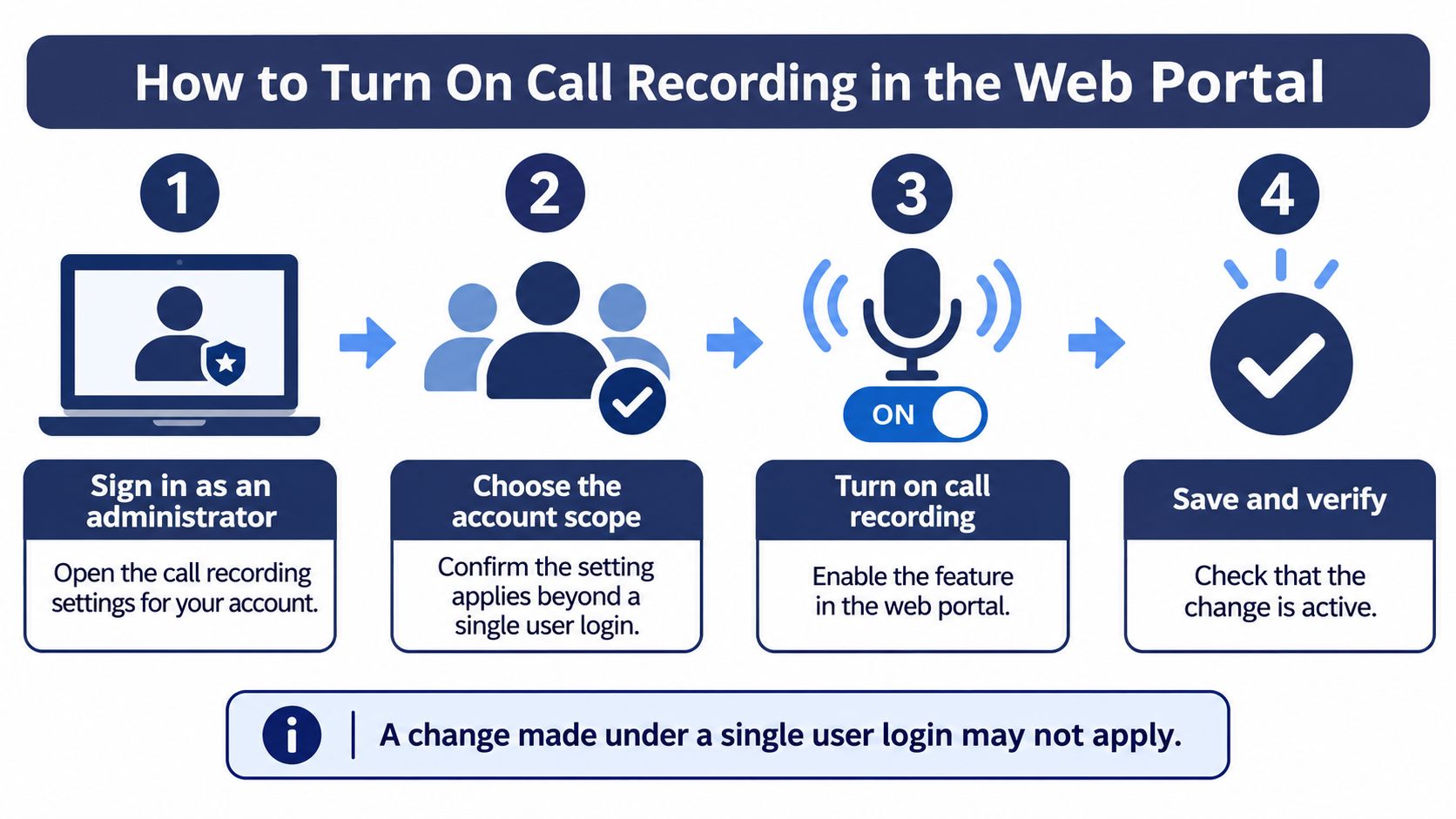
Before enabling recording, decide which calls it should cover and what consent and retention rules apply. Then configure the account in the portal and verify the setup with a test call.
Sign in to the Web Portal and open call recording settings. Confirm you are working in the right account before changing anything.
Set the recording scope. Choose the call types, queues or users that need recording. Start with the intended scope so you can check it against your consent rules.
Review the consent notice. Confirm what callers will hear, if a notice is part of your setup, and check that it fits the caller locations and call types you handle. Ask legal counsel to review requirements where needed.
Set the retention period and access rules. Match the retention period to your policy, and limit playback to the roles that need it.
Save the settings and make a test call for each call type or queue in scope. Check that the recording appears in the call log and that an authorized user can play it.
Review the result before expanding coverage. Confirm the recording matches your intended scope and that the notice, retention and access choices are appropriate.
Where each step goes wrong
A test call confirms that the selected call type is recording and that an authorized user can play it. Check consent, retention and access before relying on the archive for business reviews. If you add a queue or number later, review whether it belongs in the recording scope and update the settings as needed.
Troubleshoot Missing Recordings and Verify Fixes
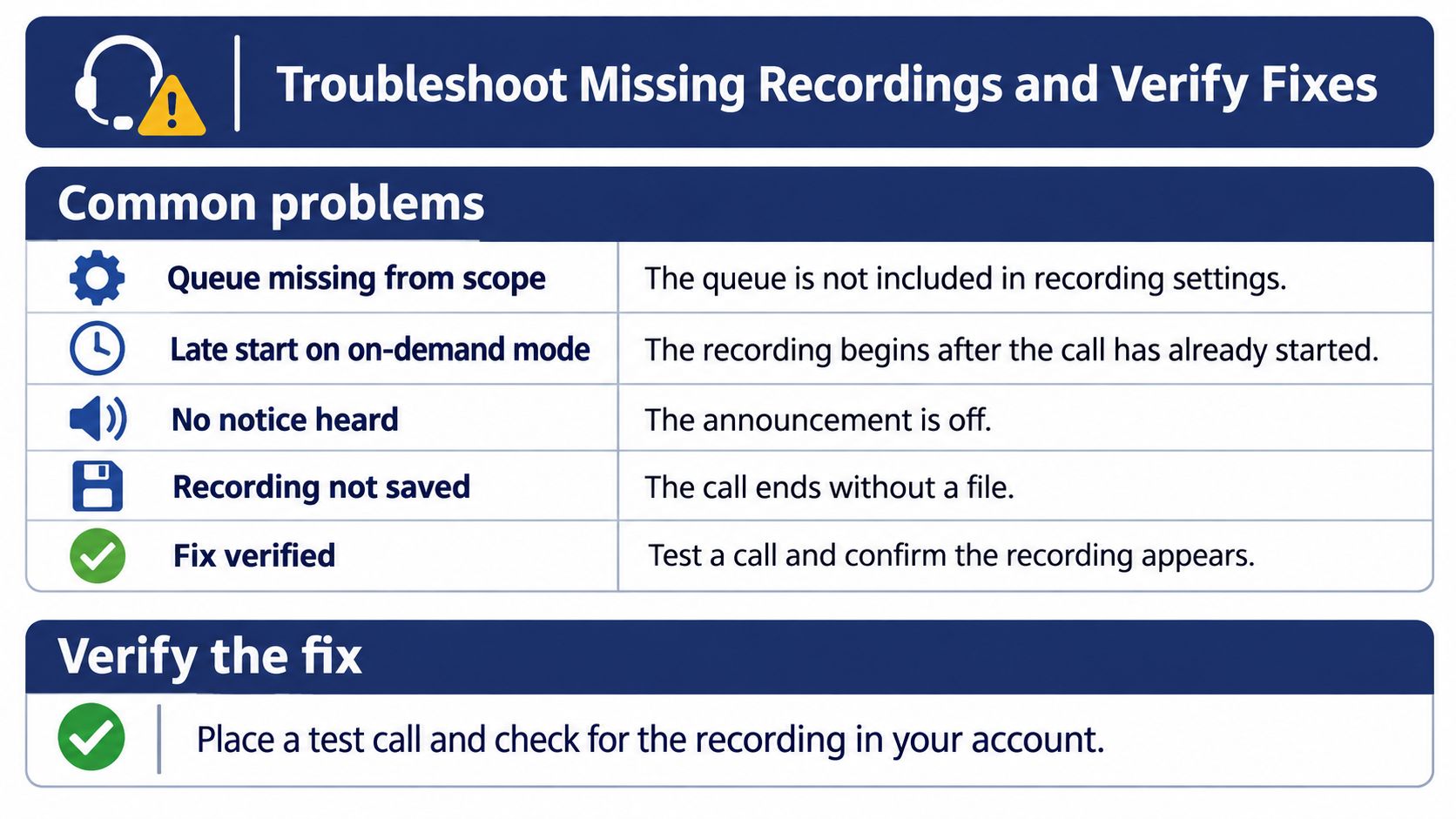
When a recording is missing, check the call type and the recording method before changing settings. Use the symptom to narrow down what to review.
| Symptom | Likely cause | Fix |
|---|---|---|
| No recording for a queue | The queue may not be included in the recording setup | Review the setup for that queue and place a test call |
| Recording starts late | Recording was started on demand after the conversation began | Check whether automatic recording is appropriate, or remind agents to start recording promptly |
| Callers hear no notice | The configured announcement may be off or may not cover that call type | Review the consent approach for the caller's location and call type, then test it |
| A user cannot play a recording | The user may not have permission to access it | Check the user's access rights and retest |
| Old recordings have disappeared | The recordings may no longer be available under the organization's retention policy | Review the applicable retention policy and adjust it if needed |
Confirm with one call
After a change, place a test call from an outside mobile number to the affected queue. Check the call log history to confirm the call appears and that an admin can play the recording. If the result differs from the expected behavior, note the queue, call time and call log entry before reviewing the setup.
Keep consent and retention decisions tied to the call type and caller location. A recording that appears in the log confirms capture, but does not by itself confirm that the notice, access or retention rules are appropriate. Get legal review where required.
SnapDial includes call recording at no cost and can disable the feature upon request if it is not a fit for your company. Its web portal lets businesses manage call logs, recordings and routing changes from anywhere. Setup and configuration are handled end to end at no cost, with support from a 24/7 Texas-based team. Request a quote or schedule a call with SnapDial.