
You probably know the feeling. Call volumes jump on Tuesday afternoon, wait times creep up, two customers complain about getting bounced around, and your dashboard still doesn't tell you what caused it. You can see activity, but not meaning.
That's where contact center analytics stops being a technical add-on and starts becoming an operating system for service. For SMBs and multi-location teams, the shift is especially important because modern cloud PBX platforms now put call recordings, queue data, routing logs, and agent activity in one place instead of scattering them across separate tools. The result is simple. You can connect what happened on the phone to staffing, training, customer experience, and revenue protection.
A lot of companies still treat the phone system like utility plumbing. It rings, routes, records, and maybe reports. That mindset leaves value on the table. Every interaction contains clues about demand, friction, missed opportunities, and process failure. If you can surface those clues consistently, your contact center becomes a source of operational intelligence instead of a cost center that gets reviewed only when something breaks.
What Is Contact Center Analytics Really
Contact center analytics is the practice of turning raw interaction data into decisions. Not just reports. Decisions.
That distinction matters. Organizations often already have data. They have call counts, queue times, recordings, and maybe CRM notes. The problem is that raw data doesn't tell you why repeat calls are rising, why one location gets stronger reviews than another, or why one agent resolves issues cleanly while another creates callbacks. Contact center analytics connects those dots.
It's less about software and more about visibility
For a business owner or operations manager, the practical question isn't “Do we have analytics?” It's “Can we explain performance and improve it without guessing?”
A useful analytics setup helps you answer questions like these:
- Demand questions: Which hours, days, products, or locations create the most inbound pressure?
- Experience questions: Where do customers get frustrated, drop off, or need repeat help?
- People questions: Which agents need coaching, and which habits are worth replicating across the team?
- Growth questions: Are calls converting, resolving, retaining, or just consuming labor?
What changed in the last few years is access. Enterprise teams used to be the only ones with the budget and infrastructure to analyze calls at scale. Cloud PBX systems changed that by bundling call recording, reporting, transcription, and queue visibility into platforms that smaller companies can run.
The business shift is visible in market adoption. The global contact center analytics market is projected to grow from $2.27 billion in 2024 to $4.98 billion by 2029 at an 18.2% CAGR, according to the 2025 global market report on contact center analytics. That tells you this isn't niche anymore. It's becoming standard operating equipment.
Practical rule: If your team is still making staffing, routing, and coaching decisions based mostly on anecdotes, you don't have a people problem. You have a visibility problem.
Why SMBs should care now
SMBs don't have the luxury of waste. A few missed calls in a service business can mean lost revenue. A bad transfer flow across multiple locations can erode retention. A weak onboarding process can turn into longer handle times for months.
That's why the most useful framing is this: contact center analytics helps smaller organizations behave with enterprise discipline without building enterprise overhead. If you want a deeper view of how teams are improving CX with conversation analytics, that approach is a good complement to traditional phone metrics because it ties the words inside the interaction to the operational numbers around it.
The Core Metrics That Drive Performance
A regional service company with three locations can quickly miss the core problem. Headquarters sees calls answered on time. One branch is drowning in repeat contacts. Another has short handle times but weak customer feedback. Without the right metrics, every site looks busy and none of the patterns are clear.
That is why a useful scorecard starts with management decisions, not acronyms. Each metric should point to a specific operational question, a likely cause, and a practical next step.
Read the metric like a manager
Some measures track access. Others show resolution, effort, or workload balance. Cloud PBX platforms have made these numbers much easier for SMBs to get in one place, which matters even more for multi-location teams that need to compare sites using the same definitions.
Use a short list first.
| Metric (Acronym) | What It Measures | Business Question It Answers |
|---|---|---|
| First Call Resolution (FCR) | Whether the customer's issue was resolved in the first interaction | Are we solving problems cleanly, or creating repeat work? |
| Customer Satisfaction (CSAT) | How customers rate the service experience | Did the customer feel helped? |
| Average Handle Time (AHT) | The total time spent handling an interaction | Are we working efficiently, or is the process too complex? |
| Average Speed of Answer (ASA) | How quickly agents answer incoming contacts | Are customers waiting too long before a conversation even starts? |
| Service Level (SL) | How consistently the team answers within the target window | Are we meeting our response commitments during busy periods? |
| Occupancy Rate | How much of an agent's time is spent actively handling work | Are we overstaffed, understaffed, or running too hot? |
| Call Abandonment Rate | How often customers give up before reaching an agent | Are queue delays or routing issues pushing customers away? |
| Agent Utilization Rate | How much productive workload an agent carries | Is capacity balanced across the team? |
The few metrics that usually matter first
For most SMBs, the first priority is matching demand to execution. That means resolution, customer sentiment, and effort.
FCR is one of the clearest measures because it exposes whether the operation solved the issue or merely moved it. If repeat contacts are climbing, the cause is often process friction. Agents may lack authority to complete the request, the call may be landing in the wrong queue, or the knowledge base may be too hard to use under pressure.
AHT needs context. I have seen teams cut handle time and still lose customers because agents rushed callers off the phone, which pushed the same issue back into the queue a day later. AHT becomes useful when it sits beside FCR and CSAT. Long calls with strong resolution can be acceptable. Short calls with poor resolution usually create extra labor and lower retention.
CSAT helps validate whether efficiency is landing well with customers. It also has limits. Survey response rates are uneven, and scores can rise or fall based on factors outside the agent's control, so CSAT works best as a trend line paired with call reason, queue, and agent behavior.
If FCR is low and AHT is high, the work is probably hard to complete. If FCR is low and AHT is low, the team may be closing interactions before the issue is resolved.
Metrics that expose capacity problems
ASA, service level, and abandonment rate answer a different question. Can customers reach the right person fast enough to stay engaged?
Those numbers matter a lot for smaller companies because missed access turns into missed revenue quickly. A plumbing company that misses ten service calls during the lunch rush feels it in booked jobs. A healthcare office feels it in scheduling gaps. A multi-location retailer feels it in store-level inconsistency. Modern cloud PBX reporting makes those patterns visible by queue, site, time block, and call outcome instead of burying them in one company-wide average.
Quality review ties the numbers to real behavior. A strong review process lets supervisors compare scorecards with actual interactions, then coach on what caused the transfer, delay, or failed resolution. For teams building that discipline, call center quality monitoring connects dashboard trends to specific coaching actions.
One more metric layer matters now. Personalization and context handling. McKinsey's research on personalization found that 71% of consumers expect personalized interactions and 76% get frustrated when they do not get them. For an SMB, that means KPI reviews should go beyond speed and volume. A key question is whether the team recognized the customer, understood the issue, and moved the conversation toward revenue, retention, or resolution.
Data Sources and Architecture Simplified
A small business usually does not have a data problem first. It has a fragmentation problem. Calls sit in the phone system, customer history sits in the CRM, survey feedback lives somewhere else, and no one can line them up fast enough to explain why one location converts better than another.
Cloud PBX platforms changed that. SMBs and multi-location operators can now collect the same categories of interaction data that large enterprises use, without building a custom warehouse first. The practical goal is simple: connect call activity to customer history and business outcomes so managers can act on patterns instead of guesses.
The data sources that actually matter
A useful analytics setup usually combines a few core feeds:
- Call recordings: What was said, where the pauses happened, how transfers unfolded, and whether the issue was resolved.
- CRM records: Customer identity, account history, open cases, purchases, and prior contact context.
- Chat and email transcripts: What happened before or after the call on other channels.
- Queue and routing logs: Wait times, overflow events, transfers, abandonment points, and staffing pressure by site or team.
- Survey responses: Post-interaction feedback that helps validate whether operational improvements changed the customer experience.
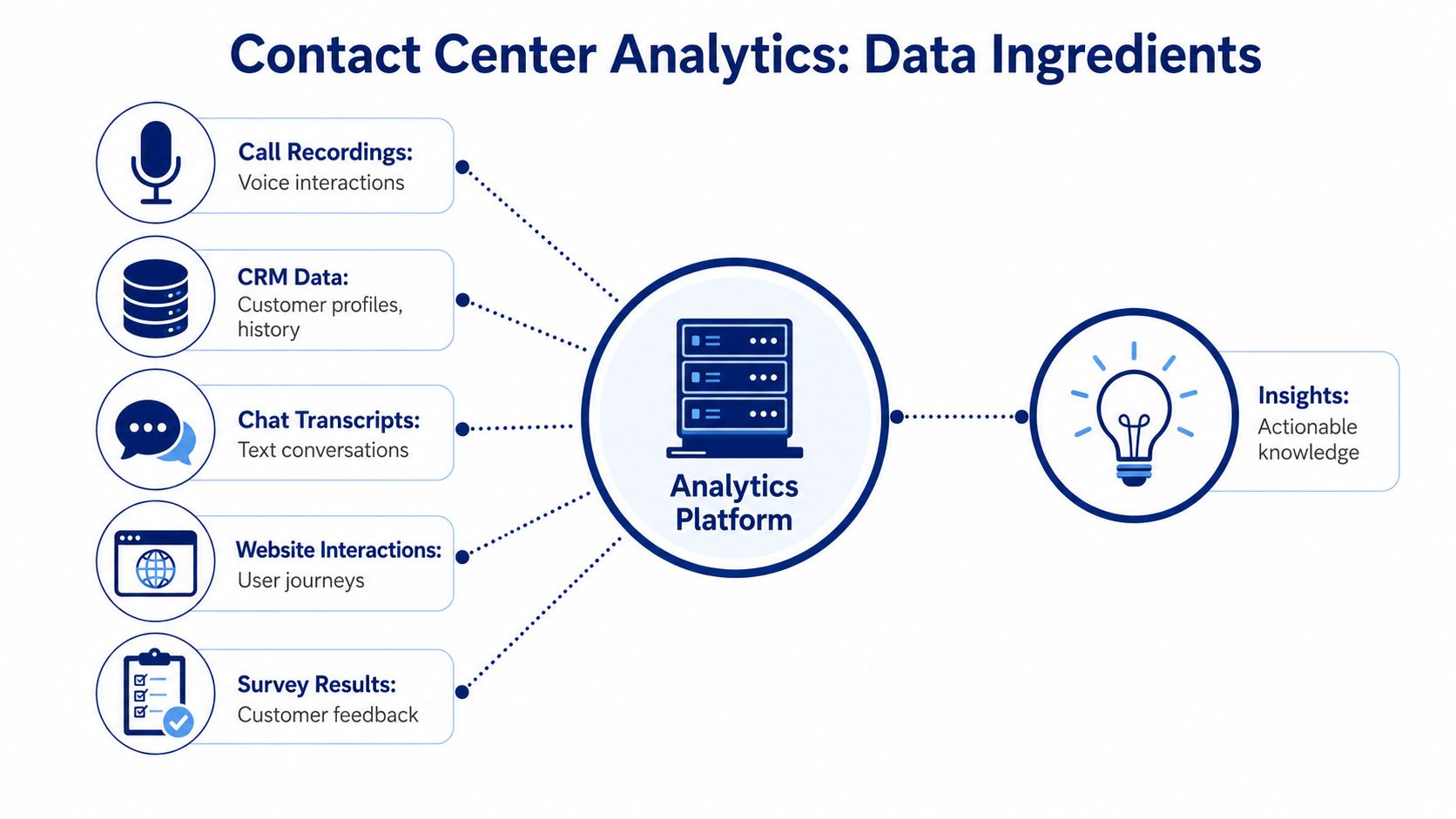
Once those feeds land in one reporting layer, the questions improve. A manager can compare repeat contacts by location, trace failed resolutions back to routing logic, or see whether certain call reasons correlate with lost appointments or lower close rates.
That matters for growth. If a multi-location business sees one branch handling the same call types with fewer transfers and better booking rates, leadership has something usable. They can standardize scripts, routing rules, or staffing models across the rest of the operation.
Why transcript quality affects everything downstream
Recorded audio does not become useful analysis on its own. It has to be transcribed well enough for supervisors and analysts to search it, classify it, and review it at scale.
Google Cloud's Speech-to-Text documentation explains how speech recognition systems support features such as domain adaptation and custom phrase hints. In practice, that matters because contact centers deal with product names, local place names, account terminology, and industry jargon that generic transcription often misses. When transcripts are weak, topic tagging gets noisy, compliance checks miss details, and coaching reviews take longer than they should.
For SMBs, the trade-off is straightforward. Higher-quality transcription usually costs more than basic recording storage, but it saves supervisor time and makes conversation analytics usable instead of theoretical.
Clean transcripts support reliable QA, search, and trend analysis. Poor transcripts create extra review work and false conclusions.
Architecture is simpler than it sounds
The underlying stack does not need to be complicated. For many smaller teams, it comes down to four layers: the cloud PBX or contact center platform captures the interaction, integrations pull in CRM and ticket data, an analytics layer organizes the records, and dashboards surface trends by agent, queue, location, and outcome.
Real-time data adds another operational benefit. Supervisors can catch queue spikes, stuck calls, or sudden transfer patterns while the shift is still in progress, not the day after.
A lot of that foundation starts with phone system event data. Teams that want to understand the base layer should start with CDR call detail record reporting, which covers timestamps, duration, routing paths, and call disposition before conversation intelligence is added on top.
The key point is not technical sophistication for its own sake. It is getting one version of the truth that ties conversations to sales, service capacity, retention, and location-level performance. That is what turns cloud PBX analytics from a reporting feature into a management tool.
How Analytics Unlocks Real Business Value
Dashboards don't create value by themselves. Action does. The payoff comes when a team uses contact center analytics to change staffing, training, routing, or customer communication in a way that removes friction.
Here's what that looks like in practice.
A retailer fixes the wrong problem first, then the right one
A multi-location retailer saw rising complaints about hold times. The first instinct was to assume the team needed more agents. Analytics often shows something less obvious.
When managers reviewed queue patterns by time block and location, they found that the worst wait times weren't evenly spread. They were clustered around a few recurring periods tied to promotions, order status questions, and store transfer calls. The fix wasn't blanket hiring. It was schedule adjustment, better IVR prompts, and clearer routing for common issues.
That's a typical contact center analytics win for SMBs. It doesn't require a huge transformation. It requires evidence strong enough to stop broad, expensive guesses.
A service business turns call reviews into coaching
A smaller field service company had plenty of recordings but no repeatable coaching method. Supervisors listened to calls only when there was a complaint. That kept the process reactive.
Once they grouped calls by outcome, they could hear patterns clearly. The strongest agents confirmed the issue early, restated the next step, and closed with a firm expectation. The weaker calls drifted, repeated questions, or ended without ownership. Analytics gave management a way to turn those patterns into a short call-flow standard and targeted training.
Good coaching starts when you can compare behavior, not just outcomes.
That's where conversation review works better than scorecards alone. You're not telling an agent to “sound better.” You're showing the exact sequence that tends to lead to resolution.
A distributed team uses call data to improve growth operations
For multi-location businesses, the hidden value of analytics is consistency. One branch may answer quickly but transfer too often. Another may deliver warmer service but struggle with follow-up. Without a unified view, leadership tends to blame people when the underlying issue is process variation.
A cloud communications platform can centralize queue stats, recordings, and reporting across offices so leadership can compare operational patterns without forcing every location onto separate tools. That's one reason modern PBX systems matter here. They don't just carry calls. They standardize visibility.
Later in the improvement cycle, teams often add workflow automation or agent-assist capabilities on top of that data. This short overview gives a useful operational frame for a B2B implementation guide for AI agents because it forces the right question: where should automation support humans, and where should it stay out of the way?
A quick product walkthrough helps make the shift tangible:
The common thread in all three examples is simple. Contact center analytics pays off when it changes operating decisions. If a report doesn't lead to a staffing move, a coaching move, a routing change, or a process fix, it's reporting theater.
An Implementation Roadmap for SMBs
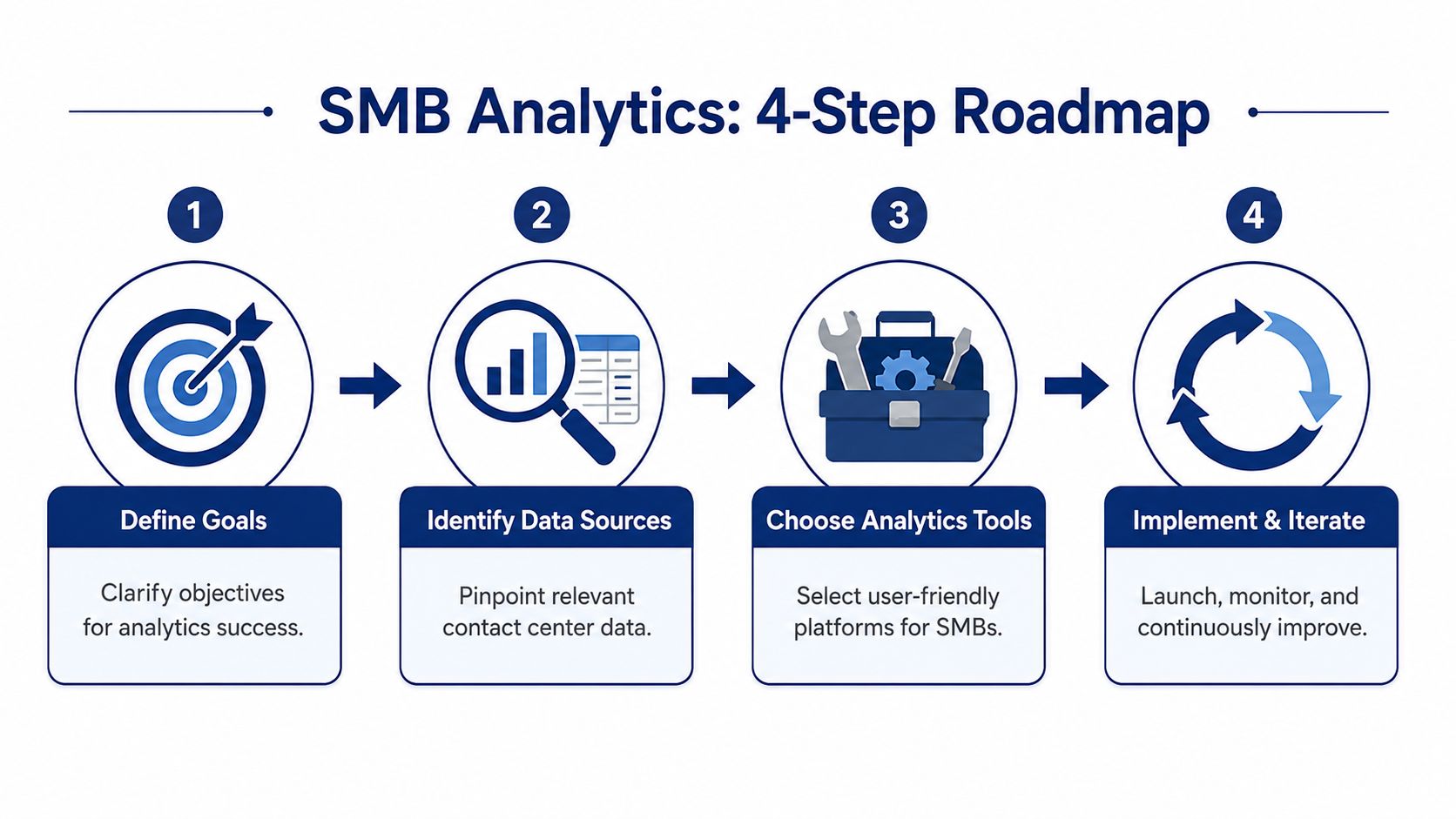
The fastest way to fail with contact center analytics is to try to instrument everything at once. SMBs get better results when they start with one business problem, a few reliable metrics, and a platform the operations team can use.
Start with a business question
Don't begin with dashboards. Begin with a pain point.
Maybe calls are getting abandoned. Maybe one location underperforms. Maybe your team feels busy all day but service still slips. The goal is to phrase the problem in business terms, not reporting terms.
A good starting list looks like this:
- Revenue protection: Are missed or mishandled calls costing booked work or renewals?
- Labor efficiency: Are call patterns and staffing schedules aligned?
- Service quality: Are customers getting resolved cleanly the first time?
- Management consistency: Can leaders compare locations, queues, or teams using the same definitions?
Pick metrics that answer that question
Once the business goal is clear, choose the smallest metric set that can diagnose it.
If the issue is access, look at speed to answer, service level, and abandonment. If the issue is repeat work, focus on FCR, call reasons, and transfer patterns. If the issue is uneven branch performance, compare queue behavior, agent outcomes, and call review themes.
Many teams often overbuild. They create executive dashboards with every widget available and end up with noise. Simpler is better at the start.
Field advice: If a metric doesn't change a staffing decision, a coaching decision, or a process decision, it probably doesn't belong on your first dashboard.
Use the platform you already own
A modern cloud phone system often includes more analytics capability than teams realize. Call logs, recordings, queue statistics, routing reports, and user-level activity can already support a strong first phase.
For example, call center analytics software can pull interaction records from phone systems, CRMs, and IVRs into one view so teams can analyze patterns without building a custom reporting stack first. That's usually the right order for an SMB. Use built-in tools, prove value, then expand.
Build a coaching culture, not a surveillance culture
Analytics works when managers use it to remove friction and improve confidence. It fails when agents believe every metric is there to catch mistakes.
A healthy rollout usually includes:
- Shared definitions: Everyone should understand how the team defines resolution, transfer quality, and escalation.
- Visible fairness: Compare like-for-like workloads, not raw numbers without context.
- Review loops: Supervisors should bring recordings, examples, and specific improvement steps to coaching sessions.
- Small iterations: Change one script element, routing rule, or staffing pattern at a time so you can see what moved.
The best implementations feel operational, not academic. A team starts with a problem, uses analytics to expose the cause, makes a focused change, and checks whether the outcome improved.
Navigating Common Challenges and Governance
Most contact center analytics problems aren't technical. They're managerial.
Teams either drown in data, misuse the metrics, or create resistance by rolling analytics out like surveillance. None of those are software issues. They come from weak operating discipline.
The two traps that slow teams down
The first trap is analysis paralysis. Managers open a dashboard with dozens of charts, filter everything six ways, and still don't make a decision. The cure is to tie every report to an action owner. If no one is expected to do anything with a metric, remove it from the routine view.
The second trap is fear from the front line. Agents hear “analytics” and assume the company is building a tighter scorecard to punish variance. That reaction is predictable if leaders only use recordings and reports when something goes wrong.

Governance doesn't have to be heavy
Good governance is mostly clarity. Who can access recordings. Who can see agent-level data. How long data is kept. Which teams can export reports. Which calls need extra privacy handling.
You don't need a giant committee to handle this well. You do need written rules and consistent ownership. For leaders building that foundation, this overview of Understand data governance software components is useful because it breaks governance into practical pieces instead of abstract policy language.
What works better than pure monitoring
Use analytics to support coaching, capacity planning, and process correction first. Use it for discipline only when there's a clear reason and clear documentation.
That means:
- Coach from patterns: Review repeated behaviors, not isolated bad moments.
- Protect context: Compare agents handling similar queues and issue types.
- Limit access intentionally: Not every manager needs every data view.
- Respect compliance requirements: Privacy rules like GDPR or CCPA affect what you record, retain, and share.
Teams accept analytics faster when leaders use the data to fix broken processes, not just expose individual weaknesses.
When governance is clear and the purpose is constructive, analytics becomes easier to trust. That trust matters because people change behavior faster when they believe the system is fair.
The Future Is an Analyzed Conversation
Every customer conversation leaves a trail. It shows what customers need, where your operation creates friction, which agents build trust, and which processes force repeat work. The companies that capture that signal and act on it will make better decisions than the ones still managing from anecdotes.
For SMBs and multi-location businesses, this is no longer an enterprise-only capability. Modern cloud PBX systems have changed the cost and complexity curve. Call data, routing logs, recordings, and performance reporting can now live in one operational system instead of a patchwork of vendors and spreadsheets.
That matters for growth. Better analytics helps a business answer phones more consistently, coach more precisely, route more intelligently, and standardize service across locations. It also creates a cleaner foundation for automation, agent assist, and future AI use because the business has already learned how to measure the work.
The practical takeaway is straightforward. Stop treating the phone system like a utility line item. Treat it like a customer intelligence platform. If you can hear what the business is being told every day, and if you can tie that back to queue performance, training, and operational design, you're not just running a contact center. You're building a sharper business.
If you're evaluating a modern phone system, SnapDial is worth considering as a cloud PBX option for teams that want calling, routing, recordings, reporting, and contact center features in one managed platform. For SMBs and multi-location businesses, that kind of unified setup makes it much easier to turn everyday call activity into usable operational insight.