
A lot of IT managers are in the same position right now. The phone system has moved to the cloud, employees split time between headquarters, home, and shared offices, and everyone assumes dialing 911 will “just work.” That assumption is where trouble starts.
In a legacy office, a desk phone was tied to a physical copper line. The location was built into the system. With VoIP, the endpoint can move, the user can sign in from somewhere else, and the number alone doesn't tell a dispatcher which floor, suite, or room needs help. That gap matters most during the few minutes when nobody has time to explain where they are.
Why E911 for VoIP Is a Critical Business Responsibility
A common failure scenario looks ordinary at first. Someone in a fourth-floor conference room has a medical emergency. A coworker grabs the nearest VoIP desk phone or softphone and dials 911. The call goes through, but the address on file points to the company's main entrance, or worse, to an old office location. Responders reach the building, but they still don't know which floor or room to enter.
That problem isn't rare because emergency calling no longer lives in a landline world. Approximately 240 million calls are made to 9-1-1 annually in the United States, and 80% or more of those calls in many U.S. regions now come from wireless devices or VoIP-enabled connections rather than traditional landlines, according to this overview of E911 and VoIP calling. For businesses, that means your phone environment is part of your safety infrastructure, not just your communications stack.
Why the old assumptions fail
The old mental model was simple. Phone equals desk. Desk equals room. Room equals emergency location.
VoIP breaks that chain. A user can log into a Yealink desk phone in one office today, a mobile app tomorrow, and a softphone from home next week. If your system treats “registered address” as a one-time setup field, you're exposed.
E911 compliance is really location management under stress. The phone call is only half the job.
What responsible teams do differently
The teams that handle this well treat E911 as an operational process, not a feature checkbox inside an admin portal.
They usually focus on three things:
- User movement: Desk phones, mobile clients, and softphones all need location logic that matches how people work.
- Building detail: A street address may get responders to the property, but not to the person.
- Ongoing ownership: HR, facilities, IT, and office managers all affect whether location data stays accurate.
If you manage a multi-location or hybrid environment, your obligation goes beyond buying a compliant service. You have to make sure the service is configured in a way that can help responders find a real person in a real place, quickly.
Understanding E911 and How It Differs from Basic 911
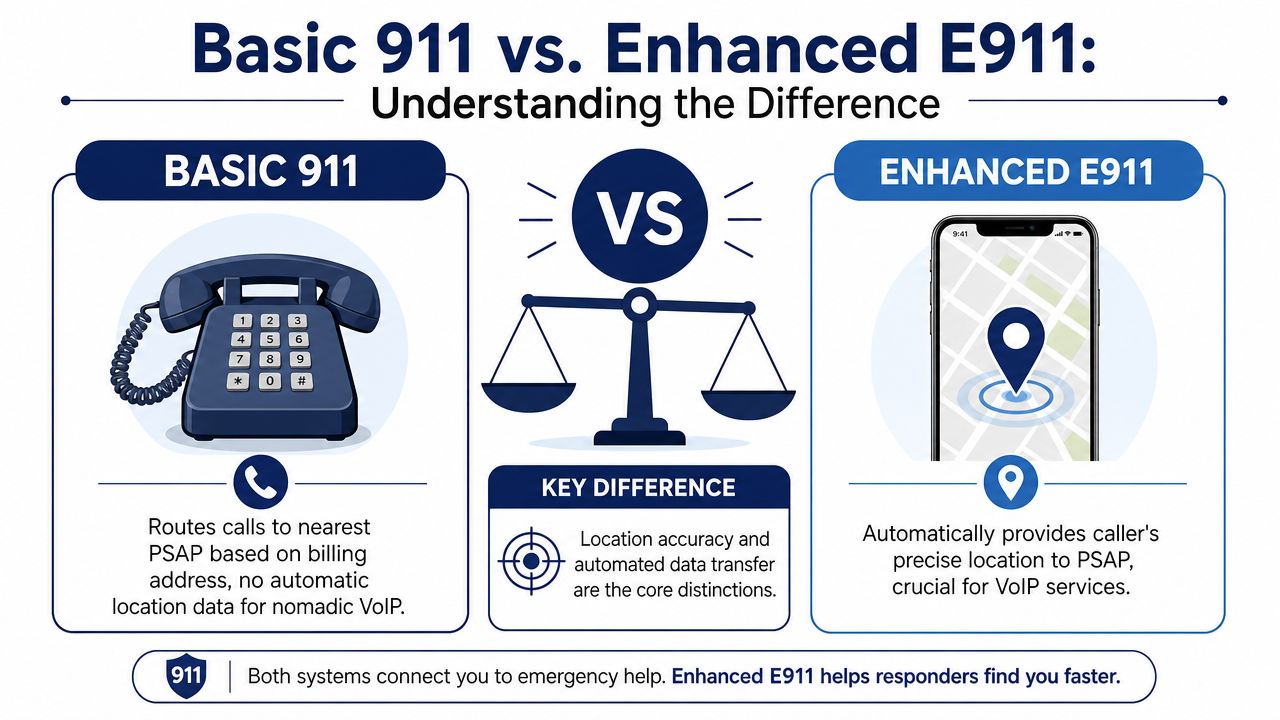
Basic 911 and E911 sound similar, but they aren't the same service level. For a business using VoIP, the difference is operational, technical, and legal.
The simple distinction
Basic 911 routes an emergency call to the appropriate PSAP. That stands for Public Safety Answering Point, which is the call center that receives 911 calls.
E911, or Enhanced 911, adds automatic data delivery. It sends the callback number and location data to the PSAP so dispatchers don't have to rely only on the caller's voice.
Consider a pizza order. Basic 911 is giving the restaurant your phone number and hoping they can sort out the address. E911 is sending your number plus the exact delivery destination automatically.
The core terms that matter
A few telecom terms show up in every serious E911 conversation:
- ANI: Automatic Number Identification. This is the callback number the PSAP sees.
- ALI: Automatic Location Information. This is the location record tied to the call.
- PSAP: The public safety center receiving the call.
For a business admin, the practical takeaway is simple. If your provider can only tell you “911 is enabled,” that's not enough. You need to know what number and what location record will reach the PSAP.
Why VoIP changes the problem
Traditional landlines were physically tied to a building. VoIP endpoints aren't. A user can carry the same identity across devices and locations. That flexibility is useful for operations, but it removes the built-in location certainty older 911 systems assumed.
If you need a refresher on the underlying calling model, ARPHost's guide to SIP VoIP is a useful primer on how SIP-based business calling works and why call setup in IP systems behaves differently from legacy telephony. Businesses also run into related issues when managing number assignments across offices and teams, especially with VoIP phone numbers for business that may not map neatly to one physical room or user forever.
A compliant E911 setup doesn't ask, “Can users dial 911?” It asks, “What exact data will the dispatcher receive when they do?”
That's the difference that matters in an audit and in an emergency.
The Technical Path of an E911 VoIP Call
A normal SIP call and an E911 call don't follow the same path. That's the first thing to understand when evaluating any E911 VoIP service.
What happens after a user dials 911
With a standard business call, SIP signaling handles call setup across the provider's voice platform. Emergency calling requires a separate compliance path.
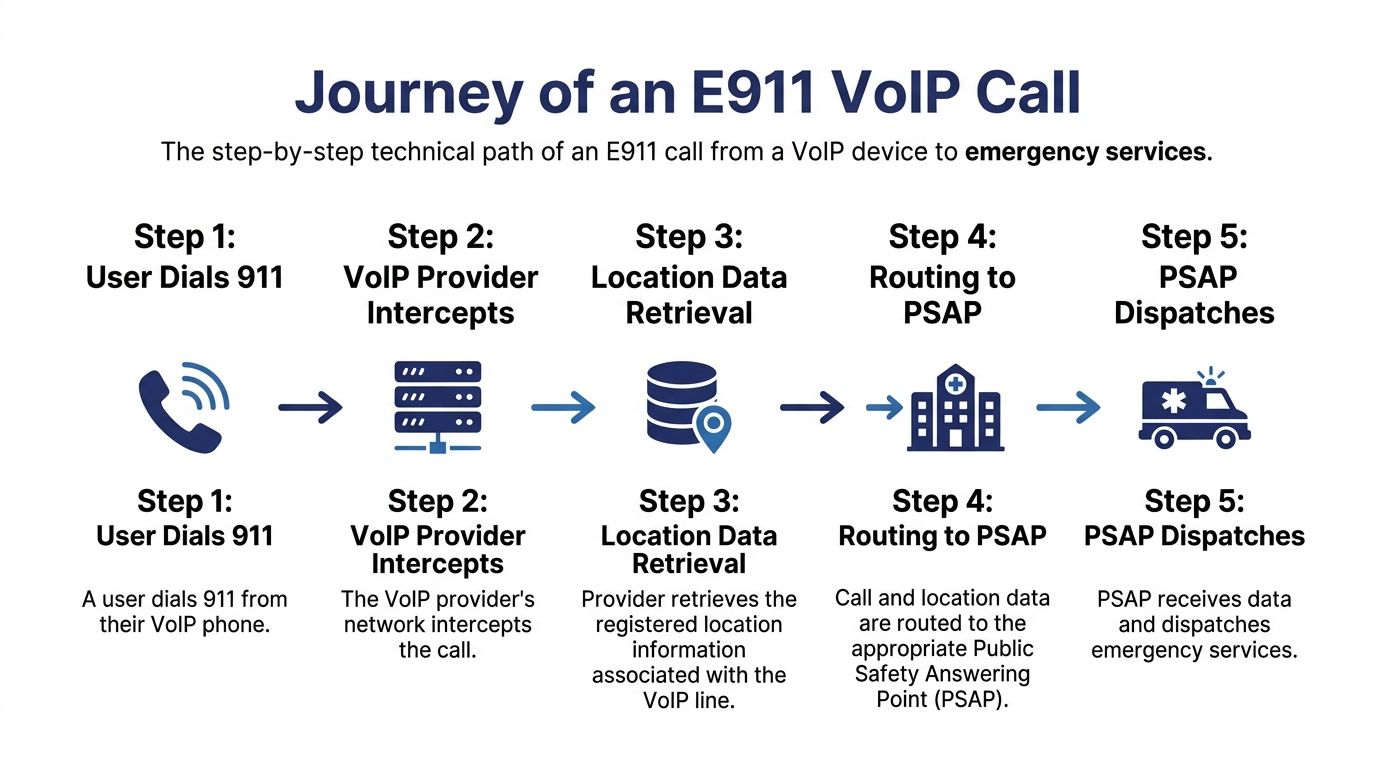
E911 technical implementation mandates routing all 911 calls through the dedicated Wireline E911 Network using Automatic Number Identification (ANI) or pseudo-ANI so the callback number and Registered Location are automatically transmitted to the PSAP. Providers must also interface with ALI databases maintained by Local Exchange Carriers (LECs) to map the caller's ANI to a verified dispatchable location, as described in this E911 requirements summary.
In practical terms, the provider has to do more than carry voice. It has to maintain the emergency routing logic and the location database relationships that let the PSAP receive usable information.
The call flow in business terms
A compliant call usually looks like this:
- The user dials 911: The platform identifies the call as emergency traffic.
- The provider diverts it from normal routing: It doesn't treat the call like an ordinary SIP session.
- The system pulls the caller's emergency record: That includes callback information and location details.
- The call enters the emergency network: The provider hands the call off through the dedicated 911 path.
- The PSAP receives voice plus data: Dispatchers should see the emergency callback number and location record together.
If your network team is reviewing firewall behavior, handset registration, or media path issues, it helps to understand the broader SIP transport layer too. A technical reference on SIP IP ports can help separate normal VoIP traffic concerns from the dedicated emergency routing obligations above.
A short visual explanation is helpful here:
What providers often get asked wrong
Many buyers ask whether a provider “supports 911.” That's too vague.
Ask instead:
| Question | Why it matters |
|---|---|
| How is the emergency record created? | You need to know who owns location accuracy. |
| How are updates pushed to emergency databases? | Delayed sync can leave stale records in place. |
| What happens for softphones and remote users? | Nomadic endpoints are where most location assumptions fail. |
A provider that answers these clearly usually understands E911. A provider that stays at the marketing level often doesn't.
The FCC Regulatory Landscape and Your Obligations
The legal side of E911 for VoIP starts with a basic principle. Emergency calling for interconnected VoIP is not optional.
The 2005 foundation
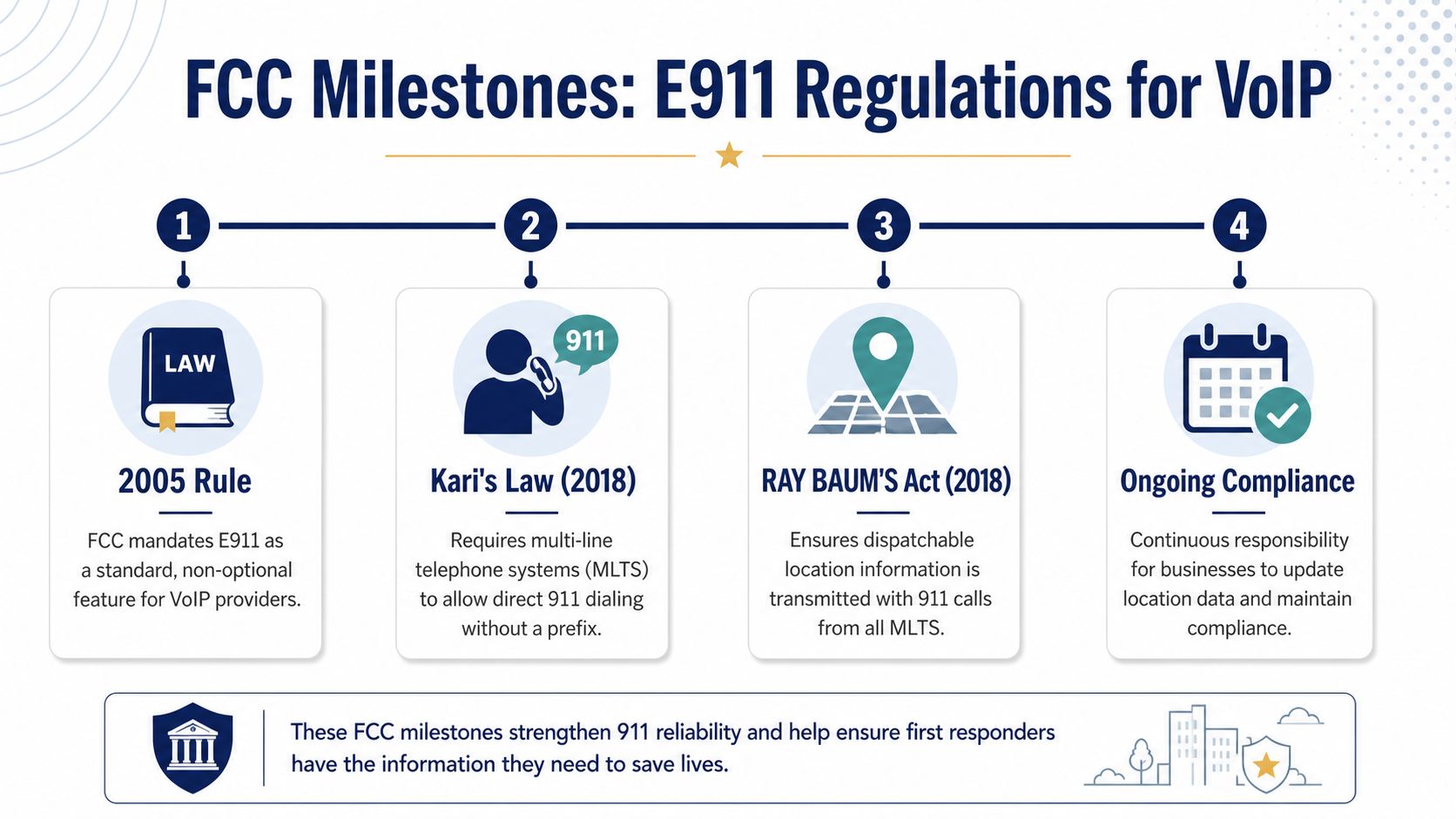
The Federal Communications Commission formally adopted rules in 2005 requiring all providers of interconnected VoIP service to supply Enhanced 911 as a standard, non-optional feature of service, in FCC Order 05-116, which you can review in the FCC order itself.
That rule changed the market. It established that an interconnected VoIP provider couldn't sell business phone service and treat E911 as an add-on for customers who happened to care about safety. It became part of the service obligation.
Where many businesses still fall short
A lot of organizations think compliance means “we entered our office address in the portal.” For modern business systems, especially MLTS environments, that isn't enough. MLTS means Multi-Line Telephone System, which covers many office phone deployments, shared systems, and enterprise environments.
The current compliance risk isn't just whether you have an address. It's whether you have a dispatchable location. That means the information responders need to reach the person, not just the building. Floor, room, and suite details matter.
Compliance rule: If responders can reach your lobby but still have to search for the caller, your location design is probably incomplete.
The difference between address and dispatchable location
Here's the practical distinction:
| Location type | What it tells responders | Where it fails |
|---|---|---|
| Street address | The property or building | Multi-floor offices, campuses, suites, shared spaces |
| Dispatchable location | The building plus floor, room, suite, or similar detail | Fails only if the data is stale or missing |
This is the issue many hybrid and multi-location businesses miss. A billing address or headquarters address may satisfy an internal recordkeeping habit, but it won't satisfy the operational need of finding a person quickly inside a large facility.
The FCC's dispatchable location requirement for MLTS and nomadic users is serious enough that businesses risk fines up to $10,000 plus $500 daily per device for non-compliance when that granular location data isn't properly handled.
What that means for IT managers
Your obligations usually include more than vendor selection:
- Direct 911 dialing: Users shouldn't have to dial a prefix first.
- On-site awareness: Internal personnel often need immediate notice when someone places an emergency call.
- Location maintenance: Remote users, moved desk phones, and repurposed conference rooms all need updated records.
- Proof of process: If you're questioned after an incident, “we thought the address was correct” won't hold up well.
In practice, the rule trend is clear. Regulators expect business phone systems to reflect how people work now, not how office telephony worked decades ago.
A Practical Compliance Checklist for Your Business
Most E911 failures don't happen because a company ignored safety. They happen because nobody owned the details. The easiest way to avoid that is to run E911 like a recurring compliance control, not a one-time deployment task.
Start with an endpoint audit
Inventory every device and client that can place a call. That includes desk phones, conference phones, softphones, browser calling, and mobile apps.
Don't rely on extension lists alone. Compare the actual endpoint, assigned user, and current working location. In hybrid environments, those records drift faster than many expect.
Build a dispatchable location standard
A valid record should answer one question clearly. If responders arrive on-site, can they find the caller without asking for directions?
Use a standard format for every site:
- Building identifier: Useful on campuses or shared properties.
- Floor and suite: Required in many office settings.
- Room or area description: Conference room, warehouse bay, reception, server room, and similar markers.
- Owner of updates: Name the department or role responsible for accuracy.
The FCC's dispatchable location requirement is not satisfied by a generic street address, and businesses can face fines up to $10,000 plus $500 daily per device for non-compliance when this location detail is missing or poorly maintained.
Put user movement into policy
A lot of companies have the right technology and the wrong workflow. If employees can move devices or work from different locations, your policy has to say what happens next.
A workable policy usually includes:
- New hires: No phone activation until emergency location is confirmed.
- Desk moves: Facilities or IT updates the location record the same day.
- Remote workers: Users confirm their current work location through the approved process before using calling features.
- Shared spaces: Conference rooms and common phones get fixed dispatchable records that match signage on-site.
Treat E911 updates like access control changes. They should happen as part of onboarding, moves, and offboarding, not as a separate afterthought.
Test what users will rely on
Where available, use 933 for address verification instead of placing live 911 test calls. The point isn't just to verify that a number connects. The point is to verify the location record that would be read back or associated with the call.
This is also where broader compliance discipline helps. If your organization already works through formal audit routines, a checklist mindset like AuditReady's guide on preparing for DORA and NIS2 audits is useful because E911 compliance also depends on evidence, ownership, review cycles, and documented corrections.
A simple operating cadence works well:
- Monthly: Review location changes for active users and devices.
- Quarterly: Test sample endpoints and remote user workflows.
- After office changes: Revalidate conference rooms, floor plans, and moved departments.
Don't forget internal notifications
Emergency dialing inside a business often needs an immediate internal alert so reception, security, or floor wardens can respond while public responders are on the way. Many systems can support this, but it has to be configured and tested.
The practical test is easy. If someone dials 911 from a second-floor room, who inside your organization knows within seconds, and what information do they receive?
Common E911 Failure Scenarios and How to Mitigate Them
Most E911 issues fall into a handful of patterns. None are theoretical. They show up in office moves, internet failures, and softphone rollouts all the time.
Power and internet loss
This is the most misunderstood risk. Traditional copper lines often carried their own power. Standard VoIP phones do not. During a grid failure, standard VoIP phones can lose connectivity immediately, and compliant providers need redundancy and failover capabilities to help 911 calls complete during disruptions.
That means you need both provider-side and customer-side planning.
Mitigation steps
- Protect local gear: Put switches, routers, and critical handsets behind properly sized UPS devices.
- Verify provider failover: Ask how emergency traffic is handled if a primary path or facility has trouble.
- Define an outage procedure: Employees should know what device to use if the desk phone is unavailable, including when to use a charged mobile phone.
Wrong address, right person
This happens when the phone system works, but the location record doesn't. Common causes include moved desk phones, re-used extensions, stale softphone records, and remote users who never update their working location.
The fix is mostly administrative, but it has to be enforced.
Mitigation steps
- Tie updates to moves: Don't let facilities relocate phones without an IT update step.
- Limit silent reuse: Reassigning numbers and extensions should trigger a location review.
- Audit high-risk users: Executive assistants, sales staff, hybrid workers, and shared-area phones deserve extra attention because they move more often.
If your business changes seating, sites, or work patterns faster than it changes E911 records, the records are already behind.
Nomadic users in large buildings
A home address may be current, but a rotating desk in a client site, warehouse, or shared office introduces ambiguity. The issue gets worse in multi-tenant buildings where one street address covers many businesses and entry points.
Mitigation steps
- Use consistent naming conventions: Floor, suite, and room fields should match posted signage.
- Create approved location workflows: Don't leave updates to memory or email requests.
- Separate temporary from permanent use: A user who occasionally visits a site shouldn't inherit the same assumptions as a fixed desk phone there.
Congestion and operational confusion
Sometimes the call path is fine, but the humans around it aren't. Reception doesn't know how internal alerts work. Security gets the notification but not the room number. Nobody has checked whether front desk personnel can guide responders after hours.
Mitigation steps
- Run drills: Test the handoff from emergency call to on-site response.
- Align facilities and IT: Directory names, room labels, and system records should match.
- Document after-hours handling: A locked lobby can be as real a barrier as bad location data.
Choosing a Compliant E911 VoIP Service Provider
A good provider won't just say “yes, we support E911.” They'll answer detailed operational questions without dodging them. That's what you should look for.
Questions worth asking in a sales process
Use questions that force specifics:
- How do you handle dispatchable location for desk phones, softphones, and remote users?
- What tools do administrators get to review, update, and verify location records?
- How are internal emergency notifications configured for office staff or security teams?
- What redundancy and failover design supports emergency call completion?
- How do you help customers test and validate records without misusing live 911 services?
You can compare providers against a broader shortlist of business VoIP phone service providers, but the key differentiator is whether a vendor can explain emergency calling as an operating discipline, not just a product feature.
What strong answers sound like
Strong vendors talk about process ownership, location data hygiene, and testing. They understand that remote users and MLTS environments create different risks. They can explain where your team's responsibility starts and where theirs begins.
Weak vendors stay vague. They use phrases like “911 ready” or “fully compliant” without explaining how location changes are managed, how records are validated, or what happens during outages.
The right buying decision usually comes down to this. Choose the provider that treats E911 like a safety system attached to your phone platform, because that's what it is.
If your team is replacing an old PBX, supporting hybrid staff, or trying to close gaps in dispatchable location compliance, SnapDial is worth a close look. Their cloud phone platform is built for businesses that need managed VoIP without the usual admin burden, and their white-glove setup and ongoing support can help you turn E911 from a vague feature into a documented, maintainable process.